

The FullStack Alpha research desk tests AI trading bots on paper and live accounts. Reviewed and edited by Jay Rocco, Founder and Editor.
By FullStack Alpha Editorial Team | Reviewed by Jay Rocco, Chief Editor
Robinhood MCP is the Robinhood Trading MCP, Robinhood’s official connector that lets Claude read your Robinhood accounts and place trades inside one dedicated MCP account. To connect Claude Desktop, go to Settings, Connectors, Add custom connector, paste https://agent.robinhood.com/mcp/trading, sign in with Robinhood, and finish the on-screen steps that open the MCP account. The agent can read every Robinhood account you hold but can only trade in the MCP account, and Robinhood says trade approvals are off by default for MCP accounts. Turn approvals on, fund the account with a small fixed amount, and run read-only prompts before you let Claude place a single order.
Key insights
- Official and live since May 2026. Robinhood’s newsroom says more than 150,000 customers opened agentic trading accounts after the launch and agents use its tools almost 30 million times a day.
- Read everything, trade one place. Per Robinhood’s external agent onboarding page, the agent reads all accounts, account numbers, positions, balances and order history, but “can only place trades in your Robinhood Agentic account.”
- Approvals are your seatbelt, and they start off. With approvals on, the agent proposes and you place the order in the app. They are “turned off by default for MCP accounts” and still rolling out.
- What it can trade: long equities, options and crypto with market, limit, stop limit and stop market orders. No multi-leg options orders.
- No fee for the connection is listed on Robinhood’s external agent pages we checked; token billing applies only to Robinhood’s built-in agents.
What Is the Robinhood MCP and What Is Agentic Trading?
The Robinhood MCP is Robinhood’s server for the Model Context Protocol, an open standard that, in Robinhood’s words, “lets AI agents connect to external apps and services. Instead of just answering questions, an AI with MCP access can take actions on your behalf.” Claude connects to it like any custom connector and gets a defined set of Robinhood tools: read your portfolio, pull market data, manage watchlists, run scans and place orders.
Agentic trading is the product built on top of that connection. Robinhood calls it “a new type of brokerage product that allows you to connect a third-party AI agent to a dedicated Robinhood account to automate investment decisions and order placement,” and adds that “trades may be executed by an AI agent without your direct input on each transaction.” That sentence is the appeal and the risk at once.
Robinhood MCP is not Robinhood Agents
Two products share a name, so be precise:
| Product | What it is | Who runs the AI | Approvals default |
|---|---|---|---|
| Robinhood Trading MCP (this guide) | Connect your own AI platform, such as Claude, to a dedicated MCP account | You pick the client: Claude, ChatGPT, Codex, Cursor, Grok and others | Off |
| Robinhood Agents | AI built into the Robinhood app, announced in September 2026 | Robinhood hosts it; you pick a model | On |
Robinhood’s HOOD Summit announcement says “the Robinhood Trading MCP we launched this summer is still there for customers who want to connect their own third-party agents,” and that customers can also run third-party agents inside Robinhood Legend through the Trading MCP. Fox Business covered the original launch in a short clip, “Robinhood launches AI trading agents,” if you want the news version.
For our full review of how the agentic account behaves once it trades, read Robinhood agentic trading.
Who Can Use Robinhood Agentic Trading Right Now?
You need a primary individual investing account at Robinhood that is in good standing before you can open an MCP account. Robinhood says an MCP account “is a type of self-directed, individual investing account,” and that you can have up to 10 self-directed individual investing accounts, including the MCP account.
Other eligibility details from Robinhood’s help pages:
- Onboarding happens through the connection. When you authenticate the AI agent, Robinhood prompts you to open an MCP account, then walks you through the steps.
- Crypto needs its own setup. To trade crypto through the agent you need a Robinhood Crypto account that corresponds to your MCP account and must accept the updated Robinhood Crypto customer agreement and agentic disclosures. The agent cannot open a crypto account for you.
- State limits apply to crypto. Agent crypto trading “isn’t available in some states, including New York.” If you move into a restricted state, the agent loses the ability to place new crypto trades; moving back restores access after 45 days.
- Approvals are still rolling out. “Trade approvals are still rolling out for MCP accounts. Not all customers have access.” Check your Safety Controls before you connect a funded account.
Finder, a secondary source, adds that setup and authentication are desktop-only and that the agentic account is not an IRA or other retirement account. We did not find a Robinhood page that lists every unsupported account type, so treat retirement and joint accounts as out of scope unless Robinhood’s onboarding offers them.
Decision rule: if your primary Robinhood account is restricted or pending verification, fix that first. Forcing the connection on an account that does not qualify wastes time before you reach the agent step.
How Do You Connect Claude to Robinhood Step by Step?
Connecting Claude to the Robinhood MCP takes six moves: add the Trading MCP link to Claude, authenticate with Robinhood, open the MCP account, set trade approvals, fund it small, and run a read-only test. None of this needs code.
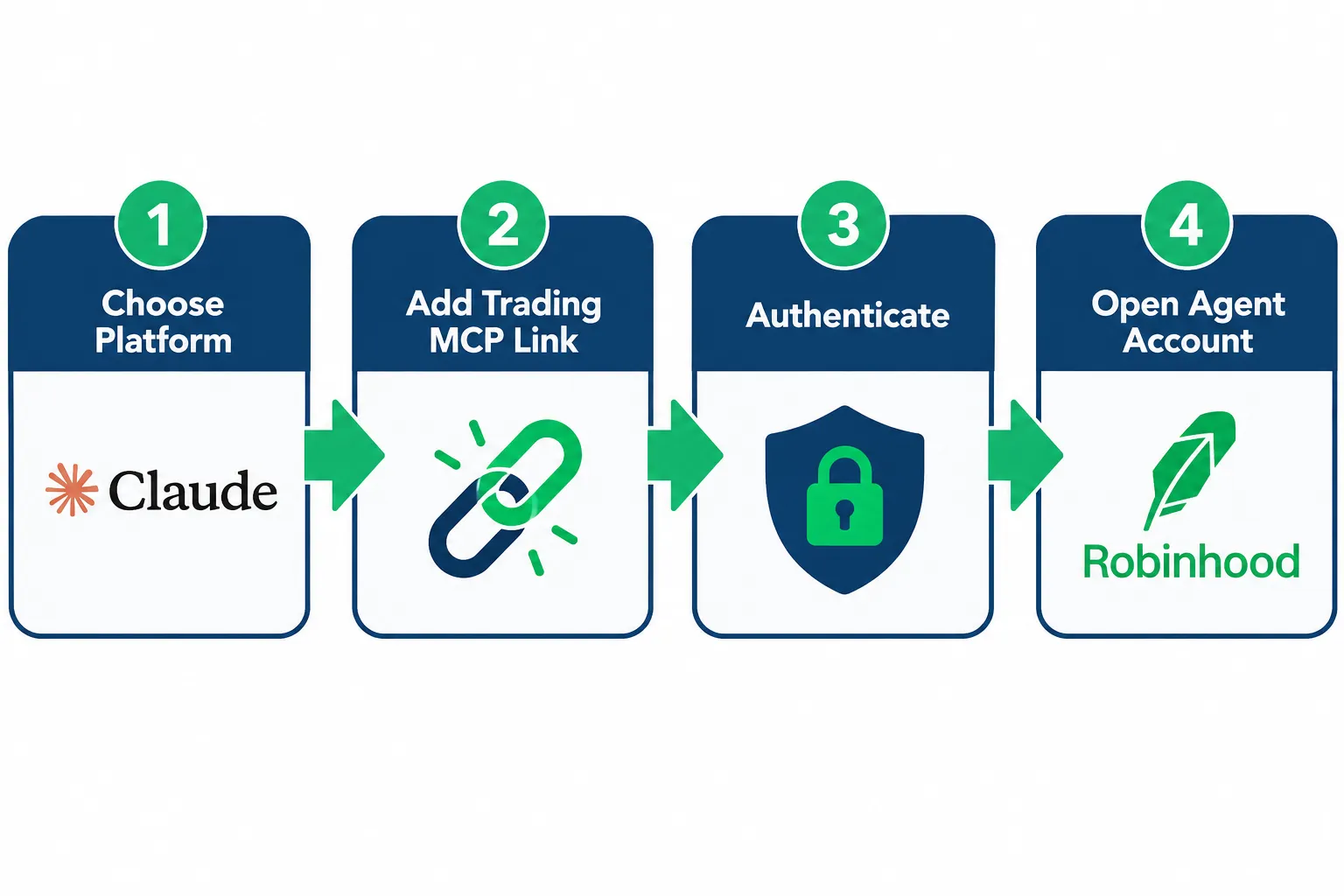
- Add the connector. In Claude Desktop, go to Settings, Connectors, Add custom connector and add
https://agent.robinhood.com/mcp/trading. In Claude Code, run the command Robinhood publishes:
claude mcp add robinhood-trading --transport http https://agent.robinhood.com/mcp/tradingThen enter /mcp in Claude Code and select robinhood-trading to authenticate.
- Authenticate with Robinhood. You sign in through Robinhood’s own login flow, not by typing your password into the chat.
- Open the MCP account. Robinhood prompts you during authentication. Follow the on-screen steps.
- Set trade approvals before anything else. Open the MCP account tab, go to Agent Settings by tapping your connected agent, and under Safety Controls turn trade approvals on.
- Fund the MCP account with a fixed small amount. The agent trades only the money in that account, so the deposit is your first and best control.
- Run read-only prompts first. See the test list below. No orders on day one.
Where does the Robinhood Trading MCP link go?
The link goes into your AI platform’s connector settings, not a Robinhood menu. Robinhood publishes the path for each platform:
| Platform | Where to add https://agent.robinhood.com/mcp/trading |
|---|---|
| Claude Desktop | Settings, Connectors, Add custom connector |
| Claude Code | claude mcp add robinhood-trading --transport http ..., then /mcp |
| ChatGPT | Settings, Security and login, turn on Developer Mode, then Plugins, + |
| Codex | Settings, MCP servers, Streamable HTTP |
| Codex CLI | codex mcp add robinhood-trading --url ..., then /mcp |
| Cursor | Settings, Cursor Settings, Tools and MCPs, Connect |
| Grok | New chat, +, Add connector, Custom |
Robinhood also lists Perplexity, OpenClaw, Replit, AWS Quick, Poke and “any localhost platform” using the same link.
Read-only prompts for your first session
| Prompt | What a healthy answer looks like |
|---|---|
| ”List my Robinhood accounts and which one you can trade in.” | Every account, with the MCP account named as the only tradable one |
| ”What is my trade approval setting?" | "On” (the agent has a get_trade_approval_setting tool) |
| “What is my buying power in the MCP account?” | The amount you deposited |
| ”Show the latest quote for SPY.” | A price with a time, matching the app |
| ”Review, but do not place, a limit order to buy 1 share of SPY at $X.” | A simulated order with any pre-trade warnings |
The last prompt uses review_equity_order, which Robinhood describes as a tool to “simulate an equity order and get pre-trade warnings.” If Claude places an order instead of reviewing it, stop and tighten your instructions.
Troubleshooting: Robinhood’s own fix for most connection problems is to disconnect and reconnect the Trading MCP on your AI platform. If the agent reports an error on the Robinhood side, contact Robinhood support.
What Can the Agent See and What Can It Trade?
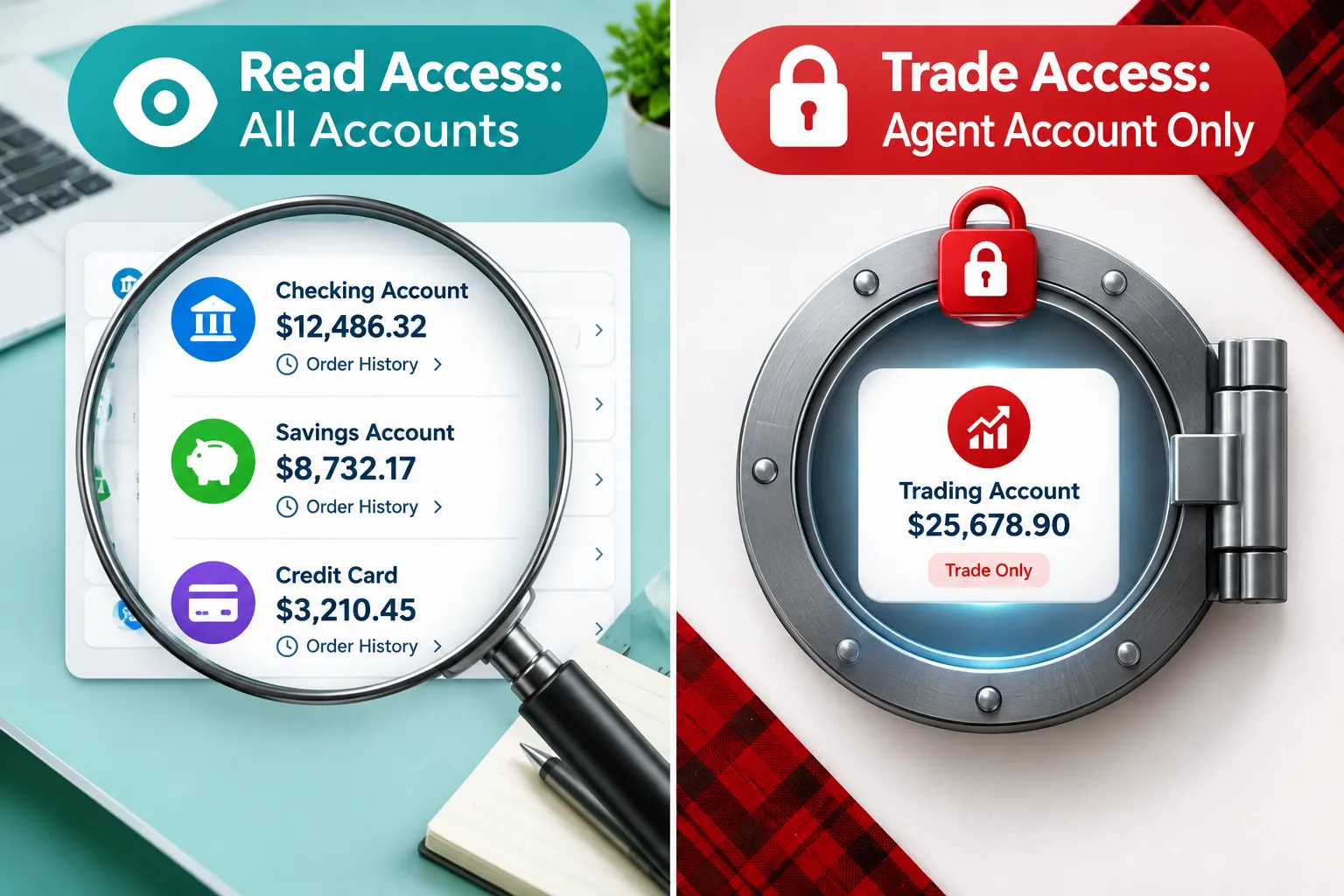
Claude can read information across every Robinhood account you hold, but it can only place trades inside the dedicated MCP account. That split, full visibility with limited authority, is the core safety design of the product.
| Capability | Scope |
|---|---|
| View balances, positions, order history | All your Robinhood accounts |
| View account numbers | All your Robinhood accounts |
| Place buy or sell orders | MCP account only |
| Trade equities, options, crypto | MCP account only; long orders; crypto subject to state and account rules |
| Multi-leg options orders | Not supported for agents |
| Transfer, stake or lend crypto | Not supported; you do it in the app |
| Trade in retirement or joint accounts | No; trades go only to the MCP account |
Can the agent read your main account?
Yes. Robinhood’s onboarding page says the agent gets read access to “all your Robinhood accounts, including your Robinhood account numbers,” all position and balance details, and all transactions, including order history. That is a lot of data to hand to a third-party AI provider, and Robinhood’s disclosures say you assume all risk “for any use of your data by third-party AI providers.”
What tools does the agent have?
Robinhood’s trading with your agent page lists the external agent’s tools. Highlights:
- Account and portfolio:
get_accounts,get_portfolio,get_realized_pnl, plus tools to list and decline trade approval requests. - Market data: historical bars, fundamentals, a real-time Level 2 book for up to 4 stocks, technical indicators such as RSI and MACD, earnings calendars over windows up to 31 days, SEC filings, analyst ratings and disclosed politician trades.
- Equities: real-time quotes for up to 20 symbols, tax lots, tradability checks,
review_equity_order,place_equity_order,cancel_equity_order. - Options: chains, quotes,
review_option_order,place_option_order, exercise and cancel exercise. - Crypto: supported pairs, quotes,
preview_crypto_order,place_crypto_order, cancel. - Scanner, alerts and advanced orders: build and run scans, set price or indicator alerts, and review or place advanced orders.
Common mistake: assuming “the agent can see my whole portfolio” means “the agent can trade my whole portfolio.” It cannot, and that boundary protects your core holdings from an agent having a bad day.
How Do You Stay in Control of the Agent?
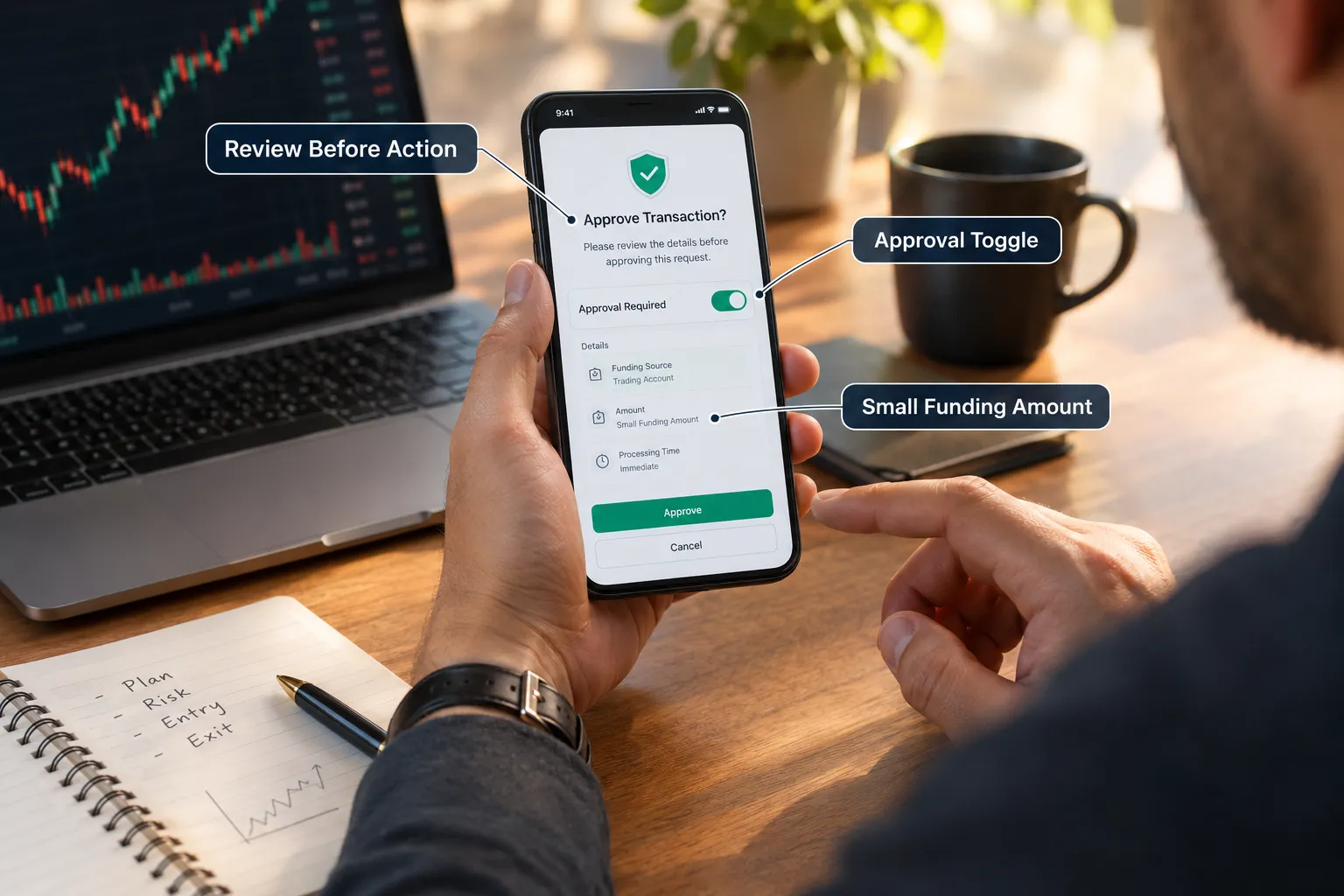
You stay in control with three levers: trade approvals, the size of the MCP account balance, and the review tools. Approvals decide whether Claude asks first or acts first. The balance decides the most it can lose. The review tools let you see an order before it exists.
How trade approvals work
Robinhood explains it plainly: “If you turn the setting on, your agent can propose trades, but you must review and manually place the proposed orders in the Robinhood app. With trade approvals off, your agent can place eligible trades for you without your manual confirmation of each order.”
Three details matter:
- Default is off for MCP accounts. It is on by default only for Robinhood’s built-in agents.
- It is still rolling out. Not every MCP account has the toggle yet. If you do not see it under Safety Controls, assume the agent can trade without asking.
- Some trades may still need approval even when approvals are off, per Robinhood. Do not rely on that as a safety net.
How to use the balance as a hard limit
The agent “can only access the funds in your dedicated agentic trading account,” per Robinhood’s newsroom. So fund it like you would hand a new employee a company card: a small limit on day one, raised only after a record. A practical rule is to start with an amount you would accept losing in full, run a few weeks of observed trades, then decide.
How to write instructions the agent cannot misread
Robinhood’s example prompts include “Buy $100 of ROAR every time the price decreases 2% or more in 1 day.” Before you send anything like that, answer the questions the agent will otherwise answer for you:
- 2% from the prior close or from today’s high?
- Market or limit order, and at what price?
- What if it drops 2% three days in a row: buy three times or once?
- What is the maximum total position?
Write the rule as if it were code. Then ask the agent to review the order before placing it, every time.
What Is a Safe First Month on the Robinhood MCP?
A safe first month on the Robinhood MCP moves from reading, to reviewing, to small approved trades, and only then to a decision about anything more. Each stage has one question it must answer before you move on.
| Week | What the agent may do | Question to answer |
|---|---|---|
| 1 | Read only: portfolio, quotes, scans, watchlists | Do its numbers match the app every time? |
| 2 | Review only: review_equity_order and review_option_order, nothing placed | Does it build the order you meant, size and type included? |
| 3 | Approvals on, one small trade a day at most | Do proposals arrive when and how you expect? |
| 4 | Same as week 3, then read the full log | Did it ever do something you did not intend? |
If the answer to any week’s question is no, repeat that week. Moving faster does not make the agent better; it only makes mistakes more expensive.
Use scans and alerts before orders
The research tools are the low-risk value in the Robinhood MCP. The agent can create and run scans, set price or indicator alerts, read SEC filings and pull earnings calendars. A useful first workflow is “run my saved scan each morning, explain why each name surfaced, and add the top three to a watchlist.” No money moves, and you learn how the agent reasons before it touches an order ticket.
Know where your data goes
Everything the agent reads, including account numbers and order history, flows into your AI provider’s chat logs under that provider’s terms, not Robinhood’s. Robinhood’s disclosures put the risk of “any use of your data by third-party AI providers” on you. Before you connect, check your AI platform’s data retention and training settings, and turn off anything you would not want stored next to your brokerage history.
What Are the Risks of Using Claude With Robinhood?
The core risk is accountability. Robinhood says it “does not guarantee the accuracy, completeness, or suitability of any agent output, and is not responsible for losses resulting from agent-generated decisions,” and that “you assume all risk for trades executed by AI agents.” Its newsroom adds that Robinhood “does not control, supervise, monitor, recommend, or audit agents.”

Robinhood’s disclosures name the failure modes: AI agents “can make errors, misinterpret instructions, act on incomplete or outdated information, and may behave in unexpected ways,” and AI-driven strategies “may be difficult to monitor or stop in real time.”
FINRA’s 2026 oversight report section on GenAI lists the agent risks regulators are watching. Four apply directly to a Robinhood MCP setup:
- Autonomy: “AI agents acting autonomously without human validation and approval.” That is approvals off.
- Scope and authority: agents “may act beyond the user’s actual or intended scope and authority.” That is a loose instruction.
- Auditability and transparency: multi-step reasoning “can make outcomes difficult to trace or explain.” That is the moment you ask “why did it buy that?”
- Data sensitivity: agents on sensitive data may “store, explore, disclose or misuse” it. That is your full account history in a third-party chat log.
FINRA also lists domain knowledge, reward design and the usual GenAI problems of bias, hallucination and privacy. Translate all of it into trader language: this is not a backtested setup with known stops. It is a new hire whose decision log you cannot fully read. Size it that way. Our guide to AI trading agent risks covers why the kill switch must live outside the agent.
A worked example of scope creep
Say you tell Claude, “Keep my tech exposure around 20%.” The agent can read your main account, so it sees that your primary portfolio is already 35% tech. It cannot sell anything there, but it can act in the MCP account. One reasonable reading is “do nothing.” Another is “short tech in the MCP account to offset it,” which the agent cannot do because it only places long orders. A third is “buy everything except tech in the MCP account until the combined mix drifts toward 20%,” which could spend your whole MCP balance in one afternoon.
None of those readings is a bug. Each is the model filling a gap you left. The fix is boring and effective: name the account, the maximum dollar amount, the order type and the stop condition in every standing instruction, and keep approvals on until you have seen the agent interpret your instructions the way you meant them for weeks.
What Does the Robinhood MCP Cost?
Robinhood’s external agent pages list no fee for connecting through the Robinhood MCP, on the pages we checked in 2026. Your costs are your AI platform’s plan, plus normal trading fees on whatever the agent trades.
Two details people mix up:
- Token billing is for built-in agents only. Robinhood’s token usage billing page says it “applies only to agents hosted on Robinhood, not external agents.” Built-in agents start with $5 in tokens and charge the model’s public token cost after that.
- Trading costs still apply. Finder, a secondary source, notes index options carry a per-contract fee whether a person or an agent places the trade. Check Robinhood’s fee schedule for the products your agent will trade.
Edge case: “free to connect” does not mean “free to run.” Claude’s plan has its own usage limits, and an agent that polls quotes and runs scans all day uses them up faster than a person would.
Which AI Platforms Work With the Robinhood MCP?
Robinhood names Claude Code, Claude Desktop, ChatGPT, Codex, Codex CLI, Cursor and Grok with setup steps, and lists Perplexity, OpenClaw, Replit, AWS Quick, Poke and any localhost platform as supported with the same link. It does not rank them.
Pick the client you already use daily and can watch. For most traders that is Claude Desktop, because the connector lives in the same app you chat in and you can see each tool call. Developers who want to script prompts may prefer Claude Code or Codex CLI.
If you want to compare how other brokers approach the same idea, our coverage of eToro’s MCP connectors for Claude, ChatGPT and Grok is a useful side-by-side, and our Alpaca MCP setup guide shows a connector that defaults to paper trading, which Robinhood does not offer.
Robinhood MCP vs a broker API
A Robinhood MCP connection is not the same as a broker API key. With an API you write the order code; with the MCP, the model decides which tool to call. Robinhood’s only developer API is for crypto, as we explain in our Robinhood API guide. If you want to build your own deterministic bot logic, read our walkthrough of a Robinhood AI trading bot with Claude and our breakdown of what a Claude trading bot can build and where it fails.
How Do You Shut Down Robinhood MCP Access?
Shutting down takes five moves: stop new orders, disconnect the platform, cancel what is open, move the money, and read the history. Do them in that order.
- Stop new orders first. Turn trade approvals on under Safety Controls so nothing else executes without you.
- Disconnect the platform. Remove the Robinhood connector from Claude’s connector settings, or the equivalent in your platform. Without the connection, the agent has no tools.
- Cancel open orders in the app. Orders the agent placed earlier can still fill after you disconnect. Robinhood notes that when crypto access is restricted, “any open orders your agent placed before your move won’t be canceled,” so check them yourself.
- Move funds back from the MCP account to your primary account.
- Audit the order history. All agent orders appear in the MCP account’s Activity section and your Robinhood history. Read every one, not just the summary. This is where FINRA’s auditability problem shows up in practice.
Treat the shutdown like cutting a losing position: decisively, without second-guessing once it is done.
Frequently Asked Questions
What is the Robinhood MCP?
The Robinhood MCP is the Robinhood Trading MCP, Robinhood’s official Model Context Protocol connector at agent.robinhood.com/mcp/trading. It lets AI platforms such as Claude read your Robinhood accounts and place trades in a dedicated MCP account. Robinhood launched agentic trading in May 2026.
How do I connect Claude to Robinhood?
In Claude Desktop, go to Settings, Connectors, Add custom connector and add https://agent.robinhood.com/mcp/trading, then sign in with Robinhood. Robinhood prompts you to open an MCP account during authentication. In Claude Code, run claude mcp add robinhood-trading —transport http with the same link, then use /mcp.
Can the Robinhood MCP agent trade my main account?
No. The agent can read all your Robinhood accounts, including account numbers, positions, balances and order history, but it can only place trades in the dedicated MCP account. Fund that account with a small fixed amount to cap what the agent can spend.
Are trade approvals on by default for Robinhood MCP?
No. Robinhood says trade approvals are on by default for its built-in Robinhood Agents and off by default for MCP accounts, and the setting is still rolling out. Turn it on under Agent Settings, Safety Controls, so the agent proposes trades and you place them in the app.
What can a Robinhood MCP agent trade?
Long equities, options and crypto, using market, limit, stop limit and stop market orders. Agents cannot place multi-leg options orders and cannot transfer, stake or lend crypto. Crypto trading through an agent is not available in some states, including New York.
Does the Robinhood MCP cost money?
Robinhood’s external agent pages list no fee for connecting through the Trading MCP. Token billing applies only to Robinhood’s built-in agents, and normal trading fees still apply to what the agent trades. Your AI platform’s own plan limits apply too.
Is Robinhood responsible if the AI agent loses money?
No. Robinhood says it is not responsible for losses from agent-generated decisions and that you assume all risk for trades executed by AI agents. Keep approvals on, review each order and check the MCP account’s Activity section regularly.
Our Take
The Robinhood MCP is useful plumbing and a live experiment where you are the test subject. The account isolation is smart engineering: read everywhere, trade in one account you fund yourself. But Robinhood’s “you assume all risk” is not boilerplate here. It is the actual deal.
Process over prediction: approvals on, a small fixed balance, review before every order, and a weekly read of the order log. Do not let a chat window talk you into skipping risk rules you would never skip on your own. For more broker connectors and bot breakdowns, start at AI Stock Trading Bots, and for the rest of the platform see our sister site’s Robinhood review.
Related: to see how other AI-ready brokers and platforms stack up, browse the AI trading platforms directory on AI Stock Picker Apps.
Running Claude on a Robinhood MCP account with a real order log? Send it to us and we will run it through the same checks.
Stay alpha.
The FullStack Alpha research desk tests AI trading bots on paper and live accounts. Reviewed and edited by Jay Rocco, Founder and Editor.
