

The short answer, from FullStack Alpha: The AI trading apps worth knowing in September 2026 are Robinhood (Agentic Trading and the new Robinhood Agents), Public.com Agents, Composer by SoFi, Trade Ideas, TrendSpider, StockHero, Surmount, Option Alpha, Tickeron, Prospero.ai, TradingView and Webull. Our pick depends on the job: Composer for rule based investing, Trade Ideas for intraday scanning, and Surmount or Composer’s free plan if you want to test automation on a small budget. Chart traders should look at TradingView, and anyone who wants AI built into a free broker app should look at Webull. None of them removes risk, so paper trade first.
By the numbers: AI trading apps
Four numbers that frame this topic, each linked to its source. Checked September 2026 and reviewed monthly.
150,000+
Robinhood customers opened agentic trading accounts, where an AI agent can place trades.
Source: Robinhood, Sept 20262,000+
community built strategies on Composer by SoFi when SoFi bought it in June 2026.
Source: SoFi, June 2026$5 to $30
a month for each Robinhood Agent App, on top of the Gold plan.
Source: Robinhood, Sept 2026The 12 AI trading apps worth knowing in 2026
Sorted by the job each app does, not by who pays us. FullStack Alpha takes no payment for placement on this list.
Updated September 30, 2026 by Jay Rocco for FullStack Alpha. Picks are reviewed monthly. Prices were checked on vendor sites in September 2026 and change often, so confirm before you pay.
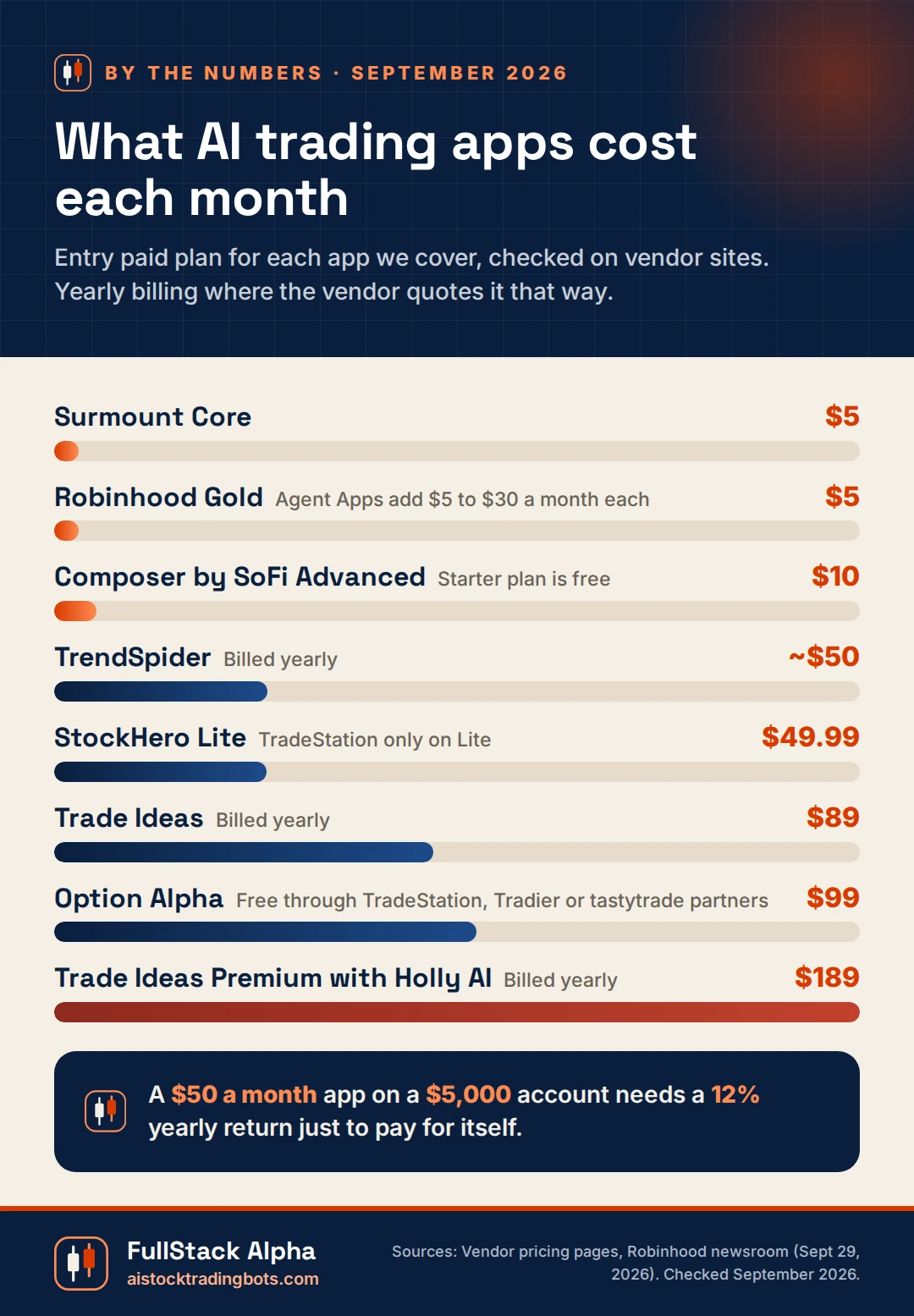
| App | What it automates | Starting price | Best for |
|---|---|---|---|
| Robinhood | AI agents in a separate funded account | Free app; Gold $5/mo | Agents inside a big broker |
| Public.com | Built in AI Agents (waitlist) | Free account | Plain English instructions |
| Composer by SoFi | No code strategies that rebalance | Free Starter; Advanced $10/mo | Rule based investors |
| Trade Ideas | Holly AI scans and autotrading | $89/mo billed yearly; Holly on $189/mo | Active day traders |
| TrendSpider | Chart analysis, alerts, backtests | About $50/mo billed yearly | Chart traders |
| StockHero | Guided no code bots and a bot marketplace | $49.99/mo; 14 day trial | Beginners who want hand holding |
| Surmount | Automated strategies you follow | Free plan; Core $5/mo | Small accounts |
| Option Alpha | Options bots from visual rules | $99/mo billed yearly, or free via partner brokers | Options sellers |
| Tickeron | AI pattern robots and signals | Free plan; paid tiers | Signal browsers who verify |
| Prospero.ai | Free AI signals from institutional flow | Free | Research, not execution |
| TradingView | AI Copilot on your chart, alerts and webhooks to a broker | Free Basic; Essential $14.95/mo; Copilot add-on about $7.50/mo | Chart traders who route alerts |
| Webull | Vega AI voice orders; Cloud MCP for Claude, Perplexity, Grok | Free app; $0 commission on US stocks and ETFs | AI inside a free broker app |
1. Robinhood (Agentic Trading and Robinhood Agents)

Best for: Robinhood customers who want an AI agent with a separate account
Price: Free app; Robinhood Gold is $5 a month
Paper trading: Not offered
Official site: robinhood.com
Robinhood opened its doors to outside AI agents on May 27, 2026. Its Agentic Trading beta lets a tool like Claude connect over MCP to a separate funded account. At the HOOD Summit on September 29, 2026, it went further and announced built in Robinhood Agents, standing instructions called Loops, and paid Agent Apps. The catch is simple: Robinhood has no paper trading, so your first test is real money. Keep that first account small.
Read next: Robinhood AI Trading Bot Free: Connect Claude in 3 Minutes
2. Public.com Agents

Best for: Investors who want to describe a goal in plain English
Price: Free brokerage account; no separate Agents fee listed at our last check
Access: Select members, with a waitlist
Official site: public.com
Public launched Agents on March 31, 2026 for select members, and on September 24, 2026 it added agents for prediction markets through Kalshi. You state an intent and the agent handles the steps. The drawback is access. If you are still on the waitlist you cannot test it, and a tool you cannot test is a tool you should not fund.
Read next: Public.com review on the FullStack Alpha editorial desk
3. Composer by SoFi
Best for: Rule based investors who want portfolios that rebalance on their own
Price: Starter free; Advanced $10 a month; Pro $40 a month or $32 a month billed yearly
Paper trading: Backtests on every strategy
Official site: composer.trade
Composer lets you build a strategy from logic blocks, or describe one to its AI, then runs it on a schedule with no code. SoFi announced it was buying Composer on June 23, 2026, so expect the product and pricing to keep moving. One long time user on r/ComposerTrade summed up the honest pitch: “Some will win, some will lose.” Composer backtests look clean, so test any strategy on dates you did not tune it on.
Read next: Backtesting Websites: 7 That Test a Strategy Without Code
4. Trade Ideas (Holly AI)

Best for: Active intraday traders
Price: Standard $89 a month billed yearly; Holly AI and autotrading need Premium at $189 a month billed yearly
Autotrades with: Interactive Brokers, E*TRADE, Alpaca and TradeStation through Brokerage Plus
Official site: trade-ideas.com
Trade Ideas is the scanner serious day traders keep coming back to, and Holly is its AI that selects strategies overnight and flags entries during the session. Price is the filter: Holly lives on the $189 plan. Reddit is split. One r/etrade user wrote, “The last couple of weeks have been rough for Holly.” Paper trade Holly’s alerts for a month before Brokerage Plus places anything real.
Read next: Trade Ideas review on the FullStack Alpha editorial desk
5. TrendSpider

Best for: Chart traders who want patterns, backtests and alerts in one place
Price: From about $50 a month billed yearly (promotional pricing, September 2026); paid 14 day trial
Trades through: Alerts and webhooks sent to routing tools such as SignalStack or TradersPost
Official site: trendspider.com
TrendSpider draws trendlines, spots chart patterns and backtests ideas without code, and its Sidekick AI answers questions about the chart in front of you. Traders on r/RealDayTrading rate its scanners highly. The downside is focus. It is a research and alert tool first, so it needs a routing service and a broker before it can trade for you.
Read next: TrendSpider review on the FullStack Alpha editorial desk
6. StockHero

Best for: Beginners who want a guided, no code bot
Price: Lite $49.99 a month with a 14 day free trial; Premium $99.99; Professional $159.99
Works with: TradeStation on Lite; E*TRADE, Webull, Tradier, Alpaca and others on higher plans
Official site: stockhero.ai
StockHero walks you through building a bot step by step and runs a marketplace where you can rent strategies other users built. Paper trading is included, which is the right default. Two cautions. The cheapest plan only connects to TradeStation, and our editorial review calls the marketplace win rate badges something you should read past. Treat rented bot stats as vendor claims until your own paper account agrees.
Read next: AI Trading Bot Free Tiers: The 8 Caps Nobody Lists
7. Surmount

Best for: Small accounts that want to try automation cheaply
Price: Free plan; Core $5 a month; Plus $10; Pro $30
Works with: E*TRADE, Alpaca and TradeStation for stocks
Official site: surmount.ai
Surmount lets you follow automated, rules based portfolios through a brokerage account you control. The free plan and $5 tier make it one of the cheapest ways to watch automation handle real fills. The limit is depth. You mostly pick from strategies someone else designed, so read the rules behind each one before you connect money.
Read next: AI Trading Bot: How the 5 Types Differ
8. Option Alpha
Best for: Options traders who want bots for defined risk trades
Price: Pro $99 a month billed yearly ($149 month to month); free with a funded TradeStation ($10,000 minimum), Tradier or tastytrade ($5,000 minimum) account
Paper trading: Free
Official site: optionalpha.com
Option Alpha builds options bots from visual decision trees, with a backtester and free paper trading. The partner broker deal is the smart way in: fund an account at a supported broker and the platform costs nothing. Options automation multiplies mistakes fast, so keep size tiny until you have watched a bot handle an early assignment or an overnight gap.
Read next: Free Option Backtesting: 5 Tools That Cost $0 to Start
9. Tickeron
Best for: Traders who like browsing AI pattern signals and verify them independently
Price: Free plan plus paid tiers; check current pricing on the site
Caution: Advertised returns are vendor claims
Official site: tickeron.com
Tickeron runs AI robots that scan for chart patterns and attach a confidence level to each signal. The returns it advertises are vendor claims, not audited results. In FullStack Alpha’s August 2026 Reddit scan, 6 of the 7 Tickeron mentions we found were promotional posts, which tells you where much of the buzz comes from. Paper trade the signals before paying for a higher tier.
Read next: Is AI Trading Legit? Yes. The Real Question Is Does It Work.
10. Prospero.ai

Best for: Research and learning to read signals
Price: Free app
Trades for you: No, you place trades at your own broker
Official site: prospero.ai
Prospero turns institutional flow data into simple AI scores and signals, and the core app costs nothing. It does not trade for you, which is a feature if you are new. Our editorial desk’s verdict applies here too: treat the signals as inputs, not orders.
Read next: Prospero AI review on the FullStack Alpha editorial desk
11. TradingView (AI Copilot and broker connections)
Best for: Chart traders who want AI answers on the chart and alerts that can fire orders at a connected broker
Price: Basic free; Essential $14.95 a month ($12.95 billed yearly); Plus $29.95; Premium $59.95; Ultimate $239.95. AI Copilot is a paid add-on of about $7.50 a month on top of a paid plan. 30 day trial on Essential, Plus and Premium
Trades through: A broker you connect inside TradingView (such as Interactive Brokers, tastytrade or TradeStation), built in paper trading, or webhook alerts sent to bridges such as TradersPost or SignalStack
Official site: tradingview.com
Here is the first thing to know: TradingView is not a broker. It is the charting screen most traders already have open, and in 2026 it added an AI layer on top. AI Copilot answers questions about the chart in front of you, an AI screener filters stocks in plain English, and an MCP server lets Claude read TradingView data. The actual trade happens at a broker you connect, or through a webhook alert that a bridge turns into an order.
The pushback is price. Copilot costs extra even on paid plans, and one paying user on r/TradingView put it bluntly: “Title is misleading as you still have to pay for it to be added on top of the paid plan.” Our advice: run any alert on TradingView’s built in paper trading for a few weeks before a webhook touches a live account.
Read next: TradingView Automated Trading | 3 Bridges That Reach Your Broker
12. Webull (Vega AI and Cloud MCP)

Best for: Self directed traders who want AI built into a free brokerage app, plus a way to let Claude prepare orders
Price: Free app; $0 commission on US stocks and ETFs; Vega and the AI connectors are free; Vega Analyst has a free tier plus paid credits
Paper trading: Free inside the app
AI connections: Claude, Perplexity and Grok through Cloud MCP; every trade needs your separate confirmation
Official site: webull.com
Yes, Webull uses AI, and more of it than most brokers. Vega, its in app assistant, reviews your portfolio, sends options alerts and takes plain language voice orders, then shows you the interpreted order before you confirm. On September 29, 2026, Webull expanded its Cloud MCP so Claude, Perplexity and Grok can prepare trades with no coding or installs, and Webull says each trade requires separate customer confirmation. It also shipped a command line tool for traders on August 4, 2026.
The drawbacks are clarity and maturity. Webull does not publish exactly which accounts qualify for the AI connectors, and early threads on r/Webull show people unsure where to start. The best advice we found there: “I would start with read only access and make the AI summarize positions news and risk before letting it anywhere near execution.”
Read next: Webull API and MCP | Trading From Claude Without Code
What we test in every AI trading app
- Setup time. How long from download to first paper trade.
- Broker support. Which brokers it connects to, and whether the connection is official.
- Automation level. Alerts only, one tap trades, or fully automated trading.
- Real monthly cost. Including premium tiers, data add ons, and trading costs.
- Control. How quickly you can pause the app and cancel open orders from your phone.
- Transparency. Whether you can read the rules behind each trade.
Three types of AI trading apps
- Signal apps. They find the setup and you place the trade. Lowest risk, most work.
- Strategy builders. You pick rules from menus and the app trades them. Composer and Capitalise.ai are well known examples.
- Managed bots. The app runs a strategy you did not write. Highest convenience, least visibility.
Each type fits a different trader. None of them fits someone who has not paper traded first.
Before you connect an app to your broker
- Confirm it works with your account on Trading Bots by Broker.
- Run it on paper. Our Paper Trading guides show how.
- Read the permissions screen. A trading app should never need withdrawal access.
- Check the scam signals on AI Trading Bot Scams if the app holds your deposit.
What AI trading apps cost each month
Real trader pain points, answered
Real comments from Trustpilot and the App Store, quoted as posted. Each one gets a straight answer from FullStack Alpha and a link to the guide that fixes it.
 Trustpilot
 App Store
I deposited $50 to try this out and didn’t find out there was a $32/mo subscription required until after the deposit.
App Store review of the Composer by SoFi iPhone app, April 2026. Quoted as posted.
Price the plan before you fund the account. Composer by SoFi lists Starter free, Advanced at $10 and Pro at $40 a month ($32 billed yearly). Pick the plan first, then deposit.
Read: Best AI Trading App in 2026If you are not investing a large amount it is hard to justify the $200 per year unless your returns are well over that fee.
App Store review of the Autopilot iPhone app, August 2026. Quoted as posted.
Run the fee math first. A $200 yearly fee on a $2,000 account is a 10% hurdle before you earn a cent. On $20,000 it drops to 1%.
Read: AI Trading Bot Free TiersI was in Pelosi pilot for a good 6 months and not once did my returns match what the app said the pilot returns were.
Trustpilot review, January 2025. Quoted as posted. Read the original
Copy trading apps show the model's return, not yours. Trade timing, fills and fees sit between the two. Track your own account against the pilot for 90 days before you add money.
Read: Is AI Trading Legit? Yes. The Real Question Is Does It Work.From the FullStack Alpha blog
Related guides on this site, written and edited by Jay Rocco:
- Best AI Trading App in 2026: How to Pick One Without Getting Burned
- Robinhood AI Trading Bot Free: Connect Claude in 3 Minutes
- AI Trading Bot: How the 5 Types Differ
- Trading Bot Basics: What Runs While You Are Away
- AI Trading Bot Free Tiers: The 8 Caps Nobody Lists
- Is AI Trading Legit? Yes. The Real Question Is Does It Work.
Our take
Every AI trading app promises the same thing: less work, more results. The less work part is usually true. The more results part is where you need evidence. Our rule is to judge an app by the button you will need most on a bad day, the pause button. If you cannot stop the app and cancel its orders from your phone in under a minute, it is not ready for your money.
Quick answers
Which AI app is best for trading?
The best AI trading app depends on how much control you want. Signal apps suit hands on traders, strategy builders suit rule based investors, and managed bots suit people who accept less visibility. Pick one that supports your broker and offers paper trading.
Do AI trading apps actually work?
AI trading apps work at what they are built to do: finding setups, running rules, or automating orders. Whether they make money depends on the strategy and costs. Test any app on paper through real market days before trusting it with money.
Are AI trading apps safe?
The safer AI trading apps connect through a regulated broker, use official logins or trading only API keys, and never hold your deposit. Avoid apps that ask for withdrawal permission, remote access to your device, or money sent directly to them.
Is there a free AI trading app?
Yes. Several AI trading apps offer free tiers or trials, and many brokers include free paper trading. Free plans usually limit strategies, data speed, or automation. Check what happens when the trial ends, and cancel before auto renewal if it does not earn a place in your routine.
Related reading
- Scored app reviews: AI Trading Bot Reviews
- Apps that cost nothing to start: Free AI Trading Bots
- Rules based automation without an app: Trading Automations
Looking for AI stock picker apps and screeners rather than bots? The FullStack Alpha directory at aistockpickerapps.com ranks more than 200 AI stock tools.
Apps tested by Jay Rocco, Founder and Editor of FullStack Alpha. Educational content only, not financial advice. Trading involves risk of loss.
Stay alpha.
Frequently Asked Questions
What is an AI trading app?
A mobile or web app that uses AI or rule based automation to find trades, send alerts, or place orders for you, usually without writing code.
Is there a fully automated AI trading app?
Several apps can place trades automatically once you set the rules and connect a broker. Fully automated still needs your supervision, a daily loss limit, and a way to switch it off fast.
What is the best AI trading app for beginners?
One with paper trading, clear rules you can read, support for your broker, and a price you can carry for a year. Our reviews score each app on those points.
Which AI app is best for trading?
The best AI trading app depends on how much control you want. Signal apps suit hands on traders, strategy builders suit rule based investors, and managed bots suit people who accept less visibility. Pick one that supports your broker and offers paper trading.
Do AI trading apps actually work?
AI trading apps work at what they are built to do: finding setups, running rules, or automating orders. Whether they make money depends on the strategy and costs. Test any app on paper through real market days before trusting it with money.
Are AI trading apps safe?
The safer AI trading apps connect through a regulated broker, use official logins or trading only API keys, and never hold your deposit. Avoid apps that ask for withdrawal permission, remote access to your device, or money sent directly to them.
Is there a free AI trading app?
Yes. Several AI trading apps offer free tiers or trials, and many brokers include free paper trading. Free plans usually limit strategies, data speed, or automation. Check what happens when the trial ends, and cancel before auto renewal if it does not earn a place in your routine.
Explore AI Trading Apps

Best AI Trading App in 2026: How to Pick One Without Getting Burned
Find the best AI trading app for your goals in 2026. Compare costs, red flags, and real features before you risk a single dollar on autopilo…
Learn More →