

The short answer, from FullStack Alpha: To build a trading bot, pick a broker API (Alpaca or Interactive Brokers), write your rules in Python, backtest them with backtesting.py, vectorbt or QuantConnect’s LEAN engine, paper trade for weeks, then go live small with a kill switch. FullStack Alpha’s starter stack is Python, an Alpaca paper account, backtesting.py and an AI assistant such as Claude Code for the first draft of the code.
Building your own trading bot is the fastest way to understand what every AI trading bot on the market is really doing. It’s also the fastest way to find out how many things can go wrong at 9:31 in the morning.
This section is for traders who want to write the code themselves, most often in Python.
By the numbers: building a trading bot
Four numbers that frame this topic, each linked to its source. Checked September 2026 and reviewed monthly.
$8
a month for QuantConnect’s paid tier billed yearly. The free tier runs backtests.
Source: QuantConnect4M+
orders Knight Capital’s untested code fired in 45 minutes. Test before you deploy.
Source: SECThe parts of every trading bot
Strip away the branding and every bot has the same six parts:
- Data. Prices, volume, and sometimes news or fundamentals.
- Strategy. The rules that turn data into a buy, sell, or do nothing.
- Risk. Position size, stop logic, and a daily loss limit.
- Execution. Sending the order to the broker and confirming the fill.
- Monitoring. Logs, alerts, and a kill switch.
- Hosting. Somewhere the code runs on time, every time.
Beginners obsess over part two. Bots usually die in parts four through six.
Python algorithmic trading, step by step
- Pick a broker API. Alpaca and Interactive Brokers are the most common starting points. See Broker APIs.
- Secure your API keys. Keep them out of your code and out of GitHub. Broker APIs shows how.
- Write the strategy in plain rules first. If you cannot explain it in two sentences, you cannot debug it.
- Backtest it honestly. Use realistic costs and out of sample data. Start with Backtesting.
- Paper trade it. Let it run through real sessions before any money moves. See Paper Trading.
- Deploy with a kill switch. A single command that cancels open orders and stops new ones.
The 10 tools we would build a bot with in 2026
Every tool below is free or has a free tier. Pick one from each layer: broker, backtest, data and help writing code.
Updated September 30, 2026 by Jay Rocco for FullStack Alpha. Picks are reviewed monthly. Prices were checked on vendor sites in September 2026 and change often, so confirm before you pay.
| Tool | Layer | Cost | Best for |
|---|---|---|---|
| Alpaca | Broker API | Free API and paper trading | Your first bot |
| Interactive Brokers | Broker API | Free paper account | Options, futures, global markets |
| QuantConnect (LEAN) | Backtest and live engine | Free tier; $8/mo billed yearly | Multi asset research |
| backtesting.py | Python backtest library | Free, open source | A first honest backtest |
| vectorbt | Python backtest library | Free; paid PRO version | Testing thousands of settings |
| Backtrader | Backtest and live framework | Free, open source | Learning event driven design |
| NautilusTrader | Backtest and live engine | Free, open source | Production grade bots |
| TradingView Pine Script | Strategy scripting | Free Basic plan | Chart based strategies |
| OpenBB | Market data and research | Free, open source | Pulling data into Python |
| Claude Code | AI coding assistant | Included with paid Claude plans | Writing and debugging code |
Alpaca

Layer: Broker API
Cost: Free API, free paper trading, free IEX real time data for up to 30 symbols; full market data $99 a month
Official site: alpaca.markets
The fastest path from zero to a working order. Commission free US stocks, a separate paper environment and clean REST and websocket APIs. Most first bots we see start here, and the official MCP server lets an AI assistant work against your paper account.
Read next: Alpaca API for Beginners: Keys, Paper Trading, and Your First Order · Alpaca API Keys: Generate, Store, and Rotate Them Safely
Interactive Brokers

Layer: Broker API
Cost: Free paper account; commissions and data fees when live
Official site: interactivebrokers.com
Where most bots end up once they need options, futures or international markets. The TWS API is powerful and old fashioned, so plan to keep a gateway logged in and handle reconnects. The Python library ib_async makes the code side easier.
Read next: Interactive Brokers TWS API: Setup, Costs, and the Limits That Bite
QuantConnect (LEAN)

Layer: Backtest and live engine
Cost: Free tier with unlimited backtesting; Researcher $8 a month billed yearly
Official site: quantconnect.com
LEAN is the open source engine behind QuantConnect. Write a strategy in Python or C#, backtest it across stocks, options, futures and crypto with modeled fees and slippage, then deploy the same code live. Live trading is where the bill starts.
Read next: QuantConnect: What LEAN Runs That Your Laptop Cannot
backtesting.py
Layer: Python backtest library
Cost: Free, open source
Official site: kernc.github.io
A small, readable library for testing one strategy on one instrument, with a built in parameter search and an interactive results chart. A good fit for your first honest backtest. It is not built for portfolios of hundreds of symbols.
Read next: Best Free Backtesting Software for Stock Traders in 2026
vectorbt

Layer: Python backtest library
Cost: Free; vectorbt PRO is paid
Official site: vectorbt.dev
Vectorized backtesting that tests thousands of parameter combinations in seconds. That speed is also the risk, because it makes overfitting effortless. Use it to find what breaks a strategy, not to find the single setting that looked best.
Read next: Python Algorithmic Trading: A Beginner Roadmap From Data to Live Orders
Backtrader

Layer: Backtest and live framework
Cost: Free, open source
Official site: backtrader.com
An event driven Python framework with years of tutorials and forum answers behind it. Development has slowed, so confirm it supports your broker and Python version before you commit a project to it.
Read next: Best Algorithmic Trading Courses (2026): 7 That Teach Real Code
NautilusTrader
Layer: Backtest and live engine
Cost: Free, open source
Official site: nautilustrader.io
A Rust core with a Python API, built so the same strategy code runs in backtests and live trading. It is the most production minded open source option on this list, and it has the steepest learning curve.
Read next: Python Algorithmic Trading: A Beginner Roadmap From Data to Live Orders
TradingView Pine Script
Layer: Strategy scripting and alerts
Cost: Strategy Tester free on Basic; webhook alerts from Essential at $14.95 a month
Official site: tradingview.com
If your strategy lives on a chart, Pine Script is the shortest path to a backtest. Once it works, webhook alerts can send orders to a broker through a routing tool such as SignalStack or TradersPost.
Read next: Pine Script Tutorial: Write Your First TradingView Indicator Tonight · Pine Script Strategy: Turn an Indicator Into a Backtest That Trades
OpenBB

Layer: Market data and research
Cost: Free, open source
Official site: openbb.co
An open source research platform that pulls prices, fundamentals and economic data into Python through one interface. Useful as the data layer of a bot before you pay for a premium feed.
Read next: OpenBB: 3 Reasons Traders Drop Their Paid Terminal
Claude Code

Layer: AI coding assistant
Cost: Included with paid Claude plans
Official site: claude.com
Anthropic’s coding agent reads broker docs, writes the connection code and runs your tests. In FullStack Alpha’s August 2026 scan of trading subreddits, Claude and Claude Code were named 117 times, more than any other AI tool. The verdict was consistent: great for building and backtesting, not trusted to make trading decisions.
Read next: Claude Trading Bot: What Claude Can Build and Where It Fails
Building with AI coding assistants
Claude, ChatGPT, and Codex can write strategy code, parse broker docs, and debug errors fast. They also invent functions that do not exist. If you are building with an AI assistant or starting from a GitHub repo, our Claude Trading Bots section covers the workflow and the traps.
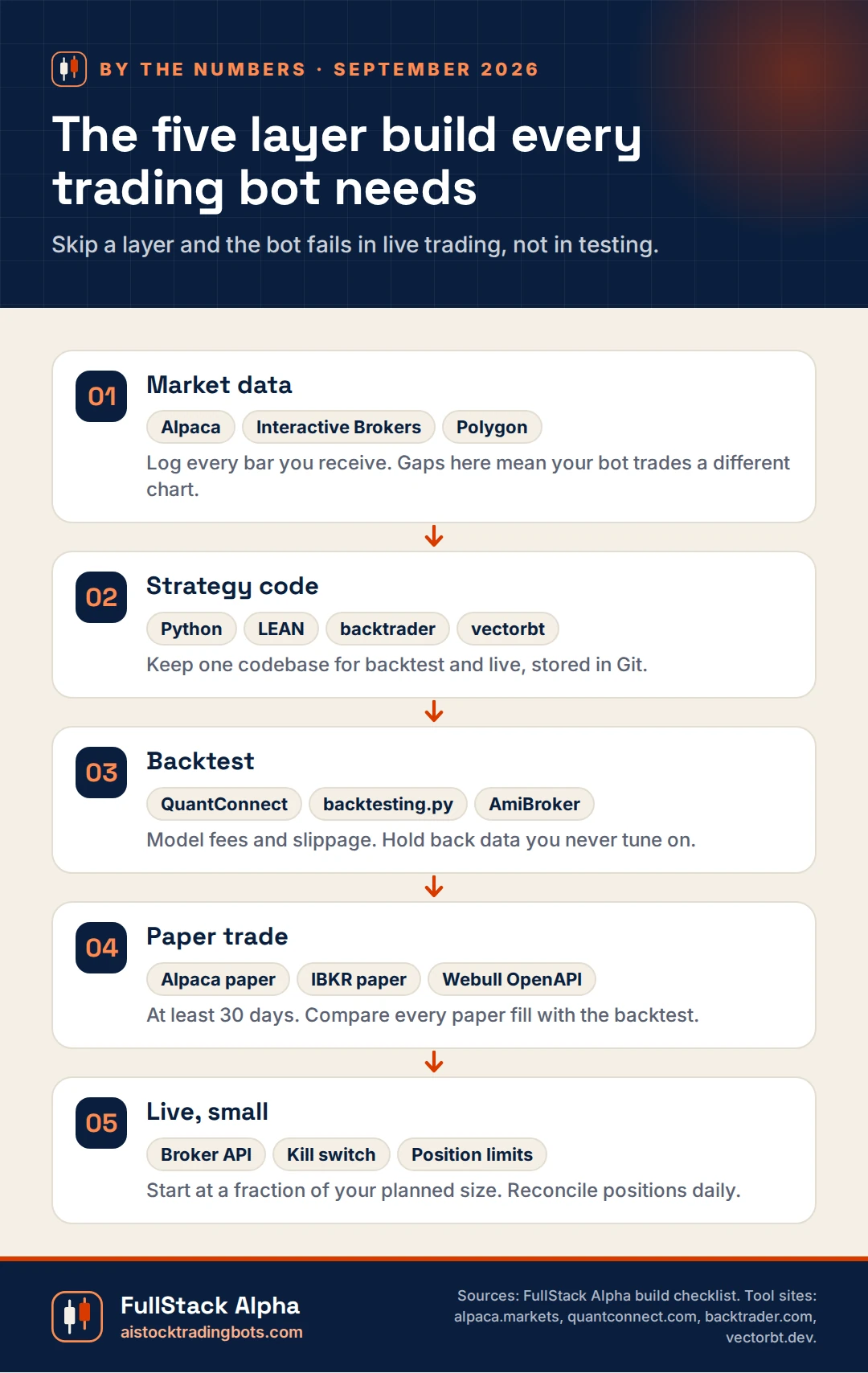
The five layer build every trading bot needs
Real trader pain points, answered
Real comments from Trustpilot, quoted as posted. Each one gets a straight answer from FullStack Alpha and a link to the guide that fixes it.
 Trustpilot
Being able to unify the code and backtest and run with the same code was a huge win for me.
Trustpilot review, September 2025. Quoted as posted. Read the original
One codebase for backtest and live trading removes a whole class of bugs. QuantConnect's LEAN engine is built around that idea, and it is open source.
Read: QuantConnectKernel deactivates in a few minutes of inactivity, you lose your progress, re run things. Extremely buggy environment.
Trustpilot review, September 2026. Quoted as posted. Read the original
Keep strategy code in files under Git and treat notebooks as scratch paper. Then a timeout costs you a rerun, not your work.
Read: Python Algorithmic TradingI see a constant loss of candles during the trading hours.
Trustpilot review, August 2026. Quoted as posted. Read the original
Log every bar your bot receives and compare it with the broker's historical bars after the close. Gaps mean your bot traded a different chart than your backtest.
Read: Alpaca API for BeginnersFrom the FullStack Alpha blog
Related guides on this site, written and edited by Jay Rocco:
- Python Algorithmic Trading: A Beginner Roadmap From Data to Live Orders
- Alpaca API for Beginners: Keys, Paper Trading, and Your First Order
- QuantConnect: What LEAN Runs That Your Laptop Cannot
- Pine Script Tutorial: Write Your First TradingView Indicator Tonight
- Best Algorithmic Trading Courses (2026): 7 That Teach Real Code
- Claude Trading Bot: What Claude Can Build and Where It Fails
Our take
Building your own trading bot is the best education in this market, even if you never run it with real money. You learn why fills slip, why data arrives late, and why a strategy that looked brilliant on a chart falls apart at the open. Our advice is simple: build small, log everything, paper trade longer than feels necessary, and treat your kill switch as the most important feature you will ever ship.
Quick answers
Can Python be used for automated trading?
Yes. Python is the most popular language for algorithmic trading, with libraries for market data, backtesting, and broker APIs like Alpaca and Interactive Brokers. It is fast enough for most retail strategies. Very high frequency trading is the main exception.
Is algorithmic trading illegal?
No. Algorithmic trading is legal for individuals trading their own accounts through a broker that allows it. What is illegal is market manipulation, such as spoofing orders you never intend to fill. Follow your broker’s API terms and you are in normal territory.
How much does it cost to run a trading bot?
The software can cost nothing if you use open source tools and a free broker API. Real costs are hosting, often a small cloud server, market data upgrades, and trading costs on every order. Your time building and maintaining it is the biggest cost of all.
Related reading
- Trading Automations: no code routes like webhooks and alert to order pipelines
- Why Trading Bots Fail: the errors that break homemade bots most often
Edited by Jay Rocco, Founder and Editor of FullStack Alpha. Code examples are educational. Test everything on paper first. Not financial advice.
Stay alpha.
Frequently Asked Questions
Do I need to know Python to build a trading bot?
It helps a lot. Python is the most common language for algorithmic trading, with mature libraries for data, backtesting, and broker APIs. If you do not code, start with a no-code platform from our AI Trading Apps section.
What do I need to build a trading bot?
A broker with an API, a source of market data, a strategy with clear rules, a way to backtest it, a paper trading account, and somewhere to run the code reliably.
Can ChatGPT or Claude build a trading bot for me?
They can write a lot of the code and explain broker documentation fast. They also make subtle mistakes. Treat AI written code as a draft you must read, test on paper, and understand before it touches money.
Where should I run my trading bot?
A small cloud server or a managed platform is usually more reliable than a home laptop that sleeps, updates, or loses Wi-Fi mid session.
Can Python be used for automated trading?
Yes. Python is the most popular language for algorithmic trading, with libraries for market data, backtesting, and broker APIs like Alpaca and Interactive Brokers. It is fast enough for most retail strategies. Very high frequency trading is the main exception.
Is algorithmic trading illegal?
No. Algorithmic trading is legal for individuals trading their own accounts through a broker that allows it. What is illegal is market manipulation, such as spoofing orders you never intend to fill. Follow your broker's API terms and you are in normal territory.
How much does it cost to run a trading bot?
The software can cost nothing if you use open source tools and a free broker API. Real costs are hosting, often a small cloud server, market data upgrades, and trading costs on every order. Your time building and maintaining it is the biggest cost of all.
Explore Build A Trading Bot

Python Algorithmic Trading: A Beginner Roadmap From Data to Live Orders
A step by step Python algorithmic trading roadmap: data, backtesting, paper trading, broker APIs, and live orders. Built for beginners who w…
Learn More →
Barchart API: 3 Data Feeds a Trading Bot Can Afford
The Barchart API explained for bot builders: pricing routes, latency tradeoffs, and 3 affordable market data feeds compared so your bot runs…
Learn More →
Best Algorithmic Trading Courses (2026): 7 That Teach Real Code
We compared 7 algorithmic trading courses on code, backtesting rigor, projects, and price. From $0 to $5,000, see which one fits your accoun…
Learn More →
Pine Script Tutorial: Write Your First TradingView Indicator Tonight
Follow this pine script tutorial to build your first custom TradingView indicator, understand each line of code, fix common errors, and test…
Learn More →