

The short answer, from FullStack Alpha: The best AI trading setup for a beginner in 2026 starts free: paper trade on Webull or TradingView, try a no code strategy on Composer by SoFi’s free Starter plan or Surmount’s free plan, and use Prospero.ai for free AI signals you place yourself. StockHero is the most guided paid option, and Alpaca is the classroom if you want to code. FullStack Alpha’s rule: no bot touches real money until it has run on paper through a few volatile weeks.
By the numbers: AI trading for beginners
Four numbers that frame this topic, each linked to its source. Checked September 2026 and reviewed monthly.
24%
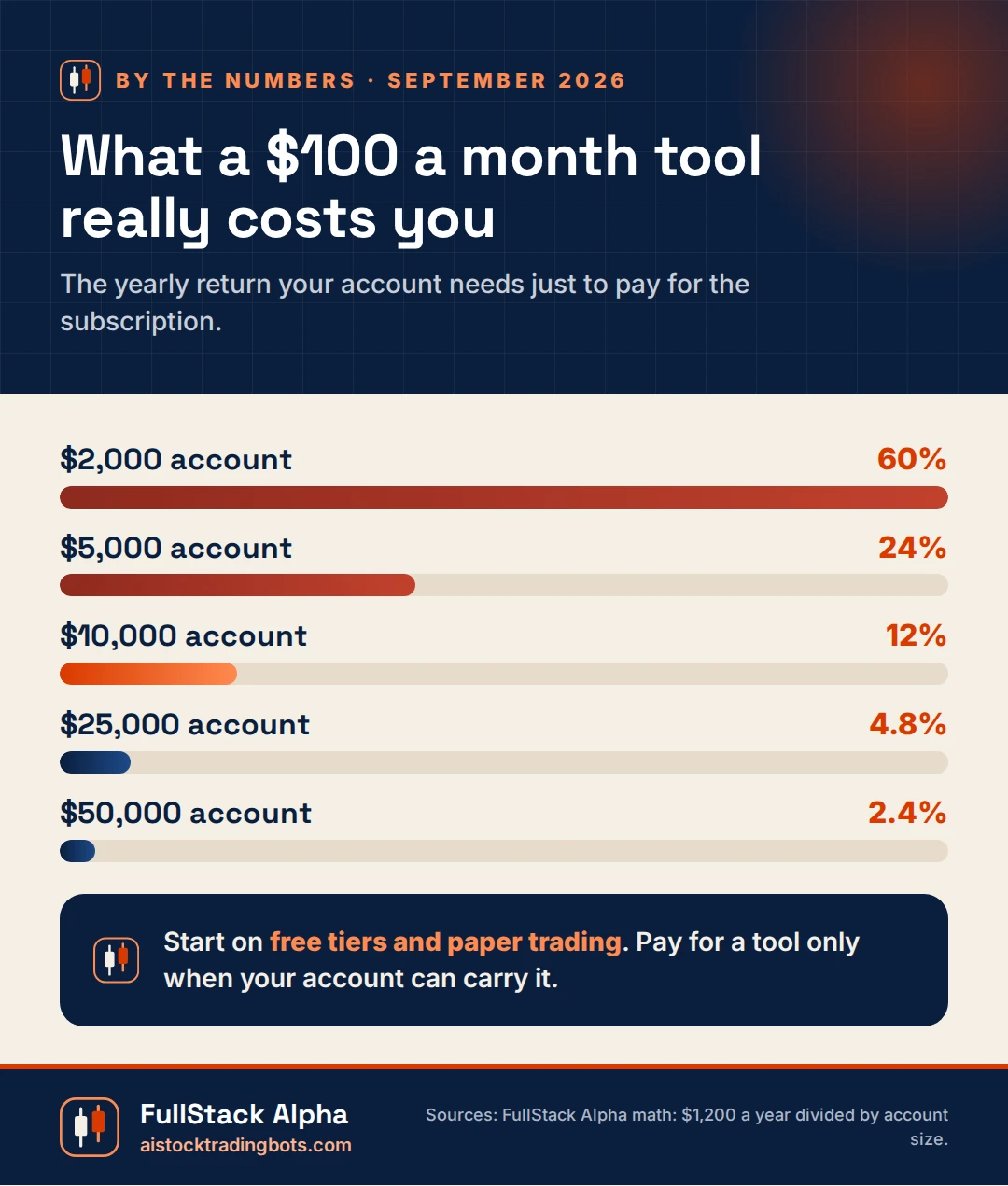
yearly return a $100 a month tool needs on a $5,000 account just to break even.
$0
to paper trade at Webull, Interactive Brokers, Alpaca and TradingView.
Source: Broker sites$25,000
pattern day trader minimum that FINRA’s new rule replaces. Brokers switch by Oct 20, 2027.
Source: FINRA Notice 26-107 beginner friendly AI trading tools, cheapest first
Sorted by what it costs to start. Every one lets you learn before you risk a dollar.
Updated September 30, 2026 by Jay Rocco for FullStack Alpha. Picks are reviewed monthly. Prices were checked on vendor sites in September 2026 and change often, so confirm before you pay.
| Tool | Cost to start | What you learn | Trades for you? |
|---|---|---|---|
| Webull paper trading | Free | Order types and fills on live data | No |
| TradingView | Free Basic plan | Charts, alerts and paper trades | No |
| Prospero.ai | Free | Reading AI signals | No |
| Composer by SoFi | Free Starter plan | Building rule based strategies | Yes, on its platform |
| Surmount | Free plan; Core $5/mo | Following automated strategies | Yes, through your broker |
| StockHero | 14 day free trial, then $49.99/mo | Guided bot building with paper trading | Yes |
| Alpaca | Free | Coding your first bot | Yes, if you code it |
1. Webull paper trading

Cost: Free
Why start here: A simulated account on live market data
Official site: webull.com
A free practice account that runs on live prices, inside an app you can later trade from. Use it to learn order types and to see how fills behave before any bot is involved.
Read next: Webull Paper Trading: How to Test a Strategy Before Real Money
2. TradingView
Cost: Free Basic plan; Essential $14.95 a month
Why start here: Charts, alerts, a Strategy Tester and paper trading in one place
Official site: tradingview.com
The free plan is where most traders learn what an indicator says and how a simple strategy would have performed. Upgrade to Essential only when you need webhook alerts to reach a broker.
Read next: Pine Script Tutorial: Write Your First TradingView Indicator Tonight
3. Prospero.ai

Cost: Free app
Why start here: AI signals with no auto trading
Official site: prospero.ai
Free AI signals built from institutional flow data. It never places trades, which makes it a safe classroom. Write down its signals, check what the stock does the following week, and see how often you would have been right.
Read next: Prospero AI review on the FullStack Alpha editorial desk
4. Composer by SoFi
Cost: Starter plan free; Advanced $10 a month
Why start here: Learn how rule based strategies are built, with a backtest for each
Official site: composer.trade
Build a strategy from blocks, or describe it to Composer’s AI, then read the backtest. The free Starter plan lets you learn the mechanics before paying anything. Be suspicious of any backtest that looks too smooth.
Read next: Backtesting Websites: 7 That Test a Strategy Without Code
5. Surmount

Cost: Free plan; Core $5 a month
Why start here: Real automation with small positions at your own broker
Official site: surmount.ai
Follow automated portfolios through a brokerage account you control, starting free or at $5 a month. A cheap way to see how automation feels with small, real positions once your paper trading is done.
Read next: AI Trading Bot: How the 5 Types Differ
6. StockHero
Cost: 14 day free trial on Lite, then $49.99 a month
Check first: Lite only connects to TradeStation
Official site: stockhero.ai
The most guided bot builder we have seen, with paper trading included. Use the trial on paper only, and confirm your broker is supported on the plan you would pay for.
Read next: AI Trading Bot Free Tiers: The 8 Caps Nobody Lists
7. Alpaca

Cost: Free API and paper trading
Why start here: The classroom for learning to code a bot
Official site: alpaca.markets
If you want to learn to code a bot, Alpaca’s free paper API is the place. Pair it with an AI assistant for the first draft of your code, then read every line before it runs.
Read next: Alpaca API for Beginners: Keys, Paper Trading, and Your First Order
What an AI trading bot actually does
An AI trading bot is software that reads market data, applies rules or a trained model, and acts on the result. That action is one of two things:
- It sends you an alert and you place the trade yourself.
- It places the trade through your broker, with no click from you.
That difference matters more than any feature list. A bot that trades on its own needs your broker login or an API key. A bot that only alerts does not. Know which one you are buying before you pay.
What a bot costs in year one
The price on the pricing page is rarely the price you pay. A realistic first year budget has three parts:
- The subscription. Monthly or annual, often with the useful features on the higher tier.
- Market data. Sometimes bundled, sometimes billed separately by your broker.
- Trading costs. Commissions, spreads, and slippage on every order the bot places.
A “free” bot can end up costing more than a paid one once you add the data and the trades. Our Free AI Trading Bots section breaks down where the free tier stops.
The beginner path we recommend
- Learn the vocabulary. Signal, backtest, paper trading, API key, slippage. Each has a guide here.
- Pick a bot that works with your broker. Check Trading Bots by Broker first. It saves you a wasted subscription.
- Run it on paper. At least a few weeks, through a volatile day or two. Start with our Paper Trading guides.
- Go live small. Real fills behave differently than simulated ones. Size down until you have seen the difference.
- Keep a kill switch. Know how to pause the bot and cancel open orders in under a minute.
What beginners ask us most
- Does the bot trade by itself or just send alerts?
- Can an API key let a bot withdraw my money?
- Is a no code app good enough, or do I need Python?
- How do I tell a real track record from a marketing screenshot?
Each question has a full answer in this section. If a claim sounds too clean, read Do AI Trading Bots Work and AI Trading Bot Scams before you sign up for anything.
What a $100 a month tool really costs you
Real trader pain points, answered
Real comments from Trustpilot and the App Store, quoted as posted. Each one gets a straight answer from FullStack Alpha and a link to the guide that fixes it.
 Trustpilot
 App Store
Start off by watching signals of stocks you know or already hold.
App Store review of the Prospero.ai iPhone app, April 2026. Quoted as posted.
Good first step. Watch any tool's signals on stocks you know for a month before you act on one. You will learn fast whether its logic matches what you see.
Read: Trading Bot BasicsWith subscriptions reaching $240+ per month, a trader realistically needs a very large account (likely $25,000+) just to cover the software costs before seeing an actual profit.
Trustpilot review, December 2025. Quoted as posted. Read the original
Do this math before you subscribe. A $100 monthly tool on a $5,000 account needs a 24% yearly return just to break even. Use free tiers until your account can carry the cost.
Read: AI Trading Bot Free TiersI really like the trading bots and the paper trading feature, which makes it easy to practice and understand how everything works before using real funds.
App Store review of the StockHero iPhone app, August 2026. Quoted as posted.
That is the right order: practice on paper, then go live small. StockHero offers a 14 day trial, so paper trade the whole trial before you pick a plan.
Read: Free Paper Trading SimulatorFrom the FullStack Alpha blog
Related guides on this site, written and edited by Jay Rocco:
- Trading Bot Basics: What Runs While You Are Away
- AI Trading Bot: How the 5 Types Differ
- Webull Paper Trading: How to Test a Strategy Before Real Money
- Does Robinhood Have Paper Trading? The Answer and 3 Free Alternatives
- Is AI Trading Legit? Yes. The Real Question Is Does It Work.
- Best AI Trading App in 2026: How to Pick One Without Getting Burned
Our take
Most beginner guides sell you a bot. This one sells you a process. If you keep one thing, make it this: a bot that trades while you do not understand it is not automation, it is outsourcing your judgment to a stranger. Start with alerts. Graduate to automation only after a few weeks of paper trades you can explain line by line. That boring path is the one that keeps accounts alive long enough to learn something.
Quick answers
Which AI trading bot is best for beginners?
The best AI trading bot for beginners is one that shows its rules, offers free paper trading, works with the broker you already have, and costs less than you would miss if it lost a month. Start with alerts, not full automation, until you understand every trade it suggests.
Can ChatGPT make a trading bot?
Yes, ChatGPT, Claude, and similar assistants can write the code for a basic trading bot and explain a broker API. They cannot tell you whether the strategy makes money, and their code often has subtle mistakes. Treat the output as a draft you test on paper first.
Is it illegal to make an AI trading bot?
No. Building and running a trading bot for your own account is legal in the US, as long as you follow your broker’s terms. Managing other people’s money or selling trade signals can require registration, so check the rules before you turn a bot into a business.
Where to go next
- AI Trading Bot Reviews: hands on tests, scored out of 100
- AI Trading Apps: no code apps you can run from your phone
- Why Trading Bots Fail: the mistakes that cost beginners the most
Want to compare more tools before you pick one? The FullStack Alpha directory at aistockpickerapps.com catalogs more than 200 AI stock tools, from screeners to trading bots.
Reviewed by Jay Rocco, Founder and Editor of FullStack Alpha. Educational content only, not financial advice. Trading involves risk of loss.
Stay alpha.
Frequently Asked Questions
What is an AI trading bot?
Software that watches the market, applies a set of rules or a trained model, and either sends you an alert or places the trade through your broker. Some only alert. Some trade on their own. Always check which one you are buying.
Can a beginner use an AI trading bot?
Yes, if you start on paper trading, keep position sizes small, and pick a bot that shows its rules. No-code platforms make setup easier, but they do not make the market easier.
How much money do I need to start?
Many bots and brokers let you start with a small account, and paper trading costs nothing. The real first-year cost is the subscription plus market data plus commissions, so budget for the tool before you budget for trades.
Which AI trading bot is best for beginners?
The best AI trading bot for beginners is one that shows its rules, offers free paper trading, works with the broker you already have, and costs less than you would miss if it lost a month. Start with alerts, not full automation, until you understand every trade it suggests.
Can ChatGPT make a trading bot?
Yes, ChatGPT, Claude, and similar assistants can write the code for a basic trading bot and explain a broker API. They cannot tell you whether the strategy makes money, and their code often has subtle mistakes. Treat the output as a draft you test on paper first.
Is it illegal to make an AI trading bot?
No. Building and running a trading bot for your own account is legal in the US, as long as you follow your broker's terms. Managing other people's money or selling trade signals can require registration, so check the rules before you turn a bot into a business.
Explore AI Trading For Beginners

Algorithmic Trading Reddit Advice: What Holds Up and What Burns Cash
Which algorithmic trading Reddit advice survives real costs and clean testing, which tips burn cash, and what to check before a bot touches…
Learn More →
Trading Bot Basics: What Runs While You Are Away
A trading bot watches a data feed, checks your rules and sends orders on its own. Learn how bots work, where they run and what beginners mus…
Learn More →