

The FullStack Alpha research desk tests AI trading bots on paper and live accounts. Reviewed and edited by Jay Rocco, Founder and Editor.
By FullStack Alpha Editorial Team | Reviewed by Jay Rocco, Chief Editor
AI trading for beginners is not about finding a bot that makes money while you sleep; it is about building a process you can trust before real cash is on the line. The safe path is five steps in order: learn the basics, pick one simple tool, paper trade it, backtest the idea, then go live small with hard limits. The tools are real now: Interactive Brokers lets eligible clients give an AI its own funded account partition, and Robinhood confines agents to a dedicated Agentic account with approvals on by default. The CFTC’s own advisory puts the limit plainly: “AI technology can’t predict the future or sudden market changes.” Skip a step and you are not trading, you are gambling with extra software.
Key insights
- IBKR’s autonomous AI trading requires at least 10 trades of $100 or more over two weeks in Review & Approve mode first, and only individual non-margin accounts qualify, per IBKR’s AI integrations page.
- Revoking an AI’s access at IBKR does not cancel pending or partially filled orders. Know how to cancel orders, not just disconnect.
- The CFTC advisory flags promises of “unreasonably high” or promised returns and “100 percent ‘win’ rates” as red flags.
- Paper trading is free at Alpaca and TradingView, and Alpaca’s paper environment starts at $100,000 but does not account for slippage or market impact.
- Decision rule: never let AI place a live order until you have paper traded your rules for four weeks and written a daily loss limit.
What Is AI Trading for Beginners in Plain Words?
AI trading means software reads market data and either suggests a trade or places one, based on rules it learned or rules you gave it. No magic, no crystal ball: pattern recognition running faster than you can.
Trading bots follow a script, not a hunch. A bot watches price action and compares it with conditions you or the AI defined. If price crosses a moving average, if volume spikes, if a scanner flags unusual activity, the bot fires an order. It does not get nervous or revenge trade. It also does not know when the rule it follows stopped working. That part is on you.
AI trading software is the layer between data and decision. There are three levels:
- Scanners surface ideas: “here are 12 stocks breaking out of a tight range today.” You decide.
- Assistants draft an order and wait for your approval. Webull’s Cloud MCP, for example, creates order instructions that require confirmation in the Webull app or desktop, per Webull’s developer docs.
- Autonomous agents submit orders on their own inside a walled-off part of your account, such as IBKR’s AI Partition or Robinhood’s Agentic account.
Why the walls matter
IBKR does not hand the AI your whole account. Per its AI integrations page, the agent trades in a separate partition funded with cash you transfer from the parent account, and only eligible stocks and equity options are allowed. Margin, short selling, fractional shares, penny stocks and Canadian stocks are excluded, and orders are limited to market, limit, stop and stop-limit with day time-in-force. Before autonomy, you must complete at least 10 trades of $100 or more over two weeks in Review & Approve mode.
Robinhood takes a similar approach. Per its agents overview, an agent trades only in a dedicated Agentic account you fund, can see but not trade your other accounts, and has trade approvals on by default. Robinhood also says it does “not control, supervise, monitor, recommend, or audit agents,” and that you are responsible for your agent’s trades.
That is two brokers admitting the same thing: untested beginners with full autonomy is how accounts get wrecked. More on both in our IBKR autonomous AI trading report and our Robinhood agentic trading review.
What AI does well: scan thousands of tickers quickly, hold a rule without emotion, summarize news and filings, and backtest an idea across years of data in seconds.
What AI cannot do: predict a surprise Fed decision, tell you when its own model quietly stopped working, or promise you will not get stopped out in a choppy market. The CFTC’s advisory title says it best: “AI Won’t Turn Trading Bots into Money Machines.”
This is why AI trading for beginners should start as a research habit, not a shopping trip for the flashiest bot.
What Are the 5 Safe Steps in AI Trading for Beginners?
AI trading for beginners works best as five steps, in order, every time. Skipping ahead is how a $2,000 account becomes a $400 lesson.
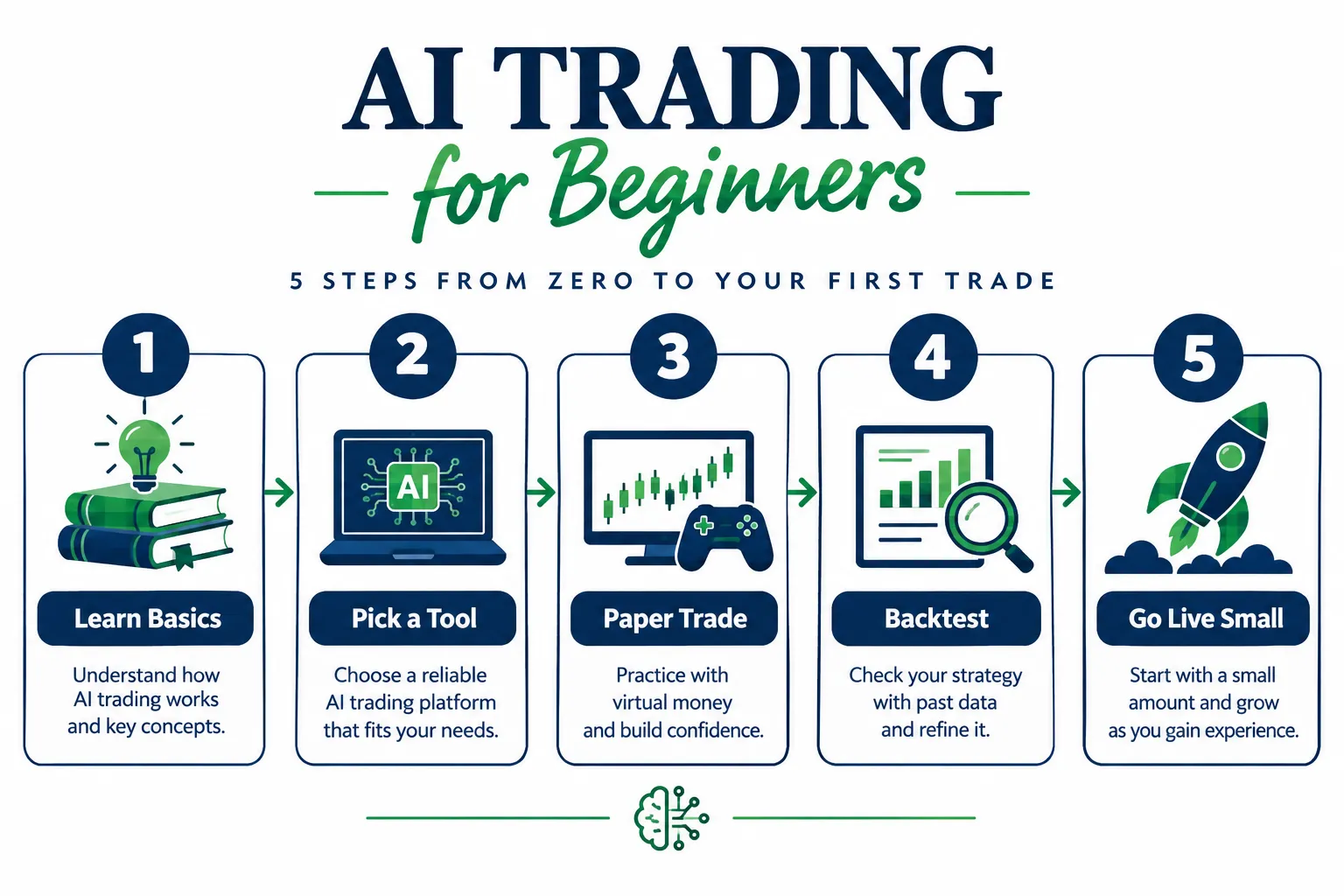
| Step | Goal | Tool Type | Cost Level |
|---|---|---|---|
| 1. Learn Basics | Understand terms and risk | Free guides, videos | Free |
| 2. Pick a Tool | Match tool to goal | Scanner, assistant, or bot | Free to low |
| 3. Paper Trade | Test without risk | Simulated account | Free |
| 4. Backtest | Check the idea on past data | Charting or bot platform | Free to mid |
| 5. Go Live Small | Prove it with real money, capped risk | Broker with an AI partition or a small separate account | Variable |
Notice what is missing: a step called “find the bot with the highest win rate.” It does not exist, because a bot advertising a 90% win rate is advertising a red flag, not an edge. The CFTC lists “100 percent ‘win’ rates” among its warning signs.
Step 1: How Do You Learn the Basics Before Using AI?
AI trading for beginners does not require a finance degree. You need about a week of focused reading and a few hours of video before you touch a tool.
Learn these four first:
- Support and resistance: price levels where a stock tends to stall or reverse.
- Stop loss: an order that sells automatically if price falls to a level you set, capping your loss.
- Position sizing: how much of your account goes into one trade.
- Risk-reward: how much you stand to lose versus gain on a setup.
If you cannot explain a stop loss to a friend in one sentence, you are not ready to let a bot place one for you.
Two videos worth your time. Sierra Aaliyah’s “How To Start Trading As A Beginner In 2026 (Step-by-Step)” covers general trading basics:
Ray Fu’s “Complete Guide to building an AI Trading Bot with Claude for Beginners” shows the AI side:
Watch them for concepts and setup steps, and treat any performance claims you see in any video as unverified until you see a full trade log.
Skip for now: options Greeks, leveraged ETF decay math, futures margin and anything with “arbitrage” in the title. That is material for someone who has placed a hundred trades, not ten.
The market truth: most beginners do not fail for lack of a clever strategy. They fail because they never defined what losing looks like before they started. A stop loss is not pessimism. It is the seatbelt you put on before you start the car.
Practical takeaway: spend one week on the four terms and the two videos, write down the words you still do not understand, look them up, then move to Step 2 on a fixed date so learning does not turn into analysis paralysis.
Step 2: How Do You Pick a Simple AI Tool?
For AI trading for beginners, pick one tool category, not all three, or you will spend your first month configuring software instead of learning markets.
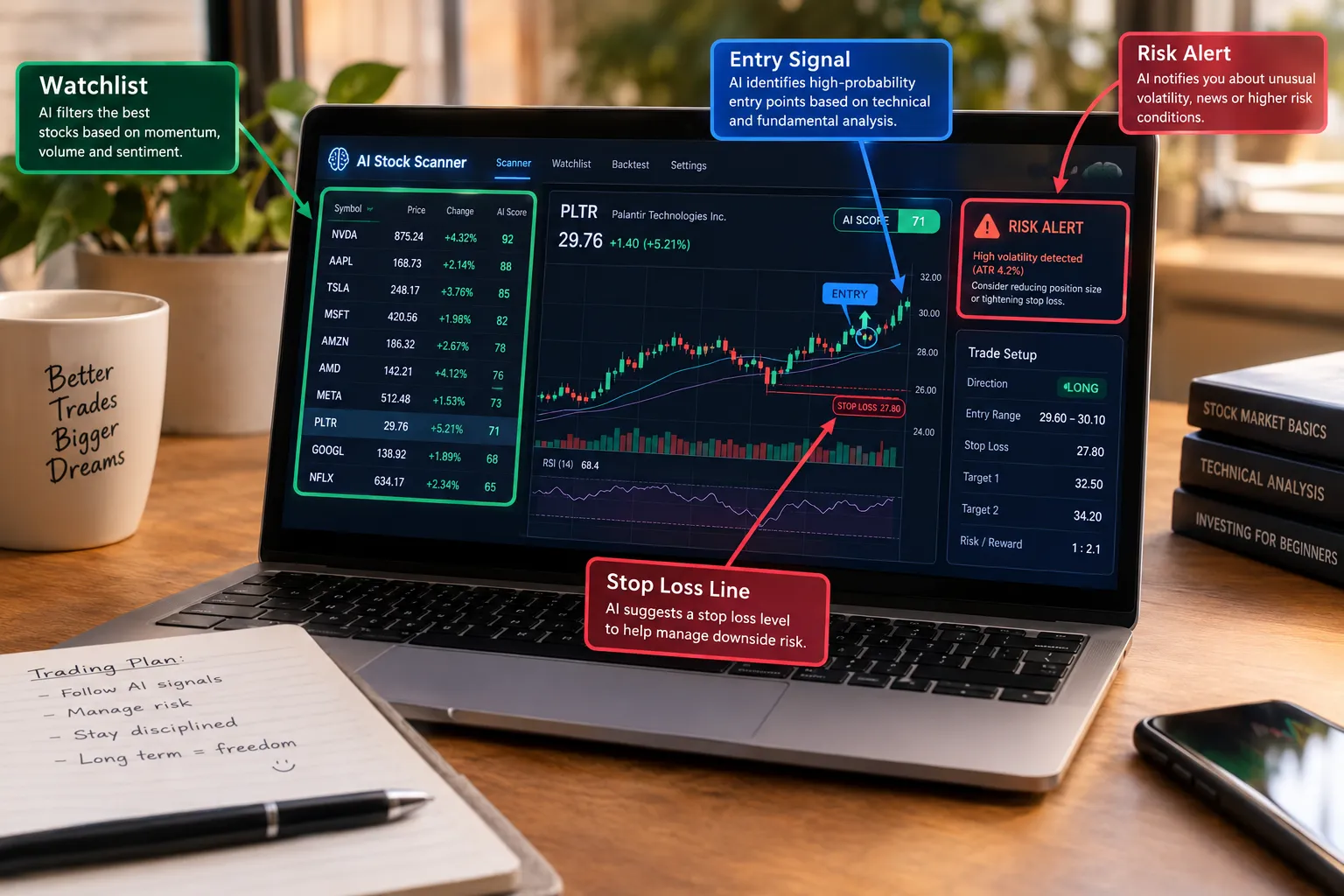
Scanners read the market and flag stocks that match a pattern. You keep the buy decision. This is the lowest-risk entry point, because the AI’s job ends at “here is something interesting.” Chart-pattern scanners such as TrendSpider are a common first stop.
Assistants draft a trade and explain the reasoning, but you click submit. Webull’s Cloud MCP works this way: you sign in with OAuth, choose which accounts and capability groups to share, and every order instruction must be confirmed in the Webull app or desktop. Webull says Cloud MCP is limited to eligible US users. That approve-before-submit design is a safer on-ramp than full autonomy.
Autonomous agents place trades with no click from you. IBKR’s AI Partition and Robinhood’s Agentic account sit here. They need the most trust and the most guardrails. Treat the broker’s rails as the minimum, not the whole plan.
How to choose: if you have never placed a live trade, start with a scanner or an assistant. Save autonomous agents for after you have paper traded and backtested your own idea.
Cost reality check: check each tool’s official pricing page before assuming it is free. Some AI features are bundled into a brokerage account you already have; others are monthly subscriptions; AI chat inside a broker app may be billed separately, as Robinhood does with a prepaid token balance for its in-app agent. If a vendor’s pricing is unclear, that is useful information about the vendor.
The fix for tool overload: pick one tool, commit for 30 days and resist adding a second scanner after a boring week. A mediocre tool you actually use beats a brilliant one you keep switching away from.
Step 3: How Do You Paper Trade With AI First?
Paper trading is the core of AI trading for beginners: a simulated account where you place trades with fake money against real prices. No risk, same market. Skipping it is the most common beginner shortcut that backfires.
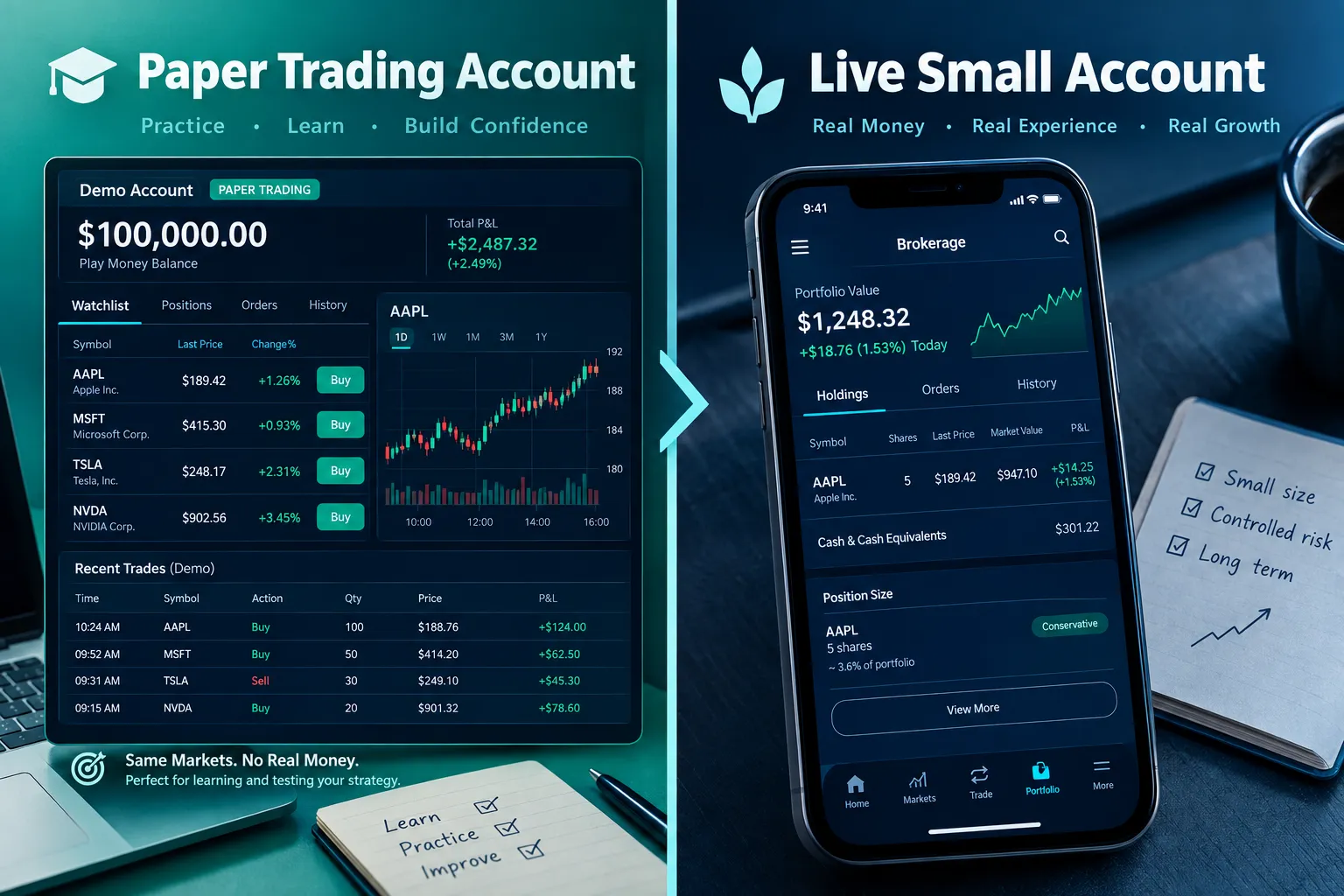
Pick a simulator. Alpaca’s paper trading is free, uses real-time quotes and starts with a $100,000 balance by default; anyone can open a paper-only account with an email address. TradingView’s paper trading ties into its charts and alerts. Our free paper trading simulator guide compares seven more.
Match the size you will really trade. If you plan to trade $2,000, size your paper positions as if the account were $2,000. A fake $100,000 account teaches you nothing about how a real $2,000 account behaves in a bad week.
Run it like a real account. Same position sizing. A stop loss on every trade, even though losing fake money stings zero. The goal is the habit of defining your exit before you are attached to the trade.
Track everything. Entry, exit, the setup that triggered the trade and what happened. After two to four weeks, patterns in your own behavior show up: stops set too tight, chasing extended moves, freezing in the last hour of the session.
Know what paper skips. Alpaca’s docs say its paper environment does not account for market impact, slippage from latency, order queue position or regulatory fees, and does not simulate dividends. Real fills will be a bit worse than paper fills. Paper also cannot simulate your nerves.
When to graduate: after four straight weeks of following your own rules without blowing past a stop or skipping your setup criteria. If you are still improvising after a month, stay in the simulator.
Step 4: How Do You Backtest an AI Idea?
Backtesting means running your rule against historical prices to see how it would have done. It is the difference between “I think this works” and “here is what it did across hundreds of trades over several years.”
The simple version: write the rule in plain language first, such as “buy when price breaks above a tight range on above-average volume; sell at a 2% stop or a 4% target.” Run that exact rule, unchanged, on two or three years of history in a charting platform or a bot’s built-in backtester. Look at three numbers:
- Win rate: how often it won.
- Average win versus average loss: your real risk-reward.
- Maximum drawdown: the worst losing stretch. If it would have taken more than you are willing to lose, the rule fails, whatever its win rate.
Worked example: why win rate alone lies
Your backtest shows 100 trades with a 2% stop and a 4% target, and a 40% win rate. Is that good?
- Winners: 40 x 4% = +160%
- Losers: 60 x 2% = -120%
- Net: +40% across 100 trades, or +0.4% per trade before costs
Now say costs (commissions plus slippage) are 0.3% per round trip. Net per trade drops to about +0.1%. A 40% win rate can be fine if winners are twice the size of losers. A 70% win rate can lose money if losers are three times the size of winners. Always look at the sizes, not just the count.
The overfitting trap. If you tweak the moving average from 20 days to 23 to 19 until the curve looks beautiful, you have built a rule that perfectly describes the past and tells you little about the future. If you changed more than two or three settings chasing a better result, go back to the simpler version, and keep some recent data aside that you never test on until the end.
A credibility test for any vendor backtest: does it include costs and slippage? Does it cover both up and down markets? If a tool only shows results from a strong bull stretch, you are looking at a highlight reel, not a track record.
Where to run this: charting platforms let you backtest pattern rules without code. If you want to go programmatic, our Alpaca API for beginners guide walks through setup from zero, and our coming quantitative trading guide covers the full research loop. You do not need to code to start at the scanner or assistant level.
Practical takeaway: backtest the exact rule you paper traded. If paper results and backtest results tell very different stories, treat that as a sign the rule is not stable yet.
Step 5: How Do You Go Live Small With Hard Limits?
This is where real money enters, and the limits matter more than the strategy.
Set a size cap before you fund anything. If you use an AI partition, fund it with a small slice of your account; IBKR’s page says funding is limited to the cash you allocate and that position transfers are not supported. If your broker has no partition, open a separate small account for the bot. Start smaller than the most the platform allows.
Set a daily loss cap in writing. Decide before the market opens how much you will lose in a day before you stop. This single rule prevents more damage than any indicator, because it stops revenge trading, the urge to take a worse trade right after a loss to “get it back.”
Worked example: a $2,000 starter account
- Risk per trade: 1% = $20
- Stop distance: 2%, so position size = $20 / 0.02 = $1,000
- Position cap: no single position above 50% of the account ($1,000), so the cap and the risk rule agree here
- Daily loss cap: 3% = $60, which means three full stop-outs end your day
- Worst plausible week at the cap: 5 x $60 = $300, or 15% of the account
If 15% in a week is more than you can stomach, cut risk per trade to 0.5%. Do the math before you fund the account, not after a bad Tuesday.
Know your off switch, and its limits. At IBKR you revoke an AI’s access through Manage Third-Party Consents in Client Portal, but IBKR notes that revoking access does not cancel pending or partially filled orders. Know how to cancel open orders by hand, in under a minute, before you go live. Our guide to AI trading agent risks explains why the kill switch should sit outside the agent.
What brokers exclude, and why it matters. IBKR’s autonomous mode excludes margin, short sales, fractional shares and penny stocks. If a beginner-facing bot offers you leveraged options spreads on day one, the tool’s ambition does not match your experience.
Practical takeaway: fund only money you have already paper traded and backtested a plan against, write a size cap and a daily loss cap, practice canceling orders, and only then let AI touch a live order.
How Much Money Do You Need to Start AI Trading for Beginners?
You can start AI trading for beginners with $0, because the first three steps (learning, picking a tool, paper trading) cost nothing at Alpaca, TradingView and most brokers. Money only matters at Step 5, and the right amount is whatever you can lose without changing your life.
There are three practical floors to know about:
- Broker minimums. Many brokers have no account minimum for a basic cash account. IBKR’s autonomous AI mode requires an individual non-margin account and at least 10 approved trades of $100 or more first, so you will spend at least $1,000 in trade value during the qualifying period, though not all of it at risk at once.
- Cost drag. Fees and AI subscriptions weigh more on small accounts. A $20 monthly tool on a $1,000 account is a 2% monthly hurdle before you earn anything; on a $10,000 account it is 0.2%.
- Position math. With 1% risk per trade and a 2% stop, a $1,000 account supports $500 positions. That works for most liquid stocks and ETFs, and fractional shares are an option at many brokers (though not inside IBKR’s AI partition).
Decision rule: pick the smallest live amount that still lets your rules work, and treat the first three months as tuition, not income.
What Does a 30-Day AI Trading for Beginners Plan Look Like?
Here is a realistic first month for AI trading for beginners, built from the five steps:
- Days 1 to 7: learn. The four core terms, the two videos, and the CFTC advisory. Write one paragraph on what you want AI to do for you (research, drafting or execution).
- Days 8 to 10: pick one tool. One scanner or one assistant. Open a free paper account at the same time.
- Days 11 to 24: paper trade. Every trade logged with entry, exit, setup, stop and result. Same size you plan to trade live.
- Days 25 to 28: backtest. Run the exact rule you paper traded on two or three years of history, with costs. Compare with your paper log.
- Days 29 to 30: decide. If paper and backtest agree and you followed your rules, plan a small live test for next month with a written size cap and daily loss cap. If not, run another month on paper.
Thirty days is not long enough to prove an edge. It is long enough to prove you can follow a process, which is the part most traders never test.
What Is the Best AI Trading App for Beginners?
There is no single best app for AI trading for beginners. The right one depends on which of the five steps you are on.
- Research only, no execution risk: an AI scanner plus TradingView’s charts and alerts. You stay the decision-maker. Best for Steps 1 to 4.
- Trade drafts with a human checkpoint: an assistant that prepares orders you confirm, such as Webull’s Cloud MCP flow for eligible US users.
- Supervised autonomy: IBKR’s AI Partition (individual non-margin accounts, after 10 approved trades over two weeks) or Robinhood’s Agentic account. Best only after Step 5’s limits are written down.
- Learning to build your own: Alpaca’s free paper API with an AI coding assistant, so you learn how bots work from the inside.
The honest answer: match the app to the step you are actually on. A beginner who has not paper traded gains nothing from autonomous execution and a lot from a good scanner.
What Do Beginners Get Wrong With AI Trading?
Every one of these AI trading for beginners mistakes is survivable if you catch it early. Most beginners catch it when the account tells them, which is the expensive way.
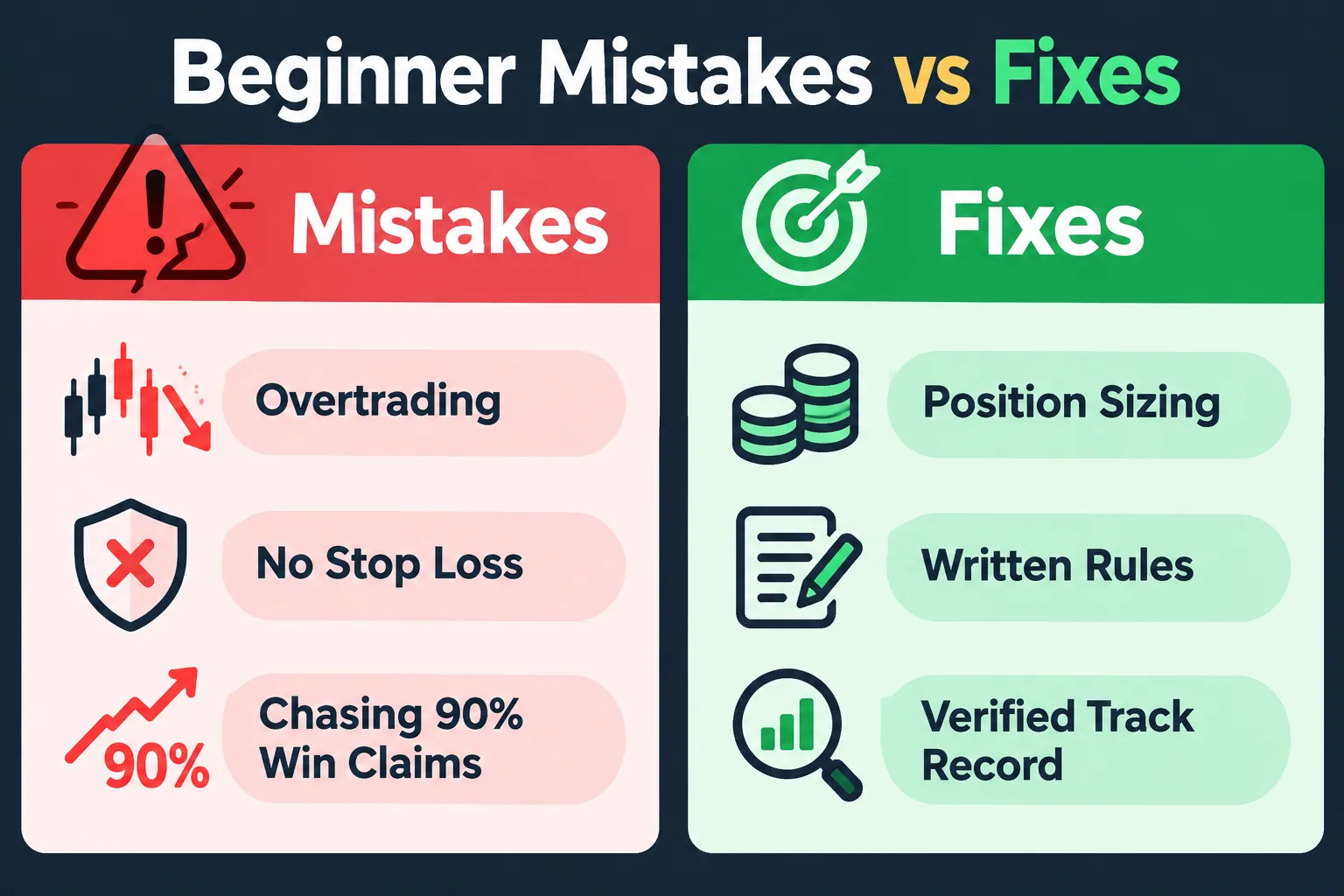
Mistake: trusting a 90% win-rate claim. Fix: ask for the full trade log with fees. The CFTC advisory flags promised returns, “100 percent ‘win’ rates” and “no trading experience required” as red flags. Our list of AI trading bot red flags covers the rest.
Mistake: overtrading because the bot makes it easy. Fix: cap trades per day before you start. More signals usually means more fees and more chances to break your own rules.
Mistake: no stop loss because “the AI knows what it’s doing.” Fix: a hard stop on every automated position. The AI optimizes for its programmed goal. It does not know your rent is due.
Mistake: endless tool research. Fix: a two-week research window, then one tool and a fixed start date for paper trading.
Mistake: skipping paper trading because it “feels fake.” Fix: treat paper as a test of your rules, not your emotions, with the same sizing and stops you will use live.
Mistake: buying a stock just because it dropped a lot. Fix: wait for price to stabilize before entering, and let your rule define “stabilize.” A sharp drop with no base is often still falling.
Mistake: thinking AI versus manual is a contest. Fix: use AI as a research assistant, not a replacement brain. It processes more data faster, but it cannot predict shocks, and you still decide when to override it.
Mistake: ignoring the regulator’s warning page. Fix: read the CFTC advisory before funding any automated account. It is short and written for exactly this reader.
Mistake: not picturing the worst case. Fix: that is what the position cap and daily loss cap are for. No broker safeguard, including a partition, eliminates loss. It limits how much of your account one bad stretch can reach. Fund only what you can lose without changing your life.
Spotting a scam before you fund anything
The CFTC’s advisory suggests researching the company or trader, checking how old the trading website’s domain registration is, and getting a second opinion from a financial advisor, friend or family member. Add one more check of our own: a real AI trading tool connects to a broker you already use through official APIs or connectors. Anything that asks you to send money to the bot itself is a scam pattern.
Frequently Asked Questions
How do I start AI trading as a beginner?
Start AI trading for beginners with five steps in order: learn four core terms, pick one simple tool, paper trade it for four weeks, backtest the same rule, then go live small. Write a position size cap and a daily loss limit before any real money goes in. Skipping steps is the most common way beginners lose money.
Is AI trading safe for beginners?
It is as safe as the limits you set. Brokers such as IBKR and Robinhood keep AI agents in separate, funded partitions or accounts, but that limits damage rather than preventing losses. Use a stop on every trade, a daily loss cap and know how to cancel open orders by hand.
Can AI predict stock prices?
No. The CFTC’s advisory states that AI technology cannot predict the future or sudden market changes. AI can spot patterns in past data and react quickly, but a surprise headline or Fed decision can catch it just as it catches a person.
How much money do I need to start AI trading?
You can begin with $0 by paper trading at Alpaca or TradingView. For a first live test, use only money you can afford to lose, and size trades so each one risks about 1% of the account. Subscriptions and fees weigh more heavily on small accounts.
What is the best AI trading app for beginners?
There is no single best app; match the tool to your step. Use a scanner for research, an assistant that requires your confirmation for drafting trades, and only consider autonomous agents such as IBKR’s AI Partition after you have paper traded and written your limits.
How do I spot an AI trading bot scam?
Walk away from any bot that promises unreasonably high returns, a 100 percent win rate or says no experience is needed, which are red flags the CFTC lists. Check the company’s background and how old its website domain is, and get a second opinion. A real tool connects to your own broker; it never asks you to send money to the bot.
Do I need to know how to code for AI trading?
No. Scanners, broker assistants and no-code backtesters cover the first steps. Coding with an API like Alpaca’s becomes useful when you want to build and test your own rules, and AI assistants can help write that code.
Our Take
The safe order for AI trading for beginners is the one in this article, and there is no faster version that does not cost you something eventually. Learn the vocabulary, pick one simple tool, paper trade it until your discipline holds for a month, backtest the exact rule you paper traded, then go live with a size cap and a daily loss cap you wrote down before the open. The brokers are building walls around AI for a reason; build your own walls too.
It is not thrilling. It is how you are still trading a year from now. For more plain-English guides and tool reviews, start at AI Stock Trading Bots.
Related: before you open that free paper account, our hands-on Alpaca review at AI Stock Picker App covers what its paper and live accounts actually include.
Got a tool you think deserves an honest test instead of a sales pitch? Send it to us and we will review it.
Stay alpha.
The FullStack Alpha research desk tests AI trading bots on paper and live accounts. Reviewed and edited by Jay Rocco, Founder and Editor.
