

Jay Rocco is the Founder and Editor of FullStack Alpha. He has tested 200+ AI stock tools since 2022 and run 15+ AI trading platforms on live accounts with his own money. He reviews the software. He does not tell you what stocks to buy.
Last updated: August 31, 2026
Quick Answer: A trading bot is software that watches a data feed, checks a rule you set, and sends a trade order to a broker automatically. It runs on a computer or a cloud server, not on your phone screen. The bot executes whatever strategy you give it, faithfully, whether that strategy is good or bad.
Key Takeaways
- A trading bot has three parts: a data feed, a set of rules, and a broker connection. Remove any one of them and nothing trades.
- The bot runs on a machine. If that machine is your laptop and you close the lid, the bot stops.
- Automation executes a strategy. It does not create one. A bad strategy automated is a bad strategy running faster.
- Most beginner-friendly platforms offer an alert-only mode. Start there before you touch fully automated mode.
- Paper trading first is not optional advice. It is the only way to know if your rules actually work before real money is at risk.
- A trading bot can lose all your money. That is not a disclaimer. It is a fact worth reading twice.
- Free tiers exist on platforms like Coinrule and TradingView, but they limit the number of active rules or the asset classes you can trade.
What Is a Trading Bot in Plain English?
A trading bot is a program that makes trading decisions based on rules you define, without you sitting at a screen. It is not magic, not a hedge fund in your pocket, and not a passive income machine. It is a rule-follower that never gets tired, never panics, and never deviates from its instructions, for better or worse.
The Three Parts Every Trading Bot Has
Every trading bot, from a free crypto tool on Coinrule to a custom algo on QuantConnect, has the same three pieces working together.
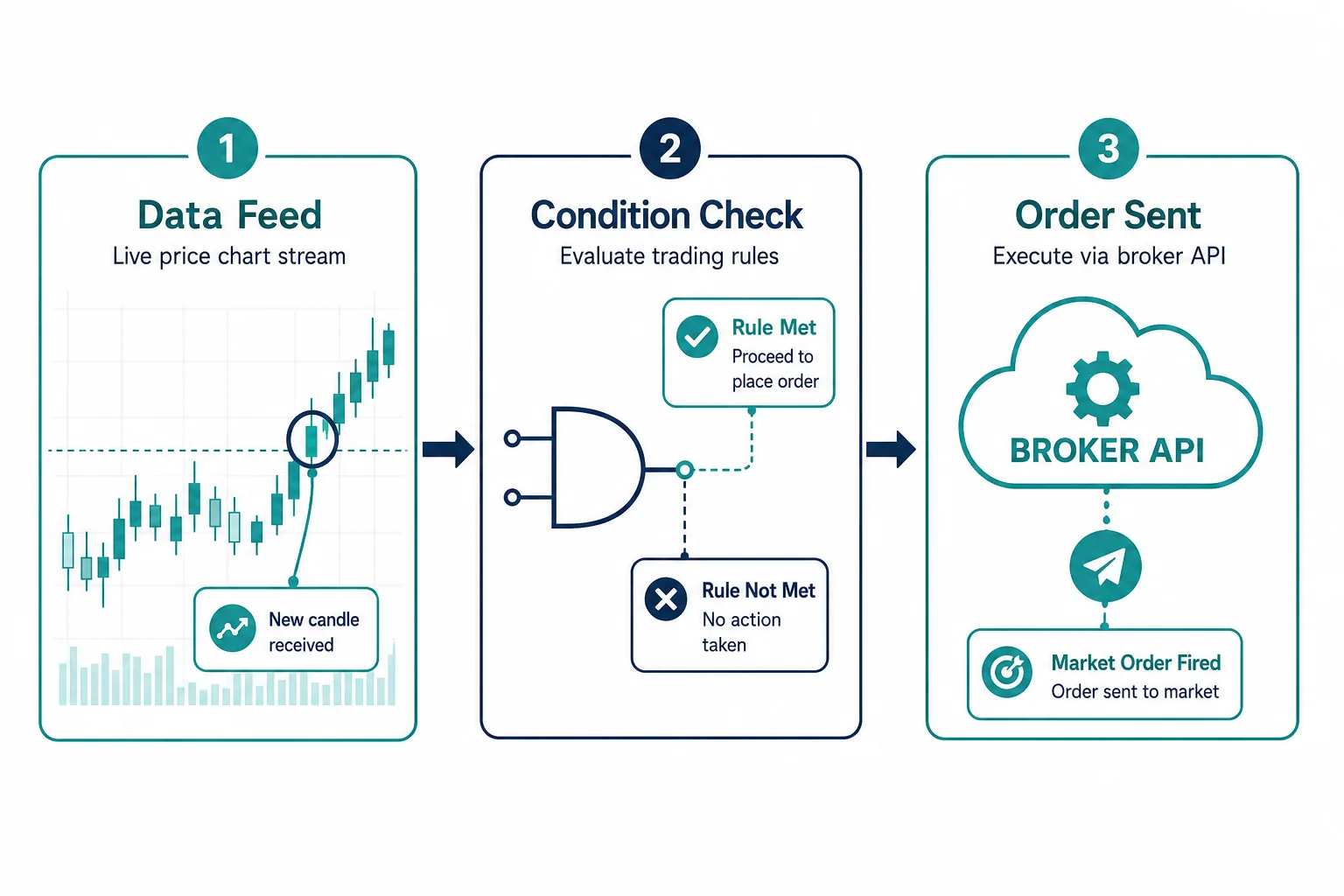
1. A data feed. The bot needs to see prices, volume, or other market data in real time. This data comes through a connection called a REST API (a way for software to request information from a server) or a WebSocket (a live, two-way connection that pushes updates the moment they happen). Think of it as the bot’s eyes.
2. A set of rules. This is the strategy, written as logic the computer can read. “If the 10-day moving average crosses above the 50-day moving average, buy.” The rule is yours. The bot just checks it.
3. A broker connection. When the rule triggers, the bot sends an order to a broker like Alpaca, Interactive Brokers, or a crypto exchange like Binance or Coinbase. The broker fills the trade.
That is the whole machine. Data in, rule checked, order out.
What the Word Bot Hides
The word “bot” sounds like artificial intelligence making smart decisions. Most trading bots are not that. Most are rule-based systems that follow an if-then logic tree. Machine-learning bots do exist, and platforms like Tickeron and TrendSpider incorporate pattern-recognition models. But even those are only as good as the data and the objective you give them. The bot does not know what it is doing. It knows what you told it to do.
How Does a Trading Bot Actually Work?
A trading bot runs a four-step loop continuously: watch the data, check the condition, send the order, record the result. Understanding each step is how you go from “I heard bots trade for you” to actually knowing what you are running.
Step 1: It Watches a Data Feed
The bot connects to a price feed from an exchange or a data provider. On a crypto platform like Bybit, this is a live WebSocket stream of price ticks. On a stock platform like Alpaca, it is a market data API. The bot checks this feed constantly, often hundreds of times per second on faster strategies.
Step 2: It Checks a Condition
Every time new data arrives, the bot asks: does this match my rule? If the rule is “price crossed above the 20-period moving average on a 15-minute chart,” the bot checks that exact condition. If yes, it moves to step three. If no, it waits and checks again on the next data point.
Step 3: It Sends an Order to a Broker
When the condition is met, the bot sends an order. That order can be a market order (fill immediately at the current price), a limit order (fill only at a specific price or better), or a stop loss (exit if price drops to a set level). The broker receives the order through an API and executes it on the exchange.
Here is a concrete example. You build a simple bot on TradersPost connected to TradingView via a webhook (a URL that receives a signal when your TradingView alert fires). Your TradingView alert triggers at 10:32 AM when a stock breaks above resistance. TradingView sends a message to TradersPost. TradersPost sends a buy order to Alpaca. Alpaca fills the trade at the market. You are at the gym. The whole sequence takes under two seconds.
Step 4: It Records What Happened
A good bot logs every trade: entry price, exit price, time, size, and reason. This data is how you know if your strategy is working. Platforms like QuantConnect and Composer keep detailed trade logs. Without logs, you are flying blind.
Where Does a Trading Bot Run?
A trading bot runs on a machine with an internet connection. That machine is either your personal computer or a remote server in the cloud. The choice matters more than most beginners realize.
On Your Computer Versus in the Cloud
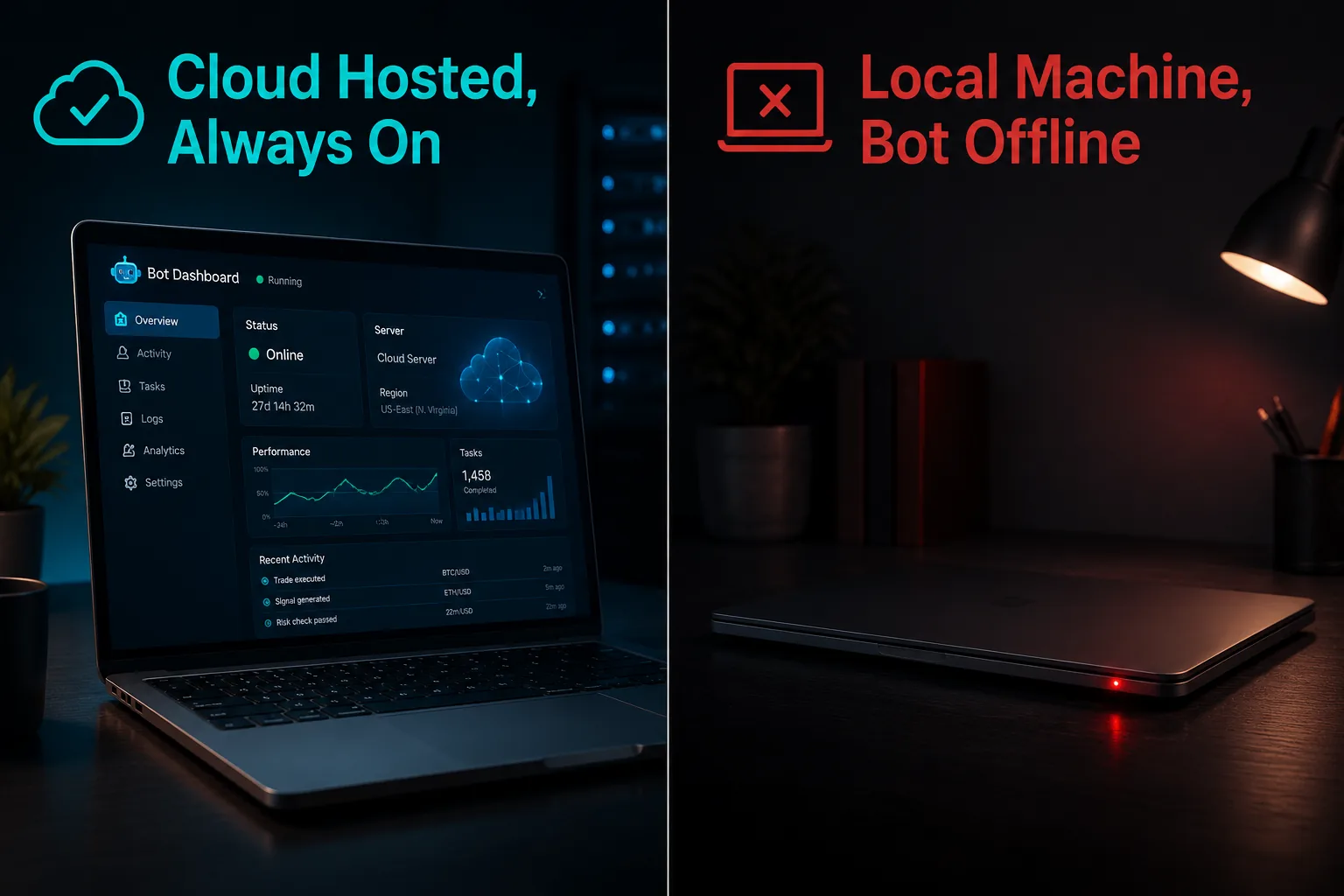
If the bot software runs on your laptop, the bot is only alive when your laptop is on, connected to the internet, and not asleep. Close the lid, lose power, or get a bad Wi-Fi signal and the bot stops mid-strategy. That is a real problem if you have open positions.
A VPS (Virtual Private Server) is a rented computer in a data center that runs 24 hours a day. You pay a monthly fee, log in remotely to set up your bot, and the server keeps running whether your laptop is open or not. Many serious bot users run their software on a VPS for exactly this reason.
Cloud-hosted platforms like TradersPost, Coinrule, and StockHero handle this for you. The bot lives on their servers. You do not need to manage a VPS yourself.
What Happens When Your Laptop Sleeps
If you are running bot software locally, a sleeping laptop means a dead bot. An open position with no bot watching it has no automated stop loss executing. The market does not pause while you sleep. This is not a theoretical risk. It is the most common beginner mistake with locally-run trading software.
Why Uptime Is a Real Cost
Bloomberg reported in August 2026 that retail investors are increasingly using AI-powered trading bots to compete with institutional strategies, with uptime and execution reliability cited as the primary infrastructure concern for small operators. A bot that misses a stop loss because the server went down is not a software problem. It is a risk management failure.
Does a Trading Bot Trade on Its Own or Ask First?
This is the question most beginners never think to ask, and it changes everything about how you start. A trading bot can operate in three very different modes: fully automated, approval mode, or alert only.
Fully Automated Versus Alert Only
Alert only mode means the bot watches the market and sends you a notification when your rule triggers. You still click the button to trade. The bot is a scout, not a soldier. This is the safest starting point because you stay in control of every order.
Approval mode means the bot prepares the order and waits for you to confirm it, usually with a single tap in an app. You get a few seconds to review before it fires. Some platforms call this “semi-automated.”
Fully automated mode means the bot sends the order without asking. No confirmation, no delay. The rule triggers, the order goes. This is the mode that runs while you sleep, and it is the mode that can also lose money while you sleep.
Why This Is the Question Most Beginners Miss
Most people who search for a trading bot imagine the fully automated version. What they should start with is alert only. The reason is simple: you do not yet know if your rules work in live market conditions. Alert only mode lets you watch the signals for weeks without risking capital. You learn whether the bot is catching good setups or firing on garbage before any real money moves.
Play stupid games, win stupid prizes. Jumping straight to fully automated with an untested strategy is the game. The prize is a blown account.
Approval Modes on Common Platforms
- TradersPost supports both webhook-triggered automated orders and manual approval workflows, connecting to brokers like Alpaca, TradeStation, and others.
- Coinrule offers automated rule-based trading on crypto exchanges including Binance, Coinbase, and Bybit, with a free tier that allows a limited number of active rules.
- TradingView sends alerts via webhooks but does not execute trades itself. It requires a connected broker or middleware like TradersPost to complete the loop.
- Composer runs fully automated strategies on US equities through Alpaca, with no approval step once the strategy is live.
- QuantConnect is code-based and fully automated, aimed at users comfortable writing Python or C#.
For a beginner, start in alert only or approval mode. Get to know your strategy’s behavior before you hand it the keys.
Comparison Table: Trading Bot Types for Beginners
| Bot Type | Coding Needed | Where It Runs | Who Approves Trade | Good First Choice |
|---|---|---|---|---|
| Alert Only Tool | None | Provider cloud | You, manually | Yes |
| No Code Visual Builder | None | Provider cloud | Bot (automated) | Yes, after paper test |
| Managed Service | None | Provider cloud | Bot (automated) | Verify track record first |
| Code It Yourself | Python or similar | Your VPS or local | Bot (automated) | Not for beginners |
What Can a Trading Bot Not Do?
A trading bot executes a strategy. It does not think. Three specific limitations matter most for beginners.
It Cannot Predict News
A bot running a momentum strategy on a Tuesday morning has no idea that a surprise earnings announcement, a Fed statement, or a geopolitical event is about to hit. It will fire its rules into a market that just changed completely. FINRA and the SEC both note that automated systems amplify losses in fast-moving, news-driven markets precisely because they execute without context.
It Cannot Judge a Changed Market
A strategy that worked in a trending market will often fail in a choppy tape. The bot does not know the difference. It keeps firing the same rules into a market environment where those rules no longer have an edge. This is called strategy decay, and it is why backtesting on historical data alone is not enough. You need to monitor live performance and know when to pause the bot.
For a deeper look at what automated systems get right and wrong, this breakdown of automated trading bot results is worth reading before you commit capital.
It Cannot Fix a Losing Strategy
This is the one that costs beginners the most. Automation is a multiplier. A profitable strategy automated makes money faster. A losing strategy automated loses money faster. The bot does not improve the strategy. It just runs it without hesitation. If your rules have a negative expected value, the bot will find that out for you at scale.
What Do You Need Before Running One?
Before you connect a bot to a live account, four things need to be in place. Skip any one of them and you are not trading with a system. You are gambling with extra steps.
A Strategy Written as Rules
“Buy when it looks good” is not a rule a bot can read. “Buy when the RSI crosses above 30 on a daily chart and the price is above the 200-day moving average” is a rule. Every entry condition, exit condition, position size, and stop loss needs to be written as a specific, measurable instruction. If you cannot write it as a rule, you do not have a strategy yet.
The Trading Expectancy Calculator is a useful free tool for checking whether your rules have a positive expected value before you automate anything.
A Broker That Allows Automation
Not every broker supports API-based automated trading. Alpaca is built for it and offers a free paper trading account. Interactive Brokers supports automation through its API. Robinhood does not currently offer a public API for retail automated trading. Check your broker’s terms of service before you build anything. Some brokers, especially in the crypto space, restrict or monitor automated order flow.
A Paper Trading Period First
Paper trading means running your bot on real market data with simulated money. No real capital at risk. Platforms like Alpaca offer free paper trading accounts. QuantConnect has a full backtesting and paper trading environment. Run your strategy in paper mode for at least 30 trading days before touching a live account. This is not caution for caution’s sake. It is how you find out whether your rules actually work in live conditions versus how they looked on a backtest.
For a guide on how to backtest a trading strategy without fooling yourself, that piece covers the most common ways backtests lie.
Money You Can Afford to Lose
This is not a legal disclaimer. A trading bot can lose all your money. A bot running a leveraged futures strategy with no stop loss in a volatile market can blow an account in minutes. The SEC and FINRA both require brokers to disclose that automated trading carries significant risk. Start with the smallest amount that gives you meaningful data. The goal of the first phase is learning, not earning.
Is There a Free AI Trading Bot for Beginners?
Free tiers exist, but they come with real limits. Knowing what those limits are before you sign up saves frustration.
What Free Tiers Actually Allow
Coinrule offers a free plan that allows up to two active trading rules and connects to major crypto exchanges including Binance and Coinbase. It is a legitimate starting point for learning how rule-based automated trading works without paying anything upfront.
TradingView has a free tier that allows a limited number of alerts. Combined with a free Alpaca paper trading account and a free TradersPost trial, a beginner can build a full alert-to-order pipeline at no cost for the first month.
QuantConnect offers free cloud backtesting and paper trading for code-based strategies. It is free to learn and test, though live trading requires a connected broker account.
For a curated list of options, the free AI trading bots page covers what is currently available and what each free tier actually delivers.
Where the Free Version Stops
Free tiers typically limit the number of active bots or rules, restrict access to certain asset classes, cap the trade frequency, or remove backtesting features. A free crypto trading bot on Coinrule will not trade US stocks. A free TradingView alert will not auto-execute without a connected paid middleware account. The free version is a sandbox. It is exactly what a beginner needs, and it is not what a serious live-trading setup runs on.
Related: what you pay for versus what you get in AI trading software breaks down where the paid tiers actually add value.
Are Trading Bots Legal and Regulated?
Trading bots are legal in the US, the EU, and most major markets, but the regulatory environment is tightening, especially for crypto. In the EU, the MiCA regulation (Markets in Crypto-Assets) set a transitional compliance deadline of July 1, 2026, for crypto bot operators offering services to EU users. Non-custodial desktop bots used for personal trading fall outside MiCA’s scope, but platforms offering bots as a service to EU customers must comply.
In the US, FINRA and the SEC regulate automated trading under existing securities law. The old $25,000 pattern day trader minimum was retired in June 2026, so a bot running on a small account is no longer blocked from day trading. Crypto bot trading in the US sits in a regulatory gray area that is actively being clarified, with guidance from the Federal Reserve’s agent framework issued in mid-2026.
The short version: using a bot for your own account is legal. Running a bot that manages other people’s money without registration is not.
Final Verdict: Understand the Three Parts Before You Automate Anything
A trading bot is not a strategy. It is a delivery mechanism for one. The three parts, a data feed, a rule, and a broker connection, are simple. What is not simple is building a rule that has a genuine edge in live market conditions.
The beginner’s path is clear: start in alert only mode, paper trade for at least 30 days, understand where your bot runs and what happens when that machine goes offline, and never automate a strategy you have not tested manually first. Systems over hacks. Process over prediction.
Bloomberg’s 2026 reporting on retail investors building DIY automated strategies confirms that the tools are more accessible than ever. Accessibility is not the same as simplicity. The traders who do well with automation are the ones who understood the mechanics before they touched the start button.
One tool examined in depth here. There are 200+ more in the FullStack Alpha directory, filterable by category, asset class, and what they actually do. Browse the directory at aistockpickerapps.com.
Disclosure: Some links in this article are affiliate links. FullStack Alpha may earn a commission if you sign up through them, at no additional cost to you.
References
- AI-Powered Trading Bots Help Retail Investors Take On Hedge Funds
- Updates
- Regulation
- Paramount AI Introduces Advanced Virtual Investment Assistant For Retail Investors
- Is Crypto Bot Trading Legal: Full Regulations Guide 2026
- MiCA Explained 2026: Crypto Trading Bots Europe
- EU MiCA Trading Bots 2026
- Crypto Bot Legal Countries 2026
- How AI Trading Bots Work and What Brokers Must Offer in 2026
By Jay Rocco, Founder and Editor, FullStack Alpha.
Stay alpha.
Frequently Asked Questions
What is a trading bot and how does it work?
A trading bot is software that connects to a data feed, checks a rule you define, and sends a trade order to a broker automatically. It runs on a computer or cloud server in a continuous loop: watch the price, check the condition, fire the order if the condition is met, log the result. The bot does not think. It executes whatever logic you give it.
Do trading bots really work?
Some do, within the limits of the strategy they run. A bot faithfully executes a strategy, which means a well-tested strategy with a genuine edge can run consistently without emotional interference. A poorly designed strategy runs just as faithfully and loses money just as consistently. Research and live performance data show that most retail bots underperform when transaction costs and slippage are included. The bot is not the edge. The strategy is.
Is there a free trading bot for beginners?
Yes. Coinrule offers a free plan with up to two active rules on crypto exchanges. Alpaca provides a free paper trading API for stock strategies. TradingView has a free alert tier that can trigger webhooks. These free options are real tools for learning the mechanics before committing capital. The free AI trading bots directory lists current options with their actual limitations.
Do you need to know coding to use a trading bot?
No. Platforms like Coinrule, TradersPost, and Composer are built for non-coders. They use visual rule builders or natural-language interfaces. Coding gives you more control and flexibility, especially on platforms like QuantConnect, but it is not a requirement to start. Most beginners are better served by a no-code platform until they understand what they actually want to build.
Does a trading bot run when your computer is off?
Only if it is hosted on a cloud server or a VPS. If the bot software runs locally on your laptop, it stops when the laptop is off, asleep, or disconnected from the internet. Cloud-hosted platforms like Coinrule and TradersPost run on their own servers, so your machine's status does not affect the bot's uptime.
Are trading bots legal in the US?
Yes, for personal use. Automated trading is legal under US securities law. FINRA and the SEC regulate the brokers and exchanges involved, not the act of automating a personal strategy. Running a bot that manages other people's money requires registration as an investment adviser.
How much money do you need to start using a trading bot?
For crypto, some platforms have no minimum beyond the exchange's own deposit requirements. For US stocks with a broker like Alpaca, the minimum is $0 for paper trading and $0 for a cash account, though meaningful position sizing requires at least a few hundred dollars. The old $25,000 pattern day trader minimum was retired in June 2026, so small accounts can day trade. Start with paper trading regardless of account size.
Can ChatGPT build a trading bot?
ChatGPT can write the code for a simple rule-based trading bot in Python, and it can do it reasonably well for basic strategies. It cannot backtest the strategy, connect to a live broker without additional setup, or guarantee the logic is error-free. The result is a starting point, not a finished product. For a candid look at what happens when AI builds the bot, this piece on AI-built bots is worth reading before you run anything live.
Jay Rocco is the Founder and Editor of FullStack Alpha. He has tested 200+ AI stock tools since 2022 and run 15+ AI trading platforms on live accounts with his own money. He reviews the software. He does not tell you what stocks to buy.
