

The FullStack Alpha research desk tests AI trading bots on paper and live accounts. Reviewed and edited by Jay Rocco, Founder and Editor.
By FullStack Alpha Editorial Team | Reviewed by Jay Rocco, Chief Editor
Robinhood does not offer a public Robinhood API for stock trading that you can call with your own key, on any Robinhood page we checked in 2026. There are three real routes instead: the official Robinhood Crypto Trading API for US crypto customers, the official Robinhood Trading MCP that lets AI agents such as Claude trade stocks, options and crypto inside a dedicated MCP account, and unofficial community libraries such as robin_stocks that Robinhood does not publish or support. The two official routes are safe to build on within their limits; the unofficial libraries can break without notice and put your login in someone else’s code. If you want classic programmatic stock trading with paper testing, Alpaca, Tradier or Interactive Brokers fit better.
Key insights
- Crypto API is real and scoped. You create keys in web classic crypto settings and pick the exact API actions each key can perform. Version 2 adds fee-tier orders; version 1 has no deprecation timeline, per Robinhood’s Crypto Trading API help page.
- Stocks go through the Trading MCP, not a REST key. The endpoint is
https://agent.robinhood.com/mcp/trading, and trades land only in a separate MCP account. - The agent sees everything, trades in one place. Robinhood says an external agent gets read access to all your Robinhood accounts, positions, balances and order history.
- Trade approvals are off by default for MCP accounts and still rolling out, per Robinhood’s trading help page.
- Scale: Robinhood said in 2026 that more than 150,000 customers opened agentic trading accounts after the May launch, and agents use its tools almost 30 million times a day.
Does Robinhood Have an API?
Yes, but not the kind most people mean. Robinhood has one official developer API, for crypto. For stocks and options, its sanctioned route is the Robinhood Trading MCP, which connects an AI agent rather than your own code. Everything else that calls itself a “Robinhood API” is a community project.
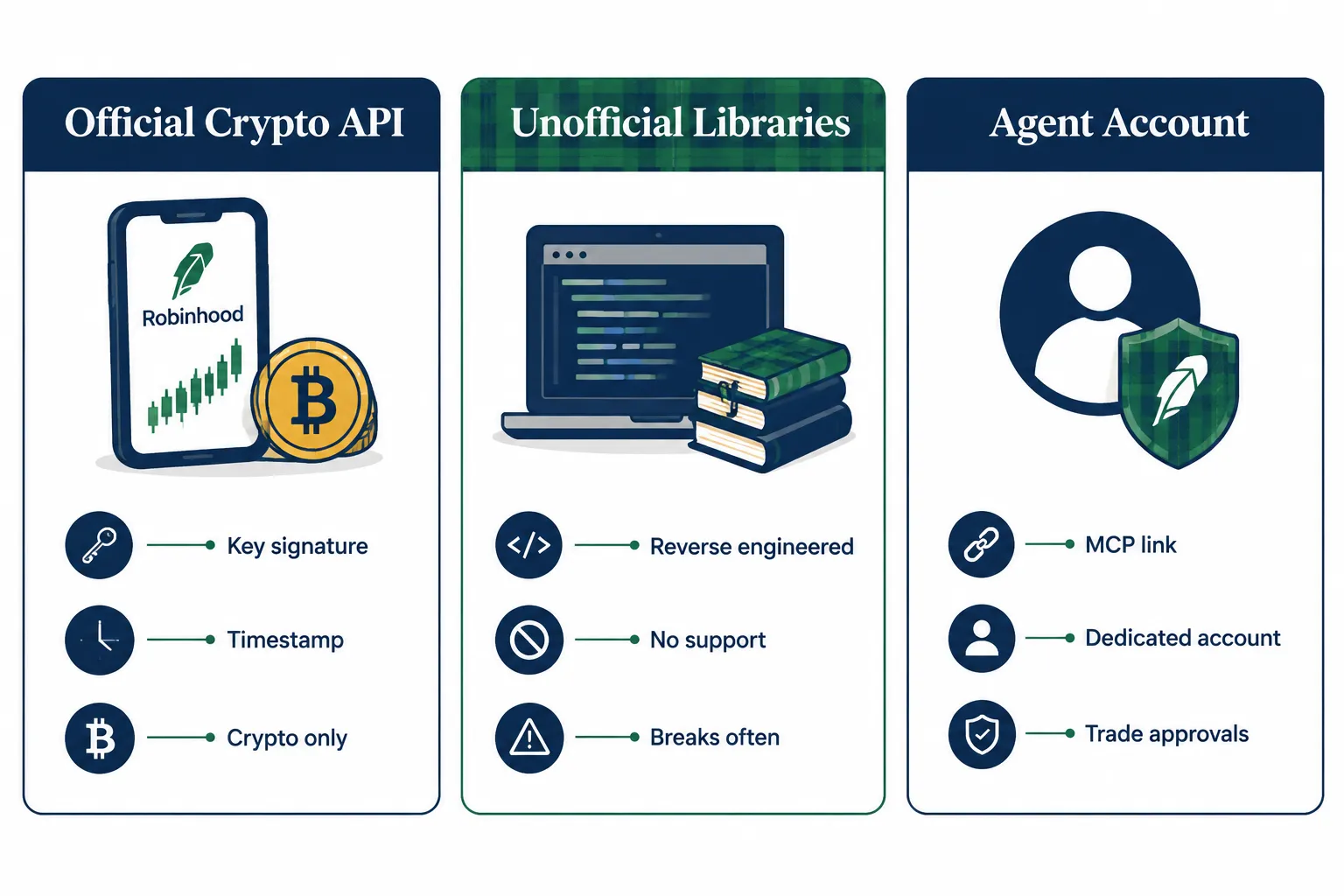
| Route | Official? | What it covers | Main risk |
|---|---|---|---|
| Crypto Trading API | Yes | Crypto market data, accounts, holdings, orders, products | Crypto only; US Robinhood Crypto customers |
| Robinhood Trading MCP | Yes | Stocks, options, crypto, watchlists, market data, through an AI agent | The agent trades fast and the losses are yours |
| Unofficial libraries | No | Whatever the private app endpoints allow | Break without warning; your login in third-party code |
Is there an official Robinhood API for stocks?
Not as a REST API with your own key, on the Robinhood pages we checked in 2026. Robinhood describes its stock automation product, Agentic Trading, as “a new type of brokerage product that allows you to connect a third-party AI agent to a dedicated Robinhood account to automate investment decisions and order placement.” You configure an agent; you do not get endpoint documentation for stocks.
That distinction matters if you are a developer. You cannot point a Python script at a documented Robinhood stock endpoint and expect support. You can point an MCP client at the Trading MCP and let it call Robinhood’s tools.
How Does the Official Robinhood API for Crypto Work?
The Robinhood Crypto Trading API lets you view crypto market data, read account information and place crypto orders programmatically. Robinhood says it is “available to Robinhood Crypto customers in the United States.”
Versions
| Version | Orders | Read actions |
|---|---|---|
| v1 | ”Place crypto orders without fee tiers” | Accounts, holdings, orders, products, quotes |
| v2 | ”Place crypto orders with fee tiers” | Same read actions as v1 |
Only orders placed through the v2 fee-tier endpoint count toward your eligible 30-day trading volume for fee tiers. Robinhood says there is currently “no deprecation timeline for v1.”
Getting a key
- Sign in to Robinhood’s web classic site and open your crypto account settings.
- Select Add key.
- Pick the specific API actions the key can perform.
- Use the key to authenticate requests, following the Crypto Trading API docs.
Step 3 is the best safety feature Robinhood offers developers. A market-data bot does not need order permissions, so do not grant them. A key that can only read cannot lose money.
The signing scheme and rate limits are on the developer docs site, which renders in a browser but returned no readable text to our server in 2026. Read them there before you write your client, and treat any blog post’s rate-limit number as unverified until you see it on that page.
Building a crypto bot on the official Robinhood API
The crypto API is the one place on Robinhood where your own code talks to documented endpoints, so treat it like any broker API and build the boring parts first:
- Separate keys by job. One key with read actions only (accounts, holdings, quotes, products) for dashboards and research. A second key with order actions for the execution service. If the research box is ever compromised, it cannot trade.
- Decide v1 or v2 up front. If fee tiers matter at your volume, place orders through the v2 fee-tier action; v1 orders do not count toward your 30-day volume.
- Plan for a market that never closes. Crypto trades around the clock, so a bot that only has a human watching during stock hours is unattended most of the week. Put hard size limits in code, not in your head.
- Log every request and response. When an order fails at 3 a.m., the log is the only witness.
Our best API for stock trading guide covers the same build pattern for stock brokers if you later add equities somewhere else.
What Are the Unofficial Robinhood API Libraries and Are They Safe?
Unofficial Robinhood API libraries are community-built wrappers, mostly in Python, that call the same private endpoints Robinhood’s own apps use. The best known, robin_stocks, describes itself on PyPI as “A Python wrapper around the Robinhood API” and was at version 3.4.0 when we checked in 2026. It is a community project, not a Robinhood product.
We found no Robinhood page that documents or sanctions these libraries. That shapes the risk in three ways.
They can break without warning
There is no published contract. When Robinhood changes a private endpoint, the library breaks until a volunteer maintainer catches up. A bot built on one can silently stop pulling fresh data, or fail to place the order you think went through. There is no changelog from Robinhood and no support ticket to file.
They put your login in someone else’s code
Most of these tools sign in with your Robinhood username, password and two-factor code. That is a different risk from a scoped API key you can revoke. If the script, the server it runs on or a dependency is compromised, your full login is exposed, not one narrow permission.
Terms of service risk is yours to check
Robinhood’s agentic disclosures say it “does not control, supervise, monitor, recommend, or audit agents,” and its official routes are the crypto API and the Trading MCP. Before you use an unofficial library on a funded account, read your Robinhood customer agreement yourself. If it is ambiguous, ask Robinhood support in writing.
Decision rule: if you have searched “robinhood api python” and found a ready-made connector, use it for read-only experiments on an account you can afford to lose access to, or not at all. Do not route real orders through it.
Can You Automate Robinhood Stock Trading in 2026?
Yes, through Robinhood’s Agentic Trading, using the Robinhood Trading MCP. You connect an AI platform such as Claude, ChatGPT, Codex, Cursor or Grok, sign in, and Robinhood opens a dedicated MCP account where the agent can trade. Robinhood’s newsroom says, “In May, we launched agentic trading, giving tech-savvy customers a way to connect their own third-party AI agents to Robinhood.”
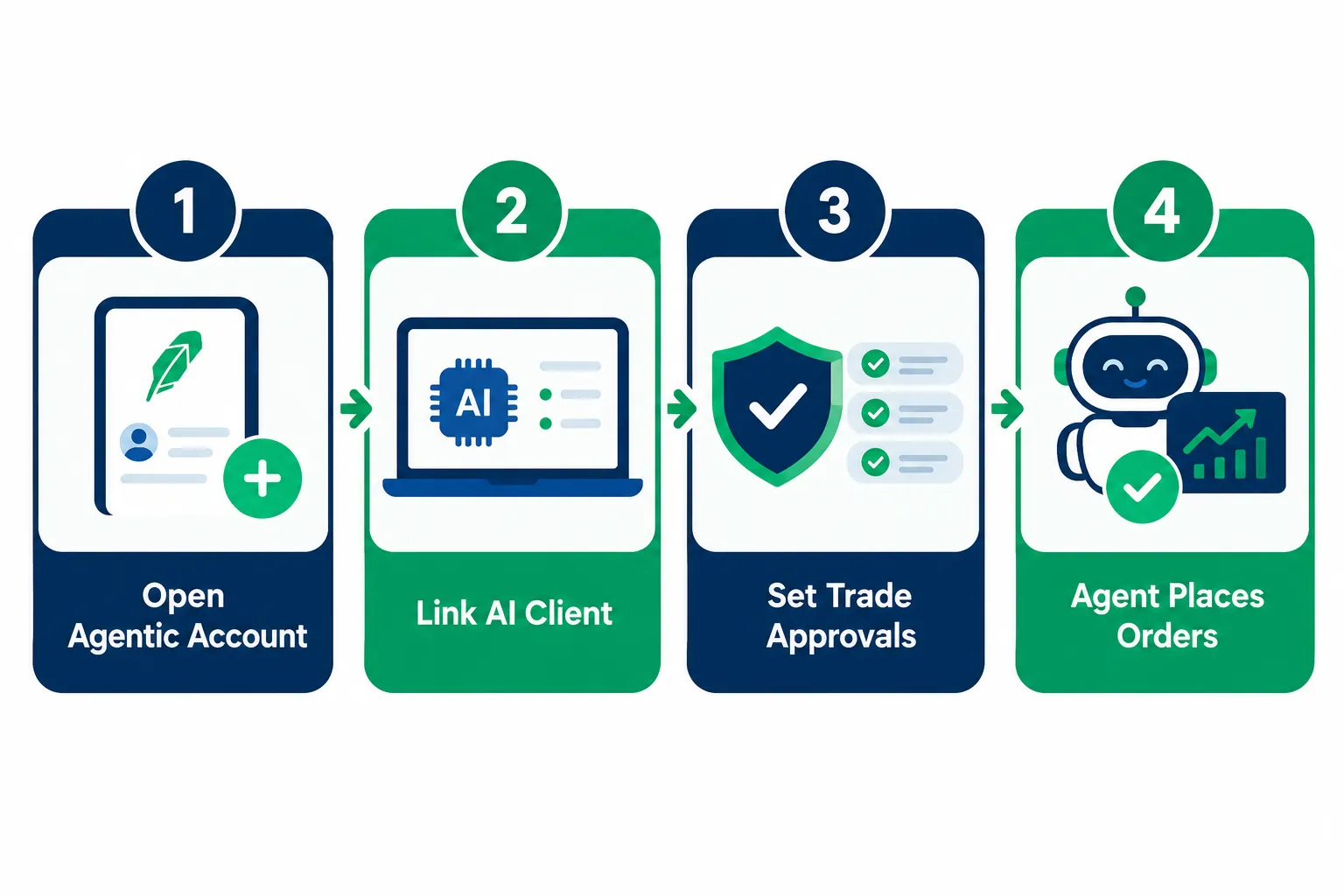
How the MCP account works
From Robinhood’s external agent onboarding page:
- An MCP account is a self-directed individual investing account. You can hold up to 10 self-directed individual investing accounts, including the MCP account.
- You need a primary individual investing account in good standing first.
- The onboarding auto-opens after you connect to the Trading MCP and authenticate.
- The agent gets read access to all your Robinhood accounts and account numbers, all positions and balances, and all transactions including order history.
- “Your agent can only place trades in your Robinhood Agentic account.”
Connecting Claude
Robinhood lists the commands itself. For Claude Code:
claude mcp add robinhood-trading --transport http https://agent.robinhood.com/mcp/tradingThen enter /mcp in Claude Code, select robinhood-trading and authenticate. In Claude Desktop, go to Settings, Connectors, Add custom connector, and paste the same link. We cover the full setup, permissions and shutdown plan in our Robinhood MCP guide.
One creator walkthrough if you want to watch the flow first:
Video by Jason Brown, “How to Connect Robinhood to ChatGPT for AI Trading (MCP Setup).” It is a creator walkthrough, not an official Robinhood tutorial, so check each step against Robinhood’s help pages.
What the agent can trade
Per Robinhood’s trading with your agent page, agents can place long equities, options and crypto orders, using market (share or dollar based), limit, stop limit and stop market orders. Agents “cannot place multi-leg options orders.” Crypto needs a matching Robinhood Crypto account and the updated agreement, the agent cannot transfer, stake or lend crypto, and agent crypto trading is not available in some states, including New York.
Trade approvals: the setting that matters most
With trade approvals on, the agent proposes trades and you place them manually in the app. With approvals off, the agent “can place eligible trades for you without your manual confirmation of each order.” Robinhood says approvals are on by default for its built-in Robinhood Agents and off by default for MCP accounts, and that approvals are “still rolling out for MCP accounts.” Check the setting under your MCP account’s Agent Settings, Safety Controls, before your first prompt.
How it differs from an API key
A traditional API key is a credential your own code uses to hit endpoints you control line by line. The Trading MCP is closer to hiring a contractor with a limited badge: the agent gets one trading account, broad read access, and a switch that decides whether it needs your sign-off. You are not writing order code; you are configuring permissions for an AI that writes the calls for you. If you want to build your own bot logic on Robinhood specifically, read our walkthrough of a Robinhood AI trading bot with Claude and our review of Robinhood agentic trading.
Built-in Robinhood Agents are a separate product
In September 2026 Robinhood announced Robinhood Agents, an AI experience inside its own app where you pick a model, open an agentic account and set limits, with trade approvals on by default. Robinhood says the Trading MCP “is still there for customers who want to connect their own third-party agents.” Token billing applies to the built-in agents (Robinhood gives $5 in tokens with the first agentic account), not to external agents.
What Can an Agent Do Through the Robinhood Trading MCP?
Robinhood publishes the full tool list on its trading help page, and it is broader than most Robinhood API wrappers ever were. External agents get tools in these groups:
| Group | Example tools | What they do |
|---|---|---|
| Account and portfolio | get_accounts, get_portfolio, get_realized_pnl, get_trade_approvals | Read every account, portfolio value, realized P&L and pending approvals |
| Watchlists | get_watchlists, create_watchlist, add_to_watchlist | Read and edit watchlists and follow Robinhood lists |
| Market data | get_equity_historicals, get_equity_price_book, get_equity_technical_indicators, get_earnings_calendar, get_sec_filing, get_equity_analyst_ratings | OHLCV bars, a real-time Level 2 book for up to 4 stocks, RSI and MACD, earnings windows up to 31 days, SEC filings, analyst targets |
| Equities | get_equity_quotes, review_equity_order, place_equity_order, cancel_equity_order | Real-time quotes for up to 20 symbols, order simulation, placement and cancel |
| Options | get_option_chains, review_option_order, place_option_order, exercise_option | Chains, quotes, simulation, single-leg orders, exercise |
| Crypto | get_crypto_quotes, preview_crypto_order, place_crypto_order | Quotes, previews and orders for tradable pairs |
| Scanner and alerts | create_scan, run_scan, create_alert, get_alert_log | Build scans, run them live, set price or indicator alerts |
| Advanced orders | review_advanced_order, place_advanced_order | Preview and submit advanced order types |
Three things stand out for anyone who used to rely on an unofficial Robinhood API library:
- Review tools exist.
review_equity_order,review_option_orderandreview_advanced_ordersimulate an order and return pre-trade warnings before anything is placed. Make your agent call them first, every time. - The data is real time where it counts. Robinhood describes equity quotes, the Level 2 book and index values as real time.
- One gap remains. Robinhood says its agents “cannot place multi-leg options orders,” so spreads still need the app.
Robinhood also says it will add more tools in future releases, so re-read the page before you rely on a specific tool name.
Robinhood API or Robinhood MCP: Which Should a Developer Use?
Use the official crypto Robinhood API if you write your own code and only trade crypto. Use the Robinhood Trading MCP if you want an AI agent to trade stocks or options on Robinhood and you are comfortable configuring permissions instead of writing order logic. Use neither, and pick another broker, if you want a classic stock bot you control line by line.
| You want to… | Best route | Why |
|---|---|---|
| Run a scripted crypto strategy | Crypto Trading API | Documented endpoints, scoped keys, fee tiers on v2 |
| Let Claude research and trade stocks with your sign-off | Trading MCP with approvals on | Official, isolated MCP account, review tools |
| Run your own Python stock strategy unattended | Another broker’s stock API | No documented stock REST API on Robinhood |
| Pull your Robinhood portfolio into a spreadsheet | Trading MCP read tools, or exports from the app | Avoids handing your login to a library |
The honest trade-off: the MCP route gives you more tools than any unofficial Robinhood API wrapper did, but you give up determinism. Your code does not decide the exact call; the model does. That is why the approvals switch and the review tools matter more here than on a traditional API.
If you already run an unofficial library
Migrate in this order:
- Stop routing orders through it today. Keep read-only calls only if you must.
- Change your Robinhood password and review your logged-in devices in the app.
- Rebuild the read side on the Trading MCP read tools, or move the strategy to a broker with an official stock API.
- Paper test the rebuilt strategy for a few weeks before any live order.
What Is the Safest Way to Test a Robinhood Trading Bot?
Prove the logic somewhere that cannot touch real money, then run it on Robinhood with approvals on and a small, capped balance. Robinhood does not offer paper trading, as we cover in does Robinhood have paper trading, so the rehearsal happens elsewhere.
A sequence that holds up:
- Paper trade the strategy on a broker with a real sandbox. Alpaca’s paper account starts with $100,000 in simulated cash, and Tradier includes a paper sandbox with every account.
- Log every simulated trade for a few weeks. You want to see the bot handle a red day, not only a lucky streak.
- Use Robinhood’s review tools first. The external agent tool list includes
review_equity_order, which simulates an equity order and returns pre-trade warnings, andreview_option_orderfor options. Ask the agent to review before it places. - Move to the MCP account with trade approvals on. The agent proposes; you place.
- Fund the MCP account with a fixed small amount. The agent can only trade the money in that account, so the deposit is your first control.
- Turn approvals off only after the pattern holds, and keep checking daily. Robinhood’s disclosures say AI strategies “may be difficult to monitor or stop in real time.”
What to log when an agent trades for you
A human trader keeps a journal. An agent needs a stricter one, because you were not there when it decided. For every session, keep:
- The exact prompt or standing instruction the agent acted on
- Every tool call it made, especially each review or preview call and the warnings it returned
- Each approval request and whether you approved or declined it (the
get_trade_approvalstool lists pending and past requests) - Fills from the app’s Activity section, not the agent’s summary of them
- What you would have done without the agent, so you can judge whether it adds anything
After a few weeks, read the log for one question: did the agent ever do something you did not mean? If yes, tighten the instruction or turn approvals back on.
A worked example of where agent orders go wrong
Say you tell the agent, “Buy $100 of ROAR every time it drops 2% in a day,” one of Robinhood’s own example prompts. Questions the agent has to answer for you: 2% from what, the prior close or the intraday high? Market or limit? What if it drops 2% three days running? On approvals-off, every ambiguous answer becomes a real order. Write the rule like code before you hand it to the agent.
Which Brokers Offer an Official Stock API Instead?
If you want a documented stock-trading API you call from your own code, with a paper environment to test against, look at Alpaca, Tradier or Interactive Brokers. Schwab has an official API too, but we found no API paper environment on the pages we checked.
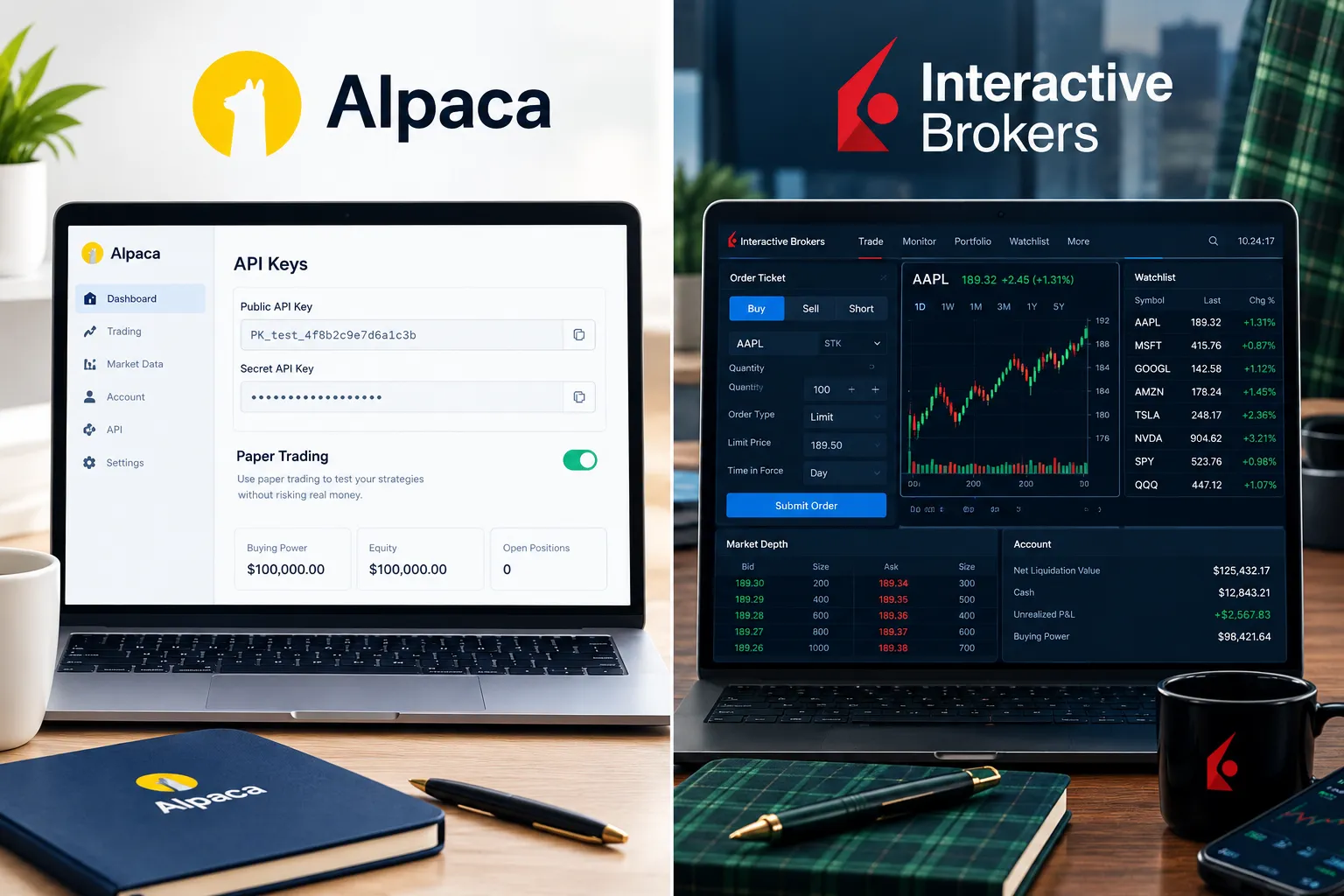
| Broker | Official stock API | Testing environment | Auth | What to check |
|---|---|---|---|---|
| Alpaca | Yes | Paper account, $100,000 default | Key and secret headers | Free plan is IEX-only data |
| Tradier | Yes | Paper sandbox with every account | API token for your own account; OAuth 2.0 for partner apps | Data and plan pricing |
| Interactive Brokers | Yes (TWS API) | Paper trading account | Through TWS or IB Gateway | Setup complexity |
| Schwab | Yes (Trader API) | No API paper environment on pages we checked | OAuth 2.0, 7-day refresh token | Weekly re-login |
| Robinhood | Crypto only, plus Trading MCP for agents | None | Scoped crypto keys; MCP sign-in | No stock REST API |
Choose Alpaca if you want the most bot-friendly docs and a paper account to test against; our Alpaca API beginner guide walks through keys and a first order. Our comparison of stock trading APIs covers Alpaca, Tradier and IBKR side by side. If you already like Robinhood’s app for manual trading, keep it for that and run your bot elsewhere. Our sister site’s Robinhood review covers the rest of the platform.
What Safety Checklist Should You Run Before Any Robinhood Bot?
Most Robinhood bot risks have a five-minute fix. Run this list before you connect anything.
- Unofficial library holding your login. Fix: do not use it for orders. If you must test one, use read-only calls and change your password after.
- MCP account with approvals off on day one. Fix: turn approvals on under Safety Controls until the agent has a clean record.
- No cap on funding. Fix: fund the MCP account with a fixed small amount and treat it as a separate bucket.
- No kill switch plan. Fix: know how to disconnect the Trading MCP from your AI platform and how to cancel open orders in the app before you turn the agent on.
- Crypto key with too many actions. Fix: create separate keys for reading and trading, and only enable the actions each needs.
- Trusting the agent’s numbers. Fix: cross-check quotes and positions in the app. The agent reads your data, but its summary can still be wrong.
- Overnight and weekend sessions. Fix: if your agent trades outside regular hours, read our guide to Robinhood 24 hour trading first; spreads and liquidity differ.
Frequently Asked Questions
Does Robinhood have an API?
Robinhood has an official Crypto Trading API for US Robinhood Crypto customers and an official Robinhood Trading MCP that lets AI agents trade stocks, options and crypto in a dedicated account. It does not offer a public stock-trading REST API you call with your own key, on the Robinhood pages we checked in 2026.
Is the Robinhood API free?
Robinhood’s help pages list no separate fee for the Crypto Trading API or for connecting an external agent through the Trading MCP. Normal trading costs still apply, and built-in Robinhood Agents use paid tokens after a $5 starter balance. External AI platforms may charge for their own plans.
Can you automate stock trading on Robinhood?
Yes, through Agentic Trading with the Robinhood Trading MCP. You connect an AI platform such as Claude or ChatGPT, sign in, and the agent trades only in a dedicated MCP account. Trade approvals are off by default for MCP accounts, so turn them on before your first prompt.
Is robin_stocks an official Robinhood API?
No. robin_stocks is a community Python library that describes itself as a wrapper around the Robinhood API, and Robinhood does not publish or support it. It signs in with your login and can break when Robinhood changes private endpoints, so do not route real orders through it.
How do I get a Robinhood crypto API key?
Sign in to Robinhood’s web classic site, open your crypto account settings and select Add key. Choose only the API actions the key needs, then authenticate requests using the developer docs. Separate read-only and trading keys if you run more than one service.
Does Robinhood have paper trading for bots?
No. Robinhood does not offer paper trading, so test a strategy on a broker with a sandbox, such as Alpaca’s paper account or Tradier’s paper sandbox. On Robinhood, use the agent’s review tools and a small, capped MCP account with trade approvals on.
Which brokers have an official stock trading API?
Alpaca, Tradier, Interactive Brokers and Schwab all publish official stock trading APIs. Alpaca and Tradier include paper environments, and Interactive Brokers offers a paper account. Robinhood’s official API covers crypto only, with stock automation through its Trading MCP.
Our Take
Use the official routes. The crypto Robinhood API is real, documented and lets you scope every key, so use it if crypto automation is the goal. For stocks, the Robinhood Trading MCP is the only sanctioned path: approvals on, a small funding cap, and a daily look at the order history. Skip unofficial libraries for anything that touches real orders. A broken wrapper does not just cost you a bad fill; it can cost you the account.
If what you really want is a stock bot you write yourself, Robinhood is the wrong home for it in 2026. Build and paper test on a broker with a documented stock API, and keep Robinhood for what it does well. For more broker and bot breakdowns, start at AI Stock Trading Bots.
If you move your stock bot to a broker with an official API, start with the Alpaca tool profile on our directory.
Built a Robinhood bot and want a second set of eyes on it? Send it to us.
Stay alpha.
The FullStack Alpha research desk tests AI trading bots on paper and live accounts. Reviewed and edited by Jay Rocco, Founder and Editor.
