

The FullStack Alpha research desk tests AI trading bots on paper and live accounts. Reviewed and edited by Jay Rocco, Founder and Editor.
By FullStack Alpha Editorial Team | Reviewed by Jay Rocco, Chief Editor
A futures trading bot is software that reads live market data for a contract like the E-mini Nasdaq-100 (NQ) or E-mini S&P 500 (ES), decides when a setup exists, and submits orders without you clicking anything. It differs from a stock bot in four ways that matter: it trades on margin with real leverage, it runs across a nearly 23-hour CME session, it has to handle quarterly contract roll, and if you run it on a prop firm account it has to obey that firm’s automation rules. The first limit you should write, before a single entry rule, is a hard daily loss cap that flattens every position and shuts the bot off. Everything else is secondary.
What You Should Know
- CME Group launched E-nano equity-index futures on August 24, 2026 (NES and NNQ), at one-tenth the size of Micro E-minis, with a $0.50 multiplier on the S&P 500 contract and $0.20 on the Nasdaq-100 contract.
- CME reported E-nano average daily volume of roughly 37,000 contracts in September 2026, rising to about 66,000 through mid-October.
- Micro E-mini Nasdaq-100 futures hit 2.4 million contracts of ADV in September 2026, up 73% year over year, per CME’s October 2 release.
- CME equity-index futures and options run roughly 23 hours a day, Sunday through Friday, with a daily maintenance interval your bot’s session logic has to account for.
- The CFTC’s December 5, 2024 AI advisory confirmed existing obligations still apply when regulated entities use AI. There is no retail “bot exemption.”
What Is a Futures Trading Bot?
A futures trading bot is an automated program that trades futures contracts according to rules you define in advance, with no manual click required between signal and order. On NQ and ES, that means the bot watches price action on the E-mini Nasdaq-100 and E-mini S&P 500 contracts, decides whether its entry conditions are met, sizes the position, and fires a bracket order with a stop loss and target attached.
The contracts themselves are standardized agreements to buy or sell the value of an index at a future date. You never take delivery of anything. You’re trading the price move, and CME Group sets the specs: tick size, tick value, margin, and expiry. ES and NQ roll to a new quarterly contract four times a year, which means your bot is trading a ticker that changes identity on a schedule. Miss the roll and your automated futures trading system is quoting a dying contract with thinning liquidity.
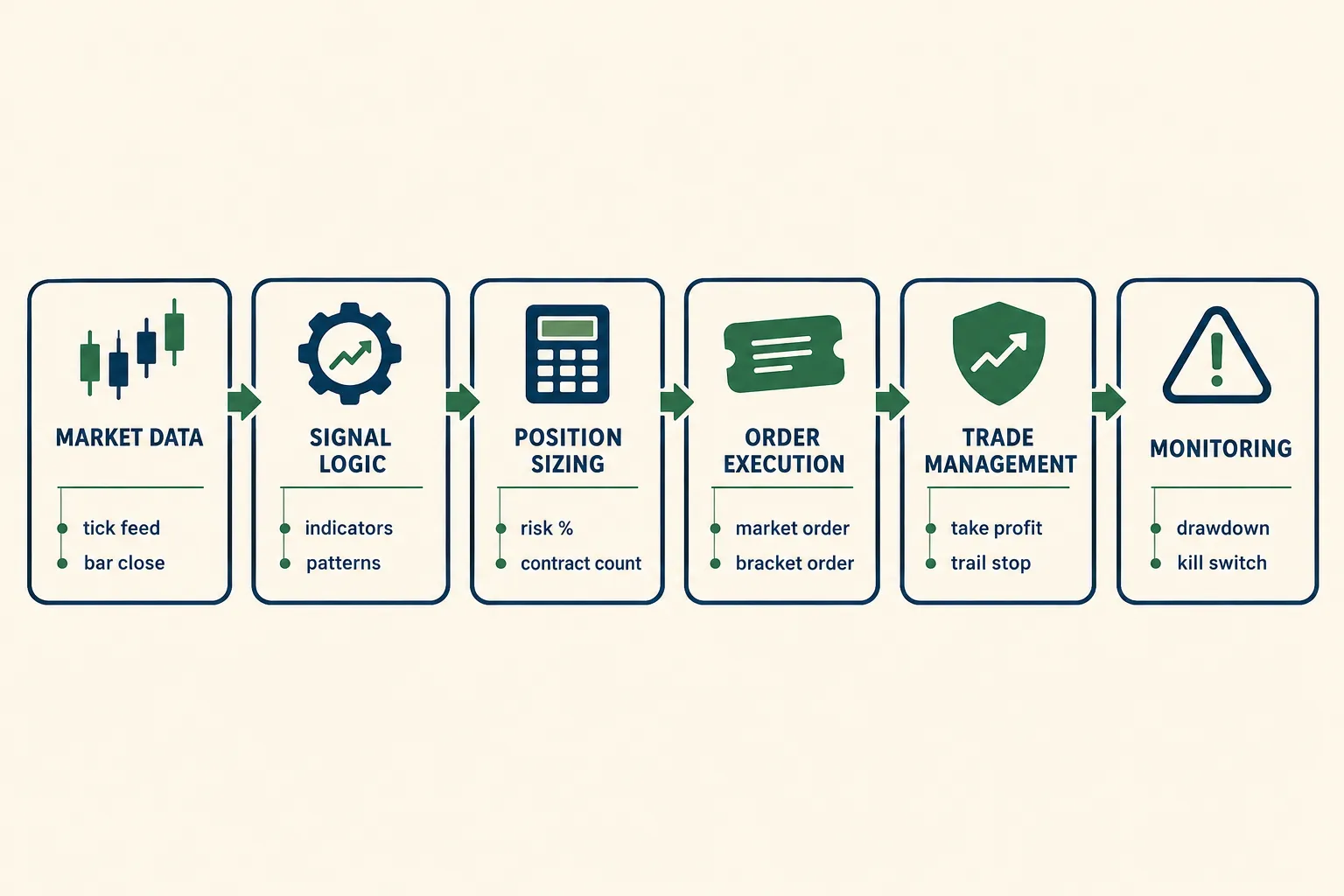
The six layers under the hood
Strip away the marketing and every ES or NQ bot has the same anatomy:
- Market-data ingestion. Tick, bar, or depth-of-market updates arriving from the broker or data feed.
- Signal generation. Indicators, price action rules, or a model output deciding whether a setup exists.
- Position sizing. How many contracts, based on account size and stop distance.
- Order execution. Submitting the entry, usually as a bracket with stop and target.
- Trade management. Moving stops, scaling out, flattening at a session cutoff.
- Monitoring. Daily loss limits, error handling, alerts when the connection drops.
Most retail builds obsess over layer 2 and ignore layers 3, 5 and 6. That’s backwards, and it’s the reason so many of them die in a single afternoon.
A bot is a rulebook that executes faster than you can hesitate. It is not a rulebook that is correct.
If you’re still deciding whether automation fits your style at all, the broader trading automation category on AI Stock Trading Bots covers the ground before you commit code.
How Is a Futures Trading Bot Different From a Stock Bot?
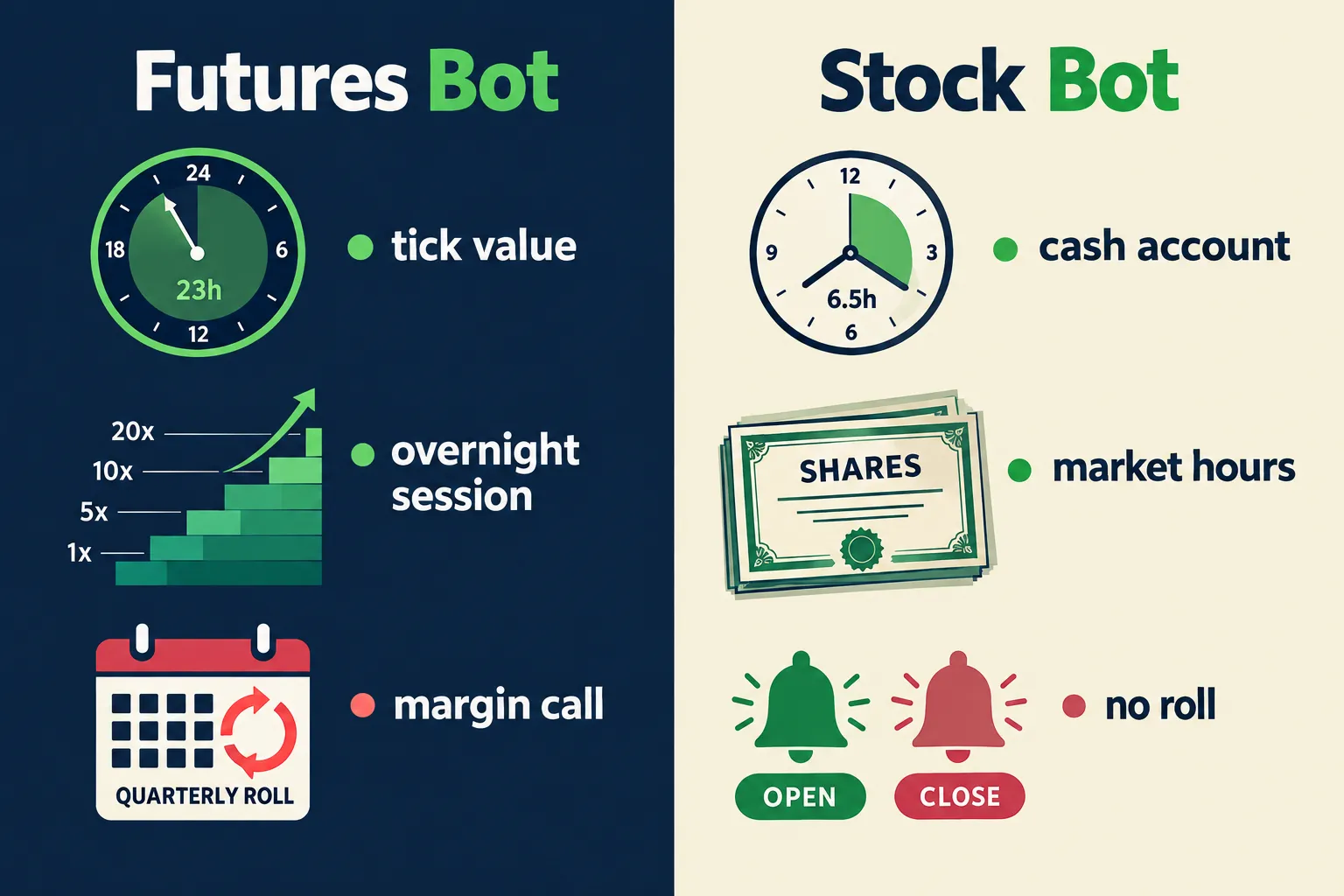
A futures trading bot carries leverage, runs almost around the clock, and trades an expiring instrument. A stock bot does none of those things. Those three differences change position sizing, session logic, and maintenance work far more than the signal logic ever will.
| Factor | Futures bot (NQ / ES) | Stock bot |
|---|---|---|
| Leverage and margin | Trades on performance bond margin set by CME and adjusted by your broker. A small move against a multi-contract position can exceed the margin posted. | Typically cash or Reg T margin, with far less notional exposure per dollar. |
| Session hours | Roughly 23 hours a day, Sunday evening through Friday, with a daily maintenance interval. Bots need explicit session filters. | Usually 9:30am to 4:00pm ET, plus optional extended hours. Simple on/off. |
| Contract roll | Quarterly expiry. Your bot must switch to the front month or it trades a dead contract. | No expiry. A ticker is a ticker. |
| Tick value | Fixed per contract and set by CME. ES, MES, NQ, MNQ and the new E-nanos each have a different multiplier. Confirm current specs on the CME contract page. | Price per share, variable, no multiplier. |
| Prop firm rules | Automation is permitted by some firms, restricted or banned by others, and the clause can change. Read the current rulebook. | Rarely relevant. You’re trading your own brokerage account. |
Leverage is the whole story
Here’s the thing most people underweight. A stock bot that’s wrong loses a percentage of a position. A futures trading bot that’s wrong, sized at four contracts on NQ during a news spike, can lose multiples of what it risked on paper, because the stop never got the fill it assumed.
The 2026 product shelf actually helps here. CME’s E-nano contracts, launched August 24, 2026, come in at one-tenth the size of the Micro E-minis, with a $0.50 multiplier on the S&P 500 version and $0.20 on the Nasdaq-100 version. That gives you a genuinely small unit to test a live automated futures trading strategy without putting a scary number at risk. Volume is building, too: CME reported roughly 37,000 contracts ADV in September 2026 and around 66,000 through mid-October, with Nasdaq-100 E-nanos leading.
Decision rule: if you’re testing a new bot with real money, trade the smallest contract that exists in the product family, not the one with the exciting P&L swings. Test the system, not your nerve.
Roll is a maintenance job, not a detail
Four times a year, every ES and NQ bot needs to point at a new contract month. Some platforms handle continuous contracts for charting but not for execution. If your signals come from a continuous back-adjusted chart and your orders go to the front month, your backtest and your live results will drift apart for reasons that have nothing to do with the strategy.
Write a roll checklist. Put it on a calendar. The quarter it gets skipped is the quarter it costs you.
How Do Creators Build Futures Bots With Claude and TradingView?
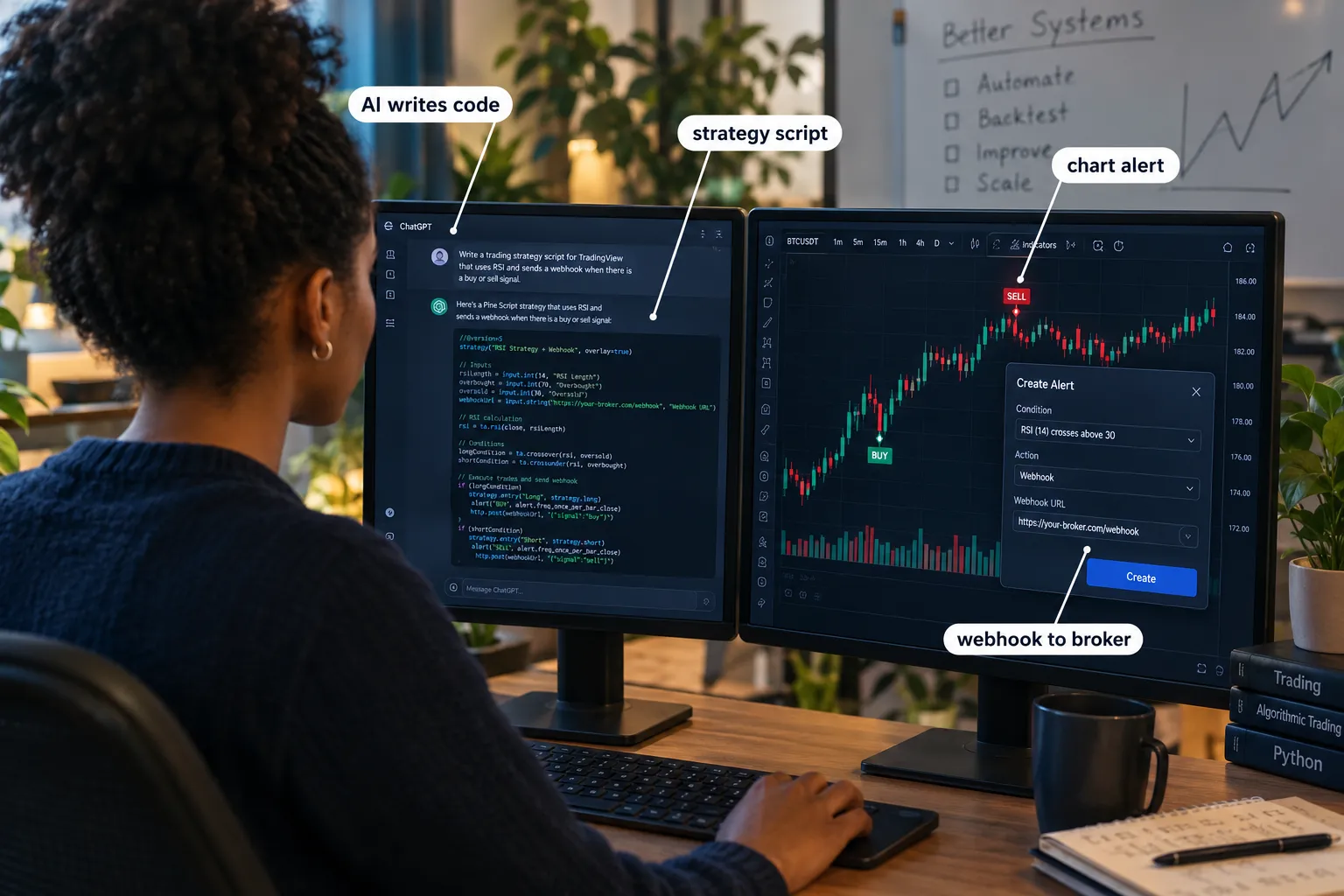
Most YouTube builds follow one pattern: describe a strategy to an AI model like Claude, have it write the strategy code, paste that into TradingView or a platform script editor, then route the alert to a broker. The build is usually shown honestly. What gets skipped is almost always the same four things.
Treat everything below as a claim shown on a video, not a verified result.
| Claim as presented | What’s typically shown | What usually gets skipped |
|---|---|---|
| ”An AI wrote a working strategy in minutes” | A chat session producing Pine Script or C# that compiles and plots on a chart | Whether the code places orders the way the narrator described, under live conditions |
| ”The backtest is strongly profitable” | A strategy tester equity curve on one symbol, one timeframe | Commission, exchange fees, slippage assumptions, and sample size |
| ”It’s fully automated end to end” | An alert firing and a webhook reaching a broker endpoint | What happens when the webhook fails, duplicates, or arrives during maintenance |
| ”Anyone can do this” | Screen recording of the full build | Capital required, prop firm automation rules, and the drawdown the curve implies |
What’s genuinely true about the AI build route
An ai futures trading bot built this way can be real. Large language models are good at translating a clearly specified rule into syntactically correct Pine Script or NinjaScript. If you can say “enter long when price closes above the 20-period EMA after three bars of tight consolidation, stop below the consolidation low, target two times risk,” a model will produce code that does roughly that.
What a model cannot do is tell you whether that edge survives fees, slippage and a choppy tape. It will write confident code for a losing idea just as fast as for a winning one.
The honest failure mode
Pine Script’s strategy tester is a sandbox. It fills at prices that a live NQ order during a news release will not get. The gap between a backtest curve and a live account is mostly made of execution assumptions, and almost no creator video audits them line by line.
If you want the mechanics of the alert-to-broker route explained properly rather than demoed quickly, read the breakdown of TradingView automated trading before you wire anything live.
A compiling script is not a tested strategy. Code quality and edge quality are separate problems.
Which Platforms Run Automated Futures Trading?
Four realistic routes exist for retail futures algorithmic trading: native platform scripting, broker API, TradingView webhooks, or your own Python stack. Pick based on how much code you’re willing to maintain, not on which demo looked slickest.
| Platform / route | How automation runs | Skill needed | Cost |
|---|---|---|---|
| NinjaTrader | NinjaScript, a C# framework built into the desktop platform. Strategies can access historical and live data, account info, and order submission, and run live or in sim from a chart or the Strategies window. Requires an active brokerage or data connection. | Moderate C# | Check NinjaTrader’s current pricing page; licence tiers and data fees change |
| Tradovate | REST and WebSocket API for order routing and market data | Moderate coding | Check the official page for current API access terms |
| TradingView webhooks | Pine Script alert fires a webhook to a bridge or broker endpoint | Low to moderate | Webhook alerts require a paid plan; check TradingView’s current tiers |
| Python / custom | Your own code against a broker or data API, running on your machine or a VPS | High | Mostly your time, plus hosting and data |
Choosing between them
- Choose NinjaScript if you want backtesting, execution and charting in one environment and you’re comfortable with C#. The strategy runs inside the platform, which means fewer moving parts and no webhook to break.
- Choose a broker API like Tradovate’s if you want the bot to live outside the chart and survive a platform restart.
- Choose TradingView webhooks if your edge is already expressed in Pine and you just want hands-off execution. Accept that you’ve added a network hop between signal and fill.
- Choose Python if you need something the platforms can’t express, like multi-contract portfolio logic or a model that retrains.
The practical guides for the first two routes: the NinjaTrader API walkthrough and the Tradovate API guide. For a plainer tool-level view of the platform itself, see the NinjaTrader tool profile.
Common mistake: running a webhook bot on a laptop that sleeps. The alert fires, the bridge is offline, you’re now long NQ with no managing logic. Host it somewhere that stays awake.
Broker choice matters almost as much as platform choice here, because routing and data costs land differently. The futures broker comparison is worth reading before you pick the stack. Our broker platform reviews score the execution side of the same names.
What Risk Limits Do Creator Builds Leave Out?
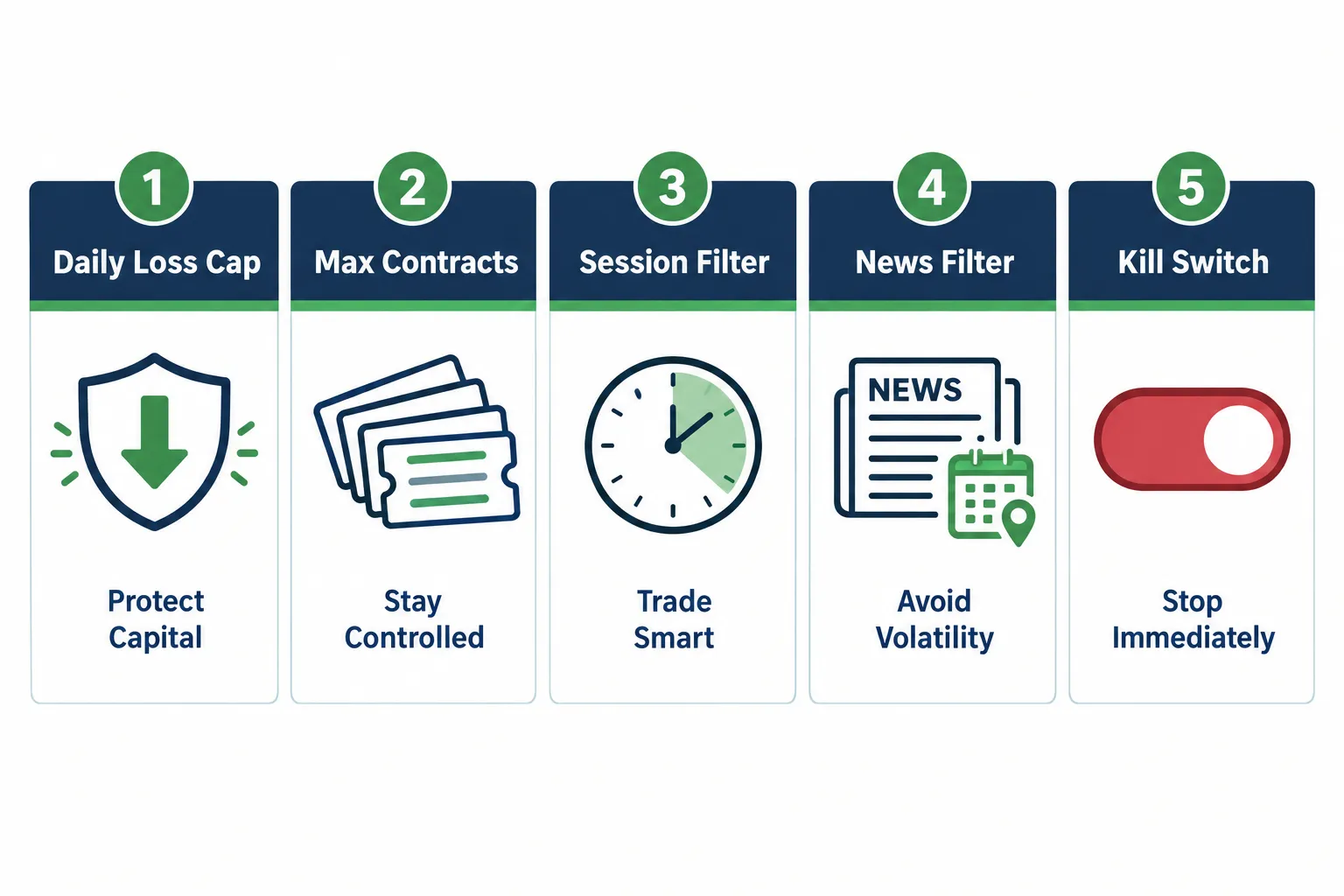
Five limits turn a script into a system: a daily loss cap, a max contract ceiling, a session filter, a news filter, and a kill switch. Most build videos include zero of them, because none of them make an equity curve look better in a backtest.
The numbers below are labeled examples to show the shape of each rule, not recommendations. Set yours against your own account and drawdown tolerance.
1. Daily loss cap
The bot stops trading for the day once cumulative loss hits a fixed number, and it flattens any open position first.
Example: account $10,000, daily cap $200 (2%). At $200 down, the bot flattens, cancels working orders, and refuses new entries until the next session.
Why it matters more on futures: leverage means three bad trades can be a week’s worth of damage. The cap is what converts a bad day into a bad day instead of a reset-the-account day.
2. Max contracts
A hard ceiling on position size, enforced in code, independent of what the sizing formula returns.
Example: sizing logic may suggest up to 5 MNQ contracts, hard cap set to 2. If a volatility input glitches and the formula spits out 40, the cap catches it.
This is the single cheapest bug insurance you can write. One bad division in a sizing function has ended more accounts than any bad entry signal.
3. Session filter
Explicit allowed trading windows, because CME runs roughly 23 hours and most of those hours are thin.
Example: allow entries 9:35am to 11:30am ET and 2:00pm to 3:50pm ET. Block the overnight session entirely. Flatten everything by 3:55pm ET.
Edge case to plan for: the daily maintenance interval. Your bot needs to know what to do with an open position and a dropped connection when the exchange goes dark for the break.
4. News filter
A block window around scheduled releases, since spreads widen and fills degrade exactly when the bot thinks the move is best.
Example: no new entries from 2 minutes before to 5 minutes after CPI, FOMC statements, and nonfarm payrolls. Existing positions get a tightened or widened stop depending on your design, decided in advance.
5. Kill switch
A manual and an automatic way to stop everything, immediately.
Example: automatic trigger on three consecutive rejected orders, a data feed gap over 10 seconds, or the daily cap being hit. Manual trigger as a one-click flatten-and-disable button you’ve actually tested while the market was open.
You cannot test a kill switch for the first time during the emergency. Practice it on a sim account on a quiet Tuesday.
The risk-limit layer is the product. The entry signal is the cheap part.
Before you set any of these numbers, understand what drawdown actually does to an account mathematically. The max drawdown explainer covers the recovery math that makes a 2% daily cap look generous rather than restrictive.
Can You Run a Futures Trading Bot on a Prop Firm Account?
Sometimes. Automation permissions vary by prop firm, and the clause can be narrower than it first reads. Some firms allow automation, some allow semi-automation only, some require you to be present at the machine, and some prohibit copy trading or shared strategies across accounts.
Here’s the part people get wrong: a firm saying “EAs allowed” is not the same as “any bot, any hours, any size.” Common restrictions that appear in evaluation rulebooks include limits on overnight holds, bans on high-frequency or latency-arbitrage style systems, bans on identical automated activity across multiple funded accounts, and consistency rules that quietly penalise a bot whose profits cluster into one or two days.
No firm rule should be taken from a blog post, including this one. Rules change between funding programs and sometimes between account types inside the same firm. Read the current terms page and the FAQ, dated, before you pay for an evaluation.
Questions to answer before you buy an evaluation
- Is full automation permitted, or only semi-automated execution with a human present?
- Can the same strategy run on more than one account under your name?
- Are overnight and weekend positions allowed?
- Does a consistency rule exist, and how is it calculated?
- What happens to the account if your bot breaches the trailing drawdown by a tick?
If the answer to any of those is ambiguous, email support and keep the reply. A screenshot of a support answer has settled more disputes than an argument about interpretation ever will.
For a current look at which programs are workable for systematic traders, see the roundup of prop firms that allow algo trading.
Edge case worth naming: trailing drawdown on funded accounts often tracks your highest unrealized balance, not your closed equity. A bot that runs a position +$800 in the green and then gives it back can breach a limit without ever closing a losing trade. Model that before you go live.
How Do You Test a Futures Trading Bot Before Going Live?
Three stages, in order: a backtest with realistic costs, a forward run on a simulation account with live data, then the smallest possible live size. Skipping stage two is where most retail bots die.
Stage 1: backtest with costs included
A backtest without commissions, exchange and clearing fees, and a slippage assumption is a cartoon. For NQ especially, which moves in bigger ticks and faster bursts than ES, assume you don’t get the price your logic asked for.
What to insist on:
- Commission and fees per round turn, entered in the tester.
- A slippage assumption of at least one tick per side on entry and stop, more if you trade the open.
- Enough trades that the result isn’t noise. Thirty trades tells you nothing.
- Out-of-sample data the strategy was never tuned on.
Common mistake: optimising twelve parameters on three years of data and calling the result an edge. That’s curve fitting with extra steps. If the strategy only works with the 14-period setting and falls apart at 13 and 15, it was never an edge.
Stage 2: sim account with live data
Run the bot on a simulation account connected to live market data, during real sessions, for weeks. NinjaTrader supports running a NinjaScript strategy on either a live or simulation account from a chart or the Strategies window, with an active data connection required either way.
This stage catches what a backtest never will: webhook failures, duplicate orders, reconnection behaviour, what happens at the maintenance break, how the bot behaves during a gap.
Stage 3: smallest live size
Go live on micros or E-nanos. The point of live stage one is operational, not financial. You’re testing whether orders fill, whether the kill switch works, and whether you can actually leave it alone.
Keep a log
One row per trade: timestamp, signal that fired, intended entry, actual fill, slippage, exit reason, and anything unusual. After 100 rows you’ll know whether your problem is the strategy or the plumbing. Most of the time it’s the plumbing.
The tooling side is covered in the guide to futures backtesting software.
Can You Really Make Money With a Futures Trading Bot, and Why Do Most People Lose?
Some people do. Most don’t, and the reasons are boringly consistent: no edge to begin with, costs that eat a thin edge, oversized positions, and a human who intervenes at the worst moment.
Automation removes hesitation. It does not create an edge. If your rules lose money when you follow them manually, they’ll lose money faster when a machine follows them perfectly.
The five ways retail bots actually fail
- The strategy was curve fit. It looked great on the data it was built on and nowhere else.
- Costs weren’t modeled. A strategy averaging 1.5 ticks of profit per trade on NQ is a losing strategy after fees and slippage.
- Position size was wrong. The math assumed a stop that got jumped during a gap.
- The operator interfered. Turned it off after three losses, turned it back on after it would have won. Revenge trading with extra steps.
- It ran unsupervised with no limits. A disconnect, a duplicate order, a stuck position, and no one watching.
The bot didn’t lose the money. The missing risk layer did.
Futures trading bot vs manual trading: which is better?
Neither is universally better. They fail differently.
- Automation wins when the edge is mechanical, frequent, and time-sensitive. A bot doesn’t flinch, doesn’t get bored at 11am, and doesn’t skip the trade that turns out to be the best one of the month.
- Manual wins when the setup requires judgement a rule can’t express, or when conditions are outside anything you’ve tested.
- The honest hybrid: let the bot do the scanning and the sizing, keep a human approval step on the entry, and let the bot manage the exit. You remove the two places discipline most often fails, which are hesitation on entry and hope on exit.
Is futures algorithmic trading better than doing it yourself? It’s better at consistency and worse at adaptation. Pick based on which of those is currently your bottleneck.
How Much Capital and Cost Does It Take to Start?
Costs split into three buckets: trading capital, platform and data, and execution fees. Confirm every current number on the official page, because broker margin and platform pricing both change.
Trading capital
Your broker sets day-trading margin per contract, often well below the exchange’s overnight requirement. That number, times your max contracts, is the floor. Then add enough cushion that a normal drawdown doesn’t trigger a margin call.
A workable framework, using labeled example numbers:
- Decide your per-trade risk. Example: 0.5% of account.
- Decide the stop distance your strategy actually uses. Example: 20 points on MNQ.
- Work backwards to the smallest account that can trade one contract at that risk.
For many retail systems on micros, that lands in the low thousands. The E-nano contracts, at one-tenth of micro size, push that floor lower still, which is the real reason they matter for testing an automated futures trading bot.
Platform, data, and fees
- Platform: free tiers exist; lifetime and lease licences also exist. Check the current pricing page for your chosen platform.
- Market data: CME equity-index data carries an exchange fee, separate from the platform.
- Execution: commission plus exchange and clearing fees per side. For a high-frequency bot, this line item is often the difference between a profitable and unprofitable system.
- Hosting: a VPS if your bot needs to run when your computer doesn’t.
Decision rule: if your strategy’s average winner is under three ticks on a micro contract, model fees first. Many of those systems are negative before they place a single losing trade.
Are there free futures trading bots that actually work?
Free code exists. Free edges mostly don’t. Open-source frameworks, free strategy templates, and community scripts are genuinely useful as plumbing. The entry logic attached to them is usually generic, widely used, and already arbitraged out.
Use free tools for the infrastructure. Build or buy the edge separately, and test it like you don’t believe it. The free AI trading bots roundup and the broader fully automated AI trading bots directory are both reasonable places to see what’s on offer before paying for anything.
What Happens During Gaps, High Volatility, and Circuit Breakers?
Badly, unless you planned for it. A stop order is an instruction to become a market order at a price, not a guarantee of that price. When ES or NQ gaps over your stop level, you get filled at the next available price, which can be far worse than your risk math assumed.
Gaps
Weekend and overnight gaps are the classic case. A bot holding a position into Sunday’s open with a 20-point stop can get filled 60 points away. Nothing malfunctioned. The fill simply didn’t exist at your price.
Fixes: flatten before the session you don’t want exposure to, cap position size assuming a multiple of your stop distance, or stay out of overnight exposure entirely with a session filter.
High volatility
Spreads widen, depth thins, and the bar that looks like a clean breakout on a chart was a two-second spike no one could fill. CME’s Q3 2026 volumes were strong (equity-index futures and options ADV hit 7.7 million contracts, up 23% year over year, with Micro E-mini Nasdaq-100 Q3 ADV up 101% to 2.6 million), and record open interest of 128.2 million contracts generally helps execution. Deep books still evaporate during a shock.
Circuit breakers and limits
Equity-index futures have price limits and the broader market has trading halts. During a halt or limit condition, your bot may be unable to exit at all. Your code needs a defined state for “I have a position and I cannot trade.”
Design rule: every bot should be able to answer three questions in code. What do I do if I can’t get a fill? What do I do if the data feed stops? What do I do if I’m already in a position and my rules say something impossible?
Most retail builds answer none of them, which is why the first genuinely weird session is also the last one.
What Is the Best Futures Trading Bot?
There isn’t one, and anyone naming a single winner without published, audited, live results is selling something. The best futures trading bot is the one matched to your platform, your capital, and your tolerance for maintenance.
By use case:
- If you want everything in one desktop environment: a NinjaScript strategy on NinjaTrader. Backtest, sim, and live execution all run in the same place, which removes the webhook as a failure point.
- If your edge already lives in Pine Script: TradingView alerts to a broker bridge. Fastest path from idea to automation, with a network hop as the tradeoff.
- If you want code control and portfolio-level logic: Python against a broker API like Tradovate’s.
- If you’re testing an automated futures trading bot with real money for the first time: whatever route you pick, run it on E-nanos or micros, not full-size contracts.
What disqualifies a vendor bot instantly: no published method, no live track record, a backtest curve as the entire sales page, or any language about guaranteed results. Play stupid games.
For a sense of which vendors survive scrutiny, the breakdown of legit AI trading bots versus scams is the right starting filter.
Best futures trading bots for beginners
Honest answer: for a beginner, the best bot is a simple one you wrote yourself, running on sim, on micros, with five risk limits and a trade log. Not because DIY is magic, but because you cannot supervise a system you don’t understand. A black box you can’t debug is a black box you’ll panic-disable at exactly the wrong moment.
Frequently Asked Questions
Does a futures trading bot work?
It works mechanically, every time. It works profitably only if the underlying strategy has a real edge after costs. Automation guarantees consistent execution of your rules, which is valuable when the rules are good and expensive when they aren’t. Test on sim with live data for weeks before risking capital.
Is it legal to build a trading bot?
Yes, building and running your own automated system on your own account is legal in the US. Existing CFTC and NFA obligations still apply, and the CFTC’s December 5, 2024 AI advisory confirmed that regulated entities using AI remain bound by their existing requirements. Selling signals or managing others’ money brings separate registration questions. Check with a compliance professional before you take anyone’s capital.
Are AI trading bots profitable?
Some are, most aren’t, and vendor claims are usually unaudited. An ai futures trading bot can write and execute code faster than you can, but it cannot verify that an edge survives slippage, fees and a choppy tape. Treat any win rate you didn’t personally verify as marketing.
Can you use bots on prop firm accounts?
It depends on the firm, and the clause varies between programs and account types. Some permit full automation, some require a human present, and many ban identical strategies running across multiple funded accounts. Read the current terms page before paying for an evaluation, and keep a dated support reply confirming your use case.
How much money do you need to trade futures with a bot?
Your floor is the broker’s day-trading margin per contract, times your maximum contract count, plus a drawdown cushion. With Micro E-minis and the E-nano contracts launched by CME on August 24, 2026, that floor is lower than it’s ever been. Confirm your broker’s current margin on its official page, since the number changes with volatility.
How do you backtest a futures trading bot properly?
Include commissions, exchange fees, and at least one tick of slippage per side. Use enough trades that the sample isn’t noise, hold back out-of-sample data the strategy was never tuned on, and resist optimising more than two or three parameters. Then forward-test on sim with live data before anything else.
Our Take
Leverage is what makes futures automation interesting and what makes it dangerous, which means the risk-limit layer is the actual product. The entry signal is the part everyone builds and the part that matters least. A mediocre edge with a hard daily loss cap, a contract ceiling, a session filter, and a tested kill switch will outlast a brilliant edge running naked, every time.
So build the limits first. Write the five rules before you write the entry logic, run them on sim through a full month including an FOMC day, and only then let the thing touch a funded account. Discipline beats prediction, and code is just discipline you can’t argue with at 10:04am.
Built something and want it torn apart by people who’ve seen a few of these blow up? Submit your bot for review.
Stay alpha.
The FullStack Alpha research desk tests AI trading bots on paper and live accounts. Reviewed and edited by Jay Rocco, Founder and Editor.
