

The FullStack Alpha research desk tests AI trading bots on paper and live accounts. Reviewed and edited by Jay Rocco, Founder and Editor.
By FullStack Alpha Editorial Team | Reviewed by Jay Rocco, Chief Editor
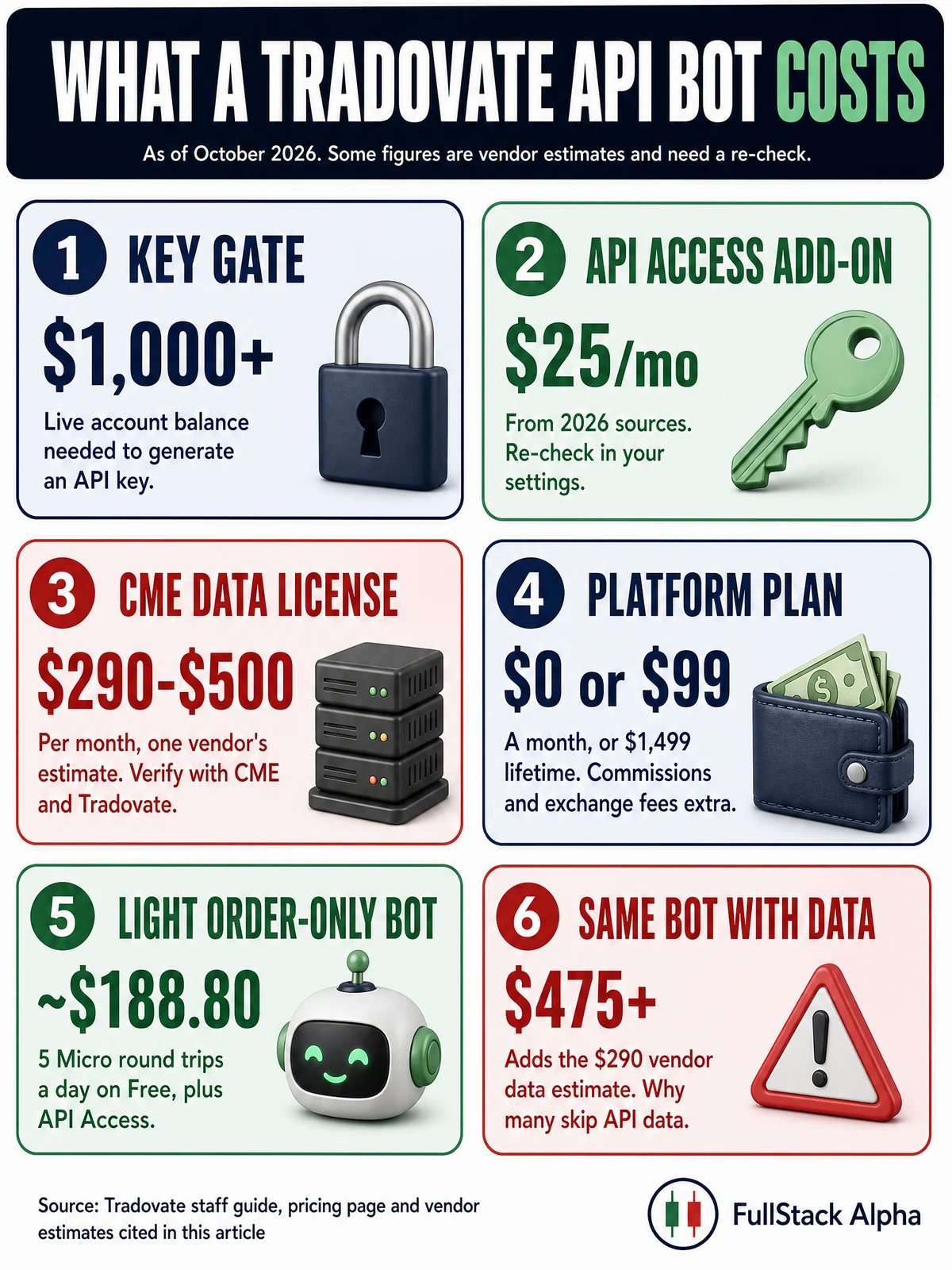
The Tradovate API is a REST and WebSocket interface that lets your own code place futures orders, read balances and positions, set risk limits and stream data on a Tradovate account. It is not a free developer signup: Tradovate’s own community guide says you must have a live account holding more than $1,000 and buy the API Access add-on before you can generate a key, and 2026 sources put that add-on at $25 a month. Once you have a key, you can build against the Demo environment for as long as you like, but prop firm and evaluation accounts cannot get direct Tradovate API credentials, according to vendors that sell the workaround. If the gate does not fit your account, a TradingView webhook bridge or NinjaTrader’s beta MCP server can route orders without your own API key.
Key insights
- Access gate: a live account above $1,000, then the API Access add-on, a self-attestation and a digital agreement, per a Tradovate staff guide. The key is shown once.
- Cost: about $25 a month for API Access in 2026 sources, plus the platform plan (Free, $99 a month or $1,499 lifetime on Tradovate’s pricing page), commissions and exchange fees. Real-time CME data through the API is a separate license that a vendor prices at $290 to $500 a month.
- Same engine as NinjaTrader: the Trade API docs now live on docs.ninjatrader.com and use
demo.tradovateapi.comandlive.tradovateapi.com. - Bot rules: tokens last about 90 minutes, two concurrent sessions per user, and every bot order must set
isAutomated: true. - Webhook limits: TradingView only sends webhooks to ports 80 and 443, cancels requests that take over three seconds, and requires two-factor authentication.
What Is the Tradovate API and Who Gets Access?
The Tradovate API is the programmable side of the Tradovate futures platform. Per the Trade API overview, “almost anything you can do in the trader application, you can also do through the API”: place and modify orders, query accounts and cash balances, look up contracts, set position and loss limits, and send alerts. Real-time quotes, depth and charts come through a separate Market Data API over WebSocket.

It is an execution pipe, not a strategy engine. Your code decides; the API carries the order.
Tradovate and NinjaTrader: one API, two front doors
If you search for Tradovate API docs in 2026, you land on docs.ninjatrader.com. Its home page describes building “on the NinjaTrader and Tradovate platform,” the Trade API pages use the same tradovateapi.com hosts, and the risk pages link Tradovate’s liquidation policy. For a developer that is good news: one set of docs, one token flow and one order engine. The practical differences are account setup, which login you use, and where the API Access option shows up in settings, so confirm those for the account you actually trade.
Who can get a key
Tradovate’s staff guide, “How Do I Access the API?,” sets two requirements before you can generate an API key: “You must have a LIVE account and hold greater than $1000 in that account,” and you must “purchase a subscription to API Access.”
That leaves three groups on the outside:
| Account type | Direct API key? | Source |
|---|---|---|
| Live personal account above $1,000 with API Access | Yes | Tradovate staff guide |
| Live account at or below $1,000 | No | Tradovate staff guide |
| Demo or simulation-only account | No; sim balances do not count toward the $1,000 | PickMyTrade 2026 article (vendor) |
| Prop firm evaluation or funded account | No, per vendor reporting | PickMyTrade 2026 article (vendor) |
Treat the last two rows with care. They come from PickMyTrade, a company that sells a webhook route around the gate and has a reason to stress it. We did not find a Tradovate page that addresses prop accounts directly.
Common mistake: assuming “I have a Tradovate login” means “I have API access.” You need the funding level and the paid add-on, and a NinjaTrader login adds another layer of confusion. In a 2026 community thread, a trader with a NinjaTrader account could not find the API option, and support told him to open and fund a separate Tradovate account. Check your own Application Settings before you plan a build around it.
How Do You Generate a Tradovate API Key?
You generate a Tradovate API key inside the Tradovate web app, under Application Settings, after you meet the funding rule and buy API Access. The staff guide walks through the steps with screenshots; here is the short version.
- Fund a live account above $1,000.
- Open Application Settings, then the Add-Ons tab, and purchase API Access.
- Open the API Access tab in Application Settings and click Generate API Key.
- Complete the self-attestation. Tradovate says, “It is extremely important that you understand futures trading and the implications of using our API before you continue.”
- Sign the digital agreement. You can download a copy.
- Choose permissions for the key. Grant only what the bot needs; a read-only research tool does not need order permissions.
- Copy the key immediately. Tradovate says it is shown “one time only.” Store it in a password manager or secret store, never in a public repo.
What your code will hold after this, per the Trade API authentication docs:
- Your username and password (or an OAuth flow for apps that log in other users)
cid, the client app IDsec, the secret or API keydeviceId, a string of up to 64 characters that permanently identifies the machineappIdandappVersion, free-form labels that show users which apps are connected
What Does Tradovate API Access Cost?
Direct Tradovate API access costs the API Access add-on, about $25 a month in 2026 sources, on top of whatever platform plan you trade under. You also need more than $1,000 in the live account to generate the key. Real-time market data through the API is a separate exchange license.
| Item | Cost | Source and confidence |
|---|---|---|
| Live account equity to generate a key | More than $1,000 | Tradovate staff guide |
| API Access add-on | $25 a month | 2026 Tradovate community reply and PickMyTrade 2026 article; re-check in your settings |
| CME real-time data license for API streaming | $290 to $500 a month | PickMyTrade 2026 article (vendor); verify with CME and Tradovate |
| Platform plan | Free $0, Monthly $99, Lifetime $1,499 | Tradovate pricing page |
| Extra simultaneous connections | Paid subscription | Trade API docs |
Commissions depend on the plan. Tradovate’s pricing page lists, per side:
| Plan | Micros and CME E-nano index | Standard | Nano and event contracts |
|---|---|---|---|
| Free ($0) | $0.39 | $1.29 | $0.20 |
| Monthly ($99) | $0.29 | $0.99 | $0.15 |
| Lifetime ($1,499, or 4 installments of $499) | $0.09 | $0.59 | $0.05 |
Exchange, clearing and NFA fees are extra on every plan.
Two worked examples
Order-only bot, light volume. Free plan, API Access at $25, no streaming data license because signals come from TradingView. Trading 5 Micro round trips a day for 21 days is 210 round trips or 420 sides: 420 × $0.39 = $163.80 in commissions. Monthly bill before exchange fees: about $188.80.
Same bot, streaming data in the API. Add the vendor’s low-end CME data estimate of $290 and the bill passes $475 a month. That one line item is why many automated traders skip API data and let the charting platform supply signals.
Decision rule: if your signals come from somewhere else and you only need execution, you likely do not need the API data license at all. Our breakdown of how much a trading bot costs adds hosting, data and platform fees to the same math.
The “fund, subscribe, withdraw” idea
PickMyTrade’s article reports a trader workaround: fund to $1,000, subscribe to API Access, then withdraw, with “trader reports” suggesting the subscription stays active. That is not Tradovate policy, and we found no Tradovate page that confirms it. If you try it, ask Tradovate support first, in writing.
Can You Test the Tradovate API Without a Live Account?
Not from zero. You need a key to call the API at all, and the key requires the funded live account and the add-on. Once you have it, though, testing is unlimited: a Tradovate staff reply says “you can use the API via your simulation account for as long as you like,” using the demo.tradovateapi.com base URL to trade, monitor data and subscribe to streams.
The same staff reply says there is no trial period for live accounts. So the honest sequence is:
- Fund the live account and buy API Access.
- Generate the key.
- Do all development and testing against Demo.
- Point at Live only after your logs say the bot behaves.
Edge case: you cannot mix environments. A Tradovate staff member warned that LIVE account info does not work on demo, and vice versa. NinjaTrader’s MCP docs say the same about agents: crossing environments “either fails with ‘account not found’ or silently targets the wrong environment’s account.”
If a third-party bridge sits between you and Tradovate, its paper or test mode is a feature of the bridge, not of Tradovate itself.
How Does a Tradovate API Bot Authenticate and Place Orders?
A Tradovate API bot exchanges credentials for an access token, sends it as a Bearer header, and places orders with order/placeorder. The token lasts about 90 minutes, and NinjaTrader’s docs, which now host the Tradovate Trade API reference, say to renew it about 15 minutes before expiry rather than requesting a new one.
The token request, with placeholders:
curl -X POST https://demo.tradovateapi.com/v1/auth/accesstokenrequest \
  -H "Content-Type: application/json" \
  -d '{"name":"YOUR_USERNAME","password":"YOUR_PASSWORD",
       "appId":"YourBotName","appVersion":"1.0",
       "cid":YOUR_CID,"sec":"YOUR_SECRET","deviceId":"YOUR_DEVICE_ID"}'
The rules that break most first builds:
- Use the right IDs. A Tradovate staff reply says to use the account entity
idfrom/account/listasaccountIdand the accountnameasaccountSpec. - Set
isAutomated: true. The API conventions say it defaults to false, must be true for bot orders, and that failing to flag automated orders “can violate exchange policies.” - Two sessions per user. A third session closes the oldest. Renew tokens instead of requesting new ones, and consider a dedicated API user that never logs in to the website.
- Read
apiHosts. The auth response can return different hosts for organizations on dedicated infrastructure. Do not hard-code them. - Respect rate limits. Breaching them returns
HTTP 429. Sensitive calls such as token requests can return a time penalty withp-ticketandp-time. - Use risk endpoints. Position limits, daily and weekly loss limits and trailing max drawdown are available through the API. Accounts below health criteria may be auto-liquidated under Tradovate’s liquidation policy.
We cover the full token lifecycle, the WebSocket user/syncRequest pattern and a minimal bot loop in our NinjaTrader API guide, since both brands now share the same Trade API.
Set risk limits through the API before the first live order
The same API that places orders can cap them, and Tradovate’s server enforces the cap even if your bot misbehaves. The authentication docs walk through it: create a userAccountPositionLimit for your account (for example exposedLimit: 30 open contracts, totalBy: "Overall"), then attach a userAccountRiskParameter with hardLimit: true that points at it. Query existing limits with userAccountPositionLimit/deps and your integer account ID. The docs list position limits, product limits, daily and weekly loss limits and trailing max drawdown as available controls.
Two habits make this useful rather than decorative:
- Set the limits from a separate script, not the bot. If the bot has a bug, it should not also be the thing that can raise its own ceiling.
- Start tighter than you think. One or two Micro contracts on Demo, then one on Live. Raise the cap only after a week of clean logs.
You can also check whether an account is close to trouble with accountRiskStatus/list, which returns the current liquidation status, the reason code and a counter of past auto-liquidations.
What Bot Setups Skip the Tradovate API?
Five setups automate Tradovate trading without your own Tradovate API key, or with less friction: fund and subscribe anyway, a webhook bridge, a bridge for prop accounts, NinjaTrader’s beta MCP server, or a different broker. Each trades off cost, control and who sits in your order path.
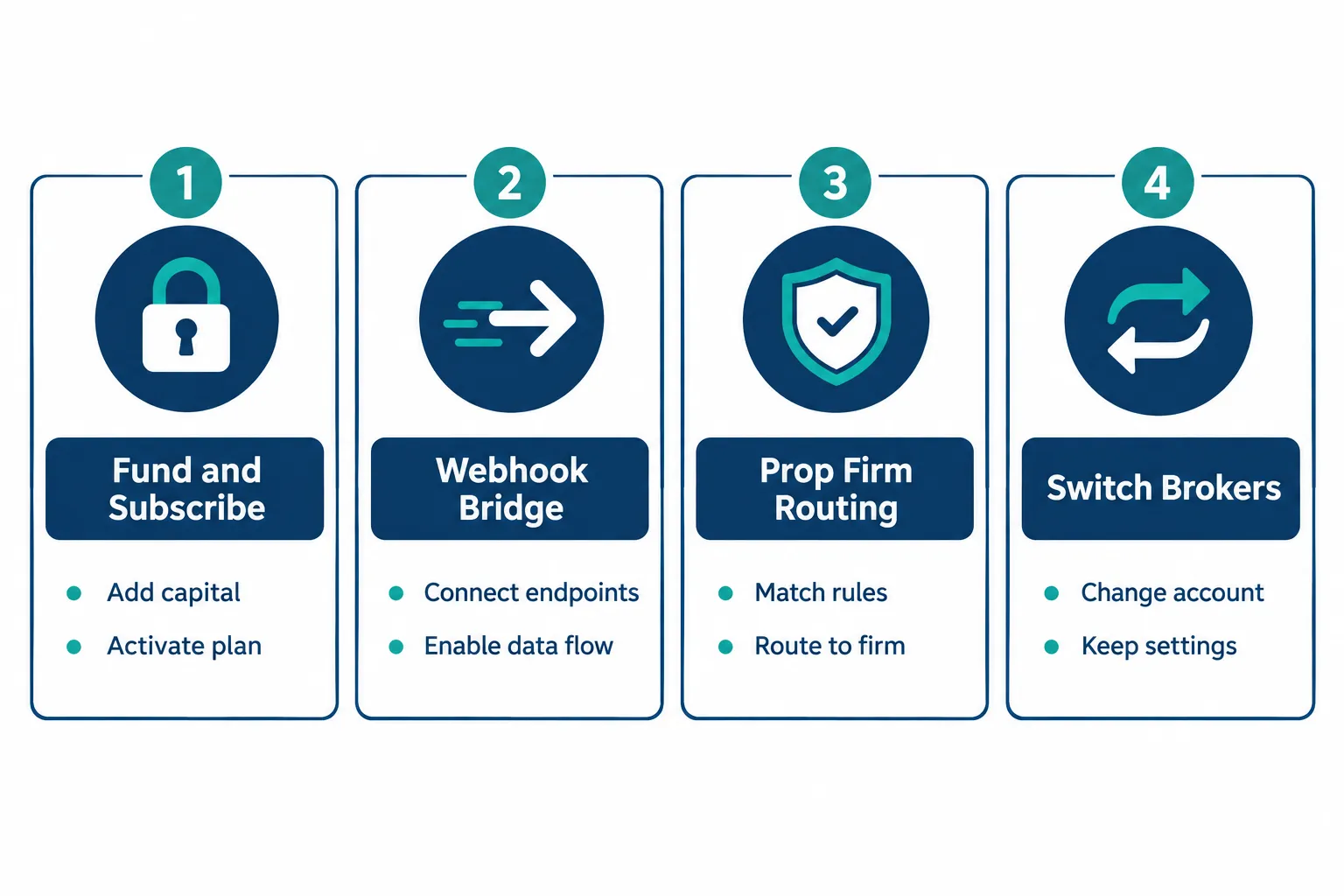
1. Fund it, subscribe, and use the API directly. Keep more than $1,000 in the account, pay for API Access, and own the whole pipe. Drawback: capital tied up, and you write and maintain everything yourself.
2. A webhook bridge from TradingView alerts. TradingView fires an alert, a bridge service catches the webhook and places the order using its own already-authorized integration. PickMyTrade, which sells this service, estimates about $65 a month for this route. Drawback: a third party’s uptime now sits between your alert and your fill.
3. A bridge for prop firm accounts. Because evaluation and prop-funded accounts reportedly cannot get direct credentials, a bridge is often the only automated route. Drawback: the prop firm’s own rules can still disqualify you; see the checklist below.
4. NinjaTrader’s MCP server (beta). NinjaTrader’s MCP connect docs list Demo and Live URLs on tradovateapi.com that Claude, ChatGPT, Codex and Cursor can connect to with an OAuth sign-in in your browser. The pages we checked in 2026 do not list the API Access add-on as a requirement, but the server is “in beta” and “not yet generally available,” so confirm access for your account. Drawback: an AI agent is now deciding what to send, which is a different risk than a fixed webhook.
5. Switch brokers. PickMyTrade’s article says Rithmic through Ironbeam needs a $500 minimum and Interactive Brokers has no minimum for basic cash-account API access. Those are vendor claims; check each broker. Drawback: rebuilding your bot for a different API. Our Interactive Brokers TWS API guide shows what that rebuild involves.
| Setup | Your own API key? | Monthly cost estimate | Main dependency |
|---|---|---|---|
| Fund and subscribe | Yes | About $25 plus plan and data | Your code |
| Webhook bridge | No | About $65 per vendor estimate | Bridge uptime, TradingView webhooks |
| Prop account via bridge | No | Bridge fee plus prop fees | Prop firm rules |
| NinjaTrader MCP (beta) | Not listed on the pages we checked | Not published | AI agent behavior, beta changes |
| Switch broker | Not needed | Varies by broker | A full rebuild |
Decision rule: choose direct API if you already trade Tradovate live with real capital and want full control. Choose a webhook bridge if you trade a prop evaluation or do not want $1,000 parked just to get a key. Treat the MCP route as an experiment on Demo until it leaves beta.
How Do You Connect TradingView to Tradovate Step by Step?
TradingView to Tradovate automation is a four-hop chain: an alert fires, a webhook carries it to a bridge or your own server, the bridge or server turns it into an order, and Tradovate executes it. Test every hop on Demo before anything touches a live account.
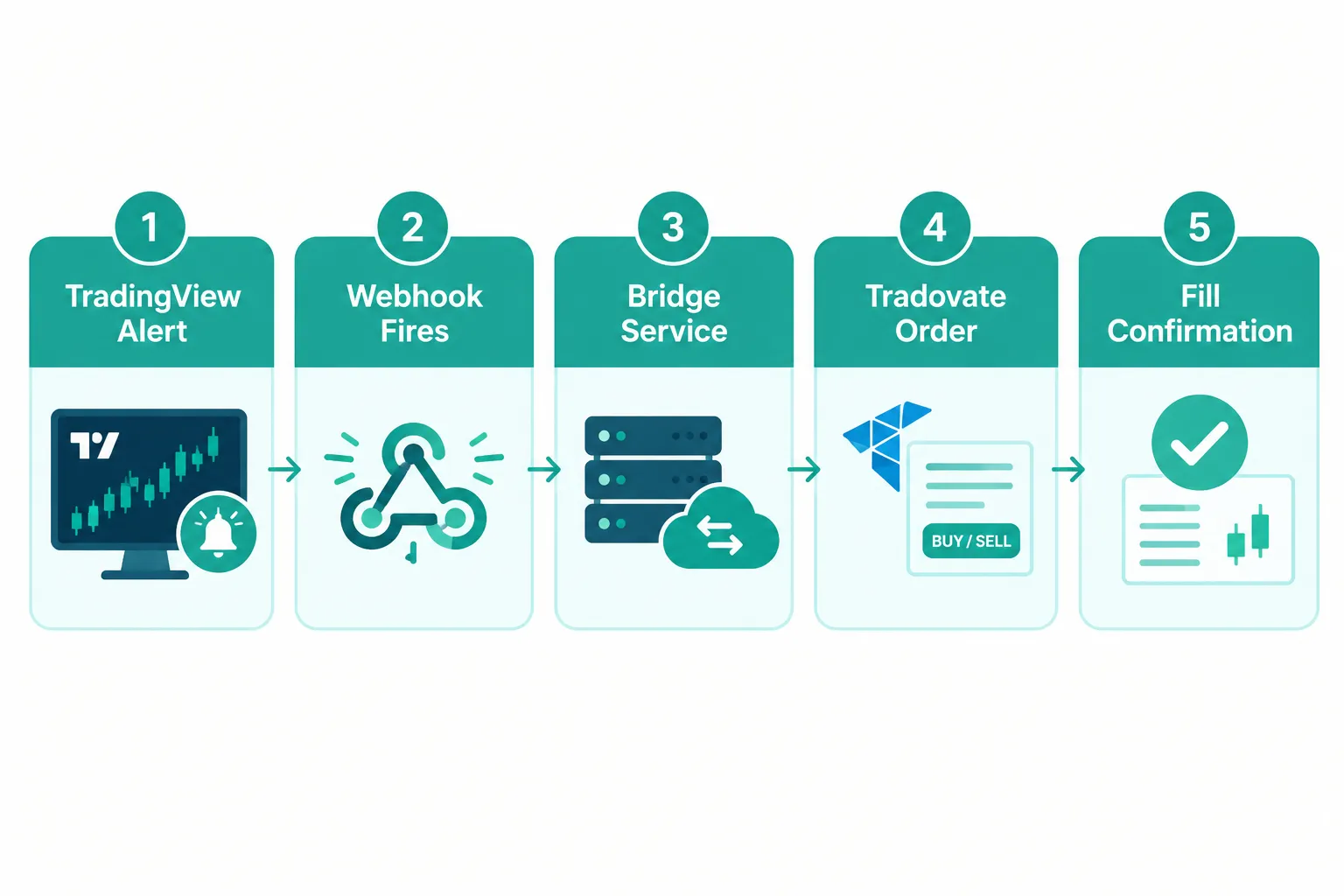
- Build and confirm the alert in TradingView. The alert condition is your entry signal and nothing else. Get it right on the chart first.
- Turn on two-factor authentication. TradingView’s webhook docs say webhook alerts “are only allowed when 2-factor authentication is enabled.”
- Set the webhook URL. Only ports 80 and 443 are accepted, IPv6 is not supported, and the receiving server must answer within three seconds or the request is cancelled.
- Format the message as JSON if your bridge expects JSON. TradingView sends plain text by default.
- Keep secrets out of the body. TradingView warns against putting login credentials or passwords in the webhook body.
- Route through the bridge or your own server. Your own server needs your API key and must set
isAutomated: trueon every order. - Confirm the fill in Tradovate. Check the contract, quantity, price and slippage against what the alert meant.
- Watch the Webhook status column in the alert log. TradingView says webhooks “may occasionally fail to reach the specified URL.”
For the TradingView side in depth, including the three bridges that reach brokers, see our guide to TradingView automated trading.
Common mistake: skipping the Demo run because the webhook “looks right.” A malformed payload, a contract symbol that rolled, or a server that answers in four seconds will all fail silently from the chart’s point of view. Simulated fills also flatter you, so read our piece on paper trading slippage before you trust any Demo P&L.
What latency does this chain add?
TradingView does not publish an alert-to-webhook delivery time on the pages we checked, and bridge vendors publish their own claims. The one hard number is the three-second server timeout. Design for it: answer the webhook immediately, queue the order, and place it from a worker, so a slow broker call never times out the alert.
Questions to ask any bridge vendor before you connect
A bridge holds the keys to your order path, so ask these before you hand it an account:
- Where are my credentials stored, and can I revoke the bridge’s access from Tradovate without calling the vendor?
- Does the bridge set
isAutomated: trueon every order it places? The API conventions require it for automated orders. - What happens when TradingView’s three-second timeout hits? A good bridge acknowledges the webhook first and places the order after.
- How does it handle duplicate alerts? An alert condition can trigger twice in a fast market, or you can fire the same test alert twice; you want one order, not two.
- Is there a full log of every webhook received, every order sent and every rejection with its error text?
- Does it have a test or paper mode, and does that mode use Tradovate’s Demo environment or its own simulator?
- What is the outage plan? If the bridge goes down with a position open, how do you flatten from your phone?
If a vendor cannot answer all seven in writing, keep looking.
What Rules Should You Check Before Automating a Prop Firm Evaluation?
Check the prop firm’s automation, copy-trading and third-party tool rules before you connect any bot to an evaluation account. Rules differ by firm and change often, and breaking one can fail the evaluation even if the bot works perfectly.

We are not quoting any firm’s current rules here, because they change and must be read on the firm’s own site on the day you connect. Use this checklist:
- Find the firm’s written policy on automated, algorithmic or bot trading in its current rulebook or help center.
- Check third-party execution tools. Some firms name allowed bridges; some ban all of them.
- Check copy trading and trade mirroring if your bridge sends one signal to several accounts.
- Check news-event and consistency rules, which bots break easily because they trade the same way every time.
- Ask in writing if anything is unclear, and keep the reply.
- Use platform circuit breakers. NinjaTrader 8.1.8 added a manual lockout for Prop accounts on the NinjaTrader connection that cancels orders, flattens positions and blocks new orders until it expires.
Practical takeaway: the Tradovate API gate is not the only gate. A prop firm’s automation policy can end an evaluation even when your bridge works flawlessly. Clear both before you go live, and keep a kill switch outside the bot; our guide to AI trading agent risks explains why.
How Does Tradovate Compare With Other Futures Bot Setups?
If you are choosing a futures platform for automation from scratch, compare the access gate, not only the commissions. Tradovate’s API needs funding and an add-on; NinjaTrader Desktop runs NinjaScript strategies locally and offers free sim; Interactive Brokers runs its API through TWS or IB Gateway.
| Platform | How bots connect | Testing | Gate to automate |
|---|---|---|---|
| Tradovate | REST and WebSocket Trade API, webhook bridges | Demo environment once you have a key | Live account above $1,000 plus API Access |
| NinjaTrader Desktop | NinjaScript, ATI, Trade API, beta MCP | Free sim, no time limit | Funded live account to activate plan features |
| Interactive Brokers | TWS API through TWS or IB Gateway | Paper account | Varies by account type |
For backtesting futures before any of this, our roundup of futures backtesting software compares seven tools, and our sister directory’s guide to the best futures trading broker compares fees.
Frequently Asked Questions
How do I get Tradovate API access?
Tradovate API access requires a live account holding more than $1,000 and a paid API Access subscription from the Add-Ons tab, per Tradovate’s staff guide. Then you open the API Access tab in Application Settings, complete a self-attestation, sign a digital agreement, pick permissions and generate the key. The key is shown only once, so store it safely.
How much does the Tradovate API cost?
The Tradovate API Access add-on is about $25 a month according to 2026 community and vendor sources, on top of your platform plan and commissions. Tradovate’s plans are Free at $0, Monthly at $99 or Lifetime at $1,499. Real-time CME data through the API is a separate license that one vendor prices at $290 to $500 a month.
Can I use the Tradovate API on a demo account?
Yes, once you have a key. A Tradovate staff reply says you can use the API with your simulation account for as long as you like through demo.tradovateapi.com. You still need the funded live account and the API Access add-on to generate the key, and there is no live trial.
Can prop firm accounts use the Tradovate API?
Not directly, according to vendors that sell the workaround, who report that evaluation and prop-funded accounts cannot get Tradovate API credentials. Traders on those accounts usually automate through a webhook bridge instead. Check your prop firm’s automation rules first, because breaking them can fail the evaluation.
Is the Tradovate API the same as the NinjaTrader API?
They share the same Trade API. The Tradovate API reference now lives on docs.ninjatrader.com and uses demo.tradovateapi.com and live.tradovateapi.com for both brands. The differences are in account setup and where the API Access option appears, so confirm them for your account.
Is Tradovate the same as TradingView?
No. Tradovate is a futures broker that holds your account and executes trades, while TradingView is a charting and alerts platform. TradingView webhook alerts can trigger Tradovate orders through a bridge or your own server, but they are separate companies.
Do I need isAutomated for Tradovate API orders?
Yes. The Trade API conventions say isAutomated defaults to false and must be set to true for any order a bot or automated process places. Failing to flag automated orders can violate exchange policies, so hard-code it in your order function.
Our Take
The Tradovate API makes sense if you already trade futures live with real capital and want direct, scriptable execution with no middleman. It is well documented now that it shares the NinjaTrader Trade API docs, and the Demo environment is a real place to build once you are in.
It does not make sense if you are on a prop evaluation or do not want more than $1,000 sitting idle to switch on a developer feature. In that case a webhook bridge costs less and skips the gate, at the price of a third party in your order path. Match the setup to your account and capital, not to whichever option sounds more official. For more futures and broker API breakdowns, start at AI Stock Trading Bots.
Related: if you are still choosing where to trade futures, the broker and platform reviews at AI Stock Picker App compare the platforms behind these setups.
Not sure which setup fits your bot? Tell us what you are building and we will point you at the route that fits. Send it to us.
Stay alpha.
The FullStack Alpha research desk tests AI trading bots on paper and live accounts. Reviewed and edited by Jay Rocco, Founder and Editor.
