

The FullStack Alpha research desk tests AI trading bots on paper and live accounts. Reviewed and edited by Jay Rocco, Founder and Editor.
By FullStack Alpha Editorial Team | Reviewed by Jay Rocco, Chief Editor
What is paper trading? It is placing simulated trades against live or near-live market prices with fake money, so you can test a strategy, a platform or a bot without risking a dollar. No real cash moves and no real shares change hands; the platform simply tracks what would have happened. The catch is that simulated results usually look better than live ones, because fills, fees, data delays and your own nerves are all gentler in a simulator. A 30-day plan with fixed rules and a written journal is the cheapest way to learn whether your system, or your bot, deserves real money.
Key insights
- Free almost everywhere: TradingView, Alpaca and Schwab’s thinkorswim paperMoney all offer simulated accounts at no cost, and Alpaca and paperMoney both start you with $100,000 of virtual money.
- Results run optimistic: Alpaca’s own documentation lists what its simulator leaves out, including market impact, slippage due to latency, queue position, price improvement, regulatory fees and dividends.
- Structure beats time: 30 days with a journal and frozen rules tells you more than six months of casual clicking.
- Bots first, money second: run any bot on a paper account through the broker’s API for a full month before it touches a funded account.
- Go live on evidence: enough trades, costs subtracted by hand, and rules followed at least 80% of the time. A lucky two-week streak is not evidence.
If you are testing an automated system, our library at AI Stock Trading Bots covers the brokers and tools that offer simulated accounts.
What Is Paper Trading and Is It Real Money?
Paper trading is practice trading with fake money inside a real or near-real market feed. The name comes from the old habit of writing trades on paper and tracking them by hand. Today the platform does the tracking: you get a starting cash balance, you place buy and sell orders, and the account shows your simulated profit and loss as if it were real.
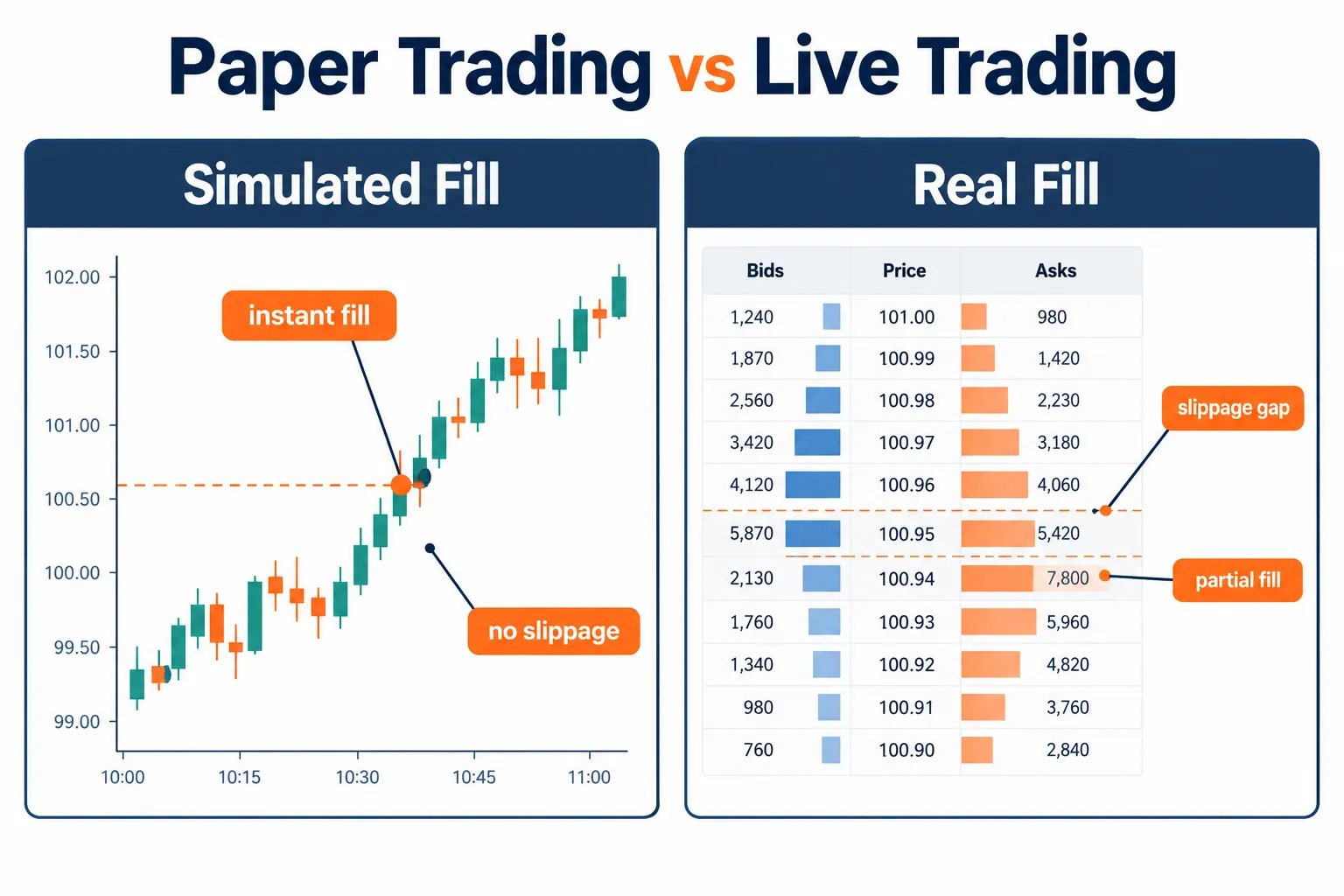
Is it real money? No. That is the whole point. You can run the simulated account to zero and nothing happens to your bank balance. You can size a position at ten times what your real account could carry and most simulators will let you, because there is no real risk to stop.
That last part matters more than it sounds. A practice account does not punish bad habits the way a live account does. Overleveraging in a simulator feels like confidence. Overleveraging live feels like a gut punch. Same click, different consequence.
Simulated trading exists for three jobs:
- Learning mechanics. How order types behave, where the buttons are, how a stop actually attaches, before you are under pressure.
- Testing a strategy. Does a setup produce a repeatable result, or did you fit it to last month’s chart?
- Testing a bot. Before automated code touches your brokerage account, it should run against live data with zero capital at risk.
One more definition. A paper account is usually a separate account with its own balance, its own order history and often its own login or API keys. It is not a switch on your live account. That separation is a feature: it keeps a practice order from turning into a real one by accident.
The takeaway: a simulator is a flight simulator for your trading plan. It teaches you the controls. It does not teach you turbulence.
How Does Paper Trading Work Behind the Scenes?
The platform takes your order, compares it with the current market price, and decides whether and where it would have filled. Each provider uses its own rules, and those rules decide how realistic your results are.
Alpaca publishes its rules more plainly than most. Its paper trading documentation says:
- The first paper account is created with a $100,000 balance by default.
- Orders fill only when they become marketable, matched against the national best bid and offer (NBBO).
- Eligible orders receive a partial fill for a random size 10% of the time.
- Paper-only account holders receive IEX market data only, not the full consolidated feed.
- The simulator does not account for market impact, price slippage due to latency, order queue position for resting limit orders, price improvement, regulatory fees or dividends.
- The paper API base URL is https://paper-api.alpaca.markets, separate from the live endpoint.
Schwab is less specific but just as clear about the limits. Its paperMoney page says “Market activity, trade executions, transaction costs, and other elements presented in paperMoney are simulations only,” and its FAQ answers the question every beginner asks: you cannot make money from it.
TradingView takes the friendliest stance. Its Paper Trading page calls the tool “a completely risk-free simulator with no fees or catches,” and its commission setting is switched off by default.
Why this matters: every rule above makes simulated results look better than live ones. Instant fills at the best price, no fees and no queue behind other traders all add up in your favor. That is not a flaw to complain about. It is a bias to correct.
Why Do Paper Trading Results Lie?
Simulated results skew optimistic because the simulation strips out the friction that costs traders money: slippage, partial fills, fees, data lag and your own emotions. A strategy that wins in a simulator can lose live for reasons that have nothing to do with the strategy.
Fills. Most simulators fill your order at the quoted price as soon as it becomes marketable, and assume no one was ahead of you. Live, your limit order waits in a queue, and it often fills right when better-informed traders decide to push price the other way. No simulator charges you for that.
Slippage. This is the gap between the price you expected and the price you got. Alpaca says outright that its simulator does not model slippage due to latency. Live markets always charge it, and they charge more in fast or thin names. We show the math in paper trading proves nothing until slippage shows up, because this is the single biggest reason a profitable simulated system goes flat with real money.
Fees. Commission-free does not mean cost-free. Alpaca’s simulator skips regulatory fees, and TradingView’s commission setting starts at zero. Over 100 trades, small per-trade costs turn a marginal strategy negative.
Data. Some simulators run on delayed or partial data. Schwab’s paperMoney tutorial shows a 20 minute default delay, and Alpaca’s paper-only accounts get IEX data, which is one exchange’s quotes, not the whole market. A few minutes of lag does not matter for a three-week swing trade. It ruins a five-minute scalp.
Emotion. Simulated losses do not trigger the same fight-or-flight response as real ones. You will hold through simulated drawdowns you would panic-sell in real life, and you will size positions you would never risk. Revenge trading and overtrading show up far less in a simulator, because there is nothing real to be angry about.
| What a simulator shows you | What live trading does |
|---|---|
| Fills at the quoted price once marketable | Queue delays, partial fills and price gaps at execution |
| No latency slippage | Real slippage, worse in fast or thin markets |
| Fees off or partly modeled | Commissions, regulatory fees, borrow costs and spreads on every trade |
| Calm decisions | Fear and greed distort entries, exits and sizing |
| No market impact | Your own order can move price in small or illiquid names |
Decision rule: if your simulated edge is thin, say an average winner barely larger than your average loser at a modest win rate, assume live trading erases it. Only strategies with a clear margin over costs survive the move to real money.
How Is Paper Trading Different From Backtesting and Live Trading?
All three test the same strategy, but they answer different questions. A backtest asks how the rules would have done on past data. A simulator asks whether you, or your bot, can execute those rules in a market that is moving right now. Live trading asks whether the result survives real fills, real costs and real fear.
| Test | What it uses | What it proves | What it cannot prove |
|---|---|---|---|
| Backtest | Historical prices, run in seconds | Whether the rules had an edge on past data | Whether you can execute them, or whether the past repeats |
| Simulated trading | Live or near-live prices, fake money | Whether the plumbing works and you follow your rules in real time | Real fills, real costs, real emotion |
| Small live account | Real prices, real money, tiny size | How fills, fees and your nerves change the result | Long-run results, which need a bigger sample |
The order matters. Backtest first, because it is fast and cheap and kills obviously bad ideas in an afternoon. Move to a simulator next, because a backtest cannot catch a bot that crashes at the open, a data feed that drops, or a trader who freezes when a setup appears. Go live last, at a size small enough that a bad month is tuition, not a disaster.
Each stage has its own classic failure. Backtests fail through overfitting and look-ahead bias, where the rules were shaped to the very data used to test them. Simulators fail through flattering fills and missing costs, covered above. Small live accounts fail through impatience, when a trader doubles size after three good days.
A simple handoff rule: a strategy earns its way from one stage to the next only if the result holds roughly steady. If a backtest shows a healthy edge and the simulator shows half of it, investigate before moving on. If the simulator shows an edge and the first 20 live trades show none, go back and compare fills line by line. The gap between stages is where the truth about a strategy lives.
Which Platforms Offer Free Paper Trading?
TradingView, Alpaca, Schwab’s thinkorswim and Webull all offer no-deposit simulators, but they are built for different jobs. Picking the right one depends on whether you are rehearsing manual trades, learning a broker’s interface or wiring up a bot.
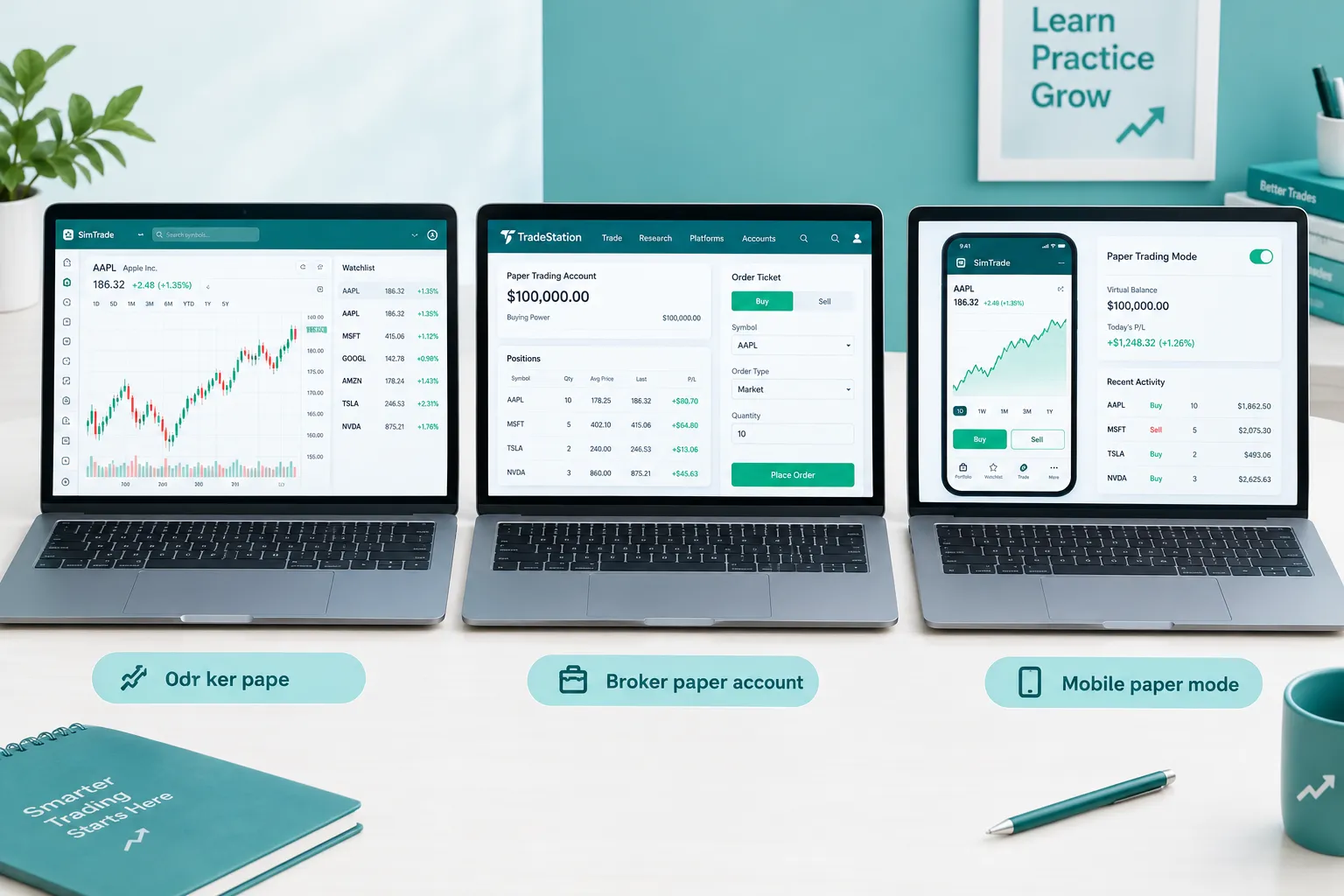
| Platform | What it is for | Verified details (2026) |
|---|---|---|
| TradingView | Chart-based manual practice | Free for all users; market, limit and stop orders; commission off by default; no good-till-canceled orders; futures treated as cash-settled |
| Alpaca | API-driven bot testing | Free; $100,000 default balance; IEX data for paper-only accounts; NBBO fills; random partial fills 10% of the time |
| thinkorswim paperMoney | Full desktop platform with deep options tools | Free for Schwab clients; $100,000 in each of a margin and an IRA account; 30 day Guest Pass for non-clients; 20 minute default delay in Schwab’s tutorial |
| Webull | Mobile-first broker simulator | See our Webull guide for current details |
A quick way to choose: TradingView is the best place to rehearse a chart-reading strategy because the charting tools are already there. Thinkorswim suits traders who need options-chain depth and plan to trade at Schwab. Alpaca is API-first, which makes it the natural home for a bot rather than for clicking by hand. Our TradingView paper trading guide and thinkorswim paper trading guide go deep on each, and our roundup of free simulators that charge nothing covers more options. If you want the broker-by-broker view of who simulates fills honestly, see which brokers simulate fills honestly.
Common mistake: practicing on a simulator that does not match your live broker. Rehearse on TradingView, trade live on a different broker’s order ticket, and you relearn the interface under pressure. Where you can, practice on the platform you will fund.
What Should Your 30-Day Test Plan Look Like?
A 30-day plan needs a fixed goal each week, a required log and a rule for when the test resets. Trying it “for a few weeks” is not a test. Structure turns a simulator from a toy into a decision tool.
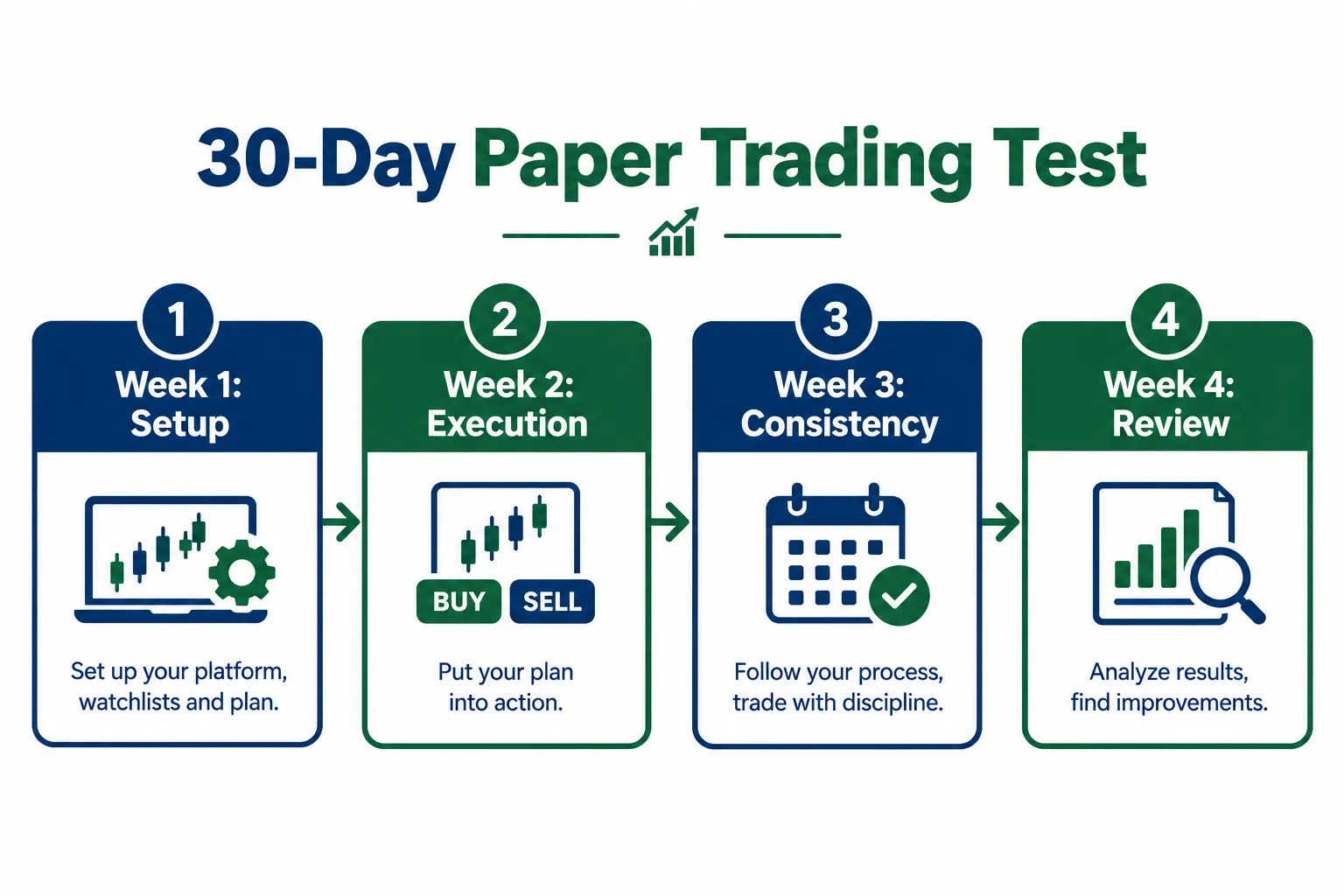
| Week | Goal | What to log | Reset rule |
|---|---|---|---|
| Week 1: Setup | Learn the platform and write your rules before one trade | Every order, entry and exit price, the reason in one sentence | Restart the week if you placed a trade without a written rule behind it |
| Week 2: Execution | Trade the plan exactly, no improvising | Fill price vs expected price, time of entry, whether the stop was honored | Flag any trade where you moved your stop after entry |
| Week 3: Consistency | Repeat the same criteria with no new indicators | Win rate, average R, valid setups taken vs skipped | If you changed the strategy, the test resets |
| Week 4: Review | Compare results with your original hypothesis | Total trades, gross result, cost haircut, rule-following percentage | If rule-following was under 80%, extend the test |
Three notes that matter more than they look:
- Freeze your rules before day one. If you keep tweaking parameters and keeping the version that looks best, you are fitting noise, not testing a strategy. Lock the rules, then run the clock. Backtests fall into the same trap through look-ahead bias, where a rule quietly uses information that was not available at the time.
- Thirty days is a floor, not a finish line. If your setup only fired eight times this month, you do not have a sample yet. Keep going until you have enough trades to read.
- Count the friction by hand. Subtract an estimated slippage and fee cost from every simulated trade before you believe the total.
Decision rule: use a 30-day window for a day or swing setup that fires several times a week. If your strategy fires once or twice a month, run 90 days. Thirty days of silence proves nothing.
A worked example of the cost haircut
Say your month produced 24 trades with a gross simulated gain of $600, or $25 per trade, trading 100 shares at a time. Assume two cents per share of slippage each way and $0.50 of regulatory fees per round trip. That is $4.50 per trade, or $108 across the month. Net: $492. The edge survives.
Now say the gross was $150 instead, or $6.25 per trade. After the same $108, you keep $42. That is under $2 per trade, a margin that one bad fill erases. The second strategy looked profitable in the simulator and is not ready for money.
What Should You Log in a Trading Journal?
A practice journal needs entry, exit, size, reason, result and an honest note on whether you followed your rules. Skip any of these and you are guessing about why a strategy worked or failed.
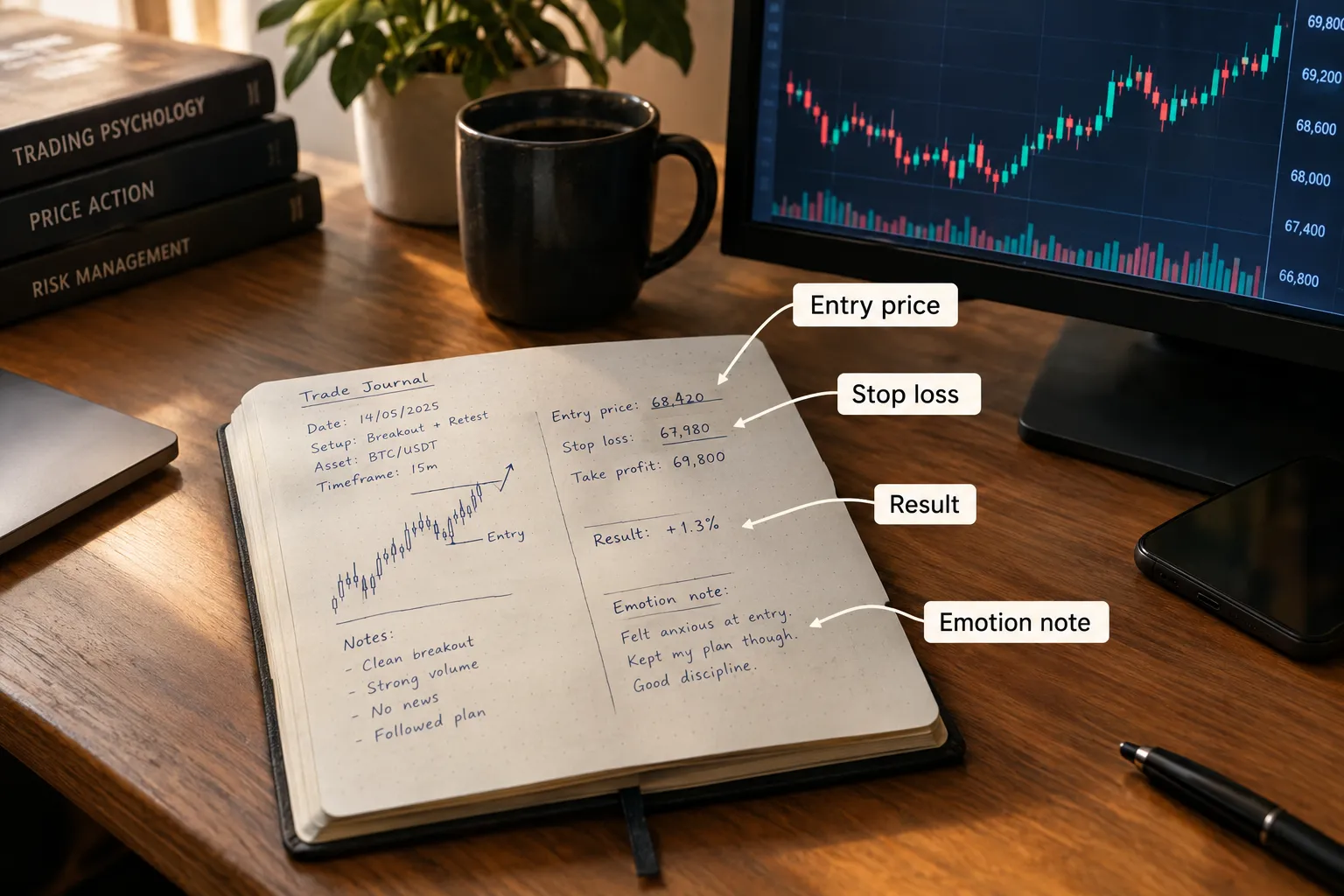
The core columns:
- Date and time of entry. The actual time, because the open, midday and the last hour behave differently.
- Setup type. Breakout, pullback, gap fill. Name it the same way every time so you can sort by it.
- Entry price and planned stop. Written before the trade, not reconstructed after.
- Exit price and exit reason. Target, stop, or early exit out of nerves. Say which.
- Position size. In dollars and as a percentage of the account size you will really fund.
- Result in dollars and in R. R is your gain or loss divided by what you planned to risk.
- Rule followed, yes or no. The most honest column in the journal.
- One-line note on emotion or friction. Did you hesitate? Move the stop? Write it down.
Here is one example row in words. On a Tuesday at 10:15 a.m., a trader logs a breakout on a stock that just cleared resistance after a tight range. Entry $42.10, stop $40.80, so $1.30 of risk per share, sized at 2% of the account. The trade exits at $44.50 two days later on the target: a gain of $2.40 per share, or about 1.8R. Rules followed, no emotional notes.
That one row tells you the setup, the risk, the result and whether the plan held. Multiply it by 30 and you have data instead of a feeling that “it’s been going well.”
Common mistake: logging only the winners. A journal that forgets the losers is a highlight reel, and the losers are where the lessons live.
How Do You Paper Test a Trading Bot?
You connect the bot to a broker’s simulated account through its API, let it trade live market data with zero capital, and run it untouched for at least a full month. The process mirrors manual practice with one difference: you are grading the bot’s behavior, not your own.
- Connect to a paper account, never a live one. Alpaca’s paper environment has its own base URL and its own keys, so a test bot physically cannot reach your live account if you keep the keys apart. Interactive Brokers also separates its paper account; our Interactive Brokers paper trading guide covers its setup and limits.
- Confirm the data feed. A bot trading on stale or partial quotes produces results that mean nothing. On Alpaca’s paper-only plan, that means IEX data.
- Let it run untouched for 30 days. If you change the logic every few days, you are testing a moving target.
- Check fills against reality. Alpaca’s simulator ignores market impact and queue position. If your bot trades thin names, assume live fills will be worse.
- Change one thing at a time. If the bot underperforms, change exactly one variable and retest.
- Log everything the bot does, not just its summary profit. Every signal, order, rejection and fill, with timestamps.
That last step is also your fraud filter. An investor alert from the SEC, NASAA and FINRA warns that promises of high returns with little or no risk are classic warning signs of fraud, and that even registered firms deserve skepticism when they say AI can deliver amazing results. The CFTC’s customer advisory, AI Won’t Turn Trading Bots into Money Machines, says scammers claim bots can “yield 100 percent ‘win’ rates” and that customers in the cases it brought lost tens of millions of dollars. If a vendor promises a fixed return or a near-perfect win rate, walk away. Our list of AI trading bot red flags covers the subtler versions.
Edge case: if your bot depends on unusual order types, check that the simulator supports them before you test. TradingView’s simulator has no good-till-canceled orders, for example, so a bot that parks multi-day exits will behave differently there than live.
When Is Paper Trading Good Enough to Go Live?
It is good enough when you have a meaningful sample, you have subtracted estimated costs by hand, and you followed your own rules at least 80% of the time. A good two-week stretch is luck wearing a system’s clothes.
The checklist before funding real money:
- Sample size. At least 30 trades for a short-timeframe strategy. Fewer only if trades are genuinely rare, not as an excuse to skip the work.
- Costs counted. If the strategy only wins before the haircut, it will not win live.
- Rule-following. If you broke your own plan more than 20% of the time, the test measured your discipline, not your strategy.
- Fresh data. If you built the strategy by staring at a chart and then tested it on the same chart, that is hindsight. Test on data you did not use to build the rules.
- A hard cap on first live size. Even after a clean month, start at a quarter or less of the size the simulator made you comfortable with. Live emotion is a different animal.
Decision rule: go live only when all five boxes are checked. If one is missing, run another 30-day cycle rather than funding the account on hope.
Can You Paper Trade Options, Futures and Crypto?
Yes, on platforms that support them, and the mechanics are the same: simulated orders, fake balance, live or near-live prices. What changes is the market underneath.
Options. Thinkorswim paperMoney simulates equities, options, futures and forex, and it is the deepest options simulator among the platforms here. Simulated options fills are still approximations, and assignment and early exercise behave as modeled, not as a real clearing firm would handle them.
Futures. TradingView supports commodity and index futures, but treats every simulated future as cash-settled and closes expired positions at the settlement price. If you trade physically settled contracts, the simulator will not rehearse a roll or delivery problem for you.
Crypto. Crypto trades around the clock with liquidity spread across many venues. A simulator can show a clean fill at 3 a.m. that a thin live order book would never give you. Treat crypto simulator results with extra skepticism, and check the rules for the specific asset, venue and leverage you plan to use.
Frequently Asked Questions
What is paper trading?
Paper trading is placing simulated trades against live or near-live prices with fake money. No real cash or shares move; the platform tracks what would have happened. It is used to learn a platform, test a strategy or test a bot before real money is at risk.
Is paper trading realistic?
Paper trading is realistic for learning mechanics and testing logic, but not for predicting live profit. Simulators like Alpaca’s skip market impact, latency slippage, queue position and regulatory fees, so results run optimistic. Subtract a cost haircut from every trade before you trust the total.
Is paper trading free?
Yes on the major platforms. TradingView paper trading is free for all users, Alpaca paper accounts are free with a $100,000 default balance, and Schwab’s thinkorswim paperMoney is free for clients, with a 30 day Guest Pass for non-clients.
How long should you paper trade before going live?
Run at least 30 days and at least 30 trades on one setup, whichever takes longer. If your setup fires only once or twice a month, extend the test to 90 days. Go live only when costs are subtracted and you followed your rules at least 80 percent of the time.
Can you paper trade a trading bot?
Yes. Connect the bot to a broker paper account through its API, such as Alpaca’s paper endpoint, and let it run untouched for a month. Log every signal, order, rejection and fill, and change only one variable at a time.
Can you paper trade options and futures?
Yes. Thinkorswim paperMoney simulates equities, options, futures and forex. TradingView supports commodity and index futures but treats all simulated futures as cash-settled, so contract rolls and delivery are not rehearsed.
Can you make money from paper trading?
No. Paper trading balances are hypothetical and never turn into real funds; Schwab’s paperMoney FAQ says so directly. What carries over to a live account is the skill and the data you collected.
Our Take
Paper trading is the cheapest test you will ever run on a strategy or a bot. It costs nothing, it teaches you the platform, and it catches dumb logic errors before they cost a dollar. It is also a floor, not a forecast: fills are too clean, fees are too light, and your nerves are too calm. Pick the simulator that matches your goal (TradingView for charts, Alpaca for code, thinkorswim for options at Schwab), freeze your rules, run 30 days with a journal, and subtract real costs by hand. Process over prediction. Size your first live trade like you are still a little scared of it. That fear is doing its job. For a broker-level view of the code route, see our Alpaca tool profile.
If options at Schwab are your route, our thinkorswim review on FullStack Alpha covers the platform behind paperMoney.
Building or buying a bot and want it reviewed before real capital touches it? Submit your bot here and get it looked at before you fund the account.
Stay alpha.
The FullStack Alpha research desk tests AI trading bots on paper and live accounts. Reviewed and edited by Jay Rocco, Founder and Editor.
