

The FullStack Alpha research desk tests AI trading bots on paper and live accounts. Reviewed and edited by Jay Rocco, Founder and Editor.
By FullStack Alpha Editorial Team | Reviewed by Jay Rocco, Chief Editor
TradingView paper trading is a free simulated broker built into TradingView’s charts, and TradingView says it is “available globally for all users,” with no plan upgrade or deposit needed. You connect it from the Trade button or the Trading Panel in Supercharts, then place market, limit and stop orders with simulated money across stocks, forex, crypto, and commodity and index futures. It is good for rehearsing execution and bad at predicting profit, because simulated fills skip the slippage, queue position and market impact a live account pays for. Test whether you can follow one written setup 30 times before you judge whether the setup makes money.
Key insights
- Free for everyone: TradingView calls its simulator “a completely risk-free simulator with no fees or catches.” Commission is inactive by default, so paper results start out cost-free unless you turn costs on.
- What you can trade: market, limit and stop orders, with stop loss and take profit attached. There are no good-till-canceled orders in the simulator.
- Futures quirk: every simulated future is treated as cash-settled, expired positions close at the final settlement price, and orders on expired contracts get canceled.
- Blocked symbols: TradingView synthetic symbols, indices such as NASDAQ:NDX, and Indian NSE symbols cannot be traded in the simulator.
- Bots need a bridge: TradingView paper trading does not run a bot on its own. Alerts and webhooks send signals out, and a separate service or a broker API does the execution.
This guide covers setup, the settings that make paper results more honest, the limits that matter for bot testing, a 30-trade plan, and how TradingView compares with Webull, Alpaca and thinkorswim. For more bot-testing guides, start at AI Stock Trading Bots.
What Is TradingView Paper Trading and Is It Free?
TradingView paper trading is a simulated brokerage account that lives inside the TradingView charting platform. You place orders against live market data with simulated money, and the panel tracks positions, orders, account history and profit or loss. TradingView’s Paper Trading support page says it is available to every user worldwide and supports “almost every asset class available on TradingView, including stocks, forex, crypto, commodity and index futures, and more.”
Yes, it is free. TradingView’s page says there are no initial deposits, broker fees or hidden charges. You do not need Essential, Plus or Premium to open a simulated account.
Who it suits:
- Beginners who need muscle memory on an order ticket before the money is real.
- Chart-first traders who already live in TradingView and do not want to learn a second platform.
- Rule testers rehearsing one written setup across stocks, forex, crypto or futures.
Who it does not suit: anyone who needs realistic fills for a scalping system, deep order book realism, or a hands-off bot that runs on its own. The simulator is a practice range, not an execution lab.
How much simulated money do you start with? TradingView’s own pages we checked do not publish a starting balance (2026). Third-party walkthroughs commonly show $100,000. Check the Account Summary tab in your own panel, and treat that number as a ceiling, not a target. Size your practice trades to the account you will actually fund.
Video by Ryan Scribner.
How Do You Set Up TradingView Paper Trading Step by Step?
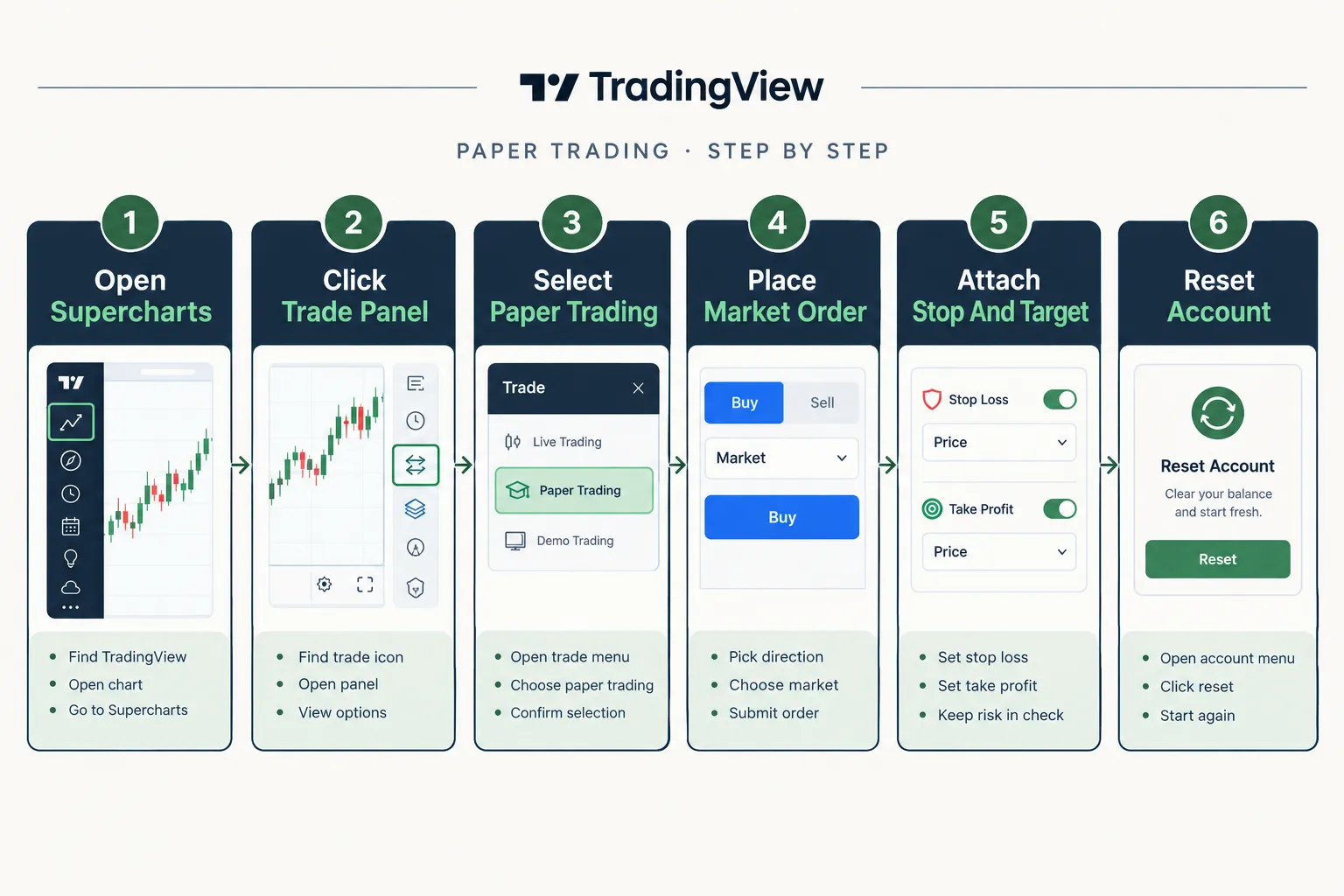
Open Supercharts, open the Trade button or the Trading Panel, choose Paper Trading from the broker list and click Connect. That is the setup, and it takes under a minute. TradingView’s help pages describe two entry points: its main Paper Trading page says to click the Trade button in the top-right corner, and its connect article says to find the Trading Panel at the bottom of Supercharts. Both lead to the same broker list.
How do you open the panel and place a first order?
- Open Supercharts. Load a liquid symbol you understand, such as SPY or a large-cap stock. Skip thin low float names for your first click.
- Open the broker list. Use the Trade button or the Trading Panel. Paper Trading sits in the list of brokers.
- Click Connect. The panel shows tabs for positions, orders, account summary and history.
- Place a market order. Open the order ticket, set a quantity and buy. A position line appears on the chart. If you get a non-tradable symbol notice instead, see the troubleshooting section below.
- Attach a stop and a target. The order ticket includes stop loss and take profit settings. You can also drag the lines on the chart and watch the dollar risk update. That number is the point of the exercise.
- Read the position. Average fill price, open quantity and unrealized profit or loss.
- Close it by hand at least once so you know where the button is when it matters.
TC Trading’s walkthrough, TradingView Paper Trading: Your First Trade In 5 Minutes, covers the same sequence on video if you want to click along.
Most common mistake at this stage: placing the entry and skipping the stop, then promising yourself you will watch it. You will not watch it. Attach the stop in the same breath as the entry, or the whole session is theater.
To log out later, TradingView’s connect article says to open the Trading Panel, open the trading menu in the top right, and click Log out Paper Trading.
Which order types can you test?
Market, limit and stop, plus stop loss and take profit brackets. TradingView also gives you three ways to send them: the order ticket, the depth of market (DOM) ladder and chart trading. Use all three in your first week and keep whichever one you are fastest and most accurate with.
| Order type | What it tests | When it bites live |
|---|---|---|
| Market | Does your setup survive immediate entry? | Fills look perfect on paper, worse live |
| Limit | Patience and entry discipline | Your fill never comes and the move leaves without you |
| Stop | Whether you actually respect your exit | Gaps can blow through it in live markets |
One missing type matters for swing traders. TradingView’s support page says: “We don’t offer Good ‘Til Cancelled orders in Paper Trading to prevent the stacking of orders that would never be executed.” If your live plan relies on GTC exits that sit for days, you will have to re-enter those orders in the simulator, and that difference is worth knowing before you compare paper and live results.
Which Settings Make TradingView Paper Trading More Honest?
Turn on commissions, set realistic leverage, and size to your real account. The defaults are friendlier than any live broker, and friendly defaults produce flattering results.
How do commissions work in paper trading?
TradingView’s commission article is clear on three points. Per-contract commission applies only to futures and options, other instruments use a separate commission type set in an “Other” section, and “The commission is inactive by default.” The fee is charged when you open and again when you close a position. TradingView’s own example: at $1.25 per contract, buying 3 contracts costs $3.75.
To set it, log in to Paper Trading, open account settings (or the new account dialog), tick the Futures and Options box in the commission section, enter your broker’s real per-contract amount, and save. Do this before trade one. A test run without costs is a test of a broker that does not exist.
What leverage does the simulator use?
You can set leverage for each asset class separately, or set a custom multiplier, and it then applies to every order in that account. TradingView’s leverage article gives one default: the margin requirement for E-mini S&P 500 futures is 5%, which works out to 20x leverage. If the required margin exceeds your available margin, the order will not execute. TradingView adds that it “does not provide real margin trading or brokerage services.”
Decision rule: set the simulator’s leverage to what your real broker will give you, not to the maximum. Rehearsing at 20x when your live account allows far less teaches position sizes you cannot take.
How should you handle slippage?
TradingView paper trading does not let you dial in slippage the way a strategy backtest does, so add it by hand in your log. A simple haircut on every trade:
- Liquid large caps: subtract one to two cents per share each way, plus your real commission.
- Futures: subtract one tick each way, plus the exchange and broker fees you will actually pay.
- Options: subtract half the typical bid-ask spread, plus per-contract fees.
Then re-run your totals. A strategy that only works before costs is a spreadsheet, not a strategy. We show worked numbers in paper trading proves nothing until slippage shows up.
What Are the Limits of TradingView Paper Trading?
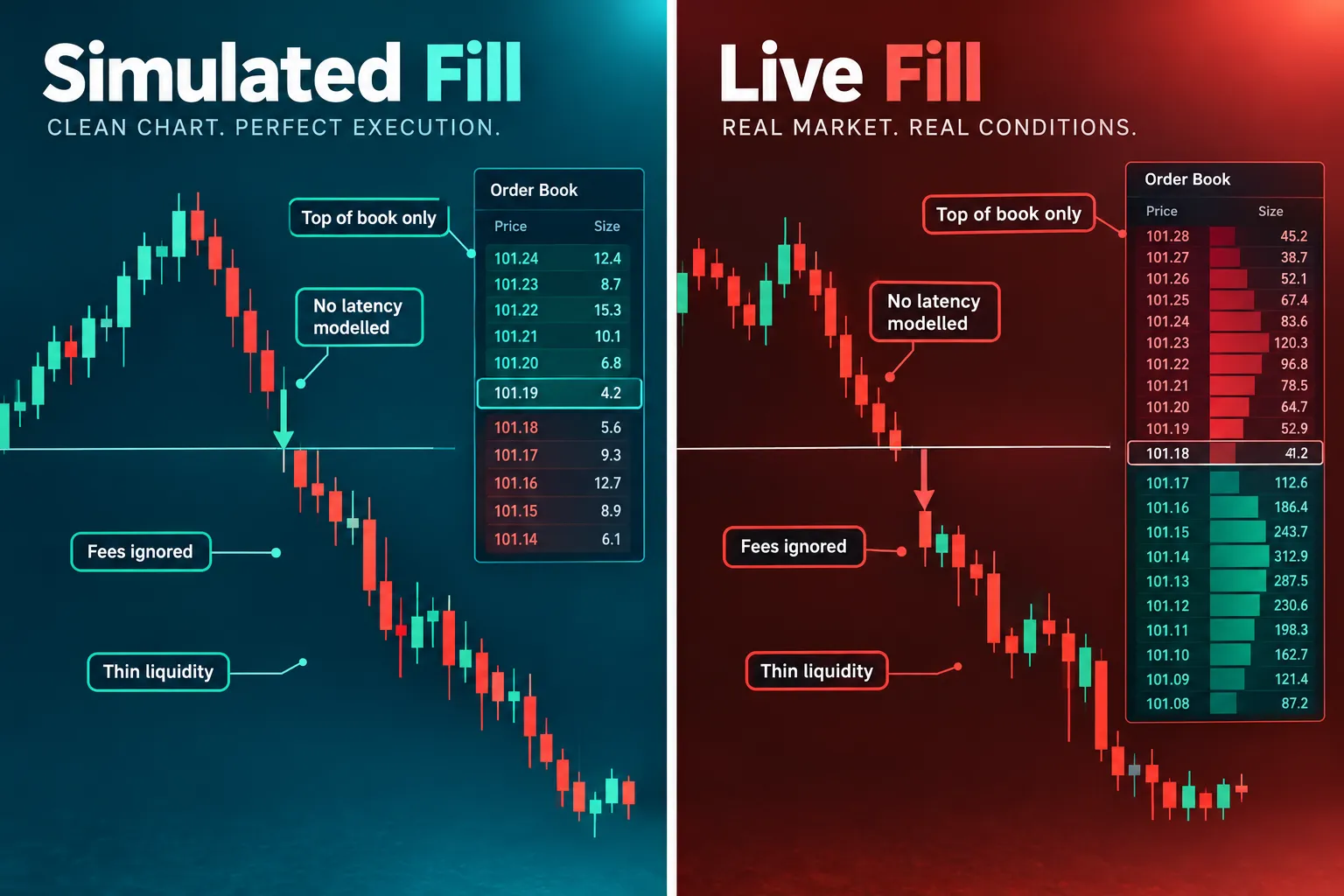
Paper fills are better than live fills, costs are off unless you switch them on, some symbols will not load, futures settle in a simplified way, and the simulator will not run a bot by itself. Each limit has a specific consequence if you are testing an automated strategy.
| Limit | What it means for a bot test |
|---|---|
| Simulated fills | Your win rate is inflated. Thin names and fast moves suffer most live |
| No built-in slippage setting | A scalping system with a few cents of edge can be net negative live |
| Commission off by default | High-frequency strategies look profitable until the fee math lands |
| Non-tradable symbols (synthetics, indices, NSE names) | Part of your watchlist may refuse to simulate |
| Futures treated as cash-settled | Roll and delivery logic goes untested |
| No GTC orders | Multi-day exit orders must be re-entered |
| No native bot execution | You need alerts plus an outside service or broker API to automate anything |
How are simulated futures handled?
TradingView’s simulated futures article lists the rules:
- “All futures are treated as cash-settled regardless of whether they are physically or cash-settled.”
- The system automatically closes expired positions at the final settlement price. If the exchange price is unavailable, TradingView uses the close of the last daily bar.
- Active orders on expired contracts are canceled.
- Realized profit or loss is booked at settlement, and any commission is deducted at settlement.
- Perpetual and continuous futures have no settlement. Classical and crypto futures are supported in all paper accounts.
If you are rehearsing contract rolls, that cash-settled treatment is a difference you must plan around before going live.
Why will some symbols not trade?
TradingView’s non-tradable symbol article names three groups. Synthetic symbols calculated by TradingView, marked with a purple label, cannot be traded. Indices such as NASDAQ:NDX are excluded because they are generally not tradable, and TradingView suggests using an instrument that tracks the index instead. Indian exchange symbols are blocked because NSE data policy bars market data from “virtual trading,” a restriction TradingView says applies to Paper Trading only.
Can TradingView paper trading connect to a bot?
Not directly. TradingView generates signals; it does not execute an automated strategy into your paper account. What it provides is alerts, and alerts can send a webhook, a small POST message, to an outside service that places orders. That service or a broker API does the execution, not TradingView.
That architecture works, but it adds failure points. Alert fires, webhook travels, service parses, broker accepts. Each hop adds delay and each can break. We compare the three common bridges in TradingView automated trading, and if your logic lives in Pine Script, our Pine Script strategy guide shows how to turn an indicator into orders.
What Should You Test First in TradingView Paper Trading?
Test whether you can execute one setup, at one size, by written rules, 30 times in a row. Not profitability. Execution. Profit is downstream of consistency, and you cannot measure it in a sample built from improvisation.
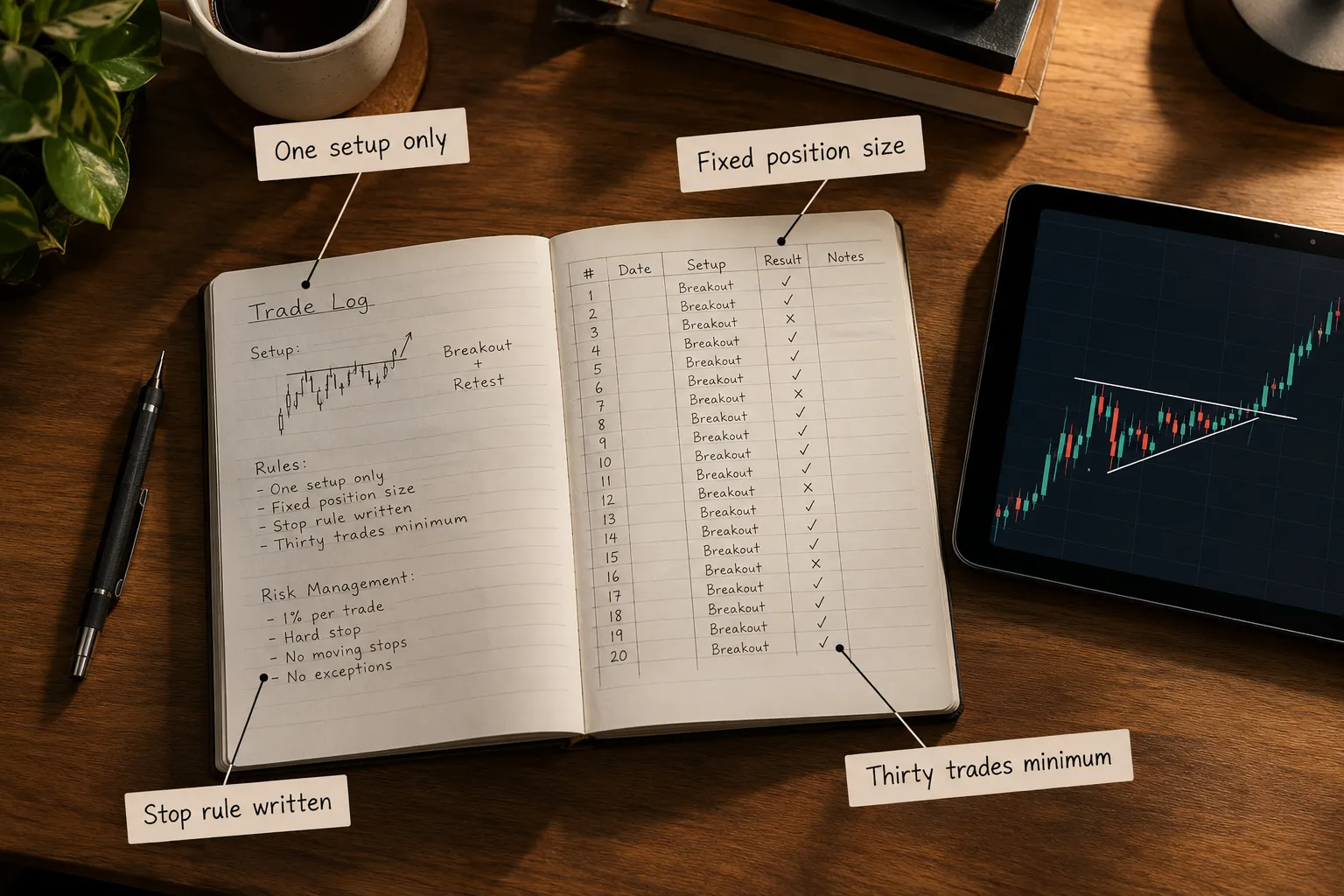
Pick one setup. A breakout from a tight range, a pullback to a moving average, a gap fill. If you cannot write the entry trigger in one sentence, you have a vibe, not a setup.
Fix your position size. Same risk per trade, every trade. Risk 1% of the account size you will really fund. Changing size mid-test ruins the sample, because you can no longer tell whether the edge worked or the size got lucky.
Write the stop rule before trade one. The stop goes where the chart structure says it goes, not where your comfort says.
Set a stop rule for the test itself. If the paper account falls 15% during the test, stop and review. Traders who skip this run a 90-trade sample where the last 60 were revenge trades.
Log everything. Minimum columns:
| Column | Why it matters |
|---|---|
| Date and time | Shows which sessions work for you |
| Symbol | Reveals whether results come from two tickers |
| Setup name | Confirms you traded the plan, not a lookalike |
| Entry price and trigger | Separates the signal from the chase |
| Stop price and planned risk | Your intended loss before the market voted |
| Exit price and reason | ”Stopped out” and “got nervous” are different outcomes |
| R multiple | Gain or loss divided by planned risk, so every trade is comparable |
| Rule followed, yes or no | The most informative column in the sheet |
| Cost haircut applied | Keeps results honest |
| One-line note | Where the real lessons hide |
Why 30 trades? Below that, luck runs the show. Ten trades can be eight winners from a strategy with no edge at all. Thirty is the point where the shape of your results starts to be readable. It is a floor, not a verdict. Thirty paper trades proves you can follow rules. It does not prove you will make money.
Worked example. You risk $40 per trade on a $4,000 practice size. After 30 trades your log shows a gross gain of $420, or $14 per trade. Your haircut assumes $8 per round trip in slippage and fees, so $240 across 30 trades. Net: $180, or $6 per trade. The edge survives, but barely, and the per-trade margin is smaller than the haircut. That is a strategy to keep testing, not one to fund.
Does TradingView Paper Trading Actually Make You Better?
Yes for mechanics, partly for process, and no for psychology. That split explains why some traders swear by simulators and others call them useless.
What it reliably improves:
- Platform fluency. Order entry, stop placement, sizing math, closing fast. Fully transferable.
- Rule adherence. You learn whether you follow your plan when nothing is at stake. Many traders do not, even then.
- Setup recognition. Thirty repetitions of the same pattern build recognition that reading cannot.
What it cannot teach:
- The flinch. A paper drawdown is a number. A live drawdown is your rent.
- Fill reality. Your live entries will be worse.
- Sizing discipline under pressure. Doubling down on simulated money costs nothing, so the lesson never lands.
Decision rule: if you cannot follow your rules on paper, you will not follow them live. TradingView paper trading is a cheap filter for bad process. It is not a forecast of live returns.
My paper trading account will not load. What do I check?
- The symbol. Synthetics, indices such as NASDAQ:NDX and NSE symbols are non-tradable in the simulator.
- The futures contract. If it expired, positions closed and orders were canceled by design.
- The connection. Log out of Paper Trading from the trading menu, refresh, reconnect.
- The browser. Panel display problems are usually local. Clear the cache or try another browser.
- Margin. If an order silently fails, the required margin may exceed your available margin at your leverage setting.
How long can you keep a paper account?
TradingView’s pages do not publish an expiry for paper accounts. Practically, cap your own testing window at 60 to 90 days per strategy. Past that, simulation becomes a place to hide from the live decision.
TradingView Paper Trading vs Webull, Alpaca and Thinkorswim for Bot Testing
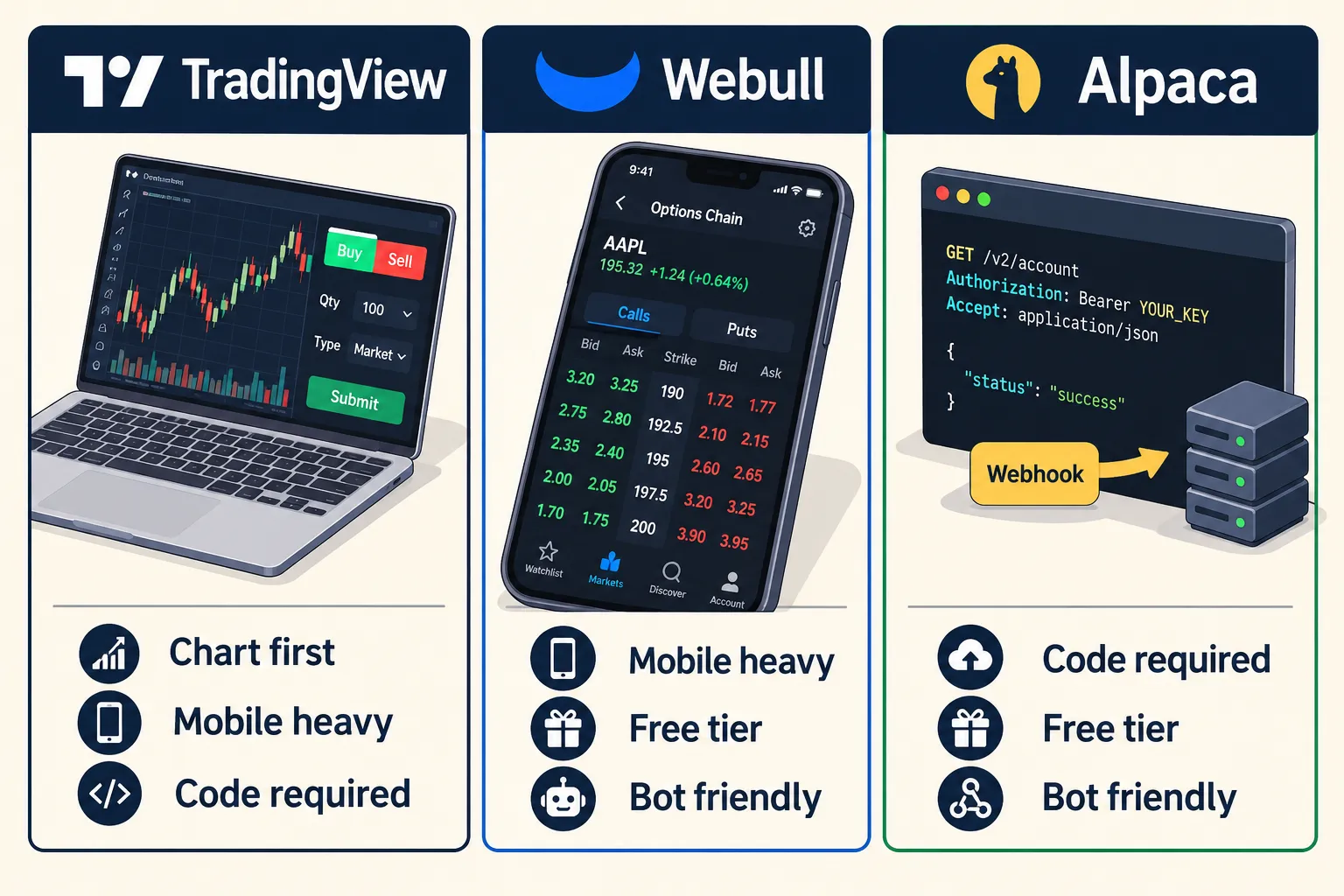
TradingView wins for chart-driven manual practice, Alpaca wins for anyone testing code, Webull suits mobile and options rehearsal, and thinkorswim suits traders who will go live at Schwab. Pick by what you are actually rehearsing.
| TradingView | Alpaca | Thinkorswim paperMoney | Webull | |
|---|---|---|---|---|
| Cost | Free for all users | Free | Free for Schwab clients | Free |
| Starting balance | Not published on the pages we checked (2026) | $100,000 default | $100,000 per account type | See our Webull guide |
| Bot connection | Alerts plus webhook to an outside service | Native REST API at paper-api.alpaca.markets | No API access on Schwab’s paperMoney pages | See our Webull guide |
| Market data | Live data across stocks, forex, crypto and futures | IEX data only for paper-only accounts | 20 minute default delay in Schwab’s tutorial | Platform data |
| Fill model | Simulated, commission off by default | Fills at the NBBO when marketable; random partial fills 10% of the time | Simulated executions and costs | Simulated |
| Best for | Manual setup practice on strong charts | Code-based strategy and bot testing | Options traders who will trade at Schwab | Mobile-first rehearsal |
Alpaca is the most transparent about what it leaves out. Its paper trading documentation says the paper account is created with a $100,000 balance by default, paper-only account holders receive IEX market data only, orders fill only when marketable, and eligible orders get random partial fills 10% of the time. It does not account for market impact, slippage due to latency, queue position for resting limit orders, price improvement, regulatory fees or dividends. Our Alpaca API for beginners guide walks through keys and a first paper order.
If you already bank with Schwab, thinkorswim paperMoney gives you $100,000 of virtual buying power across equities, options, futures and forex. Our thinkorswim paper trading guide covers its delay and its lack of bot access. For Webull’s simulator and Interactive Brokers’ paper account, see our Webull paper trading guide and Interactive Brokers paper trading guide.
Choose TradingView if you trade by hand from charts. Choose Alpaca if you write code and want a paper API that mirrors the live one. Choose thinkorswim if options depth and a Schwab account are the plan. Choose Webull if you want a simple mobile simulator. For a fuller look at the charting side, see our TradingView tool profile.
How Do You Test a Bot With TradingView Paper Trading Before Real Money?
Route the signal end to end, log every timestamp, change one variable at a time, and run it for at least 20 live sessions. The goal of a bot paper test is not profit. It is proving the plumbing does not leak.
The signal path:
- A Pine Script strategy or indicator produces a condition on the chart.
- An alert fires on that condition, with a webhook URL attached.
- An outside execution service or your own code receives the webhook, parses it and submits an order.
- A paper broker accepts, rejects or partially fills it. Use a paper account at the broker, such as Alpaca’s paper API, so the full chain is tested.
Four hops, four places to break. Log at each stage:
- Alert timestamp from TradingView’s alert log.
- Webhook received timestamp from your service.
- Order submitted timestamp.
- Fill timestamp and fill price.
- Price drift: the difference between the price when the alert fired and the price you got.
That drift number is the test. If average drift is bigger than your average edge per trade, the strategy is dead on arrival no matter how good the backtest looked.
Run it for 20 trading sessions minimum. Sessions, not calendar days, and include at least one earnings week and one choppy stretch, because those conditions expose fragile logic.
Change one thing at a time. New stop multiple? Run it clean. New entry filter? Separate run. Change two variables at once and you will never know which one did the work.
Common mistake: testing only during a trending market, declaring victory, then going live into a range.
Interactive: Paper Result Reality Check
Plug in your own log totals to see what is left after costs.
Paper Result Reality Check
Subtract realistic costs from your paper log before you believe it.
When Should You Move From Paper Trading to a Small Live Account?
Go live when you have 30 or more logged trades on one setup, costs subtracted, rules followed on at least 27 of 30, and a documented worst drawdown you can live through at real size. Miss any one and stay on paper.
- Sample size: 30 trades minimum on one defined setup, more if you trade often and your edge per trade is thin.
- Costs counted: commission switched on in the simulator, plus a slippage haircut on every entry and exit.
- Rules followed: your rule-followed column reads yes at least 27 times out of 30. Below that, the sample measures improvisation.
- Drawdown known: you can state your worst losing streak in R and you are ready to sit through it with real money.
- Hard size cap at first: risk no more than 0.25% of live capital per trade for the first 20 live trades. It feels pointless. The point is learning what your hands do.
Expect live numbers to come in worse than paper. Plan for the gap instead of being offended by it.
Frequently Asked Questions
Is TradingView paper trading free?
Yes. TradingView says Paper Trading is available globally for all users with no deposits, broker fees or hidden charges. You do not need a paid plan to open a simulated account.
How do I add paper trading to TradingView?
Open Supercharts, open the Trade button or the Trading Panel, choose Paper Trading from the broker list and click Connect. TradingView paper trading then shows tabs for positions, orders, account summary and history.
How much money do you start with in TradingView paper trading?
TradingView’s own support pages we checked do not publish a starting balance. Third-party walkthroughs commonly show $100,000. Check the Account Summary tab in your panel, and size practice trades to the account you will really fund.
Does TradingView paper trading include fees and slippage?
Commission is inactive by default, and you can switch on a per-contract fee for futures and options in account settings. There is no built-in slippage setting for simulated orders, so subtract a slippage haircut from each trade in your log before judging results.
Why can I not trade some symbols in TradingView paper trading?
TradingView blocks three groups in the simulator: its own synthetic symbols marked with a purple label, indices such as NASDAQ:NDX, and Indian NSE symbols because of NSE data policy. Use an instrument that tracks the index instead.
Can I connect a trading bot to TradingView paper trading?
Not directly. TradingView generates signals and alerts but does not run a bot into your paper account. Send a webhook alert to an outside service or your own code, and point it at a broker paper account such as Alpaca’s paper API.
Is Webull or TradingView better for paper trading?
TradingView is better for chart-based manual practice and Pine Script signals. Webull suits traders who want a simple mobile simulator. For code-based bot testing, Alpaca’s paper API is the better fit than either.
Our Take
TradingView paper trading is the cheapest execution practice in retail trading, and most people waste it by treating the simulated balance as a score. Turn commissions on, set leverage to what your broker will really give you, size to your real account, and run 30 trades on one setup. Do that and the simulator tells you something true about your discipline, even though it tells you little about your future profits. For code, pair TradingView’s alerts with a broker paper API such as Alpaca’s and measure the drift between alert and fill. The platform matters less than the log.
Related: if Schwab is where you will go live, read our thinkorswim review on AI Stock Picker App before you pick a simulator.
Built something and not sure it holds up outside your own test? Send us the bot and get a second set of eyes on the fills before your capital finds out the hard way.
Stay alpha.
The FullStack Alpha research desk tests AI trading bots on paper and live accounts. Reviewed and edited by Jay Rocco, Founder and Editor.
