

The FullStack Alpha research desk tests AI trading bots on paper and live accounts. Reviewed and edited by Jay Rocco, Founder and Editor.
By FullStack Alpha Editorial Team | Reviewed by Jay Rocco, Chief Editor
Moving a Python trading bot off your laptop and onto a free cloud server takes about an hour: spin up an always-free virtual machine (Oracle Cloud and Google Cloud both offer one), install Python, copy your script over, store your API keys as environment variables instead of inside the code, and register the bot as a system service so it restarts automatically after a reboot. A process manager plus a market-hours schedule keeps it running around the clock without you babysitting it. The first safety step, before any of that: run it on paper trading keys with fake money until it survives at least a few full weeks of live market data. A bot that crashes at 9:31 a.m. on a laptop lid-close is a bad bot. A bot that crashes on a server at least leaves a log.
What You Should Know
- Oracle Cloud cut its Always Free Arm allocation on June 15, 2026. The current documented allowance is 1,500 OCPU-hours and 9,000 GB-hours per month (roughly 2 OCPUs and 12 GB RAM total), with a 47 GB minimum boot volume.
- Google Cloud’s free tier includes one non-preemptible e2-micro VM per month in Oregon, Iowa, or South Carolina, plus 30 GB-months of standard persistent disk and 1 GB of outbound North America transfer.
- AWS has moved new accounts onto a credit-based free plan. New customers get up to $200 in credits and six months, whichever runs out first, per aws.amazon.com/free. That’s a trial, not permanent hosting.
- Oracle states its free tier carries no SLA, and documents reclaiming idle instances when CPU, network, and memory utilization stay under 20% for seven days.
- The SEC’s Fiscal Year 2026 Examination Priorities, published September 2026, names automated investment tools, AI technologies, and trading algorithms as examination areas. That’s aimed at firms, not your hobby script, but it tells you where the regulatory eye is pointed.
Why Should a Python Trading Bot Run on a Server and Not a Laptop?
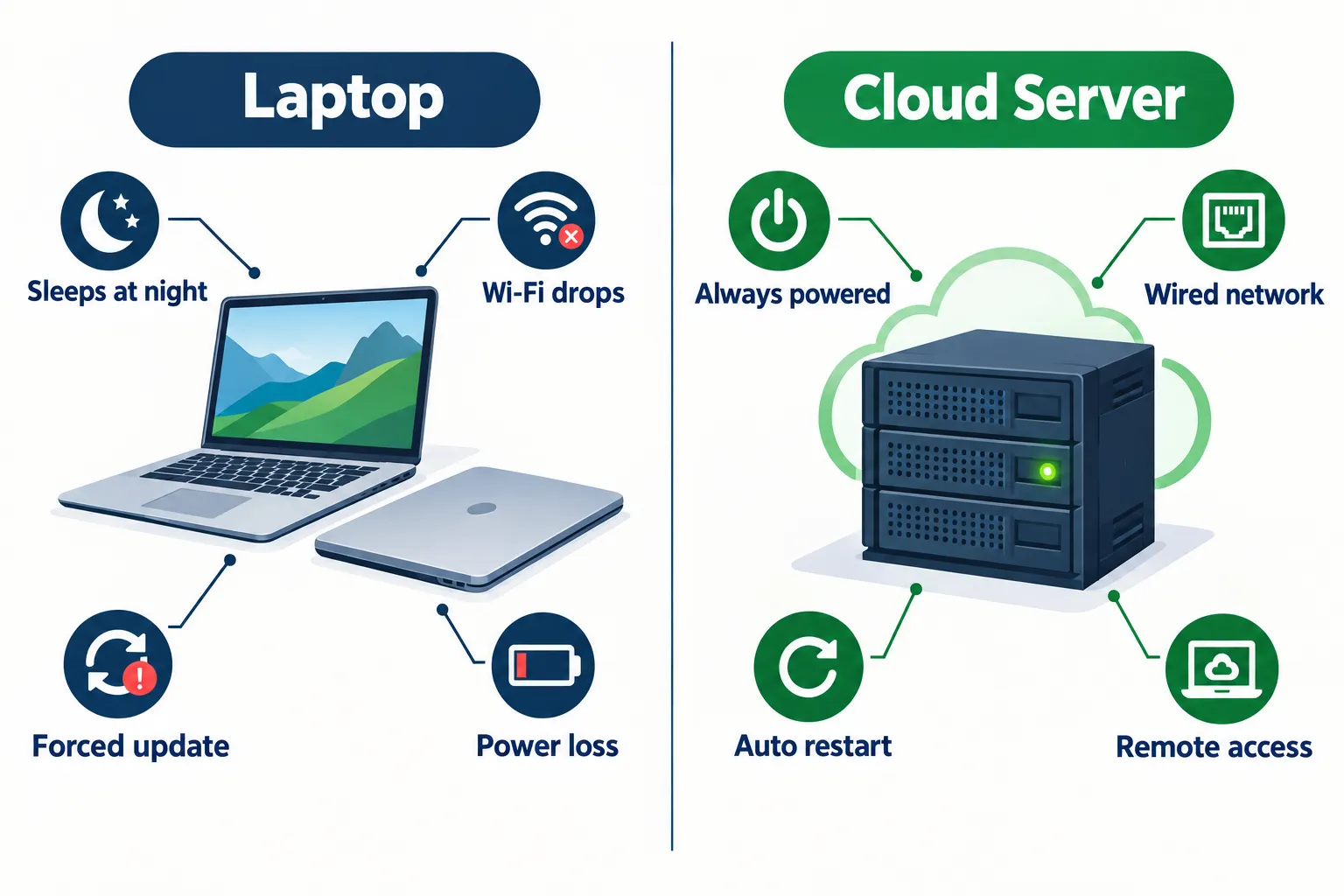
A laptop is designed to stop. A server is designed not to. Those two sentences explain the entire article.
Your laptop sleeps when you shut the lid. It drops Wi-Fi when you walk to the kitchen. Windows picks a Tuesday to install an update and restart without asking. The power cable gets kicked loose. Each of those is a normal, boring event on a personal computer, and each of them kills a running Python trading bot mid-position.
Here’s what that costs in practice. Your bot opens a long at 10:14 a.m. with a stop loss it manages in code, not on the broker’s side. Your machine sleeps at 10:40. The stop never fires because nothing is running to fire it. You come back at 2 p.m. to a position that’s down 6% with no exit plan executing. That’s not a strategy failure. That’s an infrastructure failure, and it’s completely preventable.
A server removes the four things that interrupt your bot: sleep, updates, flaky Wi-Fi, and power loss.
The other advantage people underrate: a cloud server sits in a data center with wired, redundant internet and a static IP address. Some brokers let you whitelist an IP for API access. You can’t whitelist a coffee shop.
There’s also the discipline angle. When a bot lives on a server, you stop poking at it. No more pausing the script to “just check something,” no more manual overrides at 11 a.m. because the tape looks choppy. The code runs, the log records, and you review it after the close. Systems over hacks.
Decision rule: if your bot holds positions intraday and manages its own exits in code, it belongs on a server today. If it runs once per day at 9:35 a.m. and places bracket orders the broker enforces server-side, a laptop is survivable but still sloppy.
Which Free Cloud Tiers Can Host a Python Trading Bot?
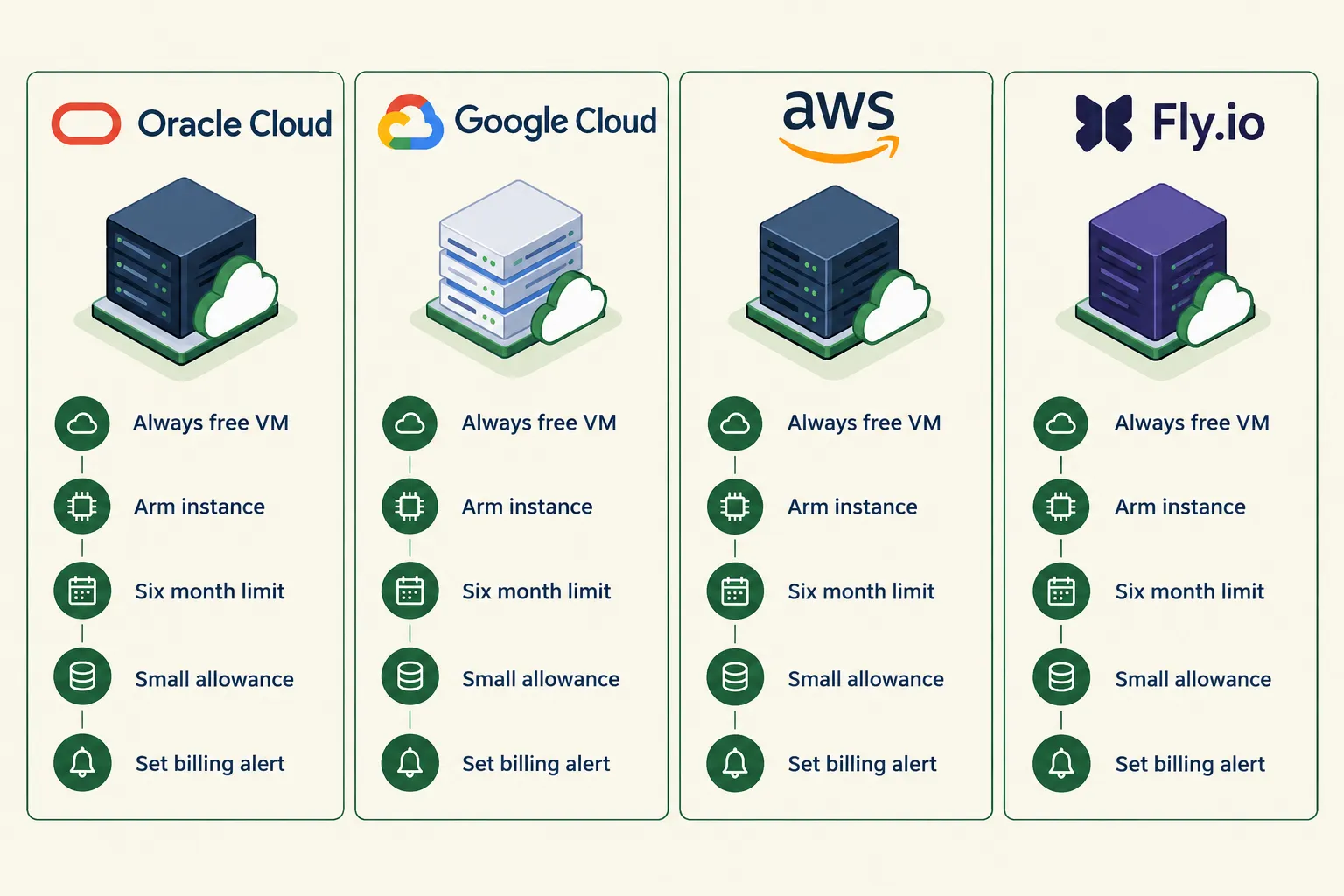
Oracle Cloud currently offers the most generous permanent free virtual machine of the major providers, Google Cloud offers one small always-free e2-micro instance, and AWS has effectively moved to a six-month credit-based trial for new accounts. All three can run a modest Python script. Only two of them will still be free a year from now.
Free tier terms change, often quietly. Check each provider’s own free tier page before you commit, and set a billing alert on day one.
| Provider | Free tier | Limits | The catch | Date checked |
|---|---|---|---|---|
| Oracle Cloud | Always Free Ampere A1 (Arm) instances, plus up to two AMD micro VMs | 1,500 OCPU-hours and 9,000 GB-hours/month (about 2 OCPUs, 12 GB RAM total), 47 GB minimum boot volume, 200 GB total block storage | No SLA. Instances can be reclaimed if CPU, network and memory stay under 20% for seven days. Arm capacity is frequently unavailable in popular regions | Oct 23, 2026 |
| Google Cloud | One non-preemptible e2-micro VM per month | Oregon, Iowa or South Carolina only. 30 GB-months standard persistent disk, 1 GB/month outbound from North America | Free hours are combined across regions, so running two eligible instances doesn’t double the allowance. Tiny RAM | Oct 23, 2026 |
| AWS | Free plan for accounts created on or after July 15, 2025 | Up to $200 in credits, six months or until credits run out | Not permanent. An AWS trading bot setup becomes a paid EC2 bill at month seven. Fine for testing, bad for indefinite hosting | Oct 23, 2026 |
| Fly.io / similar PaaS | Small free allowances on some plans, terms vary by account | Varies | Policies on this tier of provider change frequently. Check the official page before relying on it | Oct 23, 2026 |
Picking between them
- Choose Oracle Cloud if you want a permanently free box with enough RAM to run pandas, a database, and a dashboard at the same time. The tradeoff is capacity hunting. Arm instances in busy regions go out of stock and you may need to retry or pick a quieter region.
- Choose Google Cloud if you want reliability and a cleaner console, and your bot is lightweight. An e2-micro has very little memory. A script that polls an API every minute and places orders fits. One that backtests 5,000 symbols does not.
- Choose AWS if you’re testing for a few months and already know the ecosystem. Just put a calendar reminder at month five.
Common mistake: people pick the provider with the biggest free box, then build a bot that needs it. Build the bot small first. Most trading bot hosting for a personal strategy needs less compute than a browser tab with YouTube open.
Edge case worth knowing: Oracle’s idle-reclamation rule matters for bots that sleep overnight and on weekends. A process that genuinely does nothing for 120 hours a week can read as under-utilized. Give the machine honest work to do between sessions: pull end-of-day bars, rotate logs, run a health check, update your watchlist. Don’t fake load with a spin loop. Do real work you’d want anyway.
How Do You Deploy a Python Trading Bot Step by Step?
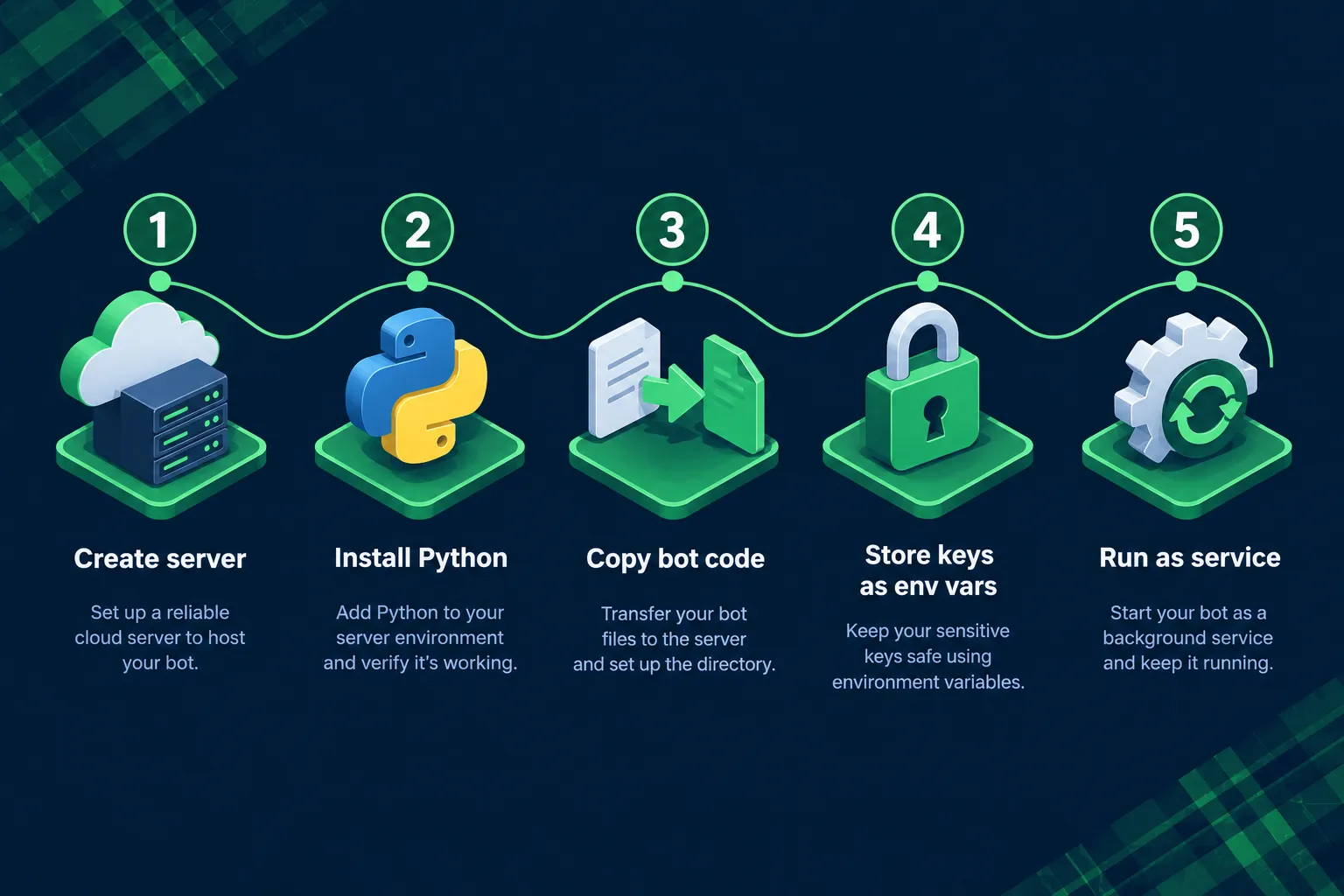
Deployment is five moves: create the server, install Python, copy the code, store your keys as environment variables, and register the bot as a service that restarts on reboot. Budget an hour the first time, fifteen minutes every time after.
Everything below is described in words rather than code blocks, because the exact commands differ slightly between Ubuntu, Oracle Linux, and Debian images. Use your provider’s documentation for the exact syntax.
Step 1: Create the server
In your provider’s console, create a new compute instance. Pick a standard Ubuntu LTS image unless you have a reason not to. Choose the region closest to your broker’s API endpoints if you know them, otherwise the nearest region to you. Download the SSH private key file the console offers and store it somewhere you won’t lose it, because most providers will not show it again.
What you should see: an instance in “Running” state with a public IP address listed.
Common errors: “Out of capacity” on Oracle Arm instances is the single most reported problem. Try a different availability domain, a different region, or retry later. Also, if you skip downloading the key, you cannot log in and will need to rebuild the instance.
Step 2: Connect and install Python
SSH into the box using the IP address, the default username for your image (Ubuntu images usually use “ubuntu”, Oracle Linux usually “opc”), and the private key you downloaded. Update the package list and upgrade packages first. Then confirm which Python version is installed, since most modern Linux images ship with Python 3 already.
Install the package manager for Python and the virtual environment module. Create a virtual environment in your project folder and activate it. A virtual environment keeps your bot’s package versions separate from anything else on the machine, which matters the first time a library update breaks something.
What you should see: the Python version printed when you check it, and your shell prompt prefixed with the environment name once activated.
Common errors: installing packages globally without a virtual environment, then hitting a permissions error or an “externally managed environment” warning on newer Ubuntu images. Use the virtual environment. It solves both.
Step 3: Copy the bot code over
Two sane options. If your code lives in a private Git repository, install Git on the server and clone it. That’s the better route, because updating later is one pull command. If your code is only on your laptop, use a secure copy tool over SSH to transfer the project folder.
Then install your dependencies from the requirements file inside the activated virtual environment. For a Python trading bot built around a broker SDK, that usually means the broker’s Python package plus pandas, requests, and whatever indicators library you use.
What you should see: your project files listed in the home directory, and a successful install of every package with no red error text.
Common errors: forgetting to generate a requirements file before you left your laptop. Generate it from your local environment first. Also, Arm instances occasionally lack a prebuilt wheel for a numeric package and will try to compile from source, which fails without build tools installed. Install the build essentials package and retry.
Step 4: Store API keys as environment variables
Never paste keys into the script. Create a file outside your Git repository that holds the key and secret as environment variables, then load it at runtime with a library like python-dotenv, or export the variables in the service definition itself.
Point the bot at paper trading endpoints first. With Alpaca, that means your paper keys and the paper API base URL, which is a different host from the live one. Our walkthrough on generating and storing Alpaca API keys covers where to find each value and which one is which.
What you should see: the bot connects, prints your paper account equity, and places no real orders.
Common errors: mixing live keys with the paper URL or vice versa. The API will reject the pairing with an authentication error, which confuses people into regenerating keys they didn’t need to regenerate. Check the base URL before the keys.
Step 5: Run it as a service that survives reboot
Running your script in an SSH session works until you close the terminal. Then it dies. Register the bot with the system’s service manager instead (systemd on most Linux images). Write a short unit file that names the working directory, the path to the Python binary inside your virtual environment, the script to run, the environment file to load, and a restart policy of “always” with a short restart delay.
Enable the service so it starts on boot, then start it.
What you should see: a service status of “active (running)” and your bot’s first log lines appearing in the system journal.
Common errors: using a relative path to Python or to the script. The service manager doesn’t inherit your shell’s context, so every path must be absolute. Second most common: forgetting to enable the service, so it runs now but vanishes after the next reboot.
That’s how to deploy a trading bot end to end. If you’re still at the code stage, our guide to building a trading bot from scratch covers the strategy logic that comes before any of this.
How Do You Keep a Trading Bot Running 24/7?
Four pieces: a process manager that restarts the bot when it dies, a schedule that respects market hours, a health check that proves it’s alive, and automatic restart on reboot. Get all four and your bot runs unattended for months.
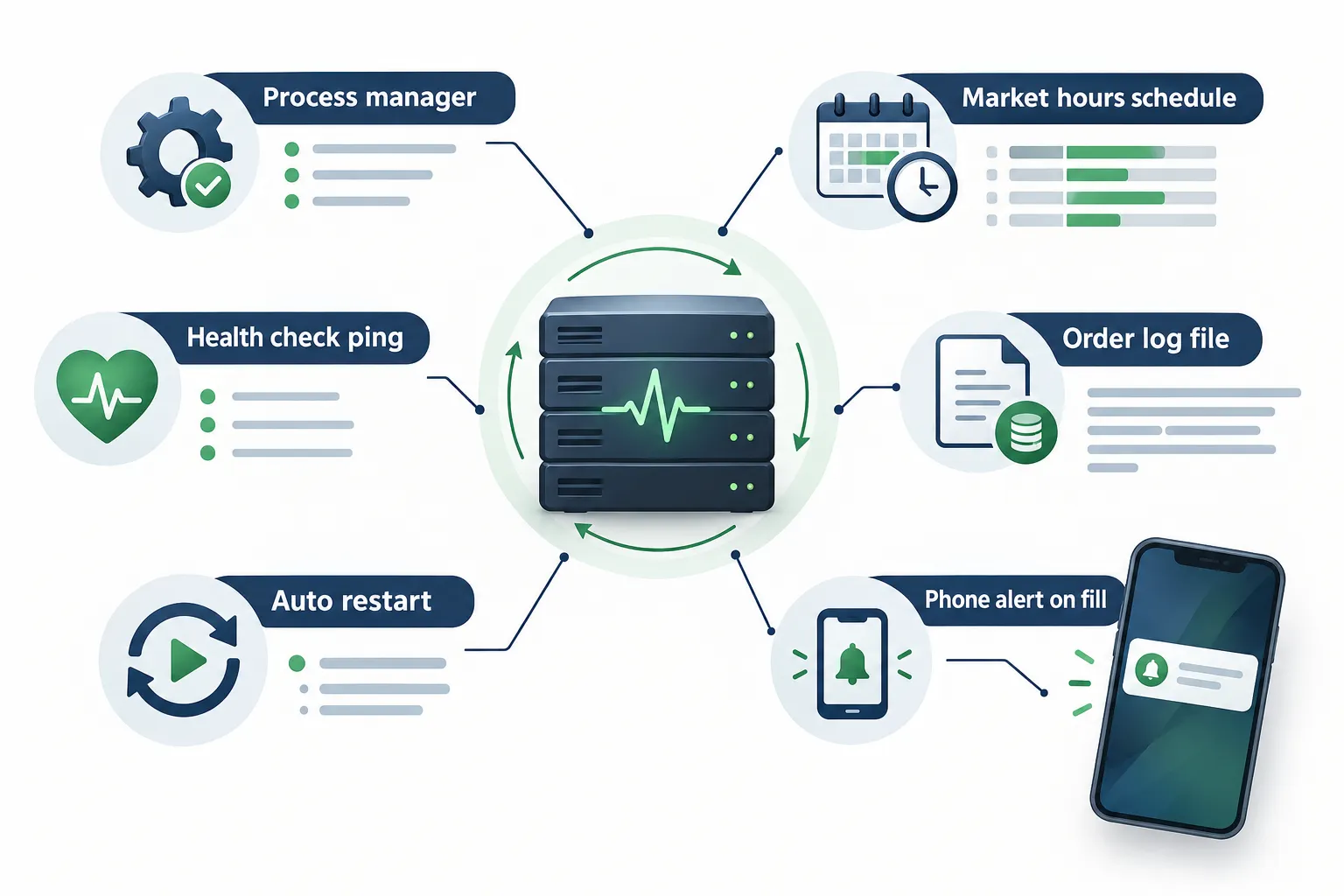
The process manager. systemd is already on the machine and it’s enough. Set the restart policy to always, add a restart delay of a few seconds, and add a limit so a bot in a crash loop doesn’t hammer your broker’s API 400 times a minute. Some people prefer supervisor or PM2. The choice matters less than actually configuring one.
The market-hours schedule. A bot that tries to place orders at 3 a.m. gets rejected, logs errors, and teaches you to ignore your own error log. Build a trading calendar check into the script itself rather than relying on cron alone. Most broker APIs expose a market clock endpoint that tells you whether the market is open right now, when it next opens, and when it next closes. Query it, and sleep until the next open if the answer is closed. That handles holidays automatically, which a hardcoded 9:30-to-4:00 schedule never will.
If your strategy touches extended hours, read up on how 24-hour and overnight sessions work on Robinhood before you let a bot trade in them. Thin liquidity and wide spreads at 2 a.m. will eat a market order alive.
The health check. A bot can be “running” and completely stuck. The process exists, the service says active, and the main loop is hanging on a network call that never times out. Write a heartbeat: every loop, update a timestamp file or ping a free uptime monitoring service. If the heartbeat goes stale for more than a few minutes during market hours, you get an alert. That’s the difference between knowing the process is alive and knowing the bot is working.
Automatic restart on reboot. Cloud providers reboot hosts for maintenance. Enable your service so it comes back by itself, then actually test it. Reboot the server deliberately on a Saturday and confirm the bot is running again two minutes later. Most people skip this test and find out during earnings season.
Common mistake: setting restart-always on a bot with no idempotency check. The service restarts, the bot wakes up, re-reads its signal, and places the same order again on top of the position it already has. Before placing any order, query your current positions and open orders from the broker. Trade against reality, not against the state your script assumed.
That’s how to run a trading bot 24/7 without checking on it every hour. More patterns in our algorithmic trading with Python walkthrough.
How Do You Add Logging and Alerts?
Log every decision the bot makes, write it to a rotating file on disk, and push an alert to your phone on two events: any unhandled error, and every single fill. A silent bot is an unaccountable bot.
What to log per order
At minimum, one structured line per order containing:
- Timestamp with timezone (use UTC, convert for reading)
- Symbol
- Side and order type
- Quantity and the position size calculation that produced it
- Intended entry price and the price at submission
- The signal or rule that triggered it
- Broker order ID returned
- Fill price, fill quantity, and fill timestamp when it comes back
- Account equity before and after
That last one sounds excessive until you’re reconciling a bad week and need to know whether the bot was sizing off stale equity.
Also log the non-events. “Signal fired on NVDA, skipped: already at max position count” is one of the most useful lines you’ll ever write, because it explains the trades you didn’t take.
Where logs live
Use Python’s built-in logging module with a rotating file handler, capped at something like 10 MB per file with five backups. That keeps disk usage bounded, which matters on a Google Cloud e2-micro with a 30 GB disk allowance. Write them to a dedicated logs directory in your project, not to the home folder.
Keep two separate streams: a human-readable text log for debugging, and a structured CSV or JSON line file for every trade. The second one is what you load into pandas on Sunday to actually review performance.
Alerts that reach you
Two channels cover almost everyone:
- A messaging bot. Telegram and Discord both have free bot APIs that are a few lines of Python. One HTTP request per message. Send fills, errors, daily start, daily summary.
- Email via SMTP or a transactional email service. Slower, better for daily summaries than for real-time fills.
Alert on: unhandled exceptions, repeated API errors, authentication failures, a position size that exceeds your configured limit, a stale heartbeat, and every fill. Do not alert on: every loop iteration, every price tick, every “no signal” check. Alert fatigue is real, and a phone that buzzes 200 times a day gets muted, which defeats the purpose.
Quick example of a good fill alert: “FILLED BUY 42 AAPL @ 231.17 | order 7f3a | equity 10,412 | rule: 20-day breakout, vol > 1.5x avg.” One line, everything you need, no app to open.
Edge case: if your alert code itself throws an error inside your exception handler, you lose both the bot and the warning. Wrap alert sending in its own try/except that fails quietly to the log file.
How Do You Keep API Keys Safe on a Cloud Server?
Use paper keys until the bot has proven itself, keep keys out of your code and out of Git, lock the server’s firewall down to SSH from your own IP, and turn on two-factor authentication for your cloud account. Those four cover most of the realistic risk.
Paper keys first, always. Alpaca and most modern brokers issue a separate key pair for paper trading that points at a different API host and can’t touch real money. There is no downside to running paper for a month. If the strategy is good, it’ll still be good in November. If the deployment has a bug, you find it with fake money. Our Alpaca API beginner’s guide covers the paper-to-live switch, and the Alpaca tool page has the scored breakdown.
No keys in code. Ever. Not in the script, not in a config file you commit, not in a notebook you push to GitHub. Use environment variables loaded from a file listed in your .gitignore, with file permissions set so only your user can read it. Public GitHub repos get scraped for exposed credentials within minutes, not days.
Firewall the box. Cloud providers give you a security group or network rule set. Default behavior should be: inbound SSH on port 22 from your IP address only, everything else closed. Your bot makes outbound calls to the broker. It does not need to accept inbound connections from the internet. If you add a web dashboard later, put it behind authentication and a non-standard port, or better, tunnel to it over SSH instead of exposing it.
Two-factor on the cloud account and the broker. Someone who gets into your Oracle or Google Cloud console can read your environment file directly. The cloud account is as sensitive as the brokerage account.
Two more worth doing:
- Disable password-based SSH login entirely and use keys only. Automated scanners try password logins on every public IP continuously.
- Scope your API keys to the minimum permission the bot needs. If your broker lets you issue a key that can trade but not withdraw funds, use that one.
Common mistake: generating live keys “just to have them ready” and storing them on the server next to the paper keys. If they’re on the box, a bug can use them. Keep live keys off the machine entirely until the day you switch.
What Did the 24/7 Bot Videos Show and Skip?
Two YouTube videos circulate heavily on this topic. Both demonstrate real deployment steps. Both compress or skip the parts that actually cause problems later. Treat everything in them as a claim to verify, not a result to copy.
https://www.youtube.com/watch?v=K26jC0z6n2w
| Source | The claim | What was shown | What was skipped |
|---|---|---|---|
| Nexus Fission | A Python trading bot can be deployed to a free cloud server and left running around the clock | The provisioning flow and getting a script running on a remote box | The reliability layer: what happens on a market holiday, how the bot behaves on a mid-session API timeout, and whether the free tier survives past the video’s publish date |
| ThinkTrade | A trading bot can be built and automated end to end | The build-and-run demo sequence | Live-money risk controls, position sizing against account equity, reconciliation after a restart, and audited results over a full market cycle |
https://www.youtube.com/watch?v=87q_P6iq9mk
The pattern in almost every deployment video: the happy path is twelve minutes long and the failure path is zero minutes long. No one films the Tuesday the Arm instance was out of capacity, or the morning the bot double-entered a position after a restart. That’s not dishonesty, it’s just editing. Your job is to assume the missing twenty hours exist and build for them.
What to do with a video like this: use it for the console navigation, which is genuinely useful and hard to describe in text. Then verify every number against the provider’s own free tier page, because a video from six months ago may be describing a tier that’s since been cut. Oracle’s June 15, 2026 reduction broke a lot of older tutorials.
Nothing here says these videos are bad. They’re a starting point. A starting point is not a system.
What Breaks When a Bot Runs Unattended?
Five things, in rough order of how often they bite people: market holidays, expired tokens, API changes, free tier limits turning into bills, and extended-hours sessions behaving differently from regular hours.
Market holidays. Example: the bot runs its normal pre-open routine on a Thanksgiving half-day, places an order at 1:05 p.m. expecting two more hours of liquidity, and gets a rejection or a terrible fill into the close. Fix: query the broker’s market calendar endpoint every morning instead of hardcoding hours.
Token expiry. Example: an OAuth-based broker connection issues a refresh token that expires after 90 days of use or inactivity. The bot runs fine for three months, then every call returns 401 at 9:30 a.m. on a Monday. Fix: handle auth errors explicitly, alert loudly, and note the expiry date in your calendar.
API changes. Example: a broker deprecates a v1 endpoint, the response shape changes, and your code that reads a field by name gets a KeyError mid-loop. Fix: subscribe to the broker’s developer changelog, and wrap response parsing so a missing field logs and skips rather than crashing the process.
Free tier limits and surprise bills. Example: your bot pulls minute bars for 300 symbols and blows past Google Cloud’s 1 GB/month free outbound transfer allowance in week two, or an AWS account hits month seven after the credits expire. Fix: set a billing alert at a dollar amount you’d notice on day one, before you deploy anything.
Extended-hours sessions. Example: a strategy tuned on regular-hours data fires a market order at 4:15 p.m. into a spread four times wider than normal and fills 1.2% away from the last print. Fix: limit orders only outside regular hours, or block the bot from trading outside them at all. Our broker platform reviews cover which venues handle extended-hours routing well.
One more, free of charge: disk fills up. Unrotated logs on a 30 GB disk will eventually take the machine down in a way that looks mysterious. Rotate your logs.
Can You Really Make Money With a Python Trading Bot?
Some people do. Most don’t, and automation doesn’t change the odds of a bad strategy, it just executes the bad strategy faster and more consistently. A bot is a delivery mechanism, not an edge.
What automation genuinely gives you:
- Consistency. It takes the setup every time, including the ones you’d have talked yourself out of.
- No revenge trading. The bot doesn’t get angry after a loss and double down.
- Speed. It acts on the signal in milliseconds, not after you finish reading a Reddit thread about it.
- A record. Every decision is logged, so you can actually measure whether the rules work.
What it doesn’t give you: a strategy. If your rules lose money when you trade them by hand, they’ll lose money faster when a script trades them. Automating a negative expectancy is just efficient losing.
The honest sequence: define rules, backtest them against several years including a bad one, paper trade them live for weeks to catch slippage and fills the backtest lied about, then go live small. People skip steps two and three constantly, which is why so many bots die in month one.
Our breakdown of which AI trading bots are legit versus scams covers the same logic applied to tools you buy instead of build. The tell is identical: can you see the method and an honest record, or just a results screenshot?
Play stupid games, win stupid prizes. The stupid game here is going live with real size on code you haven’t watched run for a month.
Python vs Other Languages for Building a Trading Bot
Python wins for retail traders on libraries, broker SDK support, and speed of development. C++ and Rust win on raw execution latency. For any strategy holding longer than a few seconds, the latency difference doesn’t matter and Python’s ecosystem does.
| Language | Best for | The tradeoff |
|---|---|---|
| Python | Retail bots, swing and daily strategies, research and backtesting | Slower raw execution. Irrelevant above the millisecond scale |
| C++ / Rust | High-frequency market making, latency-sensitive arbitrage | Far longer development time, smaller library ecosystem for retail brokers |
| JavaScript / Node | Bots tightly coupled to web dashboards | Weaker numerical and data-analysis library support than Python |
| Pine Script | Strategy prototyping on charts | Lives inside TradingView. Limited true automation and no arbitrary API calls |
Decision rule: if you’re asking which language, the answer is Python. The traders who need C++ already know they need it and are not reading a cloud deployment guide. Pine Script is worth knowing for fast prototyping before you write any Python, and you can compare charting platforms in our TrendSpider vs TradingView breakdown.
What APIs Do You Need for a Python Trading Bot?
Three, minimum: a broker API that accepts orders, a market data feed, and a notification channel. Many brokers bundle the first two.
- Broker/execution API. Alpaca is the common starting point for US equities because it offers a well-documented Python SDK and a true paper trading environment with a separate key pair and endpoint. Interactive Brokers, Tradier, and others also expose APIs with different complexity and cost profiles.
- Market data. Your broker’s feed is usually fine for quotes and bars. Check whether you’re getting consolidated data or a single-venue feed, because they differ on price and timing. Polygon and similar vendors sell deeper historical data if your backtest needs it.
- Notifications. Telegram or Discord bot API, or SMTP email. Free, and a few lines of code.
Optional but useful: a calendar or holiday API if your broker doesn’t expose a market clock endpoint, and a news or earnings feed if your rules need to avoid trading a name into an earnings release.
Common mistake: backtesting on free daily data, then running live on minute data from a different source, and wondering why results diverged. Backtest and trade on the same data source where you possibly can.
Do You Need Coding Skills to Set Up a Trading Bot?
To build and deploy your own Python trading bot, yes, you need working Python and basic Linux comfort. To use a bot, no. There’s a large category of no-code and low-code automation platforms that do the execution for you.
What “working Python” actually means for this project: functions, loops, dictionaries, reading API docs, handling exceptions, and using pandas for data. That’s maybe 40 hours of focused learning, not a computer science degree. The Linux side is narrower still: SSH in, move files, edit a text file, start a service.
AI assistants have genuinely compressed the learning curve here. Claude and similar models write serviceable boilerplate for API connections, order placement, and logging. What they can’t do is tell you whether your strategy has an edge, and they will confidently produce code with subtle bugs around position sizing and order state. Read every line before you run it. Our Claude trading bot walkthrough covers where AI-written code helps and where it quietly hurts.
If you don’t want to code at all: use a hosted automation platform instead. Atomik Trading and similar services connect signals to broker execution without you writing Python, and the fully automated AI trading bots directory lists the field by category.
What Are the Risks of Automated Trading Bots?
The biggest risk is not a server crash, it’s a working bot executing a flawed rule perfectly, at size, while you sleep. Infrastructure failures are visible. Logic failures compound quietly.
Ranked by what actually hurts retail traders:
- Runaway orders. A loop bug that submits the same order repeatedly. Hard-cap orders per day and per symbol in code, and check existing positions before every submission.
- Position sizing errors. Off-by-one-decimal mistakes that turn a 2% risk into 20%. Compute size from account equity, then assert it’s below a hard ceiling before sending.
- Overfitting. A backtest that looks beautiful because you tuned it to past data. It’ll break on new data.
- Slippage and spread. Backtests fill at the close price. Reality fills somewhere else, especially in low float names and choppy tape.
- No kill switch. Traditional quantitative desks kept a human who could pull the plug in real time, and newer AI-driven systems increasingly push that human further from the loop. Public SEC commentary on AI in trading is worth reading on sec.gov rather than paraphrased here. The point stands for your bot: build a single command that flattens all positions and stops the service, and test it.
- Regulatory scope. ESMA’s February 2026 supervisory briefing on algorithmic trading in the EU takes a broad view of what counts as algorithmic trading: software determining any single order parameter, including timing, price, or quantity, can qualify even with a human involved. Individual retail traders are generally outside firm-level obligations, but if you’re in the EU and trading at scale or for others, check your local rules.
The non-negotiable risk control: a daily loss limit enforced in code. If the account drops a set percentage in a day, the bot flattens, stops trading, and alerts you. Discipline beats prediction, and a hard-coded limit is discipline that can’t be talked out of.
How Do You Monitor If Your Bot Is Actually Making Trades?
Check three sources daily and reconcile them against each other: your bot’s trade log, your broker’s order history, and your account equity curve. If any two disagree, something is broken.
The daily routine takes four minutes after the close:
- Open the structured trade log and count the orders the bot thinks it placed.
- Open the broker’s order history for the same day and count the orders that actually exist.
- Compare fill prices on three random orders. Big gaps mean a slippage problem, not a logging problem.
- Confirm current positions in the broker match what the bot believes it holds.
Build a daily summary alert. One message at 4:15 p.m.: orders placed, orders filled, current positions, day P/L, and any errors logged. If that message doesn’t arrive, that’s your signal to go look.
The classic silent failure: the bot runs, logs “no signal” all day, and nothing is wrong except that a data field changed and your indicator has been returning NaN for a week. The process is healthy, the output is garbage. Fix: log the computed indicator values, not just the decision. Then you’d see the NaN.
For judging whether a strategy’s output is worth acting on at all, our free AI stock screeners roundup covers the signal sources worth feeding into a bot in the first place.
Can You Run Multiple Python Bots on the Same Server?
Yes, as long as the machine has the memory and each bot runs as its own service with its own virtual environment, log file, and strategy state. Three to five light bots on an Oracle Always Free Arm instance is realistic. On a Google Cloud e2-micro, one or two.
How to do it cleanly:
- One directory per bot, one virtual environment per bot, one systemd service per bot with a distinct name.
- Separate environment files, separate log files, separate alert prefixes so you know which bot sent the message.
- Separate broker sub-accounts if your broker supports them. If not, give each bot its own symbol universe so they can’t fight over the same position.
The failure mode no one expects: two bots trading the same ticker. Bot A goes long AAPL, Bot B’s rule sees a short signal and sells, which closes A’s position instead of opening a short. Now both bots have wrong state. Partition by symbol or by account. Don’t partition by hope.
Resource watch: check memory usage after a week. A pandas-heavy bot that leaks memory will eventually get killed by the OS, and on a shared box it might take a neighbor down with it. Set a memory limit in the service definition so the OS kills the offender, not the innocent process.
What Happens If Your Free Cloud Server Goes Offline?
Your bot stops. Any position it was managing in code sits unmanaged until you notice. Free tiers carry no service guarantee, so plan for the outage rather than hoping it doesn’t happen.
Oracle explicitly states its free tier has no SLA. Google’s free e2-micro is non-preemptible, which means it won’t be arbitrarily shut down mid-run, but the free tier still carries no uptime commitment. Treat all of it as a development or low-stakes environment, not as infrastructure to run meaningful size on unattended.
The three defenses, in order of value:
- Broker-side stops. This is the big one. If your exit lives as a stop order resting at the broker rather than as an if-statement in your script, a dead server doesn’t orphan the position. The broker executes it regardless. Use bracket or OCO orders wherever your broker supports them.
- External heartbeat monitoring. A free uptime service that pings your heartbeat endpoint and texts you when it goes silent. Costs nothing, catches everything.
- A rebuild script. A short shell script or a snapshot image that gets a fresh server running your bot in ten minutes. Write it once while you’re calm, not at 9:28 a.m.
Edge case specific to Oracle: their documented inactivity test can reclaim instances where CPU, network, and (for A1 instances) memory utilization stay below 20% over seven days. A bot that idles 95% of the week is a candidate. Give the box legitimate background work: end-of-day data pulls, log processing, watchlist updates.
Decision rule: if the thought of your bot being offline for six hours makes your stomach drop, you’ve sized too big for free-tier hosting. Either shrink the size or pay the $5 to $12 a month for a VPS with an actual SLA.
Common Mistakes Beginners Make With Trading Bots
The same six, over and over, in roughly this order.
- Going live before paper trading. Paper trade it first. Weeks, not days. The bugs that cost money show up in week three.
- No position size limit in code. A sizing bug with no ceiling is how a 2% risk becomes a margin call.
- Hardcoding market hours. Then the bot trades on a holiday half-day and you learn about calendar endpoints the hard way.
- Trusting a backtest with no slippage or commission model. The backtest fills at the midpoint. Your market order fills at the ask, plus a bit. On a 50-trade-a-week strategy, that gap eats the edge.
- Keys committed to a public repo. It happens weekly to somebody. Use .gitignore and environment variables, done.
- Never reading the logs. Logging without review is theater. Four minutes after the close, every trading day.
Bonus seventh: adding more tools instead of fixing the process. Six scanners, three Discords, and a bot no one reviews is analysis paralysis with extra steps. The free trading tools and calculators page is useful precisely because it’s a short list, not an endless one.
How Much Money Do You Need to Start Trading With a Bot?
Zero to start with paper trading, and the standard $2,000 margin minimum if you want margin. The PDT rule that locked small accounts out of active day trading with a $25,000 minimum ended in 2026, so the floor is far lower than it was for a quarter of a century.
That’s access, not permission to be reckless. A $2,000 account running a bot with a 1% per-trade risk is risking $20 a trade. That’s a reasonable place to learn. The same account risking $200 a trade is ten bad trades from zero.
Practical starting points:
- $0. Paper trading. Do this for at least a month regardless of what you can afford.
- $500 to $2,000. Cash account, no margin, small size, learning the operational side with real fills and real emotions.
- $2,000+. Margin eligible if your broker allows it. Use less leverage than you’re offered.
The separate budget line people forget: hosting and data. Free tier covers hosting if you stay inside the limits. Market data is often free from your broker but paid if you need depth or history. Budget $0 to $30 a month depending on what the strategy needs, and know that number before you build.
Free Alternatives to Building Your Own Python Bot
If you want automation without writing or hosting code, three routes exist: broker-native conditional orders, no-code automation platforms, and free AI trading bots that someone else hosts.
- Broker-native brackets and conditional orders. Free, zero code, and they run on the broker’s servers, so a dead laptop can’t orphan them. Covers most of what a simple entry-and-exit bot does.
- No-code automation platforms. Services that connect a signal source to broker execution with a visual rule builder. Our free AI trading bots directory catalogs the ones with genuine free tiers, and Option Alpha vs Atomik Trading compares two of the better-known options head to head.
- Screener alerts plus manual execution. The least automated, the most honest. A good scanner surfaces the setup, you pull the trigger. Many traders are better off here than running code they don’t fully understand.
Choose a hosted platform if you want automation this month and don’t plan to learn Python. Choose your own bot if you want full control of the logic, no subscription, and you’re willing to own the maintenance. The hosted route costs money and gives up control. The DIY route costs time and gives up convenience. Both are legitimate.
Compare the field on the best AI trading platforms page before you commit to a subscription.
Frequently Asked Questions
Can you make a bot with Python?
Yes. Python is the most common language for retail trading bots because broker APIs like Alpaca ship official Python SDKs and the data libraries are mature. A working bot needs market data, a rule that produces a signal, order placement code, risk limits, and logging. Expect a few hundred lines for a simple strategy.
Can ChatGPT code a trading bot?
It can write functional boilerplate: API connections, order placement, data fetching, logging. It cannot tell you whether your strategy has an edge, and it regularly produces subtle bugs in position sizing and order-state handling. Review every line, test on paper for weeks, and never run generated code against live money unreviewed.
Which AI is best for coding a trading bot?
Claude and GPT-class models both handle Python trading code competently, with Claude generally stronger on longer code files and explaining its reasoning. The difference between models matters far less than your review process. The best AI is the one whose output you actually read before running.
Do trading bots actually make money?
Some do, most don’t, and the bot itself isn’t the deciding factor. Automation executes your rules consistently and removes emotional errors like revenge trading. It cannot create an edge where none exists. A losing strategy automated is a losing strategy that loses faster. No tool guarantees returns.
Is it illegal to make an AI trading bot?
Building and running a bot on your own personal account is generally legal in the US. Market manipulation, spoofing, and trading on material non-public information are illegal regardless of whether a human or a bot does it. The SEC’s FY2026 examination priorities name automated tools and trading algorithms as a focus area for regulated firms. If you trade for others or at scale, get professional advice.
Can my bot run on the free tier forever?
Oracle Cloud and Google Cloud currently offer permanent always-free allowances. AWS accounts opened on or after July 15, 2025 get credits and six months, not permanent hosting. Free terms change, so check each provider’s official free tier page and set a billing alert before you deploy anything.
Our Take
A paper bot running on a logged, monitored server beats a live bot running on a laptop. Every time, no exceptions. One teaches you how your system behaves under real conditions with a full record. The other is a position waiting for somebody to close a lid.
Build the infrastructure first. The strategy can be mediocre at the start, because you’ll iterate on it. The infrastructure is what lets you iterate honestly, with logs that say what actually happened instead of what you think happened.
So this week: spin up the free instance, deploy whatever script you have, point it at paper keys, make it restart on reboot, and make it text you on every fill. Then leave it alone for 30 days and read the log. Process over prediction.
Got a bot running and want it in front of other traders? Submit it for review, start with our build-a-trading-bot library or the main bots hub if you are still gathering ideas, and compare what you are running against the AI stock tools directory.
Stay alpha.
The FullStack Alpha research desk tests AI trading bots on paper and live accounts. Reviewed and edited by Jay Rocco, Founder and Editor.
