

The FullStack Alpha research desk tests AI trading bots on paper and live accounts. Reviewed and edited by Jay Rocco, Founder and Editor.
By FullStack Alpha Editorial Team | Reviewed by Jay Rocco, Chief Editor
Yes, the Etrade API is real, free to use with an ETRADE brokerage account, and it covers accounts, balances, quotes, option chains and order placement. You get a sandbox key the moment you request it, and a live individual key once you finish ETRADE’s API User Intent Survey and API Developer Agreement. Authentication is OAuth 1.0a with HMAC-SHA1 signatures on every request, and the access token dies at midnight US Eastern time and goes inactive after two hours without a call. E*TRADE does not publish a per-minute rate limit on the pages we checked in 2026, so the limits that bite are the token clock, the 25-symbol quote cap and the agreement’s rule that an unused key can be terminated.
Key insights
- Two keys, two worlds. Sandbox and production use separate consumer keys, and a sandbox token only works on the sandbox, per E*TRADE’s developer guides.
- The token clock is the real constraint. Request tokens expire after 5 minutes. Access tokens expire at midnight ET and go inactive after 2 hours of no requests, fixed with the Renew Access Token call.
- Every order is two calls. You preview an order, then place it; the Place Order API submits “after it has been successfully previewed.”
- Quotes cap at 25 symbols per call, or 50 with
overrideSymbolCount=true. Real-time quotes need the Market Data Agreement; otherwise you get delayed data. - Keys can lapse. The API Developer License Agreement ends automatically if you skip the annual attestation, stop being a customer, or the key “is not actively utilized.”
What Can You Do With the Etrade API?
The Etrade API is a REST interface for ETRADE account holders. Per ETRADE’s Getting Started page, a client app can authenticate customers, place, modify and cancel orders, check order status, read balances and positions, retrieve price data for stocks, indexes and options, and receive system messages.
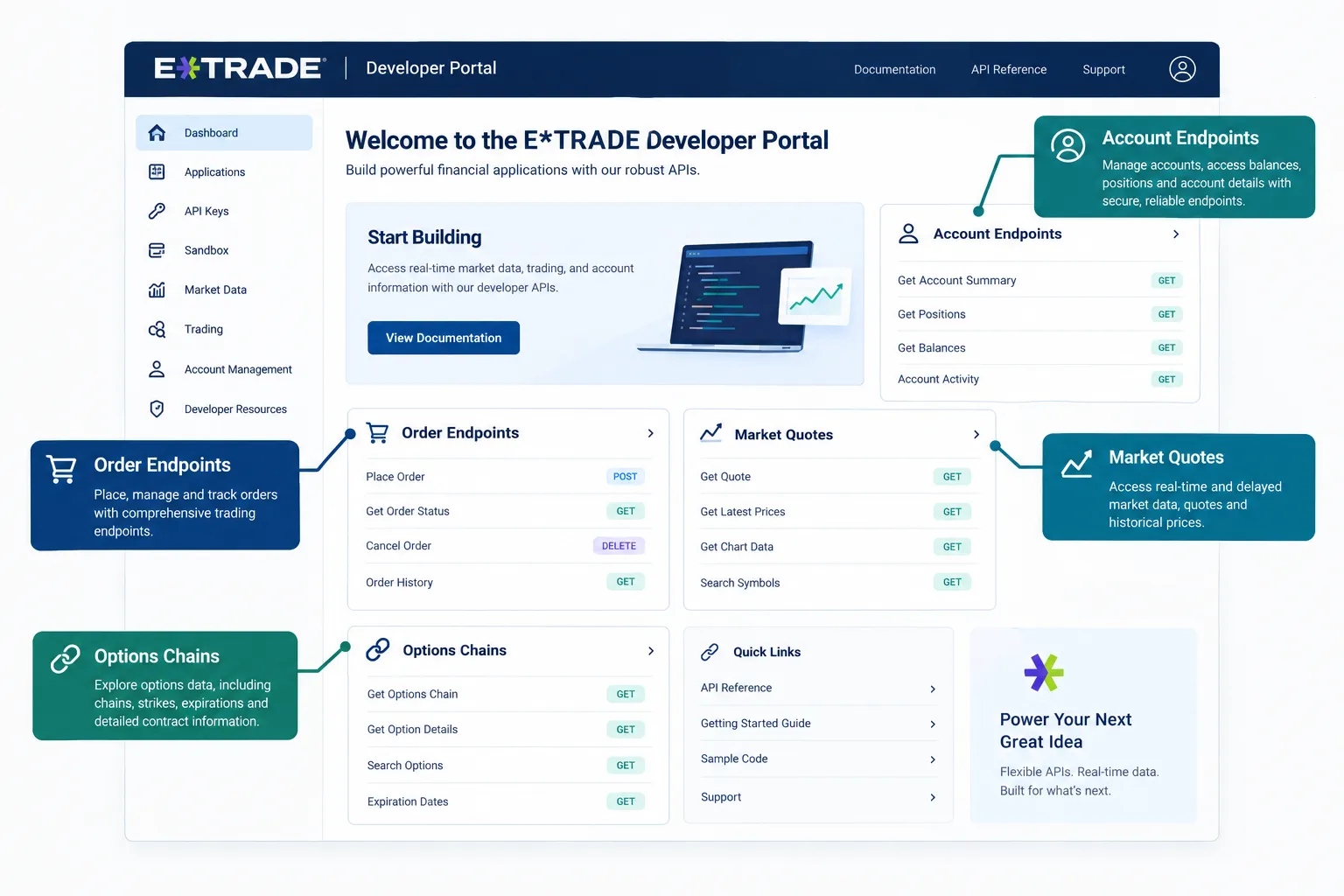
Here is the module map from the API reference, with the live paths:
| Module | What it does | Example path (live) |
|---|---|---|
| Accounts | List accounts, balances, transactions, portfolio | GET /v1/accounts/list |
| Alerts | List, read and delete account alerts | GET /v1/user/alerts |
| Market | Quotes, product lookup, option chains, option expiration dates | GET /v1/market/quote/{symbols} |
| Options | Chains for one underlying, by expiry month and calls, puts or both | GET /v1/market/optionchains?symbol={symbol} |
| Order | List, preview, place, cancel, change previewed orders | POST /v1/accounts/{accountIdKey}/orders/preview |
Production calls go to https://api.etrade.com/v1/{module}/{endpoint}. Sandbox calls go to https://apisb.etrade.com/v1/{module}/{endpoint}. Most reads are simple GET requests; orders use POST with XML or JSON bodies. Dates and times are US Eastern, and most timestamps in responses are epoch seconds.
What it does not do
It is not a backtesting engine, it does not stream tick data, and it is not built for high-frequency anything. It is a reliable pickup truck: it hauls account data and order flow if you stay inside the lines, and it does not win style points.
Two details shape how you build:
- Quotes come in batches of 25. The Get Quotes API accepts up to 25 comma-separated symbols, or 50 if you pass
overrideSymbolCount=true. Option symbols use a colon format:underlier:year:month:day:optionType:strikePrice. - Real-time data is gated. The quote docs say you must sign the Market Data Agreement and use the API through OAuth to get real-time data. Otherwise you receive delayed data.
If you are choosing a broker for a bot before you write a line of code, our comparison of the best API for stock trading puts Alpaca, Tradier and IBKR side by side.
How Do You Get Etrade API Keys Step by Step?
Getting Etrade API keys takes an ETRADE brokerage account, a sandbox key request, and then two short forms for a live key: the API User Intent Survey and the API Developer Agreement. Individual live keys appear on the page as soon as you finish both. Vendor keys appear too, but stay inactive until ETRADE approves you after a demo.
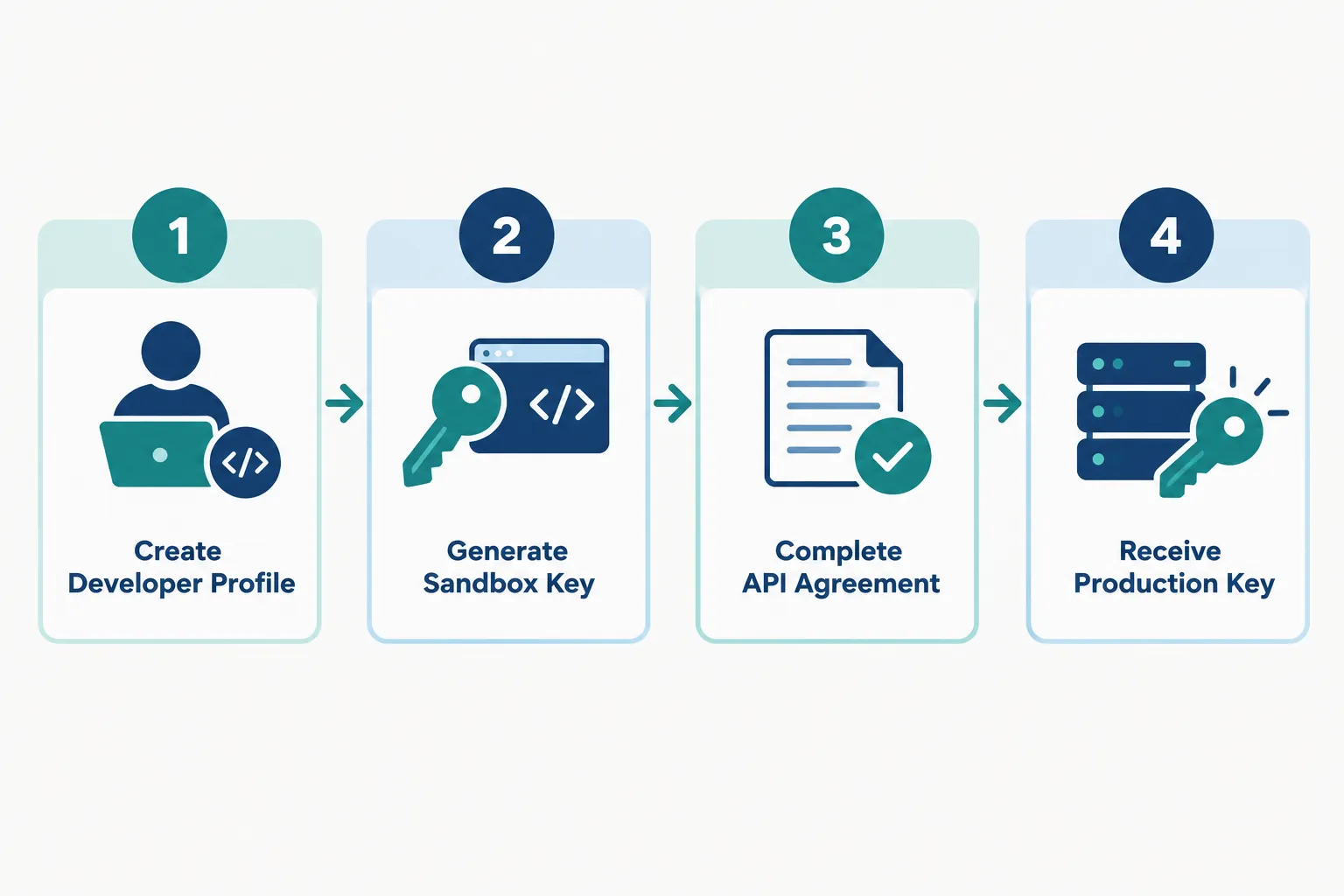
Step 1: Have an E*TRADE account. E*TRADE says it can be a personal, professional or corporate account. For development you do not need to fund it. Actual trading needs funds.
Step 2: Request a sandbox key. While logged in, use the sandbox key generator linked from the Getting Started page (us.etrade.com/etx/ris/apikey). The key and secret appear on the page right away.
Step 3: Build against the sandbox. Prove your OAuth signing, account calls and order previews against apisb.etrade.com first. More on what the sandbox can and cannot tell you below.
Step 4: Complete the API User Intent Survey. E*TRADE asks you to disclose what you plan to do with API access. This is how it sorts you into an individual or vendor key.
Step 5: Sign the API Developer Agreement. Individual live keys are then “provided immediately in page.”
Step 6: Vendor keys only: book the demo. A vendor key permits access by multiple users. E*TRADE issues it inactive, emails you to schedule a short online demo with its Product and Legal teams, and activates it after approval. Budget time for that if you plan to distribute an app.
Step 7: Sign the user agreements your app needs. The Market Data Agreement is required before the quote API returns data, and the Extended Hours Trading Agreement is required for after-hours orders.
Step 8: Put the annual attestation on your calendar. E*TRADE says developers must return once a year to complete the Market Data Attestation. The license agreement terminates automatically if you do not.
Individual key or vendor key?
| Key type | Who it is for | How it activates | Limit |
|---|---|---|---|
| Individual | Your own accounts, personal non-commercial use | Live key appears in page after survey and agreement | Works only with the user it was issued to, across that user’s accounts |
| Vendor | Apps for multiple E*TRADE customers | Issued inactive, activated after a demo with Product and Legal | Must obtain an End User Acknowledgment from each user |
The individual key restriction is strict. E*TRADE’s developer guides say that if any other user tries an individual key, a non-specific error appears instead of the login form and the process halts. Do not build a “share my bot with a friend” setup on an individual key.
Common errors at this stage:
- A sandbox key pointed at
api.etrade.comdata URLs, or a production key pointed atapisb - Signing with an old secret after you regenerated a key
- Testing an individual key from a second person’s login
- Skipping the Market Data Agreement and then wondering why quotes look delayed
How Does Etrade API OAuth Work for a Bot?
The Etrade API uses OAuth 1.0a, and the only supported signature method is HMAC-SHA1. That means every request carries a fresh signature built from your consumer key and secret, the access token and secret, a timestamp and a nonce. If you have only worked with bearer-token APIs, this is the part that will bite.
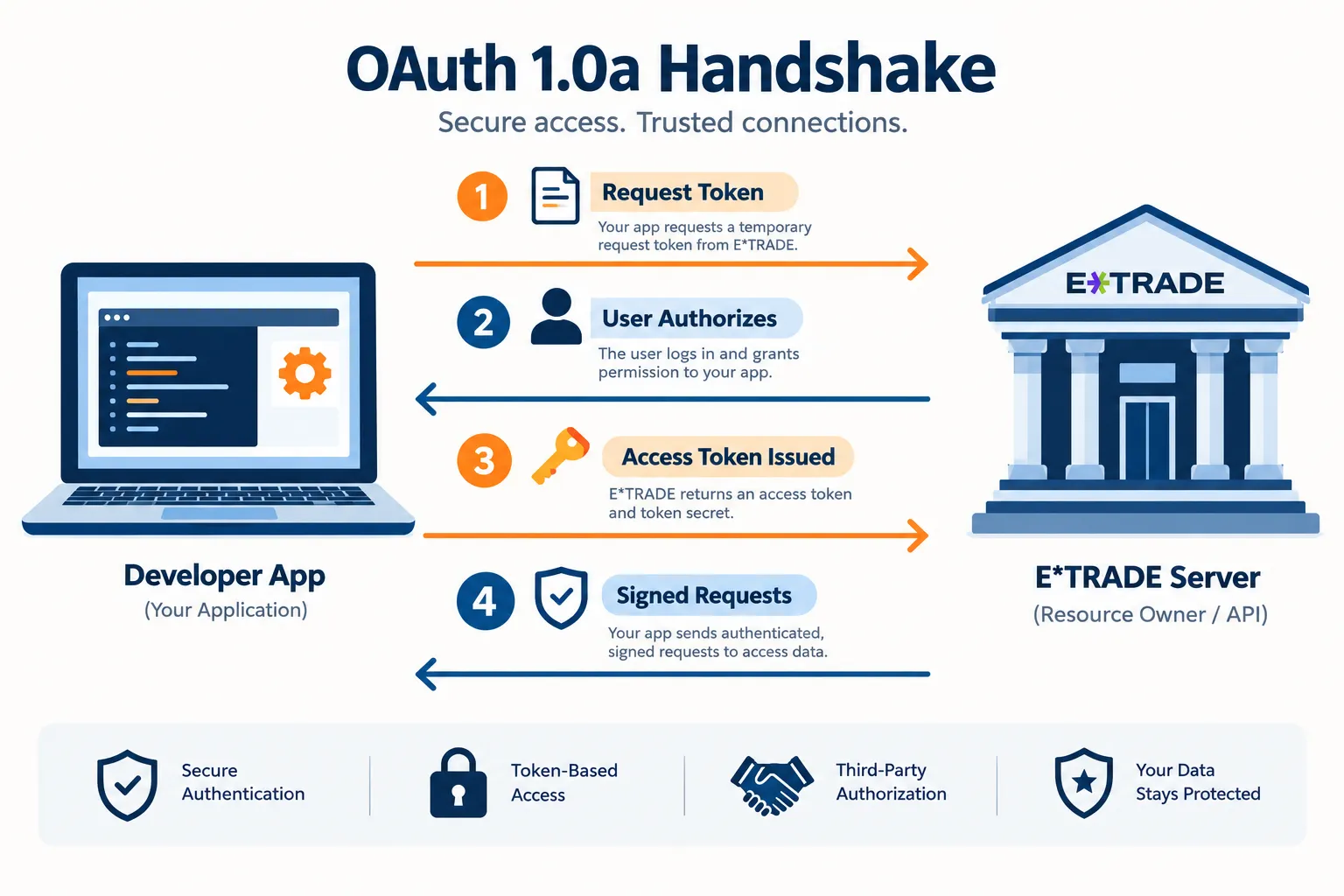
The four-step flow
- Get Request Token.
GET https://api.etrade.com/oauth/request_token, signed with your consumer key and secret. Theoauth_callbackheader must always be set tooob, whether you use a callback or not. The request token expires after five minutes. - Authorize Application. Send the user to
https://us.etrade.com/e/t/etws/authorize?key={consumer_key}&token={request_token}. They log in, see your app’s name and the privileges requested, and approve. E*TRADE shows a verification code, or redirects to your callback URL withoauth_verifierappended. - Get Access Token.
GET https://api.etrade.com/oauth/access_tokenwith the request token and theoauth_verifier. You get backoauth_tokenandoauth_token_secret. - Sign every call. Attach the access token, consumer key, timestamp, nonce, signature method and signature to every request, in the
Authorizationheader or the query string. E*TRADE does not accept OAuth credentials in the request body.
The developer guides say the sandbox uses the same OAuth procedure and the same authorization server. Only your keys change, and the resulting token works only on the sandbox.
What a signed request looks like
This is the header shape from E*TRADE’s documentation, with placeholders. Never commit real keys to a repo.
GET https://apisb.etrade.com/v1/accounts/list
Authorization: OAuth oauth_consumer_key="YOUR_CONSUMER_KEY",
  oauth_token="YOUR_ACCESS_TOKEN",
  oauth_timestamp="EPOCH_SECONDS",
  oauth_nonce="RANDOM_VALUE",
  oauth_signature_method="HMAC-SHA1",
  oauth_signature="COMPUTED_SIGNATURE"
Do not hand-roll the signature unless you have to. ETRADE recommends the libraries listed at oauth.net, and in Python, OAuth1 support in requests-oauthlib is the common choice. ETRADE’s developer guides also publish a test vector (a known key, secret, token, timestamp and nonce with the expected signature for GET /v1/accounts/list) so you can prove your signing code before you touch real data. Run it once. It saves hours.
How long do Etrade API tokens last?
| Token | Lifetime | What to do |
|---|---|---|
| Request token | 5 minutes | Finish the browser approval quickly or start over |
| Access token (active) | Until midnight US Eastern | User logs in again the next day for a new token |
| Access token (idle 2+ hours) | Inactive, not expired | Call GET /oauth/renew_access_token |
| Any token you are done with | Revoke it | Call GET /oauth/revoke_access_token |
Two details from the Get Access Token docs matter for bots. First, Renew Access Token returns an indication that the token renewed, not a new token, so keep using the one you have. Second, after midnight ET no renewal helps; the user must authorize again in a browser.
That second point is the design decision. A fully unattended bot running for days is not how this API works. Plan for a person to log in each trading day.
Why your OAuth calls keep failing
- Clock drift. The timestamp must be within five minutes of E*TRADE’s UTC time. Sync your server clock.
- Nonce reuse. A nonce cannot repeat with the same timestamp. Generate a random value per request.
- Stale secret. You regenerated a key and kept signing with the old secret.
- Idle token. Your bot sat quiet for two hours. Renew before you retry.
- Wrong environment. Sandbox token against a production URL, or the reverse.
What Are the Etrade API Rate Limits and Sandbox Limits?
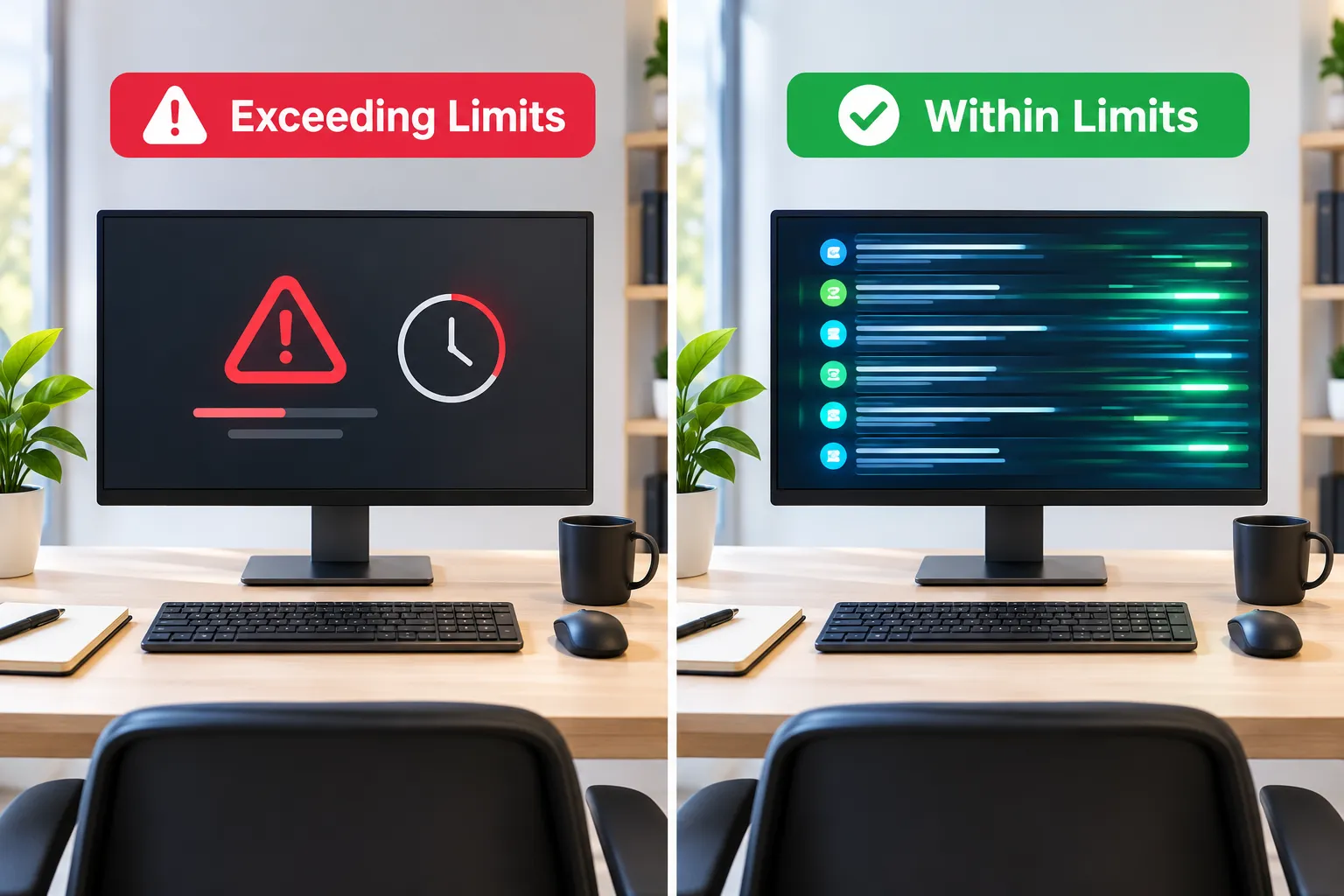
E*TRADE does not publish a single per-minute or per-day call limit on the pages we checked in 2026: the Getting Started page, the developer guides and the API reference. What it does publish are hard limits per call, token rules and agreement terms that end a key you do not use.
| Limit | Value | Source |
|---|---|---|
| Per-minute or per-day call cap | Not published on the pages we checked (2026) | Getting Started, developer guides, API reference |
| Symbols per quote call | 25, or 50 with overrideSymbolCount=true | Get Quotes API |
| Orders per List Orders page | Defaults to 25, maximum 100 | List Orders API |
| OAuth timestamp window | Within 5 minutes of current UTC | Developer guides |
| Request token life | 5 minutes | Get Request Token API |
| Access token life | Midnight ET; inactive after 2 idle hours | Get Access Token API |
| Annual attestation | Required, or the agreement terminates | License Agreement 9.1(a) |
| Unused key | Agreement terminates if the key “is not actively utilized” | License Agreement 9.1(c) |
What happens if you call too fast?
Because E*TRADE does not publish a number, engineer defensively. Add exponential backoff to every request. Cache quotes instead of re-polling every second. Never retry the order endpoint in a tight loop, because a retried place call is how you end up with two positions instead of one. If you get throttled, treat it as a design flaw, not an invitation to retry harder.
What the sandbox can and cannot tell you
The sandbox is a syntax checker, not a paper trading account. Per E*TRADE’s developer guides:
- No real transactions are executed.
- A request with a syntax error returns an error message.
- A valid request returns a stored sample response, not current data. You might ask for GOOG and MSFT and get back AAPL, ORCL and CSCO.
So the sandbox proves your signing, parsing and UI. It does not prove your strategy, your fills or your timing. For practice trades with simulated money, E*TRADE’s platform paper trading is a separate product; our guide to E*TRADE paper trading walks through it.
Decision rule: if your strategy needs sub-second polling across hundreds of symbols, the Etrade API is the wrong tool whatever the unpublished ceiling is. If you check a few positions and place a handful of orders a day, you are nowhere near it.
What Does a Trading Day Look Like for an Etrade API Bot?
A supervised bot on the Etrade API lives on a daily clock set by the token rules. Here is a realistic weekday for a bot that trades a few positions, built only from the documented token behavior:
| Time (ET) | What happens | What your code should do |
|---|---|---|
| 8:45 a.m. | You run the login flow: request token, browser approval, access token | Start the session within 5 minutes of the request token, store the token in memory |
| 9:30 a.m. to 11:30 a.m. | Bot reads quotes in batches of 25 and previews orders | Log every preview and place response |
| 11:30 a.m. to 1:45 p.m. | No calls during a quiet stretch | After 2 idle hours the token goes inactive; call Renew Access Token before the next request |
| 1:45 p.m. to 4:00 p.m. | Normal trading resumes | Back off on any error, never resend a place call blind |
| 4:15 p.m. | Bot is done for the day | Revoke the token, as E*TRADE recommends |
| Midnight | Token expires regardless | Nothing to renew; tomorrow starts with a new login |
Two design choices fall out of that table. First, a cheap heartbeat call (a balance read every 90 minutes, for example) keeps the token from going idle, but it adds traffic, so many builders prefer to renew on demand. Second, the morning login is a human step. Put it on a checklist with your pre-market routine, and have the bot refuse to trade until it has a fresh token. A bot that knows it is logged out is safe. A bot that thinks it is logged in and keeps retrying is not.
How Do Orders Work in the Etrade API?
Orders here are a two-step handshake: preview, then place. The Place Order API “is used to submit an order after it has been successfully previewed,” so your code must call POST /v1/accounts/{accountIdKey}/orders/preview first, read the response, and only then call /orders/place.
That design helps a bot more than it hurts. The preview is a natural checkpoint where your code can compare the estimated cost and order details against your own risk rules before anything is submitted.
The order workflow, using paths from the Order API reference:
- Get your
accountIdKey. CallGET /v1/accounts/list. Every account call uses this key, not the account number. - Preview.
POST /v1/accounts/{accountIdKey}/orders/previewwith the order body. - Place.
POST /v1/accounts/{accountIdKey}/orders/placeafter a successful preview. - Confirm.
GET /v1/accounts/{accountIdKey}/orders. List Orders returns 25 per page by default, up to 100, with two years of history. - Cancel if needed.
PUT /v1/accounts/{accountIdKey}/orders/cancel.
The docs also include Change Previewed Order and Place Changed Order for edits.
What E*TRADE says about API orders
The license agreement and the developer site disclosure carry three lines every bot builder should read:
- There may be latency between when an order is submitted from the API and when E*TRADE receives it.
- The E*TRADE Customer Protection Guarantee does not apply to API use.
- Orders created through the API are not vetted until E*TRADE receives them, and E*TRADE may reject any API order.
The agreement also says E*TRADE may release new API versions that “may not be compatible with previous implementations,” and that you are responsible for using the most recent version. Pin your client library and watch for change notices.
Can You Get Options Chain Data From the Etrade API?
Yes. The Get Option Chains call returns the chain for one underlying: you specify the instrument, the expiration month, and calls, puts or both. The response includes the option pair count and, per pair, the type, symbol, date and strike. A companion call, Get Option Expire Dates, returns the available expirations so you do not guess.
The live path is GET https://api.etrade.com/v1/market/optionchains?symbol={symbol}. Parameters such as noOfStrikes narrow the strikes returned.
What you get is raw chain data. You do not get strategy scoring, probability models or a volatility surface. Pull the chain, store it, and do the analysis in a tool built for it. If you want to test an options idea before you risk a dollar, our guide to options backtesting explains why most quick win rates are not real.
Practical takeaway: quote individual contracts with the Get Quotes call using the colon symbol format, in batches of 25, and cache the chain between calls instead of pulling it on every loop.
Can You Build an Etrade Trading Bot With Python?
Yes, a Python Etrade API bot is a realistic project if you respect three facts: OAuth 1.0a signing, a token that expires every night, and a preview-then-place order flow. It is not a weekend hack, but it is buildable. E*TRADE publishes sample apps in Python, Java and Node.js on its developer support downloads page.
A realistic build order:
- Signing first. Get request token, authorize, access token, and a signed
GET /v1/accounts/listworking in the sandbox. Check your signer against E*TRADE’s test vector. - Token handling second. Code the 2-hour renew and the midnight re-login as first-class states, not error cases. Alert a human when a new login is needed.
- Reads third. Balances, positions, quotes in batches of 25.
- Preview before place. Make preview a required function in your order path, and log both responses.
- Then a funded account, small. The sandbox will not tell you how fills behave. A tiny live position will.
Safety checklist before going live:
- Stop-loss logic is coded and tested, not just planned
- Position size limits are hard-coded, not suggestions
- Token expiry stops trading cleanly instead of failing silently
- Retries never resend a place call without checking open orders first
- You have read the current license agreement yourself, not just this summary
For the broader architecture, from data to live orders, see our Python algorithmic trading roadmap.
Does E*TRADE ban fully automated orders?
We did not find that rule. The current API Developer License Agreement we read in 2026 does not contain a clause banning automated order generation. What it does say: individual keys are for personal, non-commercial use, you accept all risk from using the API, the Customer Protection Guarantee does not apply, and E*TRADE can reject any API order or end your access “at any time, with or without notice.” The nightly re-login is the practical limit on unattended bots. Read the agreement before you automate, and keep a human able to stop the bot.
What Are the Alternatives to the Etrade API?
If OAuth 1.0a and nightly logins do not fit your project, four broker APIs trade off differently on auth, cost and automation.
| Broker | Auth model | Testing environment | Notable for |
|---|---|---|---|
| E*TRADE | OAuth 1.0a, HMAC-SHA1, daily token | Sandbox with stored sample data | Options chains, preview-then-place orders |
| Alpaca | Key and secret headers (APCA-API-KEY-ID, APCA-API-SECRET-KEY) | Paper account, $100,000 default balance | Built for bots, free IEX data |
| Tradier | API token from account settings for your own account; OAuth 2.0 for partner apps | Paper trading sandbox included with every account | Options-first, API access included at no extra charge |
| Charles Schwab | OAuth 2.0 with about 30-minute access tokens and a 7-day refresh token | No API paper environment on the pages we checked | Former TD Ameritrade API users |
| Interactive Brokers | TWS API through TWS or IB Gateway | Paper trading account | Global markets, steeper setup |
The Alpaca and Tradier rows come from their own docs; the Schwab token model is covered in our Schwab API guide, and IBKR in our TWS API guide. For a directory profile of Schwab’s tools, see the Charles Schwab listing on our sister site.
Decision rule: choose E*TRADE if you already bank there, trade options, and are fine with a daily login. Choose Alpaca if unattended automation is the goal from day one; start with our Alpaca API beginner guide. Choose Tradier if you want a simple token and an options focus. Choose Interactive Brokers if you need global reach and accept a steeper learning curve.
Frequently Asked Questions
Is the Etrade API free?
Yes, the Etrade API has no separate fee in ETRADE’s developer documentation. You need an ETRADE brokerage account, and normal commissions and any exchange market data fees still apply to what you trade and view. The account does not need funding for sandbox development.
How do I get an Etrade API key?
Request a sandbox key from the Getting Started page while logged in to your ETRADE account, and it appears immediately. For a live key, complete the API User Intent Survey and sign the API Developer Agreement. Individual live keys appear in the page right away; vendor keys stay inactive until ETRADE approves you after a short demo.
How long does an Etrade API access token last?
An Etrade API access token expires at midnight US Eastern time by default. If your app makes no requests for two hours, the token goes inactive and must be reactivated with the Renew Access Token API. After midnight the user must log in again to get a new token.
What are the Etrade API rate limits?
E*TRADE does not publish a per-minute or per-day call limit on the Getting Started page, developer guides or API reference we checked in 2026. It does cap quote requests at 25 symbols, or 50 with overrideSymbolCount, and List Orders at 100 per page. Build with backoff and caching rather than guessing a ceiling.
Does E*TRADE have paper trading for the API?
Not in the usual sense. The Etrade API sandbox returns stored sample responses, so it checks your syntax and parsing, not your fills, and you may ask for one symbol and get others back. For simulated trades, use E*TRADE’s platform paper trading, which is a separate product.
Can the Etrade API place options orders?
Yes, the Order API handles equity and options orders, and the Market API returns option chains and expiration dates. Every order must be previewed with the Preview Order call before you call Place Order. The Customer Protection Guarantee does not apply to orders placed through the API.
Can a fully automated bot run on the Etrade API?
Only for one trading day at a time. The access token expires at midnight Eastern and a person must log in through a browser to get a new one, so unattended multi-day bots do not fit the design. We found no clause banning automated orders in the current license agreement, but E*TRADE can reject API orders or end access at any time.
Our Take
The Etrade API is a workhorse, not a showpiece. It does accounts, quotes, option chains and orders reliably, and access is free with a brokerage account. But it taxes your time: OAuth 1.0a signing, a token that dies at midnight Eastern, a preview call before every order, and no published rate limit to design against.
That makes it a good fit for a supervised bot that a person logs into each morning, and a poor fit for anything meant to run unattended for a week. If you already trade at E*TRADE, build the token handling first and the strategy second. If you are starting fresh and want hands-off automation, another broker will get you there faster. For more broker API breakdowns, start at AI Stock Trading Bots.
Built something on E*TRADE’s API and want a second set of eyes before you size it up? Send it to us.
Stay alpha.
The FullStack Alpha research desk tests AI trading bots on paper and live accounts. Reviewed and edited by Jay Rocco, Founder and Editor.
