

Jay Rocco is the Founder and Editor of FullStack Alpha. He has tested 200+ AI stock tools since 2022 and run 15+ AI trading platforms on live accounts with his own money. He reviews the software. He does not tell you what stocks to buy.
The Schwab API hands your bot a refresh token that expires after seven days, and no amount of clever code resets that clock. Every forum thread about it ends in the same place: a human, a browser window, and a two-factor code. The 30-minute access token refresh is fully automatable. The weekly re-login is not. If you came here hoping for a loophole, the honest answer is that there isn’t one yet, and the useful answer is how to build around it.
Quick Answer
Your bot keeps logging out because the Schwab API uses two credentials with two different lifespans. The access token lasts about 30 minutes and renews silently using the refresh token. The refresh token carries a hard seven-day age limit enforced on Schwab’s side, and once it ages out you must complete a full browser-based OAuth login again, per the Schwab Developer Portal guidance on OAuth restart versus refresh token. There is no documented way to extend it, so the fix is scheduling and alerting, not code.
Key Takeaways
- Access token: roughly 30 minutes. The schwab-py authentication documentation describes the short-lived access token that the library refreshes for you automatically.
- Refresh token: a hard seven days. Schwab enforces this as an age limit on the token itself, not a timestamp your code controls, per the Schwab Developer Portal.
- The failure looks like a different bug. An over-age refresh token can come back as an
invalid_clienterror, which reads like a bad secret, as covered in the schwab-py auth guide. - Is schwab api free? Yes, for access. There is no separate subscription fee for individual developers using the Schwab Trader API, and standard Schwab commissions still apply.
- Weekly two-factor re-auth was named a top pain point in the r/algotrading thread What broker do you use for automated trading? dated September 30, 2026.
- Alternatives exist. Alpaca uses static API keys, IBKR uses a gateway session with its own constraints, and tastytrade sits in between.
- Frameworks already support Schwab. Lumibot lists Schwab as a supported broker, so you are not stuck writing every line of plumbing yourself.
What is the Schwab API and who is it for?
The Schwab API is a set of OAuth 2.0 web services that let your own code read account data, stream and pull market data, and place equity and options orders on a Charles Schwab brokerage account. It exists mainly for self-directed retail developers and the large group of former TD Ameritrade customers whose old integrations stopped working after the platform migration. If you write Python, it’s the cheapest institutional-feeling data pipe most retail traders will ever get.
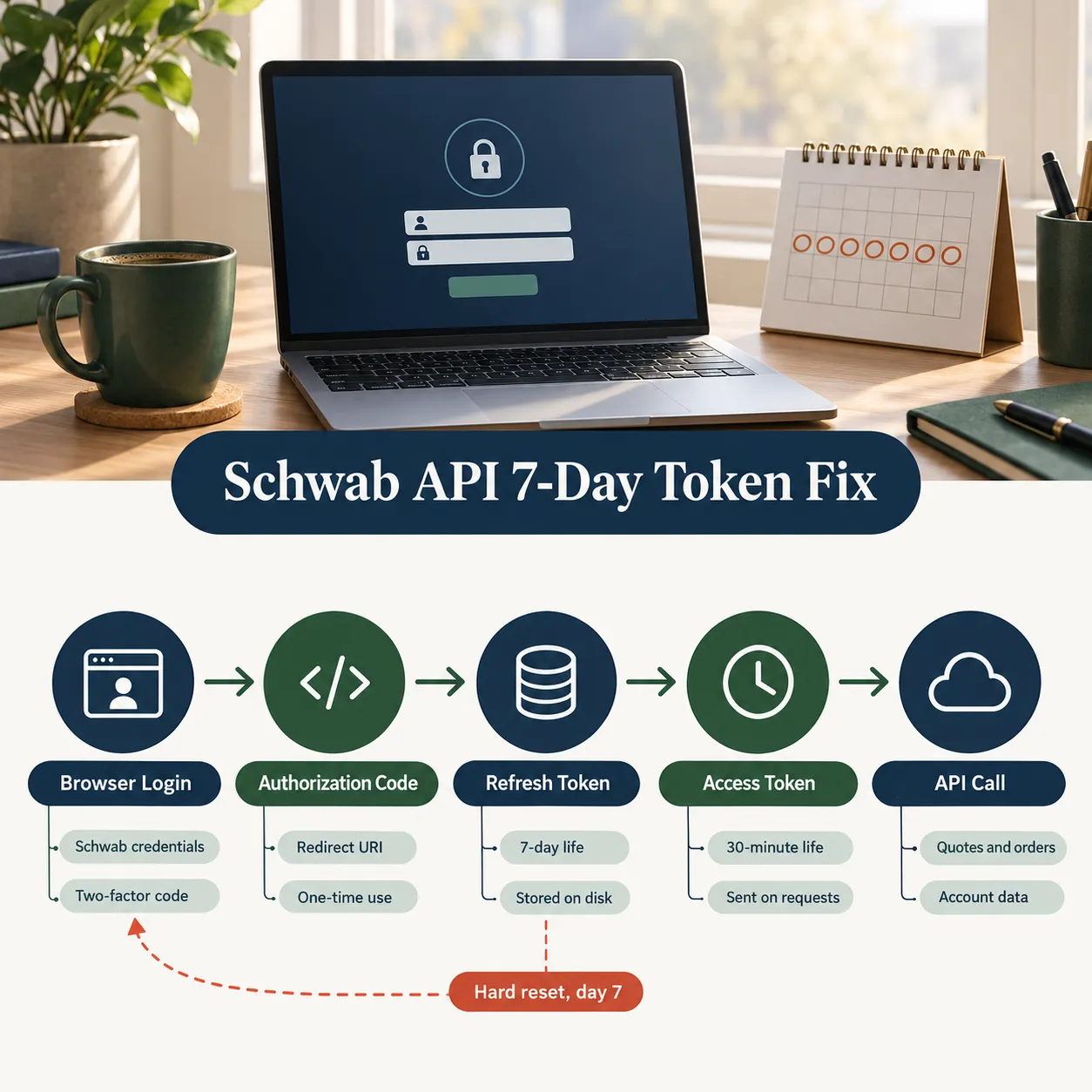
Overview, in one breath: you register an app on the Schwab developer portal, get a client key and secret, run a browser login once, and then your code talks to REST endpoints for quotes, chains, account positions, and orders.
Who it’s genuinely for:
- Former thinkorswim and TDA developers who want their old scripts back. The TradersPost write-up on the thinkorswim API situation walks through what replaced what.
- Traders who already custody assets at Schwab and don’t want to move money just to get an API.
- Anyone building a research notebook, a watchlist scanner, or a monitor rather than a high-frequency machine.
Who it is not for: futures-first traders, since the Trader API’s trade services cover equities and options rather than futures orders. If futures are your market, start with a guide to the best futures trading broker instead of fighting the wrong tool.
Do I need the Schwab API, or just the app for trading?
Most traders don’t need an API at all. If you click your own buttons, discretionary trade through the Schwab mobile or desktop app and you’re done, and the roundup of the best stock apps for day trading will serve you better than any token guide. You need the API only when you want code to make the decision, pull bulk data, or monitor a watchlist faster than your eyes can.
Schwab API at a glance
The schwab api, officially the Schwab Trader API, is a free-to-access OAuth 2.0 service for individual Schwab account holders who want programmatic data and trade services. It covers account data, positions, orders, equity and options trading, and market data. The single most important thing to understand before you write a line of code is the token model, because that’s what breaks.
Here’s what you actually get:
| Capability | What it covers | Notes |
|---|---|---|
| Market data | Quotes, option chains, price history, movers | Free with an account, no separate data fee |
| Account data | Balances, positions, transactions | Per-account access, linked at authorization |
| Trade services | Equity and options orders, cancels, replaces | No futures order entry on the Trader API |
| Streaming | Real time level one quotes over websocket | Session tied to your access token |
| Auth | OAuth 2.0 authorization code flow | 30-minute access token, 7-day refresh token |
The honest framing: Schwab allows integration via API for free, then charges you in operational friction. You pay with a weekly browser login instead of a monthly invoice.
If you want the wider field before committing, compare it against the full list of brokers that offer a trading API first. Picking the broker is the real decision. The code is downstream of it.
How much does the Schwab API cost?
Nothing extra. There is no separate subscription fee for individual developers, and you pay standard Schwab commissions on whatever your code trades. That makes it one of the better price-to-value propositions in retail automation, since market data that other vendors meter by the month arrives included with the account. If you need written confirmation of fees for your own records, check Schwab’s official pricing page rather than any third-party summary, including this one.
Why does the Schwab API log your bot out every 7 days?
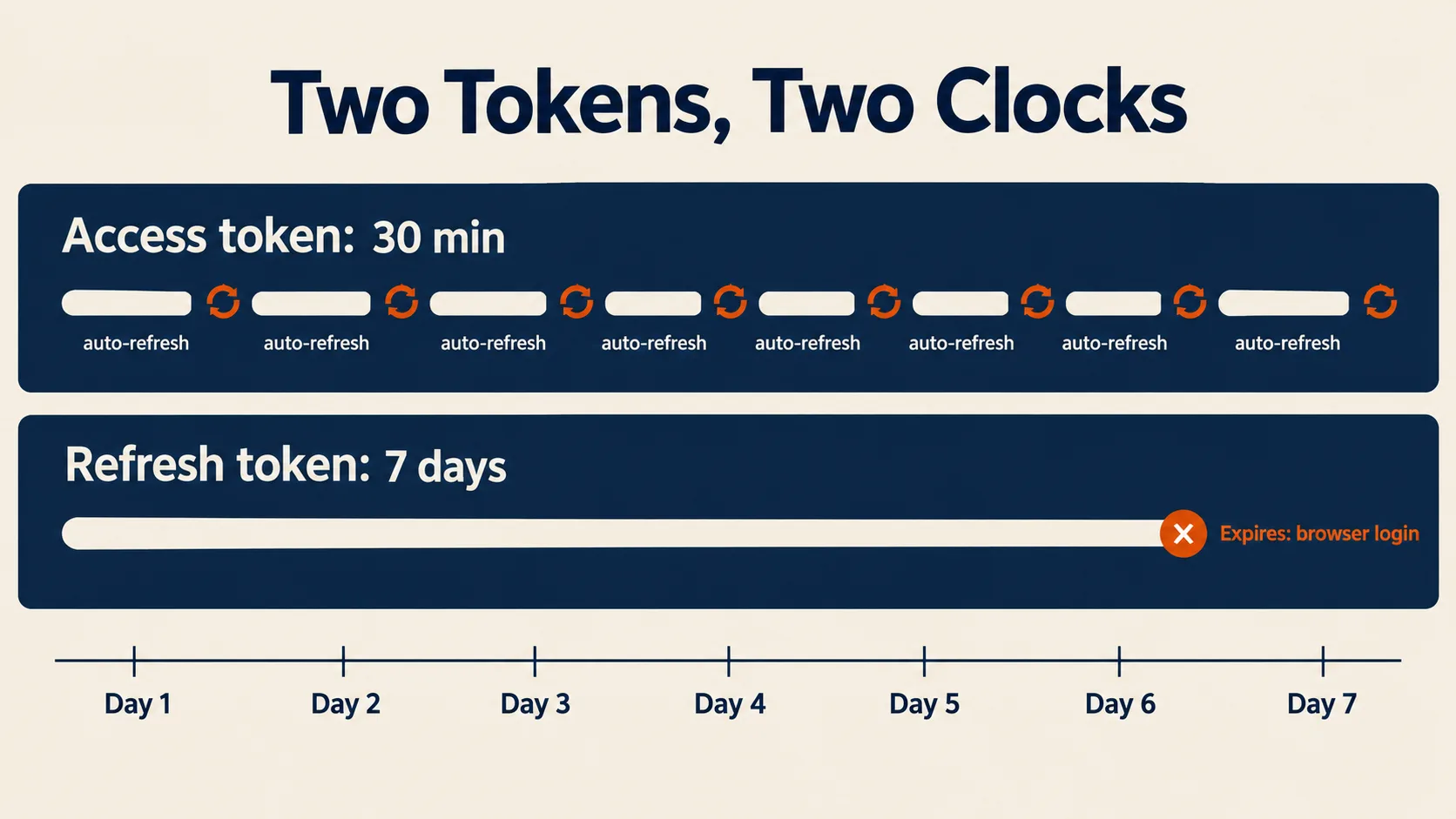
Because Schwab enforces a hard seven-day age limit on the refresh token, and when that token is too old, the server refuses to mint new access tokens. Your bot is not losing its session. It’s losing its right to renew. The Schwab Developer Portal page on OAuth restart versus refresh token is explicit that a restart means a full authorization flow in a browser.
Three things people get wrong about this:
- Refreshing the access token does not reset the seven-day clock. The age limit lives on the refresh token. Pulling quotes every minute for six days buys you nothing on day seven.
- The error message lies to you. An over-age refresh can return
invalid_client, which looks like a bad client secret or a malformed request. The schwab-py auth documentation notes this and also notes that expiry can land slightly earlier or later than exactly seven days. - It’s structural, not your bug. A September 16, 2026 TradersPost analysis still treats the seven-day expiration as a limitation of the Individual Trader API, not an implementation mistake on your end.
No change to the seven-day limit has shown up in Schwab’s documentation as of October 2026. Build for seven days.
What happens when the Schwab API token expires mid-trade?
Open positions are unaffected, but your code goes blind and mute. Orders already resting at Schwab stay live on the exchange because they live on Schwab’s servers, not in your script. Your bot, though, can no longer cancel them, modify them, or read fills.
That asymmetry is the real risk. A bot that can enter but not exit is worse than no bot. If you run anything with a stop managed in code rather than a native stop order resting at the broker, a dead token turns your risk management into a prayer. Put the protective stop at the broker. Always. The same logic shows up in any sane review of what to know before you automate trades.
How do access tokens and refresh tokens work on the schwab trader api?
Two credentials, two clocks. The access token is the one you attach to every API request and it lives about 30 minutes. The refresh token is the one that buys you new access tokens and it lives about seven days. Keep those separate in your head and 90% of the confusion dissolves.
The flow, in order:
- You open the Schwab authorization URL in a real browser and log in with credentials plus two-factor.
- Schwab redirects to your callback URL with a one-time authorization code.
- Your code exchanges that code for an access token and a refresh token.
- Every 30 minutes or on a 401, your code exchanges the refresh token for a new access token. The token refresh and re-authentication notes for the go-schwab trader library describe this cycle cleanly.
- On day seven, step four fails. Back to step one, in a browser, as a human.
Python, Go and R wrappers all document the same seven-day limit and the same manual login afterward. Multiple language communities, same answer. That’s your tell that it’s Schwab policy and not a library quirk.
Can you extend the Schwab API token beyond 7 days?
No. There is no documented parameter, scope, or endpoint that extends the refresh token past seven days for an individual developer app. Anything promising otherwise is either storing your Schwab password, which you should never allow, or simply automating the browser. Treat “unlimited Schwab token” claims the way you’d treat a scanner promising a 90% win rate.
How do you handle the 7-day re-login without breaking your bot?
Refresh early, alert loudly, and make the manual login take 60 seconds instead of 20 minutes. You cannot remove the weekly step, so engineer around it with the same discipline you’d apply to position sizing. Systems over hacks.
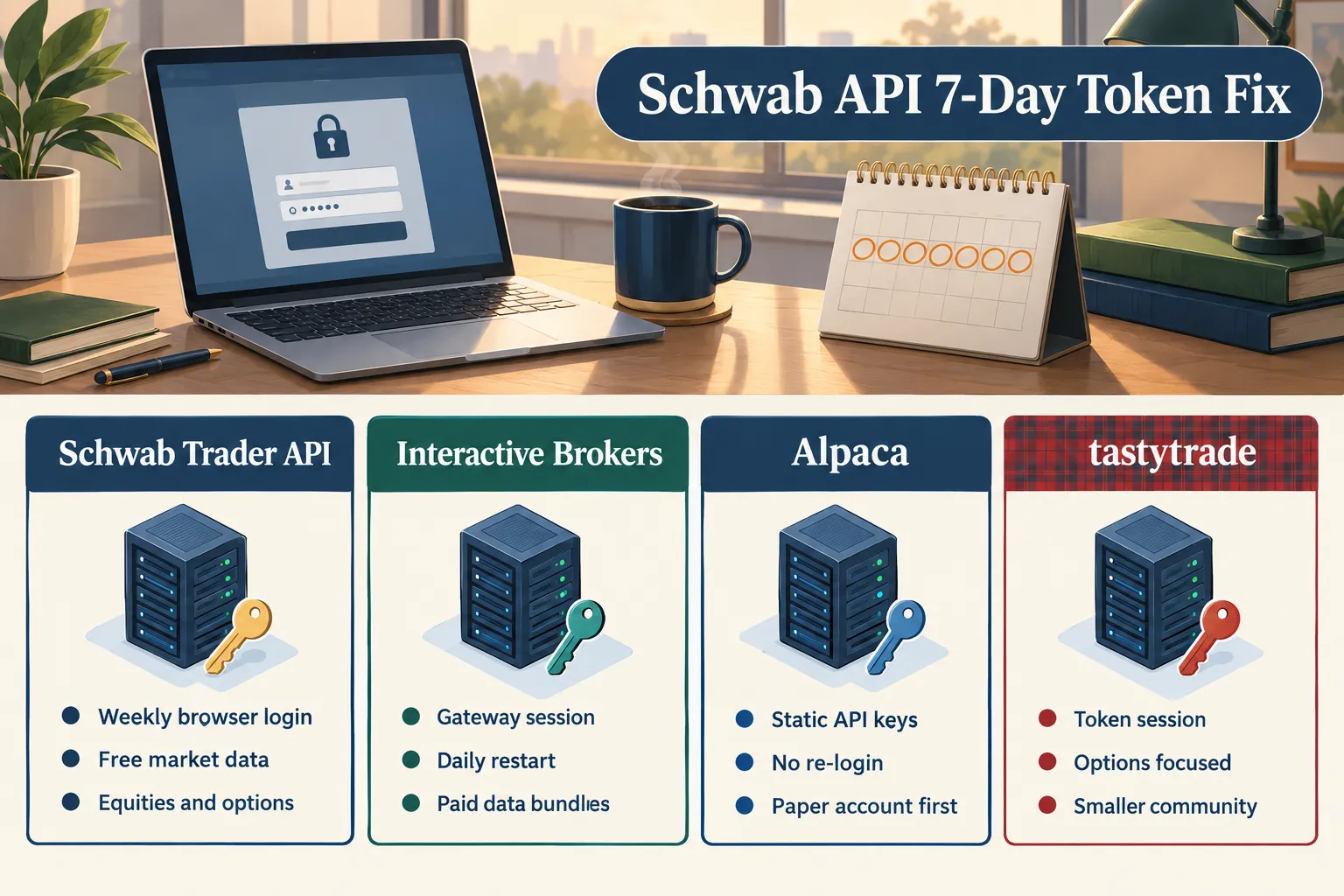
The weekly pattern that actually works
- Re-authorize on a fixed schedule, not on failure. Pick Sunday afternoon, before the week’s first open. Refreshing at day six turns a crash into a calendar event.
- Track the token’s birthdate, not its expiry. Store the creation timestamp alongside the token and compute age yourself. Log it. Expose it on your dashboard.
- Alert at day five and day six. A push notification, an email, anything. Jorgai’s notes on Schwab API token refresh for automated trading cover the same scheduling logic from the implementation side.
- Retry with backoff, then stop. If a refresh returns
invalid_client, do not hammer the endpoint. Flag it for human login. - Never let a dead token cause a blind entry. Gate order submission on a successful token check in the same run.
Schwab API authentication best practices and token storage security
Treat the refresh token like a live house key. It can place orders in your account for seven days, which means a leaked token file is a trading incident and not just a security one.
- Keep the token file outside your repository, and add it to
.gitignorebefore the first commit, not after. - Restrict file permissions to the owner only. On a shared box, assume everyone can read what’s readable.
- Store the client secret in environment variables or a secrets manager, never inline in the code.
- Encrypt at rest if your bot runs on a VPS. The Schwab MCP server reference and most serious wrappers assume encrypted or environment-scoped storage rather than a plaintext file in the project root.
- Rotate the client secret if you ever paste it into a chat window, a notebook cell you shared, or a support ticket.
Your 7-day Schwab API token plan: what to do each day
Knowing the refresh token dies on day seven is trivia. Knowing what to do each day is a system. Here is the first-week plan we would run for any bot on the Schwab API.
Run it once in full. After that, the weekly loop shrinks to Day 6 and Day 7, roughly 15 to 20 minutes a week.
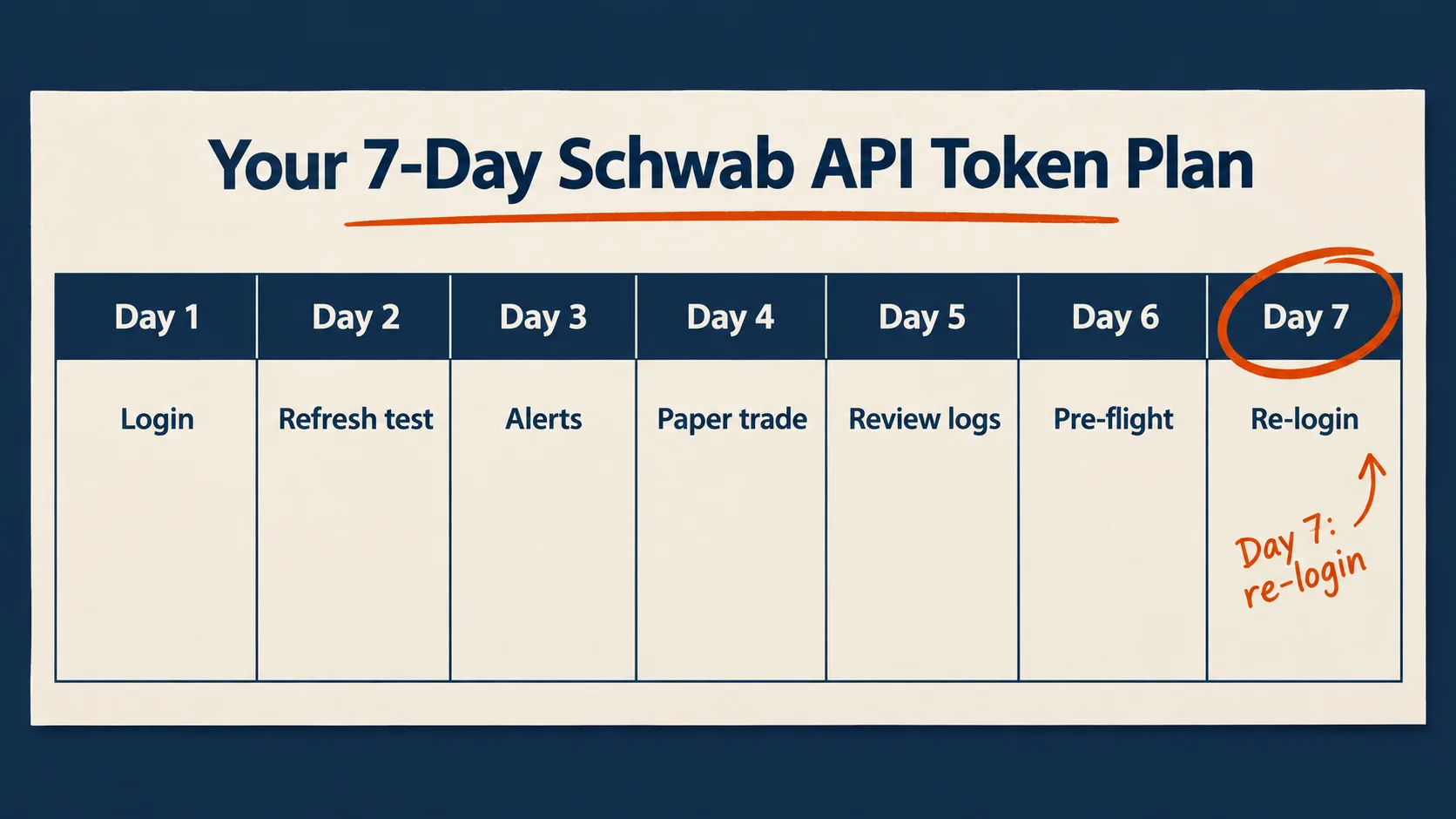
Day 1: Do the full OAuth login and write down the clock
Run the complete browser login once: credentials, two-factor, callback, code exchange. Save both tokens to a file outside your repo with owner-only permissions, and keep the client secret in an environment variable, never in the script.
Then record the moment the refresh token was issued. Write that timestamp into the token file and into your calendar. Count six days forward and book the re-login now. That date runs your week, not the bot.
Day 2: Prove the 30-minute refresh works on its own
Leave the bot running through at least three access token cycles, about 90 minutes, and touch nothing. Each refresh should land without a login prompt.
Add a log line for every refresh: time, success or failure, and the refresh token’s age in hours. If a refresh fails today, the problem is your setup, not the seven-day limit, and today is the cheap day to find it. The schwab-py auth docs show how the library runs this cycle for you.
Day 3: Wire an alert for refresh failures
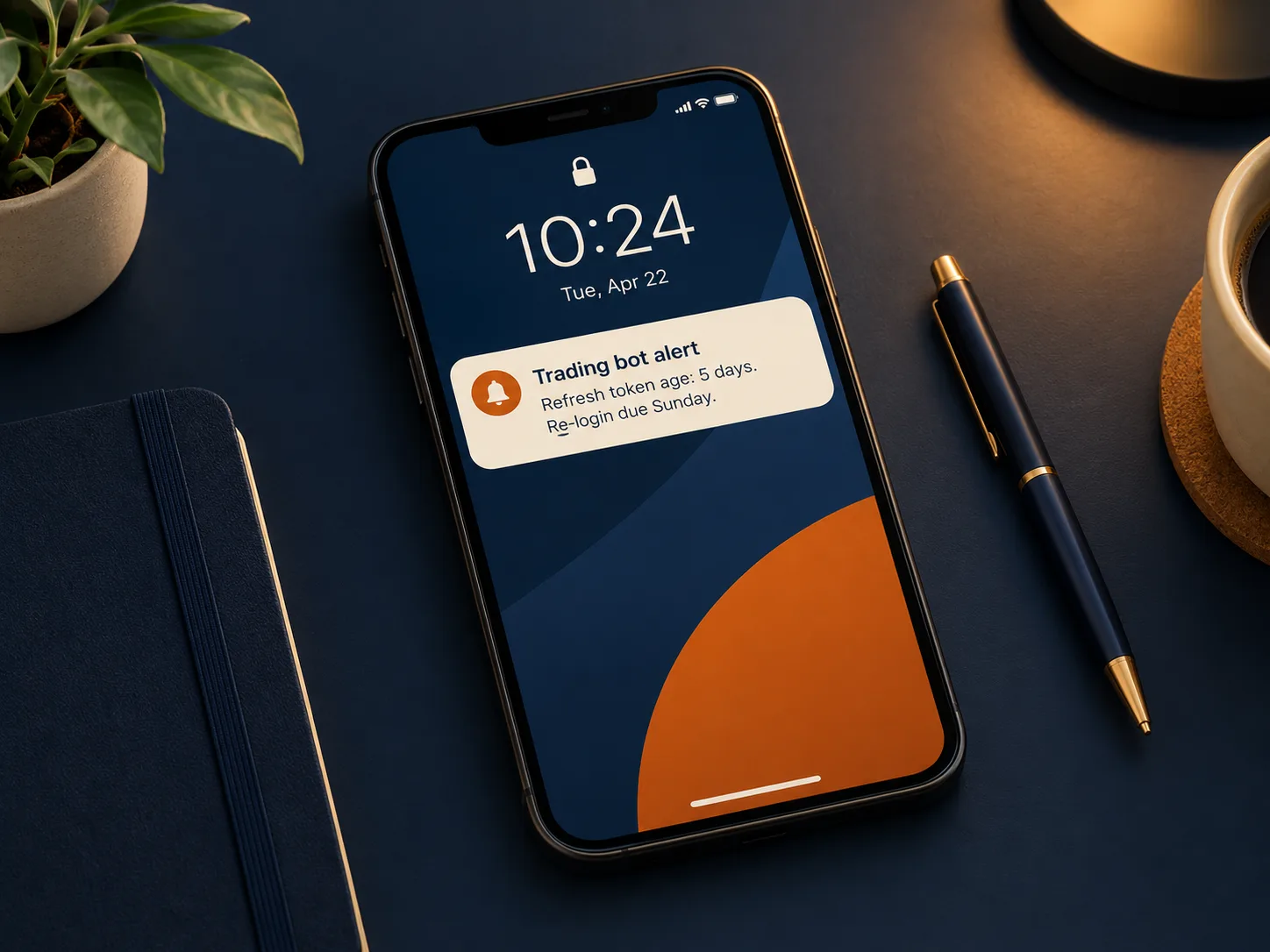
A log nobody reads is a diary. Route two events to your phone: any failed refresh, and any invalid_client response, which is how an over-age token often shows up.
Add a second alert that fires on token age alone, at day five and again at day six. Use whatever reaches you fastest: a push service, an email, a chat webhook. Trigger one fake failure on purpose so you know the alert actually lands.
Day 4: Paper-test the order flow, then go small
Now let orders move. We could not find a paper trading environment documented for the Schwab Trader API, so build your own: a dry-run mode that logs orders without sending them, then live orders at one share.
Check three things: the order reaches Schwab, the fill comes back to your code, and a cancel works. Place the protective stop as a native order resting at Schwab, not as logic in your script.
Day 5: Read the logs and check your call rate
Pull four days of logs and read them like a trade journal. Look for refresh retries, slow responses, and any HTTP 429 replies, which mean you are being throttled.
Count your calls per minute at the busiest point of the session. If option chains or quotes get re-pulled on every loop, cache them or move the quotes to the streaming connection. Fix it now, while nothing important depends on the bot.
Day 6: Schedule the re-login and run a pre-flight check
Pick a fixed slot before the next open. Sunday afternoon works for most swing traders. Put it on the calendar as a recurring weekly event, not a one-off.
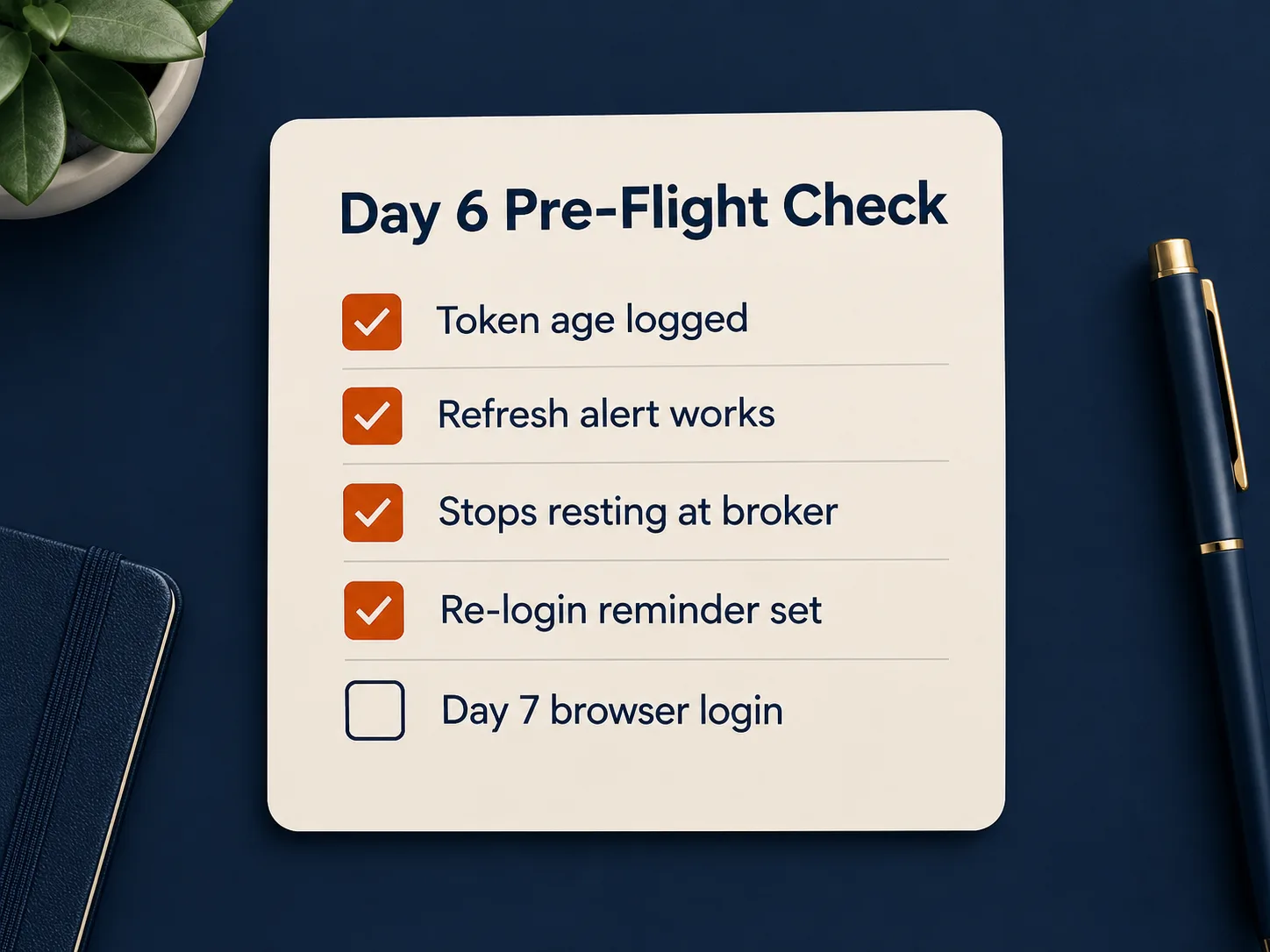
Then run the pre-flight: token age logged, refresh alert tested, protective stops resting at the broker, re-login reminder set. If any item fails, fix it today. Day 7 is for logging in, not debugging.
Day 7: Re-authenticate before expiry and confirm the bot wakes up
Do not wait for the token to die. Run the full browser login while the old refresh token still works, then replace the token file and delete the old copy so nothing loads a stale token by mistake.
Restart the bot and verify four things in order: a fresh access token is issued, one quote pulls, account positions read correctly, and the logged token age resets to zero. Then the cycle starts over.
The 7-day Schwab API plan at a glance
| Day | Task | Time needed | What breaks if you skip it |
|---|---|---|---|
| 1 | Full OAuth login, secure token storage, record issue time | 20 to 30 min | You never know when the 7-day clock started |
| 2 | Watch three access token refreshes, add logging | 10 min plus waiting | Refresh bugs surface on a live trading day |
| 3 | Alerts for failed refresh and token age | 20 min | The bot dies silently and you find out from your P&L |
| 4 | Dry run or one-share orders, stops at broker | 30 min | Order bugs cost real money at full size |
| 5 | Log review and call rate check | 15 min | Throttling hits at the worst moment of the session |
| 6 | Book recurring re-login, run pre-flight | 10 min | Day 7 turns into a scramble |
| 7 | Re-authenticate early, swap token file, verify | 5 to 10 min | The bot goes blind with positions open |
Times are our estimates for one bot on one account, not Schwab figures.
The week is not about code. It turns a forced login into a routine you would keep even if Schwab did not make you.
What are the schwab api limits and approval times?
Schwab throttles requests per registered app and does not publish a single friendly ceiling in easily accessible public documentation, so build backoff rather than betting on a number. Third-party write-ups on Schwab API rate limits and token expiry describe per-app throttling and recommend pacing your calls rather than bursting.
Practical limits that matter more than any published figure:
- Cache aggressively. Option chains are heavy. Pull once, reuse across your logic.
- Stream instead of polling. If you need real time quotes on a handful of symbols, the websocket beats a loop hitting the quotes endpoint every second.
- One app, one bot. Sharing a client key across a scanner, a notebook, and a live bot is how you throttle yourself at the worst moment.
On approval: Schwab does not publish a service-level commitment for developer app approval. Community reports range from a few days to a few weeks. Plan for weeks, be happy with days, and don’t schedule a strategy launch around it.
One more note on documentation. Because the portal is gated, third-party library docs like the stable schwab-py auth reference and the schwab-trader API reference on GitHub are often easier to reach than the official schwab api documentation, and the schwab api python ecosystem is where most working examples live. They are useful. They are not a substitute for Schwab’s own contractual terms.
Should you switch to IBKR, tastytrade or Alpaca to avoid the token problem?
Switch only if the weekly login genuinely breaks your strategy, because every alternative trades one constraint for another. Schwab’s seven-day re-auth is annoying for a bot that must never miss a session, and irrelevant for a swing system you review anyway. Match the broker to the holding period, not to the forum complaints.
| Broker API | Session model | Re-auth burden | Market data | Best fit | Access cost |
|---|---|---|---|---|---|
| Schwab | OAuth, 30-min access token, 7-day refresh | Weekly browser login with 2FA | Free with account | Swing traders already at Schwab | No separate fee, standard commissions |
| Interactive Brokers | Gateway or client session | Daily or near-daily gateway restart | Paid data bundles for most feeds | Multi-asset and global traders | Commissions plus data subscriptions |
| Alpaca | Static API keys | None in normal operation | Free and paid tiers | Always-on equity bots | Free keys, paid data tiers |
| tastytrade | Token session | Periodic, lighter than Schwab | Included with account | Options-first automation | Commissions, no API fee |
IBKR is the power answer with a different headache. Its session needs regular restarts and the data entitlements are a separate purchase, which our walkthrough of the Interactive Brokers TWS API covers in detail. Alpaca is the path of least friction for a bot that must run unattended, and static keys are the whole reason: start with the Alpaca API beginner’s guide and the piece on generating and securing Alpaca API keys.
Is the Schwab API good for automated trading?
It’s good for scheduled and semi-automated trading, and mediocre for anything that must survive untouched for a month. The data quality is strong, the price is zero, the equity and options trade services are complete enough for most retail systems, and the seven-day reset puts a human in the loop whether you like it or not. For a swing or position system, that human check-in is a feature. For a 24/5 intraday machine, it’s a single point of failure with a calendar attached.
Top 5 Favorite Features
The best parts of the Schwab API have nothing to do with order entry. Free, deep market data on an account you already own is the headline, and the rest follows from it.
- Free market data with no separate feed bill. Quotes, history and chains included. This is the feature that keeps people from leaving.
- Option chain depth. Full chains with greeks in one call makes a volatility monitor or a spread scanner genuinely practical.
- A mature Python community. The
schwab-pyproject, Lumibot’s Schwab broker module, and several Go and R wrappers mean you’re not the first person to hit any given wall. - Framework support out of the box. Because Lumibot supports Schwab as a broker, you can run a backtest and a live strategy through the same code, which pairs well with a disciplined approach to backtesting without fooling yourself.
- Clean notebook workflows. The REST surface maps neatly to a notebook cell, which makes research fast.
Notebook code and the intraday volatility monitor
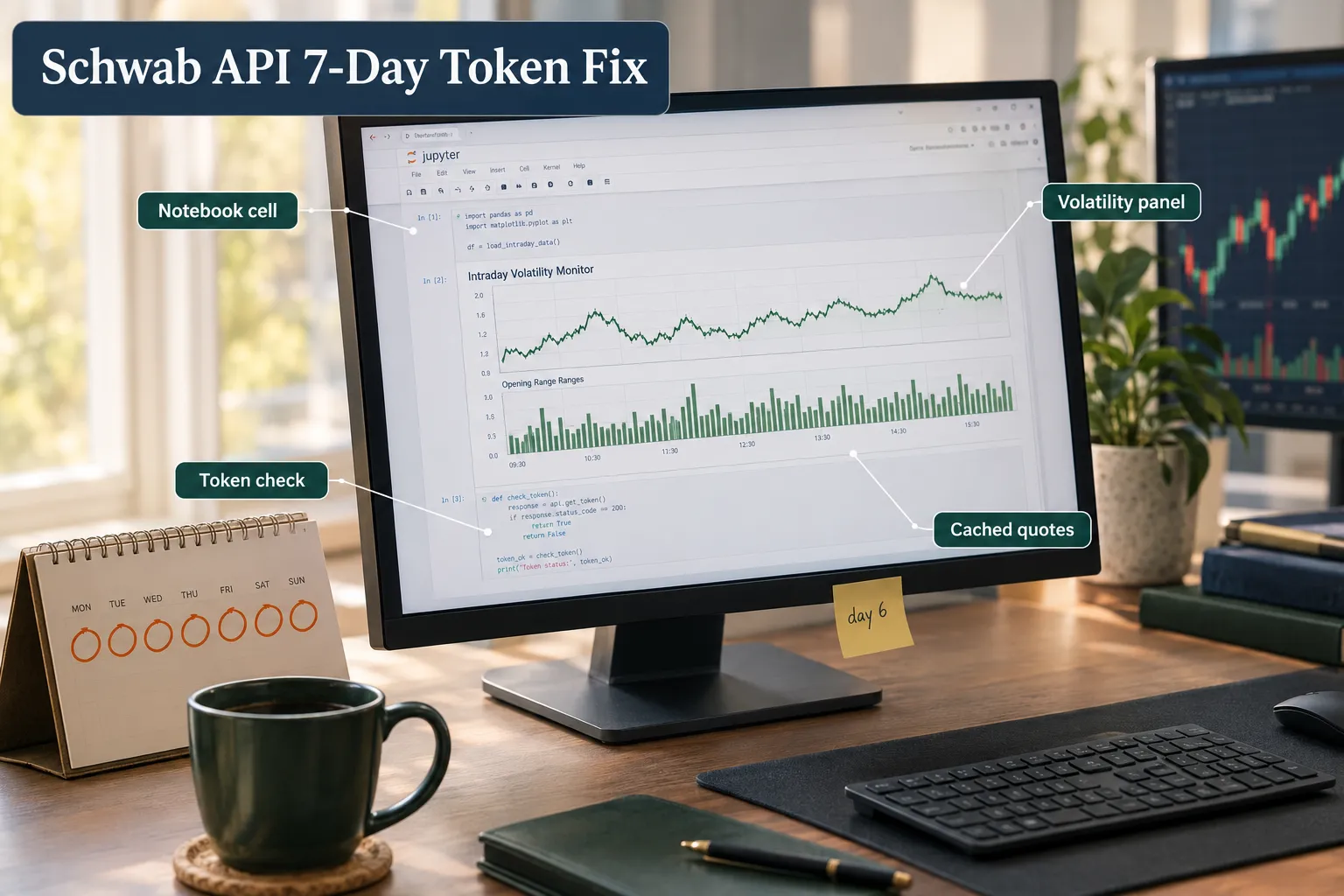
A notebook is the highest-value thing most traders build first with this API, and an intraday volatility monitor is the best starter project. Pull five-minute bars for your watchlist, compute rolling realized range, and flag names whose current range exceeds their 20-day average. That’s it. No prediction, no machine learning, just data over noise.
Keep the notebook boring and honest:
- One cell that checks token age and refuses to run if the refresh token is over five days old.
- One cell that caches raw bars to disk so you’re not re-pulling the same data on every run.
- One cell that charts the output. Nothing else.
- A header comment with the date and data source, because future you will want to know.
Jupyter is the default. If you share notebook code, state the data source, the date range, and the day you ran it. A notebook without a date is a screenshot with extra steps.
What we like / What we don’t like
Free data and a real Python community on one side, a weekly manual login and a gated developer portal on the other. The schwab developer api is a good deal with one loud flaw.
What we like
- No separate API subscription fee for individual developers.
- Market data included that competitors meter monthly.
- Equity and options trade services in one place.
- Active third-party libraries across Python, Go and R.
- Works with existing frameworks instead of demanding custom plumbing.
What we don’t like (two real drawbacks)
- The seven-day refresh token is a hard ceiling with no documented workaround. It makes true unattended operation impossible, and the
invalid_clienterror it throws misdirects your debugging. - Documentation access is inconsistent. Much of the official material sits behind the developer portal login, which pushes developers onto third-party docs for behavior that should be authoritative. Approval timelines are also unpublished.
What do real users say?
The community verdict is split: people stay for the free data and complain about the login. On the pain point side, weekly two-factor re-auth was named a top frustration in the r/algotrading thread What broker do you use for automated trading? dated September 30, 2026.
On the other side of the ledger, one trader who tested paying a competitor for real time data went back:
“My conclusion was that the data i already had from Schwab was better and free. So I kept Schwab.” u/d_e_g_m, r/algotrading
That tension is the whole story. The data keeps people in. The token pushes them out. Which force wins depends entirely on your holding period.
Competitors / alternatives
If a forced weekly browser login kills your design, three alternatives are worth real consideration: Alpaca for static keys, IBKR for breadth, tastytrade for options. None of them are strictly better. They’re differently constrained.
| Alternative | Why traders pick it | The catch | Access cost |
|---|---|---|---|
| Alpaca | Static API keys, no weekly re-login, clean docs | Equities and crypto focus, data tiers for depth | Free keys, paid data upgrades |
| Interactive Brokers | Global markets, futures, deepest instrument coverage | Gateway restarts, paid data entitlements, steep curve | Commissions plus data fees |
| tastytrade | Options-first API, reasonable session handling | Smaller developer community than Schwab or Alpaca | Commissions, no API fee |
| Schwab | Free data, existing account, strong Python support | 7-day refresh token, unpublished approval times | No separate fee |
Crypto-native venues technically offer permanent keys and 24/7 uptime, which is why people mention them in these threads. Different asset, different risk profile, not a substitute for an equity broker. Worth one line, not a strategy.
Before you move an account, read through the broader comparison of brokers with an API and be honest about whether your strategy needs an always-on connection or just a reliable one.
Our Take
The Schwab API is the best free market data pipe available to a retail trader with a Schwab account, and the seven-day token makes it unsuitable as the backbone of a fully unattended bot. Those two sentences are not in conflict. They just mean you have to pick a lane.
Here’s the position: if your strategy holds positions for days or weeks, run it on Schwab, re-authorize every Sunday, and put your protective stops at the broker rather than in your code. If your strategy must survive untouched for 30 days, stop trying to beat the refresh token and move to Alpaca or IBKR. Fighting a documented policy limit with clever scripting is how traders burn a month of evenings on infrastructure instead of edge.
And the quiet benefit nobody mentions: a weekly forced login is a weekly forced review. Most bots that blow up do it slowly while nobody’s watching. Getting dragged to a browser every seven days means you see your own account at least once a week. Process over prediction.
Your practical next step this week: add a single function that logs the age of your refresh token on every run, and set an alert at day five. One function. It eliminates the most common cause of a silent bot death, and it takes less time than reading this article did. Then paper trade the whole cycle, including a deliberate token expiry, before real money touches it. If you’re still building the foundation, the primer on Python algorithmic trading and the field guide to AI trading bots worth running are the right place to start.
Related topics and related reading
- Brokers with a trading API, compared
- Interactive Brokers TWS API walkthrough
- Alpaca API for beginners
- How to generate and secure Alpaca API keys
- Python algorithmic trading, start here
- What to know before you automate trades
Conclusion
The seven-day refresh token is not a bug you can fix, and pretending otherwise costs traders more time than the login ever will. The Schwab API gives you free market data, real trade services and a healthy Python community, and it charges you one browser login per week. Accept the trade or pick a broker whose constraints suit your strategy better. Both are legitimate choices. Only one of them involves rewriting your auth layer for the fourth time.
Do this today: log your refresh token’s age, alert at day five, re-authorize every Sunday, and put your stops at the broker. Then get back to the part that actually makes money, which is the setup and your risk management, not your plumbing.
Have you built something on the Schwab API? We review the software, not your stock picks. If you’ve built or run a bot on the schwab api, submit it and we’ll put it through the same process as every other tool on the board: submit your bot.
One tool, examined from the token layer up. There are 200+ more catalogued in the FullStack Alpha directory, filterable by category, price and what they actually do. Browse the directory at aistockpickerapps.com.
This article is education, not financial advice. It does not recommend securities and does not predict returns.
Your market edge starts with the right tool. Stay alpha.
Frequently Asked Questions
Are Schwab APIs free?
Yes. The Schwab Trader API has no separate subscription fee for individual developers, and market data is included with your brokerage account. You still pay standard Schwab commissions on anything your code trades. Check Schwab's official pricing page for current commission details.
Does Schwab provide API for trading?
Yes. Schwab allows equity and options order entry through its API, plus account data, positions, balances and market data through OAuth 2.0 endpoints. Futures order entry is not part of the Individual Trader API. You register a developer app, complete a browser authorization, and then place, replace or cancel orders programmatically.
How long does it take to get approved for Schwab API?
Schwab does not publish an approval timeline for developer applications. Community reports range from several days to several weeks. Plan for weeks, apply before you need it, and never schedule a strategy launch around an unconfirmed approval date.
How long does a Schwab API access token last?
About 30 minutes. The access token is attached to every request and renews silently using the refresh token, so this part of the cycle is fully automatable.
How long does a Schwab API refresh token last?
Seven days. Schwab enforces this as a hard age limit on the refresh token itself, and the schwab-py documentation notes expiry can land slightly before or after exactly seven days. Once it ages out, a new browser-based OAuth login with two-factor authentication is required. Refreshing your 30-minute access token does not reset that seven-day clock.
Can I fully automate Schwab API login?
Not in a supported way. Schwab requires an interactive browser login with two-factor authentication to issue a new refresh token, and no documented parameter extends it. Tools that claim full automation typically drive a headless browser or store your credentials, which creates real security exposure. Schedule the weekly login instead and alert yourself before day seven.
Is schwab api python supported?
Yes, strongly. The schwab-py library handles the OAuth flow and automatic access token refresh, Lumibot lists Schwab as a supported broker for live strategies, and community wrappers exist for Go and R as well.
What happens to my open orders if the token expires?
Orders already resting at Schwab stay active because they live on Schwab's servers, not in your script. Your bot simply loses the ability to read, modify or cancel them until you re-authorize. That's why protective stops belong at the broker as native orders rather than being managed inside your code logic.
Jay Rocco is the Founder and Editor of FullStack Alpha. He has tested 200+ AI stock tools since 2022 and run 15+ AI trading platforms on live accounts with his own money. He reviews the software. He does not tell you what stocks to buy.
