

The FullStack Alpha research desk tests AI trading bots on paper and live accounts. Reviewed and edited by Jay Rocco, Founder and Editor.
By FullStack Alpha Editorial Team | Reviewed by Jay Rocco, Chief Editor
The QuantConnect MCP server is a bridge that lets an AI client like Claude Code talk directly to your QuantConnect account over the Model Context Protocol, so Claude can create projects, write algorithm files, compile them, launch a quantconnect backtest and read the results back. You connect it by adding a custom connector in Claude’s settings pointing at QuantConnect’s MCP endpoint, then authorizing your organization in the browser. Per QuantConnect’s MCP key concepts documentation (checked October 2026), the remote server requires a paid agent node, not the free A-MICRO. And the one check to run before you trust anything Claude hands you: open the backtest’s fee and slippage settings and confirm the model matches the asset class you actually traded.
What You Should Know
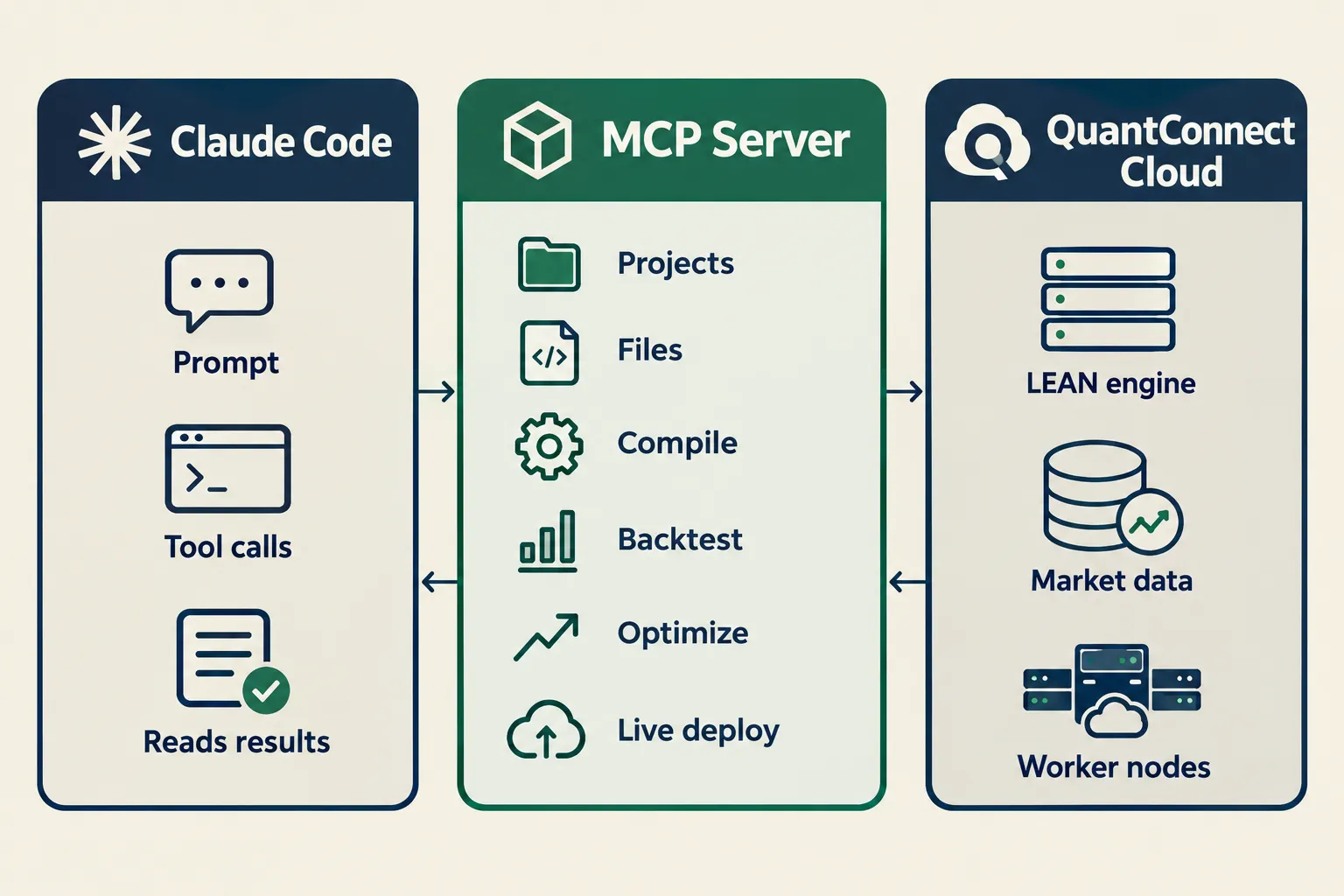
- QuantConnect launched its MCP Server in August 2025. Jared Broad’s announcement on August 5, 2025 described more than 60 API endpoints covering projects, files, compilation, backtesting, optimization and live deployment.
- The remote Claude Code connector was documented October 3, 2026. QuantConnect’s Claude Code docs page tells you to add a connector pointing at
https://www.quantconnect.com/api/v2/mcpand authorize an organization in the browser. - A free account won’t connect. QuantConnect’s key concepts page states the free A-MICRO node cannot use the remote MCP service; paid nodes such as A1-1, A4-8 or A16-32 are required.
- Backtests run asynchronously. The
create_backtesttool compiles, submits a job and returns a backtest ID. QuantConnect explicitly tells clients not to poll in a loop. - The standalone GitHub repo is marked “deprecated for now.” QuantConnect/mcp-server still documents the original local Docker build, but the README points you to the supported integration instead.
What Is the QuantConnect MCP Server?
The quantconnect mcp server is a translation layer. It takes QuantConnect’s REST API and exposes it as MCP tools an AI client can call on its own, without you copying API responses into a chat window.
MCP, short for Model Context Protocol, is an open standard for letting an AI model call external software. Think of it as a universal plug. Before MCP, hooking Claude to QuantConnect meant writing glue code yourself. Now the plug exists and QuantConnect maintains it.
Checked against QuantConnect’s MCP Server documentation on October 23, 2026, here’s what the tool surface covers:
- Projects and files, create a project, list files, read and write algorithm code
- Compilation, syntax check, code completion, detailed error messages
- Backtesting, create a quantconnect backtest, read results, pull orders, insights and charts
- Optimization, parameter sweeps across a strategy
- Live algorithms, deploy, monitor, stop
- Research, notebooks, datasets, Object Store files, notifications
What it does not do
This matters more than the feature list. The quantconnect mcp server does not give Claude judgment. It gives Claude hands.
It does not validate that your strategy makes economic sense. It does not warn you when you’ve accidentally trained on data the strategy wouldn’t have had in real time. It does not check whether your Sharpe ratio came from 11 trades or 1,100. Claude can run a backtest in under a minute. Whether that backtest means anything is still entirely your problem.
QuantConnect MCP Claude is a speed upgrade on execution, not a replacement for your own review. That distinction is the whole article.
Who this is for
Use it if you already write strategies and the friction you hate is the plumbing: creating files, waiting on compiles, re-reading error traces. Skip it if you’ve never coded a strategy and you’re hoping the AI will invent one that works. It’ll produce something that compiles. Compiling and being profitable are unrelated.
What Do You Need Before You Connect Claude Code?
Four things: a QuantConnect account, a paid agent node, a Claude Code subscription, and (for the local route only) the Local Platform environment. The quantconnect api key and user ID matter for the older local setup; the remote connector handles auth through the browser instead.
The account and the node
Sign up at QuantConnect and create an organization. Every organization gets compute resources called nodes. Per QuantConnect’s MCP key concepts page (checked October 2026), the free A-MICRO backtesting node cannot connect to the remote MCP service. You need a paid node tier such as A1-1, A4-8 or A16-32.
This is the single most common surprise. People read the docs, see “add a connector,” do it, and then wonder why their tools list is empty or their backtests queue forever. Check your node tier first. For current tier names and what each includes, read the official QuantConnect pricing page on the day you buy.
The quantconnect api key
For the legacy local Docker setup, QuantConnect’s docs direct you to your account settings, where you’ll find a user ID and an API token. Together those are your quantconnect api key pair, and the local MCP server reads them as environment variables.
The remote connector route replaces that. You click Connect, a browser window opens, you authorize the organization, and the token exchange happens behind the scenes. Fewer secrets sitting in a config file on your laptop. That’s a real improvement, and it’s why QuantConnect now leads with the remote path.
Claude Code
Anthropic’s public pricing lists Claude Code as included with Claude Pro at $20 per month, or $17 per month billed annually, with Max tiers starting at $100 per month and a $200 per month tier (Anthropic pricing, checked October 2026). Heavier agent use burns tokens faster, so if you’re running long debug loops the higher tiers exist for a reason. These costs sit on top of QuantConnect’s node fees. Budget for both.
Local tools
If you go the Local Platform route, QuantConnect documents a Claude Code extension that runs alongside your local project. The deprecated standalone GitHub repository, QuantConnect/mcp-server, describes a Docker-based local server. Its README says the preferred approach is now the MCP server embedded in VS Code or the current supported integration. If you want to understand the internals, that repo is still worth reading. For getting work done today, use the supported path.
Checklist before you start:
- QuantConnect account with a paid node tier (confirm on the pricing page)
- Claude Code installed and signed in
- Your organization name handy for the browser authorization step
- A project idea specific enough to test in one sitting
How Do You Connect Claude Code to QuantConnect Step by Step?
QuantConnect’s October 3, 2026 Claude Code documentation describes a five-step remote setup: open Settings, add a connector, paste the MCP URL, connect, authorize your organization in the browser. Here’s each step with what you should see and where people get stuck.
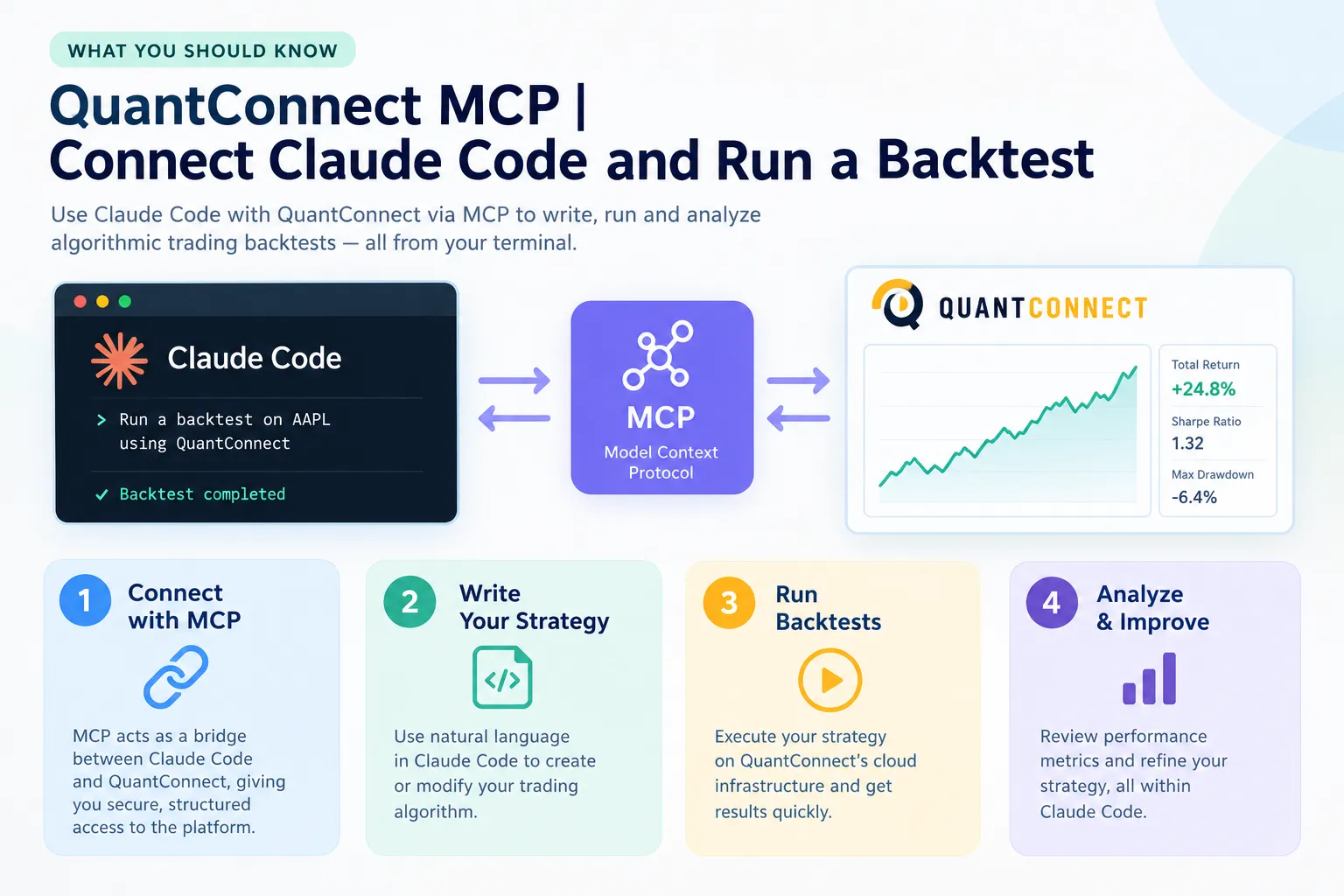
Step 1. Open Claude Code and go to Settings, then Connectors.
You should see a list of any connectors already installed and an option to add a new one. If the Connectors section isn’t there, your Claude Code build is out of date. Update it before troubleshooting anything else.
Common error: looking for this in the Claude web app instead of Claude Code. They’re different surfaces.
Step 2. Choose Add, then give the connector a name.
Name it something you’ll recognize later. “QuantConnect” works fine. The name is cosmetic.
Step 3. Enter the QuantConnect MCP URL.
QuantConnect’s documentation specifies https://www.quantconnect.com/api/v2/mcp. Type it exactly. No trailing slash, no http.
Common error: a stray space when pasting. The connector will save and then silently fail to list any tools. If your tool list is empty, re-check this field character by character before you blame your account.
Step 4. Click Connect and authorize in the browser.
A browser tab opens on QuantConnect asking you to authorize an organization. Pick the organization that holds your paid node. If you belong to several organizations, this is where people pick the wrong one and then can’t figure out why their projects don’t appear.
Common error: authorizing an organization that only has the free A-MICRO node. The connection will look successful. The backtests won’t run.
Step 5. Return to Claude Code and verify the tools loaded.
You should see QuantConnect tools available in the client: project creation, file writes, compile, create backtest, read backtest, and the rest. On Local Platform, QuantConnect’s docs say you can open the Claude Code panel inside a project and type /mcp to confirm the quantconnect mcp server shows as connected.
Common error: not restarting the client. If tools don’t appear after authorization, close Claude Code and reopen it.
Watch the setup instead of reading it
If you’d rather see someone do this live, Tim Sergeev’s QuantConnect MCP setup walkthrough covers the connection and a first backtest end to end. Credit the channel as shown on the video page.
https://www.youtube.com/watch?v=ZMnQ5bDsDq0
Treat anything a creator shows about their own results as a creator claim, not a verified benchmark. The setup steps are checkable. Performance numbers in a video are not.
How Do You Run a QuantConnect Backtest Through Claude?
Once the connector is live, a quantconnect backtest is a conversation: ask Claude to create a project, write the algorithm, compile it, submit the backtest, then read the result. QuantConnect supports quantconnect python and C# as algorithm languages, and the MCP tools work with either.
The five moves
1. Create the project. Tell Claude to create a new QuantConnect project with a specific name and language. Python is the default most people use. C# is supported if you prefer it or need the speed.
2. Write the algorithm. Be explicit about scope. A vague prompt gets you a vague strategy. A useful instruction looks like this:
Create a Python project called SPY-20-50-Cross. Write an algorithm that trades SPY on daily resolution from January 2015 to December 2024, going long when the 20-day simple moving average crosses above the 50-day and flat when it crosses below. Use a fixed 10% position size. Set a realistic fee model and slippage model for US equities. After the backtest completes, report total return, Sharpe ratio, max drawdown and total number of trades.
Notice what that prompt does. It names the symbol, the resolution, the date range, the rule, the sizing, the cost models, and the exact metrics to report. Claude doesn’t have to guess, and you have something you can audit.
3. Compile. Claude calls the compile tool. If it fails, the MCP surface includes syntax checking and detailed error messages, so Claude can read the trace and patch the file itself. This loop is the part that genuinely saves time. What used to be ten minutes of copying stack traces is now one round trip.
4. Run the backtest. QuantConnect’s key concepts documentation is explicit: create_backtest compiles the project, submits the job to a worker and returns a backtest ID. The operation is asynchronous. The docs tell the client not to poll repeatedly. The result arrives, and then Claude calls read_backtest.
5. Read the result. Claude can pull the statistics, the orders list, the equity curve chart data and any insights the algorithm emitted. Ask for the trade log, not just the headline return. A strategy with a 40% return and nine trades isn’t a strategy. It’s an anecdote.
How long does a backtest take?
Depends on three things: date range, data resolution and node tier. A ten-year daily-resolution test on one equity typically finishes in well under a minute on a paid node. The same ten years at minute resolution across 50 symbols is a different animal and can run for many minutes. Tick data on a long range can take far longer.
Decision rule: prototype on daily resolution, confirm on minute resolution. Running your first draft on tick data is how you spend an afternoon waiting to find out your logic was wrong in line four.
Can it backtest crypto, or just stocks?
Both. QuantConnect’s datasets cover US equities, options, futures, forex, CFDs and crypto, and the quantconnect mcp tool surface includes dataset access, so Claude can query what’s available in your organization. Coverage, history depth and whether a dataset is included in your tier all vary. Check the dataset listing on QuantConnect’s site before you promise yourself a 2014 crypto backtest.
What Is LEAN and When Do You Need the LEAN CLI?
LEAN is QuantConnect’s open-source backtesting and live trading engine. The quantconnect lean cloud platform runs LEAN on QuantConnect’s servers. The lean cli is a command-line tool that runs that same engine on your own machine.
Three layers, easy to confuse:
| Layer | What it is | When you use it |
|---|---|---|
| QuantConnect Cloud | Hosted platform, browser IDE, managed data | Default. Fastest path from idea to result |
| LEAN engine | The open-source engine doing the actual simulation | You rarely touch it directly. It’s what runs underneath |
| LEAN CLI | Command-line tool to run LEAN locally | Local development, custom data, offline work, version control |
Choose the cloud if you want QuantConnect’s data and compute handled for you, which is most people most of the time. Choose the lean cli if you need to run on proprietary data, want full local control of your repo, or you’re testing something you’d rather not upload.
The MCP integration works with both. QuantConnect documents a Claude Code extension for Local Platform where you type /mcp in the Claude panel to confirm the server is attached. The remote connector targets the cloud API.
One caution worth stating plainly: running LEAN locally does not make a backtest more trustworthy. Same engine, same math. The honesty of a result comes from your assumptions, not your hardware. More on the LEAN engine and CLI in our guide to QuantConnect LEAN.
What Should You Check Before Trusting the Backtest?
Run six checks every time: fee model, slippage model, data resolution, look-ahead bias, overfitting and sample size. An AI agent will happily hand you a beautiful equity curve built on assumptions no broker would honor.
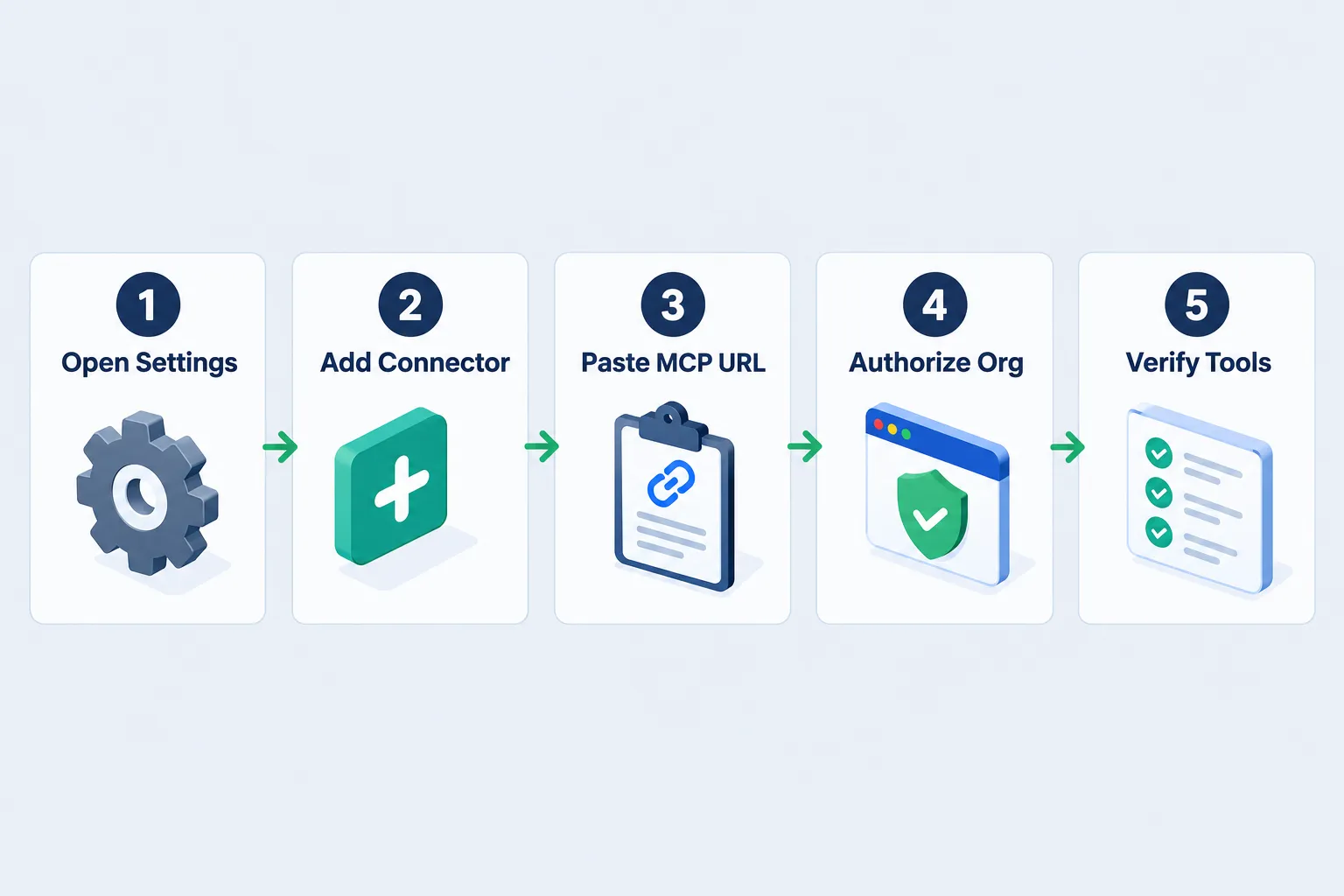
| Check | What to look for | Fix |
|---|---|---|
| Fee model | Did the algorithm set a fee model, or is it running on a default that may not match your broker? | Set the fee model explicitly to match the broker you’d actually use |
| Slippage model | Zero slippage on a strategy that trades 200 times a year is fiction | Add a slippage model; re-run and compare the delta in net return |
| Data resolution | Daily bars can hide intraday stop-outs completely | Re-run the same logic at minute resolution before you believe it |
| Look-ahead bias | Any reference to data the algorithm couldn’t have had at decision time | Confirm indicators use closed bars only and no survivorship-filtered universe |
| Overfitting | Lots of tuned parameters, a suspiciously smooth curve, great in-sample results | Hold out a date range the strategy never saw and test on that |
| Sample size | Under ~30 trades means the statistics are noise | Widen the date range or loosen the entry rule until you have real sample |
The one that gets everyone
Look-ahead bias is the quiet killer. It’s using information in a simulation that you wouldn’t have had at that moment in real life. Ranking stocks by full-year return and then “buying the winner in January” is the cartoon version. The subtle versions are harder: a universe built from today’s index members, an indicator calculated on a bar that hadn’t closed yet, a corporate action applied retroactively.
Claude won’t flag it. It doesn’t know what you intended. Our deeper breakdown of look-ahead bias in backtesting covers how it sneaks in and how to catch it.
The second one that gets everyone
Overfitting is the other half. Run 400 parameter combinations through MCP’s optimization tools and one of them will look brilliant. That’s not a discovery, it’s a lottery result. The strategy memorized the past instead of learning a rule. See overfitting vs underfitting for how to tell them apart.
Practical rule: if the equity curve barely has a drawdown, something in the setup is lying to you. Real strategies lose money regularly. A curve that goes up in a straight line usually means missing costs, missing slippage, or a peek at the future.
How accurate are QuantConnect backtests?
Mechanically, they’re solid. LEAN is open-source, widely used, and simulates order fills, corporate actions and data sources properly when you configure them. Where backtests fall apart is almost never the engine. It’s the inputs and the human reading the output.
A backtest answers one question: what would this exact rule have returned on this exact data with these exact cost assumptions. It does not answer whether the market will keep behaving that way. Process over prediction. Paper trade it first.
Can You Take It Live With Interactive Brokers?
Yes. QuantConnect supports live deployment to Interactive Brokers, and the quantconnect mcp tool surface includes live algorithm deployment, monitoring and stopping. Requirements, supported account types and funding minimums change, so confirm the current list on QuantConnect’s brokerage documentation before you wire anything up (checked October 2026).
What you’ll generally need:
- A funded Interactive Brokers account with API access enabled
- A QuantConnect live trading node, which is separate from your backtesting node
- The brokerage credentials configured in your QuantConnect organization
- A strategy that’s been through paper trading first
That last one isn’t a QuantConnect requirement. It’s a survival requirement.
On creator results
Tim Sergeev’s videos show backtest results alongside live or forward-tested outcomes. Treat those as creator claims. They’re not audited, they’re not independently verified, and a result from one person’s account on one date range tells you nothing about what your configuration will do. Useful for seeing the workflow. Not useful as evidence.
Deploy discipline
Before any live link, do three things. Run the strategy in paper trading for at least a full month across different market conditions. Compare paper fills to backtest fills and write down the gap. Then size the first live allocation small enough that being wrong costs you a lesson, not an account.
Hooking an AI agent to a broker is a genuinely new capability, and the failure mode is new too. Claude can deploy a live algorithm through MCP. It cannot evaluate whether your risk management is sane. Position sizing and stop placement are still yours. If you’re exploring the broker-API side of AI assistance more broadly, our piece on using the IBKR API with Claude covers that ground.
What Does QuantConnect Cost for This Workflow?
Two separate bills: QuantConnect’s node and data costs, and Anthropic’s Claude Code subscription. QuantConnect’s exact tier names and prices change, so pull them from the official pricing page before budgeting.
| Cost item | What it covers | Where to confirm |
|---|---|---|
| Free tier (A-MICRO) | Browser research and backtesting. Cannot use the remote MCP server per QuantConnect’s key concepts docs | QuantConnect pricing page |
| Paid backtesting node (A1-1, A4-8, A16-32) | Required for quantconnect mcp. Faster compute, more RAM, parallel backtests | QuantConnect pricing page |
| Live trading node | Separate from backtesting. Needed to run a strategy on real money | QuantConnect pricing page |
| Premium datasets | Some data is add-on, not included | QuantConnect dataset listing |
| Claude Code | $20/mo with Claude Pro, $17/mo billed annually; Max tiers $100 and $200/mo (Anthropic pricing, checked October 2026) | claude.com |
Decision rule: if you aren’t already backtesting regularly, don’t buy the paid node to try MCP. Test your ideas in the free browser IDE for a month. If the bottleneck turns out to be your plumbing rather than your ideas, then pay for the node.
For a fuller breakdown of what each tier actually includes, see our QuantConnect pricing guide, our QuantConnect tool profile in the directory, and our QuantConnect review.
Is QuantConnect MCP Better Than Other AI Trading Tools?
It’s better at a different job. Most AI stock tools hand you signals or screens. The quantconnect mcp server hands you an institutional-grade backtesting engine with an AI agent driving it. Those aren’t competitors, they’re different layers.
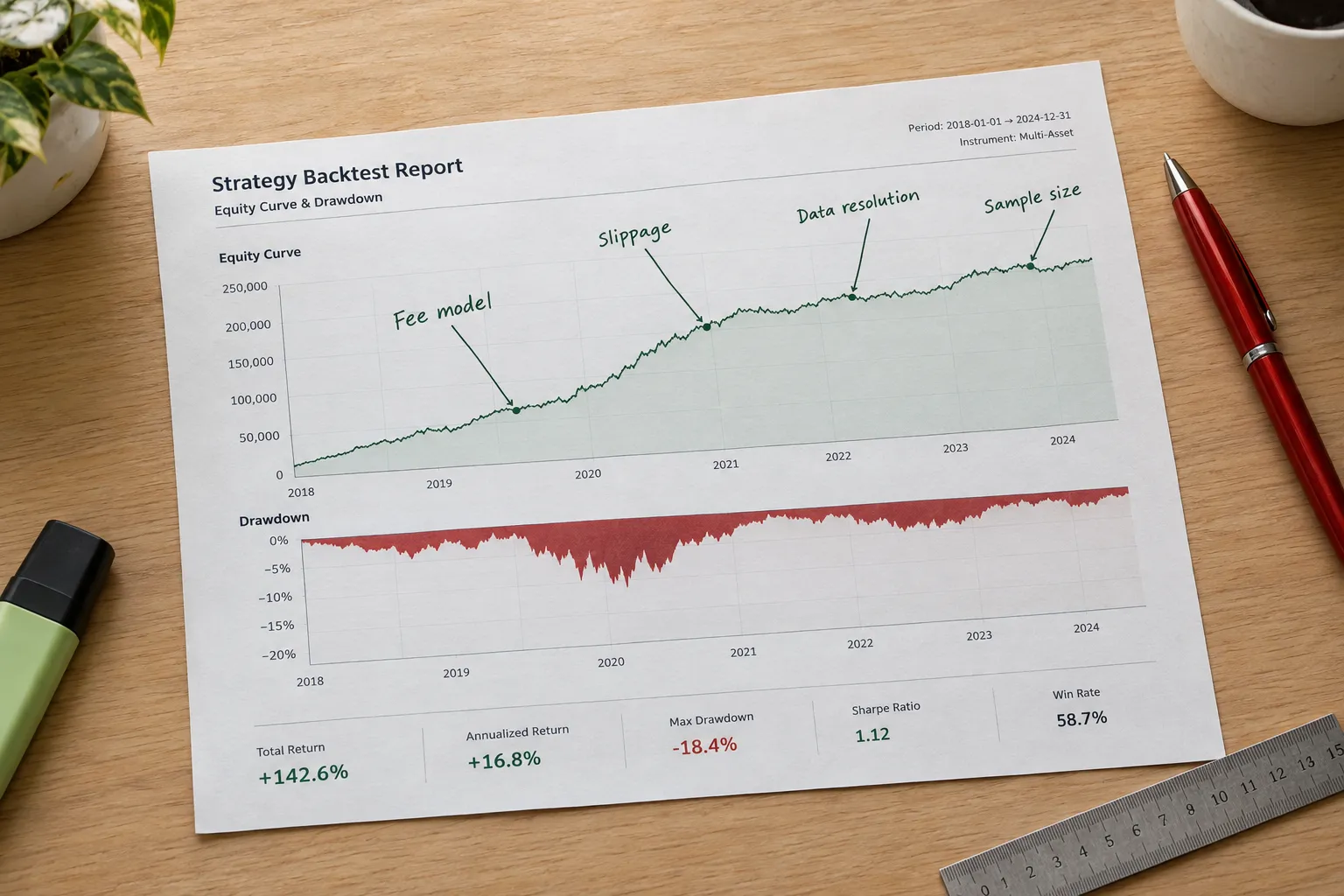
Compare it honestly:
- Against AI screeners and pickers, those tell you what might be interesting. MCP tells you whether a rule would have worked. If you want ideas, a screener is the better buy. If you want evidence, this is.
- Against backtesting-only platforms, QuantConnect’s data breadth, asset coverage and live deployment path are deeper than most. The tradeoff is a real learning curve.
- Against writing your own API glue, MCP removes a weekend of integration work. That’s the whole value proposition, and it’s a fair one.
Where it loses: if you don’t code, this isn’t your entry point. If you want a tool that just tells you what to buy, this will frustrate you within an hour.
Do you need coding experience?
Some. Claude can write quantconnect python for you, and for simple strategies you can get a result without typing a line. But you need enough fluency to read what it wrote and spot a flaw, because no one else will. Not knowing whether your indicator used a closed bar is how a strategy looks great in testing and loses money live.
Honest bar: you should be able to read Python and reason about the logic, even if you couldn’t write it from scratch. Browse more backtesting coverage in our backtesting section, or compare the broader field at aistocktradingbots.com.
What Are the Most Common Mistakes With QuantConnect MCP?
The big five: using a free node, trusting the first backtest, running a single date range, letting Claude pick parameters, and deploying live before paper trading. Each has a cheap fix.
- Connecting on a free A-MICRO node. The authorization succeeds, the backtests don’t. Confirm your node tier before you spend an hour debugging.
- Accepting default cost models. Zero fees and zero slippage flatter every strategy, especially high-frequency ones. State the models in your prompt.
- Testing one date range. A strategy that only works 2020 to 2024 isn’t a strategy, it’s a bull market. Test across a drawdown period.
- Letting the optimizer pick the winner. Parameter sweeps find the luckiest combination, not the most durable one. Validate out of sample.
- Going live off a backtest. Paper trade it first. Always. Play stupid games, win stupid prizes.
Edge case worth knowing: if your strategy depends on a symbol that was delisted or renamed mid-period, a naive universe can quietly drop it and inflate your returns. That’s survivorship bias wearing a different hat. Check your universe construction, not just your entry rule.
How Do You Fix Errors When a QuantConnect Backtest Fails?
Start with the error type. Compile errors are syntax and Claude can usually self-correct. Runtime errors mean your logic broke during the simulation. Queue problems usually mean a node or permissions issue.
Compile fails. Ask Claude to run the syntax check tool and read the detailed error message. The MCP surface includes both. Most compile failures are an import, a typo in an API method name, or a version mismatch on an indicator constructor.
Runtime error mid-backtest. Common causes: requesting data for a symbol that doesn’t exist in the date range, dividing by zero on an indicator that isn’t warmed up yet, or calling a method before the security is added. Ask Claude to read the backtest log, not just the status.
Backtest never finishes. Either the job is enormous (tick data across a long range) or your node is busy. Check the node status in your QuantConnect organization. A free-tier account will also stall here.
No tools appear in Claude Code. Re-check the connector URL, confirm you authorized the right organization, and restart the client. That sequence solves most of it.
Results look impossible. A 900% return with no drawdown is an error, not a discovery. Go back to the six-point audit table above and start with look-ahead bias.
Fastest debugging habit: ask Claude to explain what the algorithm is doing step by step on one specific trade date. If the explanation doesn’t match what you intended, you found your bug.
Frequently Asked Questions
Is there a QuantConnect MCP server on GitHub?
Yes, at QuantConnect/mcp-server, but the README marks it “deprecated for now.” The repo documents the original local Docker implementation and remains useful for understanding how the server works internally. QuantConnect now points users toward the MCP server embedded in VS Code or the supported remote connector instead.
Does QuantConnect work with Claude?
Yes. QuantConnect’s documentation dated October 3, 2026 describes connecting Claude Code via a custom connector pointing at the QuantConnect MCP endpoint, then authorizing an organization in the browser. Once connected, Claude can create projects, write code, compile, backtest and deploy live algorithms through the quantconnect mcp tool surface.
How do I get a QuantConnect API key?
Your quantconnect api key pair (user ID and API token) lives in your QuantConnect account settings. The legacy local MCP setup reads them as environment variables. The remote connector route skips this entirely, handling authorization through a browser login instead of stored credentials.
Can I use QuantConnect with Cursor?
Yes. QuantConnect’s MCP Server documentation lists supported clients including Claude, GitHub Copilot and Cursor. The setup pattern is similar across clients: point the MCP configuration at QuantConnect’s server and authorize your organization. Check the specific client page in QuantConnect’s docs for exact steps.
Does QuantConnect support C# as well as Python?
Yes. QuantConnect supports both quantconnect python and C# for algorithm development, and the LEAN engine runs either. Python is more common among retail users for readability and library access. C# generally runs faster on compute-heavy strategies.
Is QuantConnect MCP free?
No. QuantConnect’s key concepts documentation states the free A-MICRO node cannot connect to the remote MCP server, so a paid node such as A1-1, A4-8 or A16-32 is required. Claude Code is billed separately by Anthropic, starting at $20 per month with Claude Pro.
How long does a backtest take through MCP?
A ten-year daily-resolution test on a single equity usually finishes in under a minute on a paid node. Minute or tick resolution across many symbols takes substantially longer. Backtests run asynchronously, so QuantConnect’s docs instruct clients to wait for the result rather than polling repeatedly.
Our Take
Let Claude write it and run it. Audit it yourself before anything touches real money.
The quantconnect mcp server removes the boring part of quantitative research: the file management, the compile loop, the error traces. That’s genuine time back. What it doesn’t remove is the part that actually decides whether you make money, which is asking whether your assumptions were honest. An AI agent will produce a clean-looking backtest from a broken premise and never blink.
So use the speed. Then slow down at the finish line: check the fee model, check the slippage, check the sample size, hold out a date range, and paper trade before you deploy. Discipline beats prediction, every time.
Built something with this setup and want it reviewed? Submit your bot here.
Stay alpha.
The FullStack Alpha research desk tests AI trading bots on paper and live accounts. Reviewed and edited by Jay Rocco, Founder and Editor.
