

The IBKR API now talks to Claude directly, and the connection itself costs nothing extra.
Quick Answer
Interactive Brokers turned on MCP connectivity on July 28, 2026, which means Claude, Claude Code, ChatGPT, Grok, Cursor, Perplexity and Windsurf can read your IBKR account and draft orders after a single account authorization, per IBKR’s July 28, 2026 announcement. Claude cannot push an order to the market on its own. It writes the instruction, you review it inside an IBKR platform, and you submit. Everything in this guide on the IBKR API and Claude, how to connect AI to Interactive Brokers, assumes that boundary stays in place, because it is the only thing standing between a language model and your buying power.
Key Takeaways
- IBKR launched MCP connectivity on July 28, 2026, adding Claude Code, Cursor, Perplexity and Windsurf to the earlier certified set of ChatGPT, Claude and Grok, with Gemini listed as coming soon on the IBKR AI integrations page.
- The official Claude connector is listed as Anthropic verified and was added in May 2026, with the connector URL
https://api.ibkr.com/v1/api/mcpon the Interactive Brokers connector listing. - Connector version 1.1.5, documented in the IBKR connector release notes, opened the door to any MCP-compatible client and put consent revocation in Client Portal under Settings, Manage Third-Party Consents.
- There is no separate API fee for IBKR account holders on the TWS API, the Client Portal Web API or FIX. Market data subscriptions are billed on their own, so confirm current figures on the official pricing pages.
- The integration is not available in India or Japan based on IBKR’s current disclosure, so your location and account entity decide whether any of this works for you.
- Known rough edges as of October 2026: the Claude connector can show as connected on claude.ai web while failing to surface its tools, automated logins hit roughly weekly 2FA re-authentication, and the September 9, 2026 Web API changelog removed the
/hmds/scannerendpoint.
What is the IBKR API and what can AI do with it?
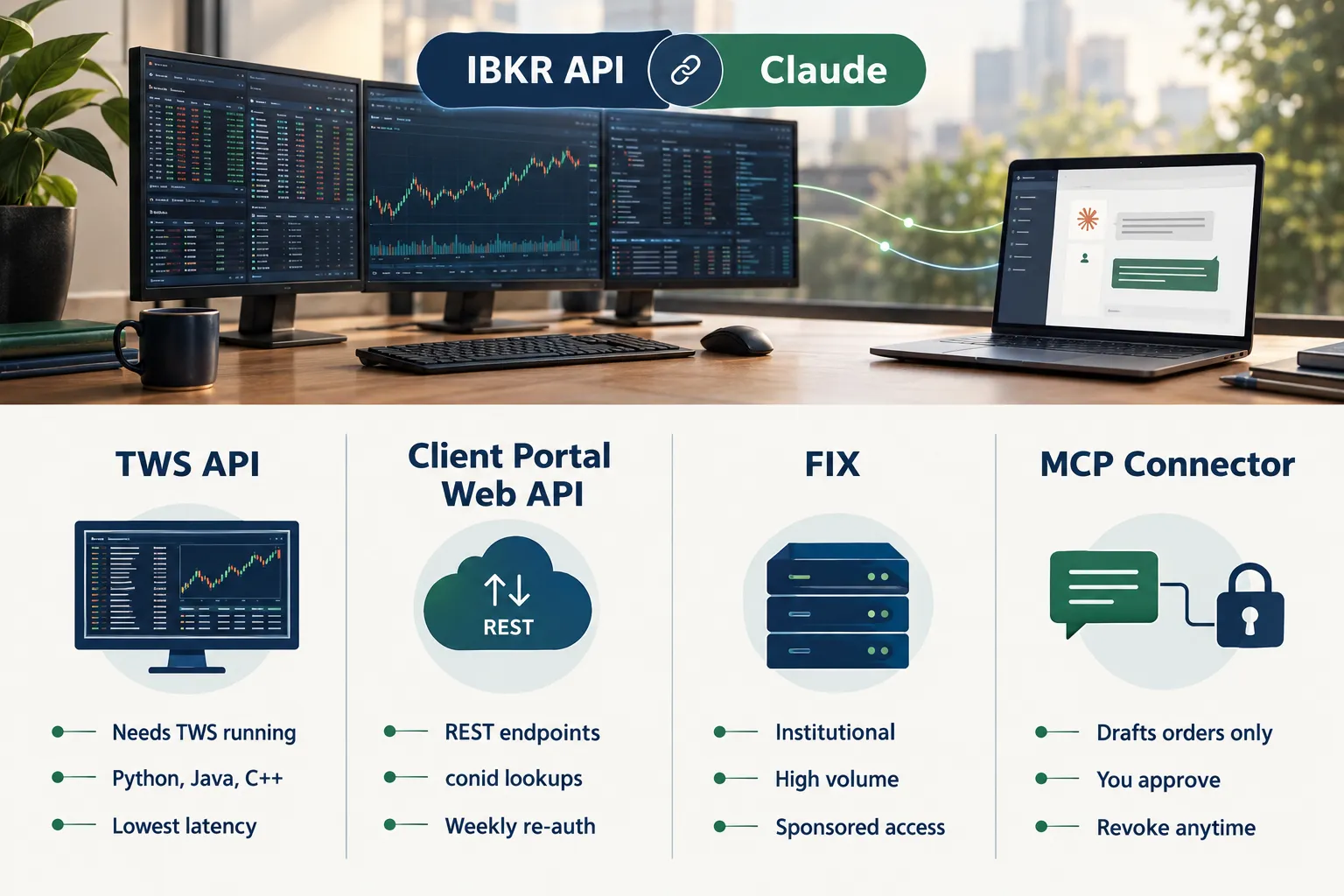
The IBKR API is not one product. It is a family of connections into an Interactive Brokers LLC account: the TWS API, the Client Portal Web API, FIX for institutions, and since 2026 an MCP connector that lets an AI model read data and draft orders. All four read the same account and the same market, just through different plumbing.
Every IBKR API request eventually touches two things: an instrument and an order. The instrument is identified by a conid, IBKR’s internal contract ID. A conid is the difference between “AAPL” and a specific listing on a specific exchange in a specific currency, which is why the first real call most developers make is a contract search to get the conid before anything else happens.
What an AI model adds is translation. You ask a question in English, the model picks the endpoint, fills in the conid, and reads back the response. That covers balances, positions, account summaries, open orders, allocations, trade history, price history, price snapshots and contract searches, which is exactly the tool list published on the Claude connector page.
Decision rule: if your question is “what do I own and what is it doing,” the AI connection is genuinely useful. If your question is “execute this at 9:31:02,” you want code, not conversation.
IBKR API: TWS API vs Client Portal Web API vs the new MCP connection
Pick by how much control you need. The TWS API gives you the deepest access and the lowest latency but demands a running desktop platform. The Client Portal Web API trades that depth for REST simplicity. The MCP connector trades both for plain-English access with a human approving every order.
TWS API
The TWS API connects to Trader Workstation or IB Gateway running on your machine. It handles stocks, options, futures, bonds and FX, streams live market data, and is the usual home for an ibkr api python project built on the official client or a community wrapper. The new synchronous wrapper pattern that keeps showing up in sample code exists because the native callback model trips up most beginners. For installation specifics, see our Interactive Brokers TWS API setup guide instead of repeating them here.
Client Portal Web API
The ibkr client portal api is REST over HTTPS. You authenticate a session, then call endpoints like GET https://api.ibkr.com/v1/api/iserver/accounts, hit /iserver paths for market data snapshots and order placement, and read JSON back. Endpoint names read like shorthand: req for requests, sec def for security definitions, fyi for notifications. No desktop software required, which is why it suits a server-side bot.
FIX
FIX is the institutional pipe. High order volume, sponsored access, order routing at scale. If you are reading a retail guide about connecting Claude, FIX is not your lane, and that is fine.
The MCP connection
MCP is the connection that made this topic interesting. One account authorization, and the model gets scoped read access plus the ability to compose order reply messages you then confirm. Generally, this is the IBKR API offering for people who do not want to write code at all.
How do you connect Claude to Interactive Brokers step by step?
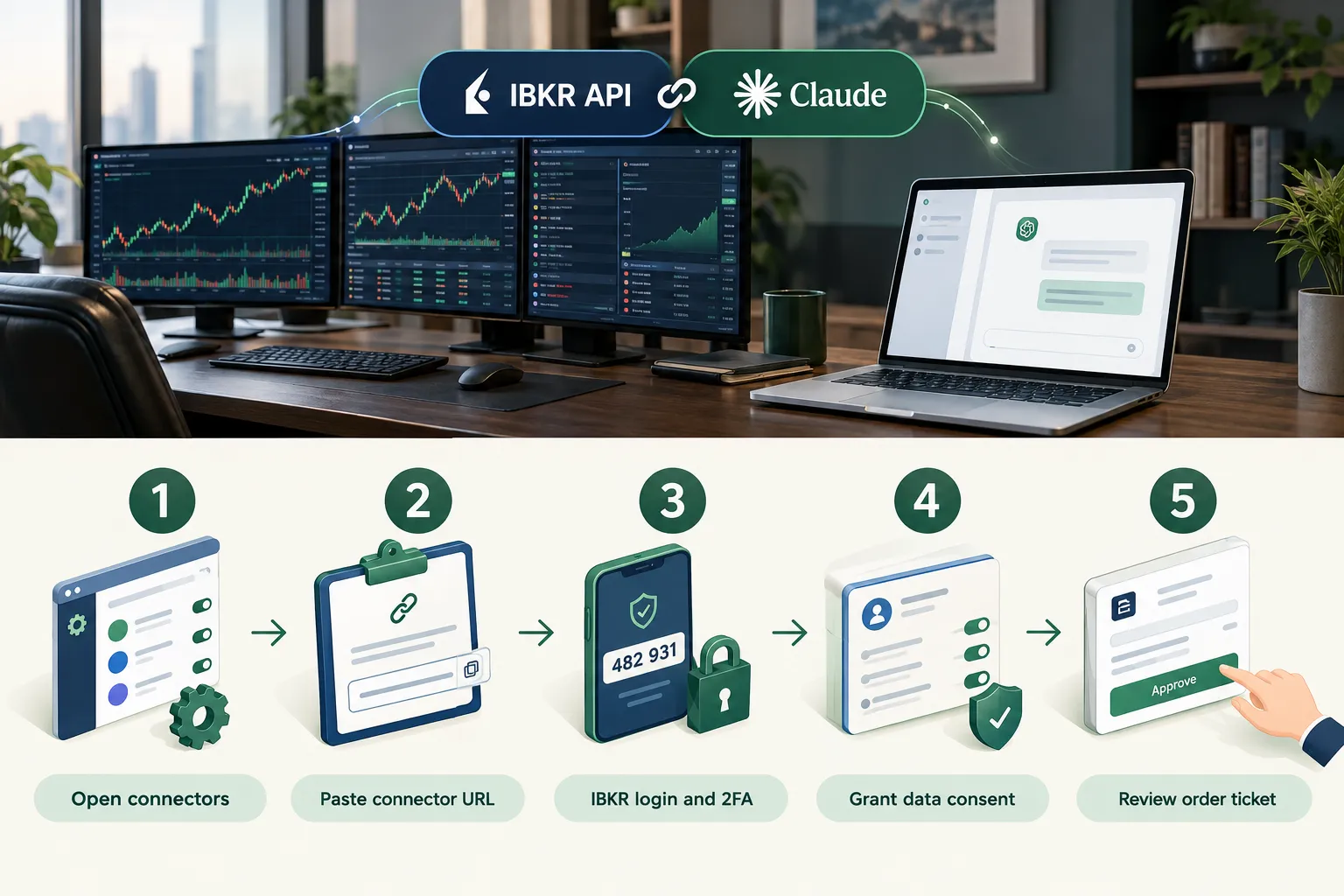
Five steps, about ten minutes, and no API key in the traditional sense. You authenticate through an IBKR-controlled login flow, and IBKR states your credentials are never shared with the AI application. That single detail is why the ibkr api key question keeps confusing people: there isn’t one for MCP.
- Find your account details. Log in to Client Portal on the website www.interactivebrokers.com and confirm which account you want exposed. Sub-accounts and advisor allocations behave differently.
- Open connectors in Claude. In settings, add the Interactive Brokers connector. Copy the connector URL
https://api.ibkr.com/v1/api/mcpexactly as published, or use the general endpointhttps://api.ibkr.com/v1/api/mcp-publicfor other MCP clients. Copy and paste beats typing it. - Authorize through IBKR. You get redirected to an IBKR login with two-factor authentication. Approve the request, and the consent is recorded on IBKR’s side, not inside the chat app.
- Check the tool list. Ask the model to pull an account summary. If balances and positions come back, the connection works. If nothing comes back, jump to the troubleshooting section below.
- Draft, review, submit. Ask for an order, read the draft, then approve it in Client Portal, IBKR Desktop, IBKR GlobalTrader, IBKR Mobile or Trader Workstation. Platform downloads for TWS sit under the Trading menu on the IBKR website.
Revoking access takes one click: Client Portal, Settings, Manage Third-Party Consents, per the version 1.1.5 notes. Please check availability for your location first, because the IBKR AI integrations disclosure excludes India and Japan, and regional sites such as the IBKR Hong Kong AI integrations page carry their own terms.
Comparison table: IBKR MCP vs TWS API vs Client Portal Web API
Here is the whole decision in one grid. The honest summary: MCP for research and drafting, Web API for server bots, TWS API for speed and depth.
| Connection | Who it’s for | Setup effort | Order approval | Cost to use |
|---|---|---|---|---|
| MCP connector (Claude, ChatGPT, Grok, Perplexity, Cursor, Windsurf) | Retail traders who want plain-English account access | Minutes, one authorization, no code | You review and submit every order manually | No separate API fee for account holders |
| Client Portal Web API | Day or algorithmic traders running server-side logic | Hours, REST client plus session handling | Programmatic, with order reply messages to confirm | No separate API fee, market data billed separately |
| TWS API | Algorithmic traders and third party developers needing depth | A day or more, desktop platform required | Fully programmatic | No separate API fee, market data billed separately |
| FIX | Institutional and enterprise order flow | Weeks, onboarding and certification | Fully programmatic | Negotiated, contact IBKR |
Double-check every figure on IBKR’s own pricing pages before you budget. We do not publish fee numbers we cannot confirm.
What does IBKR API pricing actually cost?
For account holders, IBKR API access carries no separate API fee across the TWS API, the Client Portal Web API and FIX. Market data subscriptions are the real line item, and they are billed separately per exchange and per account type. So “is ibkr api free” is a yes with an asterisk.
The asterisk matters. Without the right market data subscription, snapshot and price history responses come back empty or delayed, and your model will cheerfully describe stale numbers as current. IBKR API pricing questions almost always turn out to be market data questions in disguise.
Two IBKR features that make the cost math easier for active traders: tiered commissions that let you keep more of your returns than a flat-fee retail broker on size, and the ability to fund in your trading currency so you are not paying a conversion spread on every deposit. The IBKR advantage, in practice, is cost structure plus market breadth across stocks, options, futures, bonds and FX. See our Interactive Brokers tool profile for the broader account picture.
What data can you pull from the IBKR API?
Balances, positions, account summaries, open and historical orders, allocations, trades, price history, price snapshots and contract searches. That is the published MCP tool set. The Web API goes wider, including options chains, scanners and streaming data over websockets.
The mechanic to understand is the conid. A request for a price snapshot needs a conid, not a ticker, so the typical sequence is: search the instrument, get the conid, cache the conid, then call /iserver/marketdata/snapshot with it. Get the conid wrong and you will pull the London listing instead of the one you own.
For ibkr api options data specifically, you request the option chain by underlying conid, then resolve each strike and expiry to its own conid before you can price it. That is three requests deep before you see a single bid. Information arrives as JSON, and a thin response usually means a missing data subscription rather than a broken endpoint.
Common mistake: hardcoding conids. IBKR can change them after corporate actions. Resolve them at runtime.
What breaks when you connect Claude to the IBKR API?
Three things break often enough to plan around: the connector showing as connected without surfacing tools on claude.ai web, weekly 2FA re-authentication on automated sessions, and IBKR shipping Web API changes that retire endpoints your bot depends on.
The silent connector bug. As of October 2026 there is an open report that the IBKR MCP connector displays as connected on claude.ai web while its tools never appear in the model’s tool list, tracked as an open GitHub issue. The same connector frequently works fine in Claude Code. Workaround: test in Claude Code first to confirm the authorization itself is valid, then retry the web client.
Weekly re-authentication. Bot builders on r/algotrading consistently report needing to re-auth with two-factor roughly once a week on automated Web API logins. Any unattended system needs an alert for a dead session, not a silent failure.
Endpoint removal. The September 9, 2026 Web API changelog modified market-data-history pacing limits and removed the /hmds/scanner endpoint. Bots built on that scanner stopped working that day. Subscribe to the changelog and pin your dependencies.
Platform outages. Login outages happen at every broker, IBKR included. A model that cannot reach the account is annoying. A model that half-reaches it mid-order is worse, which is one more argument for manual order approval.
What about IBKR API rate limits and latency?
Pacing limits apply across the IBKR API, and they change. The September 2026 revision to market-data-history pacing proves the point. Build backoff and retry logic from day one, cache contract metadata, and never poll a snapshot endpoint in a tight loop.
Latency is the other honest limit. An AI-mediated order has a human in the middle by design, so it will never compete with co-located execution. For swing trading and portfolio review, that delay costs nothing. For scalping a low float name on a choppy tape, it is disqualifying.
Is the IBKR API safe to connect to an AI?
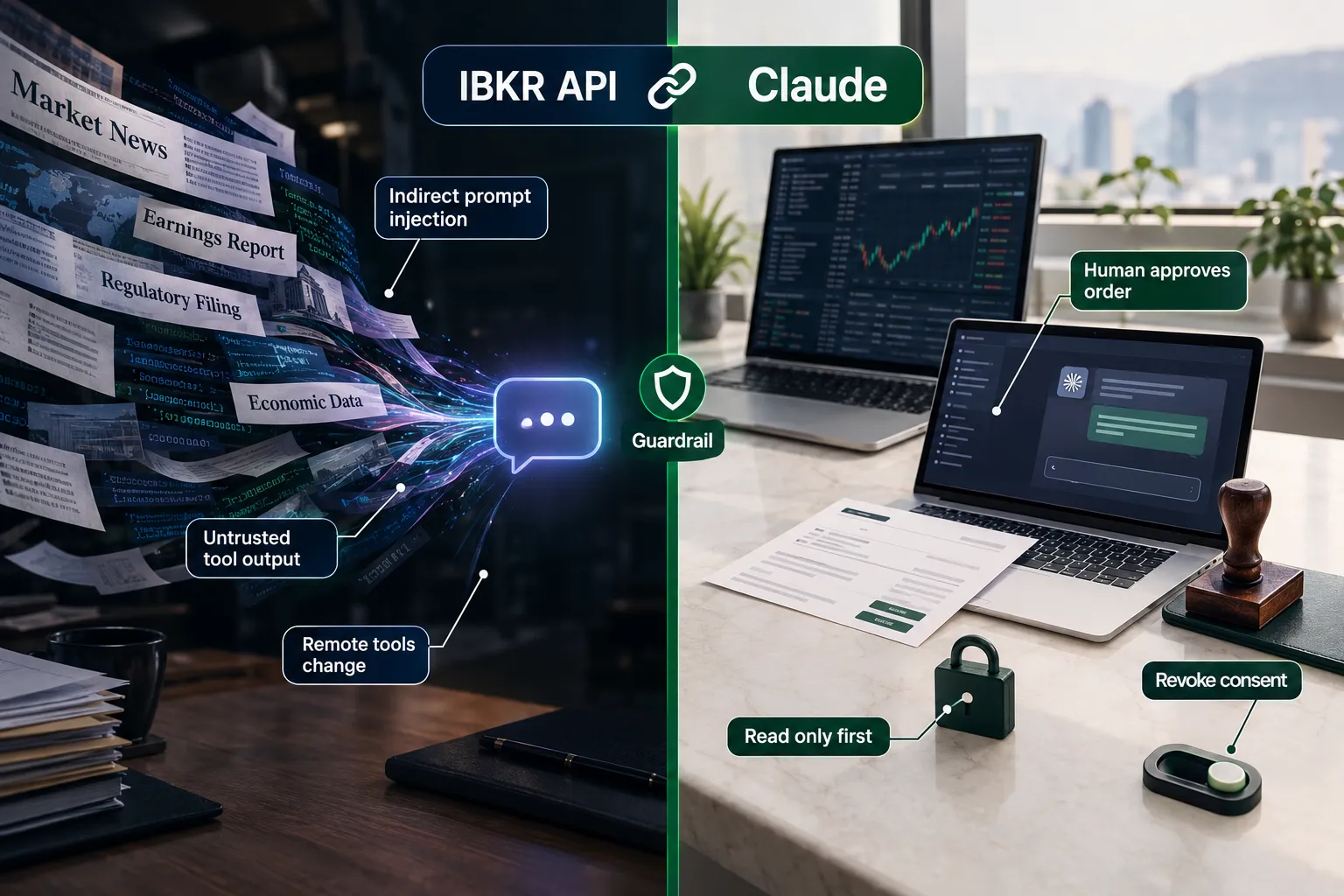
Reasonably safe, with caveats you should actually read. The architecture is sound: IBKR holds the login, the AI never sees your credentials, data access is client-controlled, and the model drafts order instructions that you convert into a live order yourself. Consent is revocable in Client Portal.
The residual risk lives in the model’s inputs. Anthropic’s own security guidance flags indirect prompt injection as a central risk for tool-using agents: market data, news, filings or web pages can contain text that tries to steer the model into an action you never asked for. Anthropic also warns that remote MCP tools are harder to audit than local ones, because a hosted tool can change after you approved it. Treat external tools as untrusted until reviewed, pinned and monitored.
Regulators are pointing the same direction. A 2026 FINRA oversight discussion warned that autonomous agents can optimize against an objective in ways that harm investors, which is why human-in-the-loop sits at the center of IBKR’s design rather than at the edge.
Practical rules:
- Start read-only. Positions and balances first, order drafting later.
- Never paste account numbers into a chat the connector already authenticates.
- Re-read every drafted order for symbol, side, quantity and order type before you submit.
- Revoke third party consents you are not actively using.
- Size positions as if the model will occasionally be wrong, because it will. Our position sizing breakdown covers the math.
IBKR API paper trading vs live trading: which should you start with?
Start in paper. The IBKR API behaves almost identically against a paper account, which means you can test every order path, every conid lookup and every weird response without a single dollar at risk. Paper trade it first is not advice for beginners only, it is standard practice for anyone shipping new order code.
What paper will not reproduce: real fills, real slippage, real partial executions, and the emotional cost of watching an AI draft an order you half-trust. Our Interactive Brokers paper trading walkthrough covers account setup and the gaps to watch.
Decision rule: run paper for 30 sessions and log every drafted order and whether you approved it. If you approved orders you would not have placed yourself, the problem is your process, not the IBKR API.
Top 5 favorite features
The short list of what makes this connection worth setting up at all.
- One authorization, many clients. Version 1.1.5 lets any MCP-compatible application connect, so Claude, Claude Code, Cursor and Perplexity all work off the same consent model.
- Credentials stay with IBKR. The AI application never holds your login, which removes the worst failure mode of third party trading tools.
- Draft-only order handling. The model composes the instruction, you approve it in an IBKR platform. Slow by design, and that is the feature.
- Real account data, not scraped data. Balances, positions, allocations and trade history come from the account itself.
- Revocation in one place. Manage Third-Party Consents gives you a single kill switch rather than a scavenger hunt through API keys.
What we like and what we don’t like
Liked: the security model, the price, and the fact that IBKR shipped this across Client Portal, IBKR Desktop, IBKR GlobalTrader, IBKR Mobile and Trader Workstation rather than one surface. Not liked: the reliability gaps and the documentation sprawl.
What we like
- No separate API fee for account holders across TWS API, Web API and FIX.
- Human approval is enforced, not optional.
- Broad market access: stocks, options, futures, bonds and FX through one account.
- Published tool list on the connector page, so you know exactly what the model can see.
What we don’t like
- The web client bug. A connector that reports connected while exposing no tools is the worst kind of failure, and as of October 2026 the issue is still open.
- Session fragility. Weekly 2FA re-auth on automated logins makes a fully unattended IBKR API bot a maintenance job, not a set-and-forget system.
- Breaking changes. Removing
/hmds/scannerin September 2026 broke working code with no grace period for anyone not reading the changelog. - Learning curve. Conids, order reply messages and pacing limits all have to be learned before anything feels smooth.
- Jurisdiction gaps. No availability in India or Japan, and regional entities differ.
What do real users say about the IBKR API?
Public discussion is split by use case. Developers on r/algotrading talk mostly about session management, with the recurring complaint being weekly two-factor re-authentication on automated logins. Builders on the MCP side are documenting third party servers such as the community Interactive Brokers MCP project and the alternate IB MCP server, which tells you the official connector has not covered every workflow yet.
The MCP connector bug thread is the other signal worth tracking, since a connector that works in Claude Code but not on claude.ai web produces exactly the kind of confusing report that fills support forums. We do not publish user quotes we cannot verify, so treat the above as pattern, not proof.
IBKR API vs other broker APIs: how does it compare?
IBKR wins on market breadth and cost, loses on simplicity. If you want a REST API you can learn in an afternoon, other brokers are easier. If you want global stocks, options, futures and FX from one account with no separate API fee, IBKR has very few peers.
| Platform | Strength | Weakness | Best for | Typical cost |
|---|---|---|---|---|
| IBKR API | Global multi-asset access, official AI connector | Conids, pacing limits, weekly re-auth | Multi-asset and options traders | No separate API fee for account holders |
| Alpaca | Simple REST, easy keys | US equities and crypto focus, thinner asset range | First-time API builders | Free tier available, verify current plans |
| Tastytrade API | Options-first design | Narrower non-options coverage | Options traders | Verify on official pricing page |
| QuantConnect | Backtesting and research environment, IBKR brokerage link | Platform lock-in, research learning curve | Systematic strategy developers | Tiered plans, verify current pricing |
If you would rather build and test strategies before touching an order endpoint, see our QuantConnect review and the head-to-head on QuantConnect vs Trade Ideas for retail traders. For the broader automation question, read what to know before you automate trades.
Where do you find IBKR API documentation and training?
Start at IBKR Campus. The IBKR-API home there hosts the Web API documentation, the TWS API reference, Traders’ Academy courses on API topics, and the IBKR Quant blog where the latest IBKR Quant articles cover things like the newer synchronous wrapper for the TWS API.
- IBKR Campus, IBKR-API home. Canonical api documentation for the TWS API and the Client Portal Web API, including the changelog you should be watching.
- Traders’ Academy courses on API. Structured lessons with trading sample assignments you can run against a paper account. These are the IBKR API training courses most people skip and then regret skipping.
- IBKR Quant blog. Code-level articles from the ibkr quant team on strategy mechanics and wrapper design.
- Traders’ Insight. Market commentary rather than code, useful for context.
- The AI hub. The IBKR AI hub collects the integration documentation in one place.
Our Take
The IBKR API with Claude is the most sensible AI-broker connection shipped so far, mostly because IBKR refused to let the model press the button. CEO Milan Galik framed MCP support as an extension of IBKR’s long-standing open-API philosophy, and the reasoning holds up: client chooses the tool, client keeps the keys, client approves the order.
It is also not finished. A connector bug that hides tools on the web client, weekly re-auth, and an endpoint removed without warning in September 2026 are not edge cases, they are the current state of play. Treat this as a research and review layer on top of a process you already trust, not as a replacement for one.
Your next step: connect the IBKR API to Claude against a paper account this week, ask it for an account summary and one order draft, and log whether the draft matched what you would have done yourself. Thirty entries of that log will tell you more than any review. Systems over hacks.
Fewer tabs, fewer alerts, one approval step you never skip.
Compare the full field
One broker API examined in depth here. Many more AI trading tools are reviewed side by side, filterable by category and what they actually do. Browse the reviews at aistockpickerapp.com/reviews
Conclusion
The connection works, costs nothing extra, and keeps you in the approval seat. Set it up against paper, read the September 2026 changelog, bookmark the consent revocation page, and write down your own rule for when you will and will not act on a drafted order. Discipline beats prediction, and a model with account access does not change that.
This article is education, not financial advice.
Your market edge starts with the right tool. Stay alpha.
Frequently Asked Questions
Is the IBKR API free?
Yes, for account holders. IBKR charges no separate API fee for the TWS API, the Client Portal Web API or FIX, and the MCP connector for Claude adds no fee either. Market data subscriptions are billed separately per exchange, which is the cost most people actually encounter. Confirm current figures on IBKR's official pricing pages.
Does IBKR offer API access?
Yes. IBKR offers four routes: the TWS API through Trader Workstation or IB Gateway, the Client Portal Web API over REST, FIX for institutional order flow, and an MCP connector for AI applications. Account holders enable access themselves, and the connector consent can be revoked anytime in Client Portal under Manage Third-Party Consents.
Does IBKR work with Claude?
Yes. The official Interactive Brokers connector is listed as Anthropic verified and was added in May 2026, with the connector URL published on the Claude marketplace listing. Claude can read balances, positions, orders, trades and price data, then draft trade instructions you must review and submit yourself inside an IBKR platform.
Can I automate trading with Interactive Brokers?
Yes, through the TWS API or the Client Portal Web API, where orders can be placed programmatically. The MCP connector is deliberately not full automation: Claude drafts, you approve. Plan for pacing limits, weekly re-authentication and changelog updates, and test everything in a paper account before live capital.
Why is IBKR going down?
Most IBKR problems that feel like downtime are login or session issues rather than full platform failures. Automated API sessions require two-factor re-authentication roughly weekly, which can look like an outage to an unattended bot. Check IBKR's system status page and the Web API changelog before assuming your code broke.
Which Brokers offer free API?
Interactive Brokers, Alpaca, Tastytrade and Tradier all provide API access without a dedicated API subscription fee for account holders, though market data, funding minimums and asset coverage differ sharply. Free API access rarely means free data. Verify current terms on each broker's own pricing page before building anything on top of it.
Is the IBKR API safe for beginners?
Safe to read with, risky to trade with. The authentication model is strong and consent is revocable, so beginners can connect read-only access with little exposure. Order drafting is where mistakes get expensive. Run a paper account for at least a month, and never approve a drafted order you do not fully understand.
What is a conid in the IBKR API?
A conid is IBKR's unique contract identifier for a specific instrument on a specific exchange in a specific currency. Most IBKR API workflows start with a contract search to resolve a ticker into a conid, then pass that conid to snapshot, history and order endpoints. Resolve conids at runtime rather than hardcoding them.
Contributing writer at AI Stock Trading Bots.
