

Published October 14, 2026, 8:00 a.m. ET | By FullStack Alpha Editorial Team | Reviewed by Jay Rocco, Chief Editor
Interactive Brokers just made its AI connector faster at research and kept it exactly as far from the order book as before. The second half of that sentence is the design, and it is the right call.
Quick answer
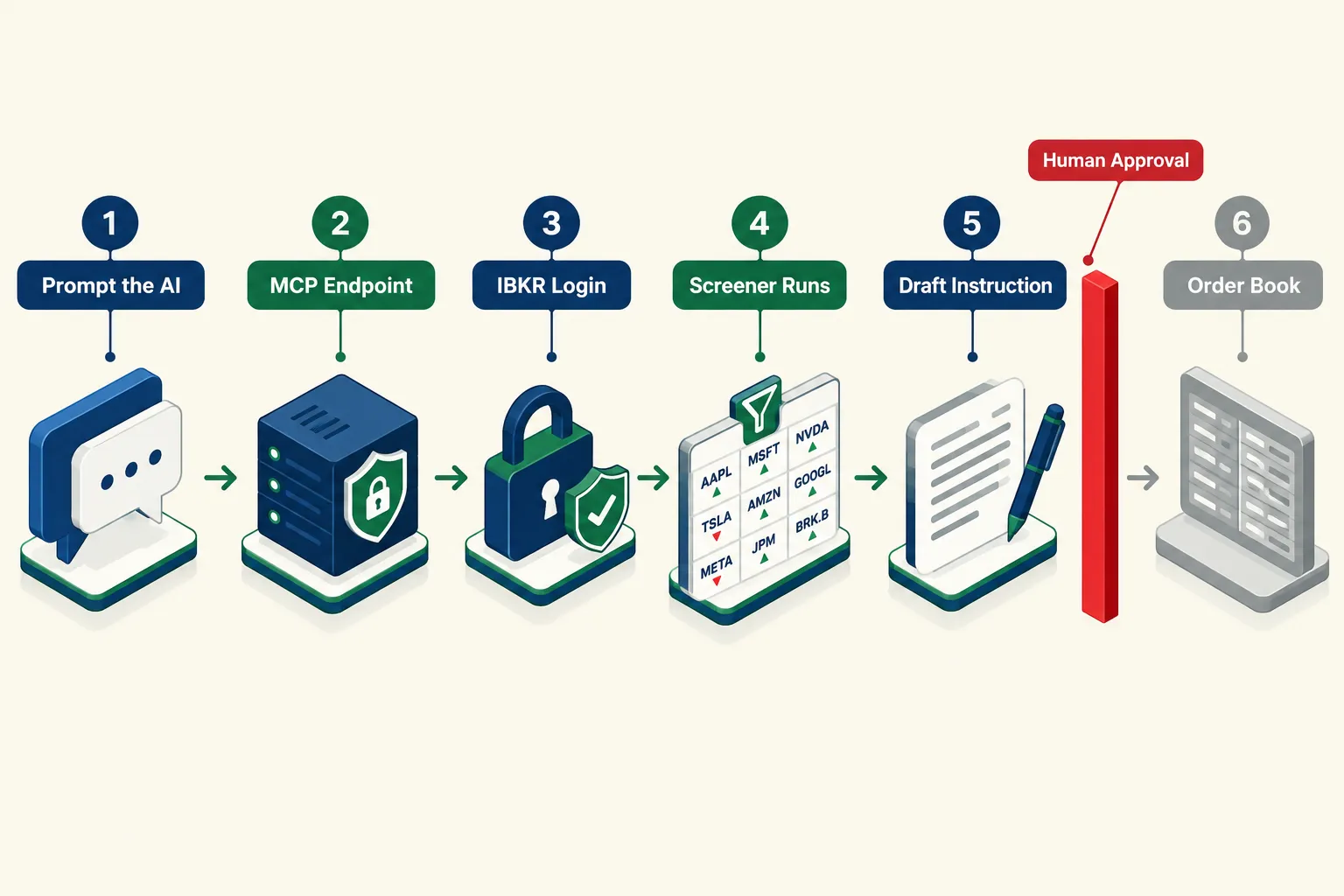
On October 14, 2026, FX News Group reported that Interactive Brokers rolled out version 1.2.0 of its IBKR Connector, which lets ChatGPT, Claude, Grok and other Model Context Protocol (MCP) apps run a client’s saved stock screeners inside the chat. Results come back as a ranked list, 10 names by default and up to 50 per request, each with a deep link to Client Portal. The AI still cannot place an order. It drafts instructions, and a human enters every trade.
Key facts
- What changed: version 1.2.0 runs saved screeners by name from a connected AI app, per FX News Group’s October 14, 2026 report.
- Output: a ranked list with rank, ticker and company name. Top 10 by default, up to 50 per request, plus a deep link to the full results in Client Portal.
- Coming next: IBKR says users will soon describe their criteria and have the AI build, save, refine or delete screeners.
- Supported apps: ChatGPT, Claude and Grok, plus any MCP client such as Claude Code, Cursor and Perplexity.
- Execution: none. The AI analyzes and drafts trade instructions. The client reviews each one and enters the order on an IBKR platform.
What exactly did Interactive Brokers ship on October 14, 2026?
MCP is an open standard that lets an AI chat app call a defined set of tools on an outside service instead of guessing. Think of it as a universal power adapter between a language model and your brokerage data.
Before this release, the connector could already read your account, analyze a portfolio, manage price alerts and draft instructions. Version 1.2.0 adds the piece screen-based traders touch every morning. Ask the assistant to pull up a saved screener by name, and it shows the parameters and returns the matches in the chat.
IBKR’s AI Hub pitches the screening side as plain-English criteria and multi-factor ranking across more than 70,000 global stocks. The release notes show a steady build: 1.1.5 opened the door to any MCP client, 1.1.6 added AI-managed price alerts and 1.1.9 added Perplexity.
Market truth: most retail traders do not lose money on the click. They lose it in the 45 minutes of scattered research before the click, on names they never should have opened.
Practical takeaway: open your saved screeners this week and delete every one you have not run in a month. An AI that runs any screen on command makes a cluttered screen list worse.
Why can the AI run a screener but not place an order?
Because IBKR built the server without an order-submission path. There is no setting to flip.
IBKR hosts the MCP server itself, and you log in on IBKR’s own page, so OpenAI, Anthropic and xAI never see your credentials. IBKR’s July 28 announcement spells out the flow: the AI drafts instructions, and the client reviews them and enters the order on an IBKR platform.
A hallucinated ticker is an embarrassment in a chat window. It is a margin call in the order book.
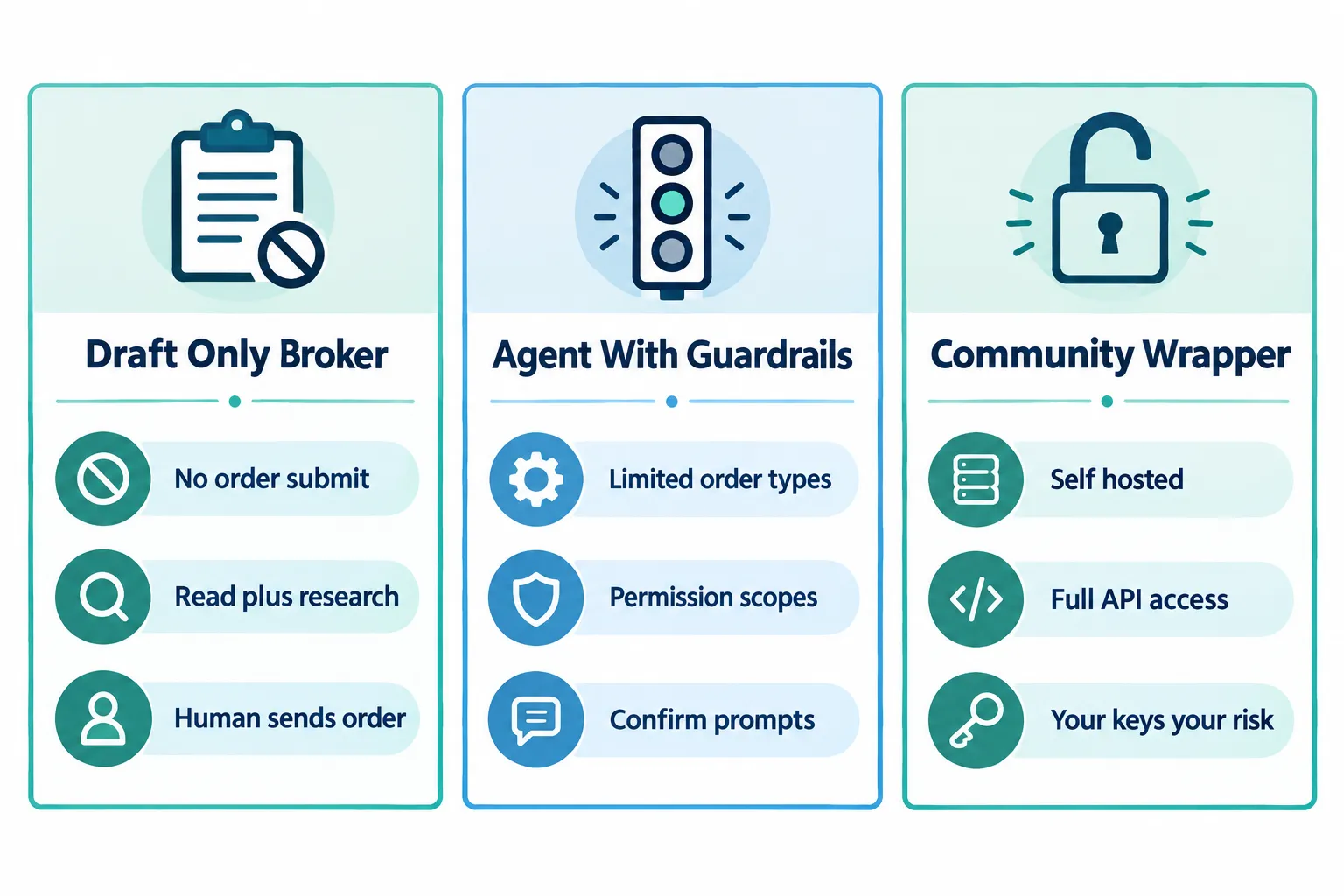
The Awesome Broker MCP project on GitHub, an open catalogue of broker MCP servers, lists IBKR as “draft only” with no environment variable that turns execution on. That separates the official connector from community wrappers around TWS or the Client Portal API, which can hit live order endpoints if you wire them that way.
How does IBKR compare with other brokers?
StockBrokers.com’s agentic trading review, dated July 31, 2026, covered 14 brokers, found seven with first-party MCP servers and described IBKR as the one where the agent never reaches the order book.
| Capability | IBKR official connector | Typical agentic broker MCP | Community TWS or API wrapper |
|---|---|---|---|
| Read positions and balances | Yes | Yes | Yes |
| Run saved screeners in chat | Yes, version 1.2.0 | Varies by broker | You build it |
| AI-managed price alerts | Yes, added in 1.1.6 | Sometimes | You build it |
| Drafts a trade instruction | Yes | Yes | Yes |
| Submits the order itself | No | Often, with permissions | Yes, if you enable it |
| Where credentials live | IBKR login page | Broker login or token | Your machine, your keys |
| Accounts connected at once | One | Varies | As many as you code |
IBKR’s version 1.0.0 documentation states that only one account can be connected to an AI platform at a time. Multi-account managers should plan around that before building a workflow on top of it.
Who should use this, and who should skip it?
Use it if your bottleneck is research throughput. Skip it if your bottleneck is discipline.
A screener on command helps the trader who already knows what a clean setup looks like and wants the universe narrowed before the open. Tight consolidation on rising volume, relative strength against the sector. Save it once, run it Sunday night.
Slow down if you hope the AI will save you from yourself. A model that drafts eleven plausible trades before breakfast is a fast lane into overtrading, and it installs no position sizing or stop loss.
The tool scales whatever process you already have. If the process is vibes plus a watchlist, you just scaled vibes.
How does this fit a screening process that holds up?
Treat the AI as the first filter and nothing else. Three layers, in order.
- The AI screen. Saved, named and re-runnable. It produces a list of maybe 20 to 40 names on a normal week, never a decision.
- Your chart review. Price action, support and resistance, volume and where the stop sits. The AI does not know your account size and does not care if you get stopped out.
- The order. Manual, on an IBKR platform, which is where IBKR has already decided you will be standing.
Stress-test the chain on paper first with our guide to Interactive Brokers paper trading, and see how to connect Claude to the IBKR API for the setup. A model that silently drops one filter is worse than a slower one that asks you to confirm, so check our Claude vs GPT vs Grok vs Gemini comparison before you pick one.
What should investors watch next?
- AI-built screeners. IBKR says the build-and-manage feature is coming, with no date given. That is the first time the AI writes the rules instead of running yours, and it deserves a hard look when it lands.
- Order permissions. IBKR has held the draft-only line through every documented release since 1.0.0. Any change to that language is the headline.
- CFTC Frontier Forum, October 28, 2026. The commission’s first session on AI and agentic finance.
- FINRA guidance. FINRA’s fourth-quarter policy agenda says it expects to issue more guidance on AI tools. Read FINRA’s AI key topics page before assuming a draft-only system carries no supervisory weight.
- Rival connectors. eToro launched ChatGPT, Claude and Grok connectors on October 8, 2026, but excluded US clients. Our eToro connector breakdown covers its approval-gated design.
Our take
IBKR made the least exciting and most defensible choice in the category, and it deserves credit for it.
Every broker shipping an MCP server is testing whether a language model can be trusted near an order book. IBKR declined to run that test on its clients. That is a product decision with a spine.
The cost is plain too. If you wanted a system that screens, decides and executes overnight, look elsewhere. You get a fast research assistant with a hard stop at the execution boundary.
Next step: write your entry, stop and size rules on one page before you connect anything. Then run your saved screen through the connector against a paper account for 30 days and log how many of the top 10 names survive your chart review.
Your screener now answers in a chat window. Is the tool behind it worth the subscription?
FullStack Alpha has tested 200+ AI stock tools since 2022, with pricing and broker connections checked hands on.
Compare the AI screeners and trading tools we have reviewed
This article is for education only and is not financial advice. Nothing here is a recommendation to buy, sell or hold any security. AI tools can be wrong, and every trade carries the risk of loss.
Sources
- FX News Group: IBKR Connector enables running of saved screeners through AI (October 14, 2026)
- Interactive Brokers press release: Interactive Brokers Opens AI Connectivity to Any Tool Built on the MCP Standard (July 28, 2026)
- FX News Group: Interactive Brokers enables traders to connect their accounts to any MCP-compatible AI application (July 17, 2026)
- StockBrokers.com: Best Brokers for Agentic Trading
- PlanAdviser: FINRA Outlines Q4 Regulatory Priorities (October 13, 2026)
- Forkast: The CFTC Is Opening Its First Forum on Agentic Finance (October 8, 2026)
- FINRA: Artificial Intelligence key topics
Your market edge starts with the right tool. Stay alpha.
Frequently Asked Questions
What is new in IBKR Connector 1.2.0?
Version 1.2.0 lets you ask a connected AI assistant such as ChatGPT, Claude or Grok to run one of your saved Interactive Brokers stock screeners by name. The results come back in the chat as a ranked list with rank, ticker and company name, 10 names by default and up to 50 per request, each with a deep link to Client Portal.
Can ChatGPT or Claude place a trade in my Interactive Brokers account?
No. The IBKR Connector drafts trade instructions only. You review each instruction and enter the order yourself on an IBKR platform such as Client Portal, IBKR Mobile or Trader Workstation.
Which AI apps work with the IBKR Connector?
Interactive Brokers offers official connectors on ChatGPT, Claude and Grok. Since July 28, 2026, any app that supports the Model Context Protocol, including Claude Code, Cursor and Perplexity, can connect through IBKR's remote MCP server.
Does the AI company get my IBKR password?
No. Interactive Brokers hosts the MCP server and you sign in on IBKR's own login page, so the AI vendor never receives your credentials. You can revoke access under Client Portal, Settings, Manage Third-Party Consents.
Can I connect more than one IBKR account to an AI assistant?
IBKR's version 1.0.0 documentation states only one account can be connected to an AI platform at a time. Check IBKR's current documentation before building a multi-account workflow.
Is this article financial advice?
No. This article is for education only. Nothing in it is a recommendation to buy, sell or hold any security, and every trade carries the risk of loss.
Contributing writer at AI Stock Trading Bots.
