

The FullStack Alpha research desk tests AI trading bots on paper and live accounts. Reviewed and edited by Jay Rocco, Founder and Editor.
By FullStack Alpha Editorial Team | Reviewed by Jay Rocco, Chief Editor
A Claude trading agent is Anthropic’s Claude, usually Claude Code, connected to market data and sometimes a broker through MCP connectors or APIs, so it can research, screen, journal and place orders inside rules you set. It is genuinely useful for research and paper trading in 2026, and builders like Nate Herk have wired Claude Code to Alpaca to place trades on a schedule. Anthropic’s own products draw a hard line: its Claude Duet agent treats “trading securities or moving money between accounts” as off-limits even with your approval, and its computer-use docs tell developers to have a human confirm financial transactions. Before you connect a Claude trading agent to real money, check the data feed, the broker’s permissions and who clicks confirm.
Key insights
- Anthropic’s computer use docs recommend a dedicated virtual machine, no login credentials for the model, a domain allowlist, and a human to confirm “completing financial transactions.”
- Claude Duet, Anthropic’s background agent in research preview, bars trading securities and moving money between accounts even if you approve, per Anthropic’s Duet article.
- Anthropic’s ten finance agent templates (May 5, 2026) cover research, models, valuation and audits. None executes trades.
- The broker sets the real rules: Robinhood limits external agents to a dedicated Agentic account, Alpaca’s MCP server defaults to paper trading, and IBKR’s connector cannot place orders at all.
- Decision rule: if a Claude trading agent pitch will not name its broker connection and its approval step, treat it as a research tool in a trading costume.
What Is a Claude Trading Agent?
A Claude trading agent is Claude plus three things: a data source for prices and news, a connection to a broker, and a set of rules that decide when orders are allowed. Claude supplies the reading, reasoning and code. The connectors supply everything market-related. Strip the connectors away and you have a very articulate chatbot with no idea where the S&P 500 closed.
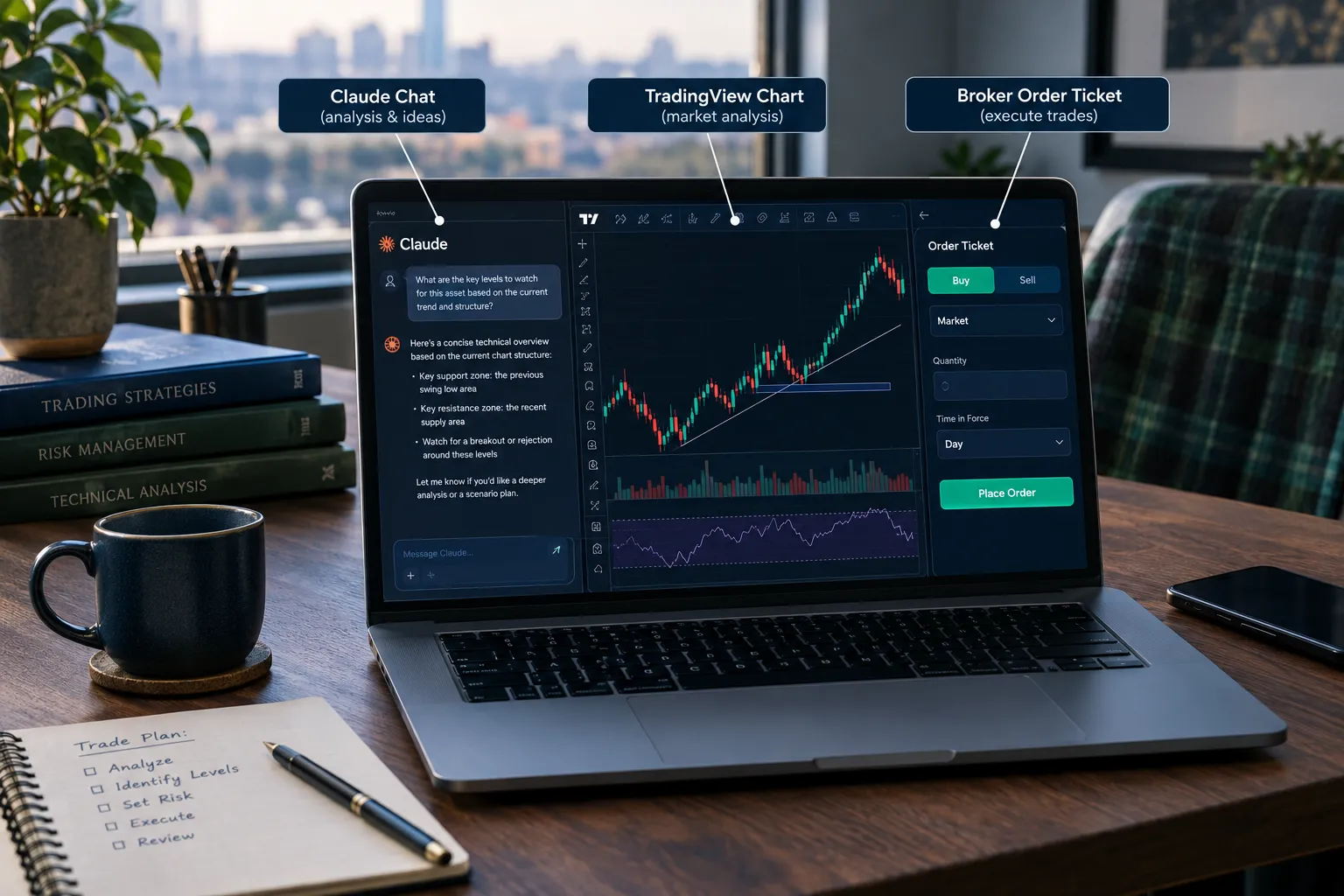
The glue is usually MCP, the Model Context Protocol. Think of it as a universal adapter: a broker or data vendor publishes one MCP server, and any MCP-capable assistant (Claude, ChatGPT, Grok and others) can call its tools without a custom bridge.
There are three common shapes:
- Chat plus connector. Claude in the app, with a broker or data connector added. Good for questions about your own portfolio and research.
- Claude Code plus a broker API or MCP server. Claude writes and runs the code, or calls the broker’s tools directly, on a schedule. This is where most “Claude trades for me” videos live.
- A coded bot that Claude helped write. Claude builds a normal Python bot, and the bot trades. Claude is not in the loop at run time. Our Claude trading bot guide covers this path and where it fails.
What Anthropic itself has shipped for finance
Here is what Anthropic’s own pages confirm:
- Claude for Financial Services launched July 15, 2025 as a Financial Analysis Solution with pre-built MCP connectors to FactSet, S&P Global (Capital IQ), Morningstar, PitchBook, Daloopa, Databricks, Snowflake, Box and Palantir, per Anthropic’s announcement. An earlier draft dated this to October 2026; that was wrong.
- In that announcement, Anthropic says that when FundamentalLabs built an Excel agent, Claude Opus 4 “passed 5 out of 7 levels of the Financial Modeling World Cup” and scored 83% accuracy on complex Excel tasks. That is a 2025 result on an older model, and it is about spreadsheets, not trading.
- Agents for financial services (May 5, 2026): ten templates (pitch builder, meeting preparer, earnings reviewer, model builder, market researcher, valuation reviewer, general ledger reconciler, month-end closer, statement auditor and KYC screener). Anthropic says users stay “in the loop, reviewing, iterating on, and approving Claude’s work.” No template places trades.
- Barclays (October 1, 2026): Anthropic says Barclays expects Claude Code adoption to reach 50% of its developers by the end of 2026, for software and legacy modernization, per Anthropic’s Barclays post. It does not mention trading systems.
Claude Duet: a background agent with a trading ban
Claude Duet is Anthropic’s background agent, in research preview with a waitlist for Pro and Max subscribers in the US, per its product page. It works on its own cloud computer, connects to your apps, sends briefs and drafts replies for your approval. Anthropic’s October 21, 2026 Duet article says: “A few things are off-limits even with your approval, like trading securities or moving money between accounts.”
That one sentence is the clearest signal in this whole category. Anthropic’s own consumer agent will draft your invoices, but it will not trade your account even if you say yes. Anything that does trade with Claude is something a developer or broker built around the model, and the safety of that build is on the builder and on you.
Decision rule: if a Claude trading agent pitch does not name its broker connection and whether a human approves each order, assume it is a research tool wearing a trading costume.
What Can a Claude Trading Agent Do Today?
A Claude trading agent is strongest at research and process work and weakest at unsupervised execution. The table separates what is solid from what needs a human or a hard rule in the loop.
| Task | Works today | Needs a human | Risk level |
|---|---|---|---|
| Reading filings, transcripts, news | Yes | Fact-check sourcing | Low |
| Screening against your own criteria | Yes, with a data connector | Verify data freshness | Low |
| Trade journaling and logging | Yes | Review entries weekly | Low |
| Earnings comparison vs. prior period | Yes | Check numbers against the filing | Low to medium |
| Writing backtest code | Yes | Check for look-ahead bias | Medium |
| Paper trading orders | Yes, via a broker paper account | Set stop rules first | Low (no real money) |
| Live orders, unsupervised | Possible with some brokers; barred in Claude Duet | Hard rules plus human approval | High |
The pattern: Claude is good at compressing information and writing code, both of which you can check. Risk jumps the moment the output is an order instead of a document. Anthropic’s finance templates sit entirely on the checkable side.
Common mistake: treating a well-written research memo as proof the same agent can manage live risk. Writing a good memo and sizing a position are different skills, for humans and for models.
What a real Claude Code trading build looks like
Nate Herk’s “I Turned Claude Into a 24/7 Trader” (April 2026) is a useful reference because the description lays out the architecture. Per the description, Claude Code is the bot itself, with no separate Python process. It researches, places trades and manages its own stops on Alpaca through five cloud routines: pre-market research, market-open execution, a midday scan, an end-of-day summary and a Friday weekly review. Memory lives in markdown files, and “hard strategy rules” gate every order before it is placed.
The description says the bot “places real trades on Alpaca” but does not say whether the account was paper or live, and it lists no results. So treat it as a build pattern, not a performance claim. The pattern itself is sound: scheduled jobs, written memory, and rules that sit outside the model’s judgment.
Which Data Connectors Are Real for a Claude Trading Agent?
The connector is what turns Claude into a Claude trading agent, and the broker behind it decides what the agent may do. Here is what we confirmed on official pages in 2026.
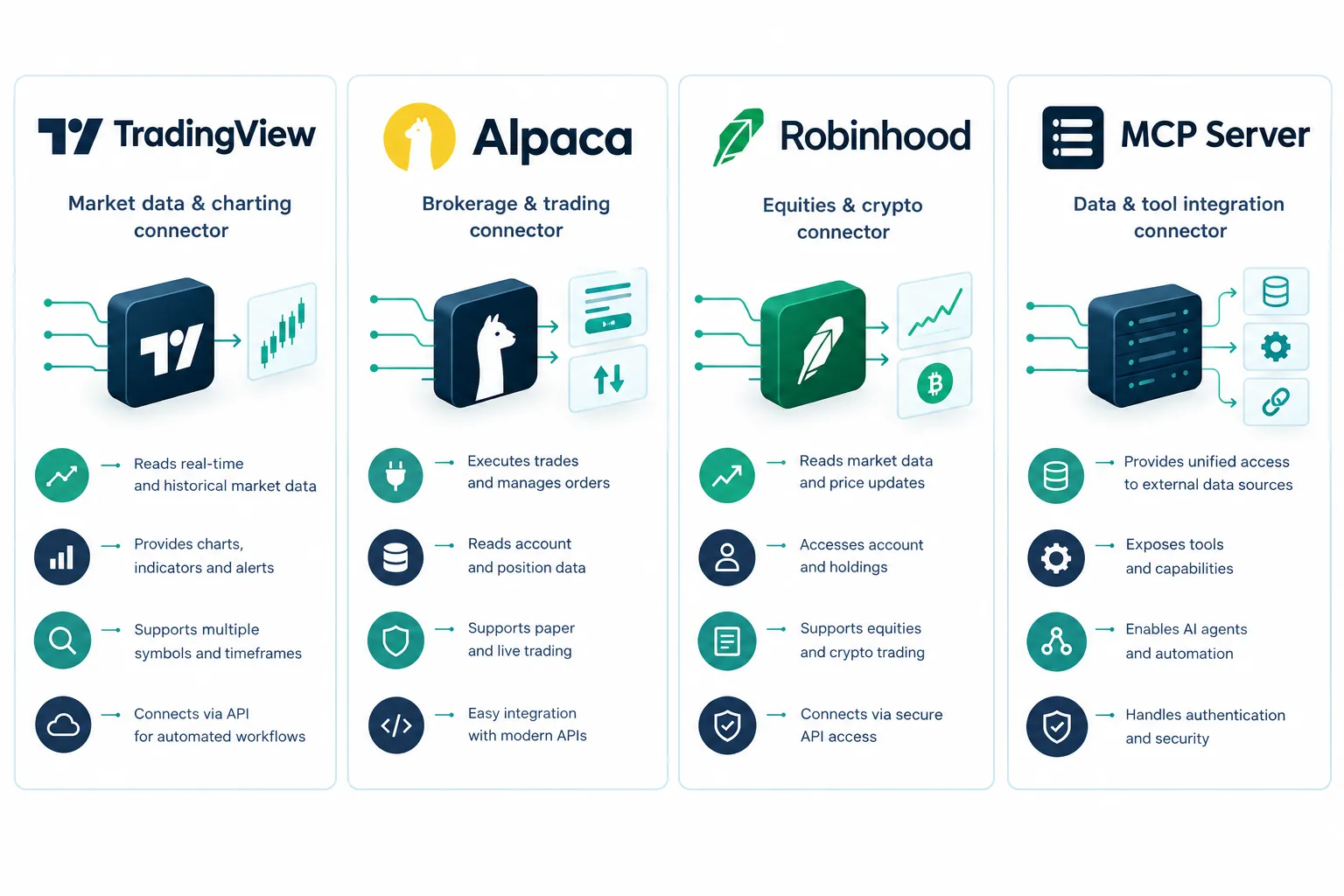
| Connection | Can read | Can trade | Default safety |
|---|---|---|---|
| Alpaca MCP Server | Account, positions, stock, options and crypto data, news | Yes | Paper trading unless you set it to live |
| Robinhood Trading MCP | Your Robinhood accounts | Only in a dedicated Agentic account | Trade approvals on by default |
| IBKR connector | Account, portfolio, saved screeners | No; it drafts instructions | Human enters every order |
| eToro connector | Holdings, balances, performance | Read-and-act where available | Every action approved; not offered in the US |
| FactSet, S&P Capital IQ, Morningstar and others | Institutional research data | No | Research only, enterprise plans |
- Alpaca. The official Alpaca MCP Server is at version 2.4.0 per its project file, lists 72 tools in its README, and needs Python 3.10+ and uv.
ALPACA_PAPER_TRADEdefaults to true, so it trades paper unless you set it to false, andALPACA_TOOLSETSlets you switch off whole groups such as trading. Use that to build a read-only research agent first. Our Alpaca MCP setup guide walks through the config. - Robinhood. Per Robinhood’s agents overview, external agents connect through Robinhood’s Trading MCP and can trade only in a dedicated Agentic account. Approvals are on by default; you can turn them off. Robinhood says you are responsible for your agent’s trades. More in our Robinhood agentic trading review.
- Interactive Brokers. IBKR’s connector lets Claude read your account and run saved screeners, but the AI cannot place an order. For full API control, see our IBKR API and Claude guide.
- Institutional data. The FactSet, S&P, Morningstar and PitchBook connectors in Claude for Financial Services are research feeds for enterprise teams. They give you fundamentals and estimates, not order routing.
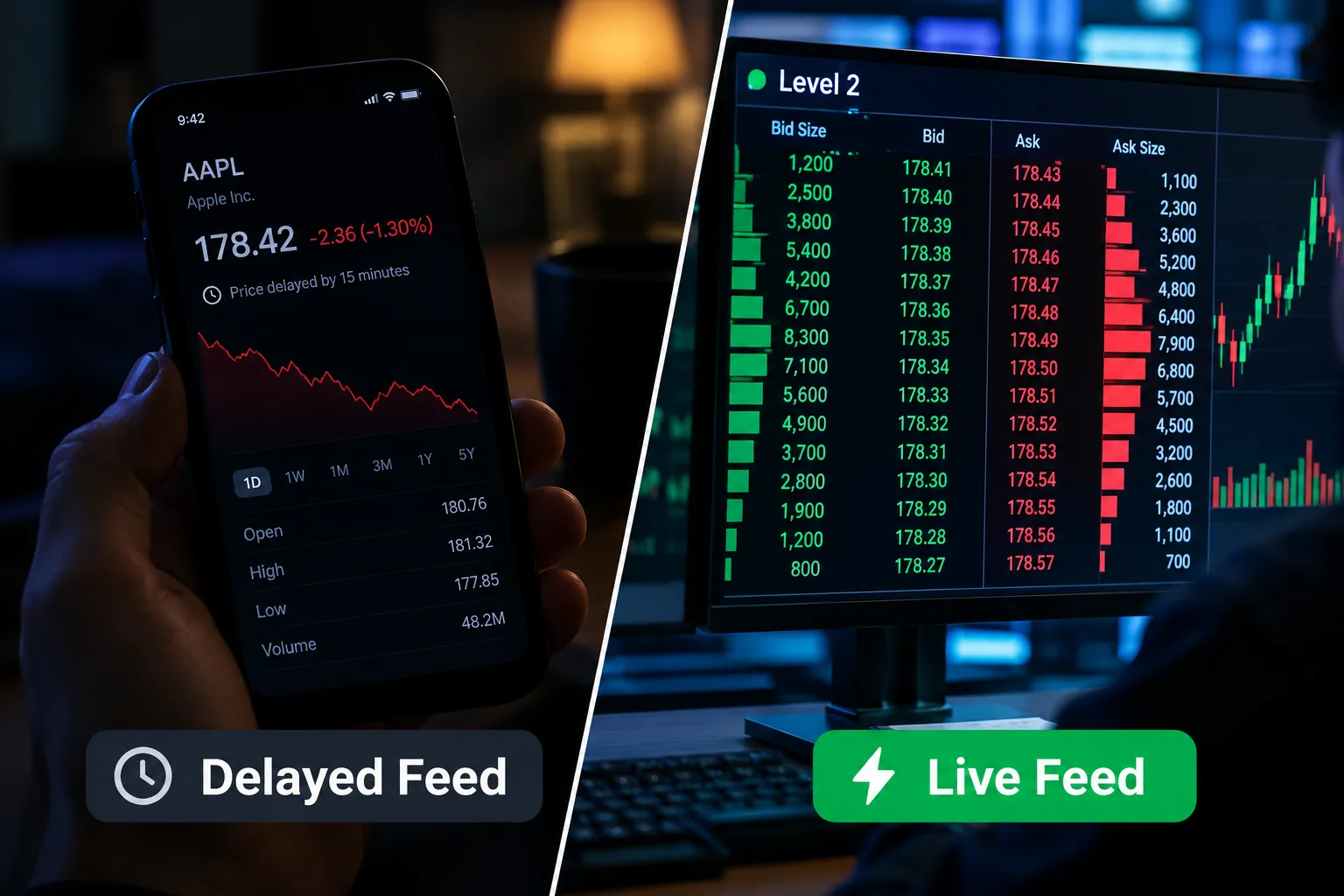
Edge case: a connector can be real and still serve stale data. Alpaca’s free plan uses the IEX feed, not the full consolidated tape. If your agent reasons over a partial or delayed feed and calls it “live,” that is a data problem, not an AI problem.
Decision rule: pick Alpaca’s paper mode to test order logic with zero capital at risk. Pick a read-only connector (IBKR, or Alpaca with the trading toolset switched off) if you only want research and screening.
How Do You Build a Read-Only Research Agent First?
Start with an agent that cannot trade at all. It is the fastest way to learn what Claude gets right and wrong about markets, and it costs you nothing if it is wrong.
Here is the order we would use:
- Pick a data path. For stocks, Alpaca’s MCP server gives Claude account data, market data and news. Set
ALPACA_TOOLSETSto the data groups only (for example account, assets, stock-data and news) and leave trading out. Per the Alpaca README,ALPACA_PAPER_TRADEalso defaults to true, so even a mistake routes to paper. - Write a research brief prompt. Ask for the same five fields every morning: last close, overnight move, any new SEC filing or press release with links, the day’s scheduled events, and one sentence on what would change your plan.
- Force sources. Tell Claude to cite the tool call or page for every number and to write “not available” instead of filling gaps from memory.
- Score it. For two weeks, compare each brief with your broker’s screen and the filings. Count wrong numbers, stale numbers and missed filings.
- Only then add order drafts. Let the agent write an order ticket (ticker, side, size, limit, stop, rule triggered) into a file. You, or code, decide whether it goes anywhere.
This is the same staged path every responsible vendor in this space recommends, from Anthropic’s review-and-approve templates to Robinhood’s approvals-on default. It also gives you a clean baseline: if the research layer is wrong 5% of the time, adding execution does not fix that. It just spends money on it.
What to log from day one
- Model and version used for each session
- Tokens in and out, so you can price the run
- Every tool call and its response time
- Every number the agent cited, with the source it named
- Every order draft and whether you accepted it
What Does a Claude Trading Agent Cost to Run?
The model bill is usually small next to trading costs, but it is not zero, and it scales with how often your routines run. Anthropic’s API pricing page lists, per million tokens in 2026:
| Model | Input | Output | Batch (input / output) |
|---|---|---|---|
| Claude Opus 5.5 | $4 | $20 | $2 / $10 |
| Claude Sonnet 5.5 | $2 | $10 | $1 / $5 |
| Claude Haiku 5.5 (prompts up to 100,000 tokens) | $0.10 | $0.50 | $0.05 / $0.25 |
Cache reads on Opus 5.5 and Sonnet 5.5 cost 0.05x the base input price, which matters for an agent that rereads the same rules file and watchlist every session.
Worked example: five routines a day
Take a build like Herk’s with five routines a trading day. Assume each routine reads 150,000 input tokens (rules, memory files, news, positions) and writes 10,000 output tokens.
- On Sonnet 5.5: (0.15 x $2) + (0.01 x $10) = $0.30 + $0.10 = $0.40 per routine. Five a day for 21 trading days = $42 a month.
- On Opus 5.5: (0.15 x $4) + (0.01 x $20) = $0.60 + $0.20 = $0.80 per routine, or $84 a month.
- With caching: if 100,000 of those input tokens are the same rules and memory each time, cache reads on Sonnet 5.5 cost 0.05 x $2 = $0.10 per million, so that block drops from $0.20 to $0.01 per routine.
On a $10,000 account, $42 a month is a 0.42% monthly hurdle; $84 is 0.84%. Your token counts will differ, so log them and do this math with your own numbers before you pick a model. Overnight research that does not need instant answers can run through the Batch API at half price.
What Does Real Time Mean in the Viral Demos?
Most viral Claude agent clips show a chat window reacting fast to a price move. That looks live. It usually is not confirmed as live. In trading, “real time” means a continuous feed with sub-second updates, which costs money; many free and demo tiers are delayed or partial.
Samin Yasar’s “Claude’s New Trading Agent Is Insane! (Tutorial)” is a typical example of the genre. Its description lists QuiverQuant’s MCP server, FireCrawl and a copy-trading flow, names no broker and reports no results. Watch it to see how these setups are framed, then ask the questions below.
What a typical demo shows: a prompt, a chart, a fast answer and a conclusion. What it almost never shows:
- The data timestamp. Was that quote live, delayed or cached?
- Fills and slippage. A “buy” in a chat window is not an order clearing at a real price with a real spread.
- Fees and funding. Commissions, data subscriptions and model usage are left out.
- The losing runs. One clean trade on camera says nothing about the others.
Common mistake: assuming a fast chat reply means a fast market reaction. Claude can write a sentence in under a second. The data behind it may be minutes old.
What Should You Verify Before Trusting a Claude Trading Agent?
Before you connect the agent to anything that holds real money, run this checklist. The failure modes are predictable, which makes them avoidable.
| Item to check | Why it matters | Fix |
|---|---|---|
| Data source and freshness | Delayed or partial data produces stale signals | Confirm the exact feed and log the timestamp on every decision |
| Broker permissions | Some connectors can place orders, not just read | Read the scope docs; switch off trading tools you do not need |
| Human approval step | Anthropic recommends human confirmation for financial transactions | Keep broker approvals on during any test |
| Paper vs. live account | Paper has zero capital risk | Confirm paper mode in the broker dashboard, not just in config |
| Backtest assumptions | Look-ahead and survivorship bias inflate results | Ask Claude to list every assumption, then check them |
| Costs and fees | Commissions, data and model usage never appear in demos | Check each official pricing page |
| Prompt injection | Web pages and documents can carry instructions | Fence untrusted text; keep credentials away from the model |
| Credential storage | Shared keys and logins are a security hole | Use scoped API keys in environment variables, never a login in chat |
Why would a trading agent fail or stop trading? Usually one of three reasons: the data connector drops, the broker rejects an order for permission or buying-power reasons, or a guardrail blocks an action that needs sign-off. A well-built agent should stop rather than guess.
What is the prompt-injection risk? Anthropic’s computer-use docs say it plainly: “In some circumstances, Claude follows commands found in content even when they conflict with your instructions,” including instructions on webpages or in images. A trading agent that reads news and social posts is reading untrusted content all day. Keep that content separate from the part of the system that can place orders. Our AI trading agent risks guide covers the external kill switch.
Is using a trading agent legal or regulated? Using Claude to research stocks or write code is using a tool, like a spreadsheet. When an agent places trades, you are still the account holder and responsible for every order; Robinhood says so in writing. No AI agent is a registered investment adviser. Check your broker’s terms before you automate orders.
Watch for scams. Fake “Claude trading bots” are a real fraud category. Our report on the fake Claude trading bot scam shows how one took $517,000 from 224 people. A real Claude trading agent runs on your own API keys and your own broker account. Anything that asks you to deposit money with the “bot” is not one.
How Do You Set Up a Safe First Test?
The safest way to test it is a paper-only pilot with written rules, a hard stop and a fixed window, run before any real money touches it.
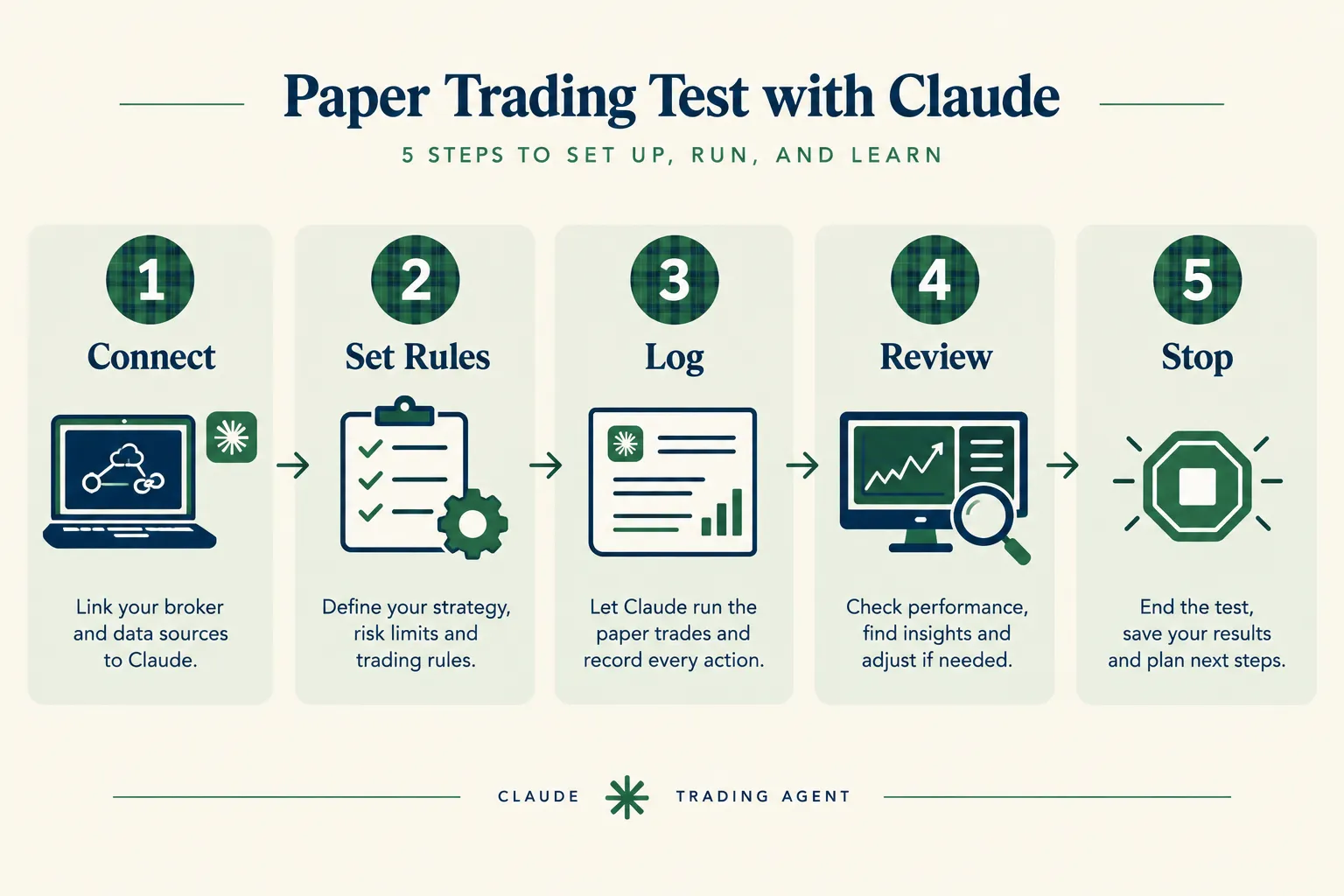
- Pick one broker’s paper account. Alpaca’s paper trading environment is free, uses real-time quotes and simulates fills; the dashboard lives at app.alpaca.markets/paper. Our Alpaca API for beginners guide covers keys and a first order.
- Write the rules before the agent runs. Universe, entry, exit, position size, a per-trade stop and a daily loss limit. Put them in a file the agent reads every session, the way Herk’s build gates every order.
- Put the rules in code where you can. A size cap and a daily loss limit should be checks in code that reject an order, not instructions the model is asked to follow.
- Log every action. Each order, the reason, the data timestamp and the fill. Journaling is where Claude is genuinely strong.
- Review weekly, not hourly. Tinkering with rules mid-test ruins the test.
- Set a kill switch. Stop the test if the paper account falls past a level you picked in advance, such as -10%.
Run it for at least four weeks before you consider live capital.
Worked example: sizing a first live trade
Say the paper test passes and you open a small live account of $10,000. You decide to risk 1% per trade, which is $100. The agent’s rule says the stop sits 4% below entry.
- Position size = risk / stop distance = $100 / 0.04 = $2,500
- If the stock is $50, that is 50 shares
- If the stop hits, you lose about $100 plus fees and any slippage
Now add a daily loss limit of 3% ($300). After three full stop-outs in one day, code blocks any new order until the next session. That one rule caps your worst day even if the model misreads every setup. The agent may suggest moving a stop mid-trade; your code should not let it widen one.
When to end the paper test early
Stop and fix the system, not the rules, if any of these show up during the pilot:
- The agent places or drafts an order that breaks a written rule, even once.
- A fill in the broker’s order history does not match what the agent logged.
- The agent cites a price or headline with no source, or fills a gap from memory.
- Your daily loss limit fires and the agent tries to trade anyway.
- Token costs per session grow week over week without a reason you can name.
Each of these is a process failure. A losing week is not, by itself; a strategy can lose for a week and still be sound. Judge the pilot on whether the system did what you told it to do, then judge the strategy on enough trades to mean something.
What should you check before using real money? Confirm the data feed is what you think it is, confirm the broker connection has only the permissions you meant to grant, confirm an approval step or code gate exists, and confirm you know every fee. If any of the four is unclear, you are not ready.
Frequently Asked Questions
Can a Claude trading agent trade stocks for me?
It can if a developer connects Claude to a broker that allows agent orders, such as Alpaca’s API or Robinhood’s Trading MCP. Anthropic’s own consumer agent, Claude Duet, will not: trading securities and moving money are off-limits even with your approval. Keep a human or code gate in front of every order.
Is a Claude trading agent safe for beginners?
It is safe for research and paper trading, and risky on a live account without hard rules. Beginners should start with a read-only research agent, then paper trade for at least four weeks. Never give an agent your login, only scoped API keys.
Does Claude have real-time market data?
Not on its own. A Claude trading agent sees only what its connectors provide, and many free feeds are delayed or partial; Alpaca’s free plan uses the IEX feed. Log the data timestamp on every decision.
What is the best Claude trading agent setup?
A practical setup is Claude Code with the Alpaca MCP Server in paper mode, a rules file the agent reads every session, and code that enforces position size and a daily loss limit. Start with trading tools switched off using ALPACA_TOOLSETS, then add order drafts once the research is accurate.
How much does it cost to run a Claude trading agent?
At Anthropic’s API rates, five daily routines of 150,000 input and 10,000 output tokens cost about $42 a month on Sonnet 5.5 or $84 on Opus 5.5. Prompt caching and the Batch API cut that further. Broker fees, data plans and slippage come on top.
Can a Claude trading agent beat the market?
There is no audited, independent record showing it does. Public builds, such as Claude Code bots on Alpaca, publish architecture rather than verified returns. Treat any return claim as unverified until you see a full trade log with fees.
How do I spot a fake Claude trading bot?
A real Claude trading agent runs on your own API keys and your own broker account. Anything that asks you to deposit money with the bot, promises returns or pressures you to fund fast is a scam pattern. One fake Claude bot scheme took $517,000 from 224 people.
Our Take
A Claude trading agent earns its keep on the research side of the desk. Anthropic’s own choices make that clear: its finance templates review and model, its Duet agent will not trade even with your approval, and its docs tell developers to keep a human on financial transactions. Builders can and do wire Claude Code to brokers that allow agent orders, and the good builds put hard rules in code and keep accounts small.
Run the paper test. Log everything. Keep the approval step even when it feels slow, because slow is the point. If a demo will not show you the data timestamp, the broker and the fees, you have your answer. For more plain-English bot reviews and broker breakdowns, start at AI Stock Trading Bots, and to compare the brokers behind these agents, see the Alpaca vs NinjaTrader comparison.
Related: since most of these builds start on Alpaca, our hands-on Alpaca review at AI Stock Picker App covers its paper account, data feed and live trading terms.
Built a Claude trading agent with a real trade log? Send it to us and we will run it through the same checklist.
Stay alpha.
The FullStack Alpha research desk tests AI trading bots on paper and live accounts. Reviewed and edited by Jay Rocco, Founder and Editor.
