

The FullStack Alpha research desk tests AI trading bots on paper and live accounts. Reviewed and edited by Jay Rocco, Founder and Editor.
By FullStack Alpha Editorial Team | Reviewed by Jay Rocco, Chief Editor
You can automate trading five ways, and they are not equally dangerous. From safest to riskiest: TradingView alerts that only notify you, webhook services such as TradersPost that turn an alert into a real order, no-code connectors such as n8n or Zapier stitched between the two, Python code running against a broker API like Alpaca’s, and an AI agent connected to your broker through MCP. Each step up removes a human decision and adds a point of failure. Pick the step that matches your ability to debug it, start on a paper account, and stay there for at least 30 days.
Key insights
- TradingView signals, it never executes. Its webhooks require two-factor authentication, accept only ports 80 and 443, do not support IPv6, and cancel any request your server takes longer than three seconds to answer.
- Costs stack. TradingView’s paid plans run $12.95 to $199.95 a month billed annually, and TradersPost’s paid plans run $41.65 to $254.15 a month billed yearly.
- Paper first, always. TradersPost’s free plan automates paper accounts only, and Alpaca’s paper API is free with a $100,000 default balance.
- AI agents carry the most risk. FINRA flags agents acting without human approval, acting beyond their intended scope, and reasoning that is hard to trace.
- You own the order. FINRA describes its rules as technology neutral. Software placing a trade does not move the responsibility off the account holder.
Our full library of bot reviews and broker guides lives at AI Stock Trading Bots.
What Does It Mean to Automate Trading?
Most people use one phrase for three different things. Separate them before you spend a dollar.
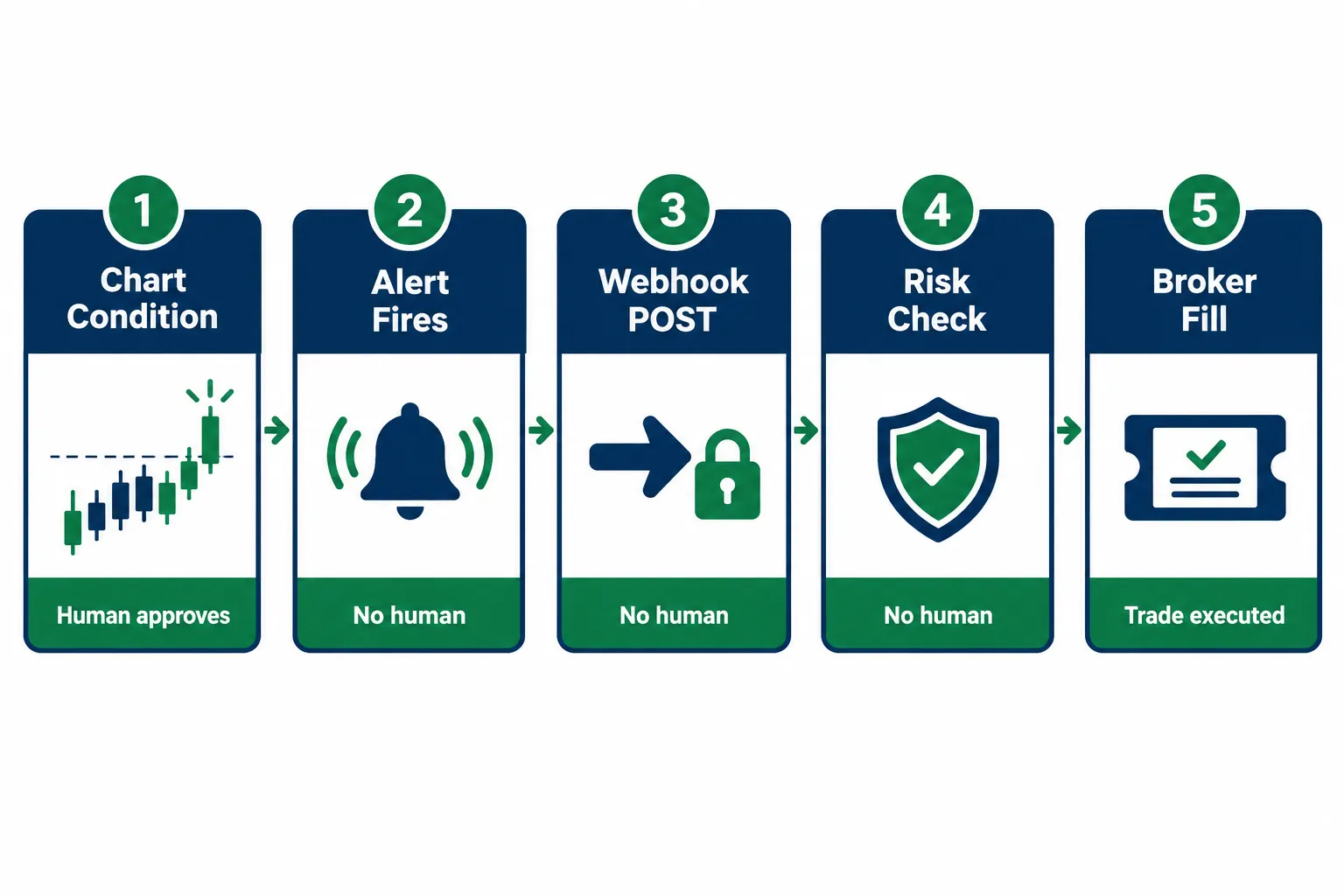
- Alert. Software watches a condition and tells you it happened. You read it, decide, and place the order. Nothing moves without you.
- Bot. Software receives a defined signal and submits the order itself, using rules you wrote in advance. You approve the rules, not each trade.
- AI agent. Software interprets, decides and can act with flexibility you did not fully specify. You approve the permissions and the budget, and sometimes not much else.
The difference matters for responsibility, too. In a January 2026 post on AI agents, FINRA said its rules are “intended to be technology neutral” and that the securities laws continue to apply when firms use generative AI. Your broker’s terms apply equally. Automation changes who clicks, never who is responsible.
The further you climb, the more of your judgment you have prepaid. That is the whole trade.
What Are the 5 Ways to Automate Trading, Ranked by Risk?
| Route | Skill needed | What breaks first | Risk level |
|---|---|---|---|
| TradingView alerts only | Beginner | Your reaction time | Lowest |
| Webhook service (TradersPost, PickMyTrade, SignalStack) | Beginner to intermediate | A dropped or late webhook delivery | Low to moderate |
| No-code connector (n8n, Make, Zapier) | Intermediate | A silent step failure mid-chain | Moderate |
| Python plus a broker API such as Alpaca | Coding required | Your own logic, and the server it runs on | Moderate to high |
| AI agent over MCP | Advanced, plus nerve | Unpredictable agent behavior | Highest |
No one gets to skip rungs. Start where your ability to debug ends, not where your ambition starts. If you cannot explain what will happen when a step fails, you are not ready to automate trading at that rung.
Can TradingView Alerts Alone Automate Trading?
Rung one, and the one almost everyone should run first.
An alert does exactly one thing: it watches a condition and tells you when it is true. It does not place an order, size a position or stop you from doing something reckless at 9:34 a.m. It is a smoke detector, not a fire department.
That limitation is the feature. You keep discretion while software handles the tedious part, which is staring at 40 tickers waiting for one to clear a level.
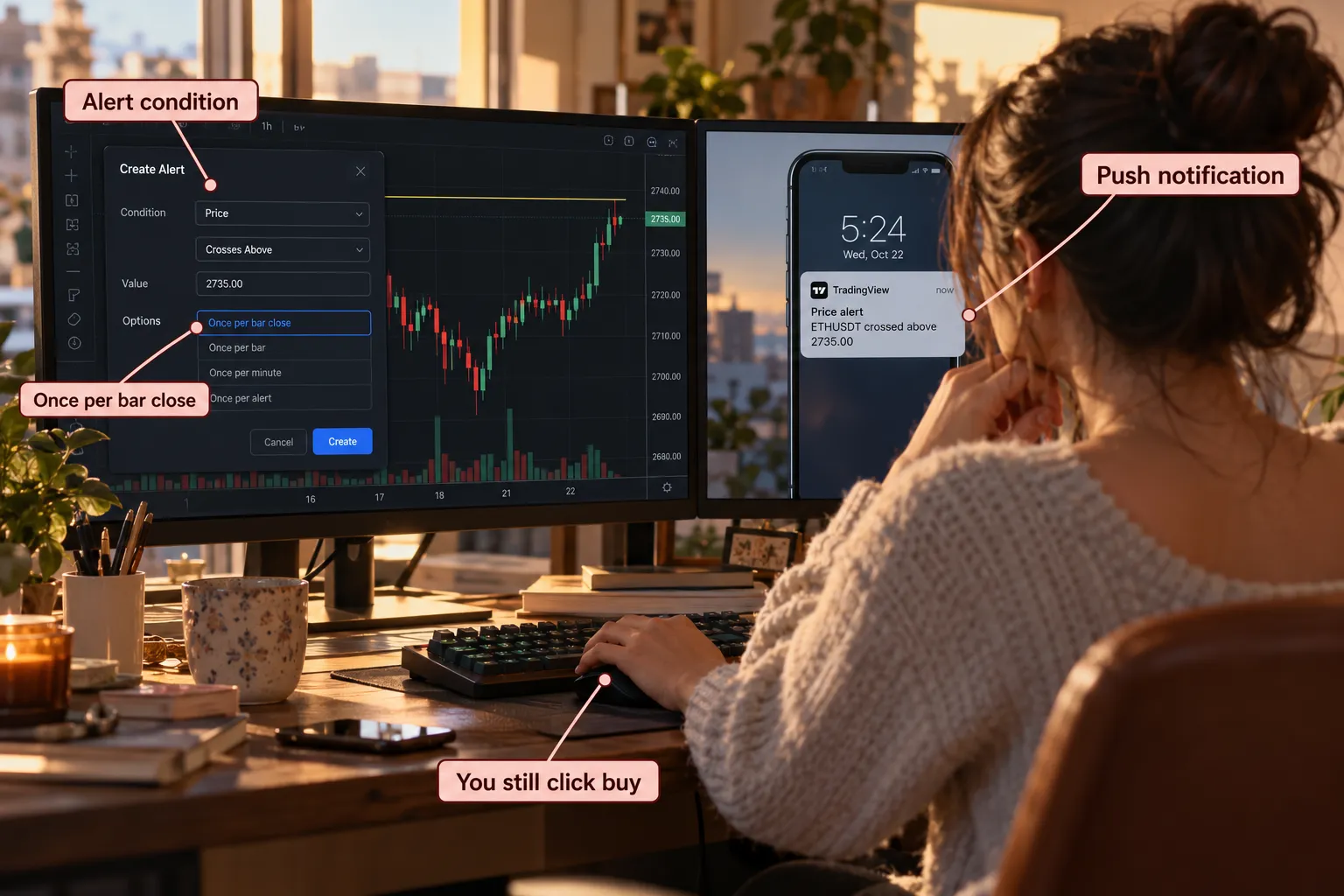
How do you set one up?
Open the chart and pick the condition: a price crossing a level, an indicator threshold, or a Pine Script strategy firing an entry. Set the trigger frequency. TradingView’s alert frequency article defines the choices:
- Once only: fires a single time.
- Once per bar: checks every bar and can fire at most once per bar, including mid-bar.
- Once per bar close: “the bar needs to close for an alert to be triggered.”
- Once per minute: checks conditions every minute.
Once per bar close is the setting that saves accounts, because a mid-bar trigger can fire on a wick that never closes beyond your level. Then pick delivery. TradingView lists app notifications, toast popups, email, webhook URL, sound and plain text.
Write the message so it is useful at a glance: ticker, condition, price. “AAPL reclaimed 232 on volume” beats “Alert on AAPL” every time.
Who it suits
Swing traders holding positions for days. Anyone with a day job. Anyone who has not written down their rules yet. If you cannot explain your entry in one sentence, do not automate it, because automation will execute the confusion faster.
The drawback
You still place the trade. Your hesitation, your fat fingers and your 2 p.m. coffee run are all in the loop. An alert that fires while you are in a meeting is not automation. It is a notification with ambitions.
Alerts also have limits. TradingView’s pricing page lists 3 active price alerts and no technical alerts on the free Basic plan, then 20 on Essential, 100 on Plus, 400 on Premium and 1,000 on Ultimate. TradingView’s alerts guide says a standard alert lasts at most two months, with an open-ended option on Premium and Ultimate. An alert that quietly expires is a strategy that quietly stopped.
How Do Webhook Services Like TradersPost Turn an Alert Into an Order?
Rung two, and where most retail traders who want to automate trading should eventually land.
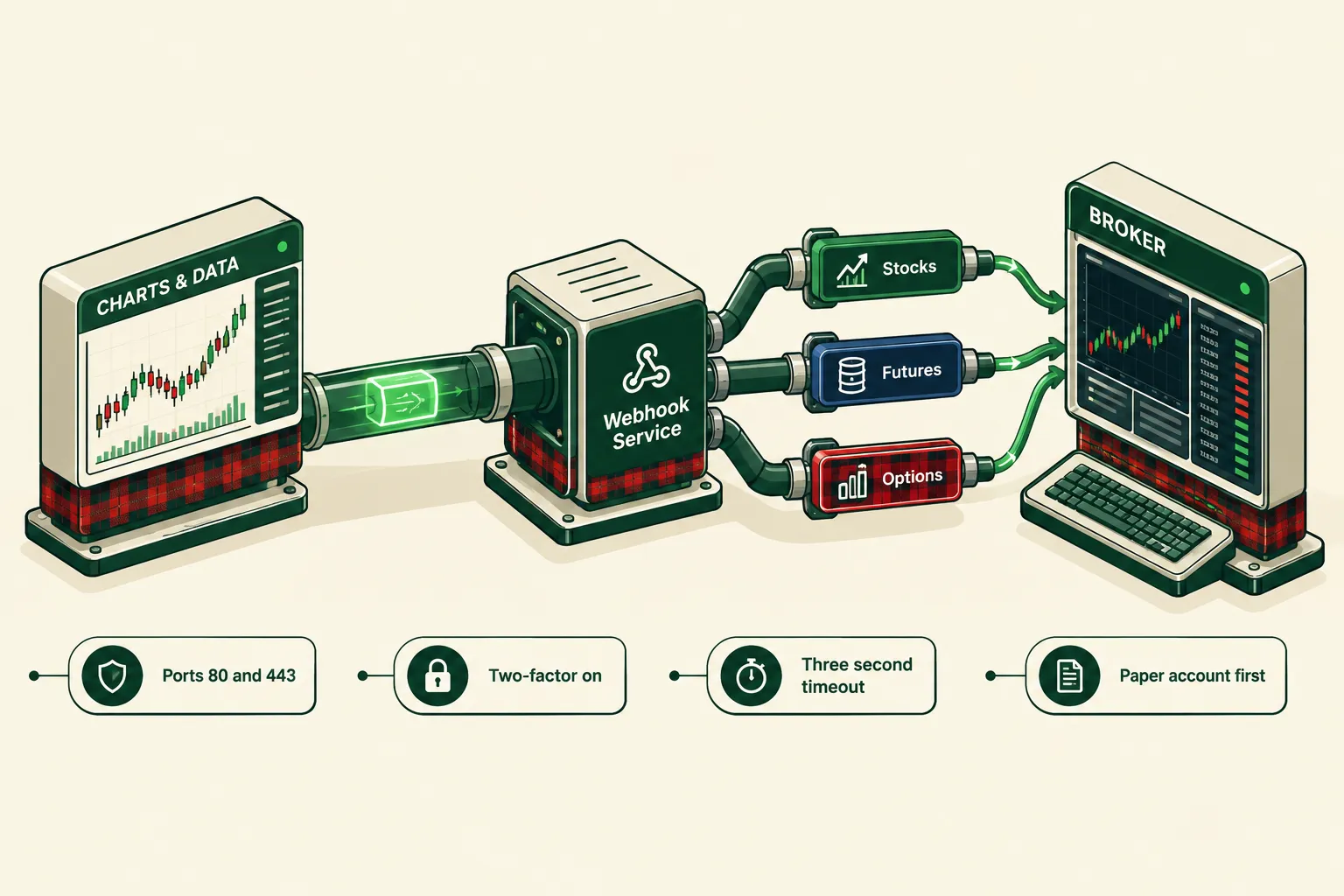
A webhook is a message your alert sends to a web address the moment it fires. Instead of buzzing your phone, TradingView sends a small POST request to a URL you supply, carrying text like “buy, AAPL, 10 shares.” A separate service at that URL reads it, checks your rules, and submits the order to your broker.
TradingView generates the signal. It never executes. That distinction trips up more people than any other part of trading automation.
What does TradingView require?
From TradingView’s webhooks article:
- “Webhook alerts are only allowed when 2-factor authentication is enabled.”
- “Only ports 80 and 443 are accepted.” Requests to other ports are rejected.
- “IPv6 isn’t currently supported for webhooks.”
- If your server “takes longer than three seconds to process a request, the request will be cancelled.”
- If the alert message is valid JSON, TradingView sends it with an application/json content type; otherwise text/plain.
- TradingView publishes four IP addresses it sends from (52.89.214.238, 34.212.75.30, 54.218.53.128 and 52.32.178.7), so you can allowlist them on your server.
- “Webhooks may occasionally fail to reach the specified URL.” Check the Webhook status column in your alert log regularly.
- Do not send sensitive data. TradingView warns that it “can expose it to unauthorized parties.” Never put API keys or passwords in an alert message.
Which plans include webhook delivery? TradingView’s pricing page lists “Webhook notifications” in its feature comparison, but the plan-by-plan checkmarks did not come through when we read it (2026). Check the comparison table before you buy.
What do the main services cost?
TradersPost publishes its prices on its pricing page. Billed yearly, it showed:
| TradersPost plan | Price per month, billed yearly | Live accounts | Paper accounts | Asset classes |
|---|---|---|---|---|
| Free | $0 | Manual submit only | Automated | Not listed |
| Starter | $41.65 | 1 | 4 | 1 |
| Basic | $84.15 | 2 | 6 | 2 |
| Pro | $169.15 | 3 | 8 | 3 |
| Premium | $254.15 | 6 | 10 | All |
The page says yearly billing saves 15%, extra live accounts cost $10 a month and extra paper accounts $5 a month, paid plans include unlimited tickers and trades subject to rate limiting, and sign-up mentions a free 7-day trial. Monthly-billed prices were not shown.
PickMyTrade leans toward futures and SignalStack toward simple alert-to-order conversion. We have not verified either one’s current prices for this piece, so check their sites on the day you compare. Our breakdown of TradingView automated trading compares the three bridges in more depth.
AlphaInsider’s walkthrough, How To Automate A TradingView Strategy, covers the wiring end to end.
First step, every time
Send a test alert to a paper account. Fire it by hand, watch the order appear, confirm the size matches what you intended, then do it again tomorrow. Then do it for a month. If waiting a month annoys you, that is the exact personality trait automation will amplify.
The drawback
A missed webhook is a missed order. A late webhook is a late order. Total delay is the sum of alert generation, network transit, your service’s checks, broker submission, exchange acknowledgement and the fill report. A service’s advertised processing speed covers only one of those steps. For a swing setup the difference is irrelevant. For a scalp on a thin name, it is your edge, gone.
Can You Automate Trading With No Code?
Rung three. Yes, and it is useful, with one honest warning attached.
No-code connectors such as n8n, Make and Zapier sit between the alert and the execution layer. They receive the webhook, then do things a plain webhook service cannot: check the time of day, look up a value in a spreadsheet, skip the trade if you already hold three positions, log the signal to a database, ping your phone, then forward a cleaned-up message to a broker or to TradersPost.
Think of it as a dispatcher. The alert is the 911 call. The connector decides whether to send a truck.
How do you wire it?
Create a webhook trigger in the connector and copy the URL it gives you. Paste that URL into your TradingView alert. Fire a test alert so the connector learns the shape of the data. Add your filters: a time check, a position-count check, a maximum daily loss check. Then add the output step that sends the order on. Run the whole chain to a paper account until it is boring.
Two TradingView rules shape the design. Your connector must answer within three seconds or TradingView cancels the request, so acknowledge the webhook first and do slow work afterward. And because TradingView sends from four published IP addresses, you can reject any request from anywhere else.
AlgoTrade Pro’s no-code automation walkthrough is a decent visual reference for the step-by-step build.
What can and cannot a non-programmer fix?
A non-programmer can fix a lot here: wrong field mapping, a filter set backwards, a step pointed at the wrong account, a message missing its ticker. The execution log shows which step failed and what data it had.
What a non-programmer usually cannot fix: an authentication token that quietly expired, a rate limit hit at the worst moment, a broker API that changed its response format, or two alerts arriving 40 milliseconds apart that both pass the position check. Those failures are silent. The workflow reports success. No order exists.
The drawback
Every link you add can break without telling you. Chart to alert to connector to webhook service to broker is five handoffs, each with its own uptime and its own login. Build a daily check: did the number of orders match the number of alerts? If you cannot answer that in under a minute, your chain is too long.
Add steps only when a step removes a mistake you have actually made. Complexity for its own sake is just slower failure.
How Do You Automate Trading With Python and the Alpaca API?
Rung four. Code is the most flexible way to automate trading, and the ceiling rises along with the maintenance bill.
Writing your own system means no vendor’s roadmap limits you. It also means no support team answers at 4 a.m. Alpaca is the usual starting point because paper accounts are free, start with a $100,000 default balance, and use a separate host, paper-api.alpaca.markets, so test code cannot reach your live account. Alpaca also says commission-free trading is available to its retail customers for self-directed accounts, though it passes through regulatory fees such as FINRA’s Trading Activity Fee on sells.
The seven moving parts, in order
Keys. Generate paper API keys and store them in environment variables, never in the script and never in a public repository. Our guide to Alpaca API keys covers storage and rotation.
Data. Decide what feeds the logic: minute bars, daily bars or quotes. Alpaca’s paper-only accounts receive IEX data only, one exchange’s view, not the full consolidated tape. Decide what happens when the feed gaps, because it will.
Signal. The rule that produces a decision. Keep it simple at first. A single moving average cross you understand beats a nine-factor model you do not.
Order. The submission itself, including order type, time in force and what happens on a partial fill. Alpaca’s simulator gives eligible orders a random partial fill 10% of the time, which is a good chance to test that path.
Risk limit. Maximum position size, maximum open positions, maximum daily loss, and a kill switch that halts everything. Write this before the signal logic, not after.
Logging. Every signal, order, rejection and fill, with a timestamp. Without logs you cannot debug, and without debugging you are guessing with money.
Hosting. A laptop that sleeps is not a server. Run the bot somewhere that stays awake through the session.
Our Alpaca API guide for beginners covers setup and a first order, and our step-by-step guide on how to build a trading bot walks the full build from rule to kill switch.
What paper results will not tell you
Alpaca’s paper documentation lists what its simulator leaves out: market impact, slippage due to latency, queue position for resting limit orders, price improvement, regulatory fees and dividends. Your paper results are the optimistic version. Haircut them before you believe them.
The drawback
You own every bug and all the upkeep. Brokers version their APIs, libraries change, and exchange holidays break date logic. A strategy built on one market regime meets conditions it never saw. Re-test after any meaningful change to the model, the data or the parameters.
Can an AI Agent Automate Trading Through MCP?
Rung five, the newest way to automate trading, and the one with the least predictable behavior.
The Model Context Protocol describes itself as “an open-source standard for connecting AI applications to external systems,” the kind of link that lets assistants like Claude or ChatGPT reach outside tools. Connect it to a broker and the model can read positions, pull quotes and, if you allow it, submit orders.
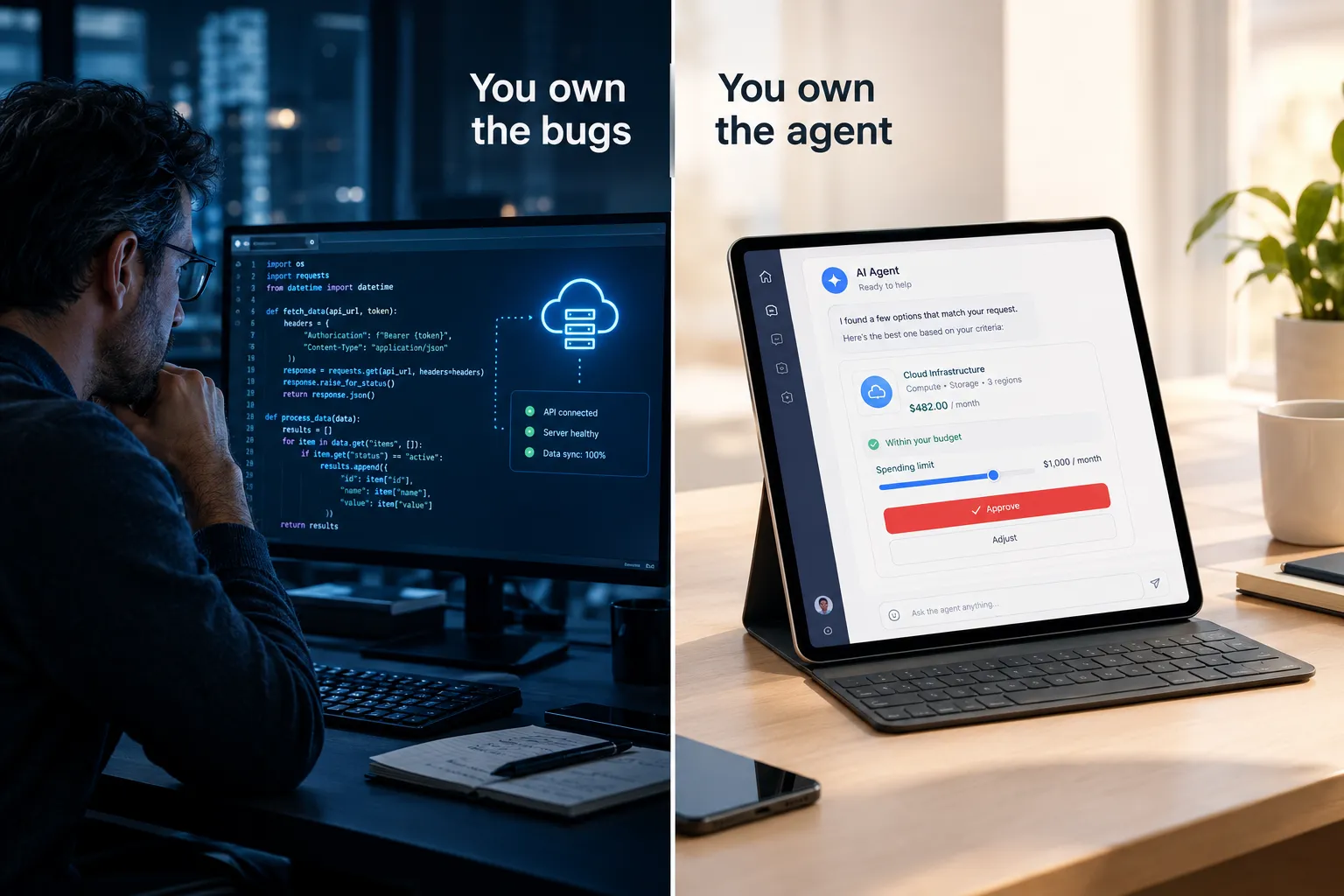
The pitch is attractive: describe what you want in English and let the model handle the plumbing. The reality is that you have handed a probabilistic system an order ticket.
Who carries the responsibility?
You do. Our Robinhood agentic trading review found that its agent can trade without your sign-off once you grant that permission, and the account holder stays responsible for what it does. There is no “the AI did it” defense on a filled order.
FINRA’s January 2026 post lists the agent risks plainly:
- Autonomy: “AI agents acting autonomously without human validation and approval.”
- Scope and authority: “Agents may act beyond the user’s actual or intended scope and authority.”
- Auditability: multi-step reasoning “can make outcomes difficult to trace or explain.”
- Domain knowledge: general-purpose agents “may lack the necessary domain knowledge.”
- Rewards: poorly designed reward functions can push an agent to optimize the wrong thing.
Regulators are watching the fraud side too. We covered the SEC’s case in SEC sues over $15 million in fake AI trading bot scams. If a product promises fixed profits from AI signals, that promise is the red flag.
Gates to set before anything goes live
- Read-only first. Let it analyze and summarize for weeks before it can touch an order. Alpaca’s own MCP server, for example, can be limited to selected toolsets and defaults to paper trading.
- Approval on every order. Slower, on purpose.
- A hard cap at the broker. Prompts are suggestions. Account limits are walls.
- One instrument, tiny size, while you watch how it behaves.
- A full log of its reasoning and every action, kept where you can read it later.
Our guide to AI trading agent risks explains why the kill switch has to sit outside the agent. AI Pathways’ video, How I Connect TradingView Indicators to AI Agents, shows one way to do the wiring.
The drawback
Least predictable, hardest to audit. Start read-only and stay there longer than feels necessary.
What Does It Cost to Automate Trading?
Prices below were checked on the vendors’ pages (2026) and must be checked again on the day you buy.
| Route | TradingView plan | Service layer | Broker or API | Hosting or AI usage |
|---|---|---|---|---|
| Alerts only | Basic $0 (3 price alerts) or Essential $12.95 a month billed annually | None | Any broker | None |
| Webhook service | A paid plan; check the webhook row on TradingView’s comparison table | TradersPost Starter $41.65 a month billed yearly; free plan automates paper only | Broker account | None |
| No-code connector | Same as webhook route | Connector plan, plus an optional webhook service | Broker account | Connector plan cost |
| Python and Alpaca | Optional | None | Alpaca paper free; live self-directed trading commission-free plus regulatory fees | A server that stays on |
| AI agent via MCP | Optional | None | Broker with agent or API support | AI subscription or usage costs |
TradingView’s other annual-billing prices: Plus $29.95, Premium $59.95 and Ultimate $199.95 a month. TradersPost’s higher tiers: Basic $84.15, Pro $169.15 and Premium $254.15 a month billed yearly.
Worked example. A swing trader who wants alert-to-order automation on one broker account picks TradingView Plus ($29.95) and TradersPost Starter ($41.65), for $71.60 a month, or $859.20 a year, before any trading costs. If the strategy makes 10 trades a month, that is about $7.16 of overhead per trade. On a $2,000 account risking 1% ($20) per trade, overhead is a third of the risk on every trade. Automation only pays when the account size and trade count can carry it.
The cheapest automation is the one you do not need yet. Paying $70 a month to execute a strategy you have not validated is a subscription to your own bad habits.
Use the estimator below to add up your own stack.
Automation Cost Estimator
Monthly running cost from listed annual-billing prices (2026). Verify before you subscribe.
What Limits Should You Check Before You Automate Trading?
Alert caps. The first ceiling people hit. If you track 60 tickers with three conditions each, that is 180 alerts, beyond Plus (100) and inside Premium (400). Do that math before you subscribe.
Alert lifetime. Standard alerts expire after two months unless you are on Premium or Ultimate. Put a renewal date in your calendar.
Broker API terms. Some brokers restrict third-party order routing, some rate-limit requests, and some charge separately for market data. Read the agreement, not the marketing page.
Outside market hours. An alert fires at 2 a.m. and your bot submits an order. Does it queue for the open, route to extended hours into a wide spread, or get rejected? Decide now, and add a time filter so overnight signals wait for liquidity.
Accountability. Settled. The account holder owns the order, not TradingView, the connector or the model. Keep records.
How Do You Test Automated Trading Without Real Money?
Paper first. Thirty days minimum. No exceptions, whichever rung you use to automate trading.
- Run it 30 days on paper, through at least one ugly session and one quiet one.
- Log alert-to-fill time on every trade. If that gap is wider than your average move, the route is too slow for the strategy.
- Compare paper fills to your backtest. Big divergence means the backtest was fiction, usually from look-ahead bias or ignored costs.
- Change one thing at a time. Two changes at once and you learn nothing.
- Count orders against alerts daily. Mismatches are silent failures.
- Check the Webhook status column in TradingView’s alert log every day of the test.
What Mistakes Break Automated Trading Most Often?
- Duplicate alerts. Two orders from one signal. Fix: use Once per bar close and set your service to reject repeat orders inside a time window.
- No kill switch. You cannot stop it from your phone at lunch. Fix: one toggle that halts all new orders, tested before you need it.
- Oversized orders. A misplaced decimal turns 10 shares into 1,000. Fix: cap position size at the broker, not just in the script.
- Exposed API keys. Keys in alert bodies, screenshots or public repositories. Fix: environment variables only, and rotate them regularly.
- Slow endpoints. A server that takes more than three seconds to answer loses the webhook. Fix: acknowledge first, process second.
- Going live untested. The classic. Fix: 30 days of paper trading, one change at a time.
Which Rung Should You Start On?
Start on rung one. Alerts only, Once per bar close, 30 days of logging what you did each time one fired. Boring, cheap, and it answers the only question that matters: do your rules work when you follow them?
If the answer is yes and the bottleneck really is your reaction time, move to a webhook service pointed at a paper account. Only then go live, at a size that will not ruin your month if the chain drops a delivery.
Skipping straight to an AI agent because it is the shiny option is how people learn that an unvalidated strategy executes losses faster than they ever could by hand.
Frequently Asked Questions
Can I automate my trading with TradingView?
Partly. TradingView generates signals and can send webhook alerts, but it never places orders itself. To automate trading from TradingView you need two-factor authentication on, a server or service that answers within three seconds on port 80 or 443, and a broker or bridge such as TradersPost to submit the order.
What is the safest way to automate trading?
Start with TradingView alerts that only notify you, set to Once per bar close, and log what you do for 30 days. Then send alerts through a webhook service to a paper account before any live money. AI agents with order permissions carry the most risk.
How much does it cost to automate trading?
TradingView paid plans run $12.95 to $199.95 a month billed annually, and TradersPost paid plans run $41.65 to $254.15 a month billed yearly. A common pairing, Plus plus Starter, costs $71.60 a month. Python on Alpaca’s paper API is free apart from hosting.
Is it legal to automate trading?
Yes, through broker-approved connections. FINRA describes its rules as technology neutral, so the same rules apply whether a person or software places the order. Read your broker’s API terms for limits on third-party routing and request rates.
Can an AI agent place trades for me?
Yes, through MCP or broker agent features that allow it. You stay responsible for every order. FINRA warns about agents acting without approval, beyond their scope and in ways that are hard to trace, so start read-only with approval on every order and a hard cap at the broker.
Why did my TradingView webhook not place an order?
Common causes are two-factor authentication turned off, an endpoint on a port other than 80 or 443, an IPv6 address, or a server slower than three seconds, which makes TradingView cancel the request. TradingView also says webhooks occasionally fail, so check the Webhook status column in the alert log.
How long should I test automated trading before going live?
At least 30 days on a paper account, through busy and quiet sessions. Log alert-to-fill time on every trade, count orders against alerts daily and change only one setting at a time. Go live small, at a size a dropped order cannot hurt badly.
Our Take
The right way to automate trading is one rung at a time, with the boring rungs first. TradingView alerts cost little and teach you whether your rules work. Webhook services turn those rules into orders but add delivery risk and $40 to $250 a month. No-code connectors and Python add power and add silent failure modes. AI agents over MCP are the least predictable of all, and FINRA has already listed the ways they go wrong. Paper trade every rung for 30 days, count orders against alerts, and keep the kill switch outside the software. Systems over hacks. Cut the noise, keep the alpha.
For the broker end of a webhook or Python build, our tools directory puts Alpaca vs NinjaTrader side by side.
Still unsure which rung fits your account and your patience? Browse our tested trading tool reviews, or submit your bot for a review before it touches real money.
Stay alpha.
The FullStack Alpha research desk tests AI trading bots on paper and live accounts. Reviewed and edited by Jay Rocco, Founder and Editor.
