

The FullStack Alpha research desk tests AI trading bots on paper and live accounts. Reviewed and edited by Jay Rocco, Founder and Editor.
By FullStack Alpha Editorial Team | Reviewed by Jay Rocco, Chief Editor
Alpaca paper trading is a free simulated brokerage account that runs on the same API shape as live trading but uses its own key pair and its own host, https://paper-api.alpaca.markets. Per Alpaca’s paper trading documentation, the account opens with a default simulated balance of $100,000 and paper-only users get IEX market data under the basic entitlement. The biggest difference from live isn’t the code, it’s the fills: simulated orders don’t fight for queue position, so your backtest-looking equity curve flatters you. Your first test order should be one share of a liquid name like SPY or AAPL, a day market order, then a separate status check to confirm it actually filled.
What You Should Know
- Paper keys and live keys are not interchangeable. Alpaca’s paper trading docs state the paper account has its own key pair and its own endpoint,
https://paper-api.alpaca.markets. - The default simulated balance is $100,000, and Alpaca’s docs note you can create a new paper account with a configured balance instead.
- Paper accounts are free and open globally to anyone who can sign up with an email address, per Alpaca’s paper trading documentation.
- Paper-only users get IEX data under the basic entitlement. SIP (full consolidated tape) sits behind a paid data plan, so check the official pricing page for current cost.
- On October 12, 2026, Alpaca launched a Paper Trading plugin for ChatGPT that can check balances, positions and buying power and submit simulated orders. The companion Live plugin is read-only and cannot place live orders.
What Is Alpaca Paper Trading?
Alpaca paper trading is a simulated brokerage environment with its own credentials and its own API host, built so you can run real order logic against fake money. Confirmed on Alpaca’s paper trading documentation page as of October 23, 2026.
Think of it as a flight simulator for your bot. The cockpit layout matches the real plane, the switches are in the same place, and nothing in the sky is actually trying to kill you. That last part is the whole point and also the trap.
What the alpaca paper trading api actually gives you
The alpaca paper trading api exposes essentially the same surface as the live trading API: submit orders, cancel orders, list positions, pull account details, stream updates. Alpaca’s documentation frames this deliberately so switching environments means swapping credentials and a base URL, not rewriting your strategy.
What changes:
- The host.
https://paper-api.alpaca.marketsinstead of the live host. - The keys. A separate key ID and secret generated inside the paper dashboard.
- The money. Simulated, starting at $100,000 by default.
- The fills. Simulated matching, not an actual exchange queue.
In the official Python SDK, TradingClient(..., paper=True) selects the paper environment for you, so you don’t hand-build the URL. The Alpaca Trading API MCP documentation goes further: it states a free paper account is enough to get started and that paper trading is the default configuration. Live use requires explicitly setting ALPACA_PAPER_TRADE=false and supplying live keys. That default matters. It means a careless config change is what promotes your bot to real money, not a careful one.
Who this is for, and who it isn’t
Use alpaca paper trading if you’re writing code, you need to validate authentication and order plumbing, or you want to run a strategy for 30 days before risking a dollar.
Skip it if you’re a discretionary trader who just wants a practice chart. You’d be better served by a charting platform’s built-in simulator. Alpaca is a developer-first broker. The dashboard exists, but the API is the product. For a broader view of where it sits against other platforms, our Alpaca vs Public broker comparison covers the retail-facing side.
Common mistake: treating the $100,000 default as your strategy’s capital base. Alpaca’s own docs suggest creating a new paper account with a configured balance instead. Testing a $3,000 account’s position sizing on a $100,000 simulated balance teaches you nothing about risk management, because you’ll never hit the constraint that actually bites you.
How Do You Get Alpaca Paper Trading API Keys Step by Step?
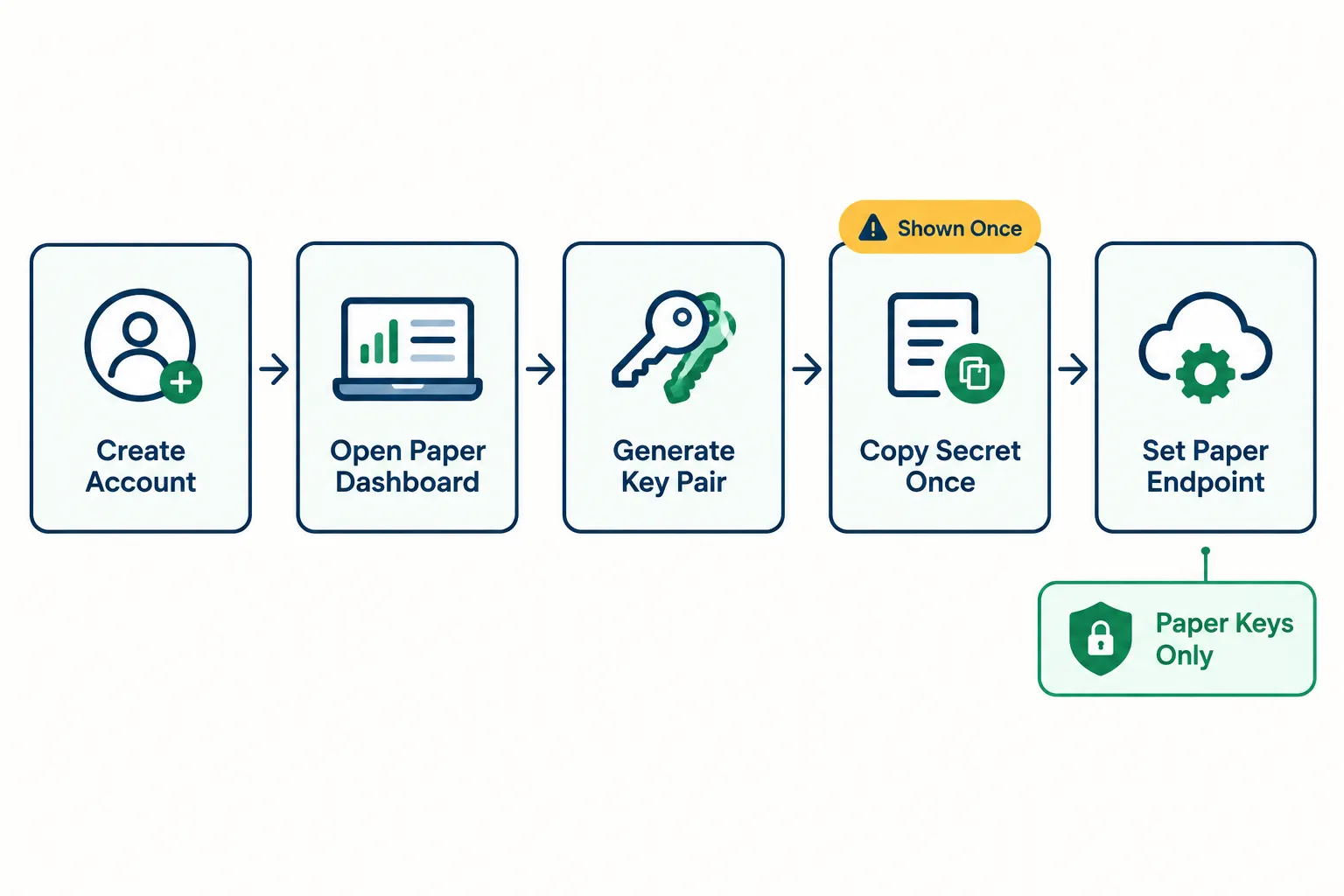
Sign up with an email, switch the dashboard into paper mode, and generate a key pair from the API keys panel. The secret is displayed once. Copy it then, or regenerate and start over.
The steps
- Create an Alpaca account with an email address. Per Alpaca’s paper trading docs, a paper account is free and available globally. No deposit, no funding, no brokerage application required to reach the paper environment.
- Open the dashboard and switch to the paper account. The interface separates paper from live. Confirm you’re on the paper side before touching anything labeled “keys.” If the toggle isn’t obvious, check the official dashboard page rather than guessing.
- Find the API keys panel. This is where the paper key pair is generated. You’ll get a key ID and a secret key.
- Copy the secret immediately. Secrets are shown once on generation. There’s no “show me again” button. Lose it, regenerate it, and note that regenerating invalidates the old pair, which will break anything already running on it.
- Store both values outside your code. Environment variables, a secrets manager, anything that isn’t a hardcoded string in a file you might push to GitHub. Scanning bots crawl public repos for exactly this pattern.
- Point your client at the paper host. Either set the base URL to
https://paper-api.alpaca.marketsor, in the Python SDK, passpaper=True. For REST calls, the credentials travel in theAPCA-API-KEY-IDandAPCA-API-SECRET-KEYheaders. - Make one read-only call first. Fetch the account object. If it returns a balance, your keys and endpoint agree with each other. If it 401s, they don’t.
If you want the deeper walkthrough with the dashboard specifics, we cover it in our Alpaca API keys guide, and the Alpaca API for beginners post handles the first-time-developer version.
Errors you’ll hit in the first ten minutes
| What you see | What’s actually wrong |
|---|---|
| 401 unauthorized | Live keys pointed at the paper host, or paper keys pointed at the live host. The pairs are not interchangeable. |
| 403 forbidden | Usually a data-feed entitlement problem, not an auth problem. You asked for SIP data on a basic plan. |
| Keys “stopped working” | Someone regenerated the pair. Old secrets die the moment a new one is issued. |
| Order rejected instantly | Endpoint is fine, the order body isn’t. Missing time_in_force is the classic. |
Decision rule: if your error is 401, check the host and key pairing before you check anything else. Nine times out of ten that’s it.
Edge case worth naming: developers who set up live keys first, then add paper later, frequently end up with both pairs in the same .env file under similar names. One typo and your “test” order is real. Keep live credentials out of your development config entirely. Not in a comment. Not commented out. Out.
How Is Alpaca Paper Trading Different From Live?
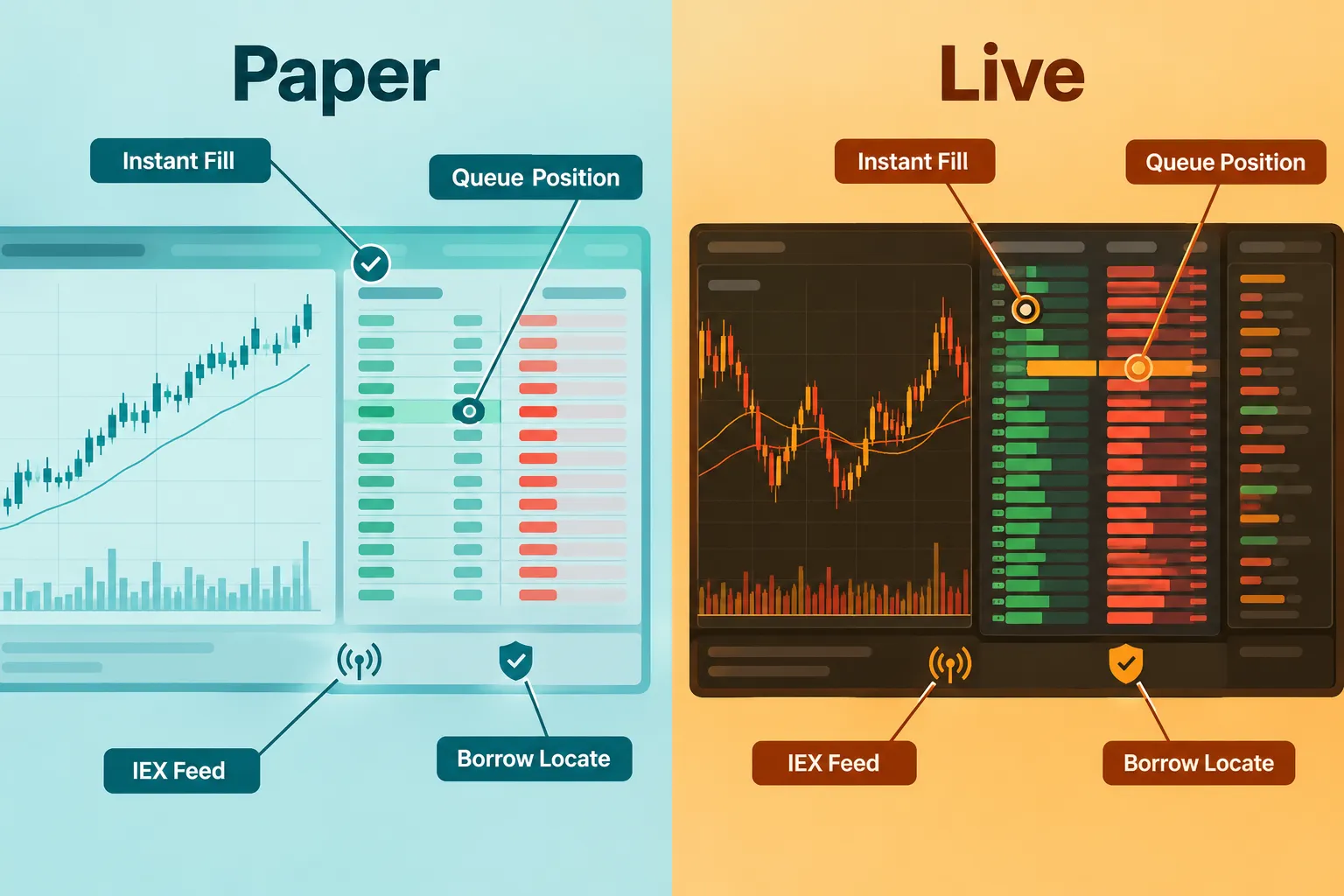
The API shape is nearly identical. The market mechanics are not. Simulated fills don’t model queue position, partial fills in thin books, or the price you actually get when 500 other orders arrive at the same tick.
| Area | Paper | Live | Why it matters for a bot |
|---|---|---|---|
| Fills | Simulated matching. An order acknowledgment is not a fill, and Alpaca says to verify status explicitly. | Real exchange routing, real counterparties, real queue. | A strategy that assumes instant fills at the touch will underperform when live orders sit unfilled. |
| Slippage | Not modeled the way a live market book behaves. | Spread, size and volatility all cost you. | This is the single largest gap between a paper equity curve and a live one. |
| Market data | IEX feed under the basic paper entitlement. | Same basic entitlement unless you pay for SIP. | IEX is one venue. SIP is the consolidated tape. Signals keyed to last price can differ between them. |
| Short selling, borrow and locates | Simulated. Check Alpaca’s shorting documentation for the current paper behavior. | Requires an actual locate and borrow availability. | A short strategy that works in paper may be unshortable live. Verify before you build on it. |
| Account reset | You can create a new paper account with a configured balance per Alpaca’s docs. | No resets. Drawdowns are permanent. | Resets destroy the psychological lesson. A bot doesn’t care; you should. |
| Credentials | Separate paper key pair, separate host. | Separate live key pair. | Low switching friction, high misconfiguration risk. |
The uncomfortable part
Paper trading proves your code can submit an order, parse a response and track a position. It does not prove your edge exists. Those are different claims and most people conflate them.
A strategy that scalps a 3-cent spread will look brilliant in simulation and die in live markets the moment the spread, the fee and the queue all take their cut. We break the math down in our guide to paper trading slippage.
Decision rule: the thinner your edge per trade, the less your paper results mean. If your average winner is under 0.3%, assume paper is lying to you until live fills say otherwise.
Quick example: a mean-reversion bot buys a dip at the bid, sells the bounce at the ask, and clears 0.18% a trade across 400 paper trades. Looks like a machine. Live, half those bids never fill, the ones that do fill at the wrong moment, and the win rate collapses. Nothing was wrong with the code. The code was never the thing being tested.
What Are the Alpaca Paper Trading Limits?
Paper accounts start at a default simulated $100,000 balance, run on IEX market data under the basic entitlement, and are subject to API rate limiting. For the current requests-per-minute figure, check Alpaca’s official API rate limit documentation rather than a third-party number.
What’s confirmed
- Starting balance: $100,000 simulated by default, per Alpaca’s paper trading documentation. Configurable by creating a new paper account.
- Cost: free. Paper accounts are available globally to anyone with an email address.
- Market data: IEX feed under the basic entitlement for paper-only users. SIP requires a paid data plan. Pricing changes, so check the official page or see our breakdown of Alpaca API pricing.
- Rate limits: the alpaca trading api is rate limited per account. Alpaca publishes the current figure in its API reference. Don’t hardcode a number you read on a forum.
What the paper account can’t do
- It can’t give you real fills. Nothing simulated will.
- It can’t prove live borrow availability for short setups.
- It can’t model your broker’s live routing behavior, because there isn’t any.
- It can’t tell you how you’ll behave when the money is yours. That one costs people more than any technical limitation.
Edge case: Alpaca launched live index-options trading on September 2, 2026, covering SPX, SPXW, VIX, VIXW, DJX and XSP. If you’re testing options workflows in paper, understand that live index options carry product-specific settlement, expiration and market-data considerations that a one-share stock test order never surfaces. Paper validates the request format. It doesn’t validate your understanding of cash settlement.
Common mistake: building against the IEX feed, getting clean results, then going live and finding your entry trigger fires at a different time because the consolidated tape printed first. If your strategy is timing-sensitive, the feed difference is a real variable, not a footnote.
How Do You Place a First Test Order on Alpaca Paper Trading?
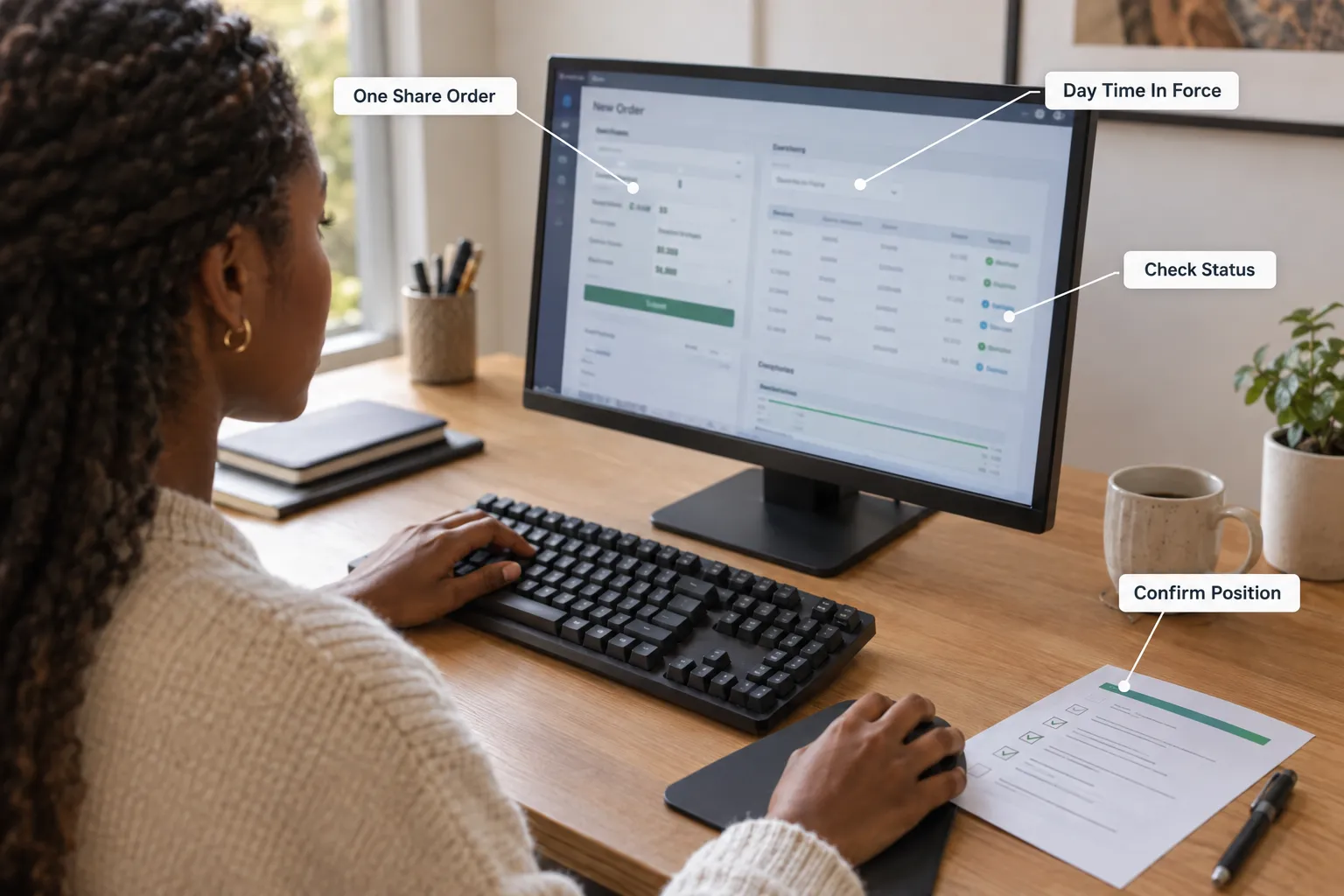
Check the account first, submit one share of a liquid ticker as a day market order, then query the order status separately. Alpaca’s own recommended workflow, published October 12, 2026 alongside the ChatGPT plugin, follows exactly that sequence, and it explicitly warns that an order acknowledgment is not proof of a fill.
The nine-step first order
- Confirm the environment. Call the account endpoint. You should see a simulated balance and buying power. If you see a number you recognize from your real life, stop immediately, you’re on live keys.
- Pick a liquid ticker. SPY or AAPL. This is a plumbing test, not a stock pick. A thin low-float name introduces execution variables that have nothing to do with whether your authentication works.
- Build the order body. The alpaca trade api expects
symbol, then eitherqtyornotional, plusside,typeandtime_in_force. For this test: one share, buy, market, day. - Attach a unique
client_order_id. Alpaca supports retrieving an order by that identifier. It prevents accidental duplicate submissions and lets multiple strategies tell their own orders apart. Skip this and you’ll eventually fire the same order twice during a retry loop and have no clean way to detect it. - Submit it. A
POSTto/v2/orderson the paper host, with the key ID and secret in the headers. Or the SDK equivalent. You’ll get back an order object with an ID and a status. - Read the status, not the acknowledgment. A 200 response means Alpaca accepted the request. It does not mean you own a share. Query the order by its ID or your
client_order_id. - Check four fields: status, filled quantity, average fill price, and the timestamp. If status is
neworacceptedand filled quantity is zero, nothing happened yet. Outside market hours withtime_in_forceset to day, that’s expected. - Pull your positions. One share of SPY should now appear. If the order filled but no position exists, you’re querying a different account than you think.
- Repeat with a limit order. Same ticker, one share, buy, limit, priced well below the market so it won’t fill. Confirm it sits in the open-orders list. Then cancel it and confirm the cancellation lands. You’ve now tested submission, fill, status retrieval, resting orders and cancellation. That’s the full loop.
The dashboard version
If you’d rather not write code for the first run, the paper dashboard has a manual order ticket. Enter the symbol, quantity, side, order type and time in force, submit, and watch the order appear in your activity list. Same validation, less setup. Do this once to confirm the account works, then move to the API, because the dashboard isn’t what your bot will use.
Agentic setups: Claude, MCP and ChatGPT
Alpaca’s developer tooling now includes an MCP server, a CLI, and as of October 12, 2026, a ChatGPT plugin. MCP (Model Context Protocol) is a standard that lets an AI assistant like Claude call external tools directly, so you can ask for your paper positions in plain English and get a real API response back.
Two things worth knowing:
- The MCP default is paper. Live requires explicitly flipping
ALPACA_PAPER_TRADE=falsewith live keys. Good design. Don’t undo it casually. - The ChatGPT Live plugin is read-only. It monitors; it cannot place live orders. Only the Paper plugin submits orders, and those orders are simulated.
We go deeper on the setup in our Alpaca MCP walkthrough. The short version: an LLM wired to a paper account is a genuinely useful way to inspect state without writing a query every time. An LLM wired to a live account placing orders is a different risk conversation entirely.
What Did the freeCodeCamp Course Show About Alpaca?
freeCodeCamp.org published a long-form algorithmic trading course that walks through building Python trading projects, including working with the Alpaca API for order submission and account data. It’s a solid grounding in the mechanics. It is not a substitute for testing your own bot’s failure modes.
Video: freeCodeCamp algorithmic trading course on YouTube.
What the course covers well
- Python fundamentals applied to market data rather than toy examples.
- API authentication and request structure, which is where most self-taught developers stall out.
- Building a strategy end to end, from data pull to order submission, so you see the whole pipeline instead of isolated snippets.
Credit where it’s due: freeCodeCamp.org gives this away for free, which is more than most $997 “algo trading masterclasses” deliver for actual money. Our take on that gap is in AI trading software: what you pay for vs what you get.
What it leaves out for a real bot test
A tutorial’s job is to make something work once. A bot’s job is to not break at 9:47am on a Tuesday. The gap between those includes:
- Rate limit handling. What happens when your loop hits the ceiling mid-session?
- Partial fill logic. A tutorial assumes the order fills completely. Live markets disagree.
- Reconnection after a websocket drop. Your stream will disconnect. Then what?
- Idempotency. Without a
client_order_idand a retry guard, a network hiccup becomes a duplicate position. - Position reconciliation. If your internal state and Alpaca’s state diverge, which one wins?
Practical takeaway: watch the course for the pipeline, then spend an afternoon deliberately breaking your own bot. Kill the network mid-order. Submit the same order twice. Send a bad symbol. The failures you find on purpose cost nothing.
How Do You Log a 30 Day Alpaca Paper Test?
Record every trade in a spreadsheet with ten specific columns, set a hard stop rule before you start, and compare paper fills against live fills on a small funded account only after 30 days of clean data. Logging is the part everyone skips and the part that produces every useful insight.
The columns to record
| Column | Why it’s there |
|---|---|
| Date and timestamp | Time-of-day patterns show up fast. Power hour behaves nothing like 10:30am. |
| Symbol | Obvious, but you need it to group by liquidity tier later. |
| Setup name | If you can’t name the setup, you don’t have one. |
| Intended entry | The price your logic wanted. |
| Actual fill price | The price the paper trading api gave you. |
| Slippage | Difference between the two. This column is the whole exercise. |
| Position size | In shares and as a percentage of account. |
| Stop loss level | Set before entry, always. |
| Exit price and reason | Target hit, stop hit, time stop, or you overrode the system. |
| Override flag | Yes or no. Count these at the end. The number will be ugly. |
That last column is the one that teaches. Every manual override is your discipline losing an argument with your impulse, and the log keeps score.
The stop rule
Decide this before trade one:
- Stop the test if the system takes more than 15 consecutive losses, or if you override it more than three times in a week.
- Stop the test if you change the rules mid-run. A strategy edited on day 12 is a new strategy with 18 days of data, not a 30-day result.
- Don’t stop just because you’re down. A drawdown inside your expected range is information, not a verdict.
When to compare against live
After 30 days with at least 40 trades, fund a small live account and run the identical logic at the smallest size your broker allows. Then compare the fill-price column, not the profit column. If live slippage averages within a few cents of paper on liquid names, your assumptions survive. If it’s 5x worse, your edge was never real.
Our swing trading tools section covers the longer-timeframe version of this process, where slippage matters less and position sizing matters more.
Alpaca Paper Trading vs Other Paper Trading APIs
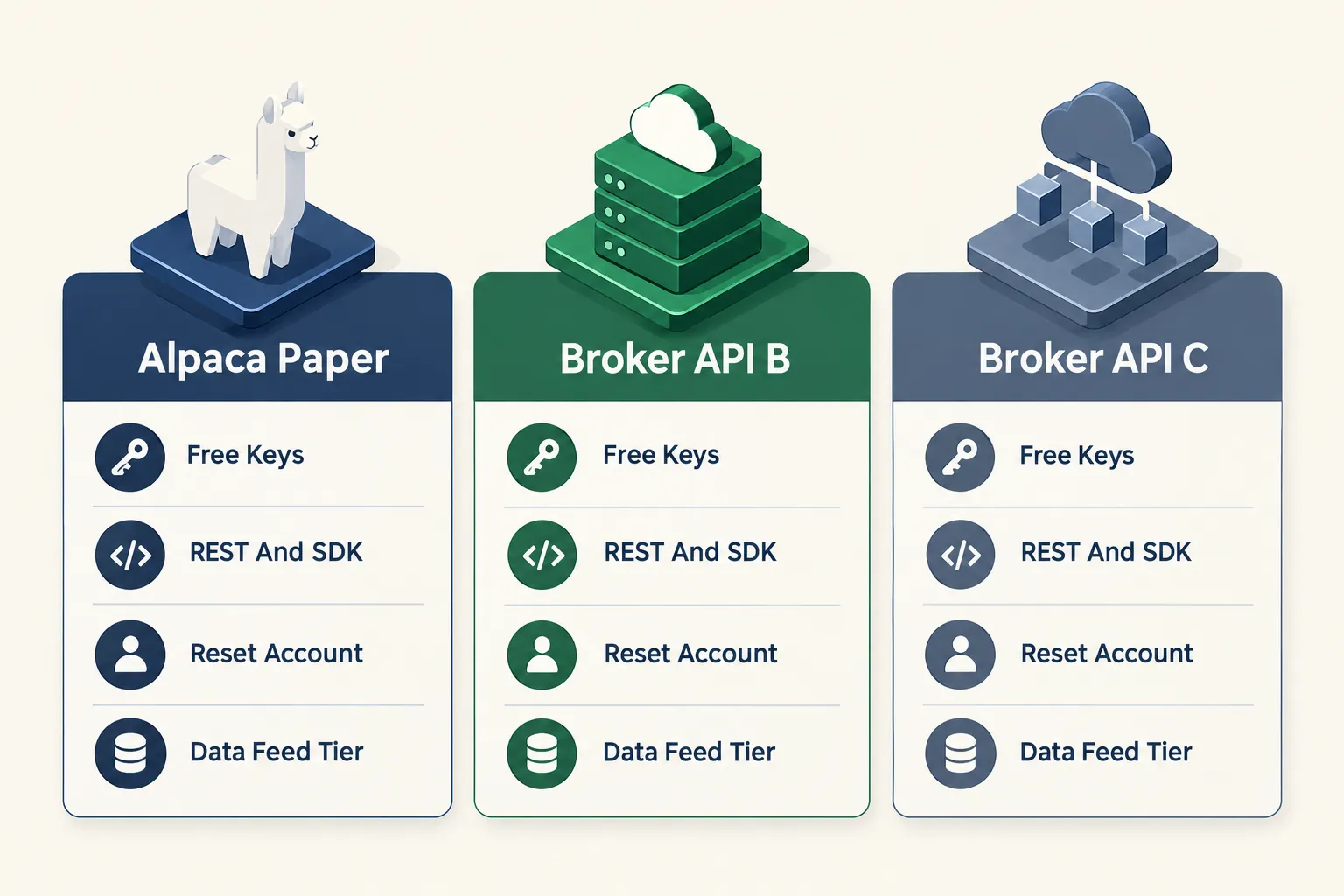
Alpaca’s advantage is friction: free keys, no deposit, global signup, and an API the simulator shares with live. Other broker paper environments offer deeper product coverage or better data, usually with more onboarding.
| Factor | Alpaca paper | Typical full-service broker paper API | Backtest-first platforms |
|---|---|---|---|
| Account requirement | Free, email signup, no deposit per Alpaca’s docs | Often requires a funded or approved live account first | Usually free tier available |
| Credentials | Separate paper key pair and paper host | Varies, check the broker’s developer docs | Platform account, not broker keys |
| Market data on free tier | IEX feed under basic entitlement | Varies widely, check the official page | Historical data, often vendor-supplied |
| Product coverage | Stocks, ETFs, options, crypto | Often broader, including futures and international | Depends on the data vendor |
| Best for | Developers testing order plumbing fast | Traders already with that broker | Strategy research before any live wiring |
Where backtesting fits
Can you backtest a strategy with alpaca paper trading? Not directly. Paper trading is forward simulation, running in real time against live quotes. Backtesting replays history. They answer different questions: a backtest asks “would this have worked?” and paper asks “does my code actually place the order?” You want both, in that order.
For the research half, platform comparisons like QuantConnect vs Alpaca are the right starting point, and we keep a running library in the paper trading category. On the tool side, our Alpaca tool page carries the scored breakdown, and Backtestloop handles the historical-replay side. If you want the broker judged as a broker rather than as an API, our full Alpaca broker review covers fees, platform and support.
Decision rule: choose Alpaca paper if you’re writing code and want keys in ten minutes. Choose a backtesting platform if you don’t yet know whether the idea has any historical merit. Choose your existing broker’s paper environment if you need a product Alpaca doesn’t carry.
What Common Mistakes Do People Make With Alpaca Paper Trading?
The top three: trading a $100,000 simulated balance when your real account is $3,000, believing an order acknowledgment means a fill, and treating a profitable paper month as proof of edge rather than proof of plumbing.
- Sizing against fantasy money. Reconfigure the paper balance to match your actual capital. Alpaca’s docs support creating a new paper account with a set balance. Otherwise your position sizing is practicing for a life you don’t have.
- Confusing acknowledgment with execution. Alpaca says this explicitly in the October 2026 ChatGPT workflow guidance. Always query status, filled quantity and average fill price.
- Skipping the
client_order_id. Then wondering why a retry created two positions. - No stop loss in paper. If you don’t practice exits with fake money, you certainly won’t execute them with real money. Revenge trading starts in simulation.
- Overriding the system and not logging it. Untracked discretion makes the whole test meaningless.
- Leaving live keys in the dev config. The MCP default is paper for a reason. Respect it.
- Running 12 days and declaring victory. Twelve days of a trending tape proves your bot likes trends. Choppy tape is the real exam.
Play stupid games with your config file and you’ll win stupid prizes with real money.
Can You Use Alpaca Paper Trading For Day Trading?
Yes, for building and testing intraday logic. The constraint is data: the basic entitlement gives you IEX, and intraday strategies keyed to the consolidated tape may behave differently on the full SIP feed.
Three things to weigh before you build an intraday bot on paper:
- Latency is not simulated honestly. Your paper loop doesn’t compete with anyone. Live, it does. Our trader reaction time test gives you a feel for how much a few hundred milliseconds actually costs.
- Feed choice changes trigger timing. IEX is one venue’s view. If your entry fires on a last-price cross, SIP and IEX can disagree on the moment it happens.
- Day trading rules apply to live accounts, not simulations. Paper won’t enforce a constraint your live account might. Check your live account’s margin terms before assuming the paper behavior carries over.
If intraday is where you’re headed, the day trading tools hub covers the execution stack around the API.
Frequently Asked Questions
What is paper trading on Alpaca?
It’s a free simulated trading account with its own API keys and its own endpoint, https://paper-api.alpaca.markets. Per Alpaca’s documentation, it starts with a default $100,000 simulated balance and gives paper-only users IEX market data. You submit orders, track positions and test code exactly as you would live, with no real money at risk.
How do I delete or reset my Alpaca paper trading account?
Alpaca’s paper trading documentation says you can create a new paper account with a configured balance, which is the standard way to reset. The exact steps live in the paper dashboard, so check the official page for the current interface. Resetting invalidates the balance history, so export your trade log first.
Is Alpaca a real brokerage?
Yes. Alpaca operates as a brokerage offering commission-free stock, ETF, options and crypto trading through its API, and launched live index-options trading on September 2, 2026 covering SPX, SPXW, VIX, VIXW, DJX and XSP. For regulatory registrations, memberships and SIPC coverage details, confirm on Alpaca’s own disclosures page.
How safe is Alpaca trading?
Account safety and market safety are two separate questions. For custody protections and regulatory status, check Alpaca’s official disclosures rather than any summary, including this one. For market risk, no broker protects you from losses, and SIPC coverage applies to custody failure, not bad trades.
Who owns Alpaca trading?
Alpaca is a privately held company. Ownership and corporate structure should be confirmed on Alpaca’s own about or disclosures page, or in a named regulatory filing, rather than from memory or a secondhand article. Don’t trust an unsourced answer on this one, including a confident-sounding one.
Are API keys free with Alpaca paper trading?
Yes. Alpaca’s paper trading documentation states that a paper account is free and available globally to anyone who can sign up with an email address, with no deposit required. The key pair generated in the paper dashboard carries no cost. Paid plans apply to upgraded market data, not to paper access itself.
Can I use Alpaca paper trading without depositing money?
Yes. No funding is required to reach the paper environment, generate paper keys or submit simulated orders. Depositing becomes relevant only when you move to live trading with a separate live key pair.
Does Alpaca paper trading have market data delays?
Paper-only users receive the IEX feed under the basic entitlement, which is real-time for IEX-reported trades but represents one venue rather than the full consolidated tape. The SIP feed, which covers all US venues, requires a paid data plan. Check Alpaca’s market data pricing page for current terms.
Our Take
Paper trading proves the plumbing works. It does not prove you have an edge, and the two get confused constantly because a green paper equity curve feels identical to a real one right up until it isn’t.
So use alpaca paper trading for what it’s actually good at: validating authentication, order formatting, status handling, cancellation logic and reconnection behavior. Thirty days, logged honestly, with a stop rule written before trade one. Then fund the smallest live account you can and compare fill prices, not profits. That comparison is the only verdict that counts.
Built something worth testing? Send it over at aistocktradingbots.com/contact and we’ll put it through the same process we put everything else through.
Stay alpha.
The FullStack Alpha research desk tests AI trading bots on paper and live accounts. Reviewed and edited by Jay Rocco, Founder and Editor.
