

The FullStack Alpha research desk tests AI trading bots on paper and live accounts. Reviewed and edited by Jay Rocco, Founder and Editor.
By FullStack Alpha Editorial Team | Reviewed by Jay Rocco, Chief Editor
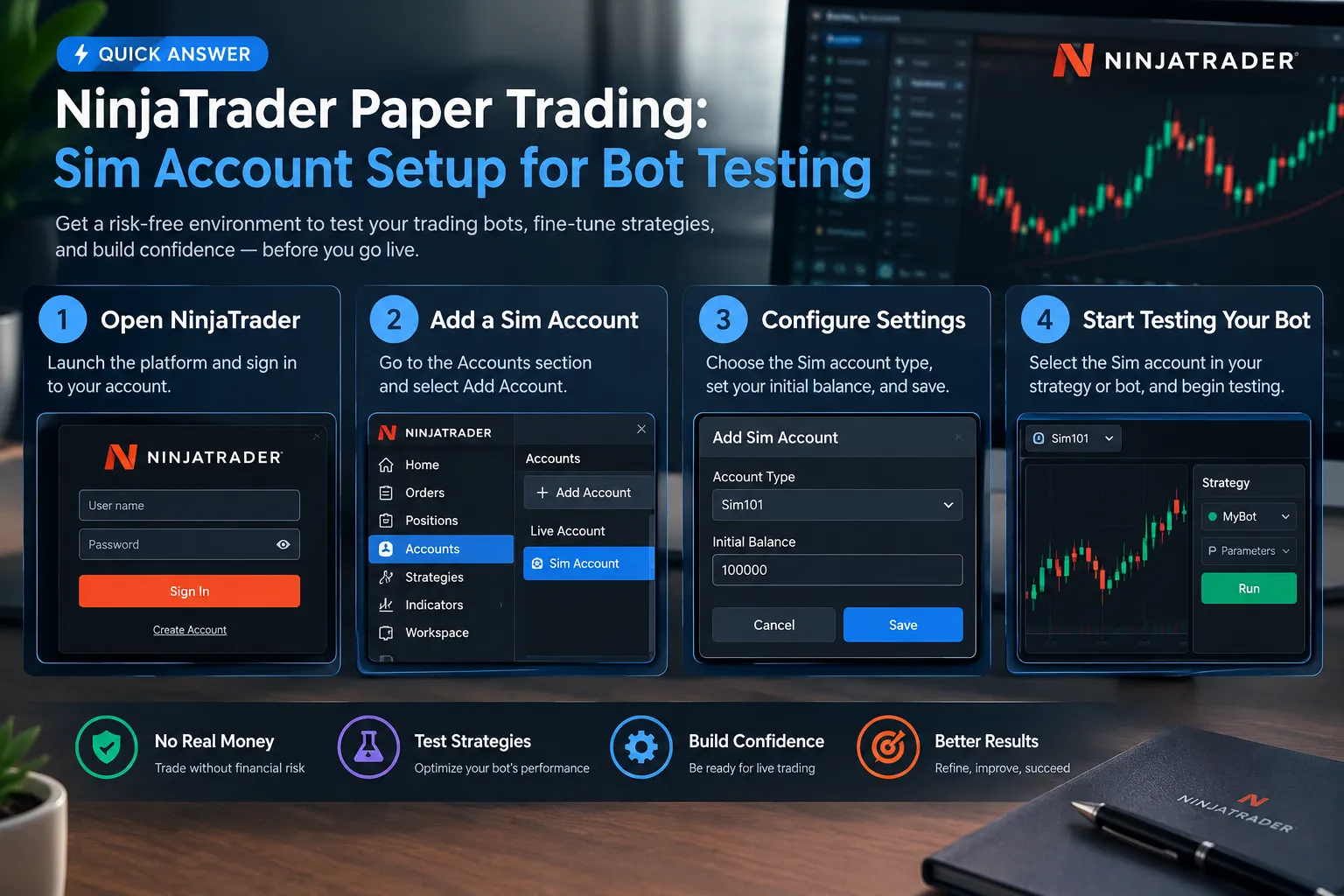
NinjaTrader paper trading runs through a built-in simulation account called Sim101, and it costs nothing to use: NinjaTrader’s pricing page lists the Free plan at $0 per month with no monthly plan fee. You set it up from the Control Center’s Accounts tab, where you can edit the starting cash, attach a commission template, and reset the account between tests. A trading bot written in NinjaScript can be loaded onto Sim101 and run forward in real time against live or delayed data. The catch no one mentions: sim fills are generous, so a bot that looks brilliant in simulation can bleed the moment real queue position and slippage show up.
What You Should Know
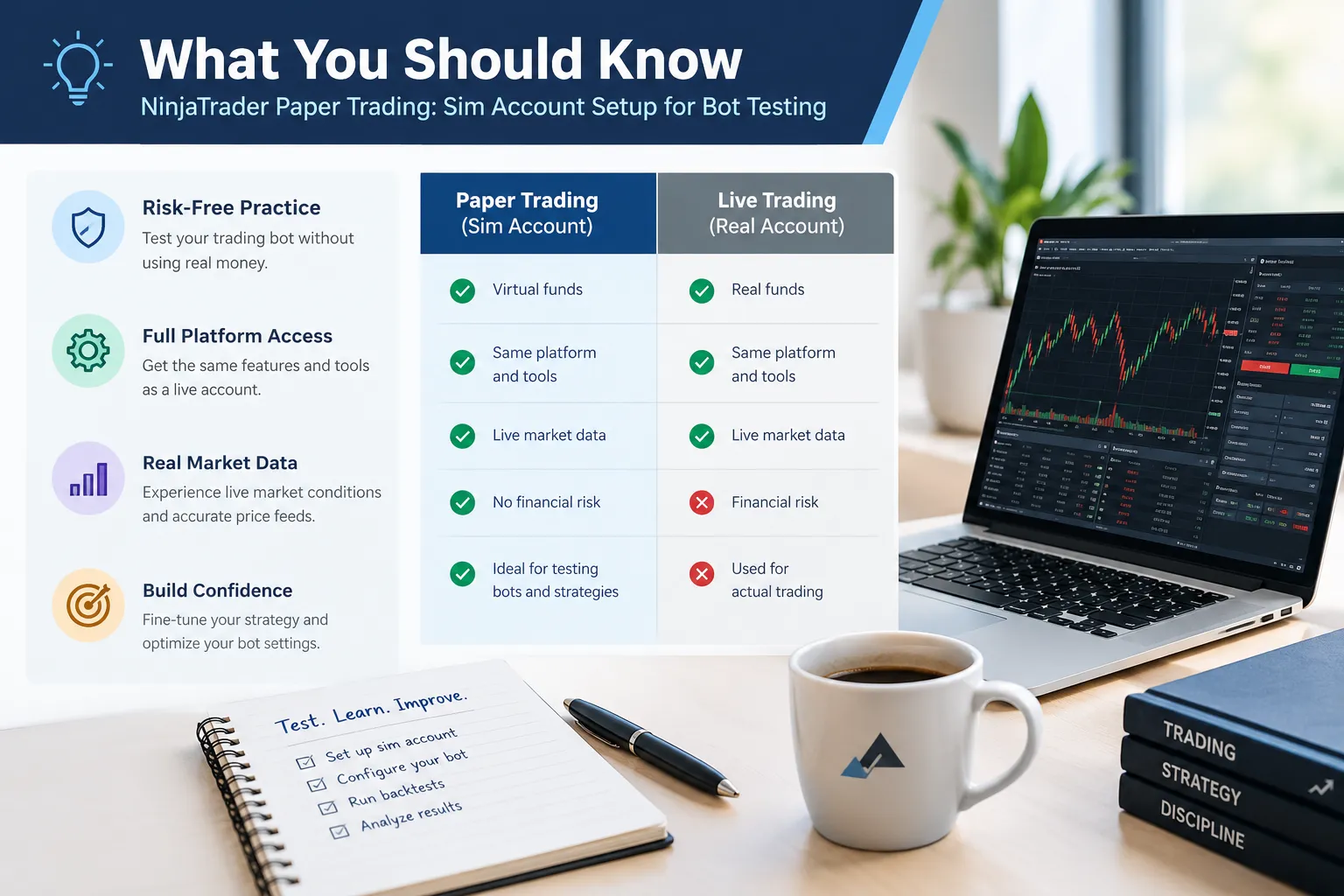
- Sim101 is the default NinjaTrader paper trading account, documented in NinjaTrader’s own simulation help guide, and it ships with a $100,000 starting balance and no commission or risk template applied.
- NinjaTrader’s Free plan is $0/month per its pricing page checked October 2026. Paid tiers listed there were $99/month and a $1,499 lifetime fee, which lower commissions but are not required for sim use.
- Simulated orders need an active market-data connection. No data feed, no fills, the bot will look alive and do nothing.
- NinjaTrader launched its Innovation Lab on September 9, 2026, adding Nina (an AI trading companion), an AI Strategy Builder that turns plain-language rules into compiled strategies, and MCP connectivity to assistants like Claude and ChatGPT. The MCP server is documented as beta/pre-release.
- NinjaTrader’s October 2026 release notes record a fix for live-account users who couldn’t see a simulation account, relevant if your strategy won’t start or points at the wrong account.
Does NinjaTrader Allow Paper Trading?
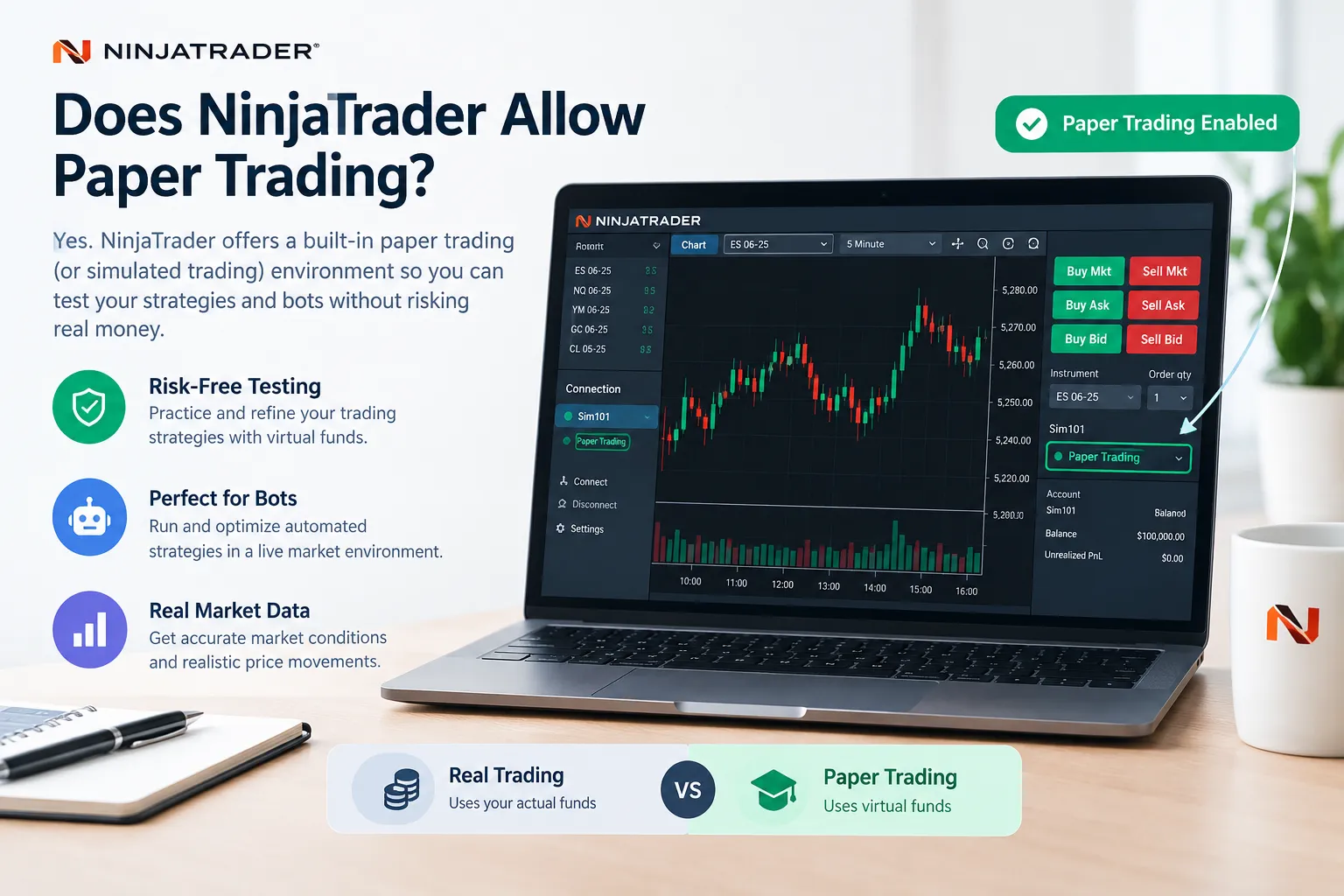
Yes. Paper trading NinjaTrader style is built into the desktop platform, not bolted on as an upsell. The simulation account is named Sim101, and it’s documented on NinjaTrader’s own simulation help pages.
Here’s how it actually works. Sim101 is a local simulation account. Orders don’t travel to an exchange or a broker’s matching engine. NinjaTrader’s simulation engine takes your order, watches incoming price data, and decides when it would have filled. That’s why no broker-side routing agreement is needed, and why you can run it on day one without funding anything.
What it costs: nothing, on the Free plan. NinjaTrader’s pricing page as of October 2026 listed three platform tiers, Free at $0/month, Monthly at $99/month, and Lifetime at a one-time $1,499. Those tiers change your live commission rates (Micro and Standard contracts drop as you move up), but a NinjaTrader demo on Sim101 doesn’t bill you per fill unless you deliberately attach a commission template. Check the official pricing page before quoting any figure, since commission schedules get revised.
Do you need a live account to use NinjaTrader paper trading? No. You can download the desktop platform, create a free account, connect to a data source, and select Sim101 from any order-entry window, Chart Trader, SuperDOM, the Order Entry panel. The reverse situation has been a known wrinkle: NinjaTrader’s October 2026 release notes document a fix for live-account holders who couldn’t see a sim account. If your Sim101 has vanished, update the platform before you start troubleshooting anything else.
How long can you use it? NinjaTrader doesn’t publish an expiry on simulation access the way some brokers cap demo periods at 14 or 30 days. The practical limit is your market data. Free delayed or limited feeds keep working; a paid real-time data subscription stops when you stop paying. If you want the current policy in writing, check NinjaTrader’s official pricing and data pages rather than trusting a forum post from 2019.
Decision rule: if you’re testing a futures bot and you want real-time ticks, budget for a data feed. If you’re testing logic and order handling, delayed data on the free tier is enough to start.
How Do You Set Up a NinjaTrader Sim Account Step by Step?
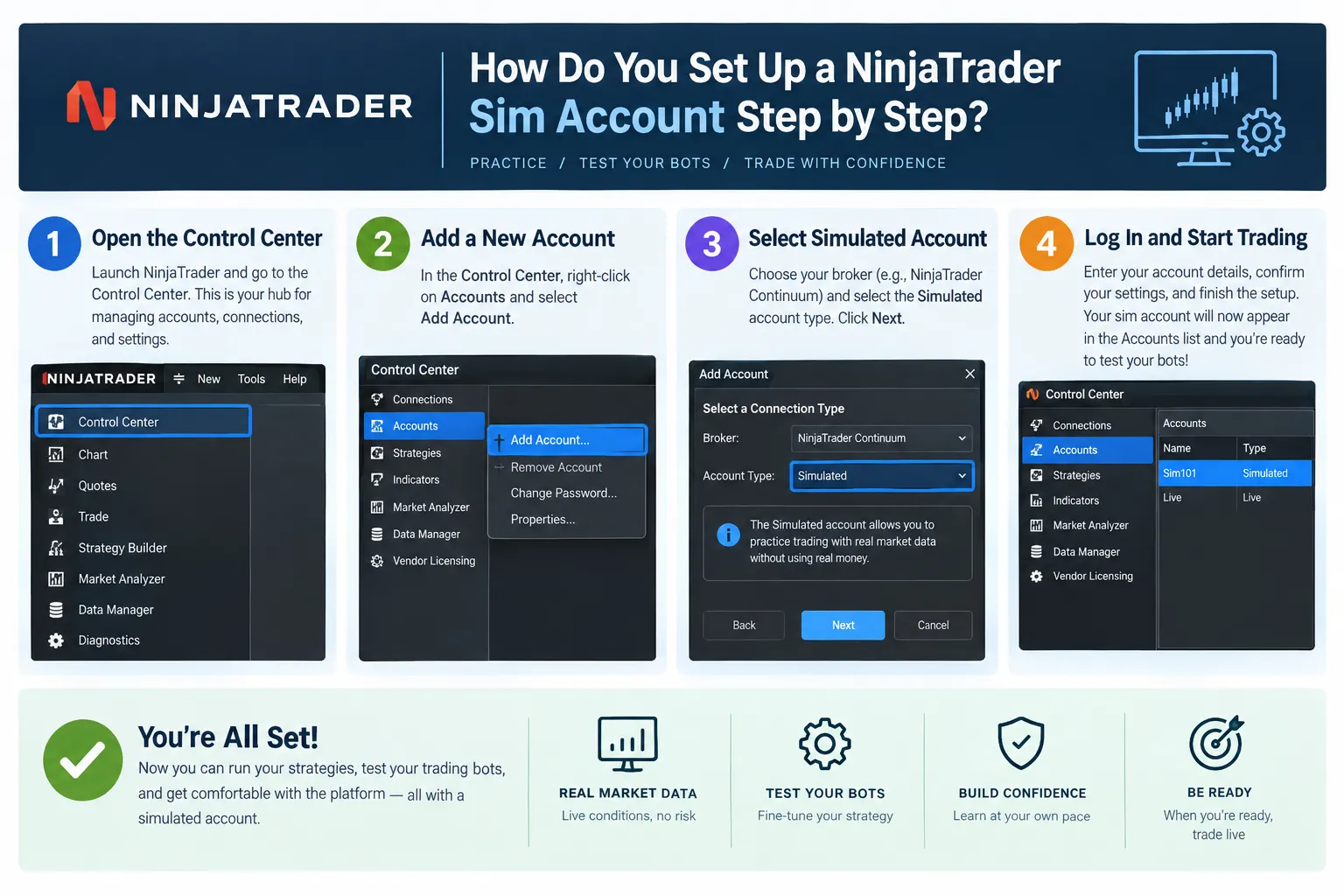
Open the Control Center, go to the Accounts tab, right-click Sim101, choose Edit Account, set a realistic starting balance and a commission template, then hit Reset. That’s the whole thing in one sentence. The detail is where people get it wrong.
The steps
1. Install and open NinjaTrader Desktop. You’ll land on the Control Center, the small window with tabs across the top (Orders, Strategies, Executions, Positions, Accounts, Log). Everything below happens here.
2. Connect to a data source. Use the Connections menu. Without a feed, the NinjaTrader simulator has no prices to fill against. NinjaTrader states plainly that simulated trading requires an active market-data connection. This is the number one reason a bot sits there “enabled” and never places a single order.
What you should see: a green connection indicator in the lower-left of the Control Center and live or delayed quotes updating on a chart.
3. Find the Trading Mode screen. Current releases include a screen that separates live and simulation access, and NinjaTrader documents a mode where you can restrict yourself to live-only. For bot testing, you want sim access available and live access switched off until the strategy has earned it. Menu names shift between builds, so if what you see doesn’t match, check NinjaTrader’s current help guide for your version number.
4. Open the Accounts tab and right-click Sim101. Choose Edit Account. If Sim101 isn’t listed, you’re likely on an older build with the visibility bug fixed in the October 2026 notes, update first.
5. Set the initial cash to something honest. NinjaTrader’s support documentation confirms Sim101 defaults to a $100,000 initial cash balance. Most retail futures traders are not working with $100,000. If your live account will hold $5,000, type 5,000. A bot that survives a drawdown on a six-figure balance might get margin-called out of existence on a five-figure one. Same strategy, different outcome, and the only variable you changed was honesty.
6. Attach a commission template. By default, Sim101 applies no commission and no risk template. Zero commission is the single fastest way to make a scalping bot look profitable. Build a template that matches your actual broker’s per-side rate for the contracts you trade, then apply it here.
7. Set your risk controls. The Edit Account dialog lets you configure maximum order size, maximum position size, and a minimum cash value. Set the max position size to whatever your live risk rules allow. If your bot has a sizing bug, you’d rather find out when the simulator blocks a 40-lot than when your broker fills one.
8. Reset before each clean test. Same path, Accounts, right-click Sim101, Edit Account, change the initial cash value and click Reset. There’s an optional Clear History checkbox. Leave it unchecked and your past trade records survive; check it and Sim101 wipes its trading history. For a fresh test with a clean equity curve, clear it. For a running log across versions, don’t.
9. Confirm Sim101 is selected on your order-entry window. Chart Trader, SuperDOM, and the Order Entry panel each have an account dropdown. A strategy pointed at the wrong account is the second most common failure after missing data.
Common errors and what they actually mean
| What you see | Usual cause | Fix |
|---|---|---|
| Strategy enabled, zero orders | No market data connection | Reconnect; confirm the instrument has permissions |
| Sim101 missing from Accounts | Older build with the live/sim visibility bug | Update the platform |
| Orders rejected instantly | Max order or position size set too low | Edit Account, raise the cap deliberately |
| Account balance won’t reset | Edited cash but never clicked Reset | Reopen Edit Account, click Reset |
| Fills at impossible prices | No commission or slippage configured | Apply a commission template, add slippage |
What Market Data Does the NinjaTrader Simulator Use?
The NinjaTrader simulator uses whatever data feed your platform is connected to at that moment, the same stream a live account would see. Simulation doesn’t generate synthetic prices; it fills your orders against real incoming market data.
That distinction matters more than it sounds. Your NinjaTrader paper trading results are only as realistic as your feed:
- Real-time data. If you’re subscribed to a live CME feed through NinjaTrader’s brokerage or a supported provider, Sim101 fills against actual tick-by-tick prices. This is the only setup worth using for intraday bot testing.
- Delayed data. Free or restricted feeds typically run delayed. Your bot’s logic still executes, but every entry and exit is time-shifted. Useful for debugging, worthless for judging a scalping strategy.
- Historical data. Separate from live simulation. That’s the Strategy Analyzer’s territory, covered below.
Does NinjaTrader paper trading use real market data? Yes, when you’re connected to a real-time feed. It does not use simulated or randomized prices. Costs for market data depend on the exchange and the connection you choose, and CME exchange fees are set by the exchange, not the platform. Confirm current data pricing on NinjaTrader’s official pricing page before budgeting, it was last structured around three platform tiers as of October 2026, with data handled separately.
One more wrinkle worth naming: NinjaTrader made CME Group single-stock futures available to eligible users in July 2026, including contracts tied to Nvidia, Tesla, and Apple. New instruments mean new data permissions and thin early liquidity. If you’re testing a bot on one of those, check contract specs and whether your feed actually carries it before you trust a single fill.
Edge case: a bot that trades the open can look flawless on delayed data because every price it reacts to is already 15 minutes old and the move is finished. That’s not a strategy. That’s hindsight with a timestamp.
How Do You Run a Bot Strategy on the Sim Account?
Load your NinjaScript strategy from the Control Center’s Strategies tab, select Sim101 as the account, set commissions and slippage in the strategy parameters, then enable it. The strategy runs forward in real time, placing simulated orders as its rules trigger.
The sequence
- Compile the strategy. NinjaScript is NinjaTrader’s C#-based strategy language. Your code has to compile cleanly before it appears in the strategy list. Compile errors show up in the NinjaScript Editor’s output panel.
- Open the Strategies tab, right-click, and add your strategy.
- Pick the instrument and the account. Select Sim101 explicitly. Don’t assume.
- Set the order fill resolution. Higher resolution means the simulator evaluates fills against finer price data. Coarse settings produce flattering fills.
- Set commission and slippage in the parameters. If the field says zero, your results are fiction.
- Enable it. The strategy status flips to Enabled and it starts listening to incoming bars and ticks.
- Watch the Orders, Executions, and Positions tabs. These are your receipts. If Executions is empty after a session where the logic should have fired, you have a data or account problem, not a strategy problem.
- Disable it to stop. Flatten any open sim position manually afterward so the next test starts square.
Backtest versus live sim run, what’s the actual difference?
This is the distinction most people blur, and it costs them.
| Strategy Analyzer backtest | Live sim run on Sim101 | |
|---|---|---|
| Data | Historical bars already stored | Real-time incoming ticks |
| Speed | Minutes for years of data | Runs at the speed of the market |
| Fill logic | Modeled against past bars | Modeled against arriving prices |
| What it catches | Logic errors, parameter sensitivity, drawdown shape | Connection drops, order rejections, real-session behavior |
| What it hides | Everything about live execution | Nothing about historical regimes |
Run both. The backtest tells you whether the idea has ever worked. The NinjaTrader paper trading run tells you whether your code works when prices arrive one tick at a time and your internet hiccups. A strategy can pass a five-year backtest and then fail on day one because it tried to place an order during a halt. Backtesting is a hypothesis. Paper trade it first, then talk about live.
About the AI Strategy Builder
NinjaTrader’s Innovation Lab, launched September 9, 2026, includes an AI Strategy Builder that converts natural-language rules into compiled, testable strategies containing entry, exit, risk, and filtering logic. That’s genuinely useful for getting from idea to testable code fast.
It is not a reason to skip verification. Read the generated NinjaScript. Backtest it. Then forward-test it in Sim101. The same Innovation Lab release added MCP connectivity, letting assistants like Claude and ChatGPT talk to NinjaTrader accounts, and NinjaTrader’s developer docs mark the MCP server as beta and pre-release, with separate Demo and Live endpoints and an explicit recommendation to start on Demo. Take the hint. An AI assistant with order-routing access to a funded account is a problem waiting for a bad prompt. Play stupid games.
If you’re evaluating whether to build your own or buy something off the shelf, our breakdown of legitimate AI trading bots versus the scams sorts the field.
How Does NinjaTrader Connect to Tradovate for Prop Firm Accounts?
NinjaTrader connects to Tradovate as a brokerage connection from the Connections menu, which matters because a large share of futures prop firms clear through Tradovate and let evaluation accounts be traded from the NinjaTrader desktop platform. Setup involves adding a Tradovate connection with your prop firm credentials and selecting the correct environment.
Two video walkthroughs cover this ground. TradeSaber published a NinjaTrader-to-Tradovate connection walkthrough showing the Connections setup and account selection inside the platform. Franco Crypto Trading covers the same connection process in Spanish, which is useful if English tutorials aren’t your first stop. Both channels are credited as shown on their respective video pages. Watch the setup steps, but verify every credential field against your prop firm’s own instructions, firms differ on whether you use a Tradovate login, a firm-issued login, or a bridge.
Things that trip people up on prop connections:
- Demo versus live environment. Prop evaluation accounts usually sit in a demo-style environment that is still scored. It is not a practice account. A reset there has consequences.
- Sim101 is not your prop account. Sim101 is local to your machine. Orders there never touch the prop firm. Confirm which account is selected on every order-entry window before you enable a strategy.
- Automation permissions. Not every prop firm allows fully automated strategies, and some ban them outright or restrict them during news. Read the rulebook before you point a bot at an evaluation.
- Data entitlements. Prop accounts often come with their own data package. Mismatched entitlements produce silent failures that look exactly like a broken strategy.
For more on how the platform stacks up against other brokers, see our Questrade vs NinjaTrader comparison, and our NinjaTrader tool profile for the full breakdown.
Decision rule: if your bot has never run a full month in NinjaTrader paper trading without an error, do not point it at a paid prop evaluation. The evaluation fee is not a testing budget.
Why Do Sim Fills Flatter Bot Results Versus Live?
Simulated fills are more generous than real ones because the simulation engine has no queue, no latency, and no counterparty. Your limit order fills the instant price touches it. In the real market, price touching your limit means you’re somewhere in a line of orders at that level, and plenty of those lines never clear.
This is the single biggest reason a bot that printed in sim bleeds live. Four mechanisms do most of the damage.
| Sim behavior | What happens live | How to adjust the test |
|---|---|---|
| Limit order fills on touch | You join a queue at that price. If the level only trades once, you may get nothing | Increase order fill resolution; require price to trade through your level, not just touch it |
| No queue position modeled | Thousands of contracts may sit ahead of you on a liquid level | Test on liquid contracts only, and discount your winners from limit entries |
| Zero latency | Signal to exchange takes real milliseconds; fast markets move inside that window | Add slippage in the strategy parameters, sized to the instrument’s typical tick movement |
| No commission by default | Every round turn costs real money, per side | Attach a commission template matching your broker’s actual rate |
The honest adjustment
Take your sim results and apply a haircut before you believe them. Add realistic slippage, at minimum one tick per side on liquid futures, more on thin contracts or during the open. Add your real commission. Then look at the equity curve again. A strategy with a 12-trade-per-day frequency and a two-tick average edge does not survive a one-tick slippage assumption plus commissions. The math isn’t subtle once you actually do it.
Where it bites hardest:
- High-frequency scalpers. Edge per trade is small, cost per trade is fixed. Sim hides the cost, live doesn’t.
- Limit-only entries. The orders that fill in sim are frequently the ones that wouldn’t have filled live, because price touched and reversed, which is exactly the move you wanted. In live trading, you miss that fill and only get filled when price keeps going against you. Adverse selection, every time.
- Illiquid or new contracts. Those single-stock futures launched in July 2026 have thin books early. Sim doesn’t care. The market does.
- News events. A sim fill at the pre-release price is pure fantasy during a Fed minute.
Our deeper write-up on how slippage distorts paper trading results and the broader day trading tools roundup go further on execution realism.
Market truth: sim doesn’t lie to you. It just answers a slightly different question than the one you asked. Your job is to make the question match.
How Do You Log a Sim Test So It Means Something?
A sim test only means something if you set the pass and fail rules before you start and record enough trades to be statistically honest. Ten profitable sim trades tell you nothing. A documented hundred with defined failure criteria tells you plenty.
Set these before you enable the strategy
- Minimum trade count. Pick a number in advance. For an intraday futures bot, 100 trades is a reasonable floor before any conclusion. Below 30, you’re reading noise.
- Test window. Define a calendar period, not a profit target. “Four weeks” is a test. “Until it makes money” is wishful thinking.
- Pass criteria. Example: net positive after realistic commission and one tick of slippage per side, maximum drawdown under a defined percentage of the account, zero unhandled errors in the log.
- Fail criteria. Just as explicit. Drawdown exceeds X, or the strategy throws an error it can’t recover from, or the trade count falls below what the logic should have produced.
Fields to record per trade
| Field | Why it matters |
|---|---|
| Entry and exit time | Reveals session clustering, all your losses in the first 15 minutes is a filter, not a flaw |
| Instrument and contract month | Rollover behavior breaks more bots than bad logic |
| Order type used | Limit versus market changes everything about live realism |
| Intended price versus fill price | Your real slippage measurement |
| Position size | Catches sizing bugs early |
| Reason for entry (which rule fired) | Lets you kill the rules that don’t earn |
| Exit reason: target, stop, time, or manual | Manual exits mean you don’t trust the bot yet |
| Running drawdown | The number that decides whether you’d actually keep it running live |
The discipline that separates testing from entertainment
Record the errors too. Connection drops, rejected orders, strategy restarts. Those are the live-trading failures that no backtest will ever show you, and they’re the entire point of running NinjaTrader paper trading instead of just hitting backtest again.
Keep version notes. If you change a parameter, that’s a new test with a new trade count, not a continuation of the old one. Moving the stop by two ticks and continuing the same log is how traders fool themselves into thinking they’ve validated something. Process over prediction.
Pair the log with our free trading tools and calculators for position sizing and drawdown math.
How Does the NinjaTrader Simulator Compare With Other Paper Trading Platforms?
NinjaTrader is the strongest free option for futures bot testing because the sim account, the NinjaScript strategy engine, and the Strategy Analyzer all live in one desktop platform. For equities and options paper trading, other platforms fit better.
| NinjaTrader (Sim101) | TradingView paper trading | thinkorswim paperMoney | |
|---|---|---|---|
| Primary market strength | Futures | Multi-asset charting, broad instrument coverage | US equities and options |
| Automated strategy support | NinjaScript strategies run on the sim account | Pine Script alerts and strategy testing | thinkScript studies and conditional orders |
| Dedicated backtest engine | Strategy Analyzer | Strategy Tester | Built-in backtesting tools |
| Cost to paper trade | Free plan listed at $0/month (Oct 2026) | Free tier available; paid plans for more features | Free with a Schwab account |
| Best fit | Futures bot developers | Chart-first traders testing ideas quickly | Options strategy practice |
Confirm current features and pricing on each provider’s own page, all three revise their tiers regularly.
Choose NinjaTrader if you’re building a futures bot and want the sim, the code editor, and the backtester in one place. Choose TradingView if you want to test ideas fast across many markets without compiling anything, our TrendSpider vs TradingView charting comparison covers the charting side. Choose thinkorswim if options are your main instrument. Choose Interactive Brokers if you need global markets and will pay for that in setup time, which our Interactive Brokers review walks through.
Weighing other platforms entirely? See the NinjaTrader alternatives list and our broader AI trading platform rankings.
Is NinjaTrader good for beginners to practice trading?
Mixed. The sim account is free, generous, and well documented, which is a genuinely good starting point. The platform itself has a real learning curve, SuperDOM, ATM strategies, NinjaScript, and the Strategy Analyzer are not a two-hour afternoon. A beginner who just wants to learn price action and position sizing will get moving faster on a browser-based simulator. A beginner who intends to build futures bots should start here and accept the ramp.
Common mistakes with NinjaTrader sim trading
- Leaving the $100,000 default balance in place. Makes every drawdown survivable and teaches you nothing about risk.
- Zero commission, zero slippage. The most expensive two settings you’ll ever skip.
- Oversizing because it’s fake money. Trading 10 contracts in sim when you’ll trade one live invalidates the entire test, especially psychologically.
- Taking manual overrides mid-test. If you close the bot’s position by hand, you tested yourself, not the bot.
- Stopping at the first good week. Revenge trading’s quieter cousin: quitting the test early because you like the number.
- Never checking the log tab. Silent errors look identical to “no setups today.”
Frequently Asked Questions
Does NinjaTrader allow paper trading?
Yes. NinjaTrader includes a built-in simulation account called Sim101, documented on its own simulation help pages. You can select it from Chart Trader, the SuperDOM, or any order-entry window, and no live or funded account is required to use it.
Is the NinjaTrader simulator free?
Yes on the Free platform plan, which NinjaTrader’s pricing page listed at $0 per month as of October 2026. Market data may carry a separate cost depending on the feed and exchange you choose, so check the current data pricing on NinjaTrader’s official page.
Which platform is best for paper trading?
It depends on the instrument. NinjaTrader leads for futures bot testing because the sim account, NinjaScript, and Strategy Analyzer are in one place. TradingView suits fast multi-asset idea testing, and thinkorswim paperMoney suits options practice.
Can you backtest on NinjaTrader for free?
Yes. The Strategy Analyzer runs historical backtests on the Free plan, limited by the historical data you have available for the instrument. Backtest results and live sim results answer different questions, so run both before considering live deployment.
Why do 90% of day traders lose?
That 90% figure is a widely repeated claim, not a verified statistic, and the sources behind it vary enormously in methodology. What published academic research on retail futures and day trading consistently finds is that a large majority lose money over time, driven by transaction costs, overtrading, and poor risk management rather than bad entries.
How long can you use NinjaTrader paper trading?
NinjaTrader does not publish a fixed expiry on simulation access the way some brokers cap demos at 14 or 30 days. Your practical limit is market data access. Confirm current terms on NinjaTrader’s official pages.
Why isn’t my NinjaTrader paper trading working?
The most common cause is no active market-data connection, since simulated orders need live prices to fill against. Also check that Sim101 is selected on the order-entry window, that max order and position size aren’t blocking orders, and that your platform build is current, October 2026 release notes fixed a bug hiding sim accounts from live-account users.
Our Take
The simulator is where a bot earns the right to touch real money. That’s its job, and it does it well, as long as you stop lying to it.
Set the starting cash to your real account size. Attach your real commissions. Add a tick of slippage per side. Define your pass and fail rules before the first trade, not after the twentieth. Then run it for a defined window and let the log argue back. Most strategies die in that process, which is exactly what you want. Dying in Sim101 is free. Dying on a funded prop evaluation is not.
NinjaTrader paper trading isn’t a video game with a scoreboard. It’s a lab. Treat it like one and it’ll tell you the truth about your code before the market does it the expensive way.
Built a bot you think is ready? Submit it for review and we will run it on sim with real commissions attached before anyone calls it finished.
Stay alpha.
The FullStack Alpha research desk tests AI trading bots on paper and live accounts. Reviewed and edited by Jay Rocco, Founder and Editor.
