

The FullStack Alpha research desk tests AI trading bots on paper and live accounts. Reviewed and edited by Jay Rocco, Founder and Editor.
By FullStack Alpha Editorial Team | Reviewed by Jay Rocco, Chief Editor
A Grok bot for trading is good at research and bad at being trusted with money on its own. xAI’s Grok Bot runs on its own cloud computer, signs in to your apps, runs saved routines and can be started by tagging @bot on X, which makes it fast at news, filings and sentiment work. It does not publish any trading track record, it can quote stale or wrong numbers, and xAI’s own docs tell you to require approval before purchases, payments and other consequential actions. Use a Grok bot for trading research and order drafts, keep every order decision with you, and check every number on your broker’s screen.
Key insights
- Grok Bot is included with xAI’s Premium plan at $30 a month, plus Super ($100) and Ultra ($200), per the Grok Bot page. Weekly usage is included; extra usage is billed at token cost.
- Robinhood says agents trade only in a dedicated Agentic account, with trade approvals on by default, and that it does “not control, supervise, monitor, recommend, or audit agents.”
- eToro’s connectors for Claude, ChatGPT, Grok and Grok Bot require approval of every proposed action, but are not available to clients in the US, Australia or Singapore.
- No vendor, broker or reviewer we checked has published an audited win rate for a Grok bot for trading in 2026.
- Decision rule: let Grok scan and draft, let your written rules decide, and let a human click submit.
What Is a Grok Bot for Trading?
A Grok bot for trading is xAI’s Grok Bot agent pointed at market work: reading news, summarizing filings, scanning X posts, building watchlists and, through broker connectors, drafting or placing orders. Grok Bot is not a trading product. It is a general AI teammate that happens to be able to touch financial apps.
Per xAI’s Grok Bot overview, each Bot “works on a persistent cloud computer with a browser, filesystem, and terminal.” All your Bots share that one computer, so anything you log into is available to every Bot you run. Work continues when your laptop is closed.
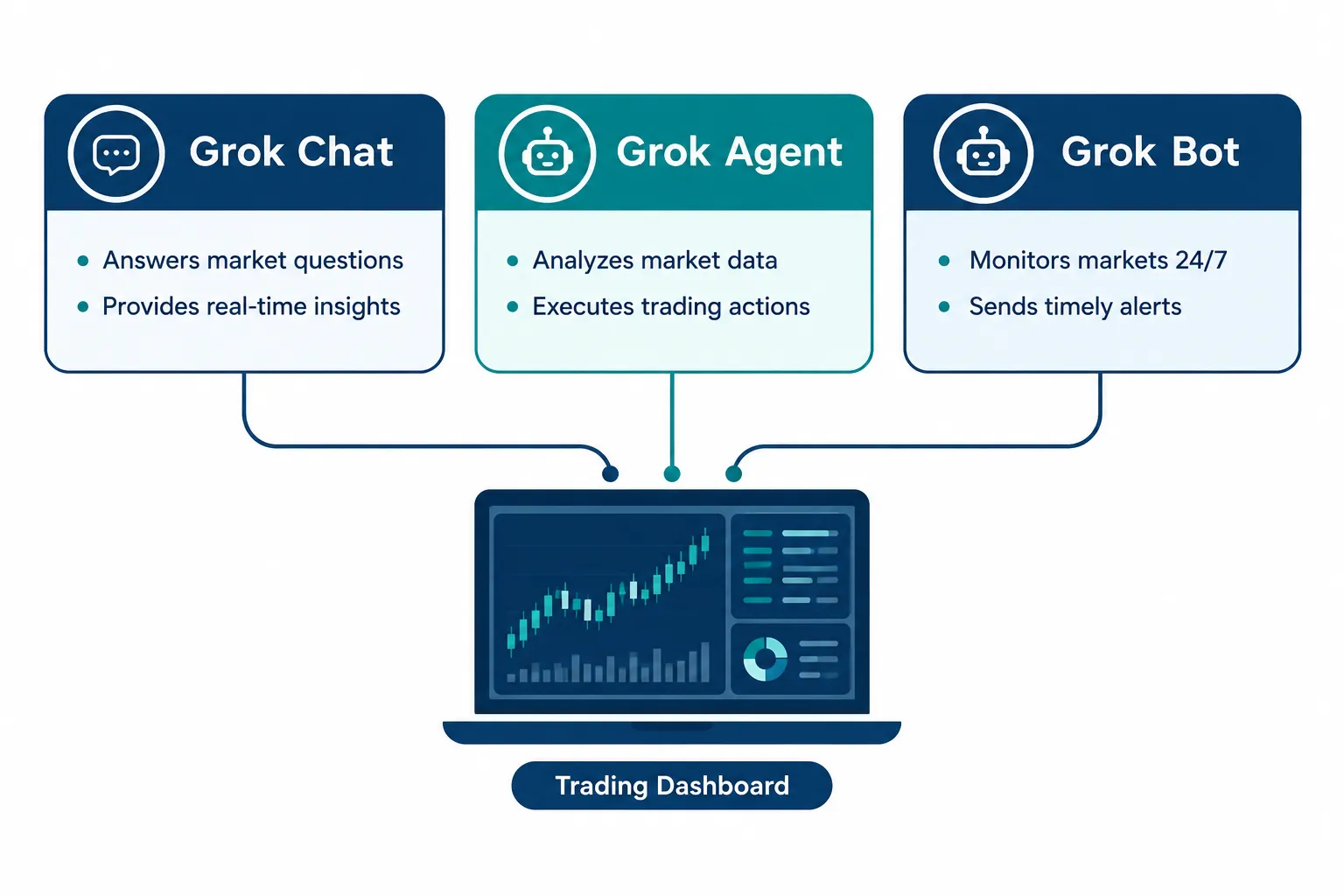
Three things get mixed up constantly, so separate them:
- Grok chat is the question-and-answer window on grok.com or X. You ask, it answers. No schedule, no follow-through.
- A Grok Bot task is a multi-step job: pull five earnings releases, compare margins, write a summary. The Bot plans and executes on its cloud computer.
- A Grok Bot routine is a saved skill on a schedule, such as “every weekday at 9:00, scan my watchlist and flag anything down 5%.” xAI’s docs say routine schedules must be at least five minutes apart and a Bot can own up to 50 routines.
The trading clips you see online usually combine a routine, a connector and a boundary. The connector is the part that changes the risk. A Bot that can only read news is a research assistant. A Bot that can sign in to a brokerage account is something you need to fence in.
What xAI’s own docs tell you to do
xAI’s skills and routines guide is blunt about the order of operations:
- “Start with a one-time task.” Make it reliable, save it as a skill, and only then automate it.
- “Automate preparation before execution.” Have the Bot “draft, reconcile, or recommend first.”
- “Require approval for sending, purchasing, deleting, publishing, or changing production systems.”
None of those pages mention trading. But read “purchasing” with a trading hat on, and the vendor’s own guidance is clear: a Grok bot for trading should prepare orders, not fire them.
What it costs
The Grok Bot pricing section lists three individual plans in 2026:
| Plan | Price | Grok Bot usage |
|---|---|---|
| Premium | $30 a month | Weekly usage included |
| Super | $100 a month | 3.5x Premium usage, priority access at peak times |
| Ultra | $200 a month | 12x Premium usage, earliest access |
Teams and Enterprise plans also include Grok Bot. Usage beyond the weekly allowance is billed by token cost. xAI’s X Subscription announcement describes the $30 Premium tier as bundling SuperGrok, Cursor Pro and X Premium+ benefits. An earlier draft of this article listed a $300 annual price; we could not find an annual price on the pages we checked (2026), so we removed it. Re-check pricing on the day you subscribe.
What Does a Grok Bot Do Well for Traders?
A Grok bot for trading earns its keep on research speed. It can read a stack of filings, headlines and posts faster than you can open the tabs, and it can do it on a schedule while you sleep. That is the confirmed strength. Picking winners is not, because nothing published shows it.
Multi-source research briefs. A Bot can combine web search, X posts and connected apps into a pre-market brief: recent filings, management commentary and sentiment in one pass. It beats opening six tabs. It does not replace reading the primary source when a position is on the line.
X monitoring. Grok sits next to X, and Grok Bot can be tagged directly. Per xAI’s Tag @bot on X page, tagging @bot in a post or reply turns that post into a task for your main Bot, and @bot posts a short public confirmation. The Bot receives your post, the post you replied to and any quoted post. That is fast. It is also a channel for whatever is in the post you replied to, which matters later.
Turning rules into routines. You can tell a Bot, in plain English, to scan a watchlist each morning, flag any position over 20% of your portfolio, or draft an order for you to review. That is the right use: automate the boring scanning, keep the trigger finger yours.
Summaries during earnings season. A Bot can turn a transcript into bullets in a minute. That is a time saving, not an edge. You still decide whether the thesis holds.
| Task | Works | Limit |
|---|---|---|
| Summarizing earnings calls | Yes, fast | Can misquote figures; check the release |
| Scanning X posts | Yes, and you can tag @bot from X | No built-in filter for bots, rumors or coordinated pumps |
| Building a watchlist | Yes, via skills and routines | Needs your criteria, not its taste |
| Drafting a trade rationale | Yes, as a first draft | Not a backtested strategy |
| Placing a live order | Possible through broker connectors and MCP | No published audited results; set approval rules first |
| Reading live price action | Limited | Confirm every price on your broker’s screen |
The pattern across every row: a Grok bot for trading shortens the research loop. It does not shorten the judgment loop.
Where Does a Grok Bot Fail for Trading?
A Grok bot for trading fails where every large language model fails. It can state a wrong number with full confidence, it does not verify fills on its own, and it has no published, tested edge. Those gaps are the whole case against running it as an autopilot.
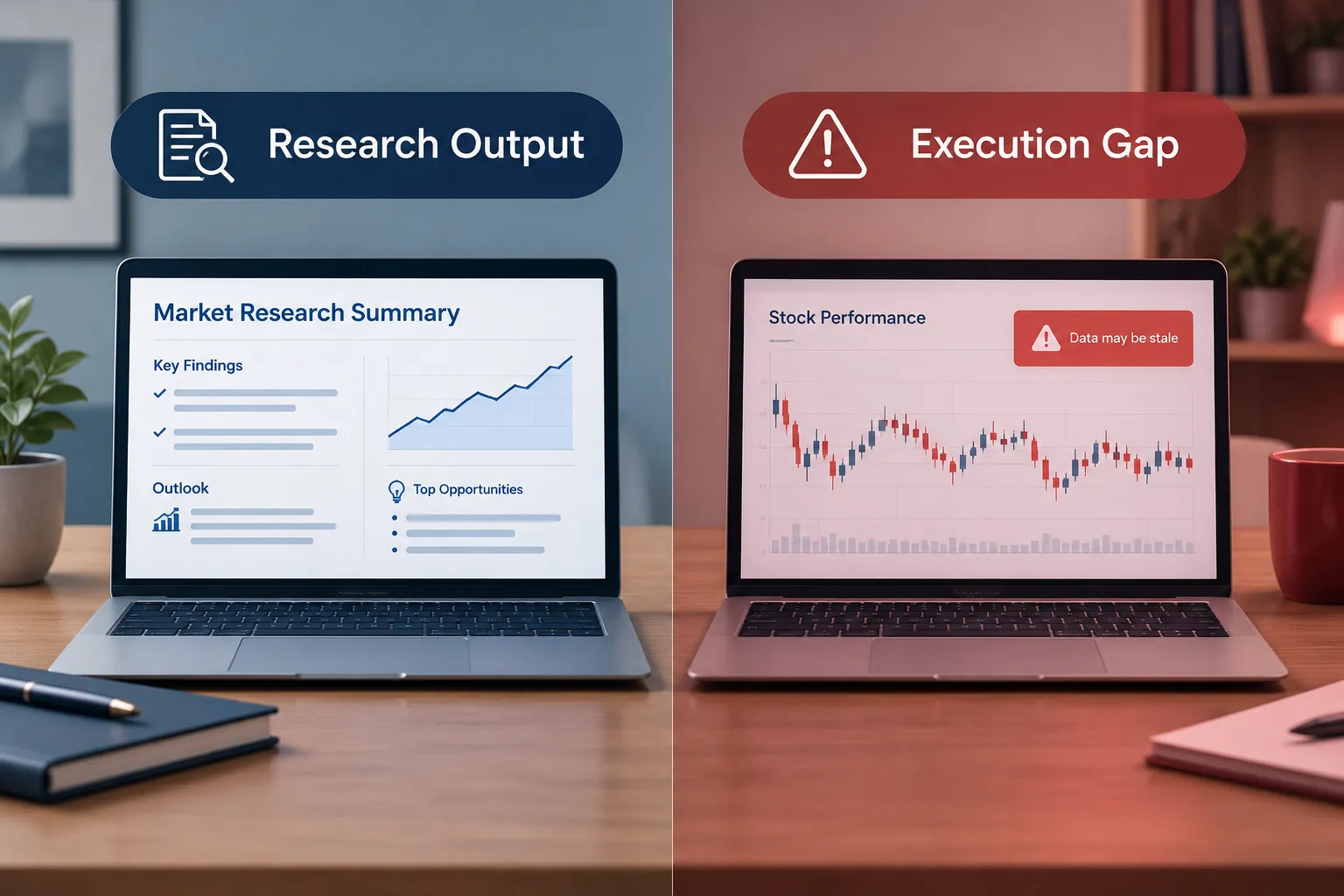
Wrong or stale numbers. Language models predict likely text; they do not look up a quote unless a tool does it for them. Even xAI’s overview says, “For consequential decisions, ask the Bot to check the current source instead of relying on memory.” That applies to Claude and ChatGPT just as much. A ten-minute-old price on a fast stock is history, not an input.
No verified fills. If a Bot places an order through a connector, the fill lives in your broker’s order history, not in the chat. A chat line that says “bought 50 shares at $182.10” is a claim. Your broker’s confirmation is the fact.
No tested edge. We found no audited win rate, backtest or live track record for a Grok bot for trading from xAI, a broker or an independent tester in 2026. Treat any creator who claims one as making a vendor-style claim until they show a full trade log with fees.
Social posts as triggers. Because tagging @bot on X turns the surrounding posts into Bot input, a manipulated or misleading post you reply to becomes part of what your Bot reads. xAI’s approvals page says nothing about prompt injection, and its tag page does not describe a setting to restrict who can start tagged tasks beyond needing your own linked account. Put a human checkpoint between any X-triggered routine and any action.
Shared computer, shared logins. All your Bots share one cloud computer and its logins. If one Bot is logged into your brokerage, assume every Bot on the account can reach it. Use a separate Bot account or keep broker sessions logged out when you do not need them.
Approvals do not undo. xAI’s approvals page says, “An approval controls the proposed action. It does not reverse work already completed.” In trading terms: once an order fills, an approval card cannot unfill it.
How Grok Bot approvals work
This is the control that matters most if you connect a broker, so here is what xAI documents:
- Ask first rules always stop matching actions for you.
- Allow automatically rules let matching actions proceed only when the automated review finds no other reason to stop.
- Auto Review is a model-based check of tool calls and computer actions before they run. If an Ask first rule and an Allow automatically rule both match, Ask first wins.
- xAI recommends explicit boundaries for payments and transfers, and taking over the computer yourself for payment confirmations.
Our rule: set an Ask first rule on anything that touches your broker, and never click “Always allow” on an order card. An automated review is a second model checking the first model. It is not a risk manager.
Which Brokers Can a Grok Bot Connect To?
A Grok bot for trading can reach a broker three ways: a broker’s own MCP connector, a Grok Bot connector, or plain computer use (the Bot driving a website like you would). What each one can do depends on the broker’s rules, not on Grok.
Here is what we could confirm on official or primary pages in 2026:
- Robinhood. Per Robinhood’s agents overview, you can connect an external AI agent to Robinhood’s Trading MCP. Agents trade only in a dedicated Agentic account you fund, can view your other Robinhood accounts but not trade in them, and trade approvals are on by default. You can turn approvals off. Robinhood says “You are responsible for your agent’s actions.” Our Robinhood agentic trading review covers the in-app version.
- eToro. eToro’s October 8, 2026 press release launched connectors for Claude, ChatGPT, Grok and Grok Bot. Access is read-only or read-and-act where available, every proposed action must be approved, funding and withdrawals stay inside eToro, and no API keys are needed. Not available to clients in the US, Australia or Singapore. Details in our eToro MCP connectors breakdown.
- Interactive Brokers. IBKR’s connector lets ChatGPT, Claude and Grok run saved screeners, but the AI still cannot place an order, per our IBKR connector report.
- Coinbase. AlphaSignal’s October 2026 report lists Robinhood, Coinbase and eToro among Grok Bot connectors, but says nothing about what the Coinbase connector can do. xAI’s connectors docs did not list Robinhood, Coinbase or eToro when we checked. The Coinbase connector’s permissions are not published on the pages we checked (2026).
AlphaSignal also reports, from xAI, that computer-use tasks now finish about three times faster on average. That is a vendor-reported average that depends on the sites, connectors, task length and approvals involved. Speed is not the bottleneck in trading. Judgment is.
How Do You Set Up a Grok Bot for Trading Research?
The safest way to set up a Grok bot for trading is research-only first: one Bot, one job, no broker login, and a routine that writes a brief instead of placing orders. Here is the sequence we would use, built from xAI’s own skills and approvals guidance.
- Create a dedicated Bot. Give it one job, such as “Pre-market brief.” Do not reuse a Bot that is already logged into email, banking or work tools, because every Bot shares the same cloud computer.
- Run the job once by hand. Ask for a brief on your watchlist, then check every number. xAI says to make a task reliable before you save it as a skill.
- Save it as a skill with written rules. xAI calls a learned skill “a draft” and tells you to add decision rules, failure handling and approval boundaries.
- Schedule it. Pick a time and time zone. Routines must be at least five minutes apart, and background routines keep running when your laptop is closed.
- Add an Ask first rule for anything that sends, posts, buys or signs in to a financial site.
A routine instruction that keeps the Bot in its lane looks like this (plain English, no code):
Every weekday at 8:45 am Eastern:
1. For each ticker in my watchlist (AAPL, MSFT, NVDA, SPY, QQQ), report last close,
   pre-market price with the time you checked it, and the source page.
2. List any SEC filing or company press release from the last 24 hours, with links.
3. Summarize X posts about each ticker in two lines and label them "unverified social."
4. Flag any ticker that moved more than 3% pre-market.
5. Do not sign in to any brokerage. Do not draft or place orders.
6. If a source will not load, say so. Do not fill the gap from memory.
Line 6 is the most important line on the page. It forces the Bot to admit missing data instead of producing a confident guess, which is exactly the failure that burns traders.
Moving from research to order drafts
Only after 30 days of clean briefs would we let a Grok bot for trading draft orders, and only into a paper account or a small dedicated agentic account. The draft should include ticker, side, size, limit price, stop and the rule that triggered it. You place the order yourself. If your written rule does not match the draft, the draft is wrong, not the rule.
This is the systems point. The Bot is a fast assistant inside your process. It is not the process. If you do not have written entry, exit and sizing rules yet, start with our trading bot basics before you connect anything.
What Do the Viral Grok Trading Videos Claim?
Viral Grok trading videos mostly show a Bot connecting to an account, scanning a ticker or summarizing a story, with the creator calling it a breakthrough. What they show is a demo. What they rarely show is a result.
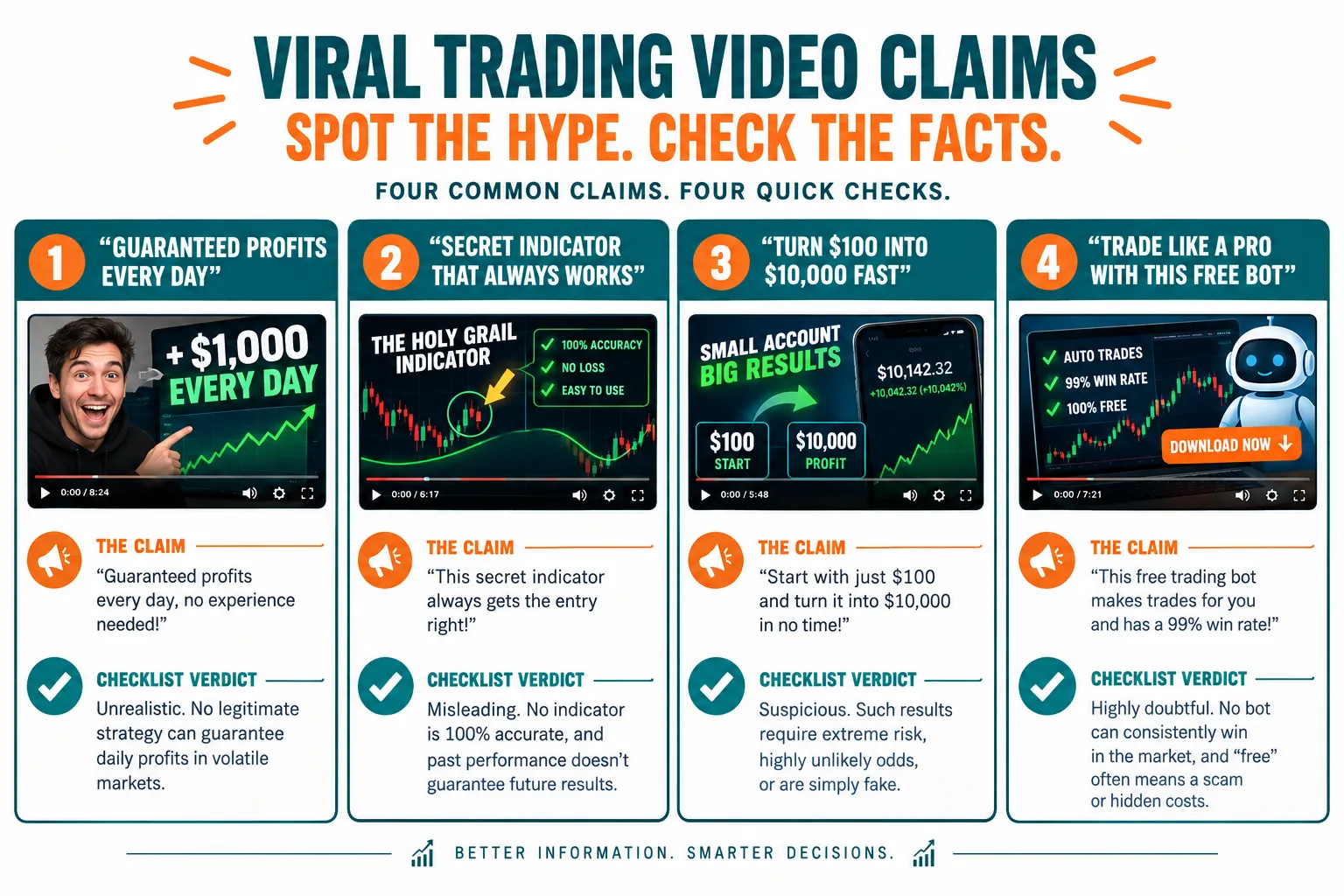
Two formats dominate:
- The setup walkthrough. A creator connects Grok Bot to a broker or crypto app and narrates the screens. You learn how the connection works. You do not learn whether any trade made money.
- The sentiment scan. A creator asks Grok to read X posts on a ticker and treats the mood summary as a buy or sell signal. The scan works as shown. What happened to the price afterward is usually left out.
Checklist for any viral Grok trading video:
- Does it show a broker statement before and after, or just a chat window?
- Does it name the connector, the account type (agentic, paper or main) and the approval setting?
- Does it claim a win rate or return? If so, where is the full trade log with fees?
- Does it ever show the Bot being wrong? A video with zero mistakes is a highlight reel.
- Does it mention position size, stop loss or what happens when the connector disconnects?
Two videos worth watching with that checklist open. The first is Charlie Chang’s general walkthrough, “The ONLY Grok Bot Tutorial You Need 2026 - How To Use Grok Bot For Beginners.” It is a product tutorial, not a trading test, which is the right place to start if you have never set up a Bot.
The second is Pat Simmons’s “I Made Grok Bot, Dots & Muse Do the Same 3 Jobs (RAW RESULTS),” a side-by-side of agent products on identical tasks. It is not about trading either, but it is the right habit: same job, same rules, compare the output.
Notice what neither video claims: a trading result. That is honest, and it is the bar every Grok trading clip should be held to.
Is Grok Better Than Claude or ChatGPT for Trading?
No model has shown it is better for trading, because none of them publish an audited trading record. What differs between Grok, Claude and ChatGPT is access: which data each can see and which brokers each can reach, not proven trading skill.
| Factor | Grok Bot | Claude | ChatGPT |
|---|---|---|---|
| Tag-to-start from X | Yes, @bot on X (not in Australia, the UK, the EU, Iceland, Liechtenstein or Norway) | No | No |
| eToro connector | Yes (not in the US, Australia or Singapore) | Yes | Yes |
| Robinhood Trading MCP for external agents | Via MCP, per Robinhood | Via MCP, per Robinhood | Via MCP, per Robinhood |
| IBKR saved screeners | Yes, no order placement | Yes, no order placement | Yes, no order placement |
| Published audited trading win rate | None found | None found | None found |
| Always-on cloud computer and routines | Yes, included from $30 a month | Check the vendor page | Check the vendor page |
Robinhood’s page does not name specific assistants; it says any external agent can connect through its Trading MCP. We list all three as MCP-capable on that basis, and you should confirm on Robinhood’s onboarding article for your assistant.
Decision rule: pick Grok Bot if X monitoring and always-on routines matter to your research. Pick Claude or ChatGPT if you want a model you already use for structured analysis and you do not need X. For a fuller head-to-head of models for bot builders, see our best AI for trading comparison. None of the three should execute unsupervised.
How Do You Test a Grok Bot Safely?
Test a Grok bot for trading like any new system: paper first, a fixed window, a written log, and a human on every order. Nothing about a fast chat window changes that sequence.
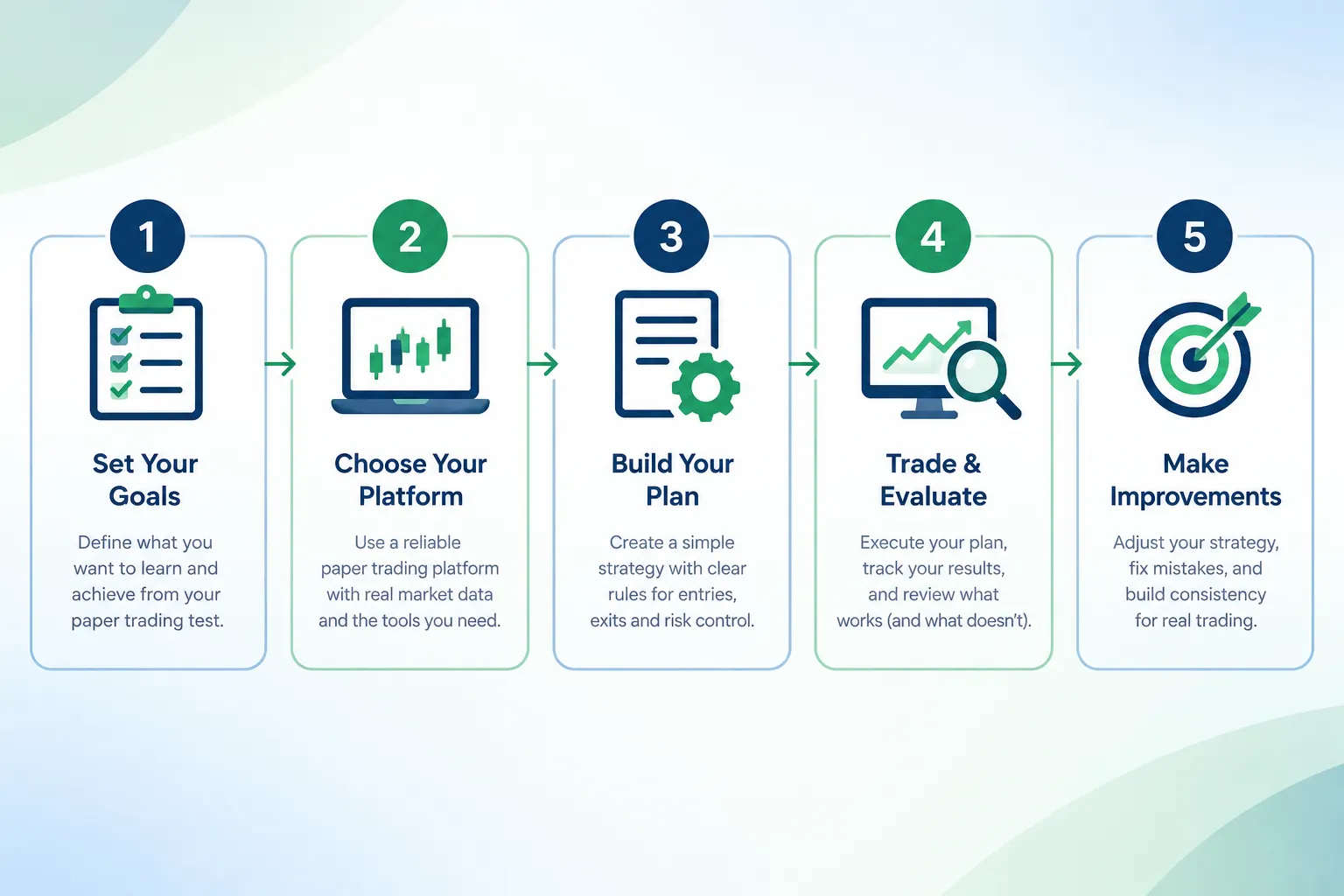
- Start with a one-time research task. Ask for a brief on one ticker. Check every figure against the filing and your broker. This is xAI’s own first step.
- Save one narrow routine. A five-stock morning scan with price, volume and headlines. Narrow scope makes errors easy to spot.
- Use paper or read-only access. A free simulator such as TradingView’s paper trading gives you a place to act on the Bot’s drafts without real money. Our paper trading app guide compares which brokers simulate fills honestly.
- Log every output against reality for 30 days. Each morning, compare the Bot’s prices, volumes and headlines to your broker’s screen. Count the misses.
- Set Ask first on every broker action. Never save an Always allow rule for orders. Keep the dedicated agentic account small if you use Robinhood’s.
- Add an outside kill switch. Know how to disconnect the connector and pause routines from your phone. Our guide to AI trading agent risks covers why the switch should live outside the agent.
A worked example: scoring the Bot’s accuracy
Say your routine reports five prices and five volume figures each morning for 30 trading days. That is 300 data points. If you find 9 that do not match your broker’s screen at the timestamp the Bot gave, the error rate is 9 / 300 = 3%.
Is 3% good? For a research brief, it may be fine if you always check before acting. For an input that triggers orders, it is not: a bot that acts on 20 signals a month at a 3% error rate will act on a bad number more than once every two months on average (20 x 0.03 = 0.6 bad inputs a month). Write your tolerance down before the test, not after.
Red flags that end the test
- The Bot reports a fill you cannot find in your broker’s order history.
- A routine runs an action you did not approve.
- The Bot cites a price or headline with no source and refuses to fetch one.
- Anyone, including a creator selling a “Grok trading bot” template, asks for your login or a deposit to activate it. Treat that as a scam until proven otherwise.
Frequently Asked Questions
Can a Grok bot for trading place real trades?
Yes, it can reach brokers through connectors and MCP, but the broker sets the rules. Robinhood lets external agents trade only in a dedicated Agentic account with approvals on by default, and eToro requires you to approve every proposed action. Set an Ask first rule in Grok Bot for any broker action.
How much does Grok Bot cost?
Grok Bot is included with xAI’s Premium plan at $30 a month, Super at $100 a month and Ultra at $200 a month, plus Teams and Enterprise plans. Each includes weekly usage, and extra usage is billed at token cost. Check xAI’s Grok Bot page on the day you subscribe, since prices change.
Is a Grok bot for trading profitable?
There is no public evidence either way. We found no audited win rate, backtest or live track record from xAI, a broker or an independent tester in 2026. Treat it as a research assistant until someone publishes a full trade log with fees.
Is Grok better than Claude or ChatGPT for stock trading?
No model has a proven trading edge, so the difference is access, not skill. Grok Bot adds tag-to-start from X and always-on routines, while all three can use eToro’s connectors outside the US and Robinhood’s Trading MCP. Pick the one that fits your research workflow.
Can I use Grok Bot with eToro in the US?
No. eToro’s AI connectors for Claude, ChatGPT, Grok and Grok Bot are not available to clients in the US, Australia or Singapore, per eToro’s October 2026 press release. US traders can look at Robinhood’s Trading MCP or IBKR’s connector instead.
Is it safe to tag @bot on X to start trading tasks?
Only for research. When you tag @bot, your Bot receives your post, the post you replied to and any quoted post, so misleading content becomes Bot input. Keep any X-triggered routine away from broker actions and require your approval before anything executes.
How should I test a Grok bot for trading?
Start with a one-time research task, then a narrow daily routine, and log every price and headline against your broker’s screen for 30 days. Use paper trading or a small dedicated account for any order drafts. Never save an Always allow rule for orders.
Our Take
A Grok bot for trading is a fast research teammate with a cloud computer and a growing list of broker connections. That is useful. It is not a trading system, and nothing published in 2026 turns it into one: no audited track record, no verified fills, no tested edge. xAI’s own docs tell you to prepare before you execute and to require approval for purchases, and the brokers say you own every trade your agent makes.
Use it to shorten your research loop. Keep the decision, the stop and the position size yours. For more plain-English bot reviews and broker breakdowns, start at AI Stock Trading Bots, and for rule-based platforms with real audit trails, see the automated trading bots directory.
Related: before you connect any agent to a broker, compare the account options in our broker reviews on AI Stock Picker App.
Running a Grok-based setup with a real trade log? Send it to us and we will review it.
Stay alpha.
The FullStack Alpha research desk tests AI trading bots on paper and live accounts. Reviewed and edited by Jay Rocco, Founder and Editor.
