

The FullStack Alpha research desk tests AI trading bots on paper and live accounts. Reviewed and edited by Jay Rocco, Founder and Editor.
By FullStack Alpha Editorial Team | Reviewed by Jay Rocco, Chief Editor
AI chart analysis works, with a hard limit: Claude and ChatGPT can both look at a chart image and usually name what they’re seeing, but neither one reliably reads exact numbers off pixels. They’re good at describing shape, trend, and pattern. They’re shaky on precise support and resistance levels, and they will invent a price if you let them. OpenAI’s own documentation says ChatGPT “may not reliably extract exact values” from image-based tables and complex visual layouts, and recommends uploading a spreadsheet instead. The habit that keeps the whole thing honest: feed the model the underlying data file, not just a screenshot, and verify every single number against your charting platform before it touches a trade.
What You Should Know
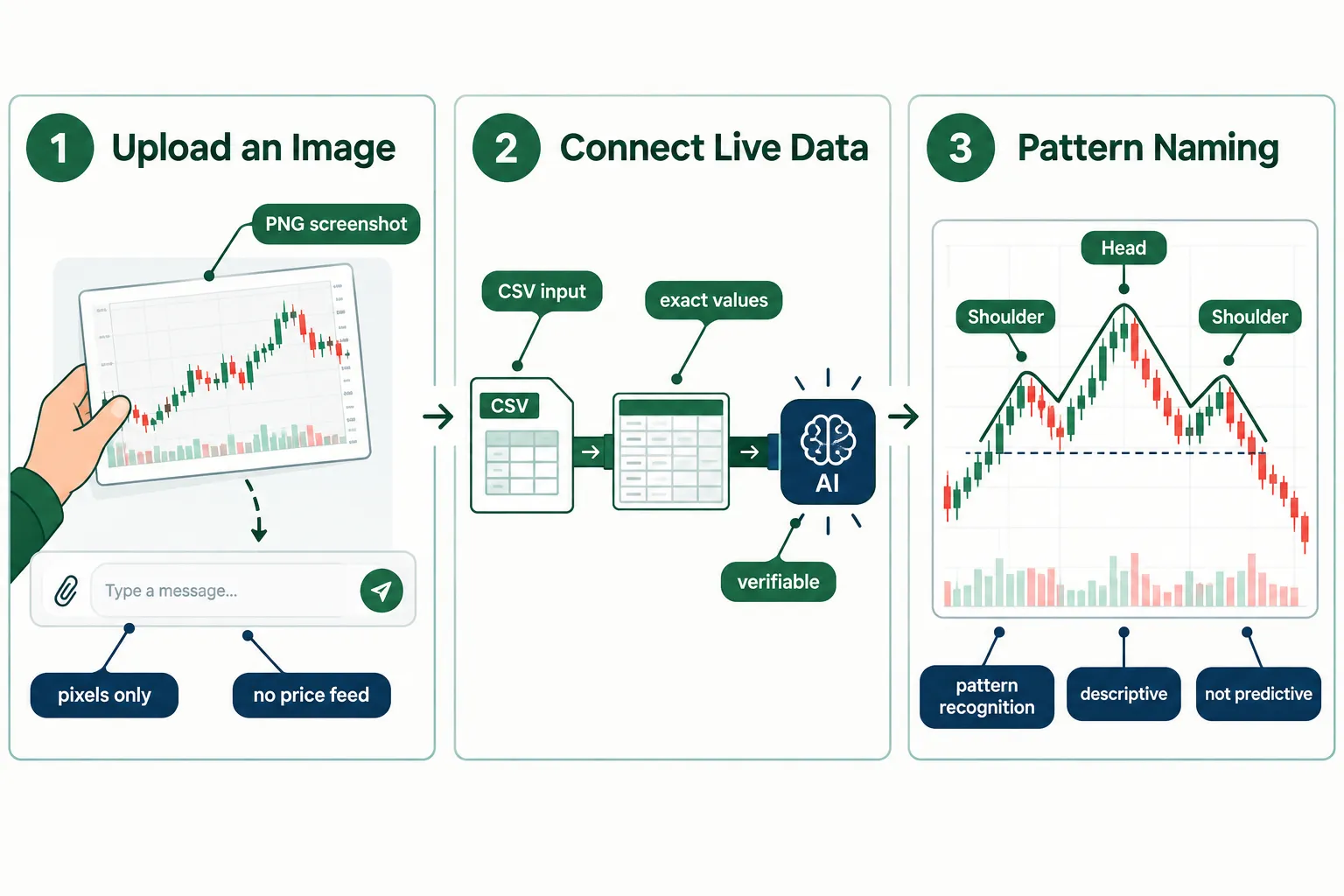
- OpenAI warns about image data directly. As of its October 2026 documentation, ChatGPT may not reliably pull exact values from scanned PDFs, image-based tables, or complex visual layouts. OpenAI’s recommendation: upload a spreadsheet or text file when precision matters.
- ChatGPT got a big visual upgrade on October 7, 2026. GPT-6 and “Intelligent UI” let ChatGPT return interactive bar, line, pie, and scatter charts inside a response, per OpenAI. That improves output, not input accuracy.
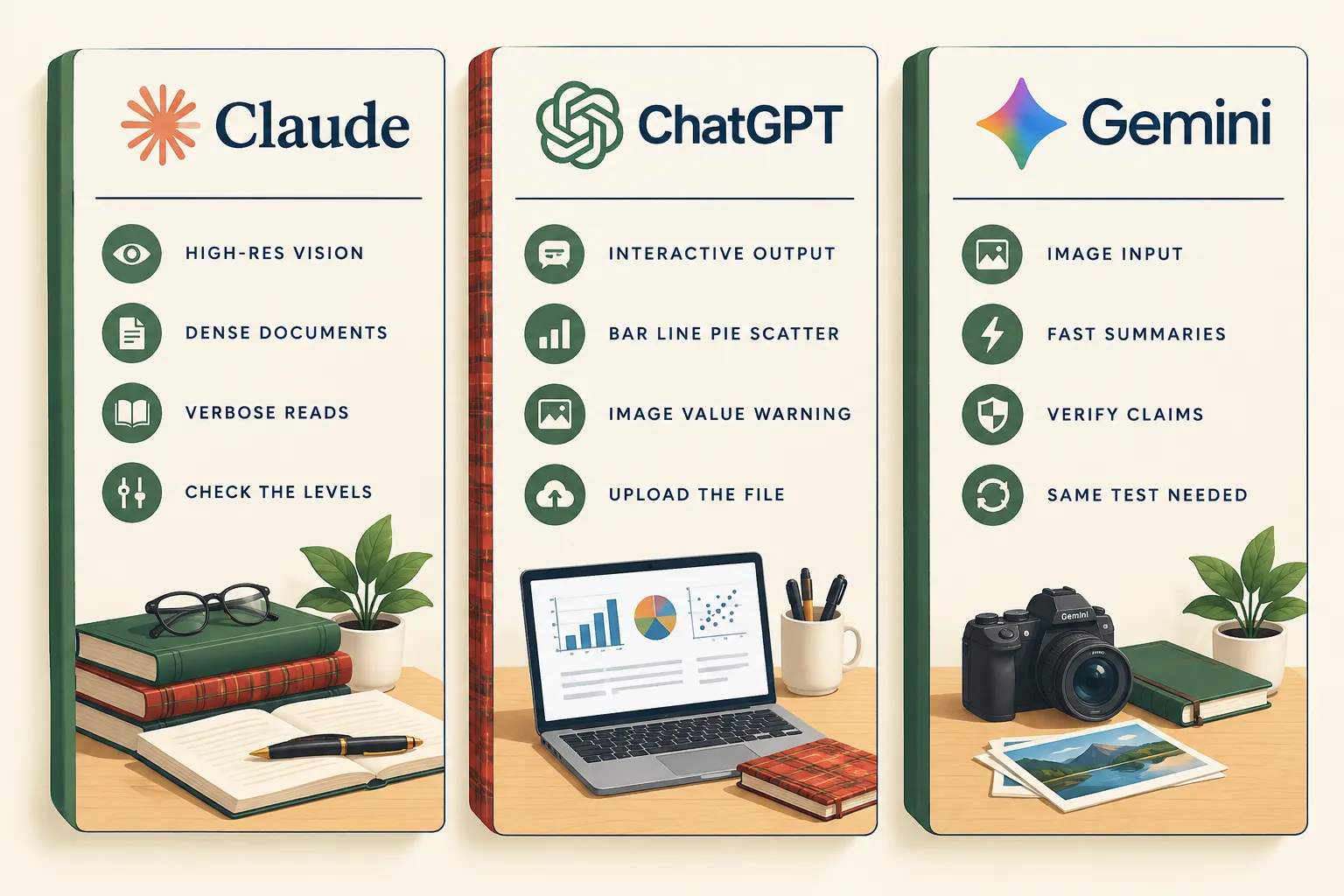
- Claude Opus 4.7 accepts higher-resolution images. Anthropic reports the model handles images up to 2,576 pixels on the long edge (roughly 3.75 megapixels), more than three times earlier Claude models. That matters for dense charts with small labels.
- Claude’s PDF behavior is split by length. Anthropic’s documentation says Claude analyzes both text and visual elements in PDFs of 100 pages or fewer. From 101 to 1,000 pages, it processes text but does not analyze charts.
- The one independent trading-chart test we could find scored both models mid-pack. ChartSnipe reported running 50 real trading-chart screenshots, scoring Claude 27/50 and ChatGPT Vision 26/50, with both at 5/10 on trade-setup quality. That’s a single site’s test, not a peer-reviewed benchmark, so treat it as a claim.
What Is AI Chart Analysis?
AI chart analysis is the practice of handing a chart to a vision-capable language model and asking it to explain what’s on it. Two paths exist: upload an image of the chart, or connect the model to the underlying numbers. They produce very different quality of answer.
Path one: the screenshot. You crop a candlestick chart from TradingView, drop it into Claude or ChatGPT, and ask what’s happening. The model is doing ai chart reading from pixels. It sees shapes, colors, axis labels if they’re large enough, and tries to reconstruct meaning. This is the version most people use, and it’s the version most likely to produce a confidently wrong number.
Path two: the data. You export a CSV of open, high, low, close, and volume, or you connect the model to a live feed through an API. Now it isn’t guessing at pixel positions. It’s reading actual values. Ai chart analysis done this way is dramatically more accurate because the arithmetic is arithmetic, not eyeballing.
The vocabulary, explained once
- Vision model is a language model that accepts images as input alongside text. Claude, ChatGPT, and Gemini all have this.
- Candlestick is the standard price bar in trading charts: body shows open-to-close, wicks show the high and low for that period.
- Chart pattern is a recurring shape traders assign meaning to: head and shoulders, flags, tight consolidation, a cup with handle.
- Ai chart pattern recognition is the model naming that shape. It’s the thing these tools do best, because it’s a visual classification problem, and that’s what vision models were built for.
The practical distinction: ai chart analysis is good at nouns and bad at numbers. It’ll tell you “this looks like a descending triangle with price compressing into the apex.” It will not reliably tell you that resistance sits at 184.20. The first is useful. The second, taken on faith, is how accounts get hurt.
Where does it fit for a real trader? As a second opinion on a setup you already sketched, as a tutor explaining why a pattern matters, and as a way to speed up research notes. Not as the thing that pulls the trigger. If you’re building a process around AI-assisted research, our walkthrough on AI trading for beginners covers the order you should learn these pieces in.
Can AI Analyse Trading Charts or Just Describe Them?
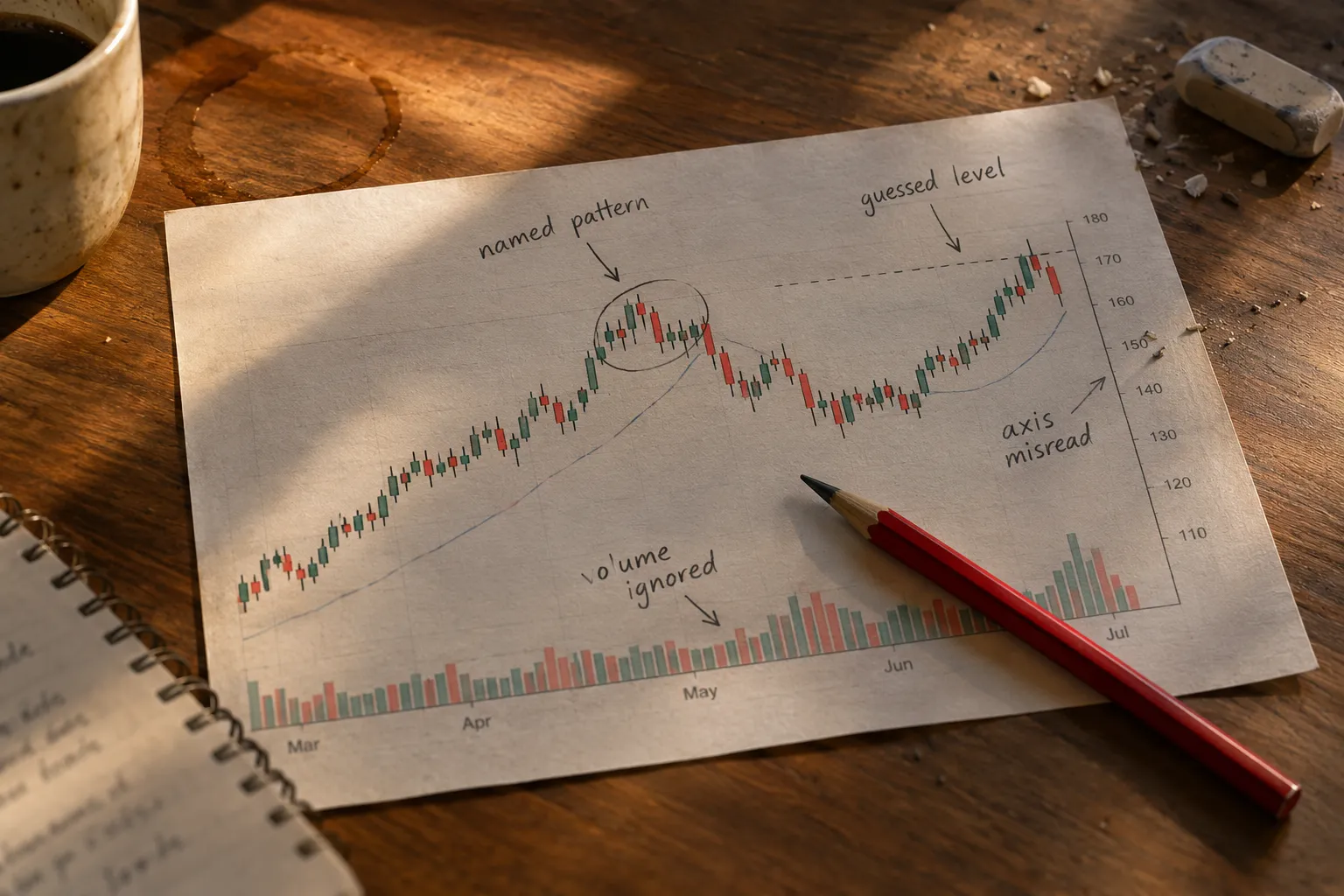
Both, but the describing is far more trustworthy than the predicting. A vision model can usually name a pattern, read a general trend direction, and comment on where volume looks heavy. It guesses at exact price levels, and it has no idea what happened after the screenshot was taken.
What ai chart analysis does reliably
- Names the dominant pattern. ChartSnipe’s reported test of 50 trading-chart screenshots found both models correctly identified the primary pattern on roughly 8 in 10 clean charts. “Clean” is the load-bearing word there.
- Describes trend structure. Higher highs and higher lows, a basing period after a decline, a sharp gap followed by sideways chop. Models handle this well because it’s shape, not arithmetic.
- Explains the concept. Ask why a bull trap happens, a false breakout above resistance that immediately reverses, and you’ll get a solid plain-English answer. This is a language task, not a vision task.
- Reads large, clear axis labels. If your chart has big typography and few overlapping indicators, the model will often get the ballpark right.
Where it guesses
- Exact support and resistance. In the ChartSnipe scoring, Claude got 5/10 and ChatGPT 4/10 for support and resistance accuracy. A model can describe the shape of a chart correctly while misreading the exact level your entire stop placement depends on.
- Trade setup quality. Both scored 5/10 on that criterion in the same test. Translation: the “here’s your entry, stop, and target” output is roughly a coin flip on usefulness.
- Anything live. A screenshot is a photograph of the past. Unless you’ve connected a data source, the model has no clue what price did in the last five minutes.
- Dense indicator stacks. Four overlaid moving averages, a Bollinger band, a volume profile, and an RSI pane in one image? Accuracy drops fast.
Treat the YouTube claims as claims
There’s a steady stream of videos promising that a prompt turns ChatGPT into a chart-reading analyst. Some of them are useful demos. None of them are evidence. A demo is one chart, chosen by the person making the video, with no record of the failures. If someone shows you a win rate and not a method you can repeat, that’s a marketing asset, not a test.
Decision rule: use ai chart analysis to question your own read, never to replace it. If the model disagrees with you, that’s a prompt to look again, not a signal to flip your position.
Common mistake: asking “should I buy this?” You’ll get an answer. It will sound authoritative. It is generated from a low-resolution image of a chart with no knowledge of your account size, risk tolerance, or what the broader market did that morning. Play stupid games.
How Do Claude, ChatGPT and Gemini Compare on the Same Chart?
No published, independent head-to-head benchmark exists that cleanly ranks Claude, ChatGPT, and Gemini on trading-chart accuracy. So instead of inventing one, here’s a method you can run yourself in under an hour, plus what each vendor actually confirms about its own capabilities.
The fair-test method
- Pick five charts you already know cold. Daily candles, one ticker each, different setups: a clean breakout, a failed breakout, tight consolidation, a downtrend, a choppy range. You need to know the right answers before you start.
- Export each one twice. Once as a high-resolution PNG with no indicators beyond volume, once as a CSV of the raw OHLC data.
- Write down the ground truth. The actual pattern, the actual support and resistance levels to two decimals, the actual high and low of the period.
- Use one identical prompt everywhere. Something like: “Identify the chart pattern. State the key support and resistance levels you can read from this image. Flag anything you cannot determine from the image alone.”
- Score blind on five criteria, 10 points each: pattern identification, level accuracy, honesty about uncertainty, explanation clarity, and whether it refused to speculate on live data it doesn’t have.
- Run the CSV version second and compare scores. The gap between the image score and the data score is the single most useful number you’ll produce.
What the vendors confirm
| Criterion | Claude | ChatGPT | Gemini |
|---|---|---|---|
| Image input supported | Yes. JPEG, PNG, GIF, WebP per Anthropic’s help docs | Yes, including chart screenshots | Yes |
| Max image resolution | Opus 4.7 accepts up to 2,576 px long edge (~3.75 MP) per Anthropic; help docs list images to 8,000 x 8,000 px | Check the official page | Check the official page |
| Files per chat | Up to 20 files, up to 500 MB, per Anthropic help docs | Check the official page | Check the official page |
| PDF chart handling | Visual elements analyzed in PDFs of 100 pages or fewer; 101 to 1,000 pages is text only | Can analyze text and images in PDFs; embedded images may need separate upload | Check the official page |
| Chart generation in replies | Yes. Anthropic release notes cite inline charts and diagrams | Yes. Interactive bar, line, pie, scatter since the October 7, 2026 GPT-6 rollout | Check the official page |
| Vendor warning on image values | Anthropic recommends images of at least 1,000 x 1,000 px | OpenAI: may not reliably extract exact values from image-based layouts | Check the official page |
This table is capability, not performance. Supporting an image is not the same as reading it correctly.
What the one available test suggests
ChartSnipe’s reported scoring put claude chart analysis at 27/50 and chatgpt chart analysis at 26/50 on 50 real trading-chart screenshots. That’s close enough to call a tie, and both scores sit barely above half marks. The honest read: neither is clearly better, both are mediocre at the part that matters for execution, and anyone telling you one of them “wins” is selling something.
Anecdotally useful difference: Claude Opus 4.7’s higher resolution ceiling helps with dense, small-label charts and multi-pane technical layouts, which is exactly what Anthropic designed it for. ChatGPT’s October 2026 interactive chart output is better when you want the model to build a visualization from data you’ve supplied. Different strengths, same core limitation.
If you’d rather compare the full field of dedicated tools instead of general-purpose models, our roundup of the best AI for trading goes deeper on where each one earns its keep.
Can ChatGPT Read Candlesticks?
Yes, with real caveats. ChatGPT can identify candlestick bodies, wicks, and common formations on a clean chart with large candles. It breaks down on small candles, cluttered axes, and anything requiring an exact price.
What works with chatgpt candlestick reading
- Big, well-spaced candles. Zoom in. Fewer bars, bigger bodies, higher accuracy. A six-month daily chart crammed into 800 pixels is a mess of toothpicks.
- Named single-bar formations. Doji, hammer, engulfing bar. These are distinct shapes and the model classifies them reasonably well.
- Directional color logic. Green up, red down, it tracks that fine.
- Explaining what a formation implies. The textbook meaning of a bearish engulfing candle at resistance is a language question, and ChatGPT answers it cleanly.
What breaks
- Small candles in a long series. Resolution kills it. Anthropic’s own guidance recommends images of at least 1,000 x 1,000 pixels for a reason, and the same logic applies across models.
- Axis misreads. If the y-axis is logarithmic, or the labels are tiny, the model will often read the scale wrong and every level it reports inherits that error.
- Hallucinated levels. This is the big one. Ask for support and you’ll get a precise-sounding number. OpenAI’s documentation is explicit that exact value extraction from images isn’t reliable. The model doesn’t say “I’m estimating.” It just says a number.
- Indicator soup. Overlays obscure the candles. Strip the chart before uploading.
- Dark-mode screenshots with low contrast. Red and green candles on near-black backgrounds compress the visual signal.
Quick example of the failure mode: upload a chart where price ranged between 47.80 and 52.40 over three months. Ask for the range. You’ll frequently get something like “roughly 48 to 52” which is fine, or “support at 48.15, resistance at 52.65” which is fabricated precision. The first is an estimate. The second is a number you might size a position against. If the answer has two decimals and came from a picture, don’t trust it.
The fix is boring and it works: paste the actual OHLC data alongside the image. Now the model has something to check itself against, and the hallucinated levels mostly disappear. If you want to go further, connecting a model to a broker or data API through something like our guides to the IBKR API with Claude or eToro MCP connectors for Claude, ChatGPT and Grok removes the screenshot problem entirely.
Does GPT-4 read charts better than GPT-3.5?
Yes, and it isn’t close, because GPT-3.5 has no vision capability at all. GPT-3.5 cannot accept an image. Any chart work with it requires you to paste data as text. Every vision-capable version since GPT-4 handles image input, and OpenAI’s October 7, 2026 GPT-6 release added interactive chart generation on the output side. If someone’s telling you a chart-reading prompt works on GPT-3.5, they’re describing text analysis, not ai chart reading.
Can you upload screenshots of charts to ChatGPT, and why won’t it read mine?
You can upload screenshots, and the common reasons it fails are resolution, format, and file handling, not a policy block. If ChatGPT refuses or returns nonsense, run this list:
- Check the file type. Standard image formats work. Anthropic’s help docs list JPEG, PNG, GIF, and WebP for Claude; confirm the current list on OpenAI’s official page for ChatGPT.
- Raise the resolution. Re-crop at full screen size. Aim for at least 1,000 pixels on the short edge.
- If it’s inside a PDF, extract it. OpenAI notes that embedded images in PDFs may not be picked up automatically and recommends uploading the chart separately. Claude only analyzes visual elements in PDFs of 100 pages or fewer.
- Strip the clutter. Remove indicators, drawings, and watermarks.
- Reduce the bar count. Fewer candles, more pixels per candle.
- Ask a narrower question. “What pattern is this?” beats “analyze this chart” every time.
Can Claude read handwritten or poorly scanned charts?
Partially. Anthropic’s Claude 3.5 Sonnet announcement specifically cited improvements in transcribing text from imperfect images and in interpreting charts and graphs, and Opus 4.7’s higher resolution ceiling helps with dense scans. A hand-drawn trendline on graph paper or a faxed research chart will often get a usable qualitative read. The numbers will still be unreliable, and badly skewed or low-contrast scans degrade fast. Rescan at higher DPI, straighten the image, and bump the contrast before uploading. Treat anything handwritten as a description task only.
What file types can ChatGPT and Claude understand for charts?
Both accept standard images and documents, and both perform better with structured data than with pictures. Anthropic’s help documentation lists JPEG, PNG, GIF and WebP images up to 8,000 x 8,000 pixels, up to 20 files per chat, and files up to 500 MB. For ChatGPT’s current file-type and size limits, check the official OpenAI help page rather than trusting a blog number. For either model, a CSV or XLSX of the underlying price data beats every image format, which is precisely what OpenAI recommends when precision matters.
What Should You Do Before Acting on an AI Chart Read?
Never act on an AI chart read directly. Use it to generate a hypothesis, then verify every number independently before it touches your risk. Here’s the sequence.
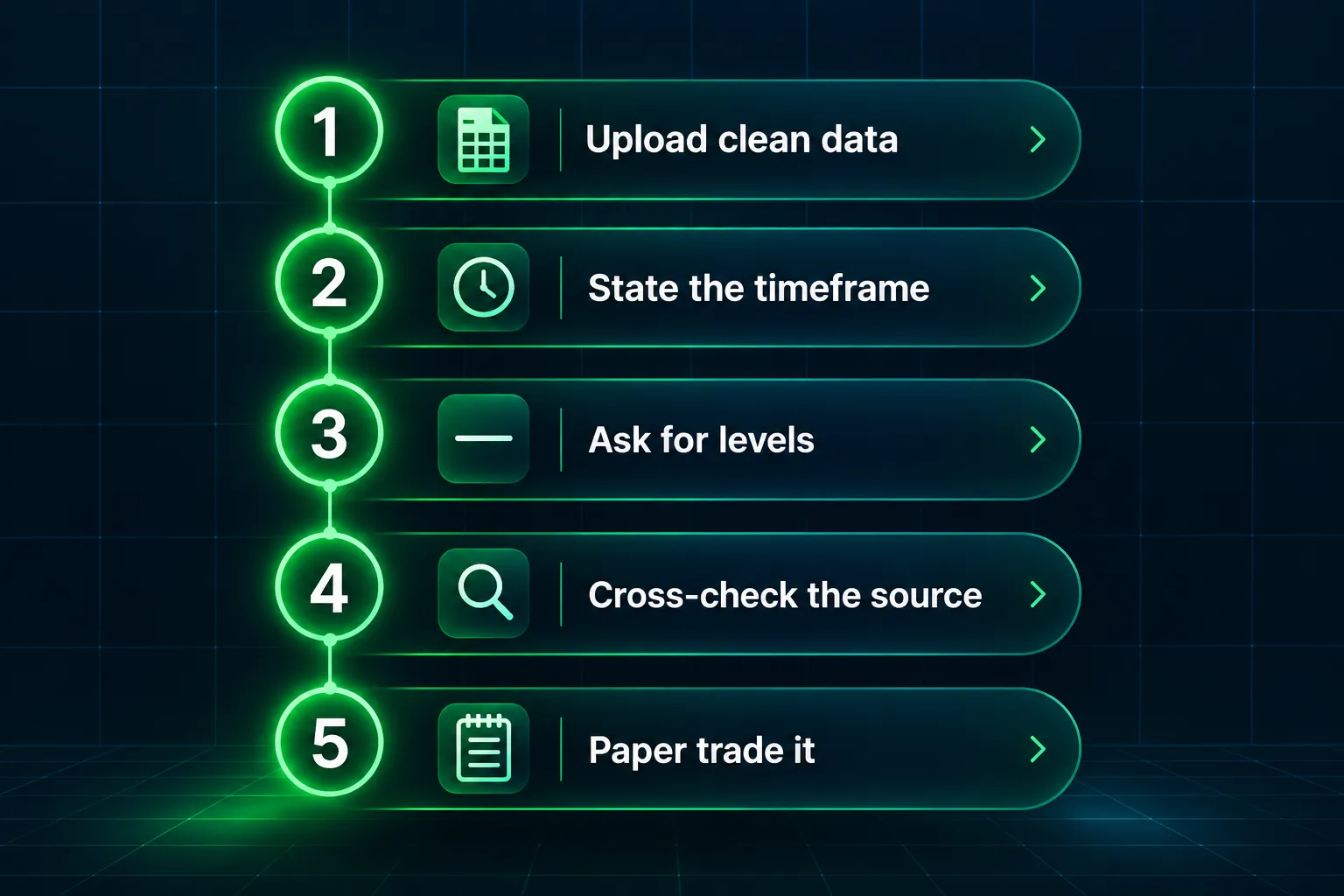
- Feed it data, not just pixels. Export the OHLC values as CSV and upload both. The image gives context, the file gives accuracy. This single step kills most hallucinated levels.
- State the timeframe explicitly. “This is a daily chart covering June through October 2026.” A model that doesn’t know the timeframe will blend intraday logic into a weekly read and give you something useless.
- Ask it to flag its own uncertainty. Add: “List anything you cannot determine from this image.” A model that admits it can’t read the axis is more valuable than one that guesses confidently.
- Verify every level against your charting platform. Open TradingView or StockCharts, drop a horizontal line at each level the model named, and see if it actually corresponds to a swing high or low. If it doesn’t, the whole read is suspect.
- Get a second source on the fundamentals. If the model mentions an earnings reaction or a catalyst, confirm it against the filing. The SEC’s EDGAR database is free and authoritative. A model narrating a catalyst it half-recalls from training data is a well-documented failure.
- Define your risk before your entry. Position sizing (how much capital you commit relative to your stop distance) and stop loss placement come first. If the AI’s level is wrong, a correctly sized position means you lose a planned amount, not an unplanned one.
- Paper trade it first. Run the AI-assisted read alongside your normal process for 30 trades without real money. Compare. If the AI layer didn’t improve anything, you learned that for free.
- Log the disagreements. Every time the model’s read differs from yours, write down who was right. After 30 entries you’ll have your own benchmark instead of a YouTube claim.
Edge case worth naming: options-flow and dealer-positioning charts are a category where visual reading breaks hardest, because the meaning lives in the numbers, not the shape. If that’s your territory, read how a gamma exposure chart works before asking any model to interpret one.
Is There a Free AI Chart Analyzer?
Yes. Both ChatGPT and Claude have free tiers that accept image uploads, which makes basic ai chart analysis free to try today. The limits are on usage volume, model access, and file handling, not on the feature itself.
What’s confirmed:
- ChatGPT’s free tier exists and received the GPT-6 Intelligent UI rollout. OpenAI began the October 7, 2026 rollout with Plus, Pro, Business, and Enterprise, then extended to Free and Go users the following day. For current free-tier message caps and which model free users get, check OpenAI’s official pricing page, since these change often.
- Claude has a free tier with image upload. Anthropic’s help documentation covers file and image limits. Whether the free tier gets the current top model, and what the daily usage cap is, should be confirmed on Anthropic’s official pricing page rather than taken from any article.
- Gemini offers a free tier with image input. Check the official page for current limits.
The real limits of free
- Usage caps hit fast. Running five charts through a free tier in one sitting will often exhaust your allowance mid-test.
- Model access may be downgraded. The free tier frequently routes to a smaller model with weaker vision, which is exactly the capability you need.
- No live data. Free tiers won’t connect to a broker feed or a real-time quote source. You’re back to screenshots.
- No audit trail. Nothing logs what you asked or what it answered, so you can’t score your own results later.
Decision rule: if you’re learning what chart patterns mean, free is genuinely enough. If you’re trying to run a repeatable research process across a watchlist every morning, free tiers will frustrate you within a week and a dedicated charting tool does the job better.
What Is the Best App for Chart Analysis?
For actual charting, a purpose-built platform beats a chat model every time, because it has real-time data, accurate levels, and drawing tools. Use the AI for explanation and the platform for measurement.
| Tool | Best for | What it does well | Watch out for |
|---|---|---|---|
| TradingView | Charting and community scripts | Deep indicator library, clean multi-timeframe charts, huge user base of published scripts | Feature depth creates a learning curve; confirm current plan limits on the official page |
| StockCharts.com | Classic technical analysis and scans | Long-established chart engine, strong scan and annotation tooling. See our StockCharts.com review | Interface feels dated next to newer platforms |
| MarketReader | Explaining why a move happened | Focuses on attributing intraday moves to drivers rather than drawing lines. See our MarketReader review | Narrower use case than a full charting suite |
Two honest caveats. First, “best” depends entirely on whether you’re a day trader needing fast intraday levels or a swing trader reviewing daily charts on the weekend. Second, pricing and plan features change constantly, so check each official page rather than any article’s numbers, including this one.
For a head-to-head on the automation side of charting, our comparison of TrendSpider vs TradingView covers which one automates pattern detection versus which one just gives you better tools to do it yourself. And if you’re assessing the wider research category, the AI research and analysis tools directory sorts them by what they do.
Who should be using ai chart analysis, and when it doesn’t work. It fits beginners learning to recognize patterns, intermediate traders wanting a second read on a setup, and anyone writing up research notes who needs a faster first draft. It does not fit scalpers needing sub-second levels, anyone trading off exact price triggers from an image, or traders who want the model to make the decision. If you can’t name the specific question you’re asking the model, you’re not doing analysis, you’re looking for permission.
Frequently Asked Questions
Can AI analyse trading charts?
Yes, but mainly descriptively. Claude and ChatGPT can both identify chart patterns and describe trend structure from an uploaded image with reasonable accuracy on clean charts. ChartSnipe’s reported test of 50 trading-chart screenshots found both named the primary pattern correctly on roughly 8 in 10 clean charts, while scoring only 5/10 and 4/10 respectively on support and resistance accuracy.
What is the best AI for chart analysis?
There’s no published independent benchmark that crowns a winner. The single trading-chart comparison available, from ChartSnipe, scored Claude 27/50 and ChatGPT Vision 26/50, effectively a tie. Claude Opus 4.7 accepts higher-resolution images (up to roughly 3.75 megapixels per Anthropic), which helps with dense charts. ChatGPT’s October 2026 update added interactive chart generation. Run the five-chart test above on your own setups.
Is there a free AI analyzer for trading charts?
Yes. ChatGPT, Claude, and Gemini all offer free tiers that accept image uploads, so basic ai chart analysis costs nothing to try. Free tiers typically impose daily message caps and may route you to a smaller model with weaker vision. Check each vendor’s official pricing page for current limits, since they change frequently.
Can ChatGPT analyze StockCharts?
It can analyze a screenshot taken from StockCharts.com the same way it analyzes any chart image, with the same accuracy limits. It cannot log into your StockCharts account or pull live data from it. For reliable numbers, export the underlying price data and upload that file alongside the image, which is what OpenAI’s own documentation recommends when precision matters.
Is anything better than TradingView?
Depends on the job. TradingView leads on indicator depth and community scripts. StockCharts.com is strong for classic technical scanning and annotation. Tools like MarketReader solve a different problem entirely, explaining why a move happened rather than drawing it. Confirm current features and pricing on each official page before switching.
Can Claude read a handwritten or scanned chart?
Partially. Anthropic has said Claude’s vision improvements include transcribing text from imperfect images, and Opus 4.7’s higher resolution ceiling helps with dense scans. Expect a usable qualitative description and unreliable numbers. Rescan at higher DPI and raise the contrast before uploading.
Our Take
Use AI to explain a chart. Never use it to trigger a trade.
That’s the whole position. A vision model is a patient tutor that will tell you what a descending triangle means at 2am without judging you for asking twice. It is not a data source, it is not a risk manager, and it cannot see what price did after your screenshot. The traders who get value from ai chart analysis are the ones who already know what they’re looking at and want a second read. The ones who get hurt are the ones outsourcing the decision.
Feed it data, not just pixels. Verify every level on your own platform. Paper trade it first. Discipline beats prediction, every time.
Building or testing an AI trading tool yourself? Submit it for review and we’ll put it through the same test. Or start with the full breakdown of what works at aistocktradingbots.com.
Stay alpha.
The FullStack Alpha research desk tests AI trading bots on paper and live accounts. Reviewed and edited by Jay Rocco, Founder and Editor.
