

The FullStack Alpha research desk tests AI trading bots on paper and live accounts. Reviewed and edited by Jay Rocco, Founder and Editor.
By FullStack Alpha Editorial Team | Reviewed by Jay Rocco, Chief Editor
Webull MCP is Webull’s Model Context Protocol server, which lets an approved AI assistant like Claude or Grok read your Webull account data, pull market research, and prepare orders in plain English. It runs on top of Webull’s Open API, the same engine that powers Webull’s developer tools, CLI, and agent skills. Per Webull’s September 29, 2026 announcement, every order prepared through Cloud MCP still requires your separate confirmation before it goes to market. The main risk isn’t that the robot takes over. It’s that you grant broad permissions, stop reading what the agent proposes, and approve a bad order with the same thumb-swipe you use to clear notifications.
What You Should Know
- September 29, 2026: Webull expanded Cloud MCP from research-only to trade preparation for eligible U.S. users, with no software install and no manual API keys required, per Webull’s own release.
- August 4, 2026: Webull launched native connectors for ChatGPT, Claude, and Grok plus a Webull CLI, per the company’s announcement.
- The endpoint:
https://api.webull.com/mcp, using OAuth Authorization Code Flow, per Webull’s Cloud MCP documentation. You authorize specific accounts and specific capability groups separately. - Local MCP tokens last 15 days and auto-refresh when used, per Webull’s Local MCP docs. Local MCP is the developer path and it can place, modify, and cancel orders.
- FINRA’s 2026 Annual Regulatory Oversight Report states that existing securities rules still apply when firms deploy generative AI or agents. The technology changes nothing about supervision and recordkeeping obligations. Our broker automation guides walk through what that means account by account.
What Is the Webull MCP Server?
Yes, Webull has an MCP server. Two of them, actually. Cloud MCP is Webull-hosted and reachable at https://api.webull.com/mcp, and Local MCP runs on your own machine using Webull OpenAPI credentials. MCP stands for Model Context Protocol, an open standard that lets an AI assistant call outside tools instead of just guessing from training data.
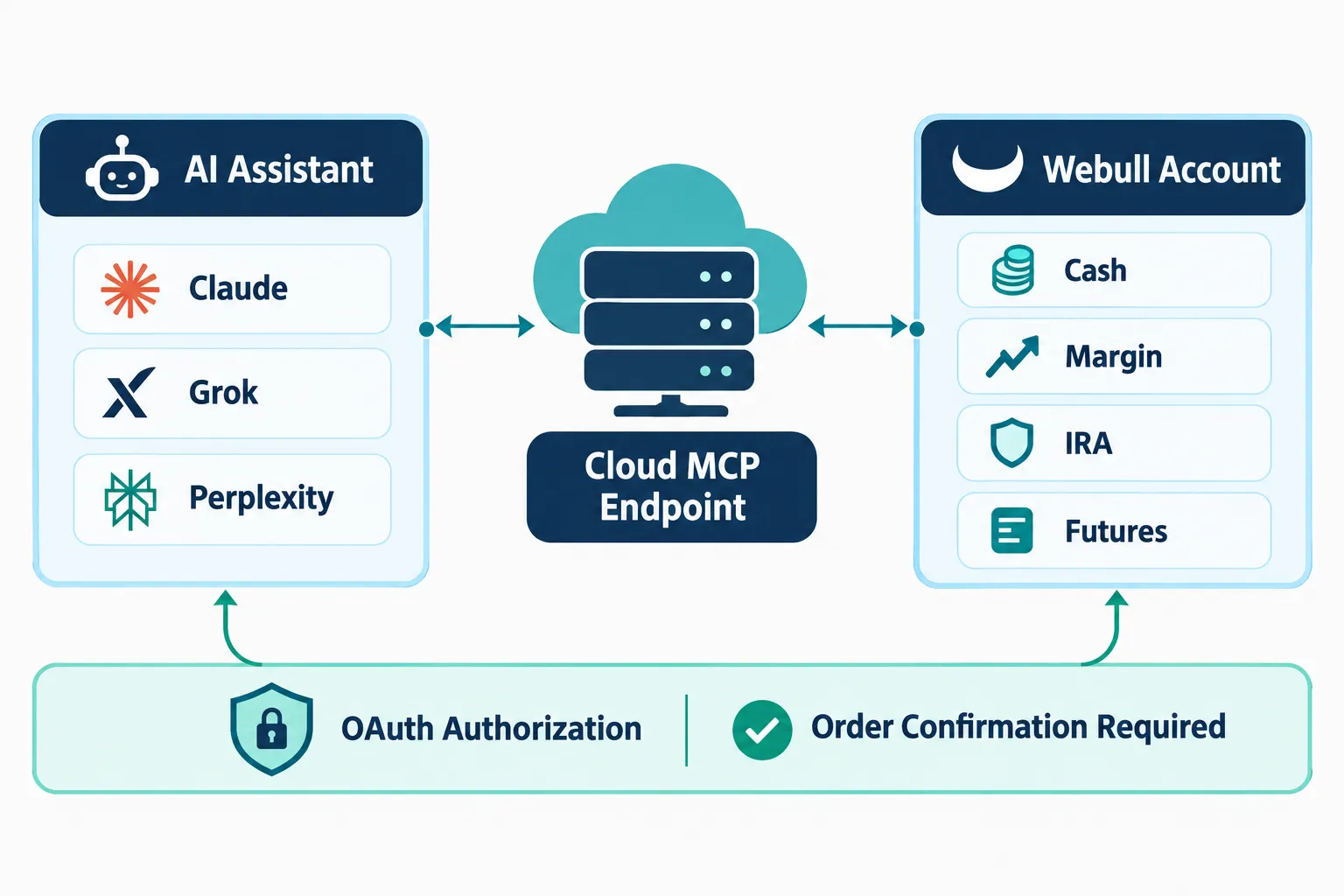
Think of MCP as a universal adapter. Before it existed, hooking a chatbot to your brokerage meant writing custom glue code for every single data call. MCP standardizes the plug. The assistant asks for “my open positions,” the server hands them over, and the model reasons on real numbers instead of hallucinating a portfolio.
Read versus trade: the line that actually matters
Webull splits what the server can do into capability groups you authorize separately. Per Webull’s Cloud MCP documentation, you can grant access to account information, order history, market data, or security reference data independently. You can also pick which accounts are in scope, including cash, margin, IRA, and futures accounts.
Read access covers:
- Account balances, positions, and buying power
- Open orders and order history
- Watchlists
- Real-time and historical market data
- Research items added in the August 2026 release, including capital-flow analysis, stock snapshots, industry comparisons, forecast EPS, SEC filings, earnings calendars, and dividend calendars
Trade preparation is the newer piece. The October 2026 documentation updates added Cloud MCP order-instruction endpoints covering stocks, single-leg options, option strategies, futures, crypto, event contracts, and algorithmic orders. These endpoints create instructions. Per Webull’s docs, those instructions require confirmation through the Webull app or desktop environment rather than silently firing into the market.
That confirmation gate is the single most important design choice in the whole product. An agent can build the order. You still press the button.
Cloud MCP vs Local MCP
| Cloud MCP | Local MCP | |
|---|---|---|
| Who it’s for | Eligible U.S. retail users | Developers and power users |
| Install required | None | Yes, runs locally |
| Auth | OAuth Authorization Code Flow | Webull OpenAPI credentials, app approval, local token (15 days, auto-refresh) |
| Can it place orders? | Prepares instructions, requires separate confirmation | Supports order placement, modification, and cancellation via callable tools |
| Typical clients | Claude, Perplexity, Grok (U.S., per Webull’s Sept 29 release) | Cursor, Claude Desktop, Kiro |
Webull’s product pages later list ChatGPT, Claude, and Grok as supported AI-market integrations. ChatGPT availability was described as pending platform approval on September 29, so what you see depends on your platform, your account, and rollout status. Check the official Webull developer page before you assume your assistant of choice is live.
The practical read: Cloud MCP is the guardrailed version, Local MCP is the loaded version. If you don’t know which one you want, you want Cloud.
What Is the Webull Open API and Who Can Use It?
The Webull Open API is the underlying programmatic interface for trading and market data, and the Webull MCP server is one of four ways to reach it. The other three are Local MCP, Agent Skills, and the Webull CLI. One engine, four doors.
Per Webull’s Open API materials, the API supports trading and market data for stocks, options, futures, crypto, and event contracts. Market data includes real-time quotes, historical data, and streaming. Some advanced or futures data requires separate paid market-data authorization, per Webull’s futures market-data documentation, so don’t assume every feed is bundled.
Who’s eligible
Access is tied to a funded, approved Webull brokerage account. Cloud MCP’s trade-preparation expansion was announced for eligible U.S. users. Options, futures, crypto, and margin each have their own approval levels inside the Webull app, and the API can’t grant you permissions your account doesn’t already have. If you’re not approved for futures, no agent is trading futures for you.
Region matters too. Webull operates multiple regional entities, and API availability, supported products, and data entitlements differ by region. The Webull developer API documentation is the only source worth trusting on what’s live where. Check the official page rather than a Reddit thread from six months ago.
The rough application path
- Open and fund a Webull brokerage account, and get approval for whatever product classes you intend to trade.
- Visit the Webull developer portal and request Open API access for your account.
- Approve the application request inside the Webull app. The app approval step is where you prove it’s really you.
- Generate or receive your credentials, depending on which path you’re using. Cloud MCP skips manual key management entirely via OAuth.
- Authorize specific accounts and specific capability groups. Don’t tick every box out of laziness.
Decision rule: if you only want an AI assistant to answer questions about your portfolio, use Cloud MCP with read-only capability groups and skip the developer portal entirely. If you want to write code that reconciles fills into a database at 4:05pm, you want the full Open API and credentials.
For the broader picture on where Webull sits as a platform, our Webull review and pricing breakdown covers the brokerage side.
How Do You Set Up a Webull Open API Connection Step by Step?
The setup is shorter than people expect, especially for Cloud MCP. Webull’s own developer documentation and the videos on the official Webull YouTube channel walk through the flow, and the honest summary is: approve in the app, authorize scopes, connect the client, test on something that can’t hurt you.
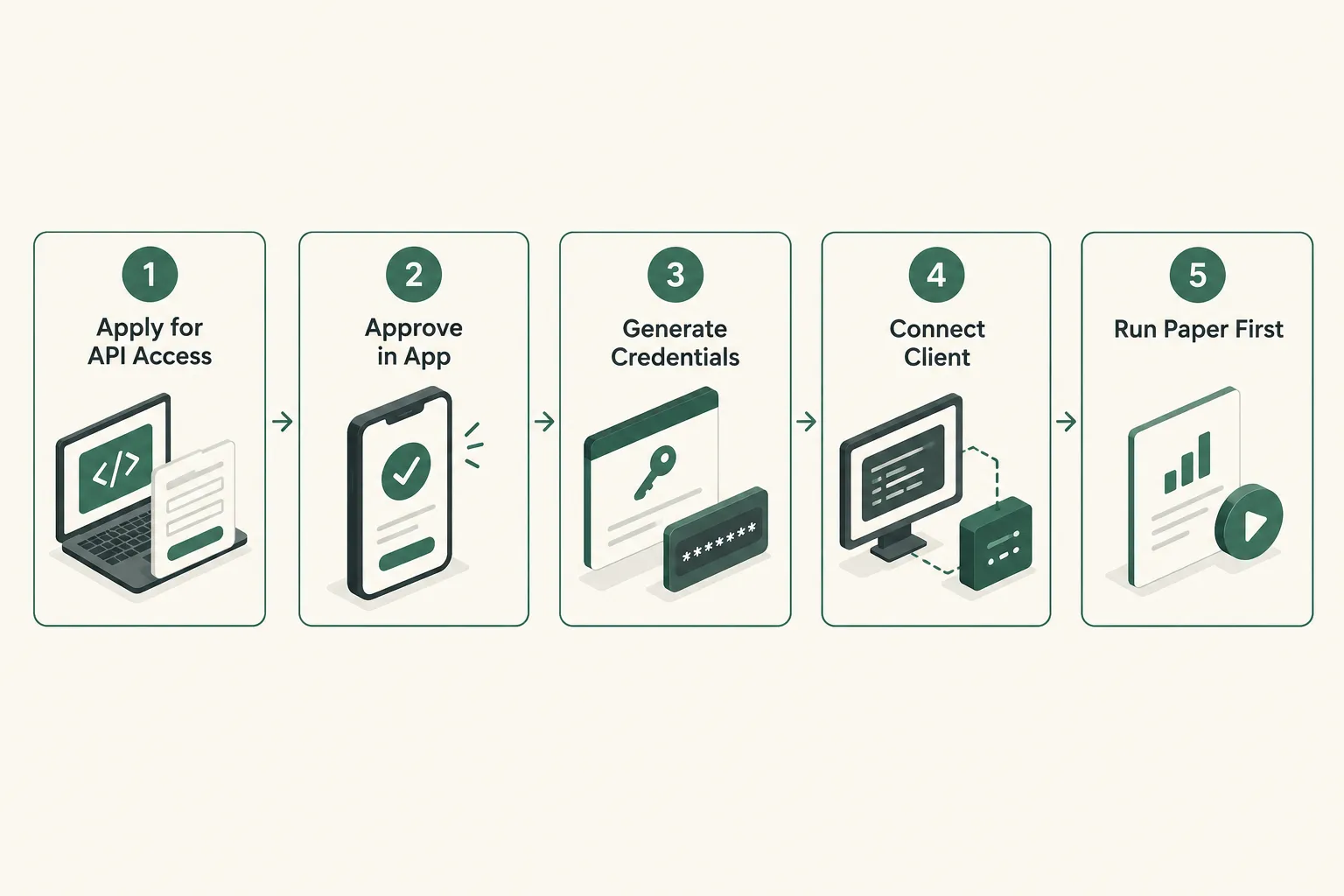
Cloud MCP path (no install)
- Open your AI client’s connector or integrations settings. You’re looking for a place to add a remote MCP server by URL.
- Enter the Webull endpoint. Per Webull’s documentation, that’s
https://api.webull.com/mcp. - Complete the OAuth login. A Webull-hosted browser screen appears. You log in with your real Webull credentials. Your password never touches the AI client.
- Pick your accounts. You should see a list of your authorizable accounts, cash, margin, IRA, futures, whichever you hold.
- Pick your capability groups. Account information, order history, market data, security reference data. Grant the minimum that answers your actual question.
- Confirm and return to the client. You should see the Webull tools listed as available in the assistant’s tool panel.
- Test with a read query. Ask for your current positions. If the numbers match the app, the connection is real. If they don’t, stop and recheck the account you authorized.
Local MCP path (developers)
- Request Open API access through the Webull developer portal.
- Approve the app request inside the Webull mobile app. Per Webull’s Local MCP documentation, the authentication flow requires app approval and then stores a token locally.
- Note the token lifetime. Webull’s docs state the local token is valid for 15 days and auto-refreshes when used. If you leave a script dormant for three weeks, expect to re-authenticate.
- Install and configure the Local MCP server per Webull’s instructions, then point a client at it. Webull’s documentation names Cursor, Claude Desktop, and Kiro as examples.
- Verify tool discovery. Your client should list market-data retrieval, account inspection, order placement, modification, and cancellation tools.
- Run a dry sequence. Query a quote. Query your balance. Only then touch anything order-shaped.
Webull API trading: the part people rush
The gap between “connection works” and “I should let this trade” is wider than most traders admit. Before any live order routing through the Webull API:
- Confirm which account is wired in. IRA and margin behave very differently when an agent misreads buying power.
- Log every request and response. If you can’t reconstruct what the agent did at 2:47pm, you have no audit trail.
- Set a hard daily order count in your own code or your own rules, and honor it.
- Paper trade it first. Always. Our guide to free AI trading bots covers low-cost ways to rehearse before real capital is in play.
One mistake shows up constantly: people authorize all capability groups and every account on day one because the OAuth screen made it easy. Then they forget what’s connected. Revoke what you don’t use.
How Do You Connect ChatGPT or Claude to Webull?
You connect through the AI client’s own connector settings, not through Webull. Per Webull’s August 4, 2026 release, the company launched native connectors for ChatGPT, Claude, and Grok that give natural-language access to balances, positions, market data, research, watchlists, open orders, and order history. Webull’s September 29 release listed Claude, Perplexity, and Grok as supported in the U.S. for Cloud MCP, with ChatGPT pending platform approval at that date.
Translation: support shifts. Confirm on Webull’s official AI products page before you spend an evening troubleshooting a connector that isn’t live for your account yet.

What third-party walkthroughs show
Independent creators have published setup walkthroughs. The TC Trading channel on YouTube has posted video content covering connecting an AI assistant to Webull. Treat any third-party walkthrough as a claim, not documentation. Interfaces change weekly in this category, and a video from last month may show scope screens that no longer exist. The Webull developer API documentation is the source of record. The video is the tour guide.
Describe the settings, don’t just click them
When you reach the authorization screen, you’re making two separate decisions:
- Which account. Choosing an IRA for an agent that reasons about options spreads is a configuration error waiting to become a tax problem.
- Which capabilities. Market data and security reference data are low-stakes. Account information exposes balances. Order-related scopes raise the ceiling on what can go wrong.
A sane starting configuration looks like this: one non-retirement account, market data plus account information, nothing order-shaped. Run that for two weeks. Ask the assistant to critique your watchlist, summarize capital flows on a name you own, or flag which positions are overextended relative to their recent basing range (basing means a stock trading sideways in a tight range after a move, building a floor). See whether its answers hold up.
Paper first, read-only second, live last
Webull offers paper trading in its app, and rehearsing a setup there costs nothing but time. If your workflow involves an agent that proposes entries and exits, run those proposals against a paper account manually for 30 trading days and score them. If the agent’s suggestions don’t survive a month of paper, they won’t survive your real money either.
Common mistake: people connect the assistant, get three good-sounding answers, and immediately widen permissions. Three good answers is not a sample. It’s a coin flip that landed heads three times.
For traders building out a broader stack, our day trading tools roundup covers what pairs well with an API connection.
What Did Webull’s Leadership Claim About Agentic Trading?
Webull’s public positioning, stated in its own announcements, is that MCP turns a brokerage account into something an AI assistant can read and reason about, while keeping a human confirmation step on every order. That’s the company’s framing, and company framing is marketing until the documentation backs it.
So here’s the honest split between what’s confirmed in Webull’s technical docs and what remains a company claim.
| Claim | Confirmed in docs | Not confirmed |
|---|---|---|
| Webull runs a hosted MCP server | Yes. Endpoint https://api.webull.com/mcp, OAuth Authorization Code Flow, per Cloud MCP docs | |
| No install, no manual API keys for Cloud MCP | Yes, per the September 29, 2026 release | |
| Agent-prepared orders require separate human confirmation | Yes. October 2026 docs state order-instruction endpoints create instructions confirmed via app or desktop | |
| Supports Claude, Grok, Perplexity, ChatGPT | Partially. Sept 29 release named Claude, Perplexity, Grok in the U.S.; ChatGPT listed as pending, later appearing on product pages | Exact per-account availability today |
| Research skills include capital flow, forecast EPS, SEC filings, earnings and dividend calendars | Yes, per the August 4, 2026 release | |
| Trading coverage across stocks, options, futures, crypto, event contracts | Yes, per Webull Open API materials | Which products are live for any individual account |
| Agentic workflows improve trading outcomes | No published performance data. Treat as unproven |
That last row is the one to tattoo somewhere. Webull AI tooling is an access and research layer. No one has published evidence that it improves returns, and Webull hasn’t claimed a number. Anyone who tells you otherwise is selling a course.
Webull has also published video content on its own YouTube channel covering its developer and AI products. Credit the Webull channel for anything you take from those clips, and treat them as marketing from the company whose product they describe.
What Does Agentic Trading Mean for Retail Traders?
Agentic trading means an AI system that doesn’t just answer questions, it plans and acts. FINRA’s 2026 Annual Regulatory Oversight Report defines AI agents as systems that can autonomously perform tasks by interacting with an environment, planning, making decisions, and taking actions. That’s a meaningful step past a chatbot that summarizes an earnings call.
For retail, Webull agentic trading practically means four things:
- Faster research. Ask one question, get account context plus market data plus filings, without opening six tabs.
- Portfolio monitoring that speaks English. “Which of my positions are most exposed to this week’s earnings season?” is a query now, not a spreadsheet project.
- Order drafting. The agent assembles the ticket. Quantity, side, order type, limit price.
- Scripting and automation via the CLI for anyone comfortable in a terminal, including CI/CD-style workflows.
What it does not mean, on Cloud MCP at least, is an unattended machine deciding to buy a low-float biotech at 9:31am while you’re asleep. The confirmation gate exists.
The uncomfortable part
An agent that removes friction from research also removes friction from doing something dumb. Overtrading and revenge trading (re-entering a position out of anger after a loss) were already the two most expensive habits in retail. Now they have a very polite assistant that will happily prepare order number eleven before lunch.
The constraint was never the speed of your clicks. It was your rules. An agent doesn’t give you rules. It gives you throughput.
Practical takeaway: write your position sizing and stop loss rules down before you connect anything, then make the agent restate those rules back to you in its system prompt. If the agent proposes a trade that breaks your own sizing rule, that’s a rejection, not a negotiation.
For the wider category, see our head-to-head on the best AI trading tools of 2026.
What Are the Risks of Letting an AI Agent Trade a Webull Account?
The biggest risk is scope creep: you grant broad permissions once, then stop reading what the agent proposes. FINRA’s 2026 report names the risk categories directly, autonomy, excessive scope, poor auditability, sensitive data exposure, weak domain knowledge, badly designed incentives, bias, hallucinations, and privacy. Those aren’t hypothetical for brokerage agents. They’re the whole list.
FINRA’s central position is worth repeating plainly: existing securities laws and FINRA rules still apply when firms use generative AI or agents. Supervision, communications, recordkeeping, fair dealing, and system reliability obligations don’t vanish because a model is in the loop. That’s the regulator’s view of firms. Your own view of yourself should be at least as strict.
| Risk | What it looks like | The fix |
|---|---|---|
| Excessive scope | You authorize every account and every capability group on the OAuth screen because it was faster | Authorize one non-retirement account and read-only groups first. Revoke unused scopes monthly |
| Hallucinated data | The agent “recalls” a price or an earnings date instead of calling the tool | Spot-check every number against the Webull app before acting. Never trade on an unverified figure |
| Approval fatigue | After 40 confirmations you start approving on reflex | Cap your daily order count. If you hit the cap, you’re done for the day |
| Weak domain knowledge | The agent proposes an options strategy it can’t correctly risk-size | Require the agent to state max loss and position size as a percent of account on every options proposal |
| Poor auditability | Something went wrong Tuesday and you can’t reconstruct why | Log every prompt, tool call, and order. No log, no live trading |
| Token and credential exposure | Local MCP credentials sitting in a shared repo or a synced folder | Keep credentials off any shared drive. Note the 15-day local token lifetime and rotate deliberately |
| Wrong account wired in | Agent reasons about margin buying power on an IRA | Authorize one account at a time and name it in your prompt |
| Unattended automation | A scripted loop keeps firing during a choppy tape with no circuit breaker | Hard-code a daily loss limit and a kill switch before any script goes live |
Edge case worth naming: data outages. If the market-data feed stalls and the agent reasons on stale quotes, it will confidently prepare an order against a price that no longer exists. Build a freshness check. If the quote timestamp is more than a few seconds old, the agent should refuse rather than guess.
And the oldest one in the book: play stupid games, win stupid prizes. Handing broad order permissions to a system you’ve tested for two days is a stupid game.
For a sober look at what AI tools actually deliver versus what the landing page promises, read what you pay for vs what you get with AI trading software.
How Does Webull MCP Compare With Other Broker API Options?
Webull is unusual in shipping a hosted, consumer-facing MCP server with OAuth rather than leaving MCP to the developer community. Most broker APIs still assume you’ll write the integration yourself.
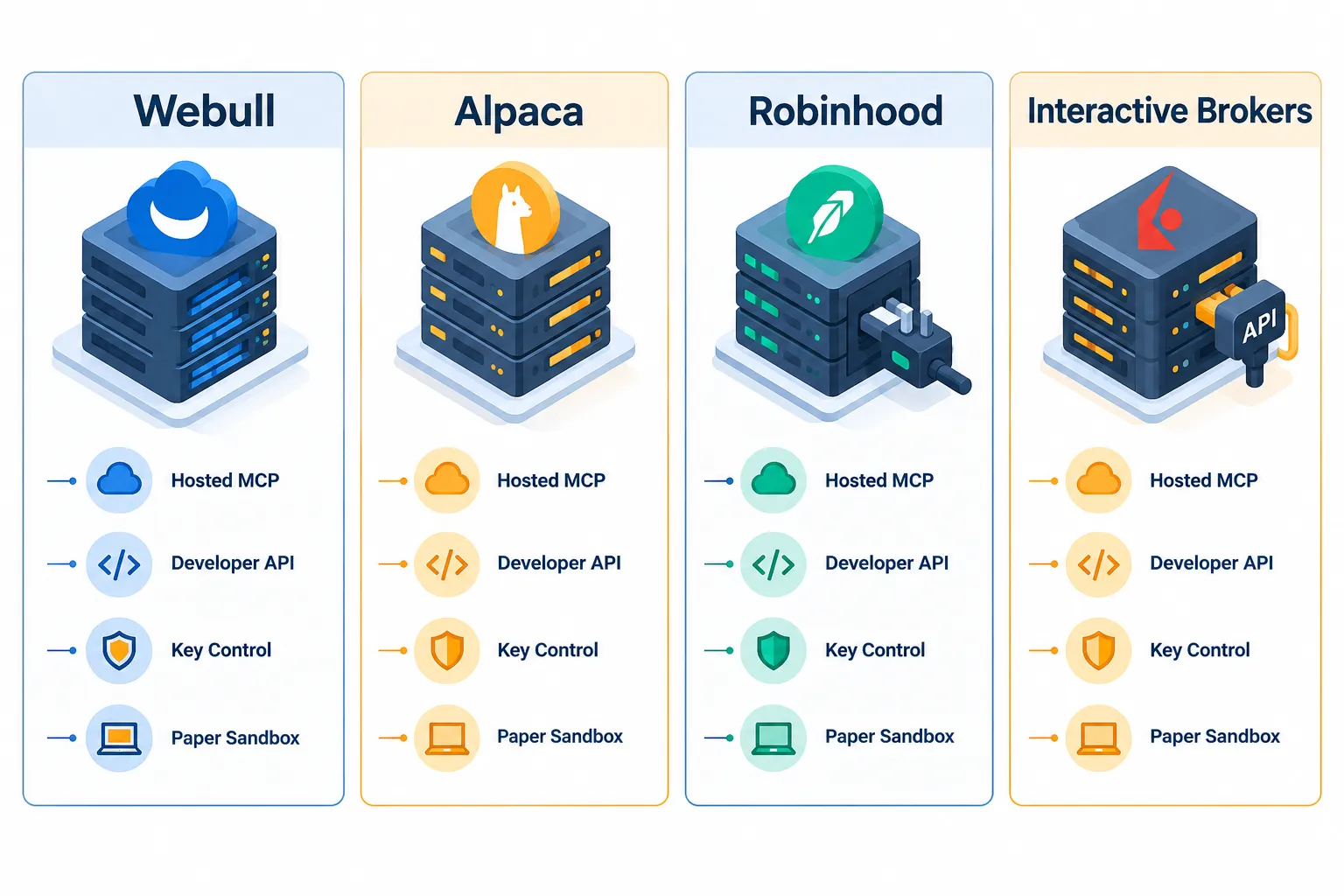
| Broker | API maturity | Official MCP server | Who it fits |
|---|---|---|---|
| Webull | Open API covering stocks, options, futures, crypto, event contracts, per Webull’s materials | Yes. Cloud MCP (OAuth, hosted) and Local MCP (credentials, local), per Webull docs | Retail traders who want AI assistant access without writing code, plus developers who want key control |
| Alpaca | Developer-first REST and streaming API, long-standing paper sandbox | Community and developer MCP integrations are common; check Alpaca’s current docs for official status | Programmers building custom systems from scratch |
| Robinhood | No broadly supported official public trading API for retail developers; confirm current status on Robinhood’s own site | Not an official hosted retail MCP product at time of writing; check the official page | Traders who want a simple app, not an integration project |
| Interactive Brokers | Deep, mature API set (TWS API, Client Portal API) with wide asset coverage | No consumer-facing hosted MCP product equivalent to Webull’s; check IBKR’s official documentation | Serious multi-asset traders and quant-leaning users who can handle complexity |
Webull MCP vs Interactive Brokers API: which is better?
Different jobs. The IBKR API is older, deeper, and covers more global markets and instrument types, and it expects you to be a developer. Webull MCP is designed so a non-developer can connect Claude to a brokerage account in under ten minutes with OAuth and a scope screen.
Choose Webull MCP if you want an AI assistant reading your portfolio and drafting orders you confirm, and you don’t want to maintain code.
Choose the IBKR API if you’re building a multi-asset system, need breadth of global instruments, and you’re already comfortable writing and maintaining software.
Choose Alpaca if you’re writing a bot from scratch and want a developer-shaped platform with a paper sandbox to test against.
No one wins this on features alone. The right answer is whichever one matches your actual skill level, because the broker API you can’t configure correctly is more dangerous than the one you never connected.
For sorting legitimate automation from marketing, our guide to which AI trading bots are legit vs scams does the filtering.
Does Webull MCP Have Rate Limits or Restrictions?
Webull’s Open API and MCP services operate under usage limits and product-specific entitlements, and those figures live in the official Webull API documentation rather than in any blog post. Check the official page for current rate limits before you build anything that polls aggressively.
What’s confirmable from Webull’s materials:
- Separate market-data authorization may be required for some advanced or futures data, per Webull’s futures market-data documentation. Real-time data entitlements are not automatic across every product.
- Scoped authorization restricts what any connected client can see or do. Accounts and capability groups are authorized independently on Cloud MCP.
- Local token lifetime is 15 days with auto-refresh on use, per Webull’s Local MCP docs. Dormant integrations will need re-authentication.
- Account-level permissions still govern. No API grants options, margin, futures, or crypto access your account doesn’t already hold.
- Order confirmation is a hard restriction, not a setting. Cloud MCP order-instruction endpoints create instructions requiring confirmation in the app or desktop environment.
Design rule: build around events and caching, not brute-force polling. An agent that queries the same quote 400 times an hour isn’t smarter, it’s just louder, and it’s the fastest way to hit any limit the platform enforces.
What Mistakes Do People Make With Automated Trading on Webull?
The most common mistake isn’t technical. It’s skipping paper trading and going live with a workflow that’s never been stress-tested through a red day.
The repeat offenders, in rough order of how much they cost:
- No written rules before connecting. If you can’t state your max position size and your stop loss in one sentence, an agent will not supply that discipline for you.
- Granting every scope on day one. Convenience now, forensic nightmare later.
- Trusting the agent’s numbers without checking. Models hallucinate prices. FINRA named hallucinations as a core agent risk for good reason.
- Testing only in a trending market. Every system looks brilliant when the trend is your friend. Test it through a choppy tape (a market chopping sideways with no follow-through) before you believe it.
- No logging. You cannot improve a process you can’t reconstruct.
- Confusing speed with edge. Faster order entry does not create an edge. It accelerates whatever edge or lack of edge you already had.
- Running order automation on a retirement account without thinking through wash sales, settlement, and permissions.
- Approving on autopilot. The confirmation step only protects you if you read the ticket.
Quick fix checklist before any live agent order:
- Rules written and pasted into the agent’s instructions
- One account authorized, named explicitly in the prompt
- 30 days of paper or read-only observation logged
- Daily order cap and daily loss limit defined
- Every prompt and tool call logged to a file you can search
- A manual kill switch you can reach in under ten seconds
If you’re still assembling the rest of your process, our swing trading tools guide covers the non-AI half of the setup.
Can You Actually Make Money With Webull’s Agentic Trading?
There’s no published evidence that connecting an AI agent to a Webull account improves returns, and Webull hasn’t claimed one. The product is an access and research layer, not an edge.
What agentic tooling plausibly improves:
- Research speed. Pulling capital-flow data, forecast EPS, SEC filings, and an earnings calendar in one query genuinely saves time.
- Monitoring consistency. An agent that checks every position against your rules every morning doesn’t get bored. You do.
- Record keeping. Logged prompts and orders make post-trade review possible instead of theoretical.
What it does not improve:
- Your entry and exit discipline
- Your position sizing
- Your willingness to cut losers fast and let winners run
- Your reaction when a position gaps against you at the open
Here’s the math no one puts in a product announcement: if your process loses money manually, automating it loses money faster and with better documentation. Speed is a multiplier, and multipliers work in both directions.
Decision rule: connect an agent only if you already have a written process with a measured result over at least 50 trades. If you don’t, the agent is a distraction dressed as an upgrade. Build the process. Then speed it up.
Discipline beats prediction, and no amount of Webull AI tooling changes that arithmetic.
Frequently Asked Questions
Does Webull have an MCP server?
Yes. Webull operates a hosted Cloud MCP server at https://api.webull.com/mcp using OAuth, plus a Local MCP option for developers. Cloud MCP was expanded from research-only to trade preparation for eligible U.S. users on September 29, 2026, with every order requiring separate customer confirmation before submission.
Is Webull MCP good for beginners, or do you need coding skills?
Cloud MCP needs no coding. You add the endpoint in your AI client, log in through OAuth, and pick which accounts and capability groups to authorize. Local MCP and the CLI do require technical comfort, since they involve credentials, local configuration, and scripting against the Open API.
What does it cost to use the Webull Open API?
Webull has not published a standalone subscription price for Open API access in its announcements, but some advanced or futures market data requires separate paid market-data authorization per Webull’s documentation. Standard brokerage commissions, contract fees, and regulatory fees still apply to any order. Check Webull’s official pricing page for current figures.
Can I fully automate my trades with Webull MCP?
Not through Cloud MCP. Its order-instruction endpoints create instructions that require confirmation in the Webull app or desktop environment. Local MCP supports order placement, modification, and cancellation through callable tools, which gets closer to automation, but that path assumes developer-level control and responsibility.
What programming languages does the Webull Open API support?
The Open API is accessed over standard HTTP endpoints with streaming market-data support, so any language that can make HTTP requests can work with it. Webull also ships a CLI exposing atomic commands for scripting and CI/CD workflows. Check Webull’s developer documentation for currently maintained official SDKs.
What trading bots work with Webull MCP?
Webull’s Local MCP documentation names clients such as Cursor, Claude Desktop, and Kiro, and Cloud MCP works with supported AI assistants including Claude, Perplexity, and Grok in the U.S. Third-party bots connect through the Open API rather than through MCP itself. Verify any bot’s Webull support on the vendor’s own documentation.
Does Webull offer paper trading for testing bots?
Webull offers paper trading in its app, which is the right place to rehearse strategy logic before risking capital. Confirm current paper-trading availability through the Webull Open API on the official developer documentation, since sandbox support varies by product and region.
Our Take
Start read-only. Keep a human approval step. Log every agent order. That’s the whole position, and it isn’t negotiable.
Webull built the confirmation gate for a reason, and the traders who disable the equivalent on Local MCP after a week of testing are the ones who’ll have an expensive story in March. An AI agent is a very fast intern with no memory of your last drawdown. Give it narrow permissions, make it show its work, and audit it weekly. Cut the noise, keep the alpha.
Building or testing an agent on top of Webull MCP? Send us what you’ve found, read our brokerage platform reviews for how the account side holds up, and see the tools we’ve already scored in the AI trading platforms directory.
Stay alpha.
The FullStack Alpha research desk tests AI trading bots on paper and live accounts. Reviewed and edited by Jay Rocco, Founder and Editor.
