

The FullStack Alpha research desk tests AI trading bots on paper and live accounts. Reviewed and edited by Jay Rocco, Founder and Editor.
By FullStack Alpha Editorial Team | Reviewed by Jay Rocco, Chief Editor
The thinkorswim vs TradingView choice comes down to one thing: TradingView is a charting and signal platform that can push alerts out to the internet, while thinkorswim is a broker platform that keeps almost everything inside Schwab’s walls. If you want to build or connect an external trading bot, TradingView’s webhook alerts are the cleaner path, and they start on paid plans listed around $12.95 per month (annual billing, TradingView pricing page, October 22, 2026). If you trade options, want free real-time simulated trading, and don’t mind writing automation against the separate Schwab Trader API instead of the platform itself, thinkorswim costs nothing extra for Schwab clients. Neither one is a complete bot engine on its own.
What You Should Know
- TradingView’s paid tiers start at roughly $12.95/month on annual billing (Essential), with Plus near $29.95, Premium near $59.95 and Ultimate near $199.95, per the TradingView pricing page checked October 2026.
- Webhook alerts only accept ports 80 and 443, cancel if your server takes longer than three seconds to respond, don’t support IPv6, and require two-factor authentication, per TradingView’s webhook documentation.
- thinkorswim desktop, web and mobile carry no separate platform fee for Schwab clients, per Schwab’s thinkorswim product pages (October 2026). Standard trading costs still apply.
- thinkorswim has no public “bot API” of its own. The separate Schwab Trader API handles accounts, market data and orders, which is not the same thing as a direct thinkorswim automation hook.
- paperMoney, Schwab’s simulated trading environment inside thinkorswim, uses real-time data and costs Schwab clients nothing extra, still the single best free reason to open the platform. Our full thinkorswim review goes through what the platform does and does not automate.
Thinkorswim vs TradingView, Which Is Better for Bot Builders?
Short version: TradingView if your bot lives outside the platform, thinkorswim if your edge is options and you’re already a Schwab client. The TradingView vs thinkorswim argument usually gets framed as “which has better charts,” which is the wrong question for anyone building automation. The right question is: can this thing send a signal out to code I control?
TradingView can. thinkorswim mostly can’t.
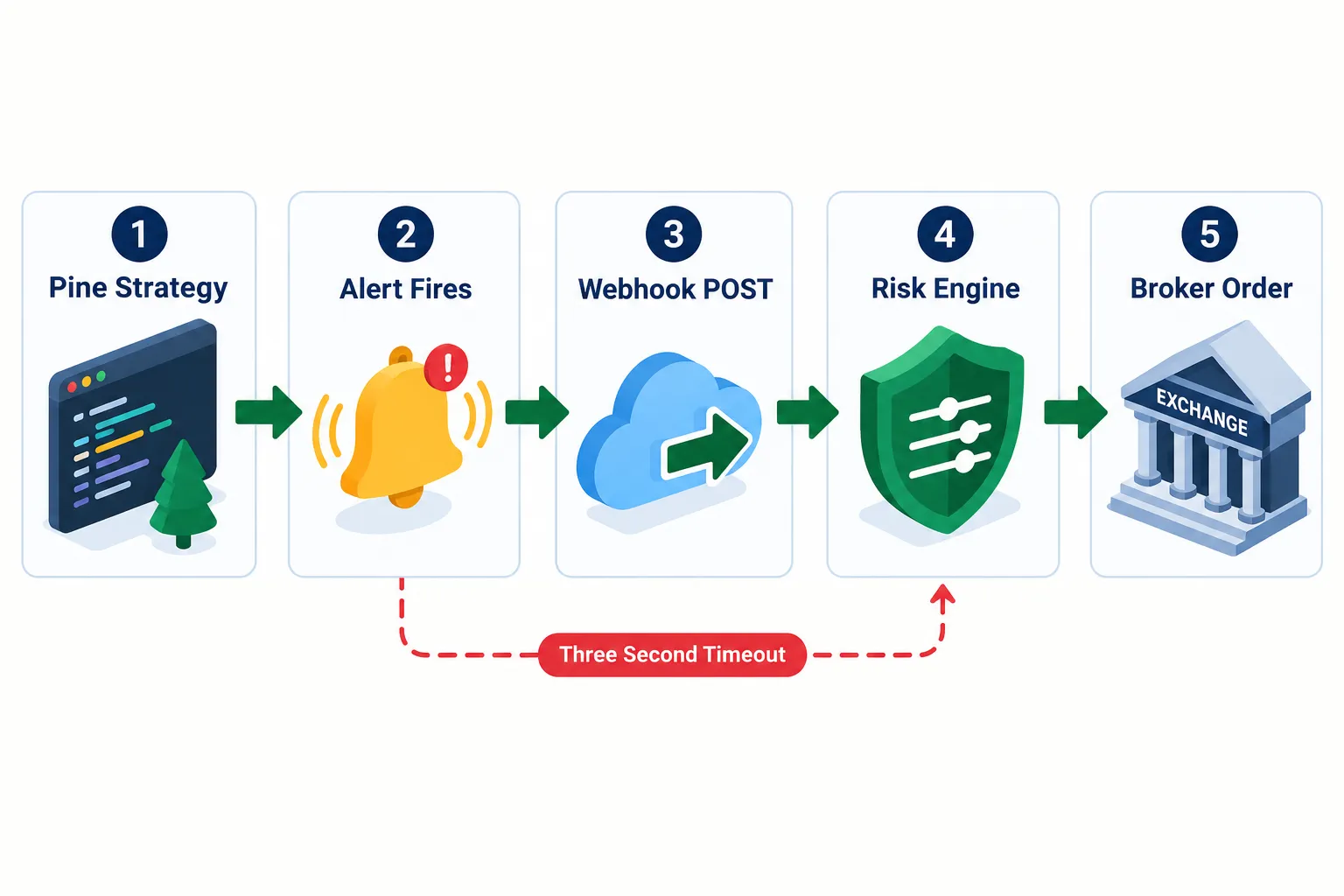
Here’s the architecture that matters. On TradingView, you write a Pine Script indicator or strategy, attach an alert to it, point that alert at a webhook URL, and your own server catches the HTTP POST. From there your code does the real work: position sizing, risk checks, then an order to a broker or exchange API. TradingView is the trigger, not the trader.
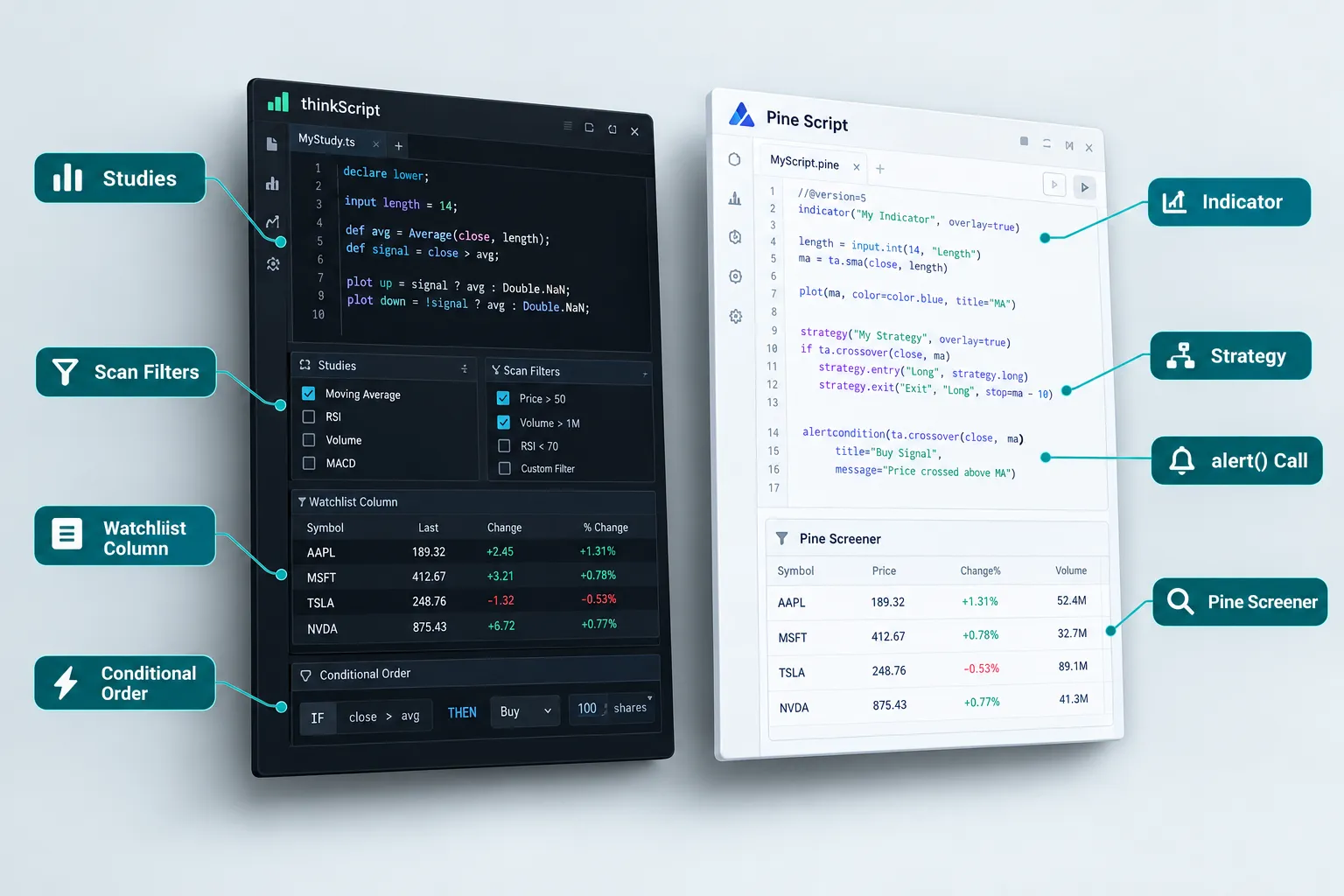
thinkorswim works the opposite way. thinkScript lives inside the platform and powers studies, scans, watchlist columns, alerts and conditional orders. All of that is useful. None of it reaches the open internet. To automate against Schwab, you go around thinkorswim and write against the Schwab Trader API, which is a separate product with its own approval process and its own documentation.
Choose by what you’re actually building
- Choose TradingView if you want a signal layer feeding an external bot, you’re comfortable with Pine Script, and you need the alert to leave the platform.
- Choose thinkorswim if you trade options seriously, want institution-grade analytics at no platform cost, and plan to automate through the Schwab API rather than the charting tool.
- Choose both if you’re honest about your workflow. Plenty of traders chart and alert on TradingView, then execute and analyze options risk in thinkorswim. There’s no rule saying you pick one.
- Choose neither if you want a drag-and-drop bot with no code. Both platforms assume you’ll write something, somewhere.
The thinkorswim vs TradingView decision is really a decision about where your logic lives. Inside a broker’s walled garden, or on a server you control.
One mistake worth naming early: traders pick a platform first, then try to bend their strategy to fit it. Backwards. Write down what your bot needs to do, universe selection, entry trigger, risk sizing, order routing, logging, then see which platform covers the most of that list. Systems over hacks.
What Are the 7 Differences at a Glance?
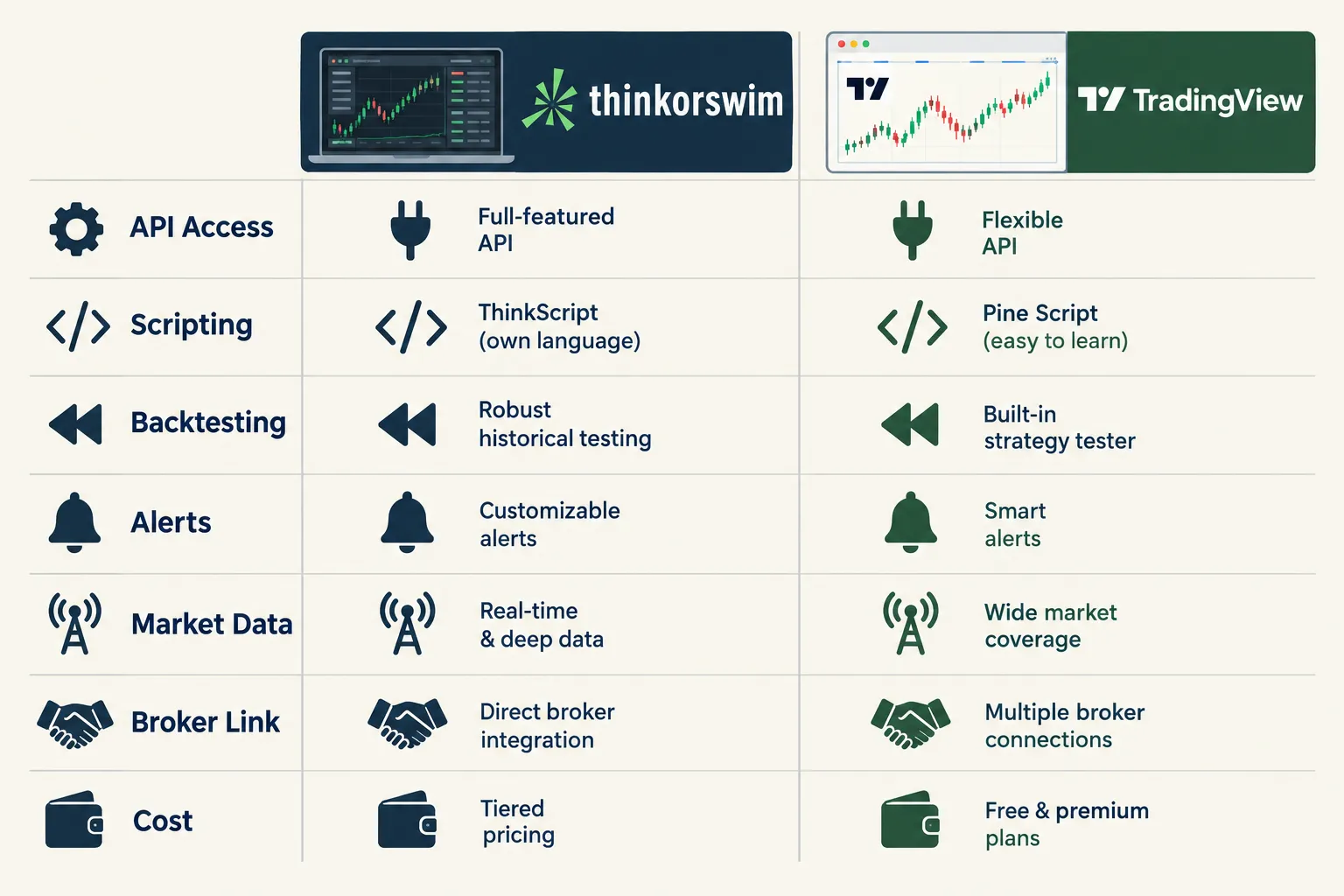
Seven differences separate thinkorswim vs TradingView for anyone building automation: API access, scripting language, backtesting model, alerts and webhooks, market data, broker connection, and cost. The table below reflects official documentation as checked on October 22, 2026.
| Difference | thinkorswim (Charles Schwab) | TradingView | Date checked |
|---|---|---|---|
| API access | No public thinkorswim bot API. Automation runs through the separate Schwab Trader API for accounts, market data and orders. | Webhook alerts POST to any URL you own. Ports 80/443 only, three-second response window, no IPv6, 2FA required. | Oct 22, 2026 |
| Scripting language | thinkScript. Powers studies, strategies, scans, watchlist columns, alerts and conditional orders, all inside the platform. | Pine Script. Indicators, strategies, visualizations, alert() events, and Pine Screener for custom universe filtering. | Oct 22, 2026 |
| Backtesting | AddOrder places simulated orders on a chart for historical strategy review. No live brokerage orders from a backtest. | Strategy Tester runs strategies through a broker emulator and plots historical results on the chart. | Oct 22, 2026 |
| Alerts and webhooks | In-platform alerts and conditional orders. No native outbound webhook. | Alert quotas scale by plan: roughly 20 (Essential), 100 (Plus), 400 (Premium), 1,000 (Ultimate) active price alerts. | Oct 22, 2026 |
| Market data | Real-time data included for Schwab clients, including paperMoney’s simulated environment. | Real-time data availability varies by plan and exchange subscription. Check the official page for your market. | Oct 22, 2026 |
| Broker connection | Native. It is the broker platform. | Broker integrations exist through TradingView’s trading panel; the available list changes. Check TradingView’s brokers page before you build. | Oct 22, 2026 |
| Cost | No separate platform fee for Schwab account holders. Standard trading costs apply. | ~$12.95 / ~$29.95 / ~$59.95 / ~$199.95 per month on annual billing for Essential / Plus / Premium / Ultimate. | Oct 22, 2026 |
A few of those rows deserve a second look.
The three-second webhook timeout is the one that bites people. Your receiver has to acknowledge the POST fast. If it tries to run a full risk calculation, hit a broker API, and wait for a fill confirmation before responding, TradingView may cancel the request. The fix is standard engineering: acknowledge immediately, queue the job, process asynchronously.
Alert quotas are a real constraint, not a marketing number. If your bot monitors 150 tickers with one alert each, Essential’s ~20 active alerts isn’t going to cut it. Price the plan against your watchlist size, not against the feature list.
thinkorswim’s “no platform fee” is genuinely free, with a condition. You need a Schwab account. That’s not a hidden cost so much as a different kind of commitment.
How Do thinkScript and Pine Script Compare?
Pine Script is built for signals that travel; thinkScript is built for analysis that stays home. Both are domain-specific languages you can learn in a weekend if you’ve written any code before, and both will frustrate you if you expect Python.
Pine Script handles indicators, strategies, chart visualizations and alert events. A Pine strategy can fire alerts through alert() calls or through simulated order-fill events. One detail people miss constantly: writing the alert condition into your script does not turn on a live alert. You still have to create and configure the alert in TradingView’s interface. The script defines when; the UI defines that it runs at all.
TradingView has also pushed Pine Screener, which lets you filter a symbol universe using your own Pine logic instead of only the built-in technical filters. For bot builders, that’s the universe-selection layer that used to require a separate scanner.
thinkScript is deeper in some ways and narrower in others. It drives studies, chart strategies, custom scans, watchlist columns, alerts and conditional orders. That conditional-order piece is underrated, you can define logic that places a real order inside Schwab. It’s automation. It’s just automation that never leaves the building.
What each language actually gives you
| Capability | thinkScript | Pine Script |
|---|---|---|
| Custom indicators | Yes | Yes |
| Historical strategy simulation | Yes, via AddOrder | Yes, via Strategy Tester |
| Custom screening logic | Yes, in platform scans | Yes, via Pine Screener |
| Outbound signal to your own server | No | Yes, via webhook alerts |
| Public script library | Yes, Schwab’s Learning Center and community sharing | Yes, very large public library |
| Portability to other platforms | Low | Low, but signals are portable |
Learning curve, honestly
Pine Script’s advantage isn’t syntax, it’s volume. The public script library is enormous, which means almost any pattern you want to build has a working example to read. You learn faster by reading other people’s code than by reading docs, and TradingView simply has more code lying around.
thinkScript’s advantage is that it sits right next to a real brokerage account with real options chains. If your strategy depends on implied volatility or options Greeks, thinkScript has access to data Pine Script doesn’t natively carry.
Decision rule: if your strategy is price-and-volume based, learn Pine Script. If it’s options-and-volatility based, learn thinkScript.
Common mistake: beginners try to make Pine Script their execution engine. It isn’t one. Pine runs on TradingView’s servers, on bar close or intrabar depending on settings, and it can’t call external APIs. Keep Pine for logic, keep execution in your own code. If you’re mapping out that stack, the breakdown of fully automated AI trading bots covers which services sit in the middle.
Which Platform Has the Better Backtesting?
TradingView’s Strategy Tester is easier to use and faster to iterate on; thinkorswim’s AddOrder approach is more tied to real brokerage conditions. Neither one is a research-grade backtesting engine, and treating either as one is how traders end up confidently wrong.
TradingView Strategy Tester. You write a Pine strategy, apply it to a chart, and the platform runs it through a broker emulator that simulates order fills against historical bars. Results plot on the chart with a performance summary. Iteration is quick: tweak a parameter, re-run, see the curve move.
thinkorswim strategy testing. thinkScript’s AddOrder function adds simulated orders directly onto a chart for historical review, documented in Schwab’s thinkScript reference. It’s visual and tied to the platform’s own data. thinkorswim also carries OnDemand, which replays historical market sessions, verify current availability on Schwab’s official thinkorswim page, since feature sets shift.
The limits no one advertises
Both tools share the same structural weaknesses, and they’re worth naming:
- Bar-level fills, not tick-level. If your strategy depends on what happened inside the bar, simulated fills are a guess. Intrabar order placement is where backtest results and live results diverge hardest.
- No slippage realism by default. You can model commission and slippage in Pine, but most traders don’t bother. A strategy that works at the midpoint often dies at the spread.
- Repainting. Pine indicators that reference future data, or that recalculate on live bars, will look brilliant in a backtest and fall apart live. This is the single most common reason a beautiful equity curve becomes a losing bot.
- Survivorship bias in your universe. Backtesting on today’s liquid names tells you how a strategy would have done on stocks that survived. Play stupid games with that assumption and the live account pays the tuition.
Decision rule: use Strategy Tester to reject bad ideas quickly, not to confirm good ones. A strategy that fails in backtest is almost certainly bad. A strategy that passes is merely not-yet-disproven.
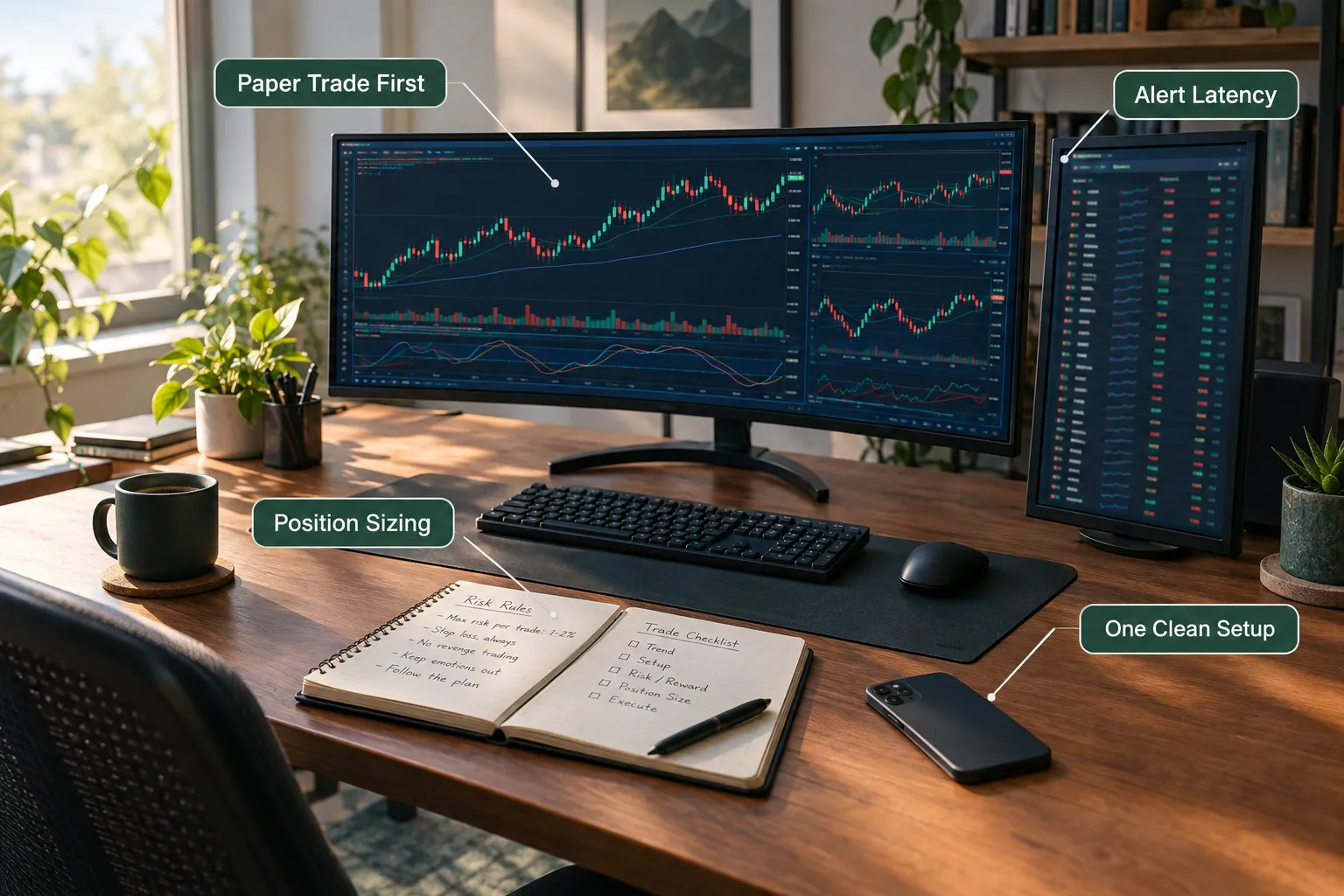
Then paper trade it first. Schwab’s paperMoney gives you a simulated environment running on real-time market data at no extra cost to Schwab clients, which is the closest free approximation of live conditions either platform offers. Run the system for 30 days in paper before a dollar moves. If you can’t follow it for 30 days in simulation, you won’t follow it with money on the line.
Which Platform Can Actually Automate Trades?
Neither one, by itself, end to end. TradingView generates and transmits the signal; something else has to execute it. thinkorswim can place conditional orders inside Schwab, but its strategy backtests never send live brokerage orders. Anyone selling you “fully automated trading on TradingView” is describing a three-part system and only naming one part.
The TradingView webhook route
The standard architecture, and it works:
- Pine Script strategy or indicator defines the condition.
- TradingView alert fires when the condition hits. You configure it in the UI, not in the script.
- Webhook POST goes to your endpoint. Port 80 or 443 only. IPv4 only. Two-factor authentication on your account is required.
- Your receiver acknowledges within three seconds, then queues the job.
- Your risk engine applies position sizing, max-exposure checks and a stop loss. This is the part amateurs skip.
- Broker or exchange API places the order.
Steps 4 through 6 are where the actual engineering lives. TradingView handles steps 1 through 3 and then hands you a JSON payload and wishes you luck.
TradingView also offers broker integrations through its trading panel, which let you place orders from the chart with supported brokers. That’s manual or semi-automated trading, not a bot. The list of supported brokers changes, so check TradingView’s official brokers page before you design around it.
The Schwab API route
thinkorswim doesn’t expose a public automation interface. The Schwab Trader API is the path, and it’s a genuinely different product: you register as a developer, get an app approved, handle OAuth authentication, and then call endpoints for account data, market data and order placement.
Independent coverage of the thinkorswim API question, including TradersPost’s writeup on what’s actually available today, makes the same point: people searching for a “thinkorswim API” are usually looking for the Schwab Trader API, and the two are not interchangeable. The old TD Ameritrade API that many older tutorials reference has been folded into Schwab’s platform.
Practical consequence: Schwab API automation is a software project, not a settings change. Expect approval wait times, OAuth token refresh handling, and rate limits you’ll need to read the official docs for. Don’t guess at those limits. Check the official page.
Can you automate on TradingView without knowing how to code?
Partly, yes. Third-party execution services sit between TradingView’s webhook and your broker, accepting the alert payload and translating it into orders without you writing a receiver. You still have to write the Pine condition (or copy one from the public library) and configure the alert payload correctly.
What “no-code” really means here: you avoid building the server, not the strategy. The thinking is still yours. If you want to see which middleware services are worth the subscription, the roundup of the best AI trading tools of 2026 put head to head is a reasonable starting point.
Common mistakes people make building bots on TradingView
These show up over and over:
- Using
alert()on an indicator and expecting the alert to exist. The script defines the condition. You still create the alert in the interface. No alert created, no webhook, no trade. - A slow webhook receiver. Three seconds. Acknowledge first, process second.
- Wrong port. If your endpoint runs on 8080, TradingView won’t reach it. Use 443 behind a proper reverse proxy.
- “Once per bar” versus “once per bar close.” Pick the wrong alert frequency and your bot fires on a candle that later reverses. That’s how you buy the top of a bull trap repeatedly.
- No idempotency key. If the same alert fires twice, does your bot open two positions? Most beginner receivers do. Tag every signal and reject duplicates.
- No kill switch. You need one endpoint that halts everything. Build it before you need it, because you will need it on a choppy tape.
- Running live before paper. Run every bot in a simulated account for at least a month. Non-negotiable.
Decision rule: if you can’t explain what your bot does when the internet drops mid-position, it isn’t ready.
How Much Do Thinkorswim and TradingView Cost?
thinkorswim is free to Schwab account holders; TradingView charges a monthly subscription, and the webhook feature you need for bots lives on paid plans. Figures below are from the official pages as of October 2026, and both companies change pricing frequently.
| Plan | Listed price (annual billing) | Active price alerts | Webhook alerts |
|---|---|---|---|
| thinkorswim (desktop, web, mobile) | No separate platform fee for Schwab clients; standard trading costs apply | In-platform alerts | No native outbound webhook |
| TradingView Essential | ~$12.95/month | ~20 | Available on paid plans, confirm on the pricing page |
| TradingView Plus | ~$29.95/month | ~100 | Available on paid plans |
| TradingView Premium | ~$59.95/month | ~400 | Available on paid plans |
| TradingView Ultimate | ~$199.95/month | ~1,000 | Available on paid plans |
Notes that matter:
- Those TradingView prices are promotional annual-billing rates shown on the pricing page. Monthly billing costs more. Promotional pricing expires. Check the official page for what’s live today.
- Real-time exchange data on TradingView is often a separate add-on depending on your market. Budget for it if your bot needs real-time, not delayed, quotes.
- thinkorswim’s free platform access is conditional on being a Schwab client. Commissions, contract fees and margin rates still apply on real trades.
- paperMoney is included at no additional cost for Schwab clients, which makes thinkorswim the cheapest serious place to test a strategy on real-time data.
Decision rule on cost: if you’re running fewer than 20 simultaneous alerts, Essential is enough. If you’re scanning a hundred-plus name watchlist, you’re in Premium territory, and the annual cost there is real money. Price the plan against alerts, not features.
Honest math: TradingView Premium at roughly $60/month runs about $720 a year. If your account is $5,000, that’s 14% of the account in tooling before you place a single trade. Small-account traders should start on Essential or free, prove the system works, then scale the subscription with the account. Not before. Tool spending is the easiest way to feel productive while making nothing.
Does TradingView Work With Thinkorswim or Schwab?
As of October 22, 2026, there is no official native broker integration that lets you route TradingView orders directly through thinkorswim or Schwab. TradingView’s broker panel supports a rotating list of integrated brokers, and you should confirm the current roster on TradingView’s official brokers page before planning around it.
What you can do instead:
- Use TradingView for charting and signals, execute manually in thinkorswim. Common, boring, works. Alert fires, you look at the setup, you place the trade in Schwab.
- Route TradingView webhooks through a third-party execution service that holds a Schwab API connection. The middleware catches the alert and places the order via Schwab’s API. This adds a dependency and a monthly fee, and it adds a failure point. Test it in paper first.
- Build your own bridge against the Schwab Trader API. Your webhook receiver authenticates to Schwab, manages OAuth tokens, and submits orders. Most control, most work, most responsibility.
Edge case worth flagging: token expiry. Schwab API access tokens need refreshing, and a bot that silently loses authentication mid-session won’t place the exit order. Log every auth failure loudly and build an alert for it. A bot that can enter but can’t exit is worse than no bot.
The broader point for the thinkorswim vs TradingView comparison: these two platforms were never designed to talk to each other. One is a brokerage’s proprietary terminal, the other is an independent charting company. Any bridge between them is something you or a vendor builds.
Thinkorswim vs TradingView: Which Has Better Charting?
TradingView wins on charting experience; thinkorswim wins on options analytics. That’s the cleanest split in the whole thinkorswim vs TradingView comparison, and almost no one disputes it.
TradingView’s charting strengths:
- Runs in a browser on anything, including a phone, with the layout synced
- Drawing tools and chart templates that feel designed rather than engineered
- An enormous library of community indicators, one click from your chart
- Multi-chart layouts on higher tiers
- Speed. The thing just loads
thinkorswim’s charting strengths:
- Options analysis tools that TradingView doesn’t attempt: risk profile graphs, probability analysis, volatility studies
- Real-time data included for Schwab clients, no separate exchange subscription math
- Direct order entry from the chart into your actual brokerage account
- OnDemand market replay for reviewing past sessions (confirm current availability on Schwab’s page)
- Deep integration between scans, watchlist columns and the chart
Decision rule: if you’re reading price action on equities and futures, TradingView’s interface will make you faster. If you’re analyzing an options spread’s risk profile before you enter, thinkorswim has tools TradingView simply doesn’t have.
For day traders specifically, speed of chart interaction matters more than feature count. A platform you can read in half a second during power hour beats a platform with 40 extra studies you never open. More on that tradeoff in the roundup of day trading tools.
Rate limits and connectivity: which is more stable?
Both platforms are run by serious companies, and both go down occasionally. Neither publishes a simple uptime figure you can quote, so treat vendor stability claims skeptically and check each company’s official status page.
What you can plan for:
- TradingView webhooks have a published three-second response window and accept only ports 80 and 443. Those are documented constraints, not guesses, and they’re the most common cause of “my webhook doesn’t work.”
- Schwab Trader API rate limits are documented in Schwab’s developer materials. Read them before you design a polling loop. Don’t assume.
- The weakest link is usually your own server, not theirs. A $5 VPS with no monitoring will fail before TradingView does.
Build for failure, not for uptime. Log every signal received. Log every order sent. Reconcile positions against the broker on a schedule. If your bot’s internal state and your broker’s actual positions ever disagree, halt and alert. That’s not paranoia, that’s risk management.
What Are the Best Alternatives to Both for Building Trading Bots?
If neither platform fits, the alternatives split into three groups: dedicated charting-plus-automation tools, broker APIs with developer-first design, and full algorithmic frameworks. Pick by how much code you want to write.
Charting tools with built-in automation. TrendSpider is the usual comparison here, and we cover it below. These sit closest to TradingView in spirit but bundle more automation natively.
Developer-first broker APIs. Brokers that treat the API as a product rather than an afterthought give you documentation, sandbox environments and predictable rate limits. If you’re writing Python and want to own the whole stack, this is the route. The tradeoff is that you build the charting and the signals yourself.
Full algorithmic frameworks. Open-source and commercial backtesting engines give you tick-level simulation, proper slippage modeling and portfolio-level risk, the things Strategy Tester and AddOrder only approximate. Steepest learning curve, most honest results.
Decision rule by skill level:
- Can’t code: TradingView plus a no-code execution service
- Can read and modify code: TradingView plus a custom webhook receiver
- Can write production software: broker API directly, with your own backtesting engine
- Options-focused regardless of skill: thinkorswim plus the Schwab API
For a wider sweep of what’s out there, the directory of best AI trading platforms 2026 sorts the field by category and price. And if you’re weighing whether a paid tool earns its subscription, AI trading software: what you pay for vs what you get is the reality check.
How Does TrendSpider Compare With TradingView?
TrendSpider positions itself as an automation-first charting platform, where TradingView is a charting-first platform with automation bolted on. The TradingView vs TrendSpider question usually comes down to whether you’d rather configure automation in a UI or write it in Pine Script.
| Factor | TradingView | TrendSpider |
|---|---|---|
| Primary identity | Charting and social platform with Pine Script | Charting platform built around automated analysis |
| Scripting | Pine Script, very large public library | Built-in automation and scripting features, confirm current capabilities on the official site |
| Community scripts | Enormous | Smaller |
| Best for | Signal generation feeding external bots | Traders who want automation configured rather than coded |
| Cost | ~$12.95 to ~$199.95/month, annual billing (TradingView pricing page, Oct 22, 2026) | Check the official TrendSpider pricing page |
The TrendSpider vs TradingView tradeoff in one line: TradingView gives you a bigger community and a more flexible scripting language; TrendSpider gives you more automation out of the box. For a longer head-to-head, see TrendSpider vs TradingView: which AI charting tool wins.
Only confirmed facts here, and TrendSpider’s feature set moves fast. Verify current pricing and automation capabilities on the official page before subscribing. Neither tool is a reason to skip the part where you define your rules and test them.
Frequently Asked Questions
Is thinkorswim or TradingView better?
Depends on what you’re building. TradingView is better for bot builders who need signals to leave the platform via webhooks, and better for general charting speed. thinkorswim is better for options traders and Schwab clients who want free real-time data, paperMoney simulated trading, and institution-grade options analytics at no platform fee.
Does TradingView work with thinkorswim?
Not natively. As of October 22, 2026 there is no official direct integration between TradingView and thinkorswim or Schwab. Traders bridge the two using TradingView webhooks routed through a third-party execution service or a custom application built on the Schwab Trader API. Confirm TradingView’s current broker list on its official page.
How much does TradingView cost a month?
TradingView’s pricing page showed roughly $12.95 (Essential), $29.95 (Plus), $59.95 (Premium) and $199.95 (Ultimate) per month on annual billing as of October 22, 2026. Monthly billing costs more, and real-time exchange data may be a separate add-on depending on your market. Check the official page for current rates.
Is thinkorswim only for TD Ameritrade customers?
No. TD Ameritrade was acquired by Charles Schwab, and thinkorswim is now a Schwab platform. Schwab’s product pages state that thinkorswim desktop, web and mobile are available to Schwab account holders with no separate platform fee. You need a Schwab brokerage account, not a legacy TD Ameritrade one.
What platform is better than TradingView?
For raw charting and community scripts, few beat TradingView at its price. For options analytics, thinkorswim is stronger. For automation configured without code, TrendSpider is the usual alternative. For full algorithmic control, a developer-first broker API with your own backtesting framework beats all of them, at the cost of significantly more work.
Can you build trading bots directly on thinkorswim?
Not in the way most people mean. thinkScript can place conditional orders inside Schwab, which is a form of automation, but thinkorswim exposes no public API for external bots. Automation against Schwab runs through the separate Schwab Trader API, which handles accounts, market data and order placement.
Our Take
If your bot lives on your own server, TradingView is the pick. Pine Script plus webhook alerts is the shortest honest path from idea to live signal, and Essential at roughly $12.95/month (annual, as of October 2026) is cheap enough to test the whole stack before you commit.
If you trade options and already bank with Schwab, thinkorswim is the pick, and the Schwab Trader API is your automation layer. It’s more work. The paperMoney environment and free real-time data partially pay you back for it.
If you’re still deciding what your strategy even is, skip both subscriptions this month. Paper trade one setup, write down the rules, run it for 30 days, and let the results argue. Tool spending feels like progress. It isn’t. Systems over hacks.
Picked your side? Work through our bot comparison write-ups next, then check the price and feature details against the AI trading tools directory before you pay for anything.
Stay alpha.
The FullStack Alpha research desk tests AI trading bots on paper and live accounts. Reviewed and edited by Jay Rocco, Founder and Editor.
