

The FullStack Alpha research desk tests AI trading bots on paper and live accounts. Reviewed and edited by Jay Rocco, Founder and Editor.
By FullStack Alpha Editorial Team | Reviewed by Jay Rocco, Chief Editor
Yes, tastytrade has a public API, and the tastytrade API is free to use with a funded brokerage account. Access runs through an OAuth2 application you register on the developer portal, which gives you a client ID, client secret and refresh token you trade for a 15-minute access token. There’s a separate sandbox environment at api.cert.tastyworks.com with its own credentials, where orders never touch a real exchange and fills are faked by rule. Order placement supports equities, options and futures through REST, with a dry-run endpoint that validates an order before you send it for real.
What You Should Know
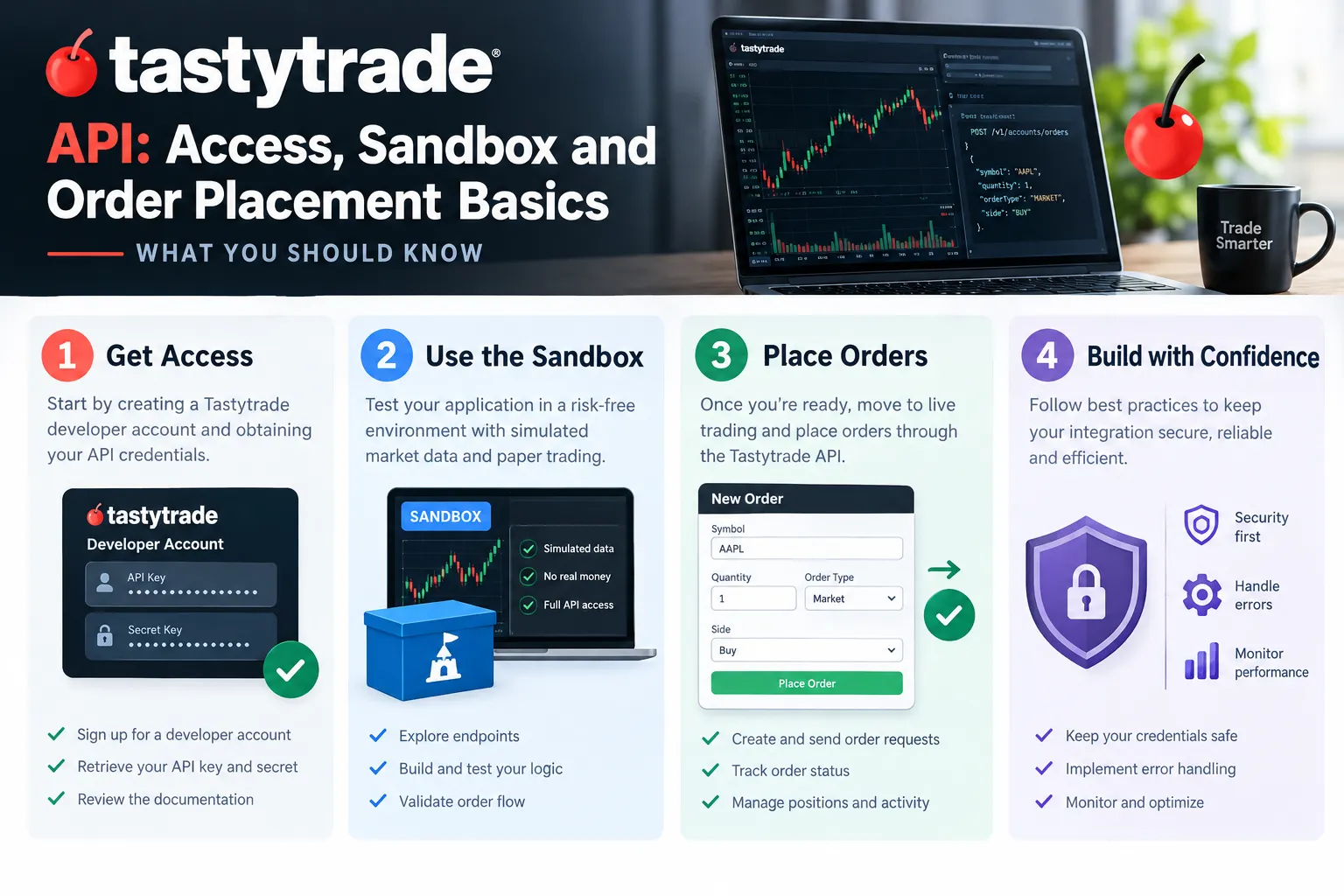
- Legacy session login is dead. tastytrade’s release notes state the old
POST /sessionsauthentication was fully decommissioned on February 11, 2026. OAuth2 is the only path now. - Access tokens last 15 minutes. Per the developer quickstart, you cannot extend them. Your app mints a new one from the refresh token when it expires.
- Crypto through the API was disabled on June 29, 2026, “until further notice,” according to the release notes, even though the main tastytrade marketing page still lists crypto.
- The sandbox has no market data. The sandbox docs (updated October 3, 2026) say
/market-dataand/market-metricsreturn HTTP 502. - The reference covers 98 operations per the quickstart, spanning accounts, balances, positions, instruments, option chains, orders and streaming.
Does Tastytrade Have an API?
Yes. tastytrade runs an official developer platform at developer.tastytrade.com with public documentation, and as of the October 2026 doc updates it’s actively maintained rather than a dusty side project. The API overview page was updated October 7, 2026, the quickstart and sandbox pages on October 3, 2026.
What the platform actually gives you:
- Accounts and balances. Pull account numbers, buying power, net liquidating value, margin requirements.
- Positions and transactions. Current holdings plus historical fills.
- Instruments and option chains. Equities, equity options, futures, futures options, and the chain data you need to build a spread.
- Orders. Create, validate, submit, replace, cancel. Both single-leg and multi-leg.
- Streaming. A WebSocket account streamer for order and position events, plus market data streaming on production.
The quickstart counts 98 operations in the reference. That’s a wide surface area. Most people touch maybe fifteen of them.
One thing the docs are blunt about that the marketing page isn’t: crypto trading through the API was switched off on June 29, 2026. If a blog post from last year told you tastytrade API does crypto, that post is stale. Equities, options and futures are the live surface.
Decision rule: if you’re building anything that needs multi-leg options orders from a US retail broker with a documented REST interface, the tastytrade API belongs on your shortlist. If you need crypto, look elsewhere.
Worth saying out loud, since this is the part most tutorials skip: an API is a permission system wearing a technical costume. The question is never “can I code this,” it’s “will the broker let my code do it, and what happens when it breaks at 9:31 a.m.” Keep that framing. It’ll save you money.
For the brokerage side of the story (commissions, platform, who it suits), see the full tastytrade broker review.
How Do You Get Tastytrade API Access Step by Step?
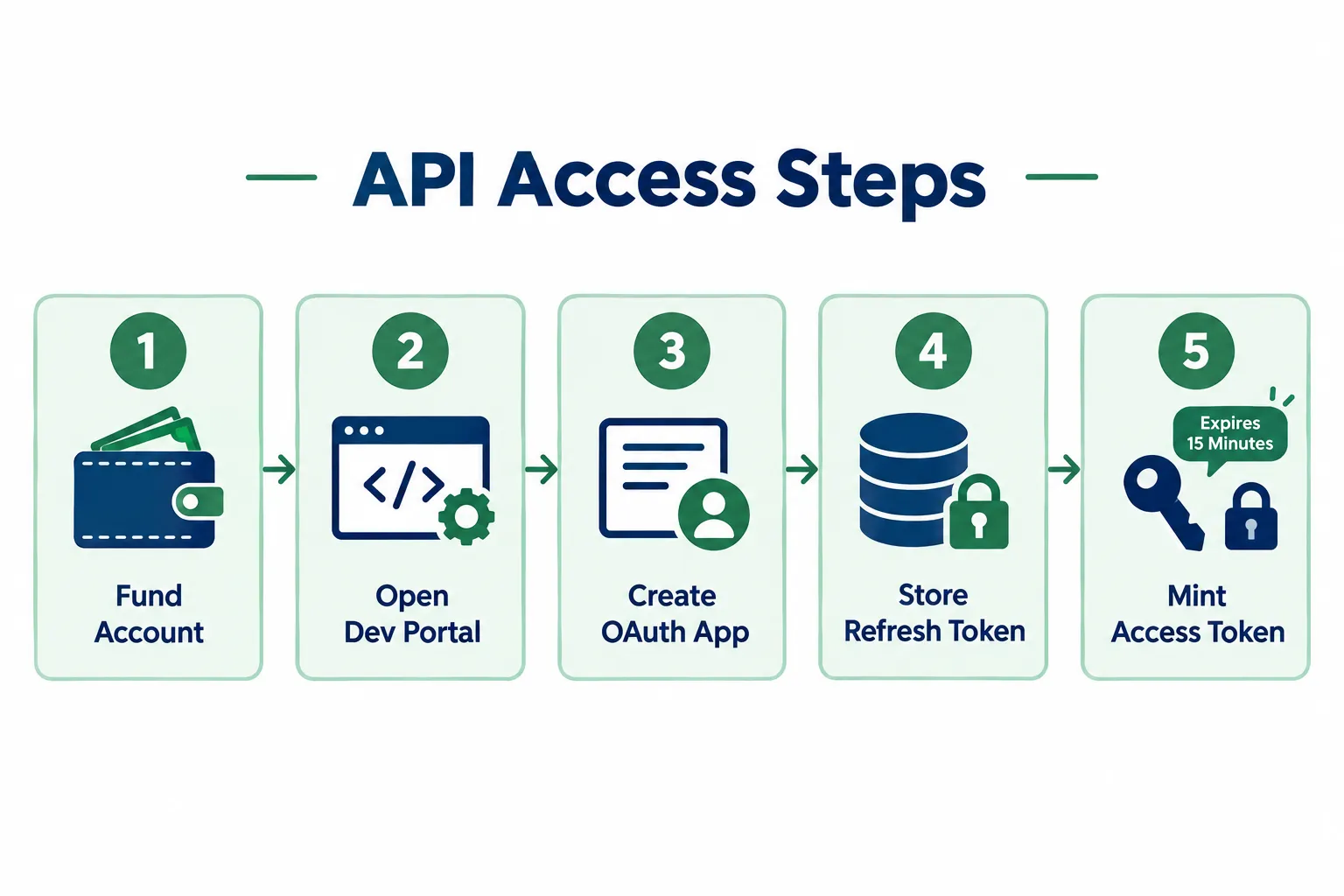
You need a funded tastytrade brokerage account, then an OAuth application registered through the developer portal, which issues a client ID, client secret and refresh token. You exchange the refresh token at POST /oauth/token for a 15-minute access token and send that as a bearer token on every request.
Here’s the sequence, in words, no code:
1. Open and fund a tastytrade brokerage account. API access rides on a real account. There’s no developer-only signup that skips the brokerage relationship. Standard account opening applies: identity verification, funding, and the usual approval process.
2. Get your options and futures permissions sorted first. This is the step people skip and then blame the API for. The API does not grant trading permissions. If your account isn’t approved for spreads, the API will reject a spread order exactly the way the web platform would. Same for futures, which require a separate futures-enabled account. Check your approval level in the account settings before you write a line of code.
3. Register an OAuth application on the developer portal. Log into developer.tastytrade.com with your tastytrade credentials and create an OAuth client. You’ll choose scopes here, which define what the app can do: read account data, trade, stream. Grant the minimum you need. A read-only client that can’t place orders is a very cheap insurance policy during development.
4. Record the client ID, client secret and refresh token. The secret is shown once. Treat it like your account password, because functionally it is one. Environment variables or a secrets manager, never a committed file, never a screenshot in a Discord.
5. Decide sandbox or production, and register separately for each.
Sandbox and production are genuinely separate systems with separate OAuth applications. The sandbox base URL is https://api.cert.tastyworks.com; production is https://api.tastyworks.com. A sandbox refresh token will not authenticate against production, and a production token will not authenticate against sandbox. That’s by design, and it’s a good design.
6. Exchange the refresh token for an access token.
Call POST /oauth/token with the grant type, client ID, client secret and refresh token. You get back an access token good for 15 minutes. No extensions. Your app needs a refresh routine that mints a new token on expiry or on a 401.
7. Set a User-Agent header globally.
Every request needs a User-Agent in the format <product>/<version>, like my-app/1.0. The quickstart says requests without one get rejected with HTTP 401. Configure this once in your HTTP client, not per-call.
8. Make a harmless read request to confirm the chain works. Pull your customer accounts or account balances. If that returns clean JSON, authentication, headers and base URL are all correct.
Common errors at this stage
| What you see | Usual cause |
|---|---|
| 401 on every request | Missing User-Agent header, or an expired access token |
| 401 only after a while | The 15-minute token expired and nothing refreshed it |
| 401 with correct-looking creds | Sandbox token pointed at production base URL, or vice versa |
| 403 on an order | Account permission level, not an API bug |
| 404 on an account endpoint | Wrong account number format, or using a username where a number belongs |
Common mistake: hardcoding the access token into a config file during testing, then wondering why everything dies fifteen minutes later. Build the refresh loop on day one. It’s twenty lines and it removes an entire category of 2 a.m. debugging.
More on how broker credentials and automation fit together in our broker API overview.
How Does the Tastytrade Sandbox Work?
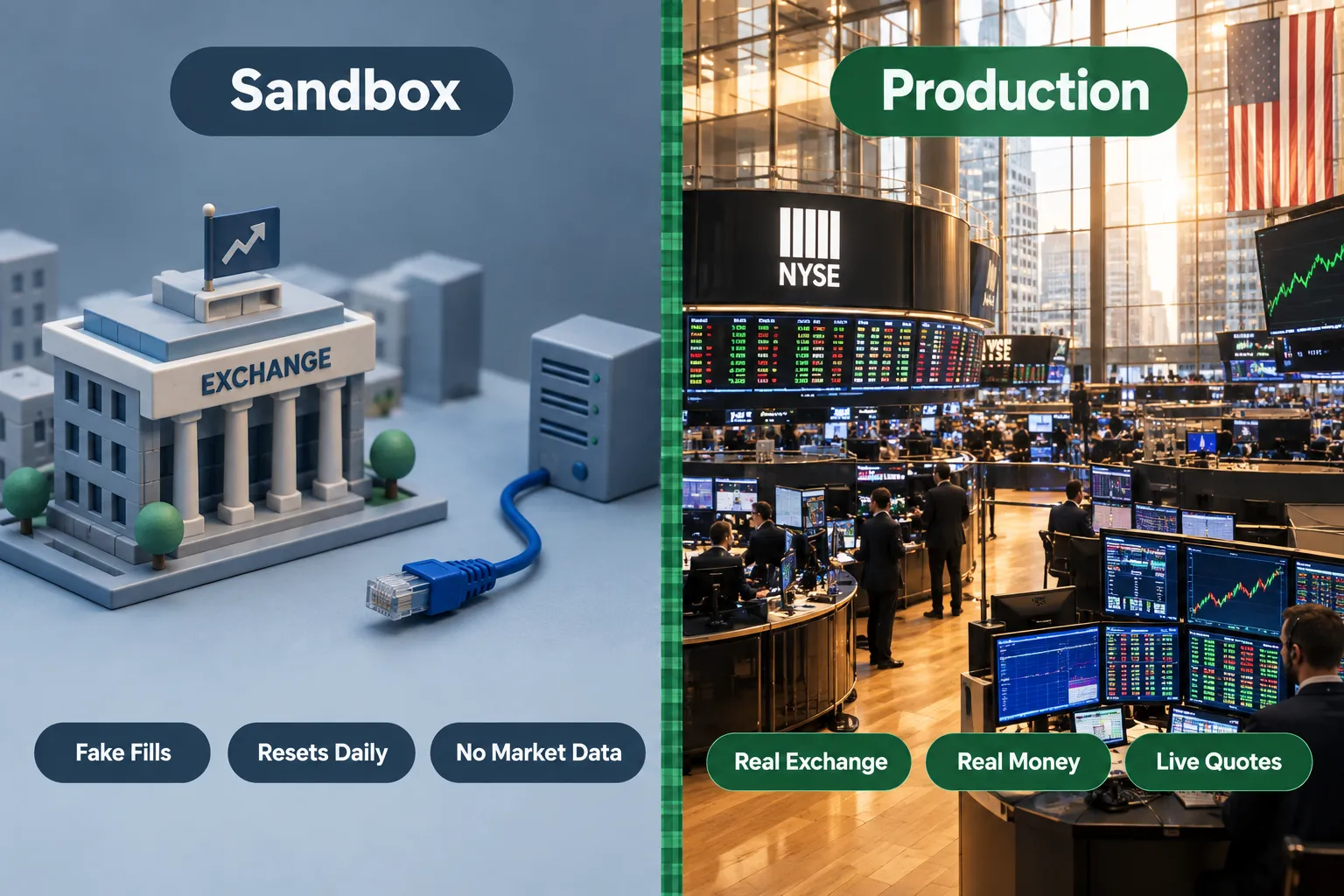
The tastytrade sandbox is a full copy of the API that accepts real order submissions and returns realistic responses, but nothing reaches an exchange. Fills are decided by a price rule, not by a live order book. It exists to test your integration, not your strategy.
The rules, straight from the sandbox documentation updated October 3, 2026:
- Market orders always fill at $1. Every time, regardless of the symbol.
- Limit orders priced below $3 fill immediately.
- Limit orders priced at $3 or above stay
Liveindefinitely. Which is actually useful, that’s how you test cancel and replace flows. - State resets roughly every 24 hours. Trades, positions, transactions and balances get wiped. Users and accounts survive.
- Market data is currently unavailable.
/market-dataand/market-metricsreturn HTTP 502. No quotes, no market metrics, no historical dividends, no earnings data.
What still works in the sandbox: instruments, option chains, accounts, balances, positions, transactions, orders, dry runs and order submission. So you can build a complete order pipeline. You just can’t price it off live quotes.
Is this tastytrade paper trading?
Not in the way most retail traders mean it. tastytrade does not offer a public paper trading account in the consumer sense, the sandbox is a developer certification environment, not a simulator for practicing strategy with realistic fills. If you want to practice trading on the tastytrade API without real money, the sandbox will let you push orders safely. It will teach you nothing about whether your setup actually works, because a market order filling at $1 on a $340 stock is fiction.
That distinction matters. Two different activities get called the same thing:
- Integration testing, does my code authenticate, build a valid order, handle a rejection, and reconcile positions? The sandbox is excellent for this.
- Strategy testing, would this system have made money? The sandbox is useless for this, and pretending otherwise is how people talk themselves into going live too early.
Decision rule: test your plumbing in the sandbox, test your strategy with historical data or a simulator that uses real quotes, then go live with the smallest position size your account allows. Paper trade it first, but know which “it” you’re paper trading.
Edge case worth planning for: because sandbox state resets daily, any test that depends on a position opened yesterday will fail overnight. Write tests that build their own state from scratch in each run. If you want a broader comparison of which brokers offer genuine simulated accounts, we covered that in does Robinhood have paper trading.
How Does Order Placement Work Through the Tastytrade API?
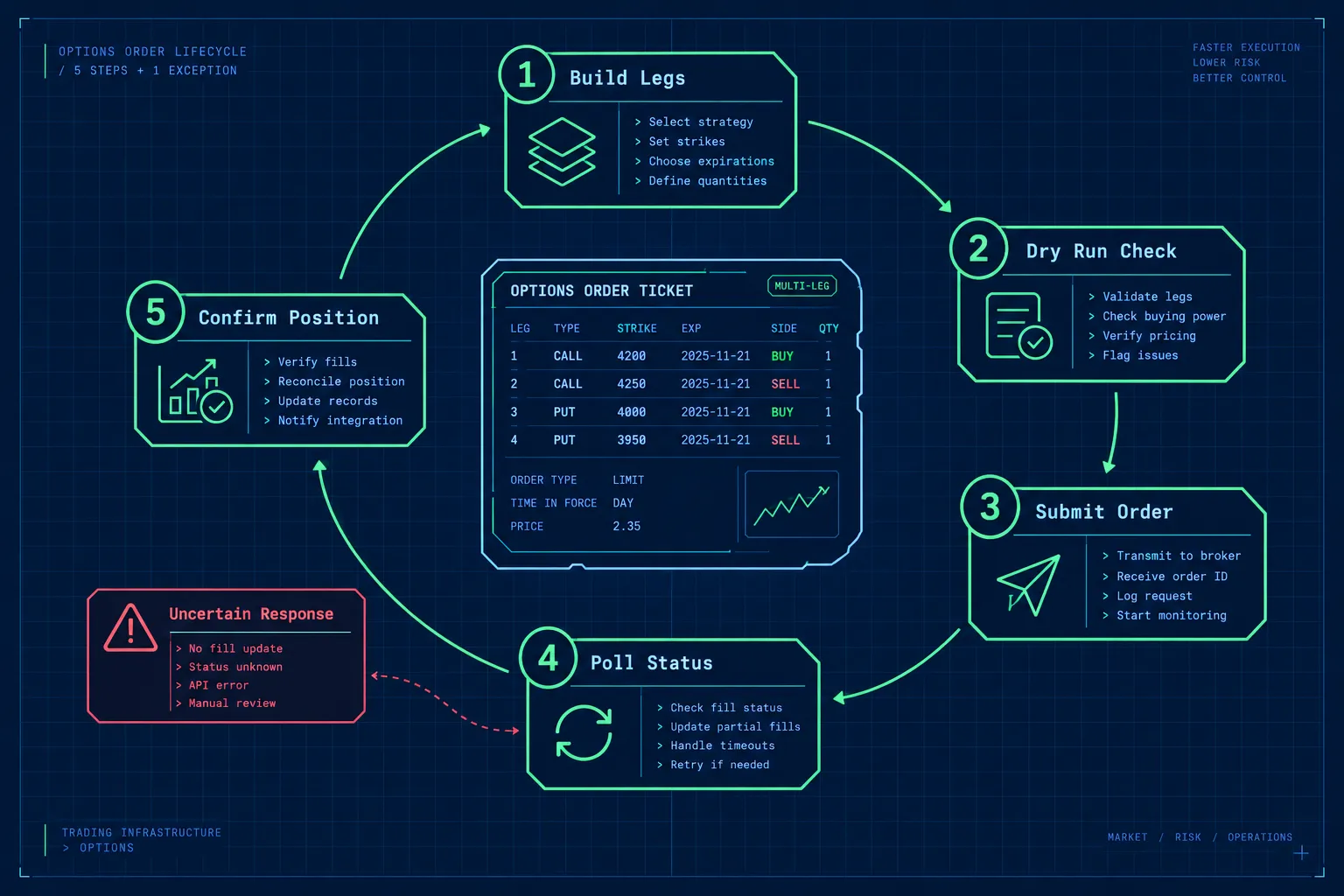
Orders are JSON objects posted to the account’s orders endpoint, containing a time-in-force, an order type, a price where applicable, and an array of legs. The tastytrade api documentation provides a dry-run endpoint that validates the exact same payload and returns buying power effect and warnings without submitting anything.
The structure in plain terms
Every order carries:
- Order type, market, limit, stop, stop limit.
- Time in force, day, GTC, and session variants.
- Price and price effect, the price effect says whether the account is debited or credited, which matters enormously on options spreads.
- Legs, each leg names the instrument type, the symbol, quantity and action (buy to open, sell to close, and so on).
A single-leg stock buy has one leg. A four-leg iron condor has four. Same envelope, more legs.
Does the tastytrade API support stop loss and limit orders?
Yes. Limit, stop and stop limit orders are supported alongside market orders. A stop order triggers at your stop price and becomes a market order; a stop limit triggers and becomes a limit order, which protects you from a terrible fill but can leave you unfilled in a fast drop. Pick the one that matches what you’re actually afraid of.
Can you place options orders with the tastytrade API?
Yes, and options are what the platform is built around. Multi-leg orders, including verticals, strangles, iron condors and calendars, go through as a single order with multiple legs. You pull the option symbols from the option chain endpoints, which return properly formatted OCC symbols so you’re not hand-assembling strings and getting the strike padding wrong.
The order flow that doesn’t get you hurt
- Pull the option chain for the underlying and pick your strikes programmatically. Never hardcode a symbol with an expiry in it.
- Build the order payload with explicit legs and an explicit price effect.
- Run the dry run. This is the step that separates careful builders from people who learn by losing money. It returns the buying power effect, fee estimates and any warnings.
- Check the buying power effect against what you expected. If the number surprises you, your legs are wrong. Stop.
- Submit the order.
- Poll the order status, or listen on the account streamer. Do not assume submitted equals filled.
- Reconcile positions after the fill to confirm the account looks the way your code thinks it does.
Handling the response you hope you never get
Network calls fail mid-flight. If you send an order and never get a response, you genuinely don’t know whether it landed. The documentation calls this out directly and it’s the single most dangerous state in any trading integration.
Never retry an order submission blindly. Query the account’s live orders first, confirm whether it exists, and only then decide.
Related: since the August 13, 2025 release, the live orders endpoint is paginated. The published example shows a page size of 1,000 and a sample total of 25,719 orders across 26 pages. If your reconciliation logic reads page one and stops, it will eventually miss an order and tell you something false about your own account. Iterate every page.
Play stupid games with retry logic, win stupid prizes in the form of a doubled position.
Can You Build a Tastytrade Trading Bot?
Yes, a tastytrade trading bot is technically straightforward because the REST surface covers everything an automated system needs: data, dry run, submit, monitor, cancel. The hard part was never the API. It’s the risk layer you have to write yourself.
A realistic workflow looks like this:
- Signal generation, runs separately from execution, on whatever data source you trust.
- Pre-trade risk checks, position sizing, max open positions, max daily loss, instrument whitelist. Your code, not the broker’s.
- Dry run, validate and read the buying power effect.
- Submit, one order, logged with a unique ID on your side.
- Monitor, account streamer for fills and rejections.
- Exit logic, stop and target placed as real orders at the broker, not held in your script’s memory. If your process dies, your stop should still exist.
The safety checklist before any bot touches a funded account
- Kill switch that cancels everything and halts the loop, reachable without redeploying.
- Daily loss limit enforced in code, checked before every submission.
- Max order size and max notional hardcoded as a ceiling, separate from strategy logic.
- Full order log written before submission, not after.
- Duplicate-order guard keyed on a client-side ID.
- Token refresh handled with retry and backoff, so a 401 doesn’t orphan a live position.
- A rehearsal in the sandbox of the ugly paths: rejection, partial fill, cancel-after-fill, connection drop.
Common mistake: holding stop logic inside the running script. Your laptop sleeps, your VPS reboots, your WebSocket drops at the worst possible moment, and the stop that lived in a Python variable never fires. Put protective orders at the broker. Always.
If you’re earlier in the process, start with trading bot basics before you write execution code.
What about rate limits?
tastytrade’s documentation doesn’t publish a single advertised requests-per-minute figure the way some brokers do, and requests that come in too fast will be throttled. Rather than guess a number here, check the official page and build for it anyway: exponential backoff on 429 responses, a request queue, and WebSocket streaming instead of polling for anything that changes often. A bot that hammers the orders endpoint every 200 milliseconds is both rude and fragile. Use the account streamer for order state and reserve REST for actions.
Is There a Tastytrade MCP for Claude?
Yes. tastytrade publishes an official MCP server in its developer documentation, under SDKs and tools. MCP (Model Context Protocol) is the standard that lets an AI client like Claude call external tools, so a tastytrade MCP server lets an assistant read account data and interact with the API through defined tools rather than you writing the HTTP calls yourself.
What the official server exposes: tools and resources for API interaction, covering the kinds of reads you’d expect (accounts, positions, balances, instruments) plus order-related operations.
The important detail is the guardrail. Order-changing tools require a confirmation token generated by a dry-run tool. That token is:
- Single-use
- Valid for 60 seconds
- Bound to the specific order arguments and the target endpoint
So an AI client can’t fabricate an order and push it through in one move. It has to dry-run first, receive a token tied to those exact parameters, and use it immediately. That’s a sensible design and it should tell you something about how seriously to take unguarded AI-to-broker connections elsewhere.
How to use a tastytrade MCP without regretting it
- Start read-only. Scopes exist for a reason. Give the MCP client an OAuth app that cannot trade.
- Point it at the sandbox first. Separate credentials, zero real exposure.
- Treat it as a research and reconciliation tool, not an execution engine. Asking an assistant to recap your open positions and current margin usage is genuinely useful. Asking it to decide and place trades is a different risk category entirely.
- The MCP layer doesn’t replace REST. It sits on top of the same API with the same permissions and the same limits.
An AI reading your account is a convenience. An AI with write access to your account is a system where a misunderstood prompt costs money. Choose accordingly. We’ve written more on where AI genuinely helps in the AI tools traders won’t admit they’re using.
Can TradingView Connect to Tastytrade?
Yes. tastytrade is a supported broker integration inside TradingView, which lets you place and manage orders from TradingView charts into a connected tastytrade account. You log in through TradingView’s broker panel and trade from the chart interface.
What that integration does:
- Manual order entry from the TradingView chart and DOM.
- Position and order visibility inside TradingView.
- Standard order types placed directly against the tastytrade account.
What it does not do:
- It is not full strategy automation. A TradingView alert firing does not automatically become a tastytrade order through the broker panel. The broker integration is a manual trading interface, not a webhook execution bridge.
- It is not a substitute for the tastytrade API. If you want code-driven execution, you still need OAuth and REST.
Decision rule: if you want to chart on TradingView and click to trade, use the broker integration. If you want “alert fires, order goes in, no human,” you’re building against the tastytrade API or using a third-party bridge that does. Those are different projects with different failure modes.
For the automation side of that question, see TradingView automated trading.
Tastytrade API vs Other Broker APIs
The tastytrade API is strongest for multi-leg options and futures from a retail account with a clean REST interface. Alpaca is simpler and better documented for equities-first automation, Tradier is the lightweight options-focused alternative, and Interactive Brokers has the broadest market coverage with the most awkward connection model.
| Broker | Public API | Paper or sandbox | Options support | Best for |
|---|---|---|---|---|
| tastytrade | Yes, REST plus WebSocket, OAuth2 | Sandbox at api.cert.tastyworks.com, no market data, daily reset | Strong, multi-leg native, futures options too | Options-first retail automation |
| Alpaca | Yes, REST plus streaming, API key based | Full paper trading with real market data | Options supported alongside equities | Equities-first bots and beginners |
| Tradier | Yes, REST, OAuth and token based | Sandbox environment available | Options chains and multi-leg orders | Lightweight options integrations |
| Interactive Brokers | Yes, TWS API and Client Portal Web API | Paper trading account | Very broad, global options and futures | Multi-asset, global, professional scope |
How to choose
- Choose tastytrade if options are the core of what you trade and you want multi-leg orders handled as first-class objects rather than bolted on.
- Choose Alpaca if you’re learning, or if you want a paper environment with real quotes so you can test strategy and plumbing at once. Our Alpaca vs tastytrade comparison goes deeper on that split.
- Choose Tradier if you want a thin, straightforward options API without a heavy platform around it. See the Tradier API guide.
- Choose Interactive Brokers if you need global markets and you’re willing to deal with running a gateway process. Start with the Interactive Brokers TWS API walkthrough.
The honest trade-off: tastytrade’s sandbox has no market data, which is a real limitation compared with Alpaca’s paper environment. tastytrade’s options handling and dry-run validation are better than most. You’re picking which half of the problem you’d rather solve yourself.
Who Should Use the Tastytrade API vs the Regular Platform?
Use the platform if you place fewer than a handful of discretionary trades a week. Use the tastytrade API if you have a written, rule-based process that you’re already executing consistently by hand and the only thing left to remove is yourself.
The API is a good fit for:
- Traders running a defined options system with repeatable entry and exit rules.
- Anyone who needs programmatic position and risk reporting across many open spreads.
- Developers building portfolio tools, journals or analytics on top of real account data.
- People who want scheduled, unemotional execution of a strategy they’ve already validated.
The API is a bad fit for:
- Traders without a documented system. Automating a vague process just produces losses faster and more reliably.
- Anyone hoping the API itself is an edge. It’s a pipe. Pipes don’t have opinions about the market.
- Casual investors placing occasional trades. The maintenance cost of OAuth refresh, error handling and reconciliation isn’t worth it for ten orders a year.
Observation: most people who ask about broker APIs are looking for a way to stop making bad discretionary decisions. Fair instinct. But code only enforces rules you’ve already written down. Discipline beats prediction, and automation enforces discipline, it doesn’t create it.
Practical takeaway: write your strategy rules on one page, trade them manually for 30 sessions, then automate exactly what’s on the page. Nothing else.
Common Errors and Why Your Tastytrade API Connection Isn’t Working
Most tastytrade API connection failures trace back to four things: a missing User-Agent header, an expired 15-minute access token, mixed-up sandbox and production credentials, or an account permission level that doesn’t allow the order you sent.
Run this troubleshooting order:
- Is there a
User-Agentheader on the request? Format<product>/<version>. Missing one returns 401 per the quickstart, which looks exactly like an auth failure and sends people down the wrong rabbit hole for an hour. - How old is your access token? Fifteen minutes, maximum, no extensions. If your request worked and then stopped, this is almost certainly it.
- Does the base URL match the credential? Sandbox credentials against
api.tastyworks.comfail. Production credentials againstapi.cert.tastyworks.comfail. Keep them in separate config profiles with different names. - Are you still using legacy session login?
POST /sessionswas decommissioned February 11, 2026. Any tutorial or SDK built around it is broken, no matter how confidently it’s written. - Are you hitting a sandbox 502 on market data? That’s expected, not your bug.
/market-dataand/market-metricsare unavailable in sandbox. - Is the rejection actually a permissions issue? Spreads, naked positions and futures all require approval levels. The API enforces the same rules as the website.
- Are you being throttled? Rapid polling gets rate limited. Back off, queue requests, and move state monitoring to the account streamer.
- Did you try crypto? API crypto trading was disabled June 29, 2026.
Edge case most people hit once: reading only the first page of live orders. Pagination arrived in the August 13, 2025 release with a page size of 1,000. On a busy account, page one is not the full picture.
Frequently Asked Questions
Does tastytrade have API trading?
Yes. tastytrade operates an official developer platform supporting programmatic trading in equities, options and futures. Access requires a funded brokerage account and a registered OAuth2 application. Crypto trading through the API was disabled on June 29, 2026 per the release notes.
What trading platform does tastytrade use?
tastytrade runs its own proprietary platform across desktop, web and mobile, built around options analysis and quick order entry. The API is a separate interface to the same brokerage accounts, and tastytrade is also available as a connected broker inside TradingView for chart-based manual trading.
How do I integrate TradingView with tastytrade?
Connect through TradingView’s broker panel and log in with your tastytrade credentials, which lets you place and manage orders from the chart. This is manual order entry, not automated alert execution. For code-driven automation you need the tastytrade API directly.
Does tastytrade have paper trading?
Not as a consumer paper account with realistic fills. tastytrade provides a developer sandbox at api.cert.tastyworks.com where orders are simulated by rule, market orders fill at $1, limit orders under $3 fill instantly. It’s for testing integrations, not strategies.
Is the tastytrade API free?
Yes, there’s no separate subscription fee for the tastytrade API. You need a funded tastytrade brokerage account, and normal commissions, exchange fees and any market data entitlements still apply to live trading. Check the official tastytrade pricing page for current commission figures.
What permissions do I need for the tastytrade API?
You need the same account approval levels the web platform requires: options approval for options orders, higher tiers for spreads and uncovered positions, and a futures-enabled account for futures. The API enforces these, it doesn’t bypass them. OAuth scopes control what your specific application can do on top of that.
What’s the rate limit on tastytrade API requests?
tastytrade doesn’t advertise a single public requests-per-minute number in its main documentation, so check the official developer page for current limits. Build with exponential backoff on throttled responses and use the account WebSocket streamer instead of polling for order and position updates.
Our Take
The tastytrade API earns its place for one specific person: the trader who already runs an options system on paper, knows exactly what their entries, exits and size rules are, and wants the execution handled without their hands shaking. The dry-run endpoint and native multi-leg orders are genuinely well-suited to that. The sandbox is honest about what it is, which is more than you can say for most broker test environments, though the lack of market data means you’ll test plumbing here and strategy somewhere else.
For everyone else? The API won’t fix a process you haven’t written down. Build the rules first. Then build the pipe.
Thinking about shipping a bot built on it? Tell us what you’re building and we’ll take a look: submit your bot. Or browse the wider field of broker API guides and automated trading tools before you commit a weekend to it.
Stay alpha.
The FullStack Alpha research desk tests AI trading bots on paper and live accounts. Reviewed and edited by Jay Rocco, Founder and Editor.
