

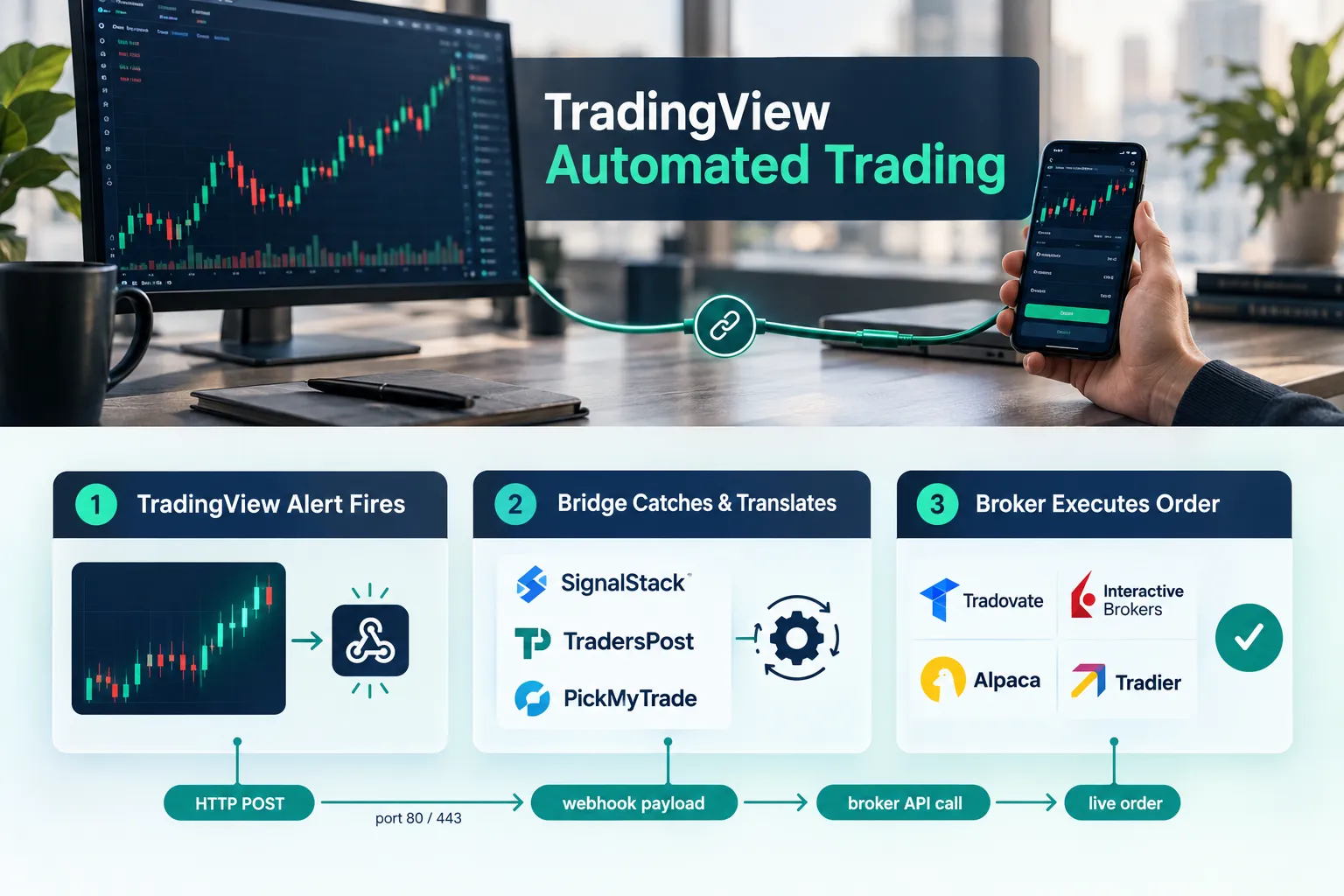
TradingView automated trading reaches a real broker through a webhook bridge, not through TradingView itself. Your alert fires, posts a message to a third-party service, and that service converts it into an order at your broker. TradingView automated trading works this way because the charting platform generates signals; it does not route your orders. That is the whole idea behind TradingView Automated Trading | 3 Bridges That Reach Your Broker: the Full Stack Alpha desk compared the three hosted bridges most retail traders actually use.
Quick Answer
Paid TradingView plans can fire a webhook when an alert triggers. A hosted bridge like SignalStack, TradersPost, or PickMyTrade catches that webhook, translates it into a broker order, and sends it to Tradovate, Interactive Brokers, Alpaca, Tradier, or whichever broker you’ve connected. No coding required. Expect to pay the bridge monthly on top of broker commissions and data fees, and expect execution latency measured in seconds, not milliseconds.
Key Takeaways
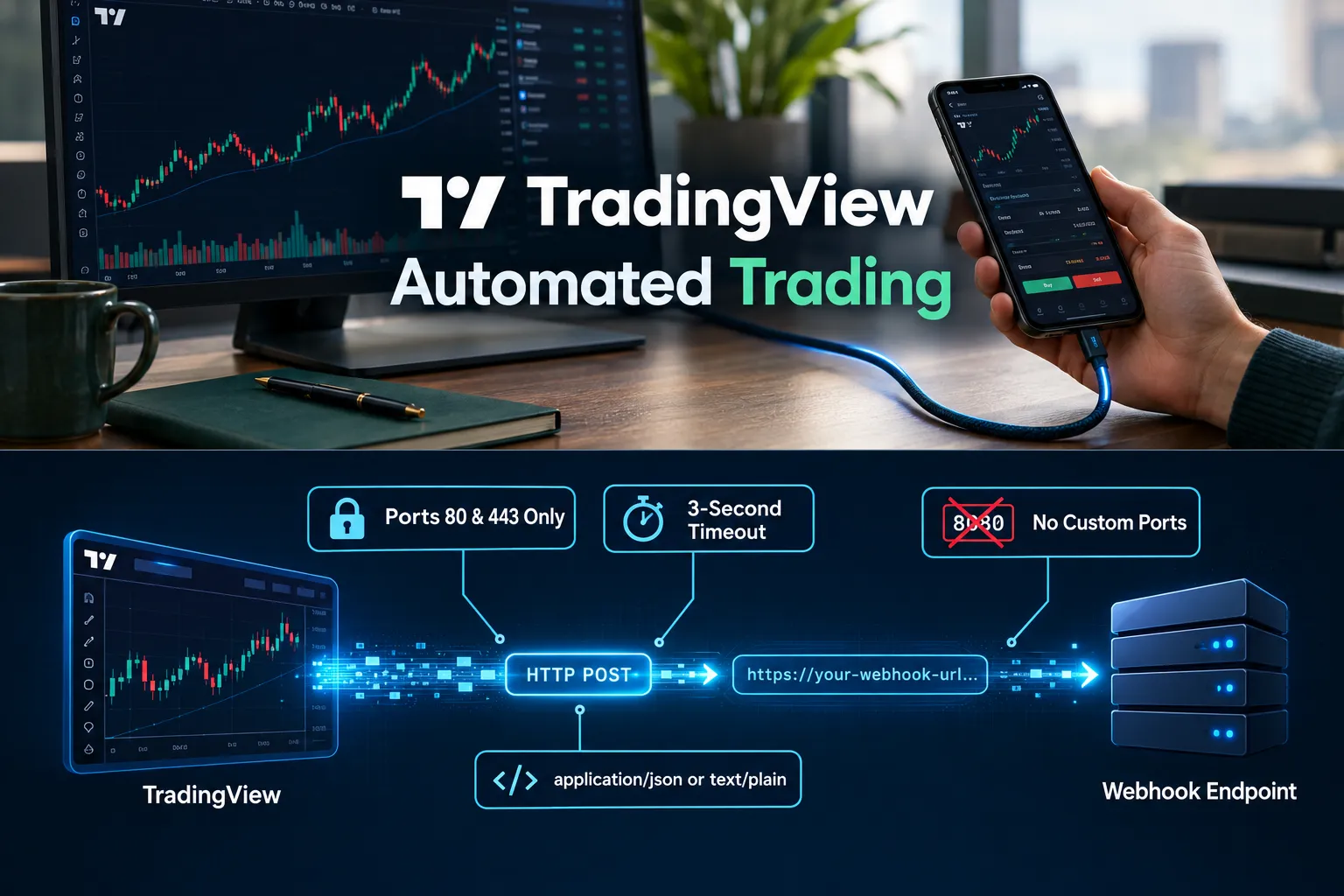
- TradingView restricts webhook destinations to ports 80 and 443 and cancels the request if your endpoint takes longer than roughly three seconds to respond, per the TradingView Help Center webhook documentation.
- Technical alert capacity scales by plan: 20 on Essential, 100 on Plus, 400 on Premium, 1,000 on Ultimate, according to the TradingView pricing page as of October 2026.
- SignalStack offers a free tier with 5 signals per month, scales to $340/mo, and connects 30+ brokers.
- TradersPost starts at $41.65/mo, supports 16+ brokers, and includes paper trading. PickMyTrade runs about $50/mo and is strongest for futures brokers and prop accounts.
- TradersPost documentation, summarized by Tradewink’s webhook automation guide, reports delays from 2-3 seconds up to 60 seconds, with 25-45 seconds normal in some conditions.
- The CFTC issued Staff Letter No. 26-25 on September 17, 2026, a no-action position for passive software providers that help users trade through registered futures intermediaries, per the CFTC press release.
Can TradingView place trades automatically?
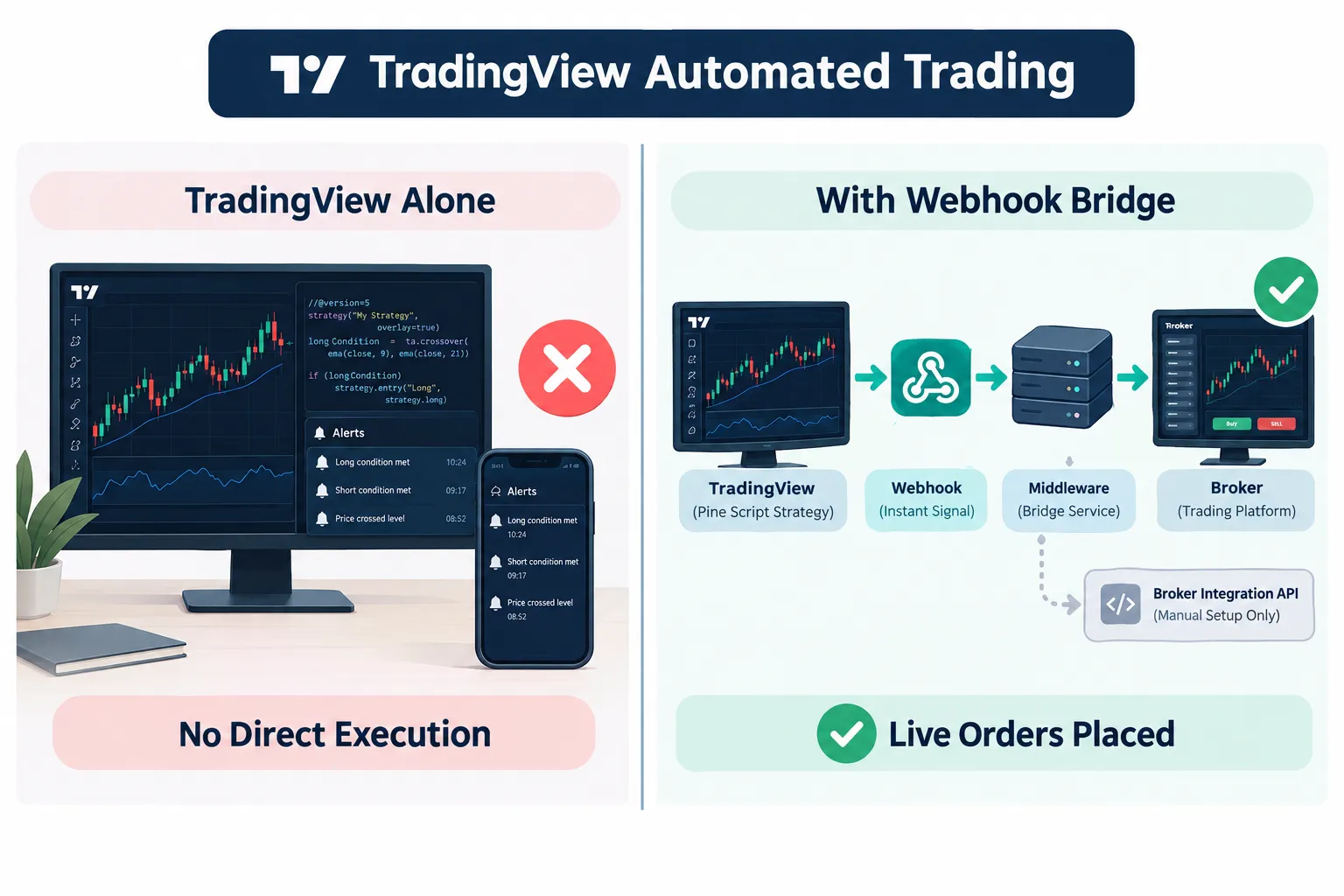
No. TradingView by itself cannot place a live broker order from a Pine Script strategy. It can fire an alert, and that alert can carry a webhook, which is the hook a bridge grabs to do the actual execution work.
There is a second route: TradingView’s own Broker Integration API, which lets brokers plug directly into the charts for order placement, position closing, symbol mapping, authentication, streaming prices, and sandbox testing. That’s manual click-to-trade from the chart panel, not strategy automation. The distinction matters because many traders assume connecting a broker account to TradingView means their script now trades. It doesn’t.
Signal generation and execution are two separate jobs. TradingView does the first. A bridge does the second.
TradingView automated trading
TradingView automated trading means using TradingView alerts as the trigger for real orders at a broker, with a middleware service handling translation and routing. You need three things: a paid TradingView plan, a bridge subscription, and a connected brokerage or prop account. Think of it as a tradingview automated trading bot assembled from parts you rent instead of code you write.
Here’s the honest version of the workflow:
- You build a strategy on the chart, either with an indicator condition or a Pine Script strategy. If you’re still learning the language, our Pine Script strategy guide covers the structure.
- You create an alert and paste the bridge’s webhook URL into the alert’s webhook field.
- The alert message carries JSON: ticker, action, quantity, order type.
- The bridge receives it, validates it, maps the symbol to the broker’s format, applies risk rules, and calls the broker API.
- The broker fills, rejects, or partially fills. The bridge reconciles.
That’s it. No Python server, no VPS, no cron jobs. Multiple comparison guides, including Insigtrade’s breakdown of four webhook-to-broker routes, reach the same conclusion: hosted bridges beat home-rolled scripts for anyone who isn’t a developer, mostly because of that three-second timeout. Every tradingview automated trading setup in this guide lives or dies on that number.
Who this is for: traders on minute, hourly, or daily timeframes with a tested strategy. Who it’s not for: sub-second scalpers. Your edge evaporates in transit.
Can you automate trading on TradingView without coding?
Yes. All three bridges accept plain-English or simple JSON alert messages, so you can automate an indicator crossover with zero code. Pine Script helps if you want precise position sizing or multiple exit legs, and our Pine Script tutorial walks through the basics for that case.
How does a TradingView webhook actually work?
A TradingView webhook is an HTTP POST. When your alert condition triggers, TradingView sends the alert message body to a URL you supply. Valid JSON goes out with application/json; anything else goes as text/plain.
Three hard constraints shape everything downstream:
- Ports 80 and 443 only. No custom ports.
- Roughly 3 seconds to respond. Slower and the request gets cancelled.
- Two-factor authentication required on your TradingView account before webhook alerts work.
TradingView’s own documentation is blunt about security over guarantees: never put passwords or broker credentials in the webhook body, and use an authenticated endpoint. Delivery can occasionally fail. That’s stated, not implied.
The deeper issue is state. TradingView, the bridge, and the broker don’t share one record of truth. A webhook can deliver perfectly while the broker rejects the order for insufficient margin, which means your strategy thinks it’s long and your account is flat. Ontology Trading’s webhook setup guide treats this as the core reconciliation problem, and it is.
One more trap specific to Pine Script: TradingView runs a server-side copy of your strategy when you create the alert. Edit the chart script and the running alert keeps using the old copy. Delete and recreate the alert after any material change.
How do SignalStack, TradersPost and PickMyTrade compare for tradingview automated trading?
SignalStack reaches the most brokers, TradersPost is the best all-rounder for stocks and options, and PickMyTrade owns the futures and prop firm lane. Price goes last because it’s the least interesting variable.
| Bridge | Brokers supported | Setup difficulty | Latency handling | Free tier | Monthly price |
|---|---|---|---|---|---|
| SignalStack | 30+ brokers, no code required | Easiest, paste-and-go | Per-signal queue; fine for swing timeframes | Yes, 5 signals/month | Free to $340/mo |
| TradersPost | 16+ brokers, paper trading included | Moderate, strategy dashboard to configure | Documents variable delay, 2-3s to 60s+ | Paper mode, not a free live tier | From $41.65/mo |
| PickMyTrade | Futures brokers, Tradovate, prop evaluation funded accounts | Moderate, broker login plus token | Built for futures order flow, trade copier across accounts | Trial available, check site | About $50/mo |
Plan names and tiers change; confirm on each vendor’s official pricing page before you commit to a tradingview automated trading subscription.
Who should pick which bridge
| Trader type | Pick | Why |
|---|---|---|
| Equities and options swing trader | TradersPost | Paper trading mode lets you dry-run the whole pipeline first |
| Dabbler testing one signal | SignalStack | 5 free signals a month costs nothing to prove the concept |
| Futures and prop firm trader | PickMyTrade | Tradovate depth, trade copier, multi-account sync |
| Interactive Brokers user | TradersPost or SignalStack | Both list IBKR; QuantVPS covers the IBKR connection path |
How do you connect your broker to TradingView step by step?
Here is how to connect broker to TradingView automation in about 20 minutes: enable 2FA, create a bridge account, link the broker, copy the webhook URL, build the alert, then paper trade it first. The order matters.
- Enable two-factor authentication on TradingView. Webhook alerts are locked behind it.
- Sign up and log in to your chosen bridge. Use a free tier, paper mode or trial where the bridge offers one rather than paying for month one blind.
- Connect broker. You’ll authorize via OAuth or paste an API key. Tradovate, Alpaca, Tradier, and Interactive Brokers each have their own flow. Our best futures trading broker breakdown covers which ones handle automation cleanly.
- Create a strategy or subscription inside the bridge. This is where position sizing, max daily loss, and trading hours live. Set them before anything is live.
- Generate alert on TradingView. Open the alert dialog, pick your condition, tick Webhook URL, paste the bridge endpoint, and put the bridge’s JSON template in the message box.
- Start auto trading in paper mode. Run it for two weeks minimum. Compare every fill against what the chart said should have happened.
- Go live small. One contract, one share lot, whatever your smallest unit is.
Common mistake: skipping step 6. Ontology Trading’s 2026 playbook on automating alerts to a broker puts paper validation at the center for a reason. Play stupid games with an untested pipeline and the prizes are ugly.
What are the risks of automating TradingView alerts?
The main risks are latency, state mismatch between systems, duplicate or missed signals, and the false comfort of thinking automation fixes a bad strategy. None are exotic. All are survivable with position sizing and alerts you actually monitor.
Why TradingView automation sometimes doesn’t execute trades:
- Alert never fired. The condition didn’t actually trigger on a closed bar.
- Webhook timed out. Endpoint didn’t answer in three seconds.
- Symbol mismatch. TradingView’s ES1! isn’t always the broker’s contract code.
- Broker rejected the order: margin, wrong session, position limits, pattern day trading flags.
- Stale Pine Script alert still running the pre-edit version.
- Bridge connection to broker expired. Tokens die. Re-authorize.
Is it safe and reliable? Reliable enough for daily and hourly systems, not for latency-sensitive scalping. The CFTC’s September 17, 2026 staff letter gives qualified comfort to passive software providers in futures, but that relief is conditional and does not cover vendors that hold assets, generate discretionary buy or sell signals, or exercise judgment over routing. It’s a narrow safe harbor, not an SEC-style blessing of automated trading vendors generally. Treat it as such.
TradingView automated trading vs manual trading
Automation removes hesitation, revenge trading, and the 3pm urge to improvise. It also removes your ability to notice that the tape has gone choppy and today’s setup is garbage. Manual trading keeps judgment but imports emotion.
The honest split: automate the execution of rules you’ve already proven, keep a human kill switch. Our guide on how to backtest a trading strategy without fooling yourself is the prerequisite step most traders skip.
TradingView alerts vs automated trading: which is better?
Alerts are better while you’re still learning your strategy’s behavior, because you see every signal and decide. Automation is better once your rules are fixed and your problem is discipline, not analysis. Start with alerts. Graduate to orders.
Top 5 favorite features across the three bridges
The features that actually change outcomes are paper trading, multi-account copying, risk limits, broad broker coverage, and transparent latency reporting. Everything else is dashboard decoration.
- Paper trading mode (TradersPost). Run the full pipeline against fake money with real signals.
- Trade copier (PickMyTrade). Copy one signal across every account, including prop evaluation funded accounts. Multi-account sync is the single biggest time saver for funded traders.
- Free starter tier (SignalStack). Five signals a month proves the plumbing for zero dollars.
- Built-in risk controls. Max daily loss, max position, session windows. Set once.
- Broad broker lists. SignalStack’s 30+ broker coverage means you probably don’t have to switch brokers.
What we like and what we don’t like
Hosted bridges solve a real engineering problem for non-coders, and all three have at least two meaningful drawbacks. Here’s the balance sheet.
SignalStack
- Like: widest broker reach, genuinely free entry point, no code.
- Don’t like: per-signal pricing punishes high-frequency systems; the $340/mo ceiling is steep versus flat-rate rivals.
TradersPost
- Like: paper mode, clean strategy configuration, 16+ brokers.
- Don’t like: publicly documented latency that can stretch to 60 seconds or more; no free live tier, so testing live costs money from day one.
PickMyTrade
- Like: futures depth, Tradovate integration, prop account support, live chat plus Discord plus email with under 24h response targets.
- Don’t like: narrower broker list outside futures; equities and options traders are better served elsewhere.
What do real users say?
Published vendor documentation and independent comparison guides are the honest record here, and they converge on one point: these bridges work, with latency caveats. No user quotes are included because none could be verified with a working permalink.
The signal in the published material: TradersPost’s own alerts and webhooks documentation treats variable latency as a design constraint rather than a bug, and third-party guides including Tradewink’s analysis repeat it. A vendor that documents its own delay honestly is more trustworthy than one claiming instant fills.
Competitors and alternatives
The alternatives to a webhook bridge are native broker integrations, no-code bot platforms, and writing your own listener. Each trades convenience for control.
- Native TradingView broker integrations. Trade directly from the chart panel via the Broker Integration API. Manual only, no strategy automation.
- Pine-to-bot platforms. Services like WebhookTrade and community webhook scripts listed on TradingView’s public script library sit in the same category as the big three, sometimes cheaper, sometimes thinner on support.
- Self-hosted listener. Cheapest at scale, worst at reliability unless you can guarantee a sub-three-second response.
- Platform-native bots. Composer and similar tools skip TradingView entirely. Compare options in our roundup of fully automated AI trading bots and the broader best AI trading platforms list.
TradingView also opened an MCP public beta on September 16, 2026 for AI agent connectivity covering data, screeners, and alerts. It does not place broker orders, so a bridge is still the execution layer.
Our Take
Use a bridge if your strategy is already profitable on paper and your failure mode is hesitation. Don’t use one if you’re hoping automation will rescue a strategy that doesn’t work. A bot executes your edge faster; it doesn’t create one. TradingView automated trading is an execution upgrade, not a strategy.
Our ranking for most traders: TradersPost for stocks and options because paper mode lets you test for free in practice, PickMyTrade for futures and prop accounts, SignalStack if your broker is obscure or you just want to prove the plumbing. Price should be your last filter, not your first. Broker commissions and data fees stack on top either way. For tradingview automated trading interactive brokers users, confirm IBKR is on the bridge’s broker list for your plan before you subscribe.
Practical next step: pick one strategy, one symbol, one timeframe above 15 minutes. Paper trade it through a bridge for 20 sessions. Log every signal against every fill. If the gap is tolerable, go live with your smallest size. If not, your strategy was too fast for webhooks, and that’s useful information you got for free. Systems over hacks.
Also worth reading: our breakdowns of AI trading bots and what to know before you automate and TrendSpider vs TradingView for charting.
This article compares tools, not stocks. See the full set of scored reviews at aistockpickerapp.com/reviews.
FAQ
Does TradingView have an AI trading bot?
No. TradingView has charts, Pine Script, alerts, and an MCP public beta launched September 16, 2026 for AI agent access to data, screeners, and alerts. It does not ship a built-in AI trading bot and the MCP beta does not place broker orders. Automation requires a third-party bridge connected to your broker.
Can you make $1000 a day with day trading?
Mathematically possible with enough capital and a real edge; statistically rare. A $1,000 daily target implies roughly $250,000 a year, which demands both a sizable account and consistent execution. Most retail day traders lose money over time. Automation changes execution speed, not whether your strategy has positive expectancy.
Does automated trading really work?
Automation works at what it’s built for: executing predefined rules without hesitation or emotion. It does not create an edge. Bridges introduce real latency, documented at 2-3 seconds up to 60 seconds in some conditions, so automated systems on daily and hourly timeframes hold up far better than sub-second scalping strategies.
How to make $500 a day with day trading?
That target requires position size, win rate, and risk-reward working together, plus capital proportional to the goal. A trader risking 1% per trade needs a large account to clear $500 consistently. Fixed daily dollar targets also encourage overtrading, which is how disciplined systems quietly fall apart.
How do you automate TradingView alerts?
Enable two-factor authentication, sign up for a bridge like TradersPost or PickMyTrade, connect your broker, then paste the bridge’s webhook URL into your TradingView alert’s Webhook URL field with the required JSON message. The alert fires, the bridge translates it, your broker executes. Paper trade it before going live.
Is TradingView automated trading safe for beginners?
It’s safe enough technically, risky behaviorally. Beginners should paper trade the full pipeline for several weeks, use the smallest position size, set hard daily loss limits inside the bridge, and never put broker credentials in a webhook message. Automation amplifies whatever your strategy already does, including losing.
Pricing note: AI tools reprice faster than a 0DTE option. Check the vendor page before you pay.
This article is education, not financial advice.
Your market edge starts with the right tool. Stay alpha.
Frequently Asked Questions
Does TradingView have an AI trading bot?
No. TradingView has charts, Pine Script, alerts, and an MCP public beta launched September 16, 2026 for AI agent access to data, screeners, and alerts. It does not ship a built-in AI trading bot and the MCP beta does not place broker orders. Automation requires a third-party bridge connected to your broker.
Can you make $1000 a day with day trading?
Mathematically possible with enough capital and a real edge; statistically rare. A $1,000 daily target implies roughly $250,000 a year, which demands both a sizable account and consistent execution. Automation changes execution speed, not whether your strategy has positive expectancy.
Does automated trading really work?
Automation works at what it's built for: executing predefined rules without hesitation or emotion. It does not create an edge. Bridges introduce real latency, documented at 2-3 seconds up to 60 seconds in some conditions, so automated systems on daily and hourly timeframes hold up far better than sub-second scalping strategies.
How to make $500 a day with day trading?
That target requires position size, win rate, and risk-reward working together, plus capital proportional to the goal. A trader risking 1% per trade needs a large account to clear $500 consistently. Fixed daily dollar targets also encourage overtrading.
How do you automate TradingView alerts?
Enable two-factor authentication, sign up for a bridge like TradersPost or PickMyTrade, connect your broker, then paste the bridge's webhook URL into your TradingView alert's Webhook URL field with the required JSON message. The alert fires, the bridge translates it, your broker executes. Paper trade it before going live.
Is TradingView automated trading safe for beginners?
It's safe enough technically, risky behaviorally. Beginners should paper trade the full pipeline for several weeks, use the smallest position size, set hard daily loss limits inside the bridge, and never put broker credentials in a webhook message.
Contributing writer at AI Stock Trading Bots.
