

Jay Rocco is the Founder and Editor of FullStack Alpha. He has tested 200+ AI stock tools since 2022 and run 15+ AI trading platforms on live accounts with his own money. He reviews the software. He does not tell you what stocks to buy.
Last updated: August 31, 2026
Quick Answer: QuantConnect is a cloud-based algorithmic trading platform built on LEAN, an open-source engine written in C# that also supports Python. It provides survivorship-bias-free historical data, cloud backtesting, a research environment that mirrors live execution, and direct broker connections for live deployment. What it does not provide is a profitable strategy. That part is still entirely on you.
Key Takeaways
- QuantConnect runs on LEAN, an open-source algorithmic trading engine available on GitHub under the Apache 2.0 license
- The free tier allows cloud backtesting but does not include live trading; live deployment requires a paid subscription
- Historical data covers equities, equity options, futures, forex, CFD, crypto, and indexes, with tick, second, minute, hour, and daily resolutions
- Survivorship-bias-free data with corporate actions handled is the single hardest thing to replicate locally, and it costs real money to source independently
- Supported live brokers include Interactive Brokers, Alpaca, Tradier, Binance, Coinbase, and others
- The free tier is serious for backtesting research but LEAN CLI for local development requires a paid tier
- Two genuine drawbacks: debugging inside a managed cloud environment is harder than local debugging, and the learning curve past basic Python is steep
- Better infrastructure produces a more trustworthy backtest, not a profitable strategy
What Is QuantConnect and How Does It Work?
QuantConnect is a cloud-based quantitative research and algorithmic trading platform founded by Jared Broad. It gives coders the tools to write, backtest, and deploy trading algorithms across multiple asset classes without building the underlying data and execution infrastructure themselves. The platform serves over 300,000 users globally as of 2026, according to QuantConnect’s own performance page.
The Platform in One Paragraph
At its core, QuantConnect is a browser-accessible environment where you write strategies in Python or C#, run them against years of historical market data, and then push the same code to live trading through a connected broker. The research environment uses Jupyter notebooks, so the transition from exploratory data analysis to a deployable algorithm happens inside one platform. The engine underneath all of it is LEAN, which is open source and available on GitHub, meaning the same code that runs your cloud backtest also runs your live positions.
Who Should Use It and Who Should Not
Use QuantConnect if you can code, want institutional-quality data without paying institutional prices, and are tired of the gap between a backtest that looks good and a live strategy that behaves differently. Skip it if you want a no-code point-and-click screener, or if your edge is discretionary and you have no interest in systematic backtesting. For a broader look at where algorithmic tools fit into a retail trading workflow, see what retail traders commonly get wrong about algorithmic trading AI.
What Is QuantConnect LEAN?
LEAN is the open-source algorithmic trading engine that powers QuantConnect. It handles data feeds, order management, portfolio accounting, and the event-driven architecture that fires your algorithm on each new bar or tick. The LEAN engine is what makes the platform credible: you can read every line of the engine on GitHub, which means no black box.
The Open-Source Engine Underneath
The LEAN engine lives at github.com/QuantConnect/Lean under the Apache 2.0 license, meaning it is free to use, fork, and modify. It is written in C# for performance, with a Python layer on top so most users never touch C# directly. The engine QuantConnect built handles equities, options, futures, forex, CFD, and crypto within a single unified framework. That matters because a strategy that trades multiple asset classes does not need separate codebases for each one.
Running LEAN Locally Versus in the Cloud
You can run LEAN locally via Docker, which is what the LEAN CLI enables. But as of August 2026, LEAN CLI for local backtesting requires a paid QuantConnect subscription tier. The free tier is cloud-only. Local development gives you faster iteration and easier debugging in your own IDE, but you supply your own data. Cloud backtesting on QuantConnect uses the platform’s curated data library and runs on cloud compute nodes, which means no local CPU bottleneck on long multi-year backtests.
Why LEAN Being Open Source Matters
Open source means the community can audit the backtesting logic. The BacktestingResultHandler source code is publicly readable on GitHub, so if you want to know exactly how performance metrics are calculated, you can check. This is not a minor point. A closed-source backtester is asking you to trust its math. An open-source one shows you the math.
What Does QuantConnect Give You That a Laptop Cannot?
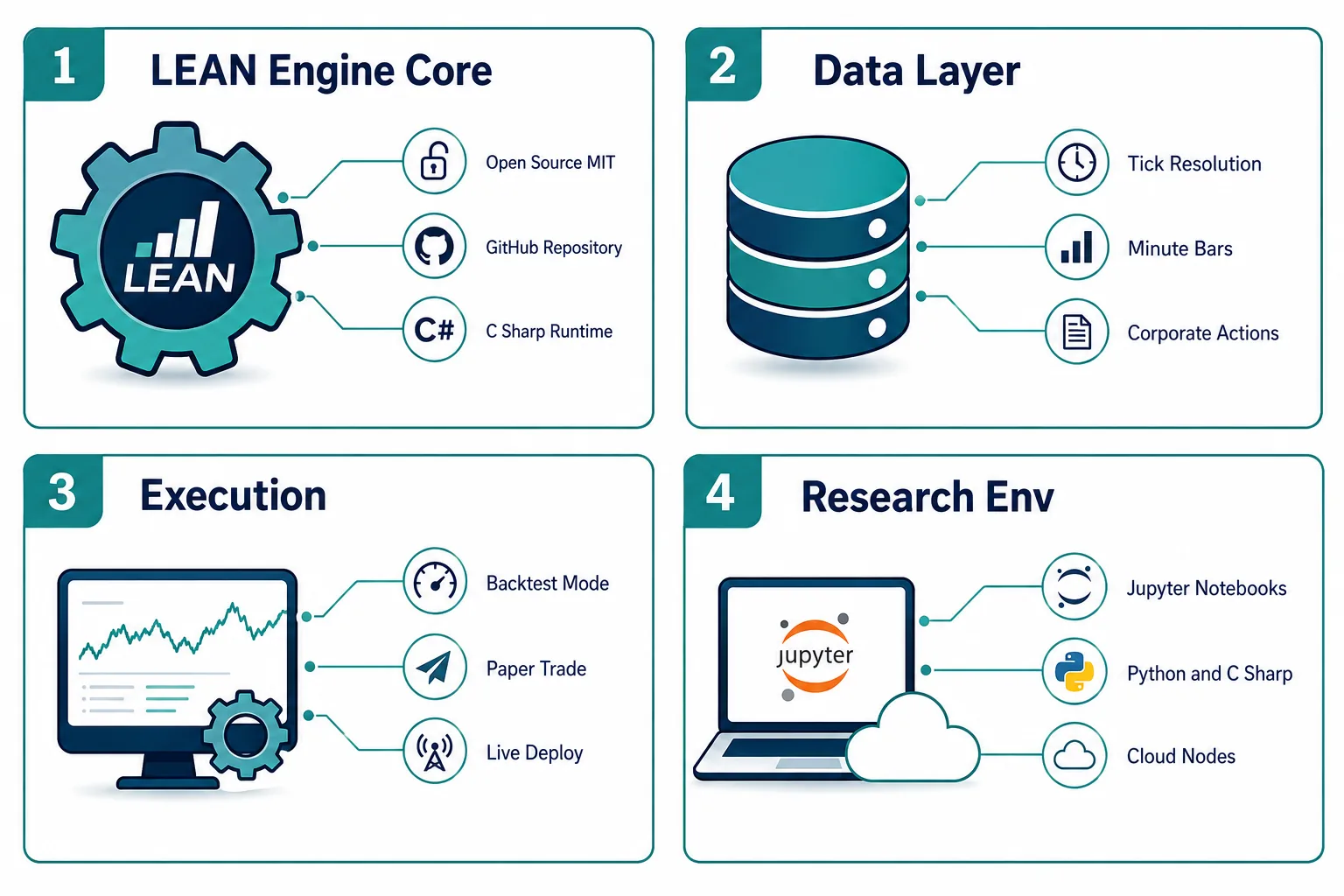
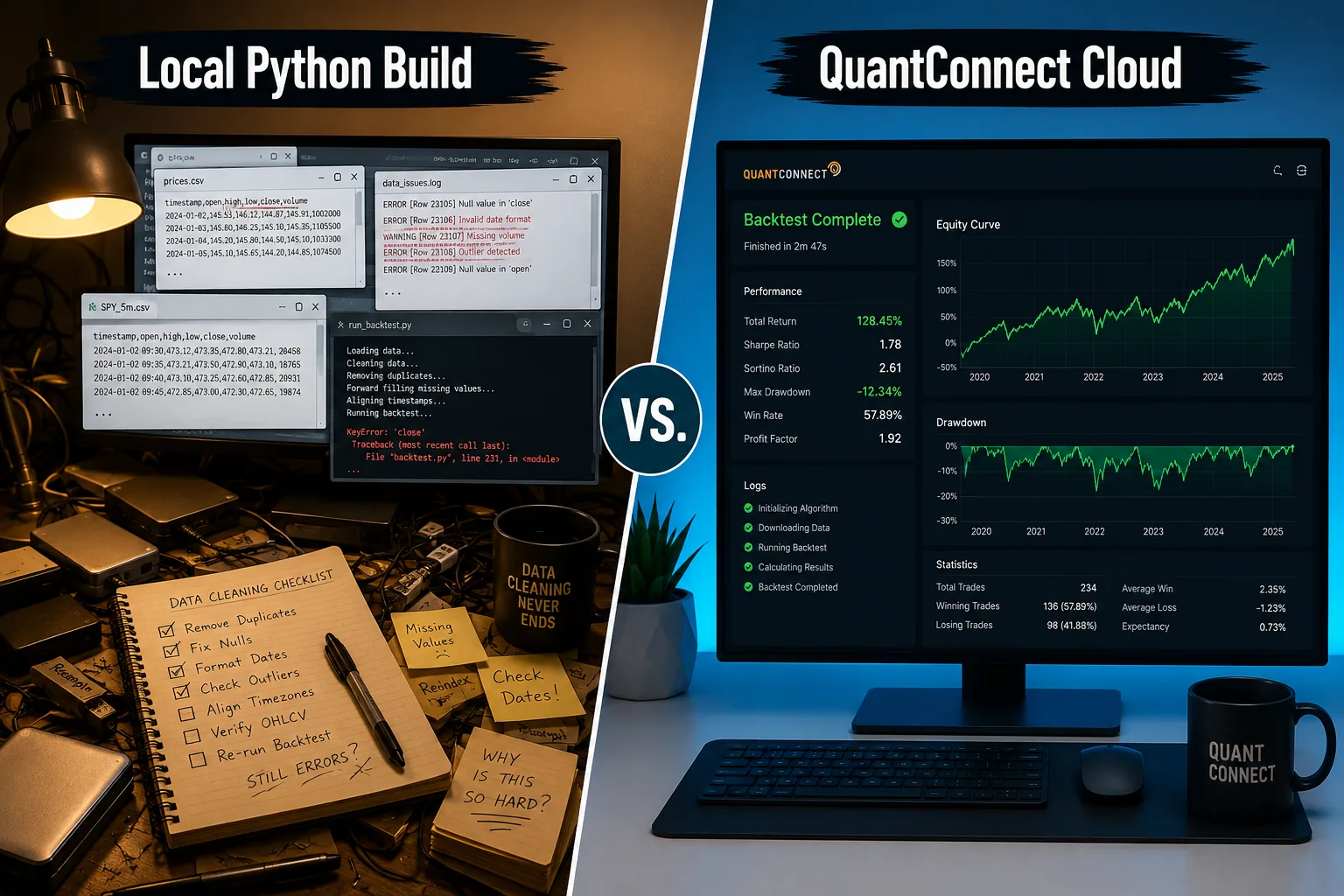
The honest answer is not compute power. A modern laptop can run a moving-average crossover strategy on five years of daily data in seconds. What a laptop cannot easily give you is clean, survivorship-bias-free historical data with corporate actions handled, at tick resolution, across multiple asset classes, with the same execution engine running in both backtest and live modes.
Survivorship Bias Free Historical Data
Survivorship bias is the mistake of backtesting only on stocks that still exist today, which makes every strategy look better than it is. QuantConnect’s data library includes delisted securities, meaning a strategy that would have bought companies that went bankrupt will show those losses in the backtest. Sourcing survivorship-bias-free data independently typically costs thousands of dollars per year from providers like Norgate Data or Compustat. For a deeper look at how to backtest without fooling yourself, see how to backtest a trading strategy without fooling yourself.
Corporate Actions and Split Adjusted Prices
When a stock splits 4-for-1, every historical price before the split needs adjusting or your backtest will show a fake 75% drop. QuantConnect handles split adjustments, dividend adjustments, and other corporate actions automatically. Building this pipeline locally means writing and maintaining an adjustment factor database, which is tedious, error-prone, and never quite finished.
Tick and Second Resolution Across Asset Classes
Most free data sources offer daily bars. QuantConnect provides tick, second, minute, hour, and daily resolution for equities, equity options, futures, future options, forex, CFD, crypto, and indexes. Tick data for US equities alone runs into terabytes per year. Storing and querying that locally is an infrastructure project, not a trading project.
Colocated Live Execution
When you deploy a live algorithm on QuantConnect, the execution runs on their cloud infrastructure, not your home internet connection. That means no dropped connection at 9:31 AM, no power outage killing a live position, and no latency spike from your ISP. The platform supports live trading through Interactive Brokers, Alpaca, Tradier, Binance, Coinbase, and other brokerages.
A Research Environment That Matches Production
The QuantConnect Research environment runs Jupyter notebooks backed by the same LEAN engine that runs your live algorithm. The research-to-production parity means a calculation you write in a research notebook will behave identically when deployed. That is not guaranteed when your research environment is a local Jupyter instance and your production environment is a separate script on a VPS. For context on how AI tools are changing the research workflow, see 15 AI investment tools replacing traditional research in 2026.
Comparison Table: QuantConnect Versus a Local Python Build
| Factor | QuantConnect | Local Python Build |
|---|---|---|
| Historical data quality | Survivorship-bias-free, curated, multi-asset | Depends on provider; free sources often biased |
| Corporate actions | Handled automatically by the platform | Must build and maintain adjustment pipeline |
| Backtest to live parity | Same LEAN engine in both modes | Backtest and live often use different code paths |
| Hosting and uptime | Cloud nodes, no local dependency | VPS or home machine; you manage uptime |
| Broker integrations | IB, Alpaca, Tradier, Binance, Coinbase, others | Write each broker API integration yourself |
| Cost | Free tier for backtesting; paid for live trading | Data costs can exceed several thousand per year |
| Debugging | Harder; managed cloud environment, limited IDE access | Full local IDE, breakpoints, direct inspection |
What Does QuantConnect Cost?
The free tier is real and usable for backtesting research, but it does not include live trading. Live deployment, LEAN CLI access, and higher-resolution data require a paid subscription.
What the Free Tier Includes
As of August 2026, the free tier on QuantConnect allows cloud backtesting with access to the platform’s historical data library, the Research environment with Jupyter notebooks, and community forum access. Live trading is not included on the free tier. The platform also added a warning when downgrading to the free tier as of August 29, 2026, which signals that users lose meaningful functionality when they drop down. For a full breakdown of what the free tier allows versus paid tiers, see the QuantConnect review on FullStack Alpha.
Where the Paid Tiers Start and What They Add
Paid tiers open live trading, LEAN CLI for local development with cloud data, faster backtest nodes, and additional data subscriptions. The platform offers tiered pricing that scales with compute and data needs. Pricing changes, so always verify current tiers at quantconnect.com before committing. External reviews as of August 2026 confirm the free tier is serious for backtesting but that live trading requires a paid plan.
Data Costs Versus Compute Costs
This is the comparison that matters. Sourcing tick data for US equities from a commercial provider runs from roughly $1,000 to over $5,000 per year depending on coverage and resolution. Survivorship-bias-free fundamental data from providers like Compustat can run $10,000 or more annually for institutional access. QuantConnect bundles much of this into subscription tiers that cost a fraction of sourcing the same data independently. The compute cost of running backtests on cloud nodes is included in the subscription rather than billed separately per run.
Which Brokers Does QuantConnect Connect To?
QuantConnect supports live trading through a range of brokerages directly from the platform. You do not write the broker API integration yourself. The platform handles order routing, position tracking, and account reconciliation through the LEAN engine’s brokerage layer.
Live Deployment and Supported Brokerages
Supported brokerages for live deployment include Interactive Brokers, Alpaca, Tradier, Binance for crypto, Coinbase, and additional partners listed in the platform documentation. Interactive Brokers is the most commonly used for equities and futures given its broad market access and institutional-grade execution. Alpaca is popular for commission-free equity trading with a developer-friendly API. The full and current list lives at quantconnect.com docs.
What Live Trading Requires Beyond a Backtest
A backtest tells you how a strategy would have performed on historical data. Live trading introduces slippage, partial fills, latency, and market impact that a backtest cannot fully simulate. QuantConnect’s live trading environment does model slippage and fill latency, but no model is perfect. The platform also offers paper trading, which runs the live execution engine against real market data without real money, making it the right step between a clean backtest and actual capital deployment. For a broader perspective on what automated trading bots actually deliver in live conditions, see automated trading bot: what the real results show.
Where Does QuantConnect Fall Short?
No platform is the right answer for every situation. QuantConnect has two genuine drawbacks worth naming plainly, and there are specific cases where a local build is the better choice.
The Learning Curve Beyond Python Basics
Writing a simple moving-average crossover in Python on QuantConnect takes an afternoon. Writing a multi-asset strategy with custom universe selection, risk management, and parameter optimization takes weeks of learning the LEAN API. The platform’s documentation is extensive, but the gap between “I know Python” and “I can build production-quality algorithms on LEAN” is real. The community forum and GitHub issues help, but there is no shortcut through the learning curve. For a realistic picture of what AI tools can and cannot do to help here, see AI trading app: what to check before you download one.
Debugging Inside a Managed Environment
Local Python development means breakpoints, print statements, and direct inspection of variables in your IDE. Debugging a QuantConnect algorithm in the cloud means reading logs, using the platform’s built-in debugger, and working within the constraints of a managed environment. When something breaks at 9:32 AM in a live algorithm, the debugging experience on a managed platform is meaningfully harder than on a local machine where you control everything. This is not a reason to avoid the platform, but it is a reason to test thoroughly in paper trading before going live.
When a Local Build Is Genuinely Better
A local build wins when your strategy requires a custom data source that QuantConnect does not carry, when you need sub-millisecond latency that cloud execution cannot guarantee, or when your firm has compliance requirements that prohibit running code on third-party infrastructure. High-frequency trading strategies that depend on co-location at an exchange are outside what QuantConnect is designed for. The platform targets systematic quantitative strategies at minute-to-daily resolution, not microsecond arbitrage. For context on how QuantConnect compares to other platforms for retail traders, see QuantConnect vs Trade Ideas: which platform is right for retail traders.
Our Take: Rent the Infrastructure, Own the Strategy
QuantConnect gives you the data pipeline, the execution engine, the research environment, and the broker connections. It does not give you an edge. A cleaner backtest is not a profitable strategy. It is a more honest test of whether your idea had merit in the past.
The case for QuantConnect is simple: the hardest parts of algorithmic trading are not writing a strategy in Python, they are getting clean data, keeping it clean, and running the same code in backtest and live without introducing a gap between the two. That is exactly what the platform handles. The QuantConnect and LEAN combination, open source and auditable, is the most transparent way to do that at a price retail traders can actually afford.
If you are a coder who has been putting off systematic trading because the data infrastructure felt like a second full-time job, that excuse just ran out. Paper trade it first. Let the research-to-production environment do its job. Then, and only then, put real capital behind it.
One tool, examined in depth. There are 200+ more in the FullStack Alpha directory, filterable by category, price, and what they actually do. Browse the directory at aistockpickerapps.com.
Disclosure: FullStack Alpha may earn a commission on purchases made through links in this article. This does not affect editorial scoring or recommendations.
References
-
Engine Performance, https://www.quantconnect.com/docs/v2/cloud-platform/backtesting/engine-performance
-
Performance, https://www.quantconnect.com/performance
-
Algorithm Performance, https://www.quantconnect.com/docs/v2/writing-algorithms/key-concepts/algorithm-performance
-
Deployment, https://www.quantconnect.com/docs/v2/lean-cli/backtesting/deployment
-
Backtestingresulthandler, https://github.com/QuantConnect/Lean/blob/master/Engine/Results/BacktestingResultHandler.cs
-
Quantconnect Review, https://www.newtrading.io/quantconnect-review/
-
Powered By Lean Dropshot Capital, https://www.quantconnect.com/lean/15786/powered-by-lean-dropshot-capital/
-
Lean Engine, https://www.quantconnect.com/docs/v2/lean-engine
-
Report, https://www.quantconnect.com/docs/v2/cloud-platform/backtesting/report
-
Question Backtesting Performance, https://www.quantconnect.com/forum/discussion/4140/question-backtesting-performance/
By Jay Rocco, Founder and Editor, FullStack Alpha.
Stay alpha.
Frequently Asked Questions
What is QuantConnect used for?
QuantConnect is used for writing, backtesting, and live-deploying systematic trading algorithms across equities, options, futures, forex, CFD, and crypto. Coders use it to test strategies against historical data before risking real capital, and to run live algorithms through connected brokerages without building their own data and execution infrastructure. The platform supports both Python and C# via the LEAN engine.
Is QuantConnect any good?
QuantConnect is well-regarded among quantitative traders for the quality of its historical data, the parity between backtest and live execution, and the open-source transparency of the LEAN engine. External reviews as of August 2026 confirm the free tier is serious for backtesting research. The main criticisms are the learning curve past basic Python and the difficulty of debugging inside a managed cloud environment.
Is QuantConnect free?
The free tier allows cloud backtesting and access to the Research environment with Jupyter notebooks. Live trading, LEAN CLI for local development, and some higher-resolution data require a paid subscription. As of August 2026, the platform added a warning when users downgrade to the free tier, indicating meaningful feature loss. Always check current pricing at quantconnect.com since tiers and features change.
Do hedge funds use QuantConnect?
Some hedge funds and systematic trading firms use LEAN as their execution engine under the "Powered by LEAN" program. DropShot Capital is a documented example of a fund running on the LEAN engine. Alpha Streams, QuantConnect's marketplace for algorithm licensing, also connects algorithm developers with institutional capital. The platform is not exclusively retail-focused.
Do you need Python to use QuantConnect?
Python is the most common language on the platform, but QuantConnect also supports C#. The LEAN engine is written in C#, and both languages have full access to the API. Most tutorials and community examples are in Python, so C# users will find fewer ready-made resources, but the language support is genuine.
Which brokers does QuantConnect support?
As of 2026, supported live brokerages include Interactive Brokers, Alpaca, Tradier, Binance, Coinbase, and additional partners. The full current list is in the platform documentation at [quantconnect.com/docs](https://www.quantconnect.com/docs/v2/lean-engine). Broker support changes as new integrations are added, so verify before choosing a live deployment path.
Is QuantConnect better than building your own bot?
For most coders, QuantConnect wins on data quality and infrastructure time saved. Building survivorship-bias-free data pipelines, corporate action adjustments, and broker API integrations from scratch takes months and costs real money in data subscriptions. QuantConnect bundles all of that. A local build wins when you need a custom data source, sub-millisecond execution, or compliance-driven infrastructure control.
How good is QuantConnect historical data?
QuantConnect's data is survivorship-bias-free, includes corporate actions and split adjustments, and covers tick through daily resolution across equities, options, futures, forex, CFD, crypto, and indexes. The engine performance documentation confirms the data pipeline's design for research accuracy. It is not perfect, but it is substantially better than what most retail traders can source and maintain independently.
Jay Rocco is the Founder and Editor of FullStack Alpha. He has tested 200+ AI stock tools since 2022 and run 15+ AI trading platforms on live accounts with his own money. He reviews the software. He does not tell you what stocks to buy.
