

Jay Rocco is the Founder and Editor of FullStack Alpha. He has tested 200+ AI stock tools since 2022 and run 15+ AI trading platforms on live accounts with his own money. He reviews the software. He does not tell you what stocks to buy.
Last updated: September 30, 2026
Quick Answer: The best backtesting software for futures is NinjaTrader for most active traders, TradeStation for automation-first strategies, and Sierra Chart for anyone who needs true tick-level accuracy. Every platform on this list was evaluated on one standard: how honestly it models a real fill, including slippage, commission per side, and continuous contract rollover. A backtest is a hypothesis test, not evidence of future returns. Treat it that way.
The Short Version
- NinjaTrader remains the default choice for native futures backtesting in 2026, with tick data replay available through its own brokerage data, Rithmic, or CQG feeds.
- TradeStation ranks as the top platform for automated strategy testing according to Gitnux’s 2026 futures backtesting rankings, but its Look Inside the Bar (LIBB) setting must be enabled manually or results will overstate performance.
- Sierra Chart offers the most granular tick-level accuracy of any platform on this list, at a subscription cost starting around $32 per month according to backtestscore.com.
- QuantConnect has a free tier, supports E-mini S&P 500 (ES), E-mini Nasdaq 100 (NQ), and Micro E-mini contracts, and requires Python or C# coding.
- TradingView’s Pine Script backtesting engine works for a fast visual first pass on futures but does not model intrabar movement or realistic slippage by default.
- Zero-slippage and zero-commission defaults are the single biggest reason futures backtests overstate performance. Set both before running a single test.
- Free futures backtesting is available through QuantConnect, TradingView’s free tier, and Backtrex, but each has real data or granularity limits that matter for day trading futures.
Pick the Best Backtesting Software for Futures in 10 Seconds
Tick replay, Strategy Analyzer, walk forward and Monte Carlo built in.
EasyLanguage plus portfolio testing. Turn on LIBB first.
Controls every fill assumption. Steep learning curve.
Cloud backtests on ES, NQ and micros. Code required.
Fast visual pass. No tick data, so never your final test.
DOM replay tick by tick. Manual practice, not automation.
How We Ranked the Best Backtesting Software for Futures
The best backtesting software for futures earns that title by modeling fills honestly, not by having the most features or the slickest interface. Every platform here was evaluated against four concrete tests before making the list.
The Four Tests Every Platform Had to Pass
Test 1: Does it support tick data or at minimum 1-minute bars? Minute bars hide intrabar price movement. Any platform that only offers daily or weekly data for futures contracts is not on this list.
Test 2: Does it handle continuous contract rollover? Futures contracts expire. A platform that stitches together contract months without back-adjusted pricing will show phantom gaps and distorted entry signals. That is not a minor issue. It is a structural flaw.
Test 3: Can you set slippage and commission per side? Default zero slippage is a fantasy. E-mini S&P 500 (ES) trades at $12.50 per tick. One tick of slippage per side, compounded across hundreds of trades, will turn a winning backtest into a losing live strategy.
Test 4: Does it support walk forward analysis or out-of-sample validation? A strategy curve-fitted to one date range is not a strategy. It is a memory test. Platforms that offer walk forward analysis or Monte Carlo simulation get credit here.
Why Tick Data and Rollover Decide Everything
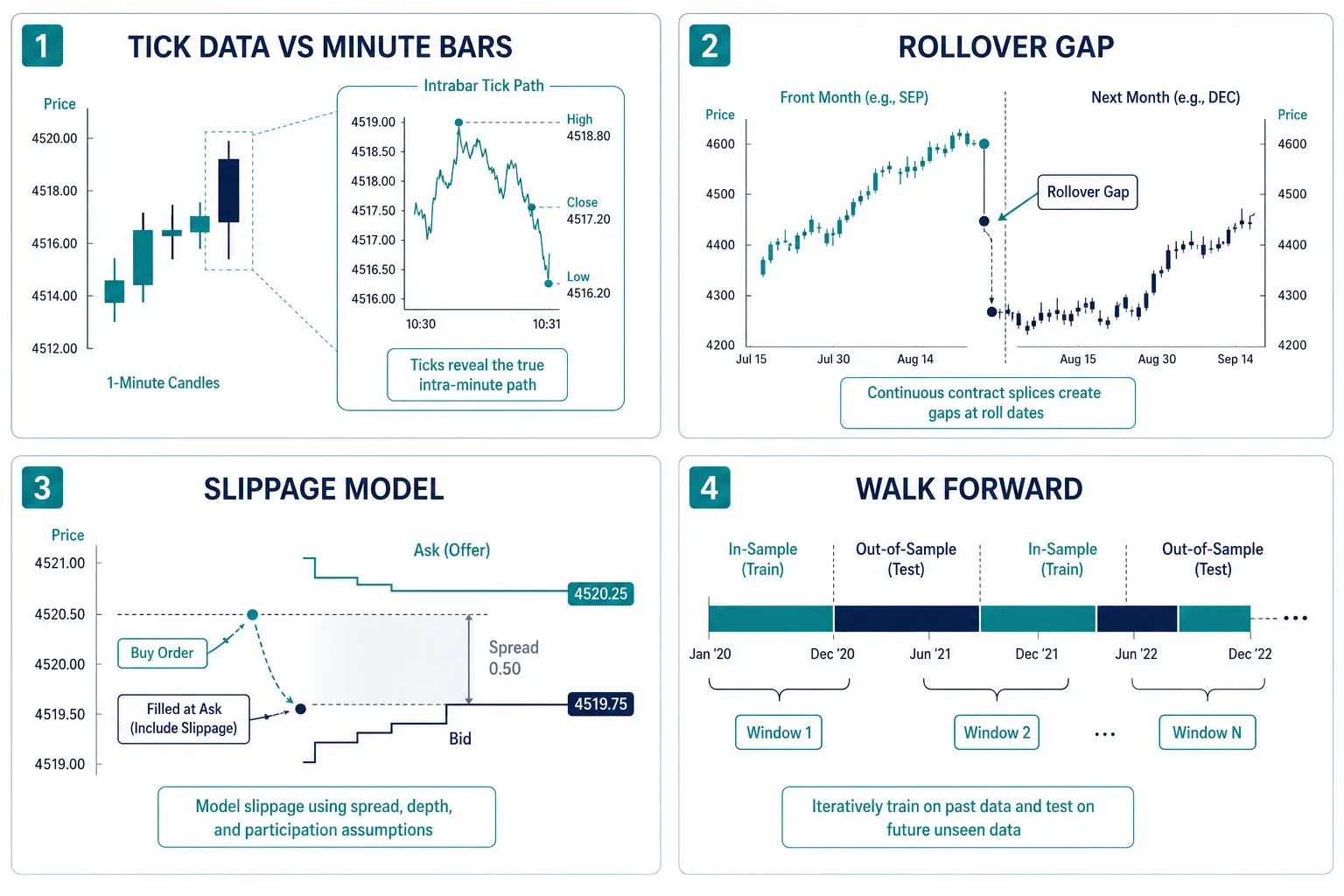
Futures backtests break in three specific ways. First, continuous contract rollover hides real price gaps between expiring and incoming contracts. When the December ES contract rolls to March, there is often a price difference of several points. A backtesting engine that does not account for this will generate false signals right at the rollover date. Back-adjusted contracts fix this by shifting historical prices to remove the gap, but they also mean historical price levels are not the same as what actually traded. Both approaches have trade-offs. The key is knowing which one your platform uses.
Second, minute bars hide intrabar movement. If a strategy places a stop loss and a profit target within the same bar’s range, a bar-based backtesting engine cannot know which was hit first. TradeStation’s LIBB (Look Inside the Bar) setting addresses this by using tick data to reconstruct intrabar order. Platforms without this feature will overstate win rates on tight-range strategies.
Third, default zero slippage is the most common and most damaging assumption in retail futures backtesting. Quantified Strategies’ AmiBroker review notes that realistic commission and slippage inputs are essential for any backtest that will be traded live. For ES futures, a round-trip commission of $4 to $8 per contract plus one tick of slippage each way is a reasonable starting assumption for most brokers.
1. NinjaTrader: Best Overall for Futures Backtesting
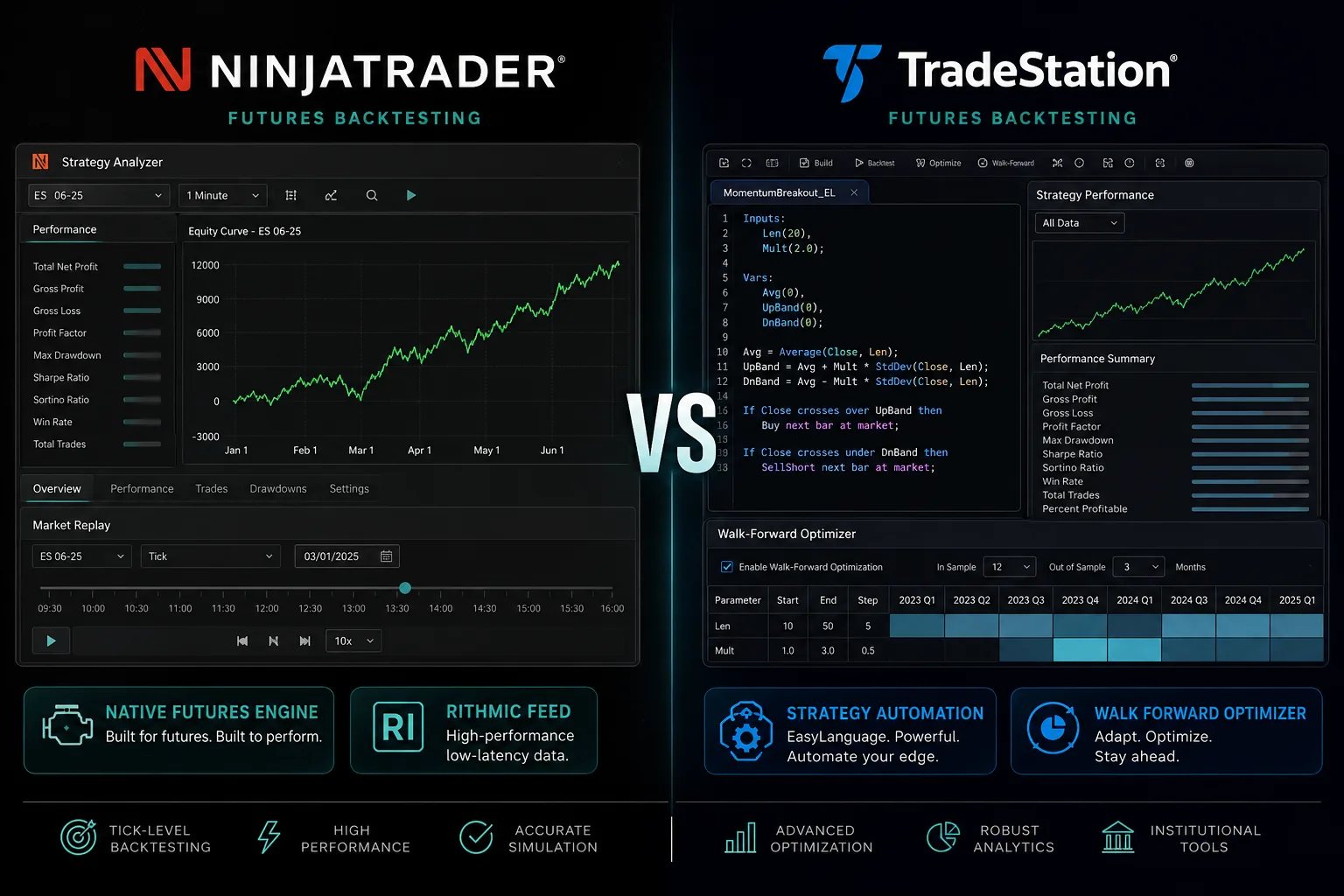
NinjaTrader is the most widely used platform for native futures backtesting among retail traders, and for good reason. It connects to Rithmic and CQG data feeds, supports tick-level replay, and includes a Strategy Analyzer that handles walk forward analysis and Monte Carlo simulation out of the box.
The platform’s replay function lets traders step through historical data bar by bar or tick by tick, which is the closest thing to live trading conditions available in a backtesting environment. This manual replay mode is particularly useful for discretionary traders who want to test a plan without automating it.
Data granularity: Tick data available through NinjaTrader’s brokerage data, Rithmic, or CQG. Minute bars available without a paid feed.
Coding required: NinjaScript (C# based) for automated strategies. Manual replay requires no coding.
Extra data feed cost: Market data is available with a funded NinjaTrader brokerage account. Third-party feeds like Rithmic or CQG add $25 to $100 per month depending on the exchange data package.
Software cost: NinjaTrader’s platform is free to download and use for backtesting and simulation. The Free plan charges $0.39 per side on micros; the $99/month plan cuts that to $0.29; the $1,499 lifetime license cuts it to $0.09.
Real limitation: NinjaScript has a learning curve. Traders who are not comfortable with C#-style syntax will spend significant time on setup before running a single meaningful backtest.
For a deeper look at how AI-powered tools compare to traditional backtesting platforms, see the best AI trading tools of 2026 put head to head.
2. TradeStation: Best for Strategy Automation
TradeStation is the top-ranked platform for futures backtesting automation according to Gitnux’s 2026 analysis, and its EasyLanguage coding environment remains one of the most accessible ways to build and test automated strategies on stocks, futures, and forex without a computer science degree.
The platform supports E-mini S&P 500, E-mini Nasdaq 100, Micro E-mini contracts, and a broad range of other futures contracts. Its backtesting engine includes walk forward optimization and a portfolio-level backtester for testing strategies across multiple instruments simultaneously.
The LIBB caveat is not optional. TradeStation’s default backtesting mode uses bar-close data, which means intrabar stops and targets are evaluated at the close of the bar, not when they would actually be hit. Enabling Look Inside the Bar (LIBB) forces the engine to use tick data to reconstruct intrabar order. Any strategy with intraday stops must have LIBB enabled. Without it, the backtest is measuring something that does not exist in live trading.
Data granularity: Tick data available. Minute bars standard.
Coding required: EasyLanguage (proprietary, relatively beginner-friendly).
Extra data feed cost: TradeStation provides its own data feed. No separate subscription required for US futures. Exchange fees apply for live trading.
Software cost: Free platform with a funded TradeStation account. No separate software fee for most users, per backtestscore.com’s TradeStation profile.
Real limitation: EasyLanguage is proprietary. Strategies cannot be ported to other platforms without rewriting. Traders who want platform independence should factor that in.
3. Sierra Chart: Best for Tick-Level Accuracy
Sierra Chart is the platform serious order flow traders reach for when they need true tick-level accuracy. It supports direct connections to Rithmic and CQG, handles continuous contract rollover with multiple adjustment methods, and lets traders control every assumption in the backtesting engine including slippage, commission per side, and fill simulation logic.
The interface is not pretty. Sierra Chart looks like it was designed in 2004 because much of it was. But under that dated exterior is a backtesting engine that institutional traders and prop firm traders use precisely because it does not hide the ugly parts of a fill.
Data granularity: True tick data. Sub-second granularity available.
Coding required: ACSIL (C++ based) for custom studies. A library of built-in studies covers many standard strategies without coding.
Extra data feed cost: Rithmic or CQG required for live and historical tick data. Rithmic fees start around $25 per month plus exchange fees.
Software cost: Sierra Chart subscription starts at approximately $32 per month for the full service package.
Real limitation: The learning curve is steep. The documentation is extensive but dense. New traders will spend days configuring the platform before running a first backtest.
4. MultiCharts: Best for Portfolio-Level Testing
MultiCharts handles portfolio-level futures backtesting better than almost any other retail platform. It supports testing a strategy across multiple futures contracts simultaneously, which matters when a trader wants to know how a plan performs across ES, NQ, crude oil, and gold at the same time rather than in isolation.
The platform supports PowerLanguage (compatible with TradeStation’s EasyLanguage), which means strategies written for TradeStation can often be ported with minimal changes. It connects to multiple data feeds including Rithmic, CQG, and Interactive Brokers, and supports tick data replay for manual testing.
According to backtestscore.com’s platform comparisons, MultiCharts sits alongside TradeStation and AmiBroker as one of the most capable futures backtesting engines available to retail traders.
Data granularity: Tick data supported. Minute bars standard.
Coding required: PowerLanguage (similar to EasyLanguage). No coding needed for built-in strategies.
Extra data feed cost: Depends on chosen feed. Interactive Brokers data is available with an IB account. Rithmic and CQG add cost.
Software cost: MultiCharts annual license starts around $1,495 per year. A 30-day free trial is available.
Real limitation: The annual license cost is the highest on this list. For traders who only backtest occasionally, the price-to-use ratio is poor.
5. QuantConnect: Best for Coding Your Own
QuantConnect is open-source and cloud-based with a free tier. It supports Python and C# for building and backtesting automated strategies across stocks, futures, forex, and crypto. For traders who want to write their own backtesting logic without paying for software, this is the starting point.
The platform provides access to historical data for E-mini S&P 500, E-mini Nasdaq 100, and Micro E-mini contracts through its data library. The backtesting engine supports tick data, minute bars, and multiple timeframes. It also includes a research environment for statistical analysis before committing to a full backtest.
Data granularity: Tick data and minute bars available. Custom timeframes supported.
Coding required: Python or C#. No coding means no backtesting here.
Extra data feed cost: Historical data for major futures contracts is included for cloud backtests. Premium data packages available for additional asset classes.
Software cost: Free plan with unlimited backtesting on shared nodes. Researcher plan at $84 per month for faster compute and more features.
Real limitation: Zero-code traders will find nothing useful here. This platform rewards programmers and punishes everyone else.
For traders interested in how automated backtesting tools compare to AI-driven stock pickers, see we tested 10 AI trading tools so you don’t have to.
6. TradingView: Best for Fast Visual Testing
TradingView’s Pine Script backtesting engine is the fastest way to run a visual strategy test on futures without setting up a desktop platform. It runs in a browser, supports major futures contracts including ES and NQ, and lets traders see equity curves and trade-by-trade results within minutes of writing a basic script.
TradingView’s free tier limits historical bars and indicators per chart. Paid plans start with Essential at $12.95 per month billed annually, with Plus at $29.95 and Premium at $59.95, which remove most of those restrictions.
The honest assessment: TradingView’s backtesting engine is not built for serious futures strategy validation. It does not model intrabar movement accurately by default, slippage defaults to zero, and commission settings are basic. Use it for a first pass on a strategy idea, then move the serious testing to NinjaTrader or TradeStation.
Data granularity: Minute bars and above on most plans. No full tick replay.
Coding required: Pine Script (proprietary, beginner-friendly).
Extra data feed cost: Real-time CME data is an add-on on paid plans. Delayed futures data is included.
Software cost: Free tier available. Essential $12.95/mo, Plus $29.95/mo, Premium $59.95/mo (annual billing).
Real limitation: No tick data. No intrabar fill simulation. Not suitable as a primary backtesting engine for day trading futures.
7. Jigsaw Daytradr: Best for Order Flow Traders
Jigsaw Daytradr is the only platform on this list built specifically for order flow trading. It includes a DOM (Depth of Market) replay tool that lets traders practice reading the tape on historical futures data, making it the best choice for traders whose strategy depends on reading order flow rather than price patterns.
The replay function in Jigsaw is not a traditional backtesting engine. It does not run automated strategy tests or generate equity curves. What it does is let traders step through historical DOM data tick by tick, which is the only honest way to backtest a strategy that depends on live order book conditions.
Jigsaw connects to Rithmic and CQG for live trading and data. The Daytradr platform itself is available as a standalone tool for traders who want order flow analysis without switching their primary broker.
Data granularity: Tick data and DOM data. The most granular data available on this list.
Coding required: None. Manual replay only.
Extra data feed cost: Rithmic or CQG required for historical DOM data.
Software cost: Jigsaw Daytradr subscription starts at approximately $167 per month.
Real limitation: This is not a general-purpose backtesting tool. Traders who do not trade order flow will find no value here. The cost is also the highest monthly fee on this list.
Comparison Table: All 7 Platforms on Data, Cost, and Coding
| Platform | Data Granularity | Coding Required | Extra Data Feed Cost | Software Cost | Best For |
|---|---|---|---|---|---|
| NinjaTrader | Tick data | Optional (NinjaScript) | Brokerage data with funded account; Rithmic/CQG extra | Free platform; $99/mo or $1,499 lifetime | Overall futures backtesting |
| TradeStation | Tick data (LIBB) | Optional (EasyLanguage) | Included with account | Free with funded account | Strategy automation |
| Sierra Chart | True tick data | Optional (ACSIL/C++) | Rithmic or CQG required | From ~$32/mo | Tick-level accuracy |
| MultiCharts | Tick data | Optional (PowerLanguage) | IB, Rithmic, or CQG | From ~$1,495/yr | Portfolio-level testing |
| QuantConnect | Tick and minute bars | Yes (Python/C#) | Included (major futures) | Free; Researcher $84/mo | Custom coded strategies |
| TradingView | 1m bars and above | Optional (Pine Script) | Real-time CME is an add-on | Free; Essential $12.95/mo | Fast visual testing |
| Jigsaw Daytradr | Tick and DOM data | None (manual replay) | Rithmic or CQG required | From ~$167/mo | Order flow traders |
Is There Free Futures Backtesting Worth Using?
Free futures backtesting exists and some of it is useful, but every free option trades something for its zero price tag. The question is whether what it trades away matters for your specific strategy.
Free Backtesting Options and Where They Stop
QuantConnect is the strongest free option for traders who can code. The platform provides access to historical data for major futures contracts including ES and NQ, supports tick data and multiple timeframes, and runs entirely in a browser. The free tier limits compute speed but not the backtesting engine itself. For automated backtesting of a coded strategy, this is the best free starting point available.
TradingView’s free tier gives access to Pine Script backtesting on futures with limited historical bars and no tick data. It is a reasonable free backtesting website for checking whether a basic moving average or breakout strategy has ever worked on ES, but it is not a tool for serious strategy validation.
Backtrex offers browser-based no-code backtesting with futures coverage through partner data, per their June through August 2026 updates. It is available without a paid subscription and suits traders who want a first pass without installing software.
TradeZella includes a backtesting and journal module that covers futures and forex without requiring code. It works as a no-code option for traders who want to combine backtesting with a trading journal in one platform.
Backtesting Software Free Versus Paid Data
Free backtesting software often means free software with a paid data requirement hiding behind it. NinjaTrader’s platform is free to download, but serious tick data backtesting requires either a funded brokerage account or a separate Rithmic or CQG subscription. Sierra Chart’s software costs roughly $32 per month, but the tick data feed adds another $25 or more per month.
The honest math: free backtesting software for futures day trading strategies will cost something, either in data fees, compute limits, or data granularity. For swing trading futures on daily or hourly bars, TradingView’s free tier or QuantConnect’s free plan will cover most needs. For intraday strategies on ES or NQ, budget for a data feed.
Free Backtesting Website Tools for a First Pass
For traders who want to test a strategy idea before committing to a platform, the workflow is: start with TradingView’s free tier or QuantConnect’s free plan to check whether the basic logic has ever produced positive results. If it does, move to NinjaTrader or TradeStation with proper tick data and realistic slippage settings before drawing any conclusions. Paper trade it first before touching a live account.
Why Do Futures Backtests Lie?
Most futures backtests overstate performance. Not because the trader is dishonest, but because the default settings on almost every platform are optimistic in ways that compound into a gap between backtest results and live trading reality.
Continuous Contract Rollover and the Gap It Hides
Futures contracts expire on a fixed schedule. The CME Group’s standard ES contract rolls quarterly, in March, June, September, and December. When a contract expires, there is often a price difference between the expiring front month and the incoming contract. This is the rollover gap.
A backtesting engine that does not account for this gap will generate false signals at every rollover date. A strategy that appears to buy a breakout might actually be buying a rollover artifact. Back-adjusted contracts solve this by shifting historical prices backward to remove the gap, but they introduce a different problem: the adjusted prices never actually traded. Traders need to know which method their platform uses and what the implications are for their specific strategy.
Tick Data Versus Minute Bars
A one-minute bar shows four data points: open, high, low, and close. It does not show the order in which those prices occurred within the minute. A strategy with a stop loss at the low and a profit target at the high of the same bar cannot be evaluated accurately from a minute bar alone. The backtesting engine has no way to know whether the low or the high was hit first.
This is why tick data matters for intraday futures strategies. Tick data records every transaction, which means the backtesting engine can reconstruct the actual sequence of prices within a bar. TradeStation’s LIBB setting approximates this by using tick data to determine intrabar order without requiring full tick data storage. Sierra Chart and NinjaTrader support true tick data replay.
Slippage and Commission Per Side
Zero slippage is not a conservative assumption. It is an impossible one. Every market order in a live futures market can fill at a price that differs from the last traded price, especially during fast markets or near open and close. For ES futures, one tick of slippage is $12.50 per contract. A strategy that trades 200 times per year with one tick of slippage each way loses $5,000 per contract before commissions.
Commission per side for retail futures trading typically runs $1.50 to $5.00 per contract depending on the broker. Set both slippage and commission in the backtesting engine before running any test. If the strategy only works at zero slippage and zero commission, it does not work.
Look Ahead Bias in Intraday Testing
Look ahead bias occurs when a backtesting engine uses data that would not have been available at the time of the trade. The most common version in intraday futures testing is a strategy that uses the close of a bar to generate a signal and then fills at the open of the same bar. That fill is impossible in live trading. The bar was not closed when the fill occurred.
Most platforms handle this correctly by default, but custom-coded strategies in NinjaScript, EasyLanguage, or Pine Script can introduce look ahead bias if the trader is not careful about which bar’s data triggers the signal versus which bar’s open executes the fill.
For a practical guide on how to backtest without fooling yourself, see how to backtest a trading strategy without fooling yourself.
How Do You Validate a Futures Backtest?
Validating a futures backtest means checking whether the results hold up under conditions the original test did not see. A strategy that only works on the data it was built on is not a strategy. It is a description of the past.
Walk Forward Analysis in Plain English
Walk forward analysis divides historical data into two segments: an in-sample period used to build and optimize the strategy, and an out-of-sample period used to test it. The strategy is optimized on the in-sample data, then run without changes on the out-of-sample data. The results on the out-of-sample period are the honest results.
A strategy that performs well in-sample but falls apart out-of-sample is curve-fitted. It memorized the data rather than identifying a real pattern. NinjaTrader, TradeStation, and MultiCharts all include walk forward optimization tools. QuantConnect supports out-of-sample testing through its research environment.
Monte Carlo Simulation and Drawdown Reality
Monte Carlo simulation randomizes the order of trades from a backtest to generate a distribution of possible outcomes. Instead of showing one equity curve, it shows hundreds, which reveals the realistic range of drawdowns a strategy might produce even if the overall edge is real.
A strategy that shows a 10% maximum drawdown in a single backtest might show a 25% drawdown in 5% of Monte Carlo scenarios. That 25% scenario is the one that ends careers. Traders who skip Monte Carlo simulation are trading the best-case version of their strategy, not the realistic one. TradeStation and NinjaTrader both include Monte Carlo tools.
Testing Across a Regime Change
A strategy tested only on trending markets will look different in choppy tape. A strategy built on 2020 to 2022 volatility will behave differently in a low-volatility consolidation period. Testing a strategy across at least one significant regime change, such as a major bear market, a volatility spike, or a prolonged sideways period, is the minimum standard for a strategy intended for live trading.
The CME Group’s historical data goes back decades for major futures contracts. Platforms like Sierra Chart and NinjaTrader with access to deep historical tick data allow testing across multiple market regimes. This is where the best backtesting software for futures earns its cost.
Final Verdict: The Platform Most Futures Traders Settle On
NinjaTrader is where most serious retail futures traders land, and the reasons are practical: native futures support, tick data through multiple feeds, manual replay for discretionary traders, and automated backtesting for systematic ones. The free platform with brokerage data through a funded account is the most accessible combination of real tick data and real backtesting capability available without a large upfront cost.
TradeStation is the right call for traders who want to automate and optimize without learning NinjaScript. Just enable LIBB before running a single test.
Sierra Chart is for traders who need the most honest fill simulation available and are willing to pay the learning curve tax to get it.
The rest of the list serves specific needs: MultiCharts for portfolio testing, QuantConnect for coders, TradingView for a fast first pass, Jigsaw for order flow. None of them are wrong choices for the right trader. The best backtesting software for futures is the one whose assumptions you have checked yourself.
What every platform on this list shares is this: the backtest is only as honest as the assumptions you put into it. Zero slippage, zero commission, and ignored rollover gaps will produce results that look great and trade terribly. Set the numbers honestly. Test out of sample. Run the Monte Carlo. Then paper trade it first before touching a live account.
Systems over hacks. Process over prediction. Cut the noise, keep the alpha.
There are 200+ more tools in the FullStack Alpha directory, filterable by category, price, and what they actually do. Compare the full field at aistockpickerapps.com.
Disclosure: FullStack Alpha may earn a commission from affiliate links in this article. This does not affect rankings or editorial independence.
References
- Amibroker, https://www.backtestscore.com/tools/amibroker
- Amibroker Review Summary Pros And Cons, https://www.quantifiedstrategies.com/amibroker-review-summary-pros-and-cons/
- Tradestation, https://www.backtestscore.com/tools/tradestation
- Best Day Trading Platform Review Amibroker, https://quantsavvy.com/best-day-trading-platform-review-amibroker/
- Futures Backtesting Software, https://gitnux.org/best/futures-backtesting-software/
- Best Algorithmic Trading Software, https://www.quantt.co.uk/resources/best-algorithmic-trading-software
- Tradestation Vs Backtesting Py, https://www.backtestscore.com/compare/tradestation-vs-backtesting-py
- Best Backtesting Software, https://www.tradezella.com/blog/best-backtesting-software
- Tradestation Vs Backtrader, https://www.backtestscore.com/compare/tradestation-vs-backtrader
- Tradestation, https://www.theoptionstack.com/brokers/tradestation.html
By Jay Rocco, Founder and Editor, FullStack Alpha.
Stay alpha.
Frequently Asked Questions
What is the best backtesting software for futures traders?
NinjaTrader is the best overall choice for most retail futures traders in 2026. It supports tick data through Kinetick, Rithmic, and CQG, includes walk forward analysis and Monte Carlo simulation, and allows both automated backtesting and manual replay without requiring coding. TradeStation is the better choice for traders who want to build and automate complex strategies using EasyLanguage.
Is there free futures backtesting software?
Yes. QuantConnect is free and supports tick data backtesting for major futures contracts including ES and NQ, but requires Python or C# coding. TradingView's free tier offers Pine Script backtesting on futures with limited historical bars and no tick data. Backtrex offers browser-based no-code futures backtesting at no cost. Each free option has real limitations for intraday strategy testing.
Do you need tick data to backtest futures properly?
For intraday strategies with stops and targets within a bar's range, tick data is not optional. Minute bars cannot reconstruct which price was hit first within a bar, which means win rates and drawdown figures will be inaccurate. For swing trading strategies on hourly or daily bars, minute bars are usually sufficient. The shorter the timeframe, the more tick data matters.
Which backtesting software free option is worth trying first?
TradingView's free tier is the fastest starting point for traders who want to check a basic strategy idea without installing software or writing code. QuantConnect is the better free option for traders who can code and want genuine tick data and multiple timeframes including 15m and 30s bars. Both are available in a browser with no download required.
How accurate are futures backtests?
A futures backtest is a hypothesis test, not a prediction. Even an honest backtest with tick data, realistic slippage, and proper rollover handling will not match live trading results exactly. Market impact, partial fills, platform latency, and psychological execution differences all affect live results. Treat backtest results as a lower bound on real-world friction, not an upper bound on expected performance.
What is continuous contract rollover in backtesting?
Continuous contract rollover is the process of stitching together expiring futures contracts into a single price series for backtesting. Because each futures contract expires and is replaced by a new one at a different price, the splice point creates a price gap in the data. Back-adjusted contracts remove this gap by shifting historical prices, but the adjusted prices never actually traded. Unadjusted contracts preserve real prices but introduce false signals at every rollover date.
Can you backtest futures on TradingView?
Yes. TradingView supports Pine Script backtesting on major futures contracts including ES and NQ. Available timeframes include 30s, 15m, and up to weekly bars. The free tier limits historical bars and data access. The backtesting engine does not support tick data or intrabar fill simulation, which makes it unsuitable as a primary tool for intraday futures strategies. Use it for a visual first pass, then validate on a platform with tick data.
How much does futures backtesting software cost?
NinjaTrader's platform is free to download; a live trading license runs approximately $33 per month or $1,099 for a lifetime license. TradeStation is free with a funded account. Sierra Chart starts at approximately $32 per month. MultiCharts costs approximately $1,495 per year. QuantConnect is free with paid compute tiers from $8 per month. TradingView's paid plans start at approximately $14.95 per month. Jigsaw Daytradr starts at approximately $167 per month. Most platforms also require a separate data feed for tick-level backtesting, adding $25 to $100 per month depending on the exchange.
Jay Rocco is the Founder and Editor of FullStack Alpha. He has tested 200+ AI stock tools since 2022 and run 15+ AI trading platforms on live accounts with his own money. He reviews the software. He does not tell you what stocks to buy.
