

Jay Rocco is the Founder and Editor of FullStack Alpha. He has tested 200+ AI stock tools since 2022 and run 15+ AI trading platforms on live accounts with his own money. He reviews the software. He does not tell you what stocks to buy.
Last updated: September 30, 2026
Quick answer
The best algorithmic trading platform for most part-time quants is QuantConnect, because you write one codebase in Python or C#, backtest it on cloud data, then push it to a live broker without building your own infrastructure. If you can’t code and don’t want to learn, Composer is the honest answer at $0 to start. If you trade futures, NinjaTrader. If you live on charts, TradingView. Pricing below was checked on September 21, 2026. Confirm at checkout, because every one of these companies changes plans without telling you.
Pick the best algorithmic trading platform in 10 seconds
Answer one question: what can you already do? Your answer picks the best algorithmic trading platform for you faster than any feature list.
Visual builder plus an AI assistant. Rules based portfolios, no intraday.
One codebase from backtest to live broker. Check its earnings data yourself.
NinjaScript in C#. Micro contracts for small accounts.
Pine Script plus webhook alerts. You own the bridge to your broker.
API first brokerage with free paper trading. No backtester included.
MQL5 Expert Advisors. Treat marketplace robots as code to retest.
Best algorithmic trading platforms: the short version
- QuantConnect is the top pick for coders: free plan with unlimited backtesting, Researcher at $84/mo, Team at $168/user/mo (2-user minimum), Trustpilot 4.5 from 64 reviews.
- Composer is the only true no-code pick here: Starter $0/mo, Advanced $10/mo, Pro $32/mo billed yearly ($384/year), zero commissions, executed through its own brokerage.
- NinjaTrader is the cheapest serious futures automation path: Lifetime license at $1,499 one-time drops commissions to $0.09 per side on Micro contracts versus $0.39 on the free plan.
- TradingView Essential costs $12.95/mo billed annually and fixes the two free-tier walls that actually slow you down: 5 indicators per chart instead of 2, and 20 alerts instead of 3.
- Alpaca is plumbing, not a platform: free paper trading, commission-free US stocks, $0 borrow fees on 5,000+ Easy-to-Borrow securities, and no backtester of its own.
- MetaTrader 5 is free to download and carries the largest library of pre-built Expert Advisors, which is also its biggest liability, since most marketplace robots are overfit to history.
- TradeStation bundles EasyLanguage scripting, backtesting, and automation inside a broker that’s been doing this since before most of its competitors existed.
Comparison table: all 7 platforms side by side
| Platform | Coding level | Languages | Markets | Backtesting | Live broker connection | Price |
|---|---|---|---|---|---|---|
| QuantConnect | Intermediate | Python, C# | Equities, options, futures, forex, crypto, CFDs | Cloud, tick to daily, fundamentals + alt data | IBKR, Alpaca, Tradier, Schwab, Coinbase, Kraken, Binance | Free; $84/mo Researcher; $168/user/mo Team; $480 Trading Firm; $1,272 Institution |
| TradeStation | Beginner to intermediate | EasyLanguage | Stocks, options, futures | Built-in strategy backtesting | Native (own brokerage) | Not published as a flat platform fee; some data and platform fees apply on low-activity accounts |
| TradingView | Light scripting | Pine Script | Stocks, crypto, futures, forex, indices | Strategy Tester on charts | Broker integrations; full automation needs webhooks to an API | Free; $12.95/mo Essential; $29.95/mo Plus; $59.95/mo Premium (annual billing) |
| Alpaca | Advanced | Any (REST/WebSocket: Python, JS, Go, C#) | US stocks, ETFs, options, crypto | None native, bring your own engine | Native API brokerage + free paper trading | Free sign-up; $0 stock commissions; market data plans extra |
| NinjaTrader | Intermediate | NinjaScript (C#) | Futures (primary), forex | Strategy Analyzer with optimization | Native (own brokerage) | Free $0/mo; $99/mo; $1,499 lifetime, commissions drop by tier |
| MetaTrader 5 | Beginner to intermediate | MQL5 | Forex, CFDs, some exchange instruments | Multi-threaded Strategy Tester | Via supporting brokers | Free to download; VPS, signals, and market products priced separately |
| Composer | None | No-code builder + AI assistant | US stocks, ETFs, crypto | Built-in, pre-invest | Native (own brokerage) | $0 Starter; $10/mo Advanced; $32/mo Pro billed yearly |
How did we pick the best algorithmic trading platforms?
We picked on four things a part-time quant actually feels in month one: coding barrier, whether backtest and live execution share the same code, verified price, and what real users complain about in public.
The test isn’t which platform has the most features. It’s how many days from “I have a rule” to “the rule is trading with real money and I can measure it.”
Here’s the scoring logic:
- Coding barrier. Python, C#, EasyLanguage, MQL5, Pine, or none. A platform that’s brilliant in a language you won’t learn is worth zero to you.
- Backtest-to-live parity. If your backtest runs in one tool and your live bot runs in another, you’ve built two systems and you’ll debug both. Platforms that use one codebase score higher.
- Verified pricing. We pulled prices from each vendor’s own page on September 21, 2026. Two companies (Alpaca and MetaQuotes) returned 404s on pricing, so we said so instead of guessing.
- Public complaints, not marketing. Reddit skews negative because people post when they’re angry. That’s the point. Data quality problems and deployment failures show up there first.
One thing we refused to score: backtest results. Nobody publishes a losing backtest. A curve on a landing page tells you the vendor knows how to fit a curve. For more on where that goes wrong, read our breakdown of what retail traders get wrong about algorithmic trading and AI.
1. QuantConnect: best for coders who want live deployment fast
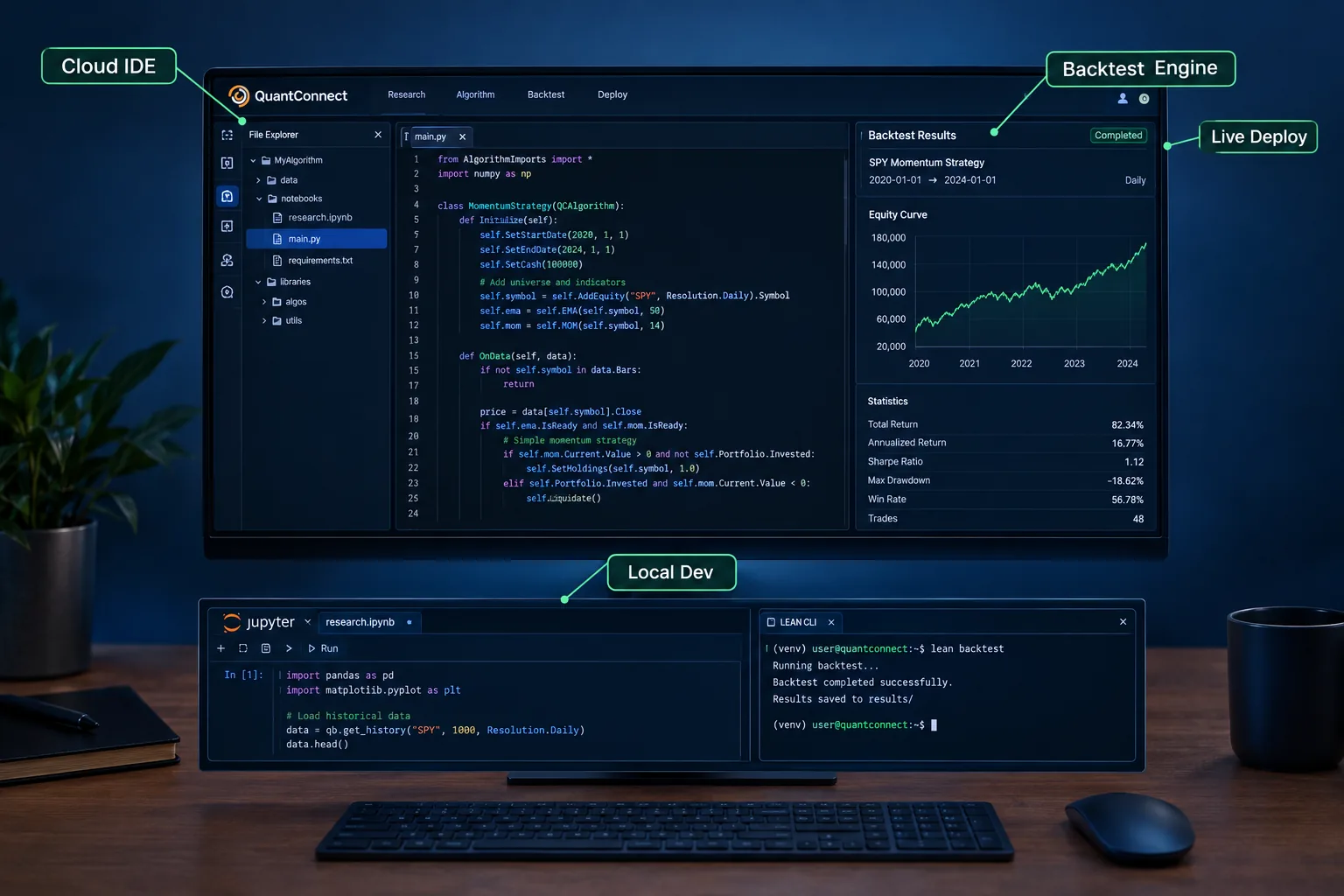
Best for: retail algo traders who can write basic Python or C#, or are actively learning, and want backtesting plus live deployment without renting servers.
QuantConnect is an open-source algorithmic trading platform built on the LEAN engine. You write a strategy, backtest it against cloud data covering equities, options, futures, forex, crypto, and CFDs, then deploy the same file to a connected broker. One codebase, two jobs.
That parity is the whole pitch, and it’s the single biggest time saver in this category. Most people who build their own stack spend six weeks discovering that their backtester and their live order handler disagree about fills.
Key features
- Cloud IDE plus local development in VS Code via the LEAN CLI
- Research notebooks for data exploration before you commit to a strategy
- An MCP server so AI assistants like Claude Code can write and test strategies alongside you
- Data from tick to daily resolution, plus fundamentals and alternative datasets
- Alpha Streams for licensing strategies
- Live integrations with Interactive Brokers, Alpaca, Tradier, Charles Schwab, Coinbase, Kraken, and Binance
Pricing (verified September 21, 2026): Free plan with unlimited backtesting on shared nodes. Researcher $84/mo. Team $168 per user per month, two-user minimum, annual billing saves $288 per user. Trading Firm $480 per user per month. Institution $1,272 per user per month. Extra compute nodes and some live data feeds cost extra.
✅ Pros
- Backtest and deploy live from one codebase, so a working test becomes a working bot
- Free plan includes unlimited backtesting across five asset classes
- Broad live brokerage support, including Schwab and IBKR
- LEAN CLI and MCP server make AI-assisted development practical, not a gimmick
- Trustpilot 4.5 from 64 mostly unprompted reviews
- One documented user went from concept to live trading in under a month
❌ Cons
- Python or C# required, so non-coders are locked out entirely
- Reddit users report earnings-date data being wrong often, sometimes off by weeks
- Backtests hanging on deployment, reported even on paid nodes
- Documentation is thin for a platform this deep
- Shared free nodes are slow, so real work pushes you to paid compute
- Team tier requires a minimum of two users
The honest verdict: validate any fundamental or earnings-dependent data yourself before you trade on it. If your strategy keys off earnings dates, cross-check them against a second source. That’s not a QuantConnect-specific rule, it’s just the one that bites hardest here.
2. TradeStation: best for system traders who want broker and backtester in one
Best for: active day traders and system traders who want to build, test, and automate strategies inside the same platform that routes their orders.
TradeStation has been running strategy automation since before “algo trading” was a retail phrase. EasyLanguage, its scripting language, was designed for traders rather than software engineers, which makes it the gentlest on-ramp in this guide for someone who can write an if-then statement but not a class.
Key features
- EasyLanguage for coding, backtesting, and automating strategies
- Advanced desktop charting with multi-pane layouts
- RadarScreen for real-time scanning across large symbol lists
- Stocks, options, and futures in a single account
- Hotkeys and fast order entry
- Mobile and web apps that sync with the desktop platform
Pricing: TradeStation doesn’t publish one flat platform price we could verify. Some market data and platform features carry fees on low-activity accounts, which is worth checking before you fund anything.
✅ Pros
- Code, backtest, and automate without leaving the broker
- RadarScreen scanning is strong for building a watchlist
- Three asset classes in one account simplifies margin and taxes
- Mature order-entry tooling for discretionary overrides
- Cross-device sync
❌ Cons
- Desktop platform is Windows-first with a real learning curve
- Fee structure punishes low-activity accounts
- EasyLanguage skills don’t transfer anywhere else
Decision rule: choose TradeStation if you want one vendor accountable for data, backtest, and execution. Skip it if you want portable code, because EasyLanguage is a walled garden.
3. TradingView: best for chart-first traders adding light automation
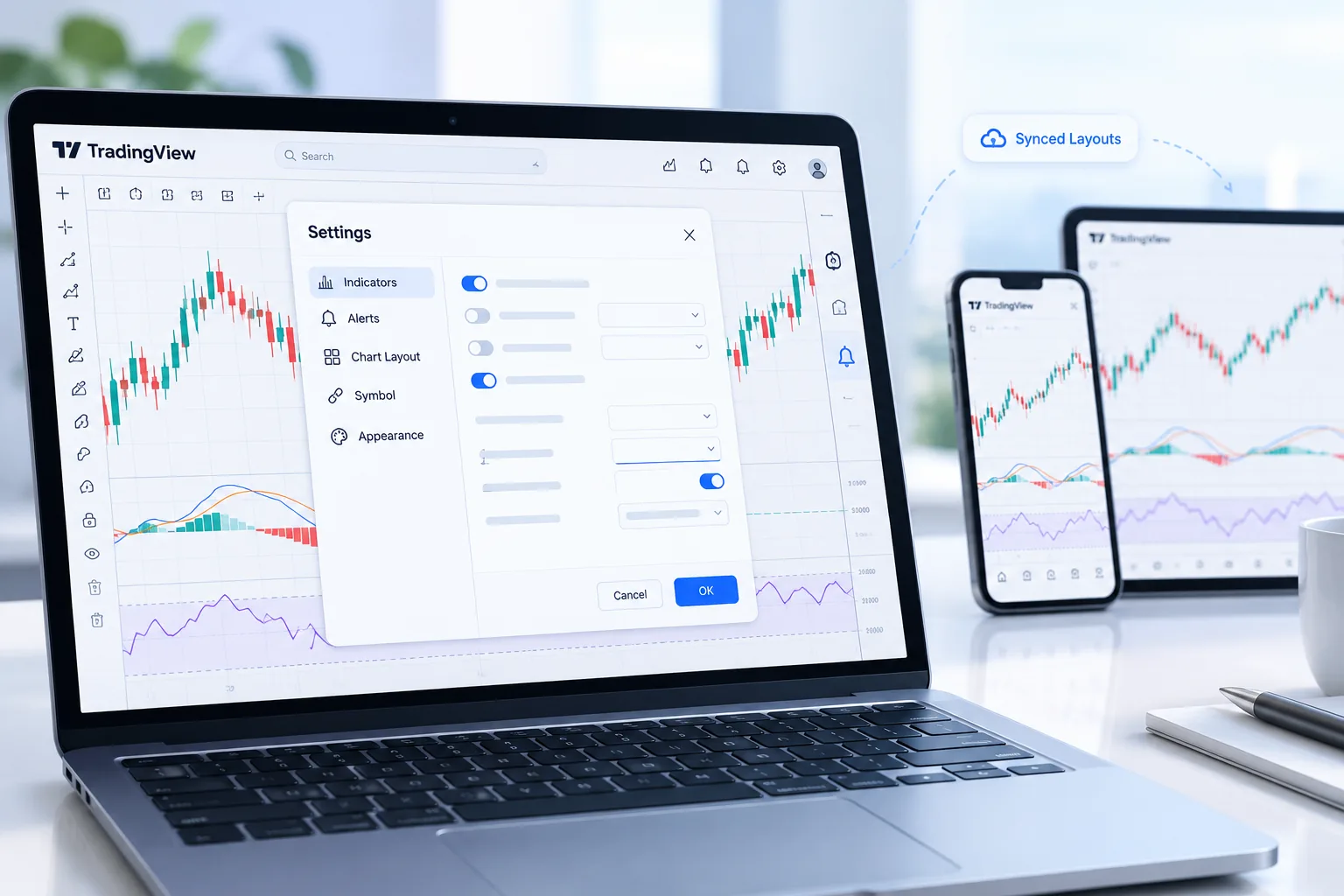
Best for: active retail traders who’ve outgrown the free tier’s caps and want Pine Script strategies, alerts, and charts that follow them between brokers.
TradingView is the most-used charting platform in retail trading, and Essential is the tier that fixes the daily friction for most people upgrading from free. The $12.95/mo annual price ($155.40/year) buys 5 indicators per chart instead of 2, two charts per tab, 20 price alerts instead of 3, and no ads.
Our in-house Alpha Score rates TradingView 95/100 overall, with the full five-pillar breakdown on the site. It’s the highest score in this guide, and it’s earned on usability and price-to-value rather than on automation depth.
Key features
- Pine Script for custom indicators and strategies, plus a Strategy Tester on-chart
- The largest community library of scripts and indicators in retail charting
- Web, desktop, and mobile apps with synced layouts
- Data across US stocks, crypto, futures, forex, and macro
- Alerts that can fire webhooks, which is how people bolt automation onto it
✅ Pros
- Free tier forever, no credit card
- Charts sync across browser, desktop, and mobile so your setup follows you between brokers
- 5 indicators and 20 alerts clear the two biggest free-tier walls
- Ad-free workspace at the lowest paid price in the category
- Community script library nothing else matches
- 100 million users means every bug has a forum thread
❌ Cons
- Multi-chart traders will hit the 2-chart-per-tab cap and need Plus at $29.95/mo
- Essential alerts expire in one to two months; only Premium alerts never expire
- Watchlist alerts aren’t in Free, Essential, or Plus (Premium gets 2)
- Real-time data on some exchanges costs extra
- Full automation requires a webhook bridge to a broker API, so it isn’t self-contained
The catch worth naming: TradingView’s Strategy Tester is a research tool, not an execution engine. Alerts plus webhooks plus Alpaca is a real architecture, and plenty of people run it, but you own the reliability of the middle piece. If your VPS drops the webhook, nobody tells you. Pair it with our guide to the AI tools swing traders use to catch moves early if charting is the core of your process.
4. Alpaca: best for developers who want an API-first brokerage
Best for: developers and bot builders connecting Python scripts, TradingView alerts, or AI agents to a real brokerage account.
Alpaca isn’t a trading platform in the way the others are. There’s no chart you’ll love and no strategy wizard. It’s a clean REST and streaming API with a brokerage behind it, and that narrow focus is exactly why it shows up in almost every algo tutorial written since 2019.
Key features
- REST and WebSocket APIs for orders, positions, and market data
- Free paper trading account that uses the same endpoints as live
- Commission-free US stock and ETF trades
- $0 commissions on multi-leg options trading
- $0 borrow fees on 5,000+ Easy-to-Borrow securities
- Options and crypto trading via API
- Works with most third-party algo and no-code tools
Pricing: free sign-up. The pricing page returned a 404 when we checked, so full tiered market data pricing isn’t confirmed. Advanced market data plans cost extra.
✅ Pros
- Developer-first API with excellent third-party support
- Paper trading is free and endpoint-identical, so you can paper trade it first without rewriting anything
- $0 stock and ETF commissions
- Plugs into QuantConnect, TradingView webhooks, and most bot frameworks
- Options and crypto in the same API surface
❌ Cons
- No native backtesting, you supply your own engine
- Useless for manual traders, the value is entirely the API
- Advanced data plans add cost
- Pricing transparency is weak, the pricing page 404’d
Decision rule: use Alpaca as the execution layer under something else. If you’re picking Alpaca as your platform, you’ve committed to building the rest yourself.
5. NinjaTrader: best for futures automation on a budget
Best for: futures day traders who want to backtest and automate strategies with low per-contract costs.
NinjaTrader is a futures platform and brokerage with NinjaScript automation written in C#, a Strategy Analyzer for backtesting and optimization, and one of the deepest third-party add-on libraries in retail trading. If your edge lives in ES, NQ, CL, or micros, this is the specialist.
Key features
- NinjaScript (C#) for building and automating strategies
- Strategy Analyzer for backtesting and parameter optimization
- Micro and e-Nano contracts for small-account position sizing
- Intraday margins starting at $50 ($100 for Micro Crude Oil)
- Free simulated trading
- Large marketplace of third-party indicators and add-ons
Pricing (verified): Free plan at $0/mo with commissions of $0.39 per side on Micro and e-Nano, $1.29 on Standard. Monthly plan $99/mo cuts that to $0.29 and $0.99. Lifetime license is $1,499 one-time and takes it to $0.09 and $0.59. No account deposit minimum, though ACH and debit transfers require $5.00. Exchange, clearing, and NFA fees apply on top.
✅ Pros
- NinjaScript gives you real C# control, not a scripting toy
- Strategy Analyzer handles optimization natively
- Lowest-tier commissions are aggressive if you trade volume
- Micro contracts let you size positions sanely on a small account
- Free sim trading with no time limit pressure
- Huge add-on library
❌ Cons
- Futures-focused, not a stock platform
- The $1,499 lifetime license only pays back at real volume
- Exchange and NFA fees land on top of the quoted commissions
- C# requirement rules out non-coders
Do the math before you buy the license. The gap between the free plan and lifetime is $0.30 per side on micros. That’s 4,997 round-turn micro trades to break even on $1,499. If you’re trading 20 micros a day, that’s roughly a year. If you’re trading three, don’t.
6. MetaTrader 5: best for forex and CFD bot builders
Best for: forex and CFD traders who want to run or build automated Expert Advisors through a supporting broker.
MetaTrader 5 from MetaQuotes is the default automation platform for a large share of the world’s forex and CFD brokers. MQL5 Expert Advisors handle fully automated execution, the built-in Strategy Tester is multi-threaded, and the marketplace holds thousands of ready-made robots and indicators.
That marketplace is the reason people come and the reason they leave disappointed.
Key features
- MQL5 Expert Advisors for fully automated trading
- Multi-threaded Strategy Tester with optimization
- Marketplace of robots, indicators, and signal subscriptions
- Runs on Windows, macOS, Linux, iOS, Android, and a WebTerminal
- Virtual hosting (VPS) for 24/5 uptime
Pricing: free to download for traders. Institutional broker licensing, VPS hosting, signal subscriptions, and marketplace product pricing weren’t listed on the page we checked, which returned a 404.
✅ Pros
- Free to use through a supporting broker
- Largest library of pre-built robots and indicators anywhere
- Fast multi-threaded backtesting
- Runs on every major desktop and mobile OS
- MQL5 skills transfer across hundreds of brokers
❌ Cons
- Mostly distributed by forex and CFD brokers, with limited US stock access
- Marketplace robot quality varies wildly, and many are overfit to historical data
- Your execution quality depends entirely on which broker you’re with
- Pricing for hosting and add-ons isn’t centrally published
The trap: a marketplace robot with a beautiful five-year backtest and no live track record is a curve fit wearing a suit. If a vendor won’t show you a verified live account, treat the backtest as fiction. We cover the pattern in what to know before you automate trades.
7. Composer: best for non-coders who want rules-based automation
Best for: investors who want automated, rules-based portfolios and have no intention of learning to code.
Composer lets you build strategies (it calls them symphonies) with a visual no-code builder or by describing what you want in plain English to an AI assistant. It backtests before you invest, then rebalances and executes automatically through its own brokerage.
This is the only pick here that a complete non-coder can run end to end, and it’s priced like it wants you to try it.
Key features
- No-code visual strategy builder with conditional logic
- AI assistant that drafts strategies from plain-language descriptions
- Backtesting before any money moves
- Automatic rebalancing and execution through Composer’s brokerage
- Community library of strategies to copy or edit
Pricing: Starter $0/month. Advanced $10/month. Pro $32/month billed yearly ($384/year). Business is custom. Zero commissions and zero management fees on trades, with standard SEC and FINRA regulatory fees on sales.
✅ Pros
- Zero coding required
- AI assistant turns a written rule into a testable strategy
- Backtest before you invest, on the free tier
- Automatic rebalancing removes the discipline problem
- Community strategies give you a starting point instead of a blank page
- No commissions or management fees on trades
❌ Cons
- Subscription sits on top of whatever the trades cost you
- Built for rules-based portfolios, not intraday trading
- No custom code means you hit a ceiling on logic detail
- You’re locked into Composer’s brokerage
Edge case to know: Composer rebalances on a schedule, so it can’t express an intraday stop loss the way a NinjaTrader script can. If your strategy needs to react inside the session, this is the wrong tool. Our longer look at whether an AI can build a trading algo you’d actually run digs into where the AI assistant helps and where it flatters you.
Top 5 features the best algorithmic trading platforms share
Every platform on this list looks different on the surface. Underneath, the good ones do the same five things, and the ones that fail usually fail on the same one.
- One codebase from backtest to live. The same file that passed the test places the orders, so you debug one system instead of two.
- Realistic fill modeling. Slippage, commissions, and spread built into the backtest, because a strategy that only works at the midpoint doesn’t work.
- Paper trading on live data. A sandbox that uses the same endpoints and the same market feed as production, so going live is a config change.
- Data you can audit. Corporate actions, splits, dividends, and earnings dates you can cross-check, since bad reference data silently invalidates every result behind it.
- A named broker connection. Documented, supported integrations rather than a community plugin someone abandoned in 2023.
If a platform is missing number one, you’ll feel it in week two. If it’s missing number four, you won’t feel it until you’ve lost money on a signal that never existed.
What should you look for before you choose?
Start with your coding level, then your market, then your budget. In that order. Most people do it backward, buy on price, then discover the language is wrong for them.
Pick by coding level:
- No code at all: Composer. Everything else will stall you.
- You can write basic Python: QuantConnect, or Alpaca plus a framework like Backtrader or vectorbt.
- You know C#: NinjaTrader for futures, QuantConnect for everything else.
- You want the shallowest scripting curve: TradeStation EasyLanguage or TradingView Pine Script.
- You trade forex or CFDs: MetaTrader 5 and MQL5, because that’s where your broker already is.
Then check these five things before you pay:
- Asset coverage. NinjaTrader won’t help you with equity options. MetaTrader 5 won’t give you US stock depth.
- Data costs. Several platforms here quote a platform price and then charge separately for real-time feeds. Add them up.
- Minimum commitments. QuantConnect’s Team tier requires two users. That’s a hidden 2x on the sticker.
- Exit cost. How much of your work is portable? EasyLanguage, NinjaScript, and MQL5 are all locked to their platform. Python is not.
- Regulatory footing. If you go beyond a personal account, know the rules. FINRA maintains supervision and registration requirements around algorithmic trading strategies for member firms, which is worth reading at finra.org before you start managing anyone else’s money.
The most common mistake: buying the deepest platform you can afford instead of the one you’ll finish a strategy on. A finished, boring strategy running live teaches you more in 30 days than six months of configuring a research environment. Analysis paralysis has a price, and it’s paid in months.
How do these compare to other options?
The two real alternatives to a hosted platform are building your own Python stack and buying a bot from a marketplace. One costs time, the other costs money and usually your capital.
Building your own stack in Python. Pandas, a data vendor, a backtesting library, a broker SDK, a scheduler, a VPS, and logging. Total software cost can be near zero. Total time cost is typically weeks to months before your first live order, and you own every bug forever. This suits engineers who want full control of the fill model and anyone whose strategy needs something a hosted engine won’t do. It does not suit someone with six hours a week, because those six hours will go to infrastructure instead of research.
Trading bot marketplaces. MetaTrader’s MQL5 Market, the various “buy this EA” corners of the internet, and copy-trade services. The pitch is that someone else did the research. The reality is that you’re renting a black box with a backtest and no verified live record, and the seller has no exposure to your drawdown. This suits almost nobody who’s serious. If you use a marketplace at all, treat the source code as a starting template you’ll re-test yourself, not a product.
Where hosted platforms win: they collapse the infrastructure problem so you can spend your limited hours on the strategy. That’s the entire trade. You give up some control over the fill engine and you pay $10 to $168 a month. For a part-time quant, that’s a good deal.
If you’re still mapping the wider field, our roundup of AI trading platforms covers the tools that sit alongside these for research and screening.
Our Take
The best algorithmic trading platform is the one that speaks the language you already know. Here’s how that shakes out.
QuantConnect is the pick for anyone who can write Python or C#, because one codebase takes you from backtest to live broker and the free tier lets you prove the idea before you spend $84. Validate its earnings and fundamental data yourself.
Composer is the pick for non-coders, at $0 to start and $32/month at the top of the retail tiers. Rules-based portfolios only, nothing intraday.
NinjaTrader is the pick for futures, with a $1,499 lifetime license that only makes sense above roughly 5,000 round-turn micro trades.
TradingView at $12.95/month is the pick if charts are your process and automation is the add-on.
Alpaca is the pick as an execution layer under something else, not as your platform.
TradeStation is the pick if you want one vendor accountable for data, backtest, and fills.
MetaTrader 5 is the pick if you trade forex or CFDs, with the marketplace treated as source code rather than a shortcut.
Your next step: pick the platform that matches the language you already know, open the free tier today, and code one rule you can write in a single sentence. Backtest it, paper trade it first, and run it for 30 days before you touch the parameters. Cut the noise, keep the alpha.
One tool is a decision. Picking the rest of the stack is the next one. The FullStack Alpha directory catalogues 200+ AI stock tools by category, price, and what they actually do. Browse the directory → aistockpickerapps.com
Some links in this article are affiliate links, which may earn us a commission at no extra cost to you.
By Jay Rocco, Founder and Editor, FullStack Alpha.
Stay alpha.
Frequently Asked Questions
Which is the best algorithm for trading?
There isn't one. Trend-following, mean reversion, and momentum all work in some regimes and lose in others, which is why the platform matters more than the algorithm. A simple moving-average crossover you've tested honestly and sized properly will outlast a complex model you don't understand.
Can ChatGPT write a trading algorithm?
Yes, it can write working code, and QuantConnect's MCP server exists specifically so assistants like Claude Code can draft and test strategies with you. What an AI can't do is know whether your idea has an edge or whether your backtest is overfit. Treat generated code as a first draft you must test, not a strategy.
Is algo trading really profitable?
It can be, and most retail attempts aren't. Automation removes emotional errors like revenge trading, and it faithfully executes a bad edge just as fast as a good one. Nobody on this page, including us, can promise you returns.
Do I need to know Python to start algorithmic trading?
No. Composer requires no code, and TradeStation's EasyLanguage plus TradingView's Pine Script are both far simpler than Python. You do need Python or C# for QuantConnect, and you need real programming skill for Alpaca.
What's the cheapest way to start algorithmic trading?
Around $0. QuantConnect's free plan gives unlimited backtesting, Alpaca's paper trading account is free, Composer's Starter tier is $0/month, and MetaTrader 5 is a free download. You can test a full strategy without paying anything.
How much capital do I need to run an algo?
Depends on the market. NinjaTrader lists no account minimum with intraday futures margins starting at $50, and micro contracts let you size small. For equities, enough to make commissions and data fees irrelevant against your position size, which realistically means low four figures and up.
Can I connect TradingView alerts to a broker automatically?
Yes, using webhook alerts pointed at a broker API like Alpaca's, or through a third-party bridge. You own the reliability of that middle layer, and it's the most common failure point in a retail setup.
How long should I paper trade before going live?
Long enough to see your strategy handle a losing stretch, which usually means at least 30 to 60 trades rather than a fixed number of weeks. Going live earlier is fine if the position size is small enough that the lesson costs less than the tuition.
Jay Rocco is the Founder and Editor of FullStack Alpha. He has tested 200+ AI stock tools since 2022 and run 15+ AI trading platforms on live accounts with his own money. He reviews the software. He does not tell you what stocks to buy.
