

Jay Rocco is the Founder and Editor of FullStack Alpha. He has tested 200+ AI stock tools since 2022 and run 15+ AI trading platforms on live accounts with his own money. He reviews the software. He does not tell you what stocks to buy.
Last updated: September 25, 2026
The alpaca options api automates contract discovery, approved options orders, defined-risk multi-leg strategies, and position monitoring, but your bot must handle permissions, execution failures, and expiration risk. Alpaca now supports selected live index options alongside equity and ETF options. A successful API request still doesn’t guarantee a fill, a safe exit, or a profitable trade.
Key takeaways
- Alpaca Level 3 supports defined-risk multi-leg trading, not unrestricted short-option strategies.
- Alpaca MLeg orders group eligible option legs inside a single request to the orders endpoint.
- SPX, SPXW, VIX, VIXW, DJX, and XSP joined live Trading API support on September 2, 2026.
- Python developers can build research, order, and monitoring workflows around Alpaca, but a library cannot supply missing account permissions.
- Index-option bots must respect restrictions on expiration combinations, naked shorts, and trading sessions.
- Paper trading is useful for checking code paths; it cannot establish live execution quality. Start with the workflow described in Alpaca’s options guide.
Method: desk research using the supplied official documentation and announcements. No hands-on execution test, latency benchmark, or independently verified public-user sentiment sample is claimed.
What is Alpaca’s developer-first trading API, and why use it?
Alpaca’s trading API lets software read account state, discover instruments, submit instructions, and monitor positions through programmable interfaces. The alpaca options api is the options portion of that workflow, using the broker’s existing account and order infrastructure.
Easy-to-use API access still needs a trade system
A REST request asks Alpaca to perform an operation. A WebSocket connection delivers events as they arrive. Your Python code decides when a trade qualifies, what to send, and how to respond when reality refuses to follow the script.
For example, an AAPL strategy might detect a stock breakout, discover an eligible AAPL call, check its quote, and submit a limit order. The stock setup and the option execution are separate decisions.
There’s a large gap between “the signal fired” and “the intended position exists.” Your script must cross it.
Alpaca’s developer-first approach helps an algo builder who wants direct control. It does not turn an untested idea into a trading system. The official options walkthrough is a useful starting point, while FullStack Alpha’s guide to AI trading bots before automation explains the larger operational job.
Trading API versus Broker API
Use the Trading API for a strategy operating your own eligible account. The Broker API addresses brokerage applications and customer-account infrastructure; it is not a shortcut around options approval.
Before choosing either interface, write down who owns the account, who authorizes the trade, and who receives the execution updates. There should be no ambiguity about which account your code controls.
The useful distinction is ownership, not how impressive the endpoint name sounds.
What can the alpaca options api do?
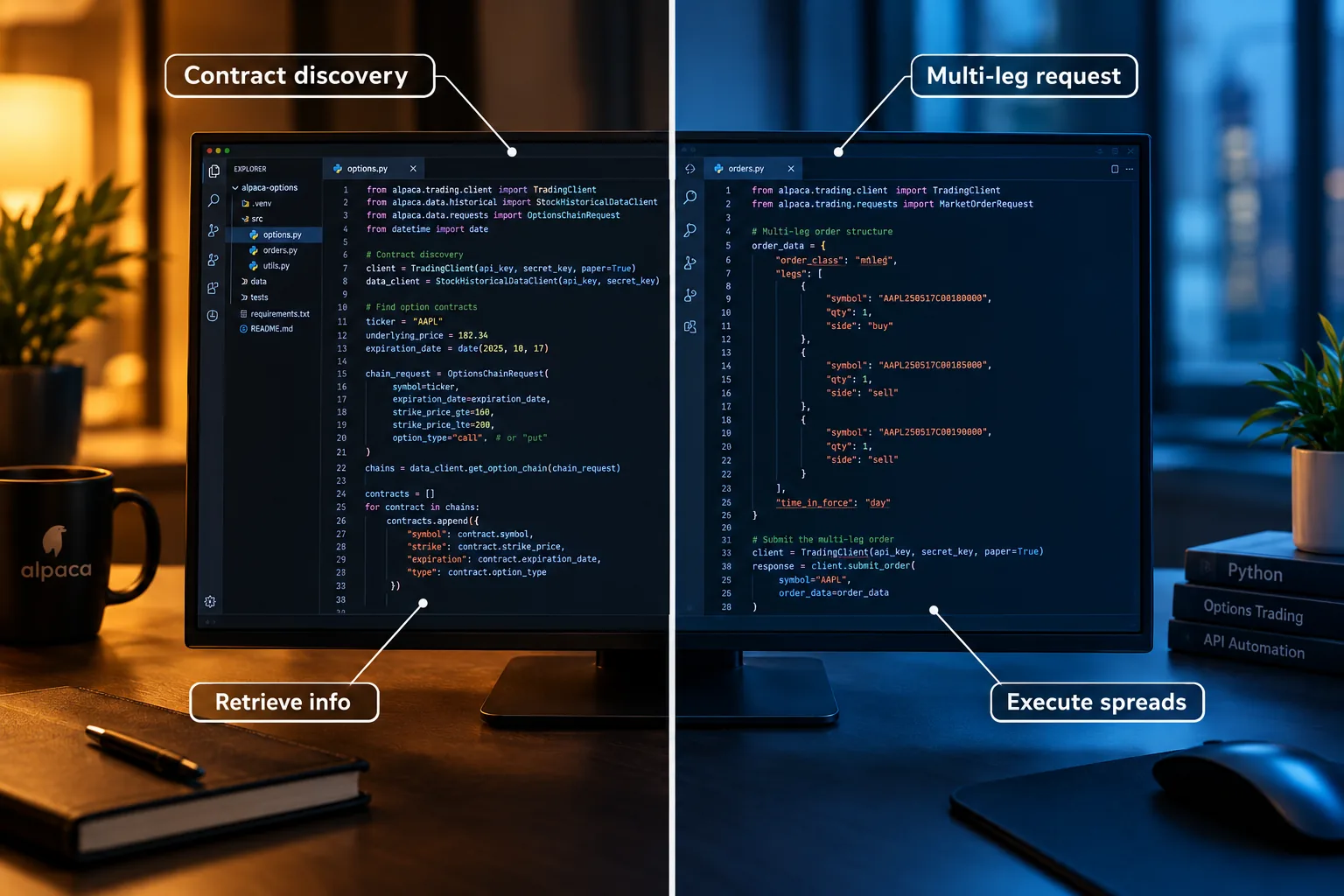
The alpaca options api can discover contracts, retrieve options information, submit supported instructions, and monitor an approved options trade. It can also execute eligible spreads through multi-leg requests, with account permissions and contract rules checked by Alpaca.
Can you automate options trading with Alpaca?
Yes. Your script can run the trade lifecycle from selection through reconciliation:
- Find a contract using the underlying, expiration, strike, and option type.
- Check account eligibility and available buying power.
- Evaluate current quotes before choosing an entry price.
- Submit an order and record its broker identifier.
- Process fills, cancellations, rejections, and position changes.
- Compare local records with Alpaca’s records after a disconnect.
The options trading overview and multi-leg documentation define the broker side. Your code owns the decision rules and failure handling.
An AAPL trade might begin with price action near support and resistance. Those are stock-price areas where buying or selling previously appeared. They do not tell your bot which AAPL option has an acceptable spread.
A clean setup still needs a clean contract.
Product launches: live index options change the scope
Alpaca’s September 2, 2026 launch added live support for SPX, SPXW, VIX, VIXW, DJX, and XSP through the Trading API and dashboard. These supported index contracts are cash-settled and European-style.
Cash settlement means settlement creates a cash adjustment rather than delivery of underlying shares. European exercise generally means exercise occurs at expiration, unlike the early-exercise exposure associated with American-style equity options.
Alpaca’s index implementation uses existing contracts, orders, positions, and activities interfaces. Your architecture can share components, but your risk engine must distinguish equity delivery from index settlement.
Does the API support options chains and Greeks?
Alpaca supports contract discovery and options market-data workflows. Keep metadata, quotes, and calculated analytics separate: a contract list tells you what exists; a quote tells you what someone is bidding or offering.
Greeks estimate sensitivity to factors such as the underlying price, volatility, and time. They are model outputs, not executable prices. An AAPL option with an attractive delta can still have a spread too wide for your trade.
Check your feed entitlement and the relevant response fields before making Greeks mandatory in the script. Start from Alpaca’s official options guide, then validate actual responses in your environment.
Which options orders and levels does the alpaca options api support?
Alpaca’s approval levels control the strategies your account may trade, while its order rules control how those strategies reach the broker. Level 3 is defined-risk multi-leg access, and eligible multi-leg instructions use order_class: "mleg" with a legs array.
Options levels: permission before strategy
Alpaca’s documented progression starts with covered calls and cash-secured puts, adds long calls and puts, and then adds defined-risk spreads. Approval is an account decision, not a field your script can override.
| Approval | Typical supported scope | Bot check |
|---|---|---|
| Level 1 | Covered calls and cash-secured puts | Confirm shares or required cash |
| Level 2 | Long calls and long puts, plus preceding permissions | Confirm premium and available buying power |
| Level 3 | Defined-risk multi-leg trading, including eligible spreads | Confirm strategy eligibility and every leg |
Source: Alpaca’s options trading overview.
Do not infer naked-short permission from Level 3. Do not assume an options approval in paper trading transfers to a live account.
Market, limit, and conditional orders
For a portable options implementation, build the initial workflow around market or limit instructions and day duration, then check the current options-specific rules before adding other order types. A stock-order example is not proof that the same fields work for an option.
A market instruction prioritizes execution, with no guaranteed price. A limit instruction sets an acceptable price but can remain unfilled.
For options, a limit usually gives the bot a more useful boundary. An AAPL contract can have a liquid underlying and an unpleasant option spread at the same time.
Do not assume stock-style brackets, trailing stops, or paired stop-loss/take-profit exits transfer unchanged. Conditional orders need explicit options support. If your script implements exits locally, those exits depend on the script, its connection, and its ability to submit the next instruction.
Can the API execute spreads and multi-leg orders?
Yes. Alpaca’s multi-leg interface groups eligible legs in one request, including each leg’s symbol, side, ratio quantity, and position intent. This is the supported route for an eligible spread, rather than pretending unrelated single-leg submissions form a protected package.
Supported requests can contain two to four option legs. Strategy eligibility still depends on permissions, contract combinations, and validation.
Defined-risk vertical spreads are the clearest starting point. Alpaca’s index documentation also describes eligible same-expiration structures, including iron condors, butterflies, and straddles, subject to the account and leg rules. It does not grant blanket approval to every structure carrying those names.
For European-style index legs, the same-expiration requirement rules out calendar and diagonal constructions.
Broker comparison: options access, multi-leg orders, paper trading, and cost
This table is a purchasing checklist, not a claim that every broker offers identical access. Competitor permissions and pricing require a separate current-documentation review; the supplied verified sources establish Alpaca’s features only.
| API | Option levels | Multi-leg orders | Paper trading | Cost check |
|---|---|---|---|---|
| Alpaca | Approval-based, defined-risk scope | Eligible MLeg requests | Separate simulation environment | Check fees and feed entitlement |
| Tradier | Verify account permissions | Verify required structures | Verify sandbox limits | Check plan and contract charges |
| Interactive Brokers | Verify product permissions | Verify combination handling | Verify simulation behavior | Check commissions and subscriptions |
| TradeStation | Verify options approval | Verify endpoint support | Verify simulated API access | Check account and API terms |
Use Alpaca’s overview and MLeg rules as the confirmed baseline.
Who should use the alpaca options api: day traders, swing traders, or algo builders?
The alpaca options api fits Python-capable algo builders and swing traders who want control over contract selection, entries, and monitoring. A day trader can use it, but a latency-sensitive scalper needs measured execution evidence beyond a convenient API.
Serving algo traders and quant funds
A swing trader can schedule contract checks, enforce position sizing, and monitor overnight exposure. An AAPL covered-call workflow may be easier to supervise than a strategy reacting to every quote.
A day trader needs fresh quotes and clear rules around incomplete fills. During power hour, the final part of the regular session, there may be less time to recover from a rejected exit.
A scalper should ask whether the expected edge survives the option spread, routing time, and queue position. “Fast Python” is not an execution study.
A long-term position investor may only need alerts and occasional covered-option instructions. A continuously running bot can add failure points without adding value.
Is the alpaca options api good for beginners?
It can be a good learning environment for a beginner who already understands option obligations and can debug code. It is a poor shortcut for someone learning options, programming, and live risk management simultaneously.
Start with an AAPL watchlist and a read-only script. Get contracts. Get quotes. Get account state. Do not submit a trade until the records agree.
FullStack Alpha’s options screener filter guide helps separate contract selection from execution. The algorithmic trading guide addresses the system around the signal.
Sourced numbers that change the build
September 2, 2026: Alpaca announced live index options through its Trading API and dashboard. Older equity-only comparisons need revision.
Six named index symbols: SPX, SPXW, VIX, VIXW, DJX, and XSP appear in the launch. Do not infer support for every index family.
Two to four legs: Alpaca’s multi-leg request supports this range, subject to validation. An arbitrary basket is a different problem.
Level 3: Alpaca defines this as defined-risk multi-leg access. A high approval level does not remove strategy restrictions.
How do you get started with the alpaca options api and test connectivity?
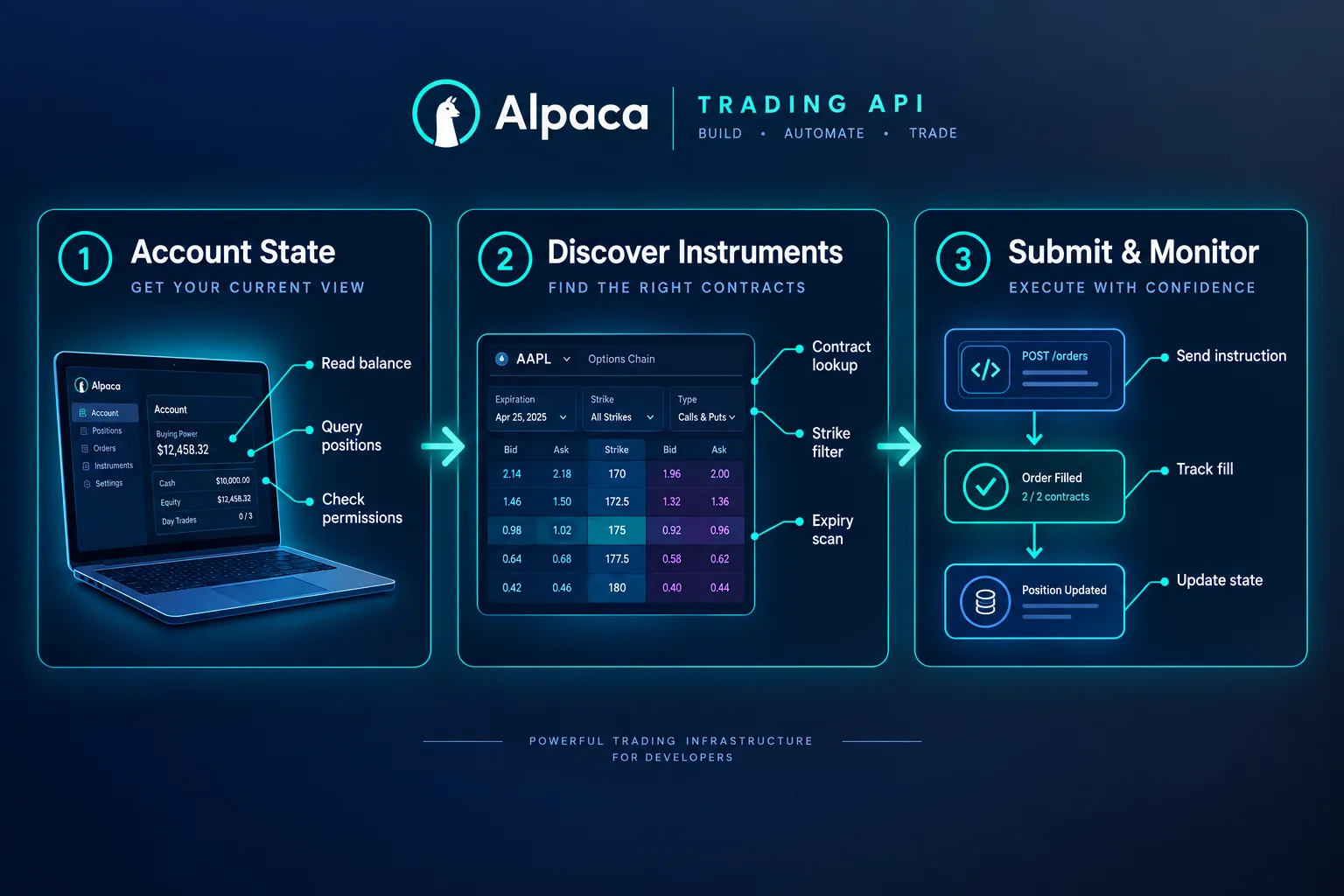
Start with a paper account, environment-based credentials, and read-only requests before submitting any trade. The alpaca options api should first prove that your code can identify the intended account, discover a tradable contract, and handle a rejected request.
Sign in, separate credentials, and test the clock
Install alpaca-py in an isolated Python environment and record the library version. Keep the API key and API secret outside the script.
Use separate credentials for paper and live environments. A deployment should stop if the expected account and actual account differ.
import os
from alpaca.trading.client import TradingClient

client = TradingClient(
    os.environ["APCA_API_KEY_ID"],
    os.environ["APCA_API_SECRET_KEY"],
    paper=True,
)

account = client.get_account()
clock = client.get_clock()

print("account:", account.id)
print("status:", account.status)
print("options level:", account.options_trading_level)
print("market open:", clock.is_open)
print("next open:", clock.next_open)
print("next close:", clock.next_close)
This connectivity code does not submit orders. The clock helps establish session context, but a general market clock is not proof that a particular option remains eligible for an instruction.
There’s another trap: a successful clock response proves connectivity, not options permission. Get the account response and inspect the options fields separately. Alpaca’s getting-started walkthrough describes the broader workflow.
Discover AAPL contracts before building the trade
Do not invent an AAPL option symbol from a familiar expiration pattern. Ask Alpaca for listed contracts and then retrieve market data for the candidates.
from datetime import date
from alpaca.trading.enums import AssetStatus, ContractType
from alpaca.trading.requests import GetOptionContractsRequest

request = GetOptionContractsRequest(
    underlying_symbols=["AAPL"],
    status=AssetStatus.ACTIVE,
    type=ContractType.CALL,
    expiration_date_gte=date.today(),
)

page = client.get_option_contracts(request)

for contract in page.option_contracts:
    print(
        contract.symbol,
        contract.expiration_date,
        contract.strike_price,
        contract.tradable,
    )
This code reads a page, not necessarily the entire chain. Production code must follow pagination and apply explicit expiry and strike filters.
AAPL is an illustration, not a recommendation. A high stock volume figure does not establish high liquidity in every AAPL option. Use the actual option quote before the next trade decision. See Alpaca’s options implementation guide.
Build a multi-leg request with explicit intent
The following Python example builds a debit call spread request without submitting it. Supply contract symbols returned by discovery, verify matching expiration and underlying, and confirm the purchased call has the lower strike.
import os
from decimal import Decimal
from alpaca.trading.enums import (
    OrderClass, OrderSide, PositionIntent, TimeInForce
)
from alpaca.trading.requests import LimitOrderRequest, OptionLegRequest

long_call = os.environ["LONG_CALL_SYMBOL"]
short_call = os.environ["SHORT_CALL_SYMBOL"]
debit = Decimal(os.environ["MAX_NET_DEBIT"])

if debit <= 0:
    raise ValueError("This example requires a positive net debit.")

spread = LimitOrderRequest(
    qty=1,
    order_class=OrderClass.MLEG,
    time_in_force=TimeInForce.DAY,
    limit_price=float(debit),
    legs=[
        OptionLegRequest(
            symbol=long_call,
            ratio_qty=1,
            side=OrderSide.BUY,
            position_intent=PositionIntent.BUY_TO_OPEN,
        ),
        OptionLegRequest(
            symbol=short_call,
            ratio_qty=1,
            side=OrderSide.SELL,
            position_intent=PositionIntent.SELL_TO_OPEN,
        ),
    ],
)

print(spread.model_dump(exclude_none=True, mode="json"))
The request structure follows Alpaca’s Level 3 interface. The sample quantity is an illustration, not position-sizing advice.
Before enabling submission, assign and persist a client identifier for the intended trade. After a timeout, reconcile with the broker before sending another order. A retry can otherwise create a second position.
How do you backtest with market data and stream WebSocket updates?
Use historical data to evaluate decision rules, REST to retrieve snapshots and reconcile state, and WebSocket streams for timely events. The alpaca options api supplies access points; your code must prevent stale observations from becoming new orders.
Does Alpaca allow backtesting?
You can use Alpaca data in a backtesting framework, but API access does not provide a complete options simulator. A useful simulation needs historical contracts, bid and ask observations, execution assumptions, and expiration handling.
An AAPL stock bar can test an underlying signal. It cannot establish what an AAPL call would have cost at that time.
A bar summarizes activity over an interval. Its open, high, low, and close hide the sequence inside that interval. If a bar touches both your entry and exit levels, the bar alone may not prove which happened first.
Alpaca’s options guide is the implementation starting point. For evaluating claims about a bot’s results, use FullStack Alpha’s automated trading results guide.
How do you get historical data and use indicators?
Choose the dataset that matches the trade question. Stock history supports an AAPL trend filter; option history supports contract selection and execution assumptions.
Calculate indicators only from information available at decision time. If your script uses a completed bar, wait for that bar to close. Using the final high before the interval ends creates a backtest that knows the future.
A high moving average reading may describe the underlying trend. It says nothing by itself about implied volatility or the option’s spread.
For tight consolidation, meaning a narrow stock range, define the allowed bar range and lookback in code. For basing, meaning price stabilizing after a decline, define the pattern before reviewing winners. There should be a rule your script can reject, not a story it can admire.
How do WebSocket trade updates work?
Keep trading updates separate from market-data subscriptions. A quote WebSocket reports observations; a trading WebSocket reports events tied to your account.
import os
from alpaca.trading.stream import TradingStream

conn = TradingStream(
    os.environ["APCA_API_KEY_ID"],
    os.environ["APCA_API_SECRET_KEY"],
    paper=True,
)

async def handle_trade_update(event):
    # Persist the event before changing local strategy state.
    print(event.event, event.order.id, event.order.status)

conn.subscribe_trade_updates(handle_trade_update)
conn.run()
Here, conn is a library client object, not a database connection. The conn callback is intentionally minimal. In production, conn updates should enter a durable event pipeline.
Do not block the callback with slow research. If conn drops, pause new exposure. When conn reconnects, get current orders and positions through REST before allowing the next trade.
The official Alpaca guide supports this API-based workflow; Alpaca’s status page helps identify service incidents.
Legacy script cleanup: broken HTML is not Python
Old scraped tutorials sometimes contain 8217 and 091 fragments. A curly apostrophe can appear as ’, while an encoded opening bracket can appear as [. Those are text-encoding artifacts, not Alpaca parameters.
Search fragments such as trade params 091, trade order 091, candlesticks 091 aapl, and 091 aapl 091 belong in a cleanup checklist, not executable code.
The same applies to compressed credential headings: api key api, key api secret, api secret base, and secret base url. Keep the actual credential names separate.
If a tutorial contains api get barset, confirm the current library method rather than copying it. If it contains api get clock or clock api get, map the intent to the current SDK’s get_clock() call.
Top 5 alpaca options api features bot builders use
The most useful alpaca options api features reduce ambiguity between a trade idea and the broker’s recorded position. The selection below favors control and auditability over promotional claims.
- Contract discovery: Find listed instruments before building an order symbol.
- Defined-risk multi-leg requests: Submit eligible spread legs together through MLeg.
- Explicit position intent: Distinguish opening exposure from closing exposure at the leg level.
- Shared index interfaces: Reuse contracts, orders, positions, and activities components for supported index products.
- Separate paper workflow: Exercise the API lifecycle before allowing live orders.
Choose the feature that removes your current failure point. More endpoints will not fix a strategy that never checks whether its previous trade filled.
How does the alpaca options api compare with competitors?
The alpaca options api is worth considering when straightforward Python integration and supported defined-risk strategies match your needs. Choose another broker only after identifying a required product, order behavior, or account feature that Alpaca does not provide.
Alpaca options API versus Interactive Brokers API
An Interactive Brokers comparison should start with your required instruments and execution workflow. If your project needs products outside Alpaca’s documented scope, investigate whether Interactive Brokers supports the exact contract family and API operation.
Do not compare a simple Alpaca script with an idealized competitor. Compare complete systems: authentication, contract discovery, quote entitlement, order replacement, session handling, and recovery after a lost connection.
Alpaca’s documented index limitations provide a concrete checklist for that review.
Tradier, TradeStation, and Schwab: who should investigate each?
Tradier API: Put it on the shortlist for an options-centered application. Verify sandbox behavior, complex-order support, and the charges attached to your intended account.
TradeStation API: Investigate it if your workflow already depends on TradeStation tools or account services. Require a working demonstration of the exact API entry and exit sequence you need.
Schwab API: Investigate it if keeping an existing Schwab account is a priority. Confirm authentication, eligible order structures, and your ability to operate the application unattended.
These are evaluation paths, not verified superiority claims. The supplied source set does not establish current competitor features or costs.
What brokers have a better options API than Alpaca?
“Better” means fewer compromises for your strategy. A broker wins if it supports your required contract, accepts your intended order, supplies usable quotes, and lets your recovery code reconstruct state.
Write a short acceptance test before opening another account. Use the same hypothetical trade across candidates, including cancellation during a disconnect.
The FullStack Alpha options tools directory can help separate research tools from execution providers. A payoff visualizer and a broker solve different problems.
Where does the alpaca options api stop?
The alpaca options api stops at account permissions, supported products, accepted order structures, data entitlements, and the broker’s operational rules. Your bot remains responsible for stale quotes, duplicate submissions, incomplete fills, and safe shutdown.
Rate limits and restrictions
Build a request budget rather than polling every object continuously. Trading requests and market-data requests may have different limits, and your active subscription is the authority for its entitlement.
On a rate-limit response, back off and preserve local state. Prioritize reconciliation and exits over refreshing the watchlist.
The restriction that deserves more attention is product scope. Alpaca’s index documentation excludes NDX/NQX, RUT/MRUT, OEX, American-style index options, naked index shorts, and calendar or diagonal index spreads.
There’s no clever trade params setting that overrides those rules. Searching trade examples until one appears to fit is not a permission model.
Latency, 99.99% availability, and 1.5ms claims
Do not convert a platform headline into an options fill guarantee. Availability, internal processing time, network transit, exchange acknowledgment, and execution are different measurements.
A 99.99% availability claim or 1.5ms processing claim should remain unverified for your strategy unless its source defines the service, measurement period, percentile, and exclusions. Those figures are not adopted here as measured Alpaca options performance.
Measure quote receipt, strategy decision, request transmission, acknowledgment, and fill separately. High speed at one stage cannot rescue stale data at another.
Alpaca’s status page is the operational source to monitor. It does not establish your application’s latency.
WebSocket and real-time data limitations
A WebSocket connection can be open while the information you need is stale. Track both connection health and the timestamp of each relevant quote.
Keep a health record for conn: last event time, last successful reconciliation, subscription state, and authentication state. There should be separate alarms for “conn disconnected” and “conn connected but no usable updates.”
If conn reconnects, do not assume missed updates replay automatically. Get broker state. Compare positions. Resume only when the account and local ledger agree.
For index strategies, Alpaca does not currently provide index-level spot data through the documented index offering. A listed option and its underlying reference data are separate entitlements.
Paper trading versus live trading
Paper trading helps check request formatting and event handling. It cannot prove queue priority, available liquidity, price improvement, or live fill quality.
Test the awkward path: submit, lose the connection, reconnect, and discover that the order filled while your script was offline. Your next trade must depend on the broker record, not the script’s memory.
Alpaca’s options walkthrough provides the starting workflow. Treat paper results as software evidence, not a return forecast.
Common mistakes with stops, expiration, and the clock
A stop loss implemented locally stops working when the process stops working. Getting stopped out is unpleasant; discovering there was no working exit is worse.
Do not confuse a stop loss take or loss take profit tutorial heading with a supported linked-order feature. Check the actual order schema. A generic loss take example may describe stock orders, not options.
Use the clock for scheduling, but calculate time until market close from the appropriate session rules. Search phrases such as time market close and left until market are not substitutes for checking product-specific cutoffs.
When the market closes, your obligation does not vanish. Equity assignment can create a stock position; index settlement creates a different cash obligation. Alpaca’s index documentation explains why the distinction changes the risk engine.
Two material drawbacks remain: the strategy menu is restricted, and you must build much of the operational safety system yourself.
Which Alpaca product launches and clearing claims matter to an options bot?
Alpaca’s broader brokerage products matter only when they change your account, funding, custody, or permitted trade workflow. Do not read a product-launch headline as an options endpoint specification.
$0 and commission-free trading: what does the API cost?
A commission-free offer does not mean a cost-free trade. Evaluate the spread, regulatory charges, data subscription, financing where applicable, and any account-specific fees.
Avoid hard-coding a promotional price into a broker comparison. For the alpaca options api, check the current account terms alongside Alpaca’s options overview.
The searches “Alpaca options api free” and “Alpaca API pricing” ask different questions. Free programmatic access does not establish free consolidated quotes.
OAuth integration and OmniSub sub-accounting
OAuth concerns delegated authorization. OmniSub concerns sub-account organization. Neither proves that a retail account can trade a particular option strategy.
If you are building software for other people, investigate the authorization and account architecture before writing the trade engine. Do not share a master API key across unrelated users.
Margin and short selling
Stock margin permissions do not automatically grant short-option permissions. A high account balance does not override an unsupported strategy.
For an AAPL covered call, confirm that the shares remain available after other open orders. For a spread, confirm the broker recognizes the intended defined-risk structure. Alpaca’s approval overview and MLeg rules govern the supported path.
24/5 trading and the Instant Tokenization Network
A stock-hours feature or tokenization announcement does not extend listed-option trading hours. Alpaca’s index documentation excludes extended-hours and global-trading-hours index trading.
Build an explicit product calendar. The next stock session and the next permitted option session may answer different questions.
High Yield Cash and FDIC bank sweep
Cash programs require separate terms. An fdic bank sweep description should identify the participating banks, eligibility, and coverage conditions.
Do not treat a cash-program headline as insurance against an options loss. Before reserving capital for a trade, get the broker-reported buying power rather than assuming all displayed cash is immediately available.
Fully Paid Securities Lending and Stock Lending
Stock lending is a separate account feature. Ask how any lending enrollment interacts with ownership records, distributions, and shares intended to cover options.
Your script should check current positions and open orders before every covered trade. Yesterday’s inventory snapshot is not enough.
Alpaca Clearing: licensed, secure, and fully self-clearing
Alpaca Clearing is part of the custody and clearing discussion, not an order-type field. Clearing reconciles and settles obligations after execution; your code must still reconcile its own ledger.
Read legal entity names literally. AlpacaDB Inc, Alpaca Crypto LLC, and an account’s securities broker are not interchangeable names.
Search fragments such as wholly-owned subsidiary alpacadb and subsidiary alpacadb inc need context from the applicable agreement. Do not copy a corporate relationship from an old review into a live account disclosure. Alpaca Crypto is outside this options workflow.
Millions of traders, funding, and building at scale
“Trusted by millions” and “backed with $320 million” are marketing claims requiring dated evidence. They are not treated here as verified operating statistics.
Alpaca Markets announcements can identify what changed, but your acceptance test must confirm what your account can do. Use Alpaca’s blog for announcement context and its status page for operational notices.
Our Take
Use the alpaca options api when its supported contracts and defined-risk strategies match your plan, and you are prepared to maintain the surrounding software. Your next step is a read-only paper script that checks the account, discovers contracts, and records state before any submission.
Then build an explicit rejection path, a reconnect path, and a shutdown path. Review every open position after a simulated failure. Paper trade it first.
FullStack Alpha’s standard is simple: systems over hacks. A bot that refuses an unsafe trade is doing useful work, even when the dashboard looks boring.
Picking a broker is one decision; choosing what runs above it is the next. Compare research and automation categories in the FullStack Alpha directory.
References
These references identify the official documentation and announcement sources used above. The index-options launch is dated September 2, 2026; undated documentation is not assigned an invented publication year.
- Options Level 3 Trading
- Trading Api
- Blog
- status.alpaca.markets
- How To Trade Options With Alpaca
- Index Options
- Options Trading Overview
- Alpaca Launches Index Options Via Trading Api
Affiliate disclosure: This article may contain affiliate links; FullStack Alpha may earn a commission if you use them.
By Jay Rocco, Founder and Editor, FullStack Alpha.
Stay alpha.
Frequently Asked Questions
Is the Alpaca data API free?
Alpaca offers data access with different entitlements, so “free” does not mean every options feed or every real-time view is included. Check the feed available to your account before designing an execution rule. Contract discovery, indicative information, and consolidated executable-market observations should not be treated as interchangeable. Start with Alpaca’s [options guide](https://alpaca.markets/learn/how-to-trade-options-with-alpaca).
Is there an API available for options trading?
Yes. Alpaca provides programmatic options trading for approved accounts, including supported single-leg instructions and eligible multi-leg requests. The API can support contract selection, order submission, and position monitoring. Your script must still check approval, tradability, and buying power before sending a request. Alpaca documents the multi-leg structure in its [Level 3 guide](https://docs.alpaca.markets/us/docs/options-level-3-trading).
Is Alpaca API good for trading?
Alpaca is a reasonable candidate for developers who want direct programmatic control and whose strategies fit its supported products. It is less suitable if you need restricted index families, unsupported spreads, or evidence of latency that has not been measured for your workflow. Review Alpaca’s [strategy limits](https://docs.alpaca.markets/us/docs/index-options) before choosing the broker.
What happened to Alpaca finance?
The phrase may refer to a separate decentralized-finance project rather than Alpaca Markets, the brokerage discussed here. Do not transfer news about one business to another because the names overlap. For this article’s broker, Alpaca announced live index-options support in September 2026. That announcement concerns brokerage trading infrastructure.
Can the alpaca options api automate iron condors?
Eligible defined-risk structures can be submitted through Alpaca’s multi-leg workflow, but an iron condor is not automatically accepted because the strategy has a familiar name. Your account approval, leg selection, ratios, expiration, and risk structure must pass validation. For supported index options, review the same-expiration requirements and strategy restrictions before submission.
Where should you find alpaca options api documentation and examples?
Start with Alpaca’s official options overview and multi-leg documentation, then match examples to your installed `alpaca-py` version. Searches for “Alpaca options api github” can help locate code, while “Alpaca options api reddit” can surface questions. Neither search result proves current endpoint behavior or account eligibility. Official documentation remains the implementation baseline.
Jay Rocco is the Founder and Editor of FullStack Alpha. He has tested 200+ AI stock tools since 2022 and run 15+ AI trading platforms on live accounts with his own money. He reviews the software. He does not tell you what stocks to buy.
